
A fast and memory efficient way to load large CSV files (Timeseries data) into Pandas
Verified details
These details have been verified by PyPIProject links
GitHub Statistics
Maintainers

Project description
fast_csv_loader.py
The csv_loader function efficiently loads a partial portion of a large CSV file containing time-series data into a pandas DataFrame.
The function allows:
- Loading the last N lines from the end of the file.
- Loading the last N lines from a specific date.
It can load any type of time-series (both timezone aware and Naive) and daily or intraday data.
It is useful for loading large datasets that may not fit entirely into memory. It also improves program execution time, when iterating or loading a large number of CSV files.
Supports Python >= 3.8
Note (v2.2.0): This release introduces
cached_csv_loader, an optional drop-in caching layer forcsv_loaderthat significantly improves performance for repeated file reads. Existing behavior remains unchanged. Users are encouraged to review the updated documentation for details on cache behavior, invalidation, and configuration options.This feature was contributed by GitHub user sai2311-eng.
Install
pip install fast-csv-loader
Documentation
https://bennythadikaran.github.io/fast_csv_loader/
Cached Loader (mtime-aware)
For workloads where the same files are read repeatedly — scanners looping
over symbol CSVs, dashboards re-rendering, rolling backtests — use
cached_csv_loader. It wraps csv_loader with an in-memory cache that
automatically invalidates when the file's modification time changes.
from fast_csv_loader import cached_csv_loader, cache_stats, invalidate_all
from pathlib import Path

# First call: reads from disk
df = cached_csv_loader(Path("AAPL.csv"), period=200)

# Subsequent calls on same file: served from cache (O(1))
df = cached_csv_loader(Path("AAPL.csv"), period=200)

# After your EOD job writes new data, the next call auto-invalidates
# (mtime changed on disk). For explicit control:
from fast_csv_loader import invalidate
invalidate("AAPL.csv")     # drop one file
invalidate_all()           # drop everything

# Observability
print(cache_stats())
# {'hits': 49, 'misses': 1, 'evictions': 0, 'size': 1, 'hit_rate': 98.0, 'max_size': 500}
Benchmark on 133 small daily CSVs (~12 KB each), 5 repeat passes:
csv_loader (no cache):         ~555 ms
cached_csv_loader (warm):       ~13 ms    (~43x faster)
The cache is process-local and thread-safe. Entries are evicted in
insertion order when the cache exceeds max_size (default 500). Adjust
with set_max_cache_size(n).
Performance
Loading a portion of a large file is significantly faster than loading the entire file in memory. Files used in the test were not particularly large. You may need to tweak the chunk_size parameter for your use case.
It is slower for smaller files or if you're loading nearly the entire portion of the file.
I chose a 6Kb chunk size based on testing with my specific requirements. Your requirements may differ.
csv_loader vs pandas.read_csv
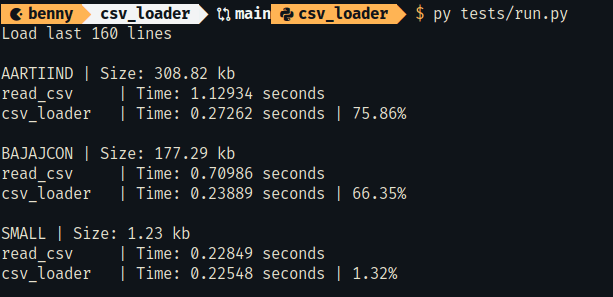
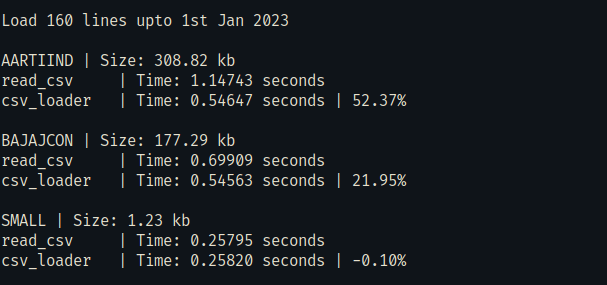
To run this performance test.
py tests/run.py
At the minimum, the CSV file must contain a Date and another column with newline chars at the end to correctly parse and load.
Date,Price\n
2023-12-01,200\n
Unit Test
To run the test:
py tests/test_csv_loader.py
Project details
Verified details
These details have been verified by PyPIProject links
GitHub Statistics
Maintainers
Release history Release notifications | RSS feed


Download files
Download the file for your platform. If you're not sure which to choose, learn more about installing packages.
Source Distribution
Built Distribution
Filter files by name, interpreter, ABI, and platform.
If you're not sure about the file name format, learn more about wheel file names.
Copy a direct link to the current filters
File details
Details for the file fast_csv_loader-2.2.2.tar.gz.
File metadata
- Download URL: fast_csv_loader-2.2.2.tar.gz
- Upload date:
- Size: 20.6 kB
- Tags: Source
- Uploaded using Trusted Publishing? Yes
- Uploaded via: twine/6.1.0 CPython/3.13.12
File hashes
| Algorithm | Hash digest | |
|---|---|---|
| SHA256 |
8b3a5b6db9f528a45a575b01505bdcb4a015a7a9d06bb67e5743990e869b97dd
|
|
| MD5 |
469fdaf3fe2730e235f90cca3d75b7b4
|
|
| BLAKE2b-256 |
6cbdb21dc5728fd88df89e072da4043d33b8c4e69124fcd8231d39f079350ac9
|
Provenance
The following attestation bundles were made for fast_csv_loader-2.2.2.tar.gz:
Publisher:
publish-to-pypi.yml on BennyThadikaran/fast_csv_loader
-
Statement:
-
Statement type:
https://in-toto.io/Statement/v1 -
Predicate type:
https://docs.pypi.org/attestations/publish/v1 -
Subject name:
fast_csv_loader-2.2.2.tar.gz -
Subject digest:
8b3a5b6db9f528a45a575b01505bdcb4a015a7a9d06bb67e5743990e869b97dd - Sigstore transparency entry: 2145655306
- Sigstore integration time:
-
Permalink:
BennyThadikaran/fast_csv_loader@35b170af1ba1bd80dfb9aca7f6bcedb12234820b -
Branch / Tag:
refs/tags/v2.2.2 - Owner: https://github.com/BennyThadikaran
-
Access:
public
-
Token Issuer:
https://token.actions.githubusercontent.com -
Runner Environment:
github-hosted -
Publication workflow:
publish-to-pypi.yml@35b170af1ba1bd80dfb9aca7f6bcedb12234820b -
Trigger Event:
push
-
Statement type:
File details
Details for the file fast_csv_loader-2.2.2-py3-none-any.whl.
File metadata
- Download URL: fast_csv_loader-2.2.2-py3-none-any.whl
- Upload date:
- Size: 21.2 kB
- Tags: Python 3
- Uploaded using Trusted Publishing? Yes
- Uploaded via: twine/6.1.0 CPython/3.13.12
File hashes
| Algorithm | Hash digest | |
|---|---|---|
| SHA256 |
f36bb78f26c72bd19889e3c463d862e2a437cb0181c124e64a91dc23d494d25f
|
|
| MD5 |
36cc05ec8a025ebc69d932815e71490b
|
|
| BLAKE2b-256 |
a1594e5c72aff1a0e06c6e63af0bfda4e9173ec9e9d4abc636b1f12d55d3413b
|
Provenance
The following attestation bundles were made for fast_csv_loader-2.2.2-py3-none-any.whl:
Publisher:
publish-to-pypi.yml on BennyThadikaran/fast_csv_loader
-
Statement:
-
Statement type:
https://in-toto.io/Statement/v1 -
Predicate type:
https://docs.pypi.org/attestations/publish/v1 -
Subject name:
fast_csv_loader-2.2.2-py3-none-any.whl -
Subject digest:
f36bb78f26c72bd19889e3c463d862e2a437cb0181c124e64a91dc23d494d25f - Sigstore transparency entry: 2145655354
- Sigstore integration time:
-
Permalink:
BennyThadikaran/fast_csv_loader@35b170af1ba1bd80dfb9aca7f6bcedb12234820b -
Branch / Tag:
refs/tags/v2.2.2 - Owner: https://github.com/BennyThadikaran
-
Access:
public
-
Token Issuer:
https://token.actions.githubusercontent.com -
Runner Environment:
github-hosted -
Publication workflow:
publish-to-pypi.yml@35b170af1ba1bd80dfb9aca7f6bcedb12234820b -
Trigger Event:
push
-
Statement type:






