
Fast F1 App
A small Textual terminal app for browsing current-season Formula 1 event results with FastF1.
This is an unofficial project. It is not associated in any way with Formula 1, the FIA, or any of their affiliates. F1, FORMULA 1 and related marks are trademarks of Formula One Licensing B.V.
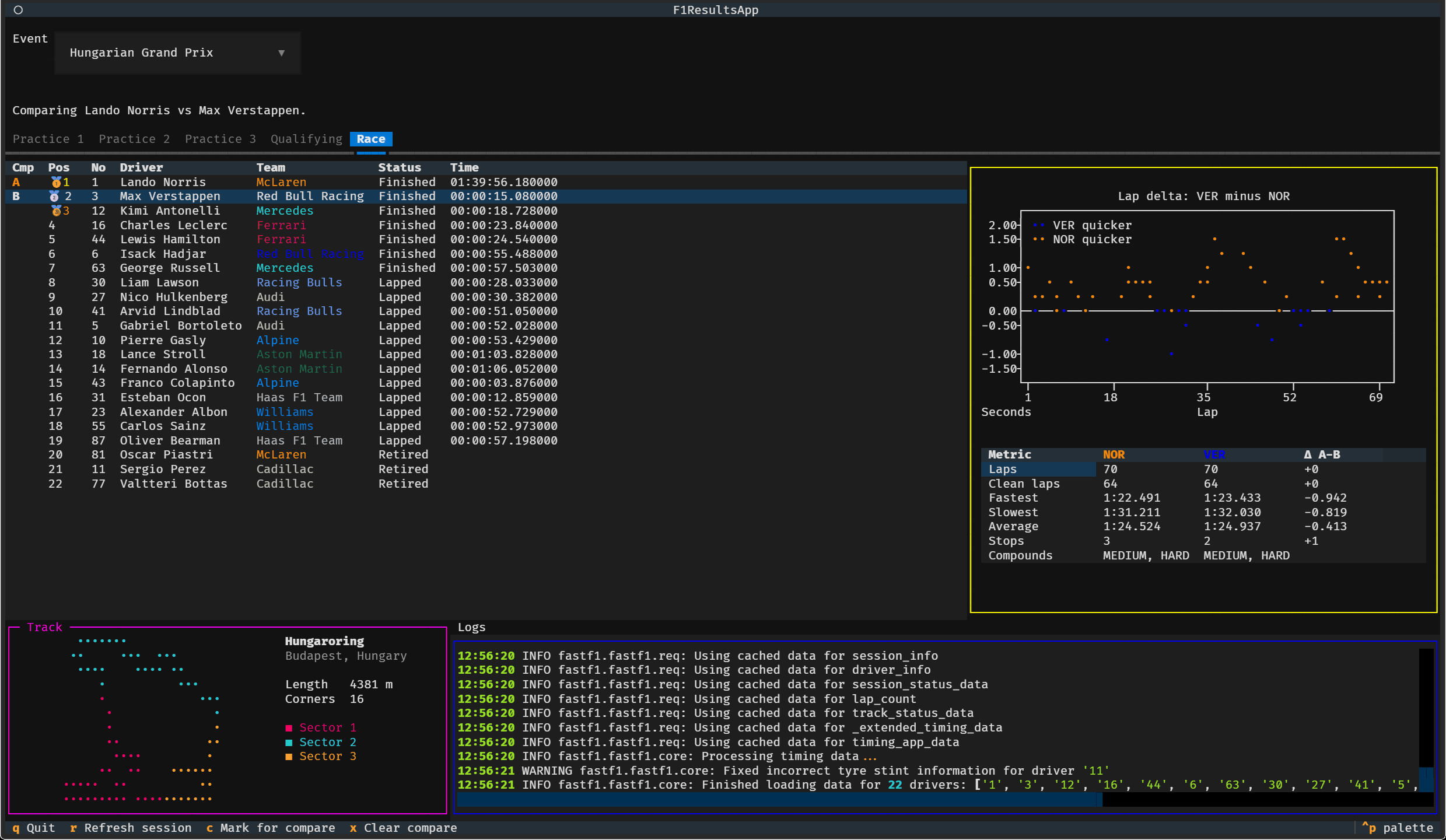
What you get
- The current weekend, already loaded. On startup the app finds the most recent race weekend that has begun and opens it — no button to press.
- One tab per session. The tab strip is built from the weekend itself, so a sprint weekend shows Sprint Qualifying and Sprint where a conventional one shows FP2 and FP3. Tabs load lazily and keep their own state, so switching back and forth costs nothing.
- Team-coloured classification. Position, driver, team, status and gap, with medals for the podium. Sessions that have run but are not yet classified (practice, sprint qualifying) fall back to a ranking by best lap.
- Per-driver detail. Select a row for lap-time stats, tire compounds and stops, plus — in qualifying — a sector-by-sector delta to the fastest lap of the session.
- Two-driver comparison. Both drivers' lap times on one graph next to a metrics table with an explicit Δ column.
- A log pane. FastF1's own chatter (cache hits, downloads, warnings) is piped into the panel at the bottom instead of scribbling over the UI.
Install
Install it as a standalone command available from any directory:
uv tool install .
fast-f1-app
This builds an isolated environment for the app, so it does not touch your system Python. The executable lands in ~/.local/bin (C:\Users\<you>\.local\bin on Windows); if the command is not found, run uv tool update-shell and restart your terminal.
uv tool install . installs a copy, so changes to the source will not appear until you re-run it. To have the command track your working tree instead, use uv tool install --editable .. To remove it, uv tool uninstall fast-f1-app.
If you prefer pipx: pipx install . works the same way.
Run from a checkout
Without installing:
uv run python fast_f1_app.py
Using it
The app opens on the current weekend with its first session loaded. Pick a different Grand Prix from the Event dropdown and the tabs rebuild for that weekend; switch sessions with the tab strip.
Selecting a result row loads lap details for that driver. FastF1 caches session data, so the first load of a session is slow and later ones are quick.
| Key | Action |
|---|---|
Enter |
Show details for the highlighted driver |
c |
Mark the highlighted driver for comparison (slot A, then B) |
x |
Clear the comparison |
r |
Reload the active session from FastF1 |
q |
Quit |
Comparing two drivers
Marking a second driver with c opens the comparison view, as in the screenshot above: both drivers' lap times on one scatter graph — coloured by team, falling back to cyan/magenta when teammates share a colour — plus a side-by-side table of laps, fastest/slowest/average lap, stops and compounds, with the A−B delta in the last column. Qualifying comparisons also list each driver's delta to pole and their sector times with sector-by-sector deltas.
Pressing c on a third driver starts a fresh comparison from that driver.
Test
uv run python -m unittest discover -s tests
License
MIT — see LICENSE.
1 maintainer

Download files
Download the file for your platform. If you're not sure which to choose, learn more about installing packages.
Source Distribution
Built Distribution
Filter files by name, interpreter, ABI, and platform.
If you're not sure about the file name format, learn more about wheel file names.
Copy a direct link to the current filters
File details
Details for the file fast_f1_app-0.1.0.tar.gz.
File metadata
- Download URL: fast_f1_app-0.1.0.tar.gz
- Upload date:
- Size: 18.7 kB
- Tags: Source
- Uploaded using Trusted Publishing? Yes
- Uploaded via: twine/7.0.0 CPython/3.13.14
File hashes
| Algorithm | Hash digest | |
|---|---|---|
| SHA256 |
ec0c280661eaa2eb55b5b3c0639e648a6ebf2af419f39ba2120cb1f5bea1e61b
|
|
| MD5 |
de5bf4fe5ba3ac03cb1934e3393ca851
|
|
| BLAKE2b-256 |
07f5cb7843f759bceb0514783a8423e48048c3d0cf04e5637d7094c2d359fbcb
|
Provenance
The following attestation bundles were made for fast_f1_app-0.1.0.tar.gz:
Publisher:
release.yml on ekss1121/fast-f1-app
-
Statement:
-
Statement type:
https://in-toto.io/Statement/v1 -
Predicate type:
https://docs.pypi.org/attestations/publish/v1 -
Subject name:
fast_f1_app-0.1.0.tar.gz -
Subject digest:
ec0c280661eaa2eb55b5b3c0639e648a6ebf2af419f39ba2120cb1f5bea1e61b - Sigstore transparency entry: 2319472049
- Sigstore integration time:
-
Permalink:
ekss1121/fast-f1-app@c9a98d657874e90e53f4bf6b1ae1c105f1404c62 -
Branch / Tag:
refs/tags/v0.1.0 - Owner: https://github.com/ekss1121
-
Access:
public
-
Token Issuer:
https://token.actions.githubusercontent.com -
Runner Environment:
github-hosted -
Publication workflow:
release.yml@c9a98d657874e90e53f4bf6b1ae1c105f1404c62 -
Trigger Event:
push
-
Statement type:
File details
Details for the file fast_f1_app-0.1.0-py3-none-any.whl.
File metadata
- Download URL: fast_f1_app-0.1.0-py3-none-any.whl
- Upload date:
- Size: 14.7 kB
- Tags: Python 3
- Uploaded using Trusted Publishing? Yes
- Uploaded via: twine/7.0.0 CPython/3.13.14
File hashes
| Algorithm | Hash digest | |
|---|---|---|
| SHA256 |
afc95c014162efc56e3e7d78064e8caea63f5b4a88baa3eed5d0fd90ed11a702
|
|
| MD5 |
24850013902b1d614007939d31d4d0e2
|
|
| BLAKE2b-256 |
811f7066f4bd686e624507485837a0bcdaea2ca12b863ee8a6d1832cf7b7789e
|
Provenance
The following attestation bundles were made for fast_f1_app-0.1.0-py3-none-any.whl:
Publisher:
release.yml on ekss1121/fast-f1-app
-
Statement:
-
Statement type:
https://in-toto.io/Statement/v1 -
Predicate type:
https://docs.pypi.org/attestations/publish/v1 -
Subject name:
fast_f1_app-0.1.0-py3-none-any.whl -
Subject digest:
afc95c014162efc56e3e7d78064e8caea63f5b4a88baa3eed5d0fd90ed11a702 - Sigstore transparency entry: 2319472545
- Sigstore integration time:
-
Permalink:
ekss1121/fast-f1-app@c9a98d657874e90e53f4bf6b1ae1c105f1404c62 -
Branch / Tag:
refs/tags/v0.1.0 - Owner: https://github.com/ekss1121
-
Access:
public
-
Token Issuer:
https://token.actions.githubusercontent.com -
Runner Environment:
github-hosted -
Publication workflow:
release.yml@c9a98d657874e90e53f4bf6b1ae1c105f1404c62 -
Trigger Event:
push
-
Statement type:







