
An unofficial, extended version of the fast, robust, strongly-typed Google Flights scraper (API).

Project description
Note: This is a fork of the original fast-flights library, with added features.
Try out the dev version: Pypi (3.0rc0)
✈️ fast-flights
The fast and strongly-typed Google Flights scraper (API) implemented in Python. Based on Base64-encoded Protobuf string.
Documentation • Issues • PyPi
$ pip install fast-flights
Basics
TL;DR: To use fast-flights, you'll first create a filter (for ?tfs=) to perform a request.
Then, add flight_data, trip, seat, passengers to use the API directly.
from fast_flights_unoff import FlightData, Passengers, Result, get_flights

result: Result = get_flights(
    flight_data=[
        FlightData(date="2025-01-01", from_airport="TPE", to_airport="MYJ")
    ],
    trip="one-way",
    seat="economy",
    passengers=Passengers(adults=2, children=1, infants_in_seat=0, infants_on_lap=0),
    fetch_mode="fallback",
)

print(result)

# The price is currently... low/typical/high
print("The price is currently", result.current_price)
Properties & usage for Result:
result.current_price

# Get the first flight
flight = result.flights[0]

flight.is_best
flight.name
flight.departure
flight.arrival
flight.arrival_time_ahead
flight.duration
flight.stops
flight.delay?  # may not be present
flight.price
Useless enums: Additionally, you can use the Airport enum to search for airports in code (as you type)! See _generated_enum.py in source.
Airport.TAIPEI
              ╭─────────────────────────────────╮
              │ TAIPEI_SONGSHAN_AIRPORT         │
              │ TAPACHULA_INTERNATIONAL_AIRPORT │
              │ TAMPA_INTERNATIONAL_AIRPORT     │
              ╰─────────────────────────────────╯
What's new
v2.0– New (much more succinct) API, fallback support for Playwright serverless functions, and documentation!v2.2- Now supports local playwright for sending requests.
Cookies & consent
The EU region is a bit tricky to solve for now, but the fallback support should be able to handle it.
Contributing
Contributing is welcomed! I probably won't work on this project unless there's a need for a major update, but boy howdy do I love pull requests.
How it's made
The other day, I was making a chat-interface-based trip recommendation app and wanted to add a feature that can search for flights available for booking. My personal choice is definitely Google Flights since Google always has the best and most organized data on the web. Therefore, I searched for APIs on Google.
🔎 Search
google flights api
The results? Bad. It seems like they discontinued this service and it now lives in the Graveyard of Google.
🧏♂️ duffel.com
> Google Flights API: How did it work & what happened to it?The Google Flights API offered developers access to aggregated airline data, including flight times, availability, and prices. Over a decade ago, Google announced the acquisition of ITA Software Inc. which it used to develop its API. However, in 2018, Google ended access to the public-facing API and now only offers access through the QPX enterprise product.
That's awful! I've also looked for free alternatives but their rate limits and pricing are just 😬 (not a good fit/deal for everyone).
However, Google Flights has their UI – flights.google.com. So, maybe I could just use Developer Tools to log the requests made and just replicate all of that? Undoubtedly not! Their requests are just full of numbers and unreadable text, so that's not the solution.
Perhaps, we could scrape it? I mean, Google allowed many companies like Serpapi to scrape their web just pretending like nothing happened... So let's scrape our own.
🔎 Search
google flightsapiscraper pypi
Excluding the ones that are not active, I came across hugoglvs/google-flights-scraper on Pypi. I thought to myself: "aint no way this is the solution!"
I checked hugoglvs's code on GitHub, and I immediately detected "playwright," my worst enemy. One word can describe it well: slow. Two words? Extremely slow. What's more, it doesn't even run on the 🗻 Edge because of configuration errors, missing libraries... etc. I could just reverse try.playwright.tech and use a better environment, but that's just too risky if they added Cloudflare as an additional security barrier 😳.
Life tells me to never give up. Let's just take a look at their URL params...
https://www.google.com/travel/flights/search?tfs=CBwQAhoeEgoyMDI0LTA1LTI4agcIARIDVFBFcgcIARIDTVlKGh4SCjIwMjQtMDUtMzBqBwgBEgNNWUpyBwgBEgNUUEVAAUgBcAGCAQsI____________AZgBAQ&hl=en
| Param | Content | My past understanding |
|---|---|---|
| hl | en | Sets the language. |
| tfs | CBwQAhoeEgoyMDI0LTA1LTI4agcIARID… | What is this???? 🤮🤮 |
I removed the ?tfs= parameter and found out that this is the control of our request! And it looks so base64-y.
If we decode it to raw text, we can still see the dates, but we're not quite there — there's too much unwanted Unicode text.
Or maybe it's some kind of a data-storing method Google uses? What if it's something like JSON? Let's look it up.
🔎 Search
google's json alternative
🐣 Result
Solution: The Power of Protocol BuffersLinkedIn turned to Protocol Buffers, often referred to as protobuf, a binary serialization format developed by Google. The key advantage of Protocol Buffers is its efficiency, compactness, and speed, making it significantly faster than JSON for serialization and deserialization.
Gotcha, Protobuf! Let's feed it to an online decoder and see how it does:
🔎 Search
protobuf decoder
🐣 Result
> protobuf-decoder.netlify.app
I then pasted the Base64-encoded string to the decoder and no way! It DID return valid data!
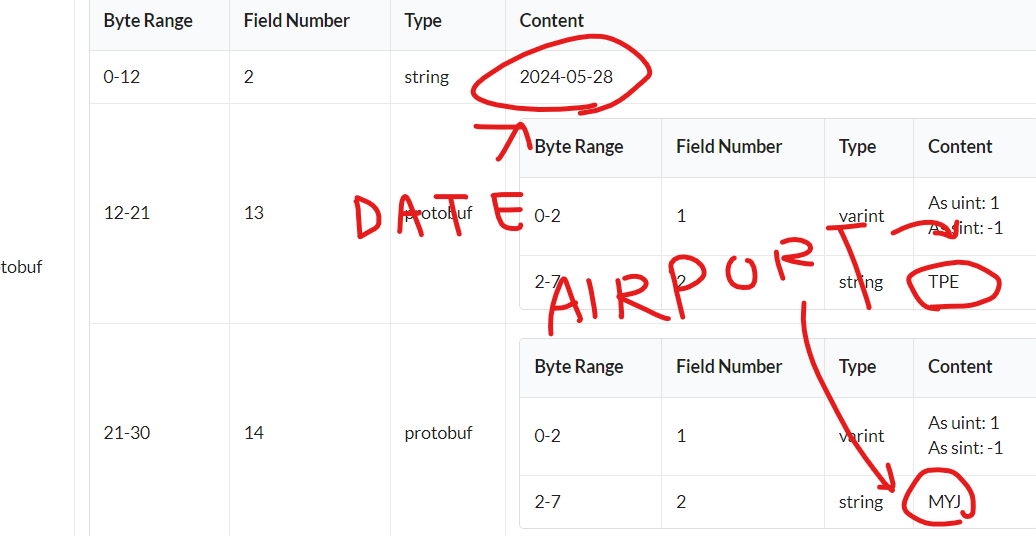
I immediately recognized the values — that's my data, that's my query!
So, I wrote some simple Protobuf code to decode the data.
syntax = "proto3"

message Airport {
    string name = 2;
}

message FlightInfo {
    string date = 2;
    Airport dep_airport = 13;
    Airport arr_airport = 14;
}

message GoogleSucks {
    repeated FlightInfo = 3;
}
It works! Now, I won't consider myself an "experienced Protobuf developer" but rather a complete beginner.
I have no idea what I wrote but... it worked! And here it is, fast-flights.
(c) 2024-2025 AWeirdDev, and other awesome people
Release history Release notifications | RSS feed


Download files
Download the file for your platform. If you're not sure which to choose, learn more about installing packages.
Source Distribution
Built Distribution
Filter files by name, interpreter, ABI, and platform.
If you're not sure about the file name format, learn more about wheel file names.
Copy a direct link to the current filters
File details
Details for the file fast_flights_unoff-0.1.0.tar.gz.
File metadata
- Download URL: fast_flights_unoff-0.1.0.tar.gz
- Upload date:
- Size: 778.5 kB
- Tags: Source
- Uploaded using Trusted Publishing? No
- Uploaded via: python-requests/2.32.5
File hashes
| Algorithm | Hash digest | |
|---|---|---|
| SHA256 |
7958718762586ee806e180ab57ce4b55ae707a595d07ae537640c477cc547413
|
|
| MD5 |
a4140feeabf6ad888adfc28d0f4fc784
|
|
| BLAKE2b-256 |
8604ddfbf8cef07278de3a1b6355c72247c3a9cebaab100ee622353dc08a9ee4
|
File details
Details for the file fast_flights_unoff-0.1.0-py3-none-any.whl.
File metadata
- Download URL: fast_flights_unoff-0.1.0-py3-none-any.whl
- Upload date:
- Size: 57.8 kB
- Tags: Python 3
- Uploaded using Trusted Publishing? No
- Uploaded via: python-requests/2.32.5
File hashes
| Algorithm | Hash digest | |
|---|---|---|
| SHA256 |
d42cec59708d7a11f767285fdfc312e832ccb7534752ad74b64a122d4013eea6
|
|
| MD5 |
acbb83636d95579a223591d2624e2b34
|
|
| BLAKE2b-256 |
8d49cb9e5e3c80dd2da78e618913a46fecc41009f58a07f63ffbdfb980fb630c
|






