
✈️ fast-flights (v3.0)
The fast and strongly-typed Google Flights scraper (API) implemented in Python. Based on Base64-encoded Protobuf string.
Documentation (v3) • Issues • PyPi (v3)
$ pip install fast-flights
What's New
v2.0– New (much more succinct) API, fallback support for Playwright serverless functions, and documentation!v2.2– Now supports local playwright for sending requests.v3.0rc0– Uses JavaScript data instead.v3.0– Polished new API! I suppose.
At a glance
from fast_flights import (
    FlightQuery,
    Passengers,
    create_query,
    get_flights
)

query = create_query(
    flights=[
        FlightQuery(
            date="YYYY-MM-DD",   # change the date
            from_airport="MYJ",  # three-letter name
            to_airport="TPE",    # three-letter name
        ),
    ],
    seat="economy",  # business/economy/first/premium-economy
    trip="one-way",  # multi-city/one-way/round-trip
    passengers=Passengers(adults=1),
    language="zh-TW",
)
res = get_flights(query)
Search filters
FlightQuery supports filters for each flight leg:
flight = FlightQuery(
    date="YYYY-MM-DD",
    from_airport="MYJ",
    to_airport="TPE",
    max_stops=1,
    airlines=["JL", "ONEWORLD"],
    earliest_departure_hour=7,
    latest_departure_hour=18,
    earliest_arrival_hour=10,
    latest_arrival_hour=23,
    max_duration_minutes=720,
    connecting_airports=["HND", "NRT"],
    min_layover_minutes=60,
    max_layover_minutes=240,
    less_emissions_only=True,
)
Filters for the whole search are passed to create_query:
query = create_query(
    flights=[flight],
    currency="USD",
    max_price=1500,
    carry_on_bags=1,
    checked_bags=1,
    hide_separate_and_self_transfer=True,
    exclude_basic_economy=True,
)
Hours use local airport time on a 0–23 clock. Duration and layover values use
minutes, and max_price uses the selected currency. Google currently applies
the first leg's airline filter to the whole search.
Integrations
If you'd like, you can use integrations.
Bright Data
Use the BrightData integration to protect your IP.
from fast_flights.integrations import BrightData

result = get_flights(
    ...,
    integration=BrightData(zone="...")
)

# ... same as normal queries
SearchApi Sponsored
If you want better consistency and richer data, consider using SearchApi.
from fast_flights.integrations import SearchApi, SearchApiResult

result: SearchApiResult = get_flights(
    ...,
    integration=SearchApi()
)

# rich data!
result.flights
result.cheaper_alternatives
result.price_insights
result.booking_options
...
Roadmap
- Use JavaScript data instead of traditional HTML parsing
- Add support for integrations
- Dangerously use Google's
GetShoppingResultsinternal API. Get ready to get banned.
Contributing
Contributing is welcomed! A few notes though:
- please no ai slop. i am not reading all that.
- im really busy with life; im not a full-time reddit mod.
How it's made
The other day, I was making a chat-interface-based trip recommendation app and wanted to add a feature that can search for flights available for booking. My personal choice is definitely Google Flights since Google always has the best and most organized data on the web. Therefore, I searched for APIs on Google.
🔎 Search
google flights api
The results? Bad. It seems like they discontinued this service and it now lives in the Graveyard of Google.
🧏♂️ duffel.com
Google Flights API: How did it work & what happened to it?The Google Flights API offered developers access to aggregated airline data, including flight times, availability, and prices. Over a decade ago, Google announced the acquisition of ITA Software Inc. which it used to develop its API. However, in 2018, Google ended access to the public-facing API and now only offers access through the QPX enterprise product.
That's awful! I've also looked for free alternatives but their rate limits and pricing are just 😬 (not a good fit/deal for everyone).
However, Google Flights has their UI – flights.google.com. So, maybe I could just use Developer Tools to log the requests made and just replicate all of that? Undoubtedly not! Their requests are just full of numbers and unreadable text, so that's not the solution.
Perhaps, we could scrape it? I mean, Google allowed many companies like Serpapi to scrape their web just pretending like nothing happened... So let's scrape our own.
🔎 Search
google flightsapiscraper pypi
Excluding the ones that are not active, I came across hugoglvs/google-flights-scraper on Pypi. I thought to myself: "aint no way this is the solution!"
I checked hugoglvs's code on GitHub, and I immediately detected "playwright," my worst enemy. One word can describe it well: slow. Two words? Extremely slow. What's more, it doesn't even run on the 🗻 Edge because of configuration errors, missing libraries... etc. I could just reverse try.playwright.tech and use a better environment, but that's just too risky if they added Cloudflare as an additional security barrier 😳.
Life tells me to never give up. Let's just take a look at their URL params...
https://www.google.com/travel/flights/search?tfs=CBwQAhoeEgoyMDI0LTA1LTI4agcIARIDVFBFcgcIARIDTVlKGh4SCjIwMjQtMDUtMzBqBwgBEgNNWUpyBwgBEgNUUEVAAUgBcAGCAQsI____________AZgBAQ&hl=en
| Param | Content | My past understanding |
|---|---|---|
| hl | en | Sets the language. |
| tfs | CBwQAhoeEgoyMDI0LTA1LTI4agcIARID… | What is this???? 🤮🤮 |
I removed the ?tfs= parameter and found out that this is the control of our request! And it looks so base64-y.
If we decode it to raw text, we can still see the dates, but we're not quite there — there's too much unwanted Unicode text.
Or maybe it's some kind of a data-storing method Google uses? What if it's something like JSON? Let's look it up.
🔎 Search
google's json alternative
🐣 Result
Solution: The Power of Protocol BuffersLinkedIn turned to Protocol Buffers, often referred to as protobuf, a binary serialization format developed by Google. The key advantage of Protocol Buffers is its efficiency, compactness, and speed, making it significantly faster than JSON for serialization and deserialization.
Gotcha, Protobuf! Let's feed it to an online decoder and see how it does:
🔎 Search
protobuf decoder
🐣 Result
protobuf-decoder.netlify.app
I then pasted the Base64-encoded string to the decoder and no way! It DID return valid data!
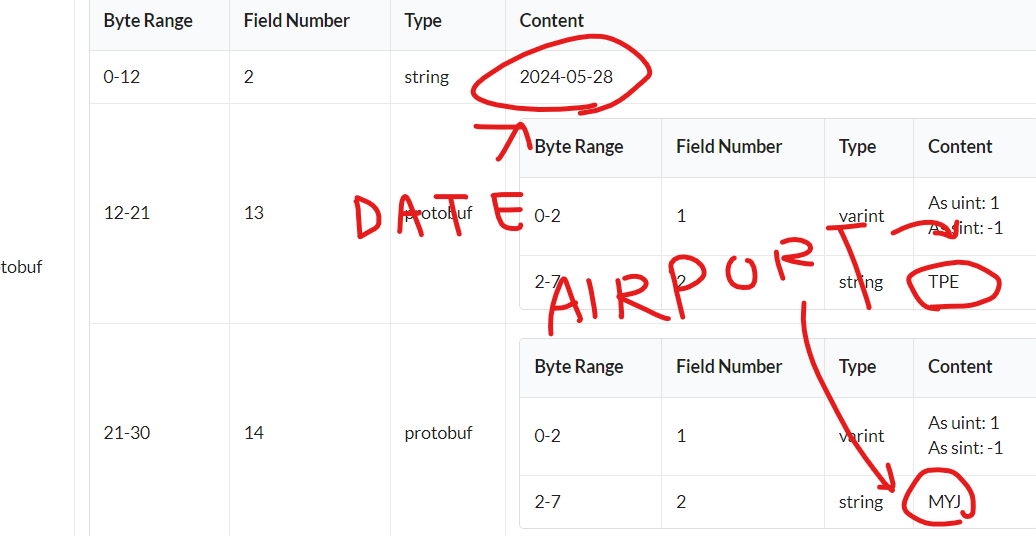
I immediately recognized the values — that's my data, that's my query!
So, I wrote some simple Protobuf code to decode the data.
syntax = "proto3"

message Airport {
    string name = 2;
}

message FlightInfo {
    string date = 2;
    Airport dep_airport = 13;
    Airport arr_airport = 14;
}

message GoogleSucks {
    repeated FlightInfo = 3;
}
It works! Now, I won't consider myself an "experienced Protobuf developer" but rather a complete beginner.
I have no idea what I wrote but... it worked! And here it is, fast-flights.
(c) 2024-2026 AWeirdDev, and all the awesome people
1 maintainer

Release files for fast-flights 3.1.0
For a detailed explanation of source distributions (sdists) and built distributions (wheels), please see the package formats documentation.
Source distribution (sdist)
| File | Size | Uploaded | |
|---|---|---|---|
| fast_flights-3.1.0.tar.gz | 22.2 kB | Details |
Built distribution (wheel)
| File | Interpreter | ABI | Platform | Reset |
|---|---|---|---|---|
| fast_flights-3.1.0-py3-none-any.whl | Python 3 | none | any | Details |
Total release size: 45.1 kB
Release files / fast_flights-3.1.0.tar.gz
| Download URL | fast_flights-3.1.0.tar.gz |
|---|---|
| Size | 22.2 kB |
| Tags | Source |
|
SHA-256 checksum How to use checksums |
3a0e279312b0dedbe7a83af2c10c7c984a792a93050ff69c33d996f703dfd706
|
|
BLAKE2b-256 checksum How to use checksums |
e140a8355032a1bd40bae23a8b94cd8019fb0567df7ca32c19b37a7c256912a0
|
| Upload date | |
|
Uploaded using Trusted Publishing? What is trusted publishing? |
Yes |
| Uploaded via |
twine/7.0.0 CPython/3.13.14
|
Provenance
Provenance describes where a file came from. On PyPI, provenance is shared via attestations, which provide a verifiable record of the build or publishing details. View details, limitations and caveats.


PyPI Publish Attestation
PyPI verified that this artifact, at this checksum, originated from the publisher listed below.
Signed by GitHub Actions, verified by PyPI on Aug 18, 2026.
Transparency logRelease files / fast_flights-3.1.0-py3-none-any.whl
| Download URL | fast_flights-3.1.0-py3-none-any.whl |
|---|---|
| Size | 23.0 kB |
| Tags | Python 3 |
|
SHA-256 checksum How to use checksums |
90c629646a591ff04a9f164ba651432f595232c3537cda5275db25c07283429a
|
|
BLAKE2b-256 checksum How to use checksums |
20cb60419fedc21fb664baf753912b4645deb38ee7653e11fbde3728ed84464c
|
| Upload date | |
|
Uploaded using Trusted Publishing? What is trusted publishing? |
Yes |
| Uploaded via |
twine/7.0.0 CPython/3.13.14
|
Provenance
Provenance describes where a file came from. On PyPI, provenance is shared via attestations, which provide a verifiable record of the build or publishing details. View details, limitations and caveats.
PyPI Publish Attestation
PyPI verified that this artifact, at this checksum, originated from the publisher listed below.
Signed by GitHub Actions, verified by PyPI on Aug 18, 2026.
Transparency log













