
Fuzzy finder for coding agent session history

Project description
fast-resume


Search and resume conversations across Claude Code, Codex, and more, all from a single place.
Why fast-resume?
Coding agents are really good right now, so I'm using a bunch of them. Sometimes I remember I, or the LLM, mentioned something specific in a previous session, and I want to go back to it.
The problem is that currently, agents do have a resume feature, but either they don't support searching, or the search is very basic (e.g., title only).
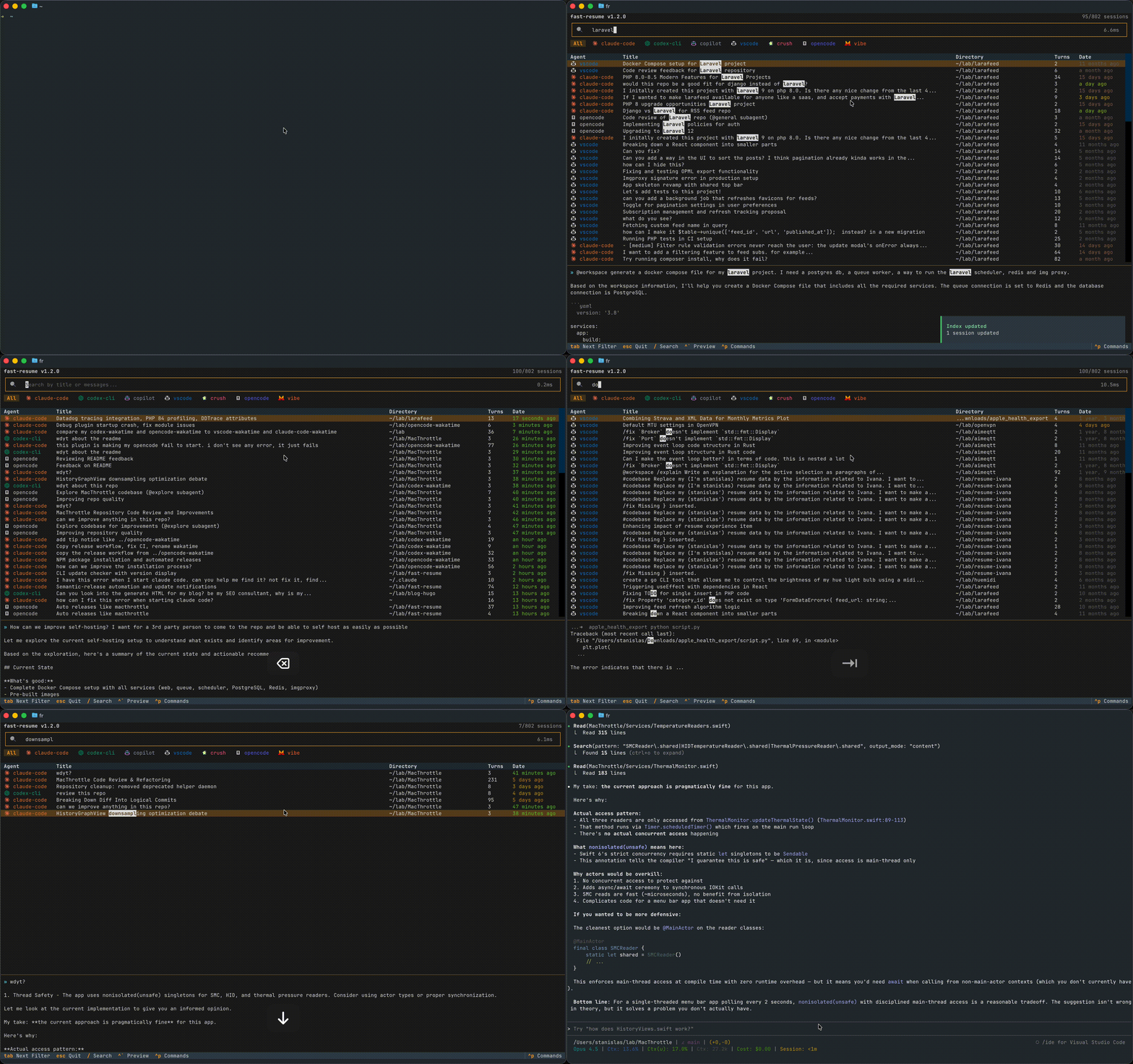
That's why I built fast-resume: a command-line tool that aggregates all your coding agent sessions into a single searchable index, so you can quickly find and resume any session.
Features
- Unified Search: One search box to find sessions across all your coding agents
- Full-Text Search: Search not just titles, but the entire conversation content (user messages and assistant responses)
- Very fast: Built on the Rust-powered Tantivy search engine for blazing-fast indexing and searching
- Fuzzy Matching: Typo-tolerant search with smart ranking (exact matches boosted)
- Direct Resume: Select, Enter, you're back in your session
- Beautiful TUI: fzf-style interface with agent icons, color-coded results, and live preview
- Update Notifications: Get notified when a new version is available
Supported Agents
| Agent | Data Location | Resume Command |
|---|---|---|
| Claude Code | ~/.claude/projects/ |
claude --resume <id> |
| Codex CLI | ~/.codex/sessions/ |
codex resume <id> |
| Copilot CLI | ~/.copilot/session-state/ |
copilot --resume <id> |
| VS Code Copilot | ~/Library/Application Support/Code/ (macOS) |
code <directory> |
| Crush | ~/.local/share/crush/projects.json |
(interactive only) |
| OpenCode | ~/.local/share/opencode/storage/ |
opencode <dir> --session <id> |
| Vibe | ~/.vibe/logs/session/ |
vibe --resume <id> |
Installation
# Run directly (no install needed)
uvx --from fast-resume fr

# Or install permanently
uv tool install fast-resume
fr
Usage
Interactive TUI
# Open the TUI with all sessions
fr

# Pre-filter search query
fr "authentication bug"

# Filter by agent
fr -a claude
fr -a codex

# Filter by directory
fr -d myproject

# Combine filters
fr -a claude -d backend "api error"
Non-Interactive Mode
# List sessions in terminal (no TUI)
fr --no-tui

# Just list, don't offer to resume
fr --list

# Force rebuild the index
fr --rebuild

# View your usage statistics
fr --stats
Yolo Mode
Resume sessions with auto-approve / skip-permissions flags:
| Agent | Flag Added | Auto-detected |
|---|---|---|
| Claude | --dangerously-skip-permissions |
No |
| Codex | --dangerously-bypass-approvals-and-sandbox |
Yes |
| Copilot CLI | --allow-all-tools --allow-all-paths |
No |
| Vibe | --auto-approve |
Yes |
| OpenCode | (config-based) | — |
| Crush | (no CLI resume) | — |
| VS Code Copilot | (n/a) | — |
Auto-detection: Codex and Vibe store the permissions mode in their session files. Sessions originally started in yolo mode are automatically resumed in yolo mode.
Interactive prompt: For agents that support yolo but don't store it (Claude, Copilot CLI), you'll see a modal asking whether to resume in yolo mode. Use Tab to toggle, Enter to confirm.
Force yolo: Use fr --yolo to skip the prompt and always resume in yolo mode, if supported.
Command Reference
Usage: fr [OPTIONS] [QUERY]

Arguments:
  QUERY                    Search query (optional)

Options:
  -a, --agent [claude|codex|copilot-cli|copilot-vscode|crush|opencode|vibe]
                          Filter by agent
  -d, --directory TEXT    Filter by directory (substring match)
  --no-tui                Output list to stdout instead of TUI
  --list                  Just list sessions, don't resume
  --rebuild               Force rebuild the session index
  --stats                 Show index statistics
  --yolo                  Resume with auto-approve/skip-permissions flags
  --version               Show version
  --help                  Show this message and exit
Keybindings
Navigation
| Key | Action |
|---|---|
↑ / ↓ |
Move selection up/down |
j / k |
Move selection up/down (vim-style) |
Page Up / Page Down |
Move by 10 rows |
Enter |
Resume selected session |
/ |
Focus search input |
Preview & Actions
| Key | Action |
|---|---|
| `Ctrl+`` | Toggle preview pane |
+ / - |
Resize preview pane |
Tab |
Cycle through agent filters |
c |
Copy full resume command to clipboard |
Ctrl+P |
Open command palette |
q/Esc |
Quit |
Yolo Mode Modal
| Key | Action |
|---|---|
Tab / ← → |
Toggle selection |
Enter |
Confirm selection |
y |
Select Yolo |
n |
Select No |
Esc |
Cancel |
Statistics Dashboard
Run fr --stats to see analytics about your coding sessions:
Index Statistics

  Total sessions          751
  Total messages          13,799
  Avg messages/session    18.4
  Index size              15.5 MB
  Index location          ~/.cache/fast-resume/tantivy_index
  Date range              2023-11-15 to 2025-12-22

Data by Agent

┌────────────────┬───────┬──────────┬──────────┬──────────┬──────────┬─────────────┐
│ Agent          │ Files │     Disk │ Sessions │ Messages │  Content │ Data Dir    │
├────────────────┼───────┼──────────┼──────────┼──────────┼──────────┼─────────────┤
│ claude         │   477 │ 312.9 MB │      377 │   10,415 │   3.1 MB │ ~/.claude/… │
│ copilot-vscode │   191 │ 146.0 MB │      189 │      954 │   1.4 MB │ ~/Library/… │
│ codex          │   107 │  23.6 MB │       89 │      321 │ 890.6 kB │ ~/.codex/…  │
│ opencode       │  9275 │  46.3 MB │       72 │    1,912 │ 597.7 kB │ ~/.local/…  │
│ vibe           │    12 │ 858.2 kB │       12 │      138 │ 380.0 kB │ ~/.vibe/…   │
│ crush          │     3 │   1.0 MB │        7 │       44 │  15.2 kB │ ~/.local/…  │
│ copilot-cli    │     5 │ 417.1 kB │        5 │       15 │   6.9 kB │ ~/.copilot… │
└────────────────┴───────┴──────────┴──────────┴──────────┴──────────┴─────────────┘

Activity by Day

 Mon   ██████████              89
 Tue   ██████████              86
 Wed   █████                   44
 Thu   ██████████████         115
 Fri   █████████████          112
 Sat   ████████████████████   163
 Sun   █████████████████      142

Activity by Hour

  0h ▄▁        ▄▄▅▂▂▂▂▂▃▃▃▅▅█ 23h
  Peak hours: 23:00 (99), 22:00 (63), 12:00 (63)

Top Directories

┌───────────────────────┬──────────┬──────────┐
│ Directory             │ Sessions │ Messages │
├───────────────────────┼──────────┼──────────┤
│ ~/git/openvpn-install │      234 │    5,597 │
│ ~/lab/larafeed        │      158 │    2,590 │
│ ~/lab/fast-resume     │       81 │    2,027 │
│ ...                   │          │          │
└───────────────────────┴──────────┴──────────┘
How It Works
Architecture
┌────────────────────────────────────────────────────────────────────────────────────────┐
│                                 SessionSearch                                          │
│                                                                                        │
│   • Orchestrates adapters in parallel (ThreadPoolExecutor)                             │
│   • Compares file mtimes to detect changes (incremental updates)                       │
│   • Delegates search queries to Tantivy index                                          │
└────────────────────────────────────────────────────────────────────────────────────────┘
                      │                                       │
         ┌────────────┴────────────┐                          │
         ▼                         ▼                          ▼
┌──────────────────┐    ┌───────────────────────────────────────────────────────────────────────────────┐
│  TantivyIndex    │    │                                 Adapters                                       │
│                  │    │  ┌────────┐ ┌───────┐ ┌───────┐ ┌─────────┐ ┌───────┐ ┌────────┐ ┌────┐        │
│ • Fuzzy search   │◄───│  │ Claude │ │ Codex │ │Copilot│ │ Copilot │ │ Crush │ │OpenCode│ │Vibe│        │
│ • mtime tracking │    │  │        │ │       │ │  CLI  │ │ VS Code │ │       │ │        │ │    │        │
│                  │    │  └───┬────┘ └───┬───┘ └───┬───┘ └────┬────┘ └───┬───┘ └───┬────┘ └─┬──┘        │
│ ~/.cache/        │    │      │          │         │          │          │         │        │           │
│   fast-resume/   │    └──────┼──────────┼─────────┼──────────┼──────────┼─────────┼────────┼───────────┘
└──────────────────┘           ▼          ▼         ▼          ▼          ▼         ▼        ▼
                          ~/.claude/ ~/.codex/ ~/.copilot/  VS Code/   crush.db opencode/ ~/.vibe/
Session Parsing
Each agent stores sessions differently. Adapters normalize them into a common Session structure:
| Agent | Format | Parsing Strategy |
|---|---|---|
| Claude Code | JSONL in ~/.claude/projects/<project>/*.jsonl |
Stream line-by-line, extract user/assistant messages, skip agent-* subprocess files |
| Codex | JSONL in ~/.codex/sessions/**/*.jsonl |
Line-by-line parsing, extract from session_meta, response_item, and event_msg entries |
| Copilot CLI | JSONL in ~/.copilot/session-state/*.jsonl |
Line-by-line parsing, extract user.message and assistant.message types |
| Copilot VSCode | JSON in VS Code's workspaceStorage/*/chatSessions/ |
Parse requests array with message text and response values |
| Crush | SQLite DB at <project>/crush.db |
Query sessions and messages tables directly, parse JSON parts column |
| OpenCode | Split JSON in ~/.local/share/opencode/storage/ |
Join session/<hash>/ses_*.json + message/<id>/msg_*.json + part/<id>/*.json |
| Vibe | JSON in ~/.vibe/logs/session/session_*.json |
Parse messages array with role-based content |
The normalized Session structure:
@dataclass
class Session:
    id: str              # Unique identifier (usually filename or UUID)
    agent: str           # "claude", "codex", "copilot-cli", "copilot-vscode", "crush", "opencode", "vibe"
    title: str           # Summary or first user message (max 100 chars)
    directory: str       # Working directory where session was created
    timestamp: datetime  # Last modified time
    preview: str         # First 500 chars for preview pane
    content: str         # Full conversation text (» user, ␣␣ assistant)
    message_count: int   # Conversation turns (user + assistant, excludes tool results)
    mtime: float         # File mtime for incremental update detection
What gets indexed:
- User text messages (the actual prompts you typed)
- Assistant text responses
What's excluded from indexing:
- Tool results (file contents, command outputs, API responses)
- Tool use/calls (function invocations)
- Meta messages (system prompts, context summaries)
- Local command outputs (slash commands like
/context)
This keeps the index focused on the actual conversation and avoids bloating it with large tool outputs that are rarely useful for search.
Indexing
Incremental updates avoid re-parsing on every launch:
- Load known sessions from Tantivy index with their
mtimevalues - Scan session files, compare mtimes against known values
- Only parse files where
current_mtime > known_mtime + 0.001 - Detect deleted sessions (in index but not on disk)
- Apply changes atomically: delete removed, upsert modified
Parallel loading via ThreadPoolExecutor:
with ThreadPoolExecutor(max_workers=len(self.adapters)) as executor:
    futures = {executor.submit(get_incremental, a): a for a in self.adapters}
    for future in as_completed(futures):
        new_or_modified, deleted_ids = future.result()
        self._index.update_sessions(new_or_modified)
        on_progress()  # TUI updates as each adapter completes
Schema versioning: A .schema_version file tracks the index schema. If it doesn't match the code's SCHEMA_VERSION constant, the entire index is deleted and rebuilt. This prevents deserialization errors after upgrades.
Search
Tantivy is a Rust full-text search library (powers Quickwit, similar to Lucene). We use it via tantivy-py.
Fuzzy matching handles typos with edit distance 1 and prefix matching:
for term in query.split():
    fuzzy_title = tantivy.Query.fuzzy_term_query(schema, "title", term, distance=1, prefix=True)
    fuzzy_content = tantivy.Query.fuzzy_term_query(schema, "content", term, distance=1, prefix=True)

    # Term can match in either field (OR), all terms must match (AND)
    term_query = tantivy.Query.boolean_query([
        (tantivy.Occur.Should, fuzzy_title),
        (tantivy.Occur.Should, fuzzy_content),
    ])
    query_parts.append((tantivy.Occur.Must, term_query))
So auth midleware (typo) matches "authentication middleware".
Query lifecycle:
┌─────────────┐   50ms    ┌─────────────┐  background  ┌─────────────┐
│  Keystroke  │ ────────► │  Debounce   │ ───────────► │   Worker    │
└─────────────┘  timer    └─────────────┘   thread     └──────┬──────┘
                                                              │
                          ┌─────────────┐              ┌──────▼──────┐
                          │   Render    │ ◄─────────── │   Tantivy   │
                          │   Table     │   results    │    Query    │
                          └─────────────┘              └─────────────┘
TUI
Streaming results: Sessions appear as each adapter completes, not after all finish.
- Fast path: Index up-to-date → load synchronously, no spinner
- Slow path: Changes detected → spinner, stream results via
on_progress()callback
Preview context: When searching, the preview pane jumps to the matching portion:
for term in query.lower().split():
    pos = content.lower().find(term)
    if pos != -1:
        start = max(0, pos - 100)  # Show ~100 chars before match
        preview_text = content[start:start + 1500]
        break
Matching terms are highlighted with Rich's Text.stylize().
Resume Handoff
When you press Enter on a session, fast-resume hands off to the original agent:
# In cli.py after TUI exits
resume_cmd, resume_dir = run_tui(query=query, agent_filter=agent)

if resume_cmd:
    # 1. Change to the session's original working directory
    os.chdir(resume_dir)

    # 2. Replace current process with agent's resume command
    os.execvp(resume_cmd[0], resume_cmd)
os.execvp() replaces the Python process entirely with the agent CLI. This means:
- No subprocess overhead
- Shell history shows
claude --resume xyz, notfr - Agent inherits the correct working directory
- fast-resume process is gone after handoff
Each adapter returns the appropriate command:
| Agent | Resume Command | With --yolo |
|---|---|---|
| Claude | claude --resume <id> |
claude --dangerously-skip-permissions --resume <id> |
| Codex | codex resume <id> |
codex --dangerously-bypass-approvals-and-sandbox resume <id> |
| Copilot CLI | copilot --resume <id> |
copilot --allow-all-tools --allow-all-paths --resume <id> |
| Copilot VSCode | code <directory> |
(no change) |
| OpenCode | opencode <dir> --session <id> |
(no change) |
| Vibe | vibe --resume <id> |
vibe --auto-approve --resume <id> |
| Crush | crush |
(no change) |
Performance
Why fast-resume feels instant:
- Tantivy (Rust): Search engine written in Rust, accessed via Python bindings. Handles fuzzy queries over 10k+ sessions in <10ms
- Incremental updates: Only re-parse files where
mtimechanged. Second launch with no changes: ~50ms total - Parallel adapters: All adapters run simultaneously in ThreadPoolExecutor. Total time = slowest adapter, not sum
- Debounced search: 50ms debounce prevents wasteful searches while typing
- Background workers: Search runs in thread, UI never blocks
- orjson: Rust-based JSON parsing, ~10x faster than stdlib json
- Streaming results: Sessions appear as each adapter completes, not after all finish
Typical performance on a machine with ~500 sessions:
- Cold start (empty index): ~2s
- Warm start (no changes): ~50ms
- Search query: <10ms
Development
# Clone and setup
git clone https://github.com/angristan/fast-resume.git
cd fast-resume
uv sync

# Run locally
uv run fr

# Install pre-commit hooks
uv run pre-commit install

# Run tests
uv run pytest -v

# Lint and format
uv run ruff check .
uv run ruff format .
Project Structure
fast-resume/
├── src/fast_resume/
│   ├── cli.py              # Click CLI entry point
│   ├── config.py           # Constants, colors, paths
│   ├── index.py            # TantivyIndex - search engine
│   ├── search.py           # SessionSearch - adapter orchestration
│   ├── tui.py              # Textual TUI application
│   ├── assets/             # Agent icons (PNG)
│   └── adapters/
│       ├── base.py         # Session dataclass, AgentAdapter protocol
│       ├── claude.py       # Claude Code adapter
│       ├── codex.py        # Codex CLI adapter
│       ├── copilot.py      # GitHub Copilot CLI adapter
│       ├── copilot_vscode.py # VS Code Copilot Chat adapter
│       ├── crush.py        # Crush adapter
│       ├── opencode.py     # OpenCode adapter
│       └── vibe.py         # Vibe adapter
├── tests/                  # pytest test suite
├── pyproject.toml          # Dependencies and build config
└── README.md
Tech Stack
| Component | Library |
|---|---|
| TUI Framework | Textual |
| Terminal Formatting | Rich |
| CLI Framework | Click |
| Search Engine | Tantivy (via tantivy-py) |
| JSON Parsing | orjson (fast) |
| Date Formatting | humanize |
Configuration
fast-resume uses sensible defaults and requires no configuration.
To clear the index and rebuild from scratch:
rm -rf ~/.cache/fast-resume/
fr --rebuild
License
MIT
Release history Release notifications | RSS feed


Download files
Download the file for your platform. If you're not sure which to choose, learn more about installing packages.
Source Distribution
Built Distribution
Filter files by name, interpreter, ABI, and platform.
If you're not sure about the file name format, learn more about wheel file names.
Copy a direct link to the current filters
File details
Details for the file fast_resume-1.5.0.tar.gz.
File metadata
- Download URL: fast_resume-1.5.0.tar.gz
- Upload date:
- Size: 5.4 MB
- Tags: Source
- Uploaded using Trusted Publishing? Yes
- Uploaded via: uv/0.9.18 {"installer":{"name":"uv","version":"0.9.18","subcommand":["publish"]},"python":null,"implementation":{"name":null,"version":null},"distro":{"name":"Ubuntu","version":"24.04","id":"noble","libc":null},"system":{"name":null,"release":null},"cpu":null,"openssl_version":null,"setuptools_version":null,"rustc_version":null,"ci":true}
File hashes
| Algorithm | Hash digest | |
|---|---|---|
| SHA256 |
86a68afba05baaada80ecae6589f7faad9db8d5ceb5d3629b3de6e1e3d305db2
|
|
| MD5 |
9033fc23c9b92823a2d2736979d33c4a
|
|
| BLAKE2b-256 |
295ade5441bca4fb93be8e7db31d243e0390e7f55a3903c7f6dcad9ce3058e29
|
File details
Details for the file fast_resume-1.5.0-py3-none-any.whl.
File metadata
- Download URL: fast_resume-1.5.0-py3-none-any.whl
- Upload date:
- Size: 90.2 kB
- Tags: Python 3
- Uploaded using Trusted Publishing? Yes
- Uploaded via: uv/0.9.18 {"installer":{"name":"uv","version":"0.9.18","subcommand":["publish"]},"python":null,"implementation":{"name":null,"version":null},"distro":{"name":"Ubuntu","version":"24.04","id":"noble","libc":null},"system":{"name":null,"release":null},"cpu":null,"openssl_version":null,"setuptools_version":null,"rustc_version":null,"ci":true}
File hashes
| Algorithm | Hash digest | |
|---|---|---|
| SHA256 |
cdd00f0b1d20e82d329a0091c1ee4c3c3cd437d3b0043a1a5f64a079cfbac1f8
|
|
| MD5 |
20c4e7be4462cab4c44cb9d9f6885b65
|
|
| BLAKE2b-256 |
ea0831f1ebef8b898d944c305b4356bcd39daceb7f21d53702dfaa53727bf677
|






