
CPU-optimized Silero-compatible VAD runtime and exporter.
Verified details
These details have been verified by PyPIProject links
GitHub Statistics
Maintainers

Project description
Fast Silero VAD







Fast Silero VAD combines a streamlined ONNX graph with an optimized spectral frontend to improve CPU throughput while preserving numerically equivalent speech probabilities.
Benchmarks
|
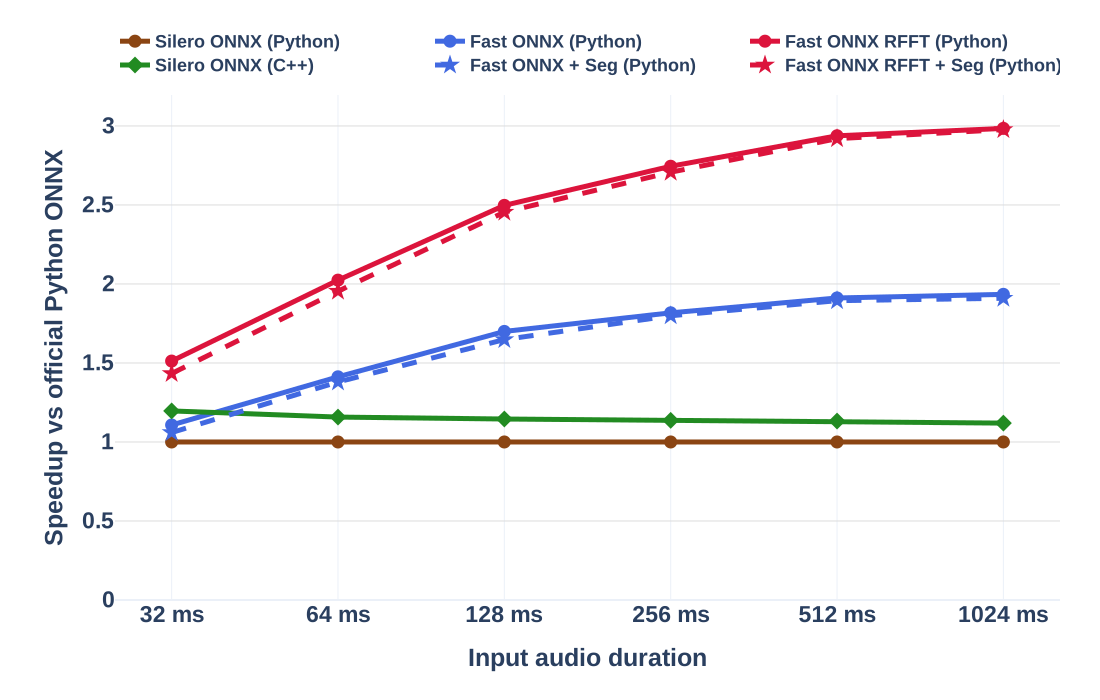
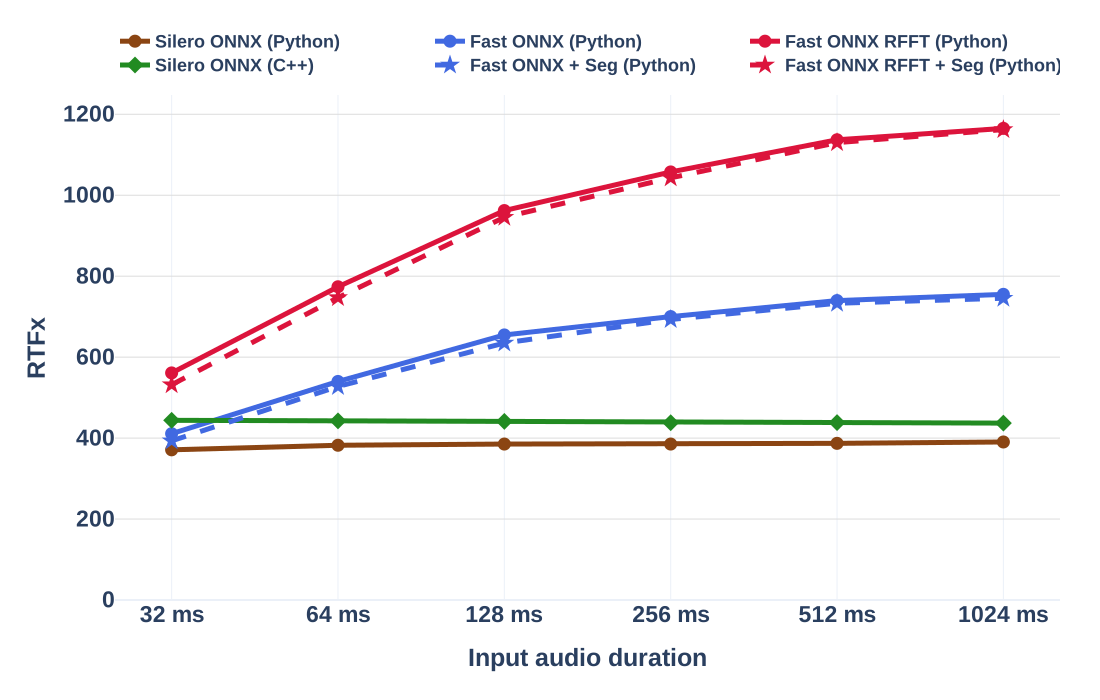
Apple M4 Max (single thread)
|
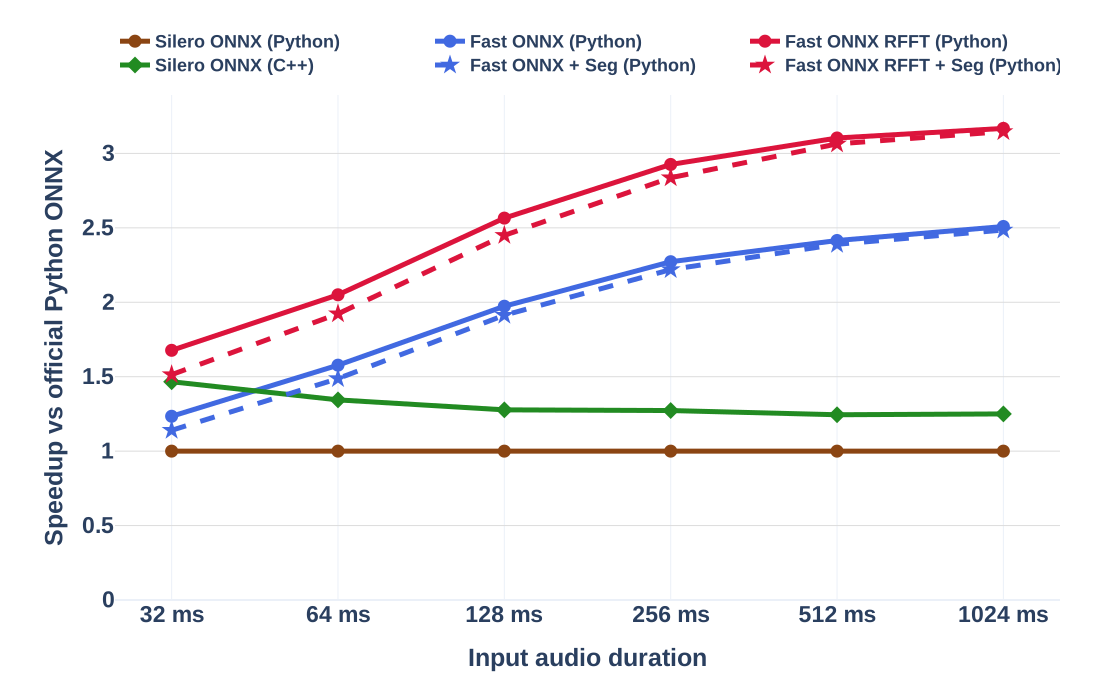
AMD EPYC 9655 (single thread)
|
|---|---|
 |
 |
 |
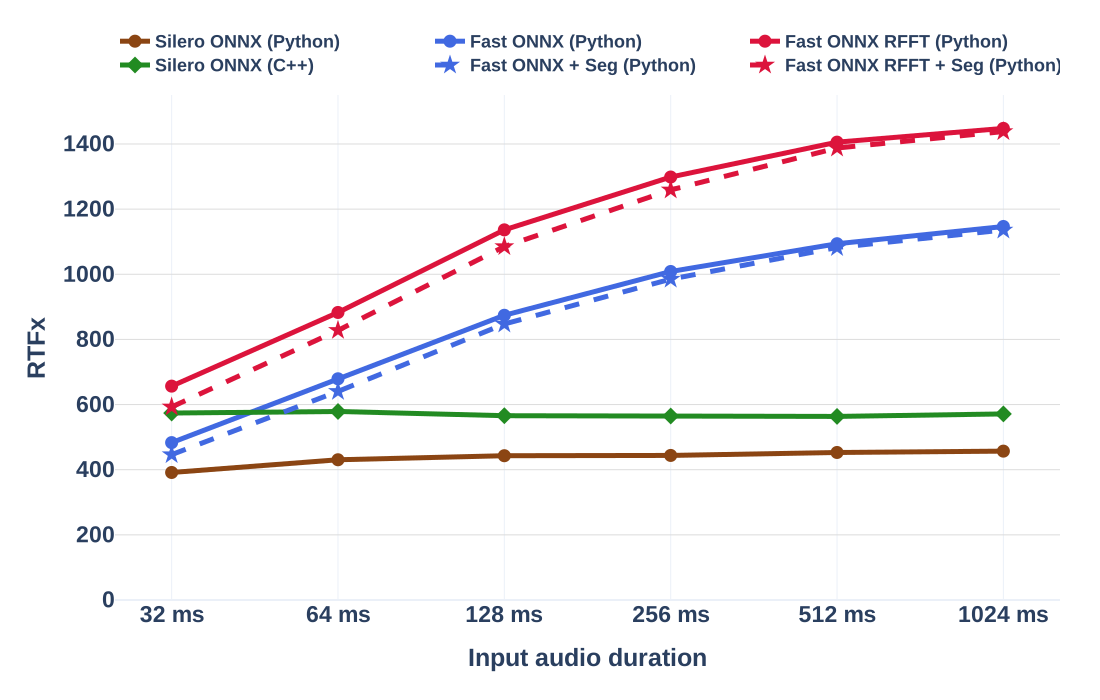 |
Solid lines measure probability inference. Dashed lines include speech segmentation. RTFx is a ratio of input audio duration to processing time.
- Upstream throughput plateaus. From 32 to 1024 ms, official Python Silero moves only from 392 to 457 RTFx on AMD and from 371 to 390 RTFx on M4. The official C++ implementation is effectively flat at 574 to 571 RTFx on AMD and 444 to 437 RTFx on M4.
- The gain reproduces across CPU families. At 1024 ms, Fast RFFT reaches 1,448 RTFx on Linux/x86-64 and 1,165 RTFx on macOS/arm64: 3.17x and 2.98x the throughput of official Python, and 2.53x and 2.67x that of official C++.
- The graph rewrite pays off without RFFT. Standard Fast ONNX reaches 1,147 RTFx on AMD and 755 RTFx on M4 at 1024 ms. That is 2.51x and 1.93x the Python baseline, or 2.01x and 1.73x the C++ baseline.
- RFFT provides the largest incremental gain. The custom spectral frontend adds another 26% on AMD and 54% on M4 over the standard Fast ONNX graph at 1024 ms.
- The full VAD inference with segmentation keeps the gain. The complete
RFFT pipeline with
Numba-optimized segmentation reaches 1,438 RTFx on AMD and 1,162 RTFx on M4, only 0.7% and 0.3% below probability inference alone. It delivers 3.15x and 2.98x the throughput of official Python Silero VAD, and 2.52x and 2.66x that of the official Silero VAD C++ implementation.
Measurements use deterministic 16 kHz mono audio, one ONNX Runtime thread, and 50 warmups. Values are medians of 500 runs. Model loading and WAV decoding are excluded.
The Python baseline uses load_silero_vad(onnx=True).audio_forward(). The C++
baseline uses the pinned upstream
examples/c++
implementation compiled with C++20, -O3, and -DNDEBUG.
Quick Start
Install Fast Silero VAD with the export dependencies:
pip install "fast-silero-vad[export]"
The RFFT export requires a C++20 compiler available as c++ and network access
on the first run.
Export
Export a 16 kHz offline bundle with the optimized RFFT frontend:
fast-silero-vad-export \
  --output-dir-path models/fast_silero_vad_16k \
  --model-type offline_vad \
  --vad-branch 16k \
  --threshold 0.01 \
  --min-speech-duration-ms 100 \
  --max-speech-duration-ms 30000 \
  --min-silence-duration-ms 1000 \
  --speech-pad-ms 300 \
  --use-onnxruntime-custom-op
The exporter uses the JIT checkpoint bundled with silero-vad>=6.2.1 and
writes the runtime and segmenter settings to model_config.yaml. For streaming,
use a new output directory and --model-type streaming_vad. Use
--vad-branch 8k to export an 8 kHz bundle.
CLI
fast-silero-vad \
  --model-dir models/fast_silero_vad_16k \
  --wav-dir /path/to/wav/files \
  --output-path segments.tsv
Python
The API accepts one-dimensional normalized floating-point audio. Offline models reset after each call:
import numpy as np

from fast_silero_vad import VAD

audio = np.zeros(16000, dtype=np.float32)

vad = VAD("models/fast_silero_vad_16k")
vad.apply_samplerate(16000)
segments = vad(audio)
A streaming model preserves state until final=True:
vad = VAD("models/fast_silero_vad_16k_streaming")
vad.apply_samplerate(16000)

segments = []
for start in range(0, len(audio), 1600):
    end = min(len(audio), start + 1600)
    segments.extend(vad(audio[start:end], final=end == len(audio)))
Why Fast Silero VAD Scales
At 16 kHz, each Silero window is 512 samples, or 32 ms. The official wrapper
executes one ONNX Runtime call per window (see
audio_forward
and
get_speech_timestamps).
Longer audio therefore increases the number of calls linearly and leaves RTFx
roughly flat.
Fast Silero VAD returns the same 32 ms probability sequence with two independent optimizations:
- Multi-window execution: one ONNX Runtime call processes multiple 32 ms windows.
- RFFT frontend: a C++ ONNX Runtime custom operator replaces the Conv1d Fourier basis with a real FFT.
The standard Fast ONNX graph gains more as input grows because one ONNX Runtime call handles more 32 ms windows, amortizing Python, tensor binding, and graph dispatch overhead across the input. At 32 ms there is only one window, so multi-window execution offers almost no advantage in this case; most of the speedup comes from the real FFT frontend.
Numerical Equivalence
Numerically equivalent means float32-close, not bit-identical. The
export equivalence tests run 12 seeded PCM
chunks statefully through the original Silero JIT checkpoint and through both
standard and real FFT exports at 8 kHz and 16 kHz. Every speech probability must
match within rtol=1e-4 and atol=1e-6.
Reproducing
These commands reproduce the duration sweep. They require
uv, a C++20 compiler
named c++, and network access on the first run. ONNX Runtime is limited to one
thread.
Setup
pip install uv
uv sync --frozen --extra export --extra plot
mkdir -p benchmarks/output/m4_max

EXPORT_ARGS=(
  --model-type offline_vad
  --vad-branch 16k
  --threshold 0.01
  --min-speech-duration-ms 100
  --max-speech-duration-ms 30000
  --min-silence-duration-ms 1000
  --speech-pad-ms 0
)

uv run --frozen --extra export fast-silero-vad-export \
  --output-dir-path models/benchmark_standard_16k \
  "${EXPORT_ARGS[@]}"

uv run --frozen --extra export fast-silero-vad-export \
  --output-dir-path models/benchmark_custom_op_16k \
  "${EXPORT_ARGS[@]}" \
  --use-onnxruntime-custom-op
Python generates its input in memory. Create the equivalent mono 16-bit WAV for the original Silero VAD C++ harness:
uv run --frozen --extra export python - <<'PY'
import wave
from pathlib import Path

import numpy as np

from benchmarks.utils import make_synthetic_audio

output_path = Path("benchmarks/output/m4_max/synthetic_1024ms.wav")
audio = make_synthetic_audio(1.024, 16000)
pcm = np.clip(audio * (2**15 - 1), -32768, 32767).astype(np.int16)

with wave.open(str(output_path), "wb") as output:
    output.setnchannels(1)
    output.setsampwidth(2)
    output.setframerate(16000)
    output.writeframes(pcm.tobytes())
PY
Python
uv run --frozen --extra export python -m benchmarks.duration_sweep \
  --standard-model-dir models/benchmark_standard_16k \
  --custom-op-model-dir models/benchmark_custom_op_16k \
  --durations-ms 32 64 128 256 512 1024 \
  --samplerate 16000 \
  --threshold 0.01 \
  --min-speech-duration-ms 100 \
  --max-speech-duration-ms 30000 \
  --min-silence-duration-ms 1000 \
  --speech-pad-ms 0 \
  --warmup 50 \
  --repeats 500 \
  --output-tsv-path benchmarks/output/m4_max/python.tsv
C++
The builder downloads the pinned upstream source and matching ONNX Runtime headers, then packages the runtime library beside the executable.
uv run --frozen --extra export python benchmarks/cpp/build.py

OFFICIAL_ONNX=$(find .venv -path '*/silero_vad/data/silero_vad.onnx' -print -quit)

benchmarks/cpp/build/vad_benchmark \
  "$OFFICIAL_ONNX" \
  benchmarks/output/m4_max/cpp.tsv \
  50 500 \
  benchmarks/output/m4_max/synthetic_1024ms.wav \
  0 \
  32 64 128 256 512 1024
Plots
uv run --frozen --extra plot python -m benchmarks.plot_benchmark \
  --input-tsv-path \
    benchmarks/output/m4_max/python.tsv \
    benchmarks/output/m4_max/cpp.tsv \
  --output-dir-path docs/plots/m4_max \
  --formats svg
License
Fast Silero VAD source code is licensed under Apache-2.0. Exported model weights are derived from Silero VAD and remain subject to the Silero VAD MIT License. This project is independent and is not affiliated with or endorsed by the Silero Team. See the project NOTICE.
Project details
Verified details
These details have been verified by PyPIProject links
GitHub Statistics
Maintainers
Release history Release notifications | RSS feed

Download files
Download the file for your platform. If you're not sure which to choose, learn more about installing packages.
Source Distribution
Built Distribution
Filter files by name, interpreter, ABI, and platform.
If you're not sure about the file name format, learn more about wheel file names.
Copy a direct link to the current filters
File details
Details for the file fast_silero_vad-0.1.2.tar.gz.
File metadata
- Download URL: fast_silero_vad-0.1.2.tar.gz
- Upload date:
- Size: 69.4 kB
- Tags: Source
- Uploaded using Trusted Publishing? Yes
- Uploaded via: twine/6.1.0 CPython/3.13.12
File hashes
| Algorithm | Hash digest | |
|---|---|---|
| SHA256 |
81b3eeb55e329a34aea042807652ccc57a8c190c57d34977866feff56b1b4ebd
|
|
| MD5 |
0be7354141012333d49a255cf51bf380
|
|
| BLAKE2b-256 |
bda71f1ac50f5443812d993d21a39959e731132a66a9aec187c500f008c2731b
|
Provenance
The following attestation bundles were made for fast_silero_vad-0.1.2.tar.gz:
Publisher:
publish.yml on SoundsGoodAI/fast-silero-vad
-
Statement:
-
Statement type:
https://in-toto.io/Statement/v1 -
Predicate type:
https://docs.pypi.org/attestations/publish/v1 -
Subject name:
fast_silero_vad-0.1.2.tar.gz -
Subject digest:
81b3eeb55e329a34aea042807652ccc57a8c190c57d34977866feff56b1b4ebd - Sigstore transparency entry: 2194984005
- Sigstore integration time:
-
Permalink:
SoundsGoodAI/fast-silero-vad@50de44ca5ec53f199e5e77e97992e529a9b93dd2 -
Branch / Tag:
refs/tags/v0.1.2 - Owner: https://github.com/SoundsGoodAI
-
Access:
public
-
Token Issuer:
https://token.actions.githubusercontent.com -
Runner Environment:
github-hosted -
Publication workflow:
publish.yml@50de44ca5ec53f199e5e77e97992e529a9b93dd2 -
Trigger Event:
release
-
Statement type:
File details
Details for the file fast_silero_vad-0.1.2-py3-none-any.whl.
File metadata
- Download URL: fast_silero_vad-0.1.2-py3-none-any.whl
- Upload date:
- Size: 46.8 kB
- Tags: Python 3
- Uploaded using Trusted Publishing? Yes
- Uploaded via: twine/6.1.0 CPython/3.13.12
File hashes
| Algorithm | Hash digest | |
|---|---|---|
| SHA256 |
02838d84560ef8f14c8c5c6524756efe7f92efa2fdebcb2bc98eb5d1ca4e355c
|
|
| MD5 |
935c439a6a974abbe0569f73fd8df43e
|
|
| BLAKE2b-256 |
3d7e3557bc013d5dedbad79b21ba10949a325b8c349665cac66e917ad68d753c
|
Provenance
The following attestation bundles were made for fast_silero_vad-0.1.2-py3-none-any.whl:
Publisher:
publish.yml on SoundsGoodAI/fast-silero-vad
-
Statement:
-
Statement type:
https://in-toto.io/Statement/v1 -
Predicate type:
https://docs.pypi.org/attestations/publish/v1 -
Subject name:
fast_silero_vad-0.1.2-py3-none-any.whl -
Subject digest:
02838d84560ef8f14c8c5c6524756efe7f92efa2fdebcb2bc98eb5d1ca4e355c - Sigstore transparency entry: 2194984021
- Sigstore integration time:
-
Permalink:
SoundsGoodAI/fast-silero-vad@50de44ca5ec53f199e5e77e97992e529a9b93dd2 -
Branch / Tag:
refs/tags/v0.1.2 - Owner: https://github.com/SoundsGoodAI
-
Access:
public
-
Token Issuer:
https://token.actions.githubusercontent.com -
Runner Environment:
github-hosted -
Publication workflow:
publish.yml@50de44ca5ec53f199e5e77e97992e529a9b93dd2 -
Trigger Event:
release
-
Statement type:






