
FastAdmin is an easy-to-use Admin Dashboard App for FastAPI/Flask/Django inspired by Django Admin.

Project description
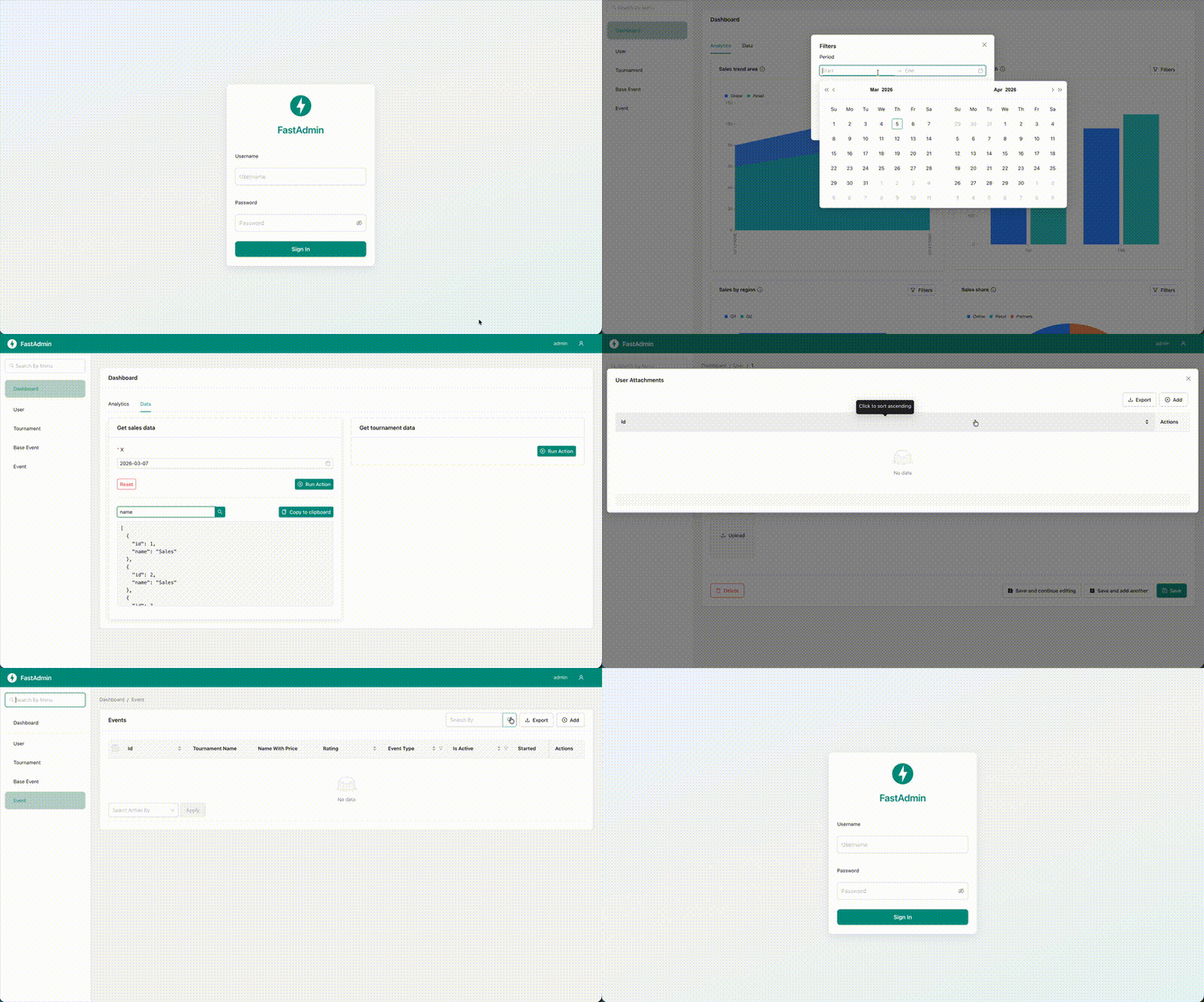
Admin Dashboard for FastAPI / Flask / Django



Demo

Introduction
FastAdmin is an easy-to-use admin dashboard for FastAPI, Django, and Flask, inspired by Django Admin.
FastAdmin is built with relationships in mind and admiration for Django Admin. Its design focuses on making it as easy as possible to configure your admin dashboard for FastAPI, Django, or Flask.
FastAdmin aims to be minimal, functional, and familiar.
Getting Started
If you have questions beyond this documentation, feel free to email us.
Installation
Follow the steps below to set up FastAdmin:
Install the package with pip:
On zsh and macOS, use quotes: pip install 'fastadmin[fastapi,django]'
pip install fastadmin[fastapi,django]        # FastAPI with Django ORM
pip install fastadmin[fastapi,tortoise-orm]  # FastAPI with Tortoise ORM
pip install fastadmin[fastapi,pony]          # FastAPI with Pony ORM
pip install fastadmin[fastapi,sqlalchemy]    # FastAPI with SQLAlchemy (includes greenlet)
pip install fastadmin[django]                # Django with Django ORM
pip install fastadmin[django,pony]           # Django with Pony ORM
pip install fastadmin[flask,sqlalchemy]      # Flask with SQLAlchemy (includes greenlet)
Or install with Poetry:
poetry add 'fastadmin[fastapi,django]'
poetry add 'fastadmin[fastapi,tortoise-orm]'
poetry add 'fastadmin[fastapi,pony]'
poetry add 'fastadmin[fastapi,sqlalchemy]'
poetry add 'fastadmin[django]'
poetry add 'fastadmin[django,pony]'
poetry add 'fastadmin[flask,sqlalchemy]'
When using SQLAlchemy, the greenlet package is required (included in the fastadmin[sqlalchemy] extra).
Configure the required settings with environment variables:
You can add these variables to a .env file and load them with python-dotenv. See all settings in the full documentation.
export ADMIN_USER_MODEL=User
export ADMIN_USER_MODEL_USERNAME_FIELD=username
export ADMIN_SECRET_KEY=secret_key
Quick Examples
ORM setup (User, UserAttachment, actions, widgets)
Tortoise ORM
from tortoise import fields
from tortoise.models import Model


class User(Model):
    username = fields.CharField(max_length=255, unique=True)
    hash_password = fields.CharField(max_length=255)
    is_superuser = fields.BooleanField(default=False)
    is_active = fields.BooleanField(default=True)
    avatar_url = fields.TextField(null=True)


class UserAttachment(Model):
    user = fields.ForeignKeyField("models.User", related_name="attachments")
    attachment_url = fields.TextField()
from fastadmin import (
    TortoiseInlineModelAdmin,
    TortoiseModelAdmin,
    WidgetType,
    action,
    register,
    widget_action,
)
from fastadmin.models.schemas import (
    WidgetActionChartProps,
    WidgetActionInputSchema,
    WidgetActionResponseSchema,
    WidgetActionType,
)
from .models import User, UserAttachment


class UserAttachmentInline(TortoiseInlineModelAdmin):
    model = UserAttachment
    formfield_overrides = {
        "attachment_url": (WidgetType.UploadFile, {"required": True}),
    }

    async def upload_file(self, field_name: str, file_name: str, file_content: bytes) -> str:
        # save file to media directory or to s3/filestorage here
        return f"/media/{file_name}"


@register(User)
class UserAdmin(TortoiseModelAdmin):
    list_display = ("id", "username", "is_superuser", "is_active")
    inlines = (UserAttachmentInline,)

    formfield_overrides = {
        "avatar_url": (WidgetType.UploadImage, {"required": False}),
    }

    actions = ("activate", "deactivate")
    widget_actions = ("users_chart", "users_list")

    @action(description="Activate selected users")
    async def activate(self, ids: list[int]) -> None:
        await self.model_cls.filter(id__in=ids).update(is_active=True)

    @action(description="Deactivate selected users")
    async def deactivate(self, ids: list[int]) -> None:
        await self.model_cls.filter(id__in=ids).update(is_active=False)

    async def upload_file(self, field_name: str, file_name: str, file_content: bytes) -> str:
        # handle avatar_url uploads for User (and other file fields if needed)
        return f"/media/{file_name}"

    @widget_action(
        widget_action_type=WidgetActionType.ChartLine,
        widget_action_props=WidgetActionChartProps(x_field="x", y_field="y", series_field="series"),
        tab="Analytics",
        title="Users over time",
    )
    async def users_chart(self, payload: WidgetActionInputSchema) -> WidgetActionResponseSchema:
        return WidgetActionResponseSchema(
            data=[
                {"x": "2026-01-01", "y": 10, "series": "Active"},
                {"x": "2026-01-02", "y": 15, "series": "Active"},
                {"x": "2026-01-01", "y": 3, "series": "Inactive"},
                {"x": "2026-01-02", "y": 5, "series": "Inactive"},
            ]
        )

    @widget_action(
        widget_action_type=WidgetActionType.Action,
        tab="Data",
        title="Users list",
        description="Simple action widget that returns a table of users.",
    )
    async def users_list(self, payload: WidgetActionInputSchema) -> WidgetActionResponseSchema:
        return WidgetActionResponseSchema(
            data=[
                {"id": 1, "username": "alice"},
                {"id": 2, "username": "bob"},
            ]
        )
Django ORM
from django.db import models


class User(models.Model):
    username = models.CharField(max_length=255, unique=True)
    password = models.CharField(max_length=255)
    is_superuser = models.BooleanField(default=False)
    is_active = models.BooleanField(default=True)
    avatar_url = models.ImageField(null=True)


class UserAttachment(models.Model):
    user = models.ForeignKey(User, related_name="attachments", on_delete=models.CASCADE)
    attachment_url = models.FileField()
from fastadmin import (
    DjangoInlineModelAdmin,
    DjangoModelAdmin,
    WidgetType,
    action,
    register,
    widget_action,
)
from fastadmin.models.schemas import (
    WidgetActionArgumentProps,
    WidgetActionInputSchema,
    WidgetActionProps,
    WidgetActionResponseSchema,
    WidgetActionType,
)
from .models import User, UserAttachment


class UserAttachmentInline(DjangoInlineModelAdmin):
    model = UserAttachment
    formfield_overrides = {
        "attachment_url": (WidgetType.UploadFile, {"required": True}),
    }

    def upload_file(self, field_name: str, file_name: str, file_content: bytes) -> str:
        # save file to media directory or to s3/filestorage here
        return f"/media/{file_name}"


@register(User)
class UserAdmin(DjangoModelAdmin):
    list_display = ("id", "username", "is_superuser", "is_active")
    inlines = (UserAttachmentInline,)

    formfield_overrides = {
        "avatar_url": (WidgetType.UploadImage, {"required": False}),
    }

    actions = ("activate", "deactivate")
    widget_actions = ("users_summary", "users_chart")

    @action(description="Activate selected users")
    def activate(self, ids):
        self.model_cls.objects.filter(id__in=ids).update(is_active=True)

    @action(description="Deactivate selected users")
    def deactivate(self, ids):
        self.model_cls.objects.filter(id__in=ids).update(is_active=False)

    def upload_file(self, field_name: str, file_name: str, file_content: bytes) -> str:
        # handle avatar_url uploads for User (and other file fields if needed)
        return f"/media/{file_name}"

    @widget_action(
        widget_action_type=WidgetActionType.Action,
        widget_action_props=WidgetActionProps(
            arguments=[
                WidgetActionArgumentProps(
                    name="only_active",
                    widget_type=WidgetType.Switch,
                    widget_props={"required": False},
                )
            ]
        ),
        tab="Data",
        title="Users summary",
    )
    def users_summary(self, payload: WidgetActionInputSchema) -> WidgetActionResponseSchema:
        qs = self.model_cls.objects.filter(is_active=True) if payload.arguments.get("only_active") else self.model_cls.objects.all()
        return WidgetActionResponseSchema(
            data=[{"id": u.id, "username": u.username} for u in qs[:5]]
        )

    @widget_action(
        widget_action_type=WidgetActionType.ChartLine,
        widget_action_props=WidgetActionChartProps(x_field="label", y_field="value", series_field="series"),
        tab="Analytics",
        title="Active vs inactive users",
    )
    def users_chart(self, payload: WidgetActionInputSchema) -> WidgetActionResponseSchema:
        active = self.model_cls.objects.filter(is_active=True).count()
        inactive = self.model_cls.objects.filter(is_active=False).count()
        return WidgetActionResponseSchema(
            data=[
                {"label": "users", "value": active, "series": "active"},
                {"label": "users", "value": inactive, "series": "inactive"},
            ]
        )
SQLAlchemy
from sqlalchemy import Boolean, ForeignKey, Integer, String, Text
from sqlalchemy.ext.asyncio import async_sessionmaker, create_async_engine
from sqlalchemy.orm import DeclarativeBase, Mapped, mapped_column, relationship

engine = create_async_engine("sqlite+aiosqlite:///:memory:")
sessionmaker = async_sessionmaker(engine, expire_on_commit=False)


class Base(DeclarativeBase):
    pass


class User(Base):
    __tablename__ = "user"

    id: Mapped[int] = mapped_column(Integer, primary_key=True)
    username: Mapped[str] = mapped_column(String(255), unique=True)
    password: Mapped[str] = mapped_column(String(255))
    is_superuser: Mapped[bool] = mapped_column(Boolean, default=False)
    is_active: Mapped[bool] = mapped_column(Boolean, default=True)
    avatar_url: Mapped[str | None] = mapped_column(Text, nullable=True)

    attachments: Mapped[list["UserAttachment"]] = relationship(back_populates="user")


class UserAttachment(Base):
    __tablename__ = "user_attachment"

    id: Mapped[int] = mapped_column(Integer, primary_key=True)
    user_id: Mapped[int] = mapped_column(ForeignKey("user.id"))
    attachment_url: Mapped[str] = mapped_column(Text)

    user: Mapped[User] = relationship(back_populates="attachments")
from sqlalchemy import update

from fastadmin import (
    SqlAlchemyInlineModelAdmin,
    SqlAlchemyModelAdmin,
    WidgetType,
    action,
    register,
    widget_action,
)
from fastadmin.models.schemas import (
    WidgetActionChartProps,
    WidgetActionInputSchema,
    WidgetActionResponseSchema,
    WidgetActionType,
)
from .models import User, UserAttachment, sessionmaker


class UserAttachmentInline(SqlAlchemyInlineModelAdmin):
    model = UserAttachment
    formfield_overrides = {
        "attachment_url": (WidgetType.UploadFile, {"required": True}),
    }

    async def upload_file(self, field_name: str, file_name: str, file_content: bytes) -> str:
        # save file to media directory or to s3/filestorage here
        return f"/media/{file_name}"


@register(User, sqlalchemy_sessionmaker=sessionmaker)
class UserAdmin(SqlAlchemyModelAdmin):
    list_display = ("id", "username", "is_superuser", "is_active")
    inlines = (UserAttachmentInline,)

    formfield_overrides = {
        "avatar_url": (WidgetType.UploadImage, {"required": False}),
    }

    actions = ("activate", "deactivate")
    widget_actions = ("users_chart", "users_list")

    @action(description="Activate selected users")
    async def activate(self, ids):
        sm = self.get_sessionmaker()
        async with sm() as s:
            await s.execute(update(User).where(User.id.in_(ids)).values(is_active=True))
            await s.commit()

    @action(description="Deactivate selected users")
    async def deactivate(self, ids):
        sm = self.get_sessionmaker()
        async with sm() as s:
            await s.execute(update(User).where(User.id.in_(ids)).values(is_active=False))
            await s.commit()

    async def upload_file(self, field_name: str, file_name: str, file_content: bytes) -> str:
        # handle avatar_url uploads for User (and other file fields if needed)
        return f"/media/{file_name}"

    @widget_action(
        widget_action_type=WidgetActionType.ChartBar,
        widget_action_props=WidgetActionChartProps(x_field="label", y_field="value", series_field="series"),
        tab="Analytics",
        title="Users count",
    )
    async def users_chart(self, payload: WidgetActionInputSchema) -> WidgetActionResponseSchema:
        return WidgetActionResponseSchema(
            data=[
                {"label": "users", "value": 42, "series": "all"},
            ]
        )

    @widget_action(
        widget_action_type=WidgetActionType.Action,
        tab="Data",
        title="Users list",
    )
    async def users_list(self, payload: WidgetActionInputSchema) -> WidgetActionResponseSchema:
        # In a real app, fetch from the DB; here it's just a static example
        return WidgetActionResponseSchema(
            data=[
                {"id": 1, "username": "alice"},
                {"id": 2, "username": "bob"},
            ]
        )
Pony ORM
from pony.orm import Database, LongStr, PrimaryKey, Required, Set

db = Database()


class User(db.Entity):  # type: ignore[misc]
    _table_ = "user"
    id = PrimaryKey(int, auto=True)
    username = Required(str)
    password = Required(str)
    is_superuser = Required(bool, default=False)
    is_active = Required(bool, default=True)
    avatar_url = Required(LongStr, nullable=True)

    attachments = Set("UserAttachment")


class UserAttachment(db.Entity):  # type: ignore[misc]
    _table_ = "user_attachment"
    id = PrimaryKey(int, auto=True)
    user = Required(User)
    attachment_url = Required(LongStr)
from pony.orm import commit, db_session

from fastadmin import (
    PonyORMInlineModelAdmin,
    PonyORMModelAdmin,
    WidgetType,
    action,
    register,
    widget_action,
)
from fastadmin.models.schemas import (
    WidgetActionInputSchema,
    WidgetActionResponseSchema,
    WidgetActionType,
)
from .models import User, UserAttachment


class UserAttachmentInline(PonyORMInlineModelAdmin):
    model = UserAttachment
    formfield_overrides = {
        "attachment_url": (WidgetType.UploadFile, {"required": True}),
    }

    def upload_file(self, field_name: str, file_name: str, file_content: bytes) -> str:
        # save file to media directory or to s3/filestorage here
        return f"/media/{file_name}"


@register(User)
class UserAdmin(PonyORMModelAdmin):
    list_display = ("id", "username", "is_superuser", "is_active")
    inlines = (UserAttachmentInline,)

    formfield_overrides = {
        "avatar_url": (WidgetType.UploadImage, {"required": False}),
    }

    actions = ("activate", "deactivate")
    widget_actions = ("users_list", "users_chart")

    @action(description="Activate selected users")
    @db_session
    def activate(self, ids):
        for u in User.select(lambda o: o.id in ids):
            u.is_active = True
        commit()

    @action(description="Deactivate selected users")
    @db_session
    def deactivate(self, ids):
        for u in User.select(lambda o: o.id in ids):
            u.is_active = False
        commit()

    def upload_file(self, field_name: str, file_name: str, file_content: bytes) -> str:
        # handle avatar_url uploads for User (and other file fields if needed)
        return f"/media/{file_name}"

    @widget_action(widget_action_type=WidgetActionType.Action, tab="Data", title="Users list")
    @db_session
    def users_list(self, payload: WidgetActionInputSchema) -> WidgetActionResponseSchema:
        return WidgetActionResponseSchema(
            data=[{"id": u.id, "username": u.username} for u in User.select()[:5]]
        )

    @widget_action(widget_action_type=WidgetActionType.ChartPie, tab="Analytics", title="Users by activity")
    @db_session
    def users_chart(self, payload: WidgetActionInputSchema) -> WidgetActionResponseSchema:
        active = User.select(lambda u: u.is_active).count()
        inactive = User.select(lambda u: not u.is_active).count()
        return WidgetActionResponseSchema(
            data=[
                {"type": "active", "value": active},
                {"type": "inactive", "value": inactive},
            ]
        )
Request and user context in admin methods
You can access the current request and authenticated user in your admin methods via self.request and self.user. This works the same way for both ModelAdmin and InlineModelAdmin.
from fastadmin import TortoiseModelAdmin, register
from .models import Event


@register(Event)
class EventAdmin(TortoiseModelAdmin):
    async def has_change_permission(self, user_id: int | None = None) -> bool:
        # you can either use user_id to load the user from the DB,
        # or rely on self.user – the current authenticated admin user
        if self.user and self.user.get("is_superuser"):
            return True
        return False

    async def save_model(self, id: int | None, payload: dict) -> dict:
        # self.request is the current HTTP request
        if self.request and getattr(self.request, "client", None):
            payload["changed_from_ip"] = getattr(
              self.request.client,
              "host",
              None,
            )
        return await super().save_model(id, payload)
Inline admins get the same properties (self.user, self.request), so you can reuse this pattern in inline-specific hooks like save_model or custom action / widget_action methods.
Framework integration (register User admin)
FastAPI
from fastapi import FastAPI

from fastadmin import fastapi_app as admin_app

import myapp.admin  # import to register User admin

app = FastAPI()

app.mount("/admin", admin_app)
Django
from django.urls import path

from fastadmin import get_django_admin_urls as get_admin_urls
from fastadmin.settings import settings

import myapp.admin  # imports @register(User)

urlpatterns = [
    path(f"{settings.ADMIN_PREFIX}/", get_admin_urls()),
]
Flask
from flask import Flask

from fastadmin import flask_app as admin_app
from fastadmin.settings import settings

import myapp.admin  # imports @register(User)

app = Flask(__name__)

app.register_blueprint(admin_app, url_prefix=f"/{settings.ADMIN_PREFIX}")
Documentation
Full documentation is available at vsdudakov.github.io/fastadmin.
License
This project is licensed under the MIT License — see the LICENSE file for details.
Release history Release notifications | RSS feed


Download files
Download the file for your platform. If you're not sure which to choose, learn more about installing packages.
Source Distribution
Built Distribution
Filter files by name, interpreter, ABI, and platform.
If you're not sure about the file name format, learn more about wheel file names.
Copy a direct link to the current filters
File details
Details for the file fastadmin-0.4.3.tar.gz.
File metadata
- Download URL: fastadmin-0.4.3.tar.gz
- Upload date:
- Size: 1.7 MB
- Tags: Source
- Uploaded using Trusted Publishing? No
- Uploaded via: poetry/2.3.2 CPython/3.12.3 Linux/6.14.0-1017-azure
File hashes
| Algorithm | Hash digest | |
|---|---|---|
| SHA256 |
10e28bc2cbbcb10865bf96c867127f7b8191c38aa495ef79045f48c0bf4a2f64
|
|
| MD5 |
06daf28fb38ed8ca58d015308324c755
|
|
| BLAKE2b-256 |
c2e7f90e64b504e5c3c32d5189ec8a04e88edc19927bcb995c70a2047c46053a
|
File details
Details for the file fastadmin-0.4.3-py3-none-any.whl.
File metadata
- Download URL: fastadmin-0.4.3-py3-none-any.whl
- Upload date:
- Size: 1.7 MB
- Tags: Python 3
- Uploaded using Trusted Publishing? No
- Uploaded via: poetry/2.3.2 CPython/3.12.3 Linux/6.14.0-1017-azure
File hashes
| Algorithm | Hash digest | |
|---|---|---|
| SHA256 |
dddf78eadb799f35b6df33faff09998ba8e0dbf1b13e41792f35973757de115d
|
|
| MD5 |
f14f94be8565d73d5265ca1fb2b183cf
|
|
| BLAKE2b-256 |
5c5c9f35300fee3bac2c11b98bd610256959bcb58c67f8a966ff1917b6a55f75
|






