
fastai simplifies training fast and accurate neural nets using modern best practices


Project description
Welcome to fastai
fastai simplifies training fast and accurate neural nets using modern best practices
Important: This documentation covers fastai v2, which is a from-scratch rewrite of fastai. The v1 documentation has moved to fastai1.fast.ai. To stop fastai from updating to v2, run in your terminal echo 'fastai 1.*' >> $CONDA_PREFIX/conda-meta/pinned (if you use conda).
[




Installing
You can use fastai without any installation by using Google Colab. In fact, every page of this documentation is also available as an interactive notebook - click "Open in colab" at the top of any page to open it (be sure to change the Colab runtime to "GPU" to have it run fast!) See the fast.ai course Introduction to Colab for more information.
You can install fastai on your own machines with conda (highly recommended). If you're using Anaconda then run:
conda install -c fastai -c pytorch -c anaconda fastai gh anaconda
...or if you're using miniconda) then run:
conda install -c fastai -c pytorch fastai
To install with pip, use: pip install fastai. If you install with pip, you should install PyTorch first by following the PyTorch installation instructions.
If you plan to develop fastai yourself, or want to be on the cutting edge, you can use an editable install (if you do this, you should also use an editable install of fastcore to go with it.):
git clone https://github.com/fastai/fastai
pip install -e "fastai[dev]"
Learning fastai
The best way to get start with fastai (and deep learning) is to read the book, and complete the free course.
To see what's possible with fastai, take a look at the Quick Start, which shows how to use around 5 lines of code to build an image classifier, an image segmentation model, a text sentiment model, a recommendation system, and a tabular model. For each of the applications, the code is much the same.
Read through the Tutorials to learn how to train your own models on your own datasets. Use the navigation sidebar to look through the fastai documentation. Every class, function, and method is documented here.
To learn about the design and motivation of the library, read the peer reviewed paper.
About fastai
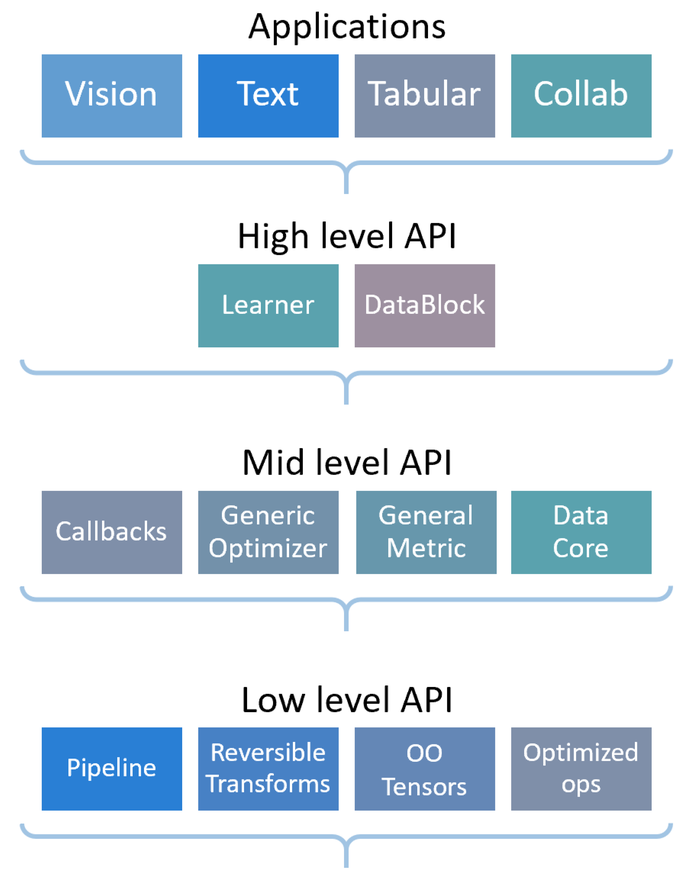
fastai is a deep learning library which provides practitioners with high-level components that can quickly and easily provide state-of-the-art results in standard deep learning domains, and provides researchers with low-level components that can be mixed and matched to build new approaches. It aims to do both things without substantial compromises in ease of use, flexibility, or performance. This is possible thanks to a carefully layered architecture, which expresses common underlying patterns of many deep learning and data processing techniques in terms of decoupled abstractions. These abstractions can be expressed concisely and clearly by leveraging the dynamism of the underlying Python language and the flexibility of the PyTorch library. fastai includes:
- A new type dispatch system for Python along with a semantic type hierarchy for tensors
- A GPU-optimized computer vision library which can be extended in pure Python
- An optimizer which refactors out the common functionality of modern optimizers into two basic pieces, allowing optimization algorithms to be implemented in 4–5 lines of code
- A novel 2-way callback system that can access any part of the data, model, or optimizer and change it at any point during training
- A new data block API
- And much more...
fastai is organized around two main design goals: to be approachable and rapidly productive, while also being deeply hackable and configurable. It is built on top of a hierarchy of lower-level APIs which provide composable building blocks. This way, a user wanting to rewrite part of the high-level API or add particular behavior to suit their needs does not have to learn how to use the lowest level.
Migrating from other libraries
It's very easy to migrate from plain PyTorch, Ignite, or any other PyTorch-based library, or even to use fastai in conjunction with other libraries. Generally, you'll be able to use all your existing data processing code, but will be able to reduce the amount of code you require for training, and more easily take advantage of modern best practices. Here are migration guides from some popular libraries to help you on your way:
Tests
To run the tests in parallel, launch:
nbdev_test_nbs or make test
For all the tests to pass, you'll need to install the following optional dependencies:
pip install "sentencepiece<0.1.90" wandb tensorboard albumentations pydicom opencv-python scikit-image pyarrow kornia \
    catalyst captum neptune-cli
Tests are written using nbdev, for example see the documentation for test_eq.
Contributing
After you clone this repository, please run nbdev_install_git_hooks in your terminal. This sets up git hooks, which clean up the notebooks to remove the extraneous stuff stored in the notebooks (e.g. which cells you ran) which causes unnecessary merge conflicts.
Before submitting a PR, check that the local library and notebooks match. The script nbdev_diff_nbs can let you know if there is a difference between the local library and the notebooks.
- If you made a change to the notebooks in one of the exported cells, you can export it to the library with
nbdev_build_libormake fastai. - If you made a change to the library, you can export it back to the notebooks with
nbdev_update_lib.
Docker Containers
For those interested in official docker containers for this project, they can be found here.
Release history Release notifications | RSS feed


Download files
Download the file for your platform. If you're not sure which to choose, learn more about installing packages.
Source Distribution
Built Distribution
Filter files by name, interpreter, ABI, and platform.
If you're not sure about the file name format, learn more about wheel file names.
Copy a direct link to the current filters
File details
Details for the file fastai-2.0.15.tar.gz.
File metadata
- Download URL: fastai-2.0.15.tar.gz
- Upload date:
- Size: 161.5 kB
- Tags: Source
- Uploaded using Trusted Publishing? No
- Uploaded via: twine/3.2.0 pkginfo/1.5.0.1 requests/2.24.0 setuptools/49.6.0.post20200814 requests-toolbelt/0.9.1 tqdm/4.49.0 CPython/3.7.7
File hashes
| Algorithm | Hash digest | |
|---|---|---|
| SHA256 |
247c47cfa253fad3445aaae34fffe9c6830d634eaf52953444a4f7dea6cc965b
|
|
| MD5 |
46388d783e341cdf4b43da7c3d1520be
|
|
| BLAKE2b-256 |
1a3664868036c57f7bbb640ef18841277d4ac5def9e7c3c37f27693f111c43b6
|
File details
Details for the file fastai-2.0.15-py3-none-any.whl.
File metadata
- Download URL: fastai-2.0.15-py3-none-any.whl
- Upload date:
- Size: 185.4 kB
- Tags: Python 3
- Uploaded using Trusted Publishing? No
- Uploaded via: twine/3.2.0 pkginfo/1.5.0.1 requests/2.24.0 setuptools/49.6.0.post20200814 requests-toolbelt/0.9.1 tqdm/4.49.0 CPython/3.7.7
File hashes
| Algorithm | Hash digest | |
|---|---|---|
| SHA256 |
c0693e14e57587d36abb8e36fb122bd9ec7c1e69205f93b986ddb0922b8a778d
|
|
| MD5 |
5d9219f0ec257bdb5368f1fbfaf5b06a
|
|
| BLAKE2b-256 |
982ed4dcc69f67b4557c8543a4c65d3e136b1929b01136b227ceb986e2596825
|






