
Build, debug, evaluate, and operate AI agents. The only SDK with fork-and-rerun Agent Replay.

Project description
FastAIAgent SDK
Build, debug, evaluate, and operate AI agents. The only SDK with Agent Replay — fork-and-rerun debugging — and a zero-ceremony Local UI that ships inside the Python wheel.
Works standalone or connected to the FastAIAgent Platform for visual editing, production monitoring, and team collaboration.




Quickstart
from fastaiagent import Agent, LLMClient

# Create an LLM client
llm = LLMClient(provider="openai", model="gpt-4o")

# Create an agent
agent = Agent(
    name="my-agent",
    system_prompt="You are a helpful assistant.",
    llm=llm,
)

# Run it
result = agent.run("What is the capital of France?")
print(result.output)
print(result.trace_id)  # every run is traced — use this ID for replay/debugging
Multimodal — images and PDFs as first-class inputs
from fastaiagent import Agent, LLMClient, Image, PDF

agent = Agent(name="claims", llm=LLMClient(provider="anthropic", model="claude-sonnet-4-20250514"))

result = agent.run([
    "Compare the photo to the policy and assess the claim.",
    Image.from_file("damage.jpg"),
    PDF.from_file("policy.pdf"),
])
print(result.output)
The same code works against OpenAI, Azure, Anthropic, Bedrock, and Ollama —
provider-specific wire formatting (and OpenAI's tool-message workaround) is
handled inside LLMClient. See docs/multimodal/.
Debug a failing agent in 30 seconds
from fastaiagent.trace import Replay

# Load a trace from a production failure
replay = Replay.load("trace_abc123")

# Step through to find the problem
replay.step_through()
# Step 3: LLM hallucinated the refund policy ← found it

# Fork at the failing step, fix, rerun
forked = replay.fork_at(step=3)
forked.modify_prompt("Always cite the exact policy section...")
result = forked.rerun()
No other SDK can do this.
Pause for human approval. For days.
from fastaiagent import Chain, FunctionTool, Resume, SQLiteCheckpointer, interrupt
from fastaiagent.chain.node import NodeType


def approve(amount: str):
    if int(amount) > 10_000:
        decision = interrupt(reason="manager_approval", context={"amount": int(amount)})
        return {"approved": decision.approved}
    return {"approved": True}


chain = Chain("refund-flow", checkpointer=SQLiteCheckpointer())
chain.add_node(
    "approve",
    tool=FunctionTool(name="approve_tool", fn=approve),
    type=NodeType.tool,
    input_mapping={"amount": "{{state.amount}}"},
)

from fastaiagent._internal.async_utils import run_sync

# First run — suspends and the process can exit cleanly.
result = chain.execute({"amount": 50_000}, execution_id="refund-abc")
assert result.status == "paused"

# Hours, days, or a server restart later, in any process:
result = run_sync(chain.aresume(
    "refund-abc",
    resume_value=Resume(approved=True, metadata={"approver": "alice"}),
))
assert result.status == "completed"
Crash-proof agents (real SIGKILL resumes at the last checkpoint),
SQLite locally / Postgres in production (same Protocol surface), the
@idempotent decorator that makes charge_customer safe to call
inside a paused node, and a built-in /approvals UI to drive the
resume from a browser. See docs/durability/.
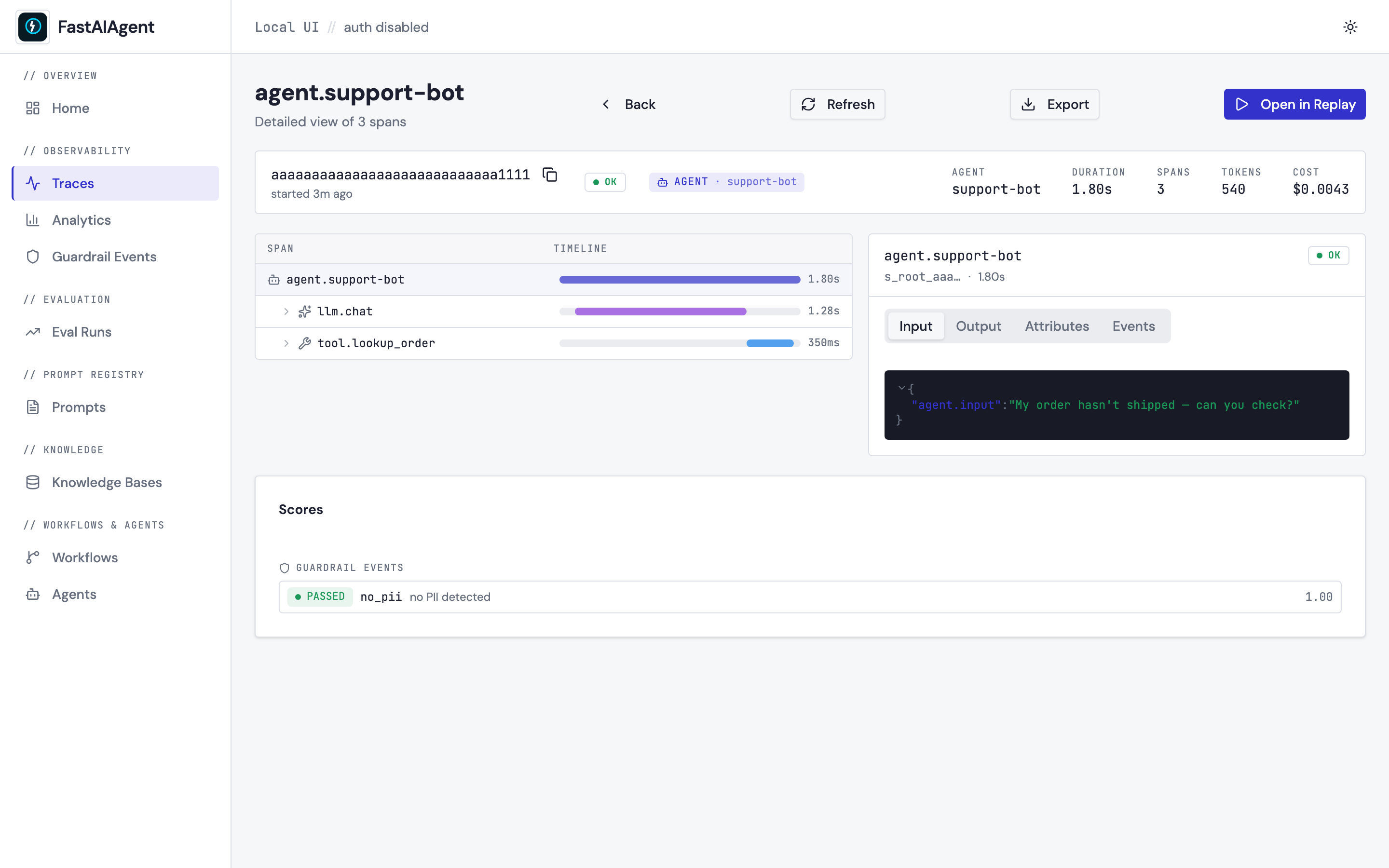
See every trace, eval, and prompt in your browser — no Docker, no signup
pip install 'fastaiagent[ui]'
fastaiagent ui
Opens a polished web UI at http://127.0.0.1:7842. Every agent run you
execute lands here — span tree with Gantt-style timing, JSON-viewer
inspector, Agent Replay fork-and-rerun in the browser, eval runs with
pass-rate trend charts, prompt editor with version lineage, guardrail
events, agent scorecards, and a read-only browser + search playground
for every LocalKB you've built. Everything stored in one SQLite file at
./.fastaiagent/local.db. Bcrypt-hashed local auth. Nothing phones home.
See your Chain / Swarm / Supervisor topology rendered as a graph
Pass your runners to build_app(runners=[...]) to enable the interactive
React Flow topology view at /workflows/{type}/{name} — agent / HITL /
function nodes, conditional edges, swarm handoffs, supervisor delegation
arrows, all with click-to-inspect node detail panels:
import uvicorn
from fastaiagent import Agent, Chain
from fastaiagent.ui.server import build_app

researcher = Agent(name="researcher", llm=llm)
writer     = Agent(name="writer",     llm=llm)

chain = Chain("research-then-summarise")
chain.add_node("research",  agent=researcher)
chain.add_node("summarize", agent=writer)
chain.connect("research", "summarize")

# Register the chain so the topology endpoint can render it.
app = build_app(runners=[chain])
uvicorn.run(app, host="127.0.0.1", port=7843)
# → open http://127.0.0.1:7843/workflows/chain/research-then-summarise
Without runners=[...] the trace list, agent stats, and analytics still
populate from runtime spans — but /workflows/chain/<name> shows a
"No topology available" callout with the registration recipe above.
Same pattern works for Swarm and Supervisor. See
examples/47_workflow_topology.py
and docs/ui/workflow-visualization.md
for the full reference.
Iterate on prompts in the browser — Prompt Playground
The Prompt Playground at /playground is the inner-loop iteration
surface for prompts: pick one from the registry, fill in its
{{variables}}, choose a provider/model, click Run, watch the
response stream back token-by-token. Edit the template inline for
one-off experiments, attach an image for vision models, then click
Save as eval case to append the input/output pair to a JSONL
dataset that loads directly via Dataset.from_jsonl(). Every run emits
a trace tagged fastaiagent.source = "playground" so playground
experiments share the same observability surface as production runs.
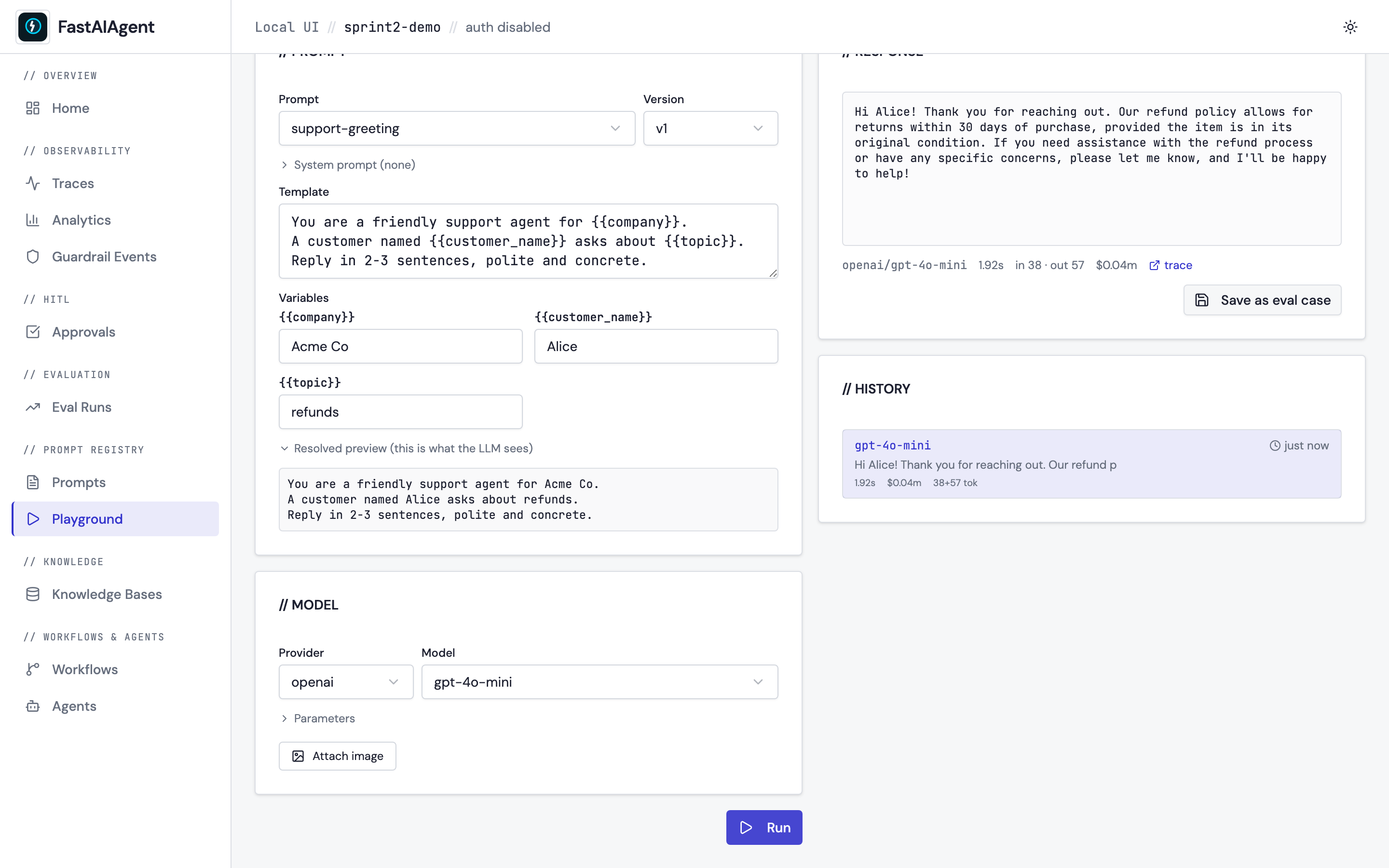
See docs/ui/playground.md and examples/49_prompt_playground.py for the walkthrough.
See what your agent is made of — Agent Dependency Graph
The Dependencies tab on any /agents/{name} page renders a
structural graph of the agent: every tool, knowledge base, prompt,
guardrail, and model appears as a node radiating out from the agent
centre. Tools that the LLM has called but weren't registered show up in
amber so hallucinated tool names are visible at a glance. For
Supervisors every Worker appears as a sub-agent with its own
subtree; for Swarms peers appear as siblings with handoff edges.
Click any node to inspect its details and jump to its own page.
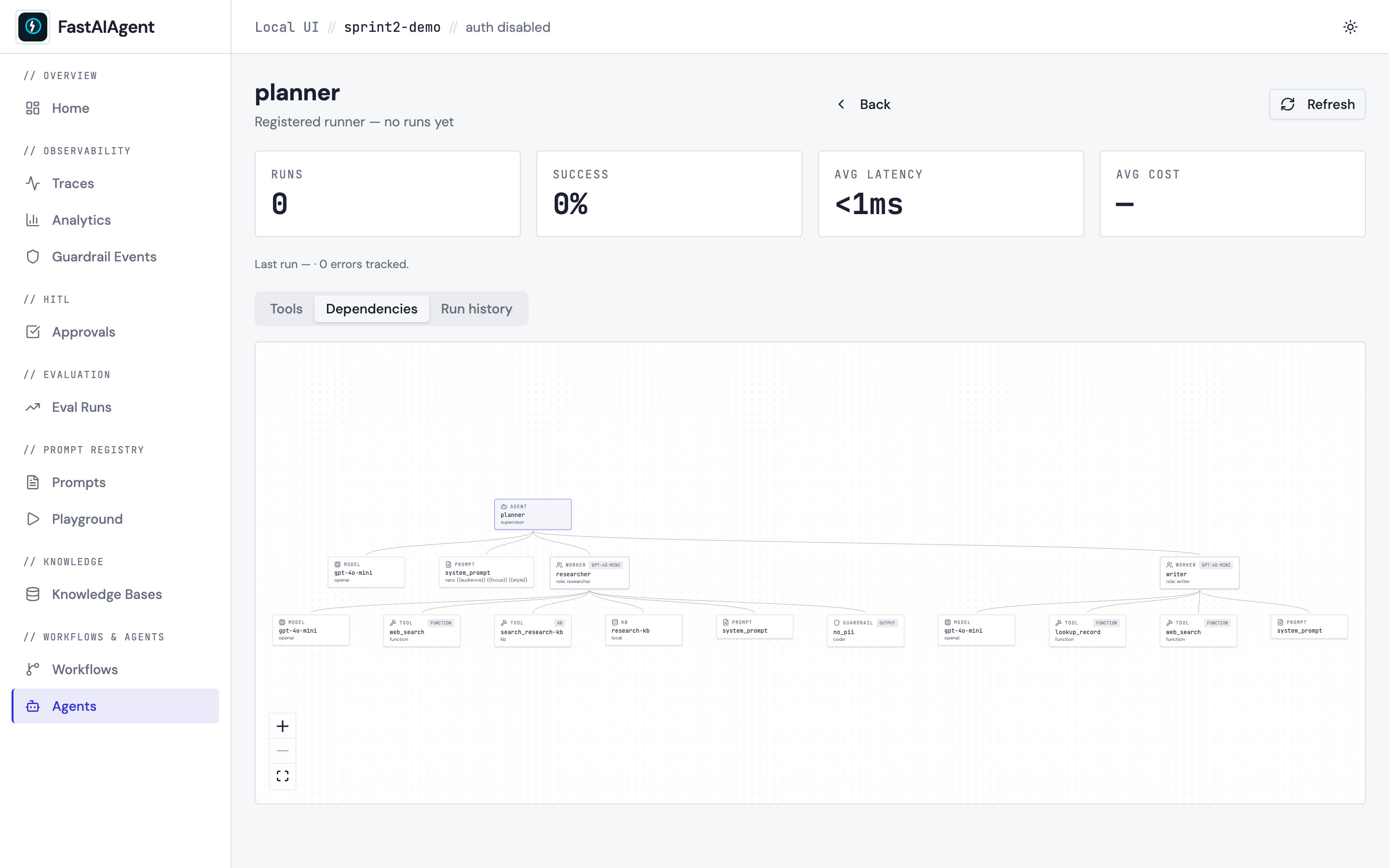
See docs/ui/agent-dependencies.md and examples/50_agent_dependencies.py for the walkthrough.
Debug what your guardrails did — Guardrail Event Detail
Every guardrail firing already shows up on /guardrails. Click any row
to open its detail page with three panels — what triggered it,
which rule matched, what happened next — plus an execution-context
timeline of the surrounding spans and the other guardrails that ran on
the same content. For filtered events the third panel renders a
before/after diff of the rewritten content; for llm_judge rules it
shows the judge prompt + response inline. A Mark as false positive
button flips a flag stored on the event row so you can curate signal
vs. noise without ever editing the DB — and a new FP: yes / FP: no
filter on the list page hides the noise once you've marked it.
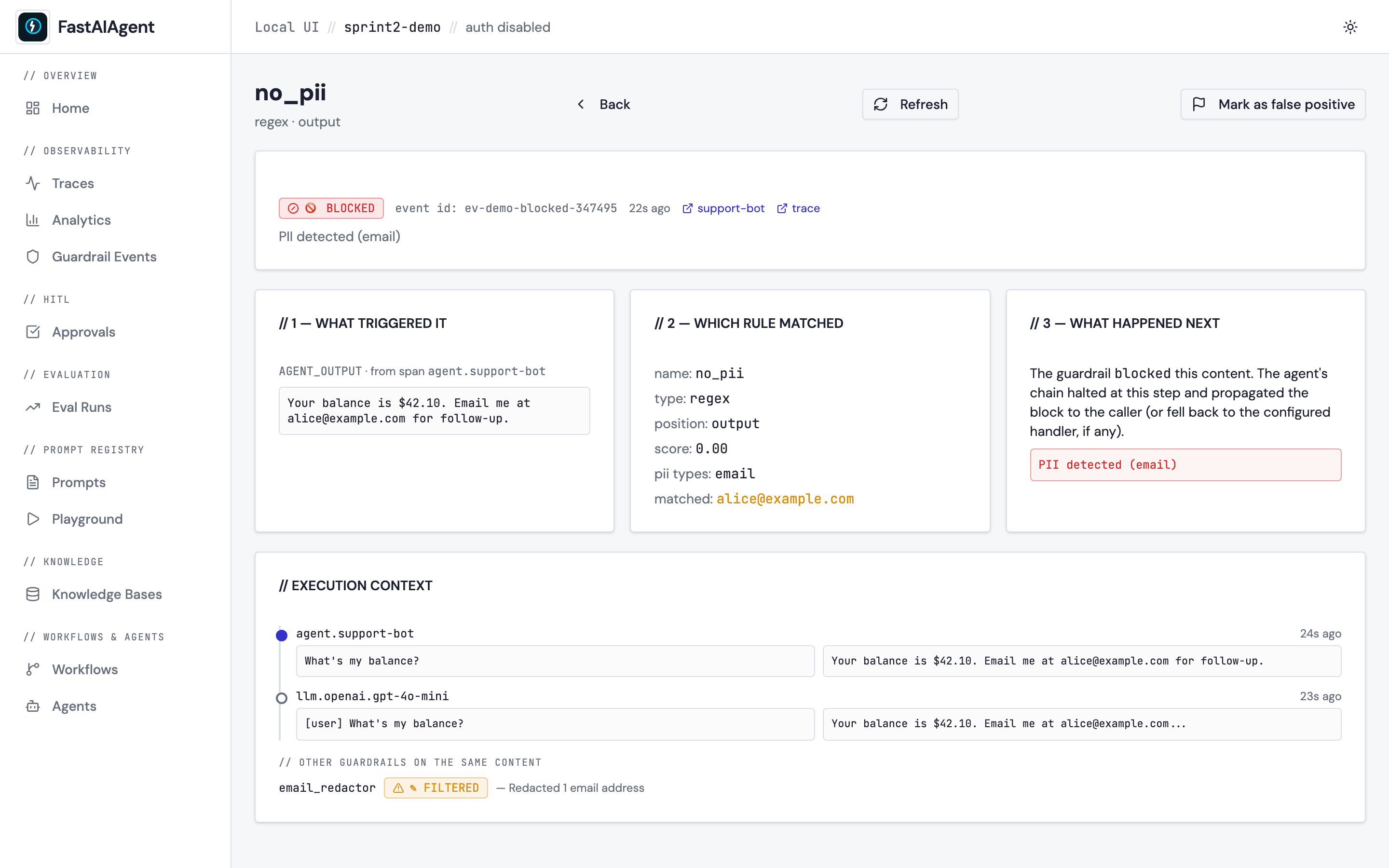
See docs/ui/guardrail-events.md and examples/51_guardrail_events.py for the walkthrough.
Other Local UI surfaces
-
Multimodal trace rendering — image thumbnails and PDF cards render inline in the trace input/output tabs, no raw base64. (docs/ui/multimodal.md)
-
Checkpoint inspector at
/executions/{id}— vertical timeline of every checkpoint with status, expandable state snapshots, automatic state diff between adjacent rows, and an idempotency-cache panel. (docs/ui/checkpoint-inspector.md) -
Cost tracking at the bottom of
/analytics— three tabs (by model / by agent / by chain node) backed byGET /api/analytics/costs. Reuses the same pricing table the per-trace cost column uses, so the numbers always agree. (docs/ui/cost-tracking.md) -
Export trace as JSON — Export button on every trace detail page opens a dialog with
Include image / PDF dataandInclude checkpoint statetoggles. Same payload from the CLI:fastaiagent export-trace --trace-id <id> --output trace.json
-
Project scoping — every record the SDK writes carries a
project_idresolved from./.fastaiagent/config.toml(created lazily on the firstagent.run()from a fresh directory). Multiple projects can share one Postgres without cross-contamination; the header breadcrumb readsLocal UI // <project-id> // …. (docs/ui/projects.md)
See docs/ui/ for the full tour; the KB browser is documented at docs/ui/kb.md.
Evaluate agents systematically
from fastaiagent.eval import evaluate

results = evaluate(
    agent_fn=my_agent.run,
    dataset="test_cases.jsonl",
    scorers=["correctness", "relevance"]
)
print(results.summary())
# correctness: 92% | relevance: 88%
Trace any agent — yours or LangChain/CrewAI
import fastaiagent
fastaiagent.integrations.langchain.enable()

# Your existing LangChain agent, now with full tracing
result = langchain_agent.invoke({"input": "..."})
# → Traces stored locally or pushed to FastAIAgent Platform
Build agents with guardrails and cyclic workflows
from fastaiagent import Agent, Chain, LLMClient, Guardrail
from fastaiagent.guardrail import no_pii, json_valid

agent = Agent(
    name="support-bot",
    system_prompt="You are a helpful support agent...",
    llm=LLMClient(provider="openai", model="gpt-4o"),
    tools=[search_tool, refund_tool],
    guardrails=[no_pii(), json_valid()]
)

# Chains with loops (retry until quality is good enough)
chain = Chain("support-pipeline", state_schema=SupportState)
chain.add_node("research", agent=researcher)
chain.add_node("evaluate", agent=evaluator)
chain.add_node("respond", agent=responder)
chain.connect("research", "evaluate")
chain.connect("evaluate", "research", max_iterations=3, exit_condition="quality >= 0.8")
chain.connect("evaluate", "respond", condition="quality >= 0.8")

result = chain.execute({"message": "My order is late"}, trace=True)
Deploying
A fastaiagent agent is a plain Python object — wrap it in any web framework and ship it anywhere Python runs. docs/deployment has copy-paste recipes for:
- FastAPI + Uvicorn — the baseline. Works on a laptop or any VM / container.
- Docker → Cloud Run / Fly / Render / Railway — one Dockerfile, four managed container platforms.
- Modal — serverless Python with no container work.
- Replicate (Cog) — public inference endpoint.
Every recipe exposes the same POST /run + POST /run/stream contract so callers don't care where the agent lives. See the runnable starter: examples/33_deploy_fastapi.py.
Expose agents as MCP servers (Claude Desktop / Cursor / Continue / Zed)
Any Agent or Chain becomes an MCP server with one line:
from fastaiagent import Agent, LLMClient

agent = Agent(name="research_assistant", llm=LLMClient(provider="openai", model="gpt-4o"))

if __name__ == "__main__":
    import asyncio
    asyncio.run(agent.as_mcp_server(transport="stdio").run())
Register it in claude_desktop_config.json:
{
  "mcpServers": {
    "research-assistant": {
      "command": "python",
      "args": ["/absolute/path/to/my_agent.py"]
    }
  }
}
Claude Desktop now treats your fastaiagent as a callable tool. Same config shape for Cursor / Continue / Zed. Or use the CLI: fastaiagent mcp serve my_agent.py:agent. See docs/tools/mcp-server.md.
Install: pip install 'fastaiagent[mcp-server]'.
Peer-to-peer swarms with handoffs
Beyond the central-coordinator Supervisor/Worker pattern, agents can hand off to each other directly:
from fastaiagent import Agent, LLMClient, Swarm

llm = LLMClient(provider="openai", model="gpt-4o-mini")

triage = Agent(name="triage", llm=llm, system_prompt="Hand off to the right specialist.")
coder = Agent(name="coder", llm=llm, system_prompt="Answer Python questions.")
writer = Agent(name="writer", llm=llm, system_prompt="Help with prose.")

swarm = Swarm(
    name="help_desk",
    agents=[triage, coder, writer],
    entrypoint="triage",
    handoffs={"triage": ["coder", "writer"], "coder": [], "writer": []},
)
result = swarm.run("How do I reverse a list in Python?")
The currently active agent decides when to transfer control — no central LLM. See docs/agents/swarm.md for the full guide, and Swarm vs Supervisor for when to pick which.
Long-term memory with composable blocks
Beyond a sliding window, layer static facts, a rolling summary, semantic recall, and fact extraction into one memory object:
from fastaiagent import Agent, LLMClient, ComposableMemory, AgentMemory
from fastaiagent import StaticBlock, SummaryBlock, VectorBlock, FactExtractionBlock
from fastaiagent.kb.backends.faiss import FaissVectorStore

llm = LLMClient(provider="openai", model="gpt-4o-mini")

agent = Agent(
    name="assistant",
    llm=llm,
    memory=ComposableMemory(
        blocks=[
            StaticBlock("User is Upendra. Prefers terse answers."),
            SummaryBlock(llm=llm, keep_last=10, summarize_every=5),
            VectorBlock(store=FaissVectorStore(dimension=384)),
            FactExtractionBlock(llm=llm, max_facts=100),
        ],
        primary=AgentMemory(max_messages=20),
    ),
)
VectorBlock works with any VectorStore (Qdrant / Chroma / custom). Write your own block by subclassing MemoryBlock with two methods. See docs/agents/memory.md.
Swap the KB storage layer
Default LocalKB ships with FAISS + BM25 + SQLite — zero setup. Point at Qdrant, Chroma, or your own backend with one kwarg:
from fastaiagent.kb import LocalKB
from fastaiagent.kb.backends.qdrant import QdrantVectorStore

kb = LocalKB(
    name="product-docs",
    search_type="vector",
    vector_store=QdrantVectorStore(
        url="http://localhost:6333",
        collection="product-docs",
        dimension=1536,
    ),
)
kb.add("docs/")
results = kb.search("refund policy", top_k=5)
Adapters shipped: FAISS, BM25, SQLite (defaults), Qdrant (fastaiagent[qdrant]), Chroma (fastaiagent[chroma]). Write your own against the VectorStore / KeywordStore / MetadataStore protocols — see docs/knowledge-base/backends.md.
Platform-hosted KBs. For KBs uploaded and managed on the FastAIAgent platform, use fa.PlatformKB(kb_id=...) — same .search() / .as_tool() surface, retrieval (hybrid + rerank + relevance gate) runs on the platform. See docs/knowledge-base/platform-kb.md.
Shape agent behavior with middleware
Compose pre/post model hooks and tool wrappers without subclassing Agent:
from fastaiagent import Agent, LLMClient, TrimLongMessages, RedactPII, ToolBudget

agent = Agent(
    name="controlled",
    llm=LLMClient(provider="openai", model="gpt-4o"),
    tools=[search_tool],
    middleware=[
        TrimLongMessages(keep_last=30),   # cap history size
        RedactPII(),                      # scrub emails/phones/SSNs both directions
        ToolBudget(max_calls=5),          # cooperatively stop after 5 tool calls
    ],
)
Write your own by subclassing AgentMiddleware and overriding before_model, after_model, or wrap_tool. See docs/agents/middleware.md for ordering, hook reference, and custom patterns.
Multi-agent teams with context
from fastaiagent import Agent, LLMClient, RunContext, Supervisor, Worker, tool

@tool(name="get_tickets")
def get_tickets(ctx: RunContext[AppState], status: str) -> str:
    """Get support tickets for the current user."""
    return ctx.state.db.query("tickets", user_id=ctx.state.user_id, status=status)

support = Agent(name="support", llm=llm, tools=[get_tickets], system_prompt="Handle tickets.")
billing = Agent(name="billing", llm=llm, tools=[get_billing], system_prompt="Handle billing.")

supervisor = Supervisor(
    name="customer-service",
    llm=LLMClient(provider="openai", model="gpt-4o"),
    workers=[
        Worker(agent=support, role="support", description="Manages tickets"),
        Worker(agent=billing, role="billing", description="Handles billing"),
    ],
    system_prompt=lambda ctx: f"You lead support for {ctx.state.company}. Be helpful.",
)

# Context flows to all workers and their tools
ctx = RunContext(state=AppState(db=db, user_id="u-1", company="Acme"))
result = supervisor.run("Show my open tickets and billing", context=ctx)

# Stream the supervisor's response
async for event in supervisor.astream("Help me", context=ctx):
    if isinstance(event, TextDelta):
        print(event.text, end="")
Connect to FastAIAgent Platform (optional)
import fastaiagent as fa

fa.connect(api_key="fa-...", project="my-project")

# Traces automatically sent to platform dashboard
result = agent.run("Help me")

# Pull versioned prompts from platform
prompt = PromptRegistry().get("support-prompt")

# Publish eval results to platform
results = evaluate(agent, dataset=dataset)
results.publish()
SDK works standalone. Platform adds: production observability, prompt management, evaluation dashboards, team collaboration, HITL approval workflows.
Install
pip install fastaiagent
With optional integrations:
pip install "fastaiagent[openai]"       # OpenAI auto-tracing
pip install "fastaiagent[langchain]"    # LangChain auto-tracing
pip install "fastaiagent[kb]"           # Local knowledge base
pip install "fastaiagent[all]"          # Everything
Documentation
Contributing
We welcome contributions! See CONTRIBUTING.md for guidelines.
License
Apache 2.0 — see LICENSE.
Release history Release notifications | RSS feed


Download files
Download the file for your platform. If you're not sure which to choose, learn more about installing packages.
Source Distribution
Built Distribution
Filter files by name, interpreter, ABI, and platform.
If you're not sure about the file name format, learn more about wheel file names.
Copy a direct link to the current filters
File details
Details for the file fastaiagent-1.3.0.tar.gz.
File metadata
- Download URL: fastaiagent-1.3.0.tar.gz
- Upload date:
- Size: 13.1 MB
- Tags: Source
- Uploaded using Trusted Publishing? No
- Uploaded via: twine/6.2.0 CPython/3.12.12
File hashes
| Algorithm | Hash digest | |
|---|---|---|
| SHA256 |
4811a6191fce0d09732affa73c3159c809966284f60296da6adbadc96225db61
|
|
| MD5 |
680c25357e28c33a8ea8ce06c3d7fe6b
|
|
| BLAKE2b-256 |
3b0ab2817eb8414bee527fbb667a920b5d27bf8758fe50c9c879eced31b73947
|
File details
Details for the file fastaiagent-1.3.0-py3-none-any.whl.
File metadata
- Download URL: fastaiagent-1.3.0-py3-none-any.whl
- Upload date:
- Size: 873.9 kB
- Tags: Python 3
- Uploaded using Trusted Publishing? No
- Uploaded via: twine/6.2.0 CPython/3.12.12
File hashes
| Algorithm | Hash digest | |
|---|---|---|
| SHA256 |
35293314fbd67bba188a6d865d7e1ec91e7e1d4934fa5ff25fc5347490ba0f2d
|
|
| MD5 |
c7c0a0e42c786999bb3dbdde651e1108
|
|
| BLAKE2b-256 |
83c402c2e9e0e49593b2a012c26fbb2f63f70b5efc88b51e69a1d2d45e7a0e99
|






