
fastapi-gae-logging
Custom Cloud Logging handler for FastAPI (or any Starlette based) applications deployed in Google App Engine to ease out logs analysis and monitoring through Google Cloud Log Explorer.
What problem does this package solve? Why do we need this?
When deploying FastAPI applications on Google App Engine, I encountered several challenges with logging and observability even when using the official package for this purpose, google-cloud-logging.
-
Scattered Logs: Logs generated during a single request lifecycle were scattered across different log entries, making it difficult to trace the entire flow of a request, especially when troubleshooting issues.
-
Log Severity Mismatch: The severity level of logs was not properly propagated throughout the request lifecycle. This meant that if an error occurred at any point in the request, the earlier logs did not reflect the severity of the final outcome, making it harder to identify problematic requests.
-
Payload Logging Issues: Capturing and logging request payloads was cumbersome, requiring extra logging in the handlers and extra deployments. This led to incomplete logs, making it harder to reproduce issues or analyze request content.
-
Inconsistent Log Structures: The default logging setup lacked a consistent structure, which made it challenging to filter, search, and analyze logs in the Google Cloud Log Explorer.
So what does it do?
The fastapi-gae-logging module addresses these problems by:
-
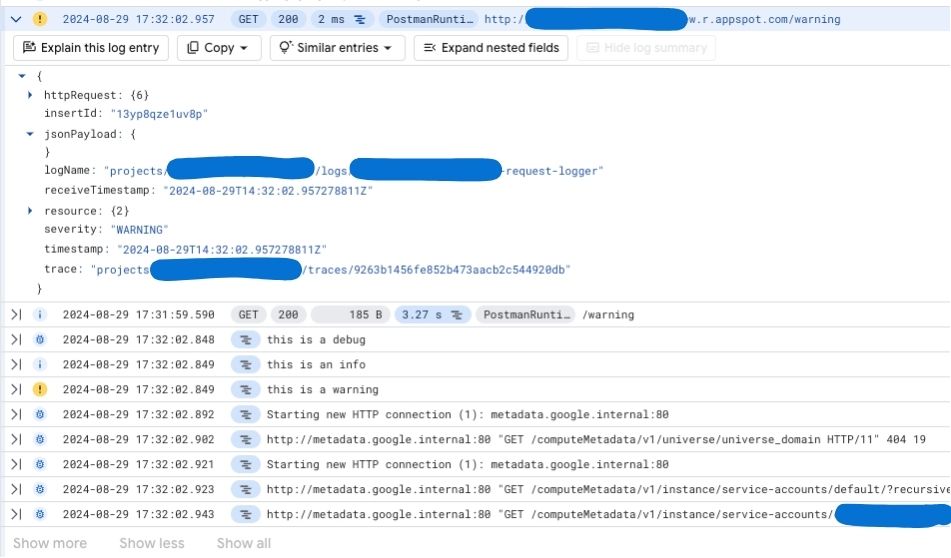
Grouping Logs by Request: All logs generated during a request's lifecycle are grouped together, allowing for a complete view of the request flow in the Google Cloud Log Explorer. This makes it much easier to trace and troubleshoot issues.
-
Log Level Propagation: The maximum log level observed during a request's lifecycle is propagated, ensuring that logs associated with a failed request reflect the appropriate severity. This improves the accuracy and utility of log searches based on severity.
-
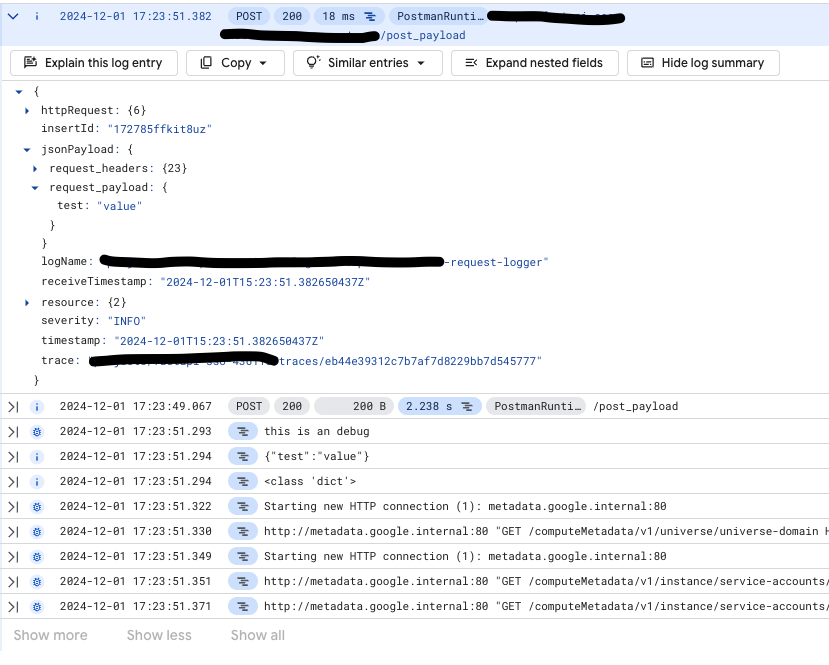
Structured Payload Logging: Request payloads are captured and logged in a structured format, even for non-dictionary JSON payloads. This ensures that all relevant request data is available for analysis, improving the ability to diagnose issues.
Install
pip install fastapi-gae-logging
Features:
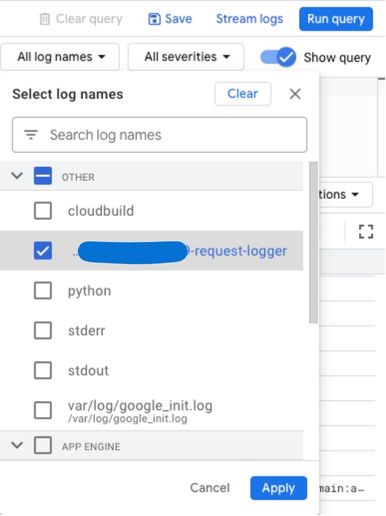
- Request Logs Grouping: Groups logs from the same request lifecycle to simplify log analysis using Google Cloud Log Explorer. The logger name for grouping can be customized and defaults to the Google Cloud Project ID with '-request-logger' as a suffix.
- Request Maximum Log Level Propagation: Propagates the maximum log level throughout the request lifecycle, making it easier to search logs based on the severity of an issue.
- Optional incoming request logging: Opt in/out to log headers and payload of incoming requests into the
jsonPayloadfield of the parent log. - Optional request headers logging: Defaults to False. Headers dict lands into field
request_headersin thejsonPayloadof parent log. - Optional request Payload Logging: Defaults to False. Incoming payload parsed lands into field
request_payloadin thejsonPayloadof parent log. Parsing is based on content type with capability to override. Currenty embedded parsers for:application/jsonapplication/x-www-form-urlencodedmultipart/form-datatext/plain
- Optional add-on log filters:
GaeLogSizeLimitFilterfilter to drop log records if they exceed the maximum allowed size by google cloud logging.GaeUrlib3FullPoolFilterfilter to drop noisy 'Connection pool is full' warning logs from Google Cloud and App Engine internal libraries.
API
- Initialization
FastAPIGAELoggingHandler(
    app: Starlette,
    client: google.cloud.logging.Client,
    request_logger_name: Optional[str] = None,
    log_payload: bool = False,
    log_headers: bool = False,
    builtin_payload_parsers: Optional[List[PayloadParser.Defaults]] = None,
    custom_payload_parsers: Optional[Dict[str, Callable[[Request], Awaitable[Any]]]] = None,
    *args, **kwargs
)
- Parameters
- app (FastAPI | Starlette): The FastAPI or Starlette application instance.
- client (google.cloud.logging.Client): The Google Cloud Logging Client instance. This is required to initialize the handler and retrieve the project ID.
- request_logger_name (Optional[str]): The name of the Cloud Logging logger to use for request logs. Defaults to the Google Cloud Project ID with the suffix '-request-logger'.
- log_payload (bool): Whether to log the request payload. If True, the payload for POST, PUT, PATCH, and DELETE requests will be captured and logged. Defaults to False.
- log_headers (bool): Whether to log the request headers. Defaults to False.
- builtin_payload_parsers (Optional[List[PayloadParser.Defaults]]): A list of built-in parser enums to enable (e.g., [PayloadParser.Defaults.JSON, PayloadParser.Defaults.FORM_URLENCODED]).
- custom_payload_parsers (Optional[Dict[str, Callable[[Request], Awaitable[Any]]]]): A dictionary mapping MIME types (e.g., 'application/custom+xml') to async parser coroutines. These coroutines must accept a Request object and return a serializable result to log. If provided, these will override default parsers for the specified content types.
- *args: Additional arguments to pass to the superclass constructor. Any argument you would pass to CloudLoggingHandler.
- **kwargs: Additional keyword arguments to pass to the superclass constructor. Any keyword argument you would pass to CloudLoggingHandler.
Example of usage
import logging
import os

from fastapi import FastAPI, File, Form, Request, UploadFile
from fastapi.exceptions import HTTPException
from fastapi.responses import JSONResponse

app = FastAPI()


async def custom_payload_parser_plain_text(request: Request):
    # Custom parser for text/plain to demonstrate GAE handler extensibility.
    # Needs to return a serializable value to be logged
    body_bytes = await request.body()
    incoming_payload = body_bytes.decode('utf-8')
    return f"Parsed Plain Text: {incoming_payload}"


# Initialize GAE Logging
if os.getenv('GAE_ENV', '').startswith('standard'):
    import google.cloud.logging
    from google.cloud.logging_v2.handlers import setup_logging

    from fastapi_gae_logging import (
        FastAPIGAELoggingHandler,
        GaeLogSizeLimitFilter,
        GaeUrlib3FullPoolFilter,
        PayloadParser,
    )

    client = google.cloud.logging.Client()
    gae_log_handler = FastAPIGAELoggingHandler(
        app=app,
        client=client,
        # Optional - opt in for logging payload and logs; defaults are False
        log_headers=True,
        log_payload=True,
        # Optional - opt in for all built in payload parsers; applicable only if log_payload is set True
        builtin_payload_parsers=[content_type for content_type in PayloadParser.Defaults],
        # Optional - override built in payload parsers or provide more; applicable only if log_payload is set True
        custom_payload_parsers={
            "text/plain": custom_payload_parser_plain_text
        }
    )
    setup_logging(handler=gae_log_handler)
    # Optional - add extra filters for the logger
    gae_log_handler.addFilter(GaeLogSizeLimitFilter())
    gae_log_handler.addFilter(GaeUrlib3FullPoolFilter())


logging.getLogger().setLevel(logging.DEBUG)


@app.get("/info")
def info():
    logging.debug("Step 1: Debugging diagnostic")
    logging.info("Step 2: General information log")
    return JSONResponse(
        content={
            "message": "info"
        }
    )


@app.get("/warning")
async def warning():
    logging.debug("Step 1: Check system state")
    logging.info("Step 2: State is normal")
    logging.warning("Step 3: Resource usage approaching threshold")
    return JSONResponse(
        content={
            "message": "warning"
        }
    )


@app.get("/error")
def error():
    logging.debug("Step 1: Internal check")
    logging.info("Step 2: Transaction started")
    logging.warning("Step 3: Retry attempted")
    logging.error("Step 4: Transaction failed after retries")
    return JSONResponse(
        content={
            "message": "error"
        }
    )


@app.get("/exception")
def exception():
    logging.debug("Step 1: Preparing logic")
    logging.info("Step 2: Executing risky operation")
    logging.error("Step 3: Critical failure detected")
    raise ValueError("Simulated ValueError for GAE grouping demonstration")


@app.get("/http_exception")
def http_exception():
    logging.debug("Step 1: Looking up resource")
    logging.info("Step 2: Resource ID not found in database")
    raise HTTPException(
        status_code=404,
        detail={
            "error": "Resource not found"
        }
    )


@app.post("/post_payload")
async def post_payload(request: Request):
    content_type = request.headers.get("content-type", "")
    logging.debug(f"Handling POST request with Content-Type: {content_type}")

    payload = None

    # 1. Handle JSON
    if "application/json" in content_type:
        try:
            payload = await request.json()
            logging.info(f"Parsed as JSON: {payload}")
        except Exception:
            logging.warning("Failed to parse body as JSON")
            payload = None

    # 2. Handle Form URL-Encoded
    elif "application/x-www-form-urlencoded" in content_type:
        form_data = await request.form()
        payload = dict(form_data)
        logging.info(f"Parsed as Form URL-Encoded: {payload}")

    # 3. Fallback for Plain Text or others
    else:
        body_bytes = await request.body()
        payload = body_bytes.decode("utf-8", errors="replace")
        logging.info(f"Parsed as Raw/Text: {payload}")

    return JSONResponse(
        content={
            "mirror_response": payload,
            "detected_type": str(type(payload)),
            "content_type_received": content_type
        },
        status_code=200
    )


@app.post("/post_form")
async def post_form(description: str = Form(...), file: UploadFile = File(...)):  # noqa: B008
    file_content = await file.read()

    payload = {
        "description": description,
        "file_name": file.filename,
        "content_type": file.content_type,
        "file_size": len(file_content),
    }

    logging.info(f"Form submission processed: {payload}")
    return JSONResponse(content={"mirror_response": payload}, status_code=200)
How it looks in Google Cloud Log Explorer
Logger selection
Groupped logs with propagated log severity to the parent log
Grouped logs in request with payload
Dependencies
This tool is built upon the following packages:
starlette: Starlette is a lightweight ASGI framework/toolkit, which is ideal for building async web services in Python. FastAPI is built on top of Starlette.google-cloud-logging: Google Cloud Logging API client library for logging and managing logs in Google Cloud Platform.
Implementation Concept
- Middleware Integration: A custom middleware integrates into FastAPI to intercept requests and log data after processing.The custom middleware is added to the FastAPI application during the initialization of the FastAPIGAELoggingHandler.
- Context Management: Uses context variables to manage request-specific data and metadata such as request payload, Google Cloud trace ID, start time of the incoming request and the maximum log level observed during the request lifecycle.
- Log Interception: A logging filter intercepts log records, injecting trace information and adjusting the maximum log level based on observed log severity.
- Cloud Logging: Utilizes Google Cloud Logging to group logs by request and propagate the maximum log level, enhancing observability and troubleshooting.
- Structured Logging: Parent log of the request-response lifecycle is structured and sent to Google Cloud Logging with additional context, such as the request method, URL, and user agent after the request has been processed and served.
Dev
uv sync --all-packages- Use
sample_appfolder for minimal Appengine app deployment of fastapi app that uses the local library src code via symlink.- If symlink is broken for any reason, create it again from inside the
devfolder:ln -s ../src/fastapi_gae_logging/ . - Deploy the app:
gcloud app deploy --version=v1 default.yaml --project=<PROJECT_ID> --account <ACCOUNT_EMAIL> - Ping the sample app to generate logs for various cases in log explorer:
python3.12 ping_endpoints.py --project <PROJECT_ID>
- If symlink is broken for any reason, create it again from inside the
1 maintainer

Metadata
1 maintainer
Release files for fastapi-gae-logging 0.2.1
For a detailed explanation of source distributions (sdists) and built distributions (wheels), please see the package formats documentation.
Source distribution (sdist)
| File | Size | Uploaded | Provenance | Actions |
|---|---|---|---|---|
| fastapi_gae_logging-0.2.1.tar.gz | 15.0 kB | With provenance | Details for fastapi_gae_logging-0.2.1.tar.gz |
Built distribution (wheel)
| File | Interpreter | ABI | Platform | Actions Reset |
|---|---|---|---|---|
| fastapi_gae_logging-0.2.1-py3-none-any.whl | Python 3 | none | any | Details for fastapi_gae_logging-0.2.1-py3-none-any.whl |
Total release size: 30.4 kB
Release files / fastapi_gae_logging-0.2.1.tar.gz
| Download URL | fastapi_gae_logging-0.2.1.tar.gz |
|---|---|
| Size | 15.0 kB |
| Tags | Source |
|
SHA-256 checksum How to use checksums |
2762b3528294c9a28c2e0208d5b6d4db57d96b2434ff4ac0ed4710ba40b5429e
|
|
BLAKE2b-256 checksum How to use checksums |
508c14d25d98d1dd09cd61fbb32ec0057d397ef05f1a0411ae0ec25a39c17634
|
| Upload date | |
|
Uploaded using Trusted Publishing? What is trusted publishing? |
Yes |
| Uploaded via |
twine/7.0.0 CPython/3.13.16
|
Provenance
Provenance describes where a file came from. On PyPI, provenance is shared via attestations, which provide a verifiable record of the build or publishing details. View details, limitations and caveats.


PyPI Publish Attestation
PyPI verified that this artifact, at this checksum, originated from the publisher listed below.
Signed by GitHub Actions, verified by PyPI on Nov 17, 2026.
Transparency logRelease files / fastapi_gae_logging-0.2.1-py3-none-any.whl
| Download URL | fastapi_gae_logging-0.2.1-py3-none-any.whl |
|---|---|
| Size | 15.4 kB |
| Tags | Python 3 |
|
SHA-256 checksum How to use checksums |
1619f22198c64475d8e70022e95b82348582306d6d994f4cbee27a09359088ba
|
|
BLAKE2b-256 checksum How to use checksums |
3232c90fbb5c8e0f09ed75a56ff3e7977d8c32b47099290fe48e59d6b43aed5d
|
| Upload date | |
|
Uploaded using Trusted Publishing? What is trusted publishing? |
Yes |
| Uploaded via |
twine/7.0.0 CPython/3.13.16
|
Provenance
Provenance describes where a file came from. On PyPI, provenance is shared via attestations, which provide a verifiable record of the build or publishing details. View details, limitations and caveats.
PyPI Publish Attestation
PyPI verified that this artifact, at this checksum, originated from the publisher listed below.
Signed by GitHub Actions, verified by PyPI on Nov 17, 2026.
Transparency logSecurity for fastapi-gae-logging 0.2.1
Provenance
Provenance describes where a file came from. On PyPI, provenance is shared via attestations, which provide a verifiable record of the build or publishing details. View details, limitations and caveats.
Full provenance
Both files in this release have been uploaded with provenance metadata.
Attestation for fastapi_gae_logging-0.2.1.tar.gz
PyPI Publish Attestation
PyPI verified that this artifact, at this checksum, originated from the publisher listed below.
Signed by GitHub Actions, verified by PyPI on Nov 17, 2026.
Transparency logA note on package security
PyPI is a repository for distributing packages, not a service for auditing them. While third-party security researchers and our staff do their best to detect and remove malicious packages, PyPI cannot guarantee the quality, security or suitability of any given package.
To learn more about protecting yourself from malicious actors, visit our package security documentation.














