
fastapi-lens
API usage intelligence for FastAPI — Lightweight middleware that identifies thriving, cold, and dead endpoints. Zero-infrastructure, high-performance monitoring.




What's New in v0.3.0 (The Maintenance Update)
The v0.3.0 release marks a milestone in stability and automation:
- Dynamic TTL Cleanup: Automatically purge old logs to keep your SQLite database lean and fast.
- Advanced Latency (Percentiles): Support for P50, P95, and P99 metrics to find real bottlenecks.
- Error Segregation: Distinct tracking for
4xx(Client) vs5xx(Server) errors. - Trusted Publishing (OIDC): Fully automated and secure deployments to PyPI via GitHub Actions.
- Concurrency Fixes: Internal
asyncio.Lockmechanisms to prevent race conditions during startup.
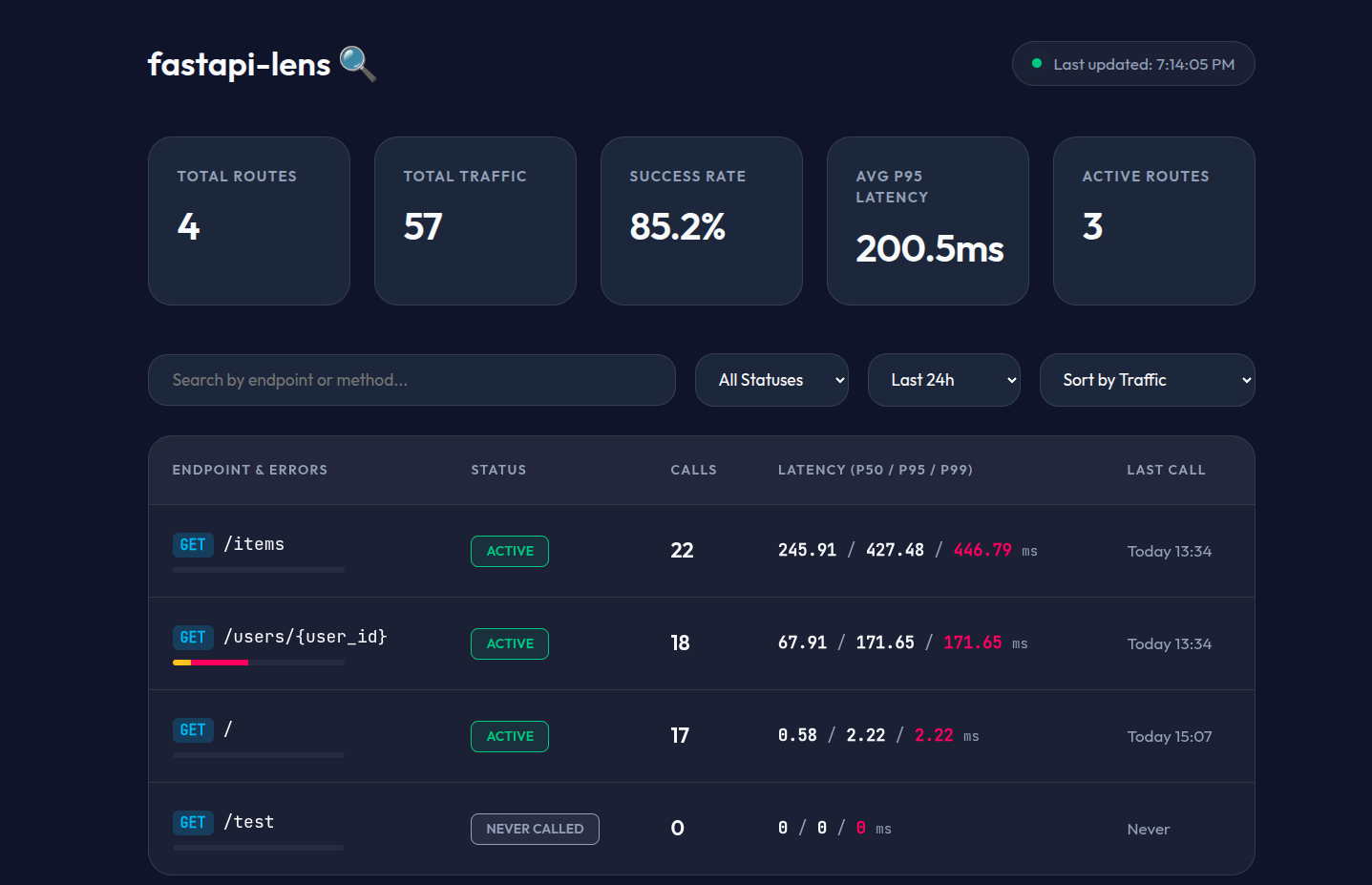
📊 HTML Dashboard
Visualizing your API health has never been easier. Access a built-in, glassmorphism-style dashboard at /lens/dashboard.
Key Dashboard Features:
- Real-time Metrics: Traffic totals, Success rates, and Active route counts.
- Latency Distribution: Watch your P95 and P99 response times per route.
- Error Visualization: Red/Green health bars indicating error rates.
- Status Filtering: Quickly find "Dead" or "Cold" endpoints to clean up your codebase.
Installation
pip install fastapi-lens
🛠️ Step-by-Step Setup (The "Senior" Way)
The recommended way to use fastapi-lens is via the setup() method, which handles both middleware and router registration automatically.
1. Basic Integration
from fastapi import FastAPI
from fastapi_lens import LensMiddleware, LensConfig

app = FastAPI()

# One-liner setup
LensMiddleware.setup(
    app,
    config=LensConfig(
        db_path="lens.db",
        ttl_days=14,           # Auto-delete records older than 14 days
        security_enabled=True,
        report_key="your-secret-passphrase"
    )
)
2. Access your data
- UI:
http://localhost:8000/lens/dashboard?report_key=your-secret-passphrase - JSON API: Send request with header
X-Lens-Key: your-secret-passphraseto/lens/report.
NOTE: If you set
security_enabled=False, you can access the dashboard and API without a report key, using the default URLhttp://localhost:8000/lens/dashboardandhttp://localhost:8000/lens/report.
The report looks like this:
{
  "generated_at": 1775243992.65774,
  "filters": {
    "days": null,
    "status": null
  },
  "summary": {
    "total_endpoints": 3,
    "total_requests": 71,
    "active": 3,
    "cold": 0,
    "dead": 0,
    "never_called": 0
  },
  "endpoints": [
    {
      "path": "/items",
      "method": "GET",
      "status": "active",
      "total_calls": 26,
      "error_4xx_count": 0,
      "error_5xx_count": 0,
      "error_rate_pct": 0,
      "success_rate_pct": 100,
      "avg_duration_ms": 272.79,
      "p50_duration_ms": 245.91,
      "p95_duration_ms": 446.79,
      "p99_duration_ms": 469.53,
      "max_duration_ms": 485.7,
      "last_called_at": 1775241265.46036,
      "first_called_at": 1775165996.83268,
      "days_since_last_call": 0
    }
  ]
}
As we said, we can filter by status: /lens/report?status={active | cold | dead | never_called} or by days: /lens/report?days=7
We also have /lens/report/top to get the top endpoints by calls.
{
  "generated_at": 1775244158.6899,
  "window_days": 7,
  "endpoints": [
    {
      "path": "/items",
      "method": "GET",
      "status": "active",
      "total_calls": 26,
      "error_4xx_count": 0,
      "error_5xx_count": 0,
      "error_rate_pct": 0,
      "success_rate_pct": 100,
      "avg_duration_ms": 272.79,
      "p50_duration_ms": 245.91,
      "p95_duration_ms": 446.79,
      "p99_duration_ms": 469.53,
      "max_duration_ms": 485.7,
      "last_called_at": 1775241265.46036,
      "first_called_at": 1775165996.83268,
      "days_since_last_call": 0
    },
    {
      "path": "/users/{user_id}",
      "method": "GET",
      "status": "active",
      "total_calls": 23,
      "error_4xx_count": 2,
      "error_5xx_count": 8,
      "error_rate_pct": 43.48,
      "success_rate_pct": 56.52,
      "avg_duration_ms": 86.2,
      "p50_duration_ms": 66.89,
      "p95_duration_ms": 167.1,
      "p99_duration_ms": 171.65,
      "max_duration_ms": 184.45,
      "last_called_at": 1775241273.30783,
      "first_called_at": 1775165996.89715,
      "days_since_last_call": 0
    },
    {
      "path": "/",
      "method": "GET",
      "status": "active",
      "total_calls": 22,
      "error_4xx_count": 0,
      "error_5xx_count": 0,
      "error_rate_pct": 0,
      "success_rate_pct": 100,
      "avg_duration_ms": 0.8,
      "p50_duration_ms": 0.62,
      "p95_duration_ms": 1.22,
      "p99_duration_ms": 2.22,
      "max_duration_ms": 2.69,
      "last_called_at": 1775241252.63773,
      "first_called_at": 1775165996.62768,
      "days_since_last_call": 0
    }
  ]
}
And finally, we also have: /lens/report/dead to get the dead endpoints.
{
  "generated_at": 1775244273.47241,
  "dead_endpoint_count": 0,
  "endpoints": [
    {
      "path": "/",
      "method": "GET",
      "status": "active",
      "total_calls": 22,
      "error_4xx_count": 0,
      "error_5xx_count": 0,
      "error_rate_pct": 0,
      "success_rate_pct": 100,
      "avg_duration_ms": 0.8,
      "p50_duration_ms": 0.62,
      "p95_duration_ms": 1.22,
      "p99_duration_ms": 2.22,
      "max_duration_ms": 2.69,
      "last_called_at": 1775241252.63773,
      "first_called_at": 1775165996.62768,
      "days_since_last_call": 0
    }
  ]
}
⚙️ Advanced Configuration
| Parameter | Default | Description |
|---|---|---|
db_path |
"lens.db" |
Path to SQLite file. Use ":memory:" for ephemeral testing. |
ttl_days |
None |
Days to keep records. Older records are deleted & DB is vacuumed. |
security_enabled |
False |
Whether to require report_key for dashboard/API access. |
report_key |
None |
The secret string used for authentication. |
report_path |
"/lens/report" |
Custom base path for the API reports. |
ignore_unmapped |
True |
If True, 404s to paths not in your FastAPI app won't be recorded. |
flush_interval |
5.0 |
Seconds between batch writes to the database. |
max_batch_size |
100 |
Flush immediately if this many records are queued. |
Architecture
fastapi-lens is designed to be non-blocking. Your request path is never slowed down.
Your FastAPI app │ ├── LensMiddleware (Starlette BaseHTTPMiddleware) │ ├── Intercepts every request (non-blocking) │ ├── Resolves route template (/users/42 → /users/{user_id}) │ ├── Pushes to asyncio.Queue (never slows the request) │ └── Background task flushes queue → SQLiteStorage (WAL mode) │ └── /lens/dashboard (The Premium UI) └── /lens/report (JSON APIRouter)
- Intercept: Middleware records timestamps using
time.perf_counter(). - Queue: Data is pushed to an
asyncio.Queue(O(1) operation). - Batch: A background task drains the queue and writes to SQLite in batches using WAL mode for high concurrency.
- Cleanup: A 24-hour cycle task runs
DELETEandVACUUMbased on yourttl_days.
Contributing 🤝
Contributions are what make the open-source community an amazing place to learn, inspire, and create. Any contributions you make are greatly appreciated.
- Fork the Project
- Create your Feature Branch (
git checkout -b feature/AmazingFeature) - Commit your Changes (
git commit -m 'Add some AmazingFeature') - Push to the Branch (
git push origin feature/AmazingFeature) - Open a Pull Request
Follow the steps in the CONTRIBUTING.md file.
📄 License
Distributed under the MIT License. See LICENSE for more information.
1 maintainer

Metadata
1 maintainer
Release files for fastapi-lens 0.3.4
For a detailed explanation of source distributions (sdists) and built distributions (wheels), please see the package formats documentation.
Source distribution (sdist)
| File | Size | Uploaded | |
|---|---|---|---|
| fastapi_lens-0.3.4.tar.gz | 119.9 kB | Details |
Built distribution (wheel)
| File | Interpreter | ABI | Platform | Reset |
|---|---|---|---|---|
| fastapi_lens-0.3.4-py3-none-any.whl | Python 3 | none | any | Details |
Total release size: 140.7 kB
Release files / fastapi_lens-0.3.4.tar.gz
| Download URL | fastapi_lens-0.3.4.tar.gz |
|---|---|
| Size | 119.9 kB |
| Tags | Source |
|
SHA-256 checksum How to use checksums |
ad218b0ff24eb19119fe75bdc67615a914316d55a3d232f3fb4edf55ab517151
|
|
BLAKE2b-256 checksum How to use checksums |
470ebe7758507d02b86d93426fb7b2dd53e753e20ef0941c01908f47218884d5
|
| Upload date | |
|
Uploaded using Trusted Publishing? What is trusted publishing? |
Yes |
| Uploaded via |
twine/6.1.0 CPython/3.13.7
|
Provenance
Provenance describes where a file came from. On PyPI, provenance is shared via attestations, which provide a verifiable record of the build or publishing details. View details, limitations and caveats.


PyPI Publish Attestation
PyPI verified that this artifact, at this checksum, originated from the publisher listed below.
Signed by GitHub Actions, verified by PyPI on Apr 4, 2026.
Transparency logRelease files / fastapi_lens-0.3.4-py3-none-any.whl
| Download URL | fastapi_lens-0.3.4-py3-none-any.whl |
|---|---|
| Size | 20.7 kB |
| Tags | Python 3 |
|
SHA-256 checksum How to use checksums |
395a5bd169ada98cb4f3bb06e704f4f5f29c91454b1cec8a7ffae09d4fe4220f
|
|
BLAKE2b-256 checksum How to use checksums |
1dfb1040fec3f361338925dac84b2902baed58381a1d962af5a22dad268969b9
|
| Upload date | |
|
Uploaded using Trusted Publishing? What is trusted publishing? |
Yes |
| Uploaded via |
twine/6.1.0 CPython/3.13.7
|
Provenance
Provenance describes where a file came from. On PyPI, provenance is shared via attestations, which provide a verifiable record of the build or publishing details. View details, limitations and caveats.
PyPI Publish Attestation
PyPI verified that this artifact, at this checksum, originated from the publisher listed below.
Signed by GitHub Actions, verified by PyPI on Apr 4, 2026.
Transparency log













