
fastapi-listing
Advanced items listing library that gives you freedom to design really complex listing APIs using component based architecture.





Upgrading to 0.4.0? It's a breaking change only if you wrote a custom
Filter/Sorter/QueryStrategy/PaginationStrategysubclass - the plainGenericDao+generic_filters+ default-strategies flow below is unaffected. See CHANGELOG.md for the migration table.
Comes with:
- pre defined filters
- pre defined paginator
- pre defined sorter
- SQLAlchemy support out of the box, and a backend-agnostic core so you're not locked into one ORM
Advantage
- simplify the intricate process of designing and developing complex listing APIs
- Design components(USP) and plug them from anywhere
- Components can be reusable
- Best for fast changing needs
- Not an ORM captive: filters/sorter/paginator are written against a small
QueryContextcontract, not a raw SQLAlchemyQuery- swap in a different backend without rewriting your filters
Installing
Using pip:
pip install fastapi-listing
Quick Example
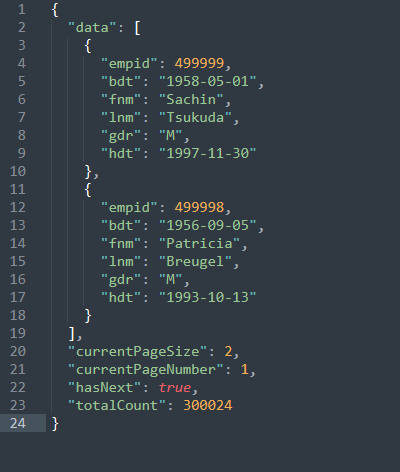
Attaching example of it running against the mysql employee db
There are two ways to implement a listing API using fastapi listing
- inline implementation
- class based implementation
for both we will be needing a dao(data access object) class
First let's look at inline implementation.
# main.py

from fastapi import FastAPI
from pydantic import BaseModel, Field
from datetime import date

from sqlalchemy import Column, Date, Enum, Integer, String
from sqlalchemy.orm import declarative_base
from sqlalchemy.orm import Session

from fastapi_listing.paginator import ListingPage
from fastapi_listing import FastapiListing, MetaInfo
from fastapi_listing.dao import GenericDao


Base = declarative_base()
app = FastAPI()


class Employee(Base):
    __tablename__ = 'employees'

    emp_no = Column(Integer, primary_key=True)
    birth_date = Column(Date, nullable=False)
    first_name = Column(String(14), nullable=False)
    last_name = Column(String(16), nullable=False)
    gender = Column(Enum('M', 'F'), nullable=False)
    hire_date = Column(Date, nullable=False)

# Dao class
class EmployeeDao(GenericDao):
    """write your data layer access logic here. keep it raw!"""
    name = "employee"
    model = Employee # sqlalchemy model class. Not on SQLAlchemy? See "Backend support" below.


class EmployeeListDetails(BaseModel):
    emp_no: int = Field(alias="empid", title="Employee ID")
    birth_date: date = Field(alias="bdt", title="Birth Date")
    first_name: str = Field(alias="fnm", title="First Name")
    last_name: str = Field(alias="lnm", title="Last Name")
    gender: str = Field(alias="gdr", title="Gender")
    hire_date: date = Field(alias="hdt", title="Hiring Date")

    class Config:
        orm_mode = True
        allow_population_by_field_name = True


@app.get("/employees", response_model=ListingPage[EmployeeListDetails])
def get_employees(db: Session):
    dao = EmployeeDao(read_db=db)
    # passing pydantic serializer is optional, automatically generates a
    # select query based on pydantic class fields for easy cases like columns of same table
    # if not passed then provide a select query in dao layer
    return FastapiListing(dao=dao, pydantic_serializer=EmployeeListDetails
                          ).get_response(MetaInfo(default_srt_on="emp_no")) # by default sort in desc order
    # let's say pydantic class contains compute fields then pass custom_fields=True (by default False)
    return FastapiListing(dao=dao,
                          pydantic_serializer=EmployeeListDetails,
                          custom_fields=True # here setting custom field True to avoid unknown attributes error
                          ).get_response(MetaInfo(default_srt_on="emp_no"))
Voila 🎉 your very first listing response
Auto generated query doesn't fulfil your use case❓️
# Overwriting default read method in dao class
class EmployeeDao(GenericDao):
    """write your data layer access logic here. keep it raw!"""
    name = "employee"
    model = Employee

    def get_default_read(self, fields_to_read: Optional[list]):
        """
        Extend and return your query from here.
        Use it when use cases are comparatively easier than complex.
        Alternatively fastapi-listing provides a robust way to write performance packed queries
        for complex APIs which we will look at later.
        """
        query = self._read_db.query(Employee)
        return query


@app.get("/employees", response_model=ListingPage[EmployeeListDetails])
def get_employees(db: Session):
    dao = EmployeeDao(read_db=db)
    # note we removed all optional named params here
    return FastapiListing(dao=dao).get_response(MetaInfo(default_srt_on="emp_no"))
Adding client site features
Django admin users gonna love filter feature. But before that lets do a little setup which no once can avoid to support a broad spectrum of clients unless you use native query param format which I doubt.
Add your custom adaptor class for reading filter/sorter/paginator client request params
Below is the default implementation. You will be writing your own adaptor definition
from typing import Literal
from fastapi_listing.service.adapters import CoreListingParamsAdapter
from fastapi_listing import utils

class YourAdapterClass(CoreListingParamsAdapter): # Extend to add your behaviour
    """Utilise this adapter class to make your remote client site:
    - filter,
    - sorter,
    - paginator.
    query params adapt to fastapi listing library.
    With this you can utilise same listing api to multiple remote client
    even if it's a front end server or other backend server.

    fastapi listing is always going to request one of the following fundamental key if you want to use it
    - sort
    - filter
    - pagination

    supported formats for
    filter:
    simple filter - [{"field":"<key used in filter mapper>", "value":{"search":"<client param>"}}, ...]
    if you are using a range filter -
    [{"field":"<key used in filter mapper>", "value":{"start":"<start range>", "end": "<end range>"}}, ...]
    if you are using a list filter i.e. search on given items
    [{"field":"<key used in filter mapper>", "value":{"list":["<client params>"]}}, ...]

    sort:
    [{"field":<"key used in sort mapper>", "type":"asc or "dsc"}, ...]
    by default single sort allowed you can change it by extending sort interceptor

    pagination:
    {"pageSize": <integer page size>, "page": <integer page number 1 based>}
    """

    def get(self, key: Literal["sort", "filter", "pagination"]):
        """
        @param key: Literal["sort", "filter", "pagination"]
        @return: List[Optional[dict]] for filter/sort and dict for paginator
        """
        return utils.dictify_query_params(self.dependency.get(key))
Once your adaptor class is set
Adding filter feature
➡️ lets add filters on Employee for:
- gender - return only Employees belonging to 'X' gender where X could be anything.
- DOB - return Employees belonging to a specific range of DOB.
- First Name - return Employees only starting with specific first names.
from fastapi import Request
from sqlalchemy.orm import Session

from fastapi_listing.paginator import ListingPage
from fastapi_listing.filters import generic_filters # collection of inbuilt filters
from fastapi_listing.factory import filter_factory # register filter against a listing
from fastapi_listing import MetaInfo, FastapiListing


emp_filter_mapper = {
    "gdr": ("Employee.gender", generic_filters.EqualityFilter),
    "bdt": ("Employee.birth_date", generic_filters.MySqlNativeDateFormateRangeFilter),
    "fnm": ("Employee.first_name", generic_filters.StringStartsWithFilter),
}
filter_factory.register_filter_mapper(emp_filter_mapper)


@app.get("/employees", response_model=ListingPage[EmployeeListDetails])
def get_employees(request: Request, db: Session):
    dao = EmployeeDao(read_db=db)
    return FastapiListing(request=request, dao=dao).get_response(
        MetaInfo(default_srt_on="emp_no",
                 filter_mapper=emp_filter_mapper,
                 feature_params_adapter=YourAdapterClass))

    # or you dont wanna pass request?
    # extract required data from reqeust and pass it directly
    params = request.query_params
    filter_, sort_, pagination = params.get("filter"), params.get("sort"), params.get("paginator")

    dao = EmployeeDao(read_db=db)
    return FastapiListing(dao=dao).get_response(
        MetaInfo(default_srt_on="emp_no",
                 filter_mapper=emp_filter_mapper,
                 feature_params_adapter=YourAdapterClass,
                 filter=filter_,
                 sort=sort_,
                 paginator=pagination))
Let's break it down
Filter mapper - a collection of allowed filters on your listing API. Any request outside of this mapper scope will not be executed for filtering safeguarding you from creepy API users.
generic_filters a collection of inbuilt filters supported by sqlalchemy orm
A dictionary is defined with structure:
{"alias": tuple("sqlalchemy_model.field", filter_implementation)}
alias - A string used by client in case if you wanna avoid actual column names to client site.
tuple - will contain two items field name and filter implementation
from fastapi_listing.filters import generic_filters


emp_filter_mapper = {
    "gdr": ("Employee.gender", generic_filters.EqualityFilter),
    "bdt": ("Employee.birth_date", generic_filters.MySqlNativeDateFormateRangeFilter),
    "fnm": ("Employee.first_name", generic_filters.StringStartsWithFilter),
}
Register the above mapper with filter factory.
from fastapi_listing.factory import filter_factory


filter_factory.register_filter_mapper(emp_filter_mapper) # Register in global space or module level.
A client could request you like v1/employees?filter=[{"gdr":"M"}]
parse the above query_param in your adapter class like [{"field":"gdr", "value":{"search":"M"}}] if passed externally as kwarg then access it via self.extra_context in your adapter class or if passed request then
access self.request directly there.
Assuming everything goes right above will produce a response with items filtered on gender field matching rows with 'M'
Sort Mapper - a collection of allowed sort on listing any request outside of this mapper scope will not be permitted for sort.
Simply define a dictionary with structure {"alias": "field"} if sorting on same column them omit model name &
if sorting on a joined table column then add sqlalchemy class name like we did for filter {"alias":"sqlalchemy_model.field"}
listing_sort_mapper = {
        "code": "emp_no"
    }
return FastapiListing(dao=dao).get_response(
        MetaInfo(default_srt_on="emp_no",
                 filter_mapper=emp_filter_mapper,
                 sort_mapper=listing_sort_mapper,
                 feature_params_adapter=YourAdapterClass,
                 filter=filter_,
                 sort=sort_,
                 paginator=pagination))

# OR if passing request obj
return FastapiListing(request=request, dao=dao).get_response(
        MetaInfo(default_srt_on="emp_no",
                 filter_mapper=emp_filter_mapper,
                 sort_mapper=listing_sort_mapper,
                 feature_params_adapter=YourAdapterClass))
A client could request you like v1/employees?sort={"code":<some_code:int>} or followed by filter v1/employees?filter=[{"gdr":"M"}]&sort={"code":<some_code:int>, "type":"asc"}
and the response should contain list items sorted by employee code column in ascending order.
Note we didn't registered sort mapper like we did for filter mapper.
Similarly, for paginator v1/employees?pagination={"page":1, "pageSize":10} or followed by filter and sort v1/employees?filter=[{"gdr":"M"}]&sort={"code":<some_code:int>, "type":"asc"}&pagination={"page":1, "pageSize":10}
Above will produce listing page of items 10 or dynamically client could change page size.
One thing to Note here is fastapi listing by default limits the client to reuqest maximum of 50 items at a time to safeguard your database
if you want to increase/decrease this default limit then simply pass the limit in MetaInfo
You can also change the default page size from 10 to anything you would want
return FastapiListing(request=request, dao=dao).get_response(
        MetaInfo(default_srt_on="emp_no",
                 filter_mapper=emp_filter_mapper,
                 sort_mapper=listing_sort_mapper,
                 max_page_size=25, # here change max page size
                 default_page_size=10, # here change default page size
                 feature_params_adapter=YourAdapterClass))
Class Based implementation
Quick Example to convey the context
from fastapi import FastAPI

from sqlalchemy import Column, Date, String, ForeignKey
from sqlalchemy.orm import declarative_base
from sqlalchemy.orm import Session, relationship
from fastapi_listing import ListingService, FastapiListing
from fastapi_listing.filters import generic_filters
from fastapi_listing import loader
from fastapi_listing.paginator import ListingPage

Base = declarative_base()
app = FastAPI()

class Title(Base):
    __tablename__ = 'titles'

    emp_no = Column(ForeignKey('employees.emp_no', ondelete='CASCADE'), primary_key=True, nullable=False)
    title = Column(String(50), primary_key=True, nullable=False)
    from_date = Column(Date, primary_key=True, nullable=False)
    to_date = Column(Date)

    employee = relationship('Employee')


class EmployeeDao(GenericDao):
    name = "employee"
    model = Employee

class TitleDao(GenericDao):
    name = "title"
    model = Title

@loader.register()
class EmployeeListingService(ListingService):
    """Class based listing API implementation"""
    filter_mapper = {
        "gdr": ("Employee.gender", generic_filters.EqualityFilter),
        "bdt": ("Employee.birth_date", generic_filters.MySqlNativeDateFormateRangeFilter),
        "fnm": ("Employee.first_name", generic_filters.StringStartsWithFilter),
        "lnm": ("Employee.last_name", generic_filters.StringEndsWithFilter),
        # below feature will require customisation to work at query level
        "desg": ("Employee.Title.title", generic_filters.StringLikeFilter, lambda x: getattr(Title, x)) # registering filter with joined table field
    }

    sort_mapper = {
        "cd": "emp_no"
    }
    default_srt_on = "Employee.emp_no"
    default_dao = EmployeeDao

    def get_listing(self):
        # similar to above inline but instead of passing meta info uncompressed we pass self
        # rest is handled implicityly like filter register
        # one advantage here is every expect is validated so you get error when running server
        resp = FastapiListing(self.request, self.dao, pydantic_serializer=EmployeeListDetails).get_response(self.MetaInfo(self))
        return resp


@app.get("/employees", response_model=ListingPage[EmployeeListDetails])
def get_employees(db: Session):
    return EmployeeListingService(read_db=db).get_listing()
Check out docs for supported list of filters. Additionally, you can create custom filters as well.
Provided features are not meeting your requirements???
The Applications are endless with customisations
➡️ You can write custom:
- Query
- Filter
- Sorter
- Paginator
You can check out customisation section in docs after going through basics and tutorials.
Check out my other repo to see some examples
Backend support
fastapi-listing ships with SQLAlchemy support by default, but nothing in the Filter/Sorter/Paginator/QueryStrategy
contract is SQLAlchemy-specific. Every one of them is written against a small QueryContext interface
(fastapi_listing/context), not a raw SQLAlchemy Query - SqlAlchemyQueryContext is just the default
implementation of it.
As proof this isn't SQLAlchemy in disguise, a ClickHouse backend ships as a reference implementation
(fastapi_listing.dao.ClickHouseDao + fastapi_listing.context.clickhouse.ClickHouseQueryContext) - raw
parameterized SQL via clickhouse-driver, no ORM at all. The same generic_filters classes
(EqualityFilter, InDataFilter, ...) and the default SortingOrderStrategy/PaginationStrategy work
against it completely unmodified, because they only ever talk to the QueryContext, never to SQLAlchemy
directly.
pip install fastapi-listing[clickhouse]
Canonical filters/sort/pagination cover the common case - equality/range/comparison checks on a plain
column, single-column sort, offset/limit pagination. Real queries aren't always that simple, so every
escape hatch that exists for SQLAlchemy (context.native) has a ClickHouse equivalent, and then some:
ClickHouseQueryContext.from_raw_sql(client=..., sql=..., params=...)- the full bypass. Hand-build a query with CTEs, joins, window functions, a table function as the source, whatever the canonicalOpvocabulary can't express - using whatever query-building approach you already have - and you still get back aQueryContextthat canonical filters/sort/pagination can layer on top of, or that you can use completely as-is.HavingMixin- filter on an aggregated field after aGROUP BY(SUM(x) > 100), same canonicalOps, routed toHAVINGinstead ofWHERE:class TotalAbove(HavingMixin, DataGreaterThanFilter): pass.order_by_raw(expression)- for a compound ordering rule (a tiebreak column, multiple sort keys) that a singlefield, directionpair can't represent.add_raw_condition(sql_template, **values)- a per-filter escape hatch for a backend-specific SQL function (a full-text search builtin, an array operator, ...) with no canonicalOpequivalent - values are still bound through the driver's real parameter binding, never string-formatted into the SQL text.
Want a different ORM or database driver (Tortoise, Django ORM, raw psycopg2, pymongo, ...)? Write your own
QueryContext + DAO pair the same way ClickHouseQueryContext/ClickHouseDao do it - see docs/query.rst.
Neither SQLAlchemy nor clickhouse-driver are required to install the package; both are opt-in extras.
Features and Readability hand in hand 🤝
- Well defined interface for filter, sorter, paginator
- Support Dependency Injection for easy testing
- Room to adapt the existing remote client query param semantics
- Write standardise listing APIs that will be understood by generations of upcoming developers
- Write listing features which is easy on human mind to extend or understand
- Break down the most complex listing data APIs into digestible piece of code
Why readability and code quality matters in one picture...

Documentation
View full documentation at: https://fastapi-listing.readthedocs.io (A work in progress)
Feedback, Questions?
Any form of feedback and questions are welcome! Please create an issue 💭 here.
1 maintainer

Download files
Download the file for your platform. If you're not sure which to choose, learn more about installing packages.
Source Distribution
Built Distribution
Filter files by name, interpreter, ABI, and platform.
If you're not sure about the file name format, learn more about wheel file names.
Copy a direct link to the current filters
File details
Details for the file fastapi_listing-0.4.0.tar.gz.
File metadata
- Download URL: fastapi_listing-0.4.0.tar.gz
- Upload date:
- Size: 67.5 kB
- Tags: Source
- Uploaded using Trusted Publishing? No
- Uploaded via:
twine/7.0.0 CPython/3.13.14
File hashes
| Algorithm | Hash digest | |
|---|---|---|
| SHA256 |
a6bc25b06f7bb54118a2d941f908adceb11a2aae3f1681defce4c3483f3d58ee
|
|
| MD5 |
7488217bb725c1a0e6a429b5cda0cd3d
|
|
| BLAKE2b-256 |
53247efa82ffbbf9f94e3b1da65553a92fd634d173a02b47e59cbe131282db55
|
File details
Details for the file fastapi_listing-0.4.0-py3-none-any.whl.
File metadata
- Download URL: fastapi_listing-0.4.0-py3-none-any.whl
- Upload date:
- Size: 82.9 kB
- Tags: Python 3
- Uploaded using Trusted Publishing? No
- Uploaded via:
twine/7.0.0 CPython/3.13.14
File hashes
| Algorithm | Hash digest | |
|---|---|---|
| SHA256 |
db3b5a9d6d3a0adfd1ed0dc28447e044610dd75d9adcc572d828a5017f2dacb3
|
|
| MD5 |
bce7f9187c7ca2665def5cb0ae972cc8
|
|
| BLAKE2b-256 |
0b6a9278dba3b00a07d26e2a64aab7629d5499ff85edc7ef741df4333832502c
|














