
A lightweight, pluggable admin panel for FastAPI

Project description
FastAPI Lite Admin
A premium, lightweight, pluggable admin panel for FastAPI and SQLAlchemy.
Screenshots
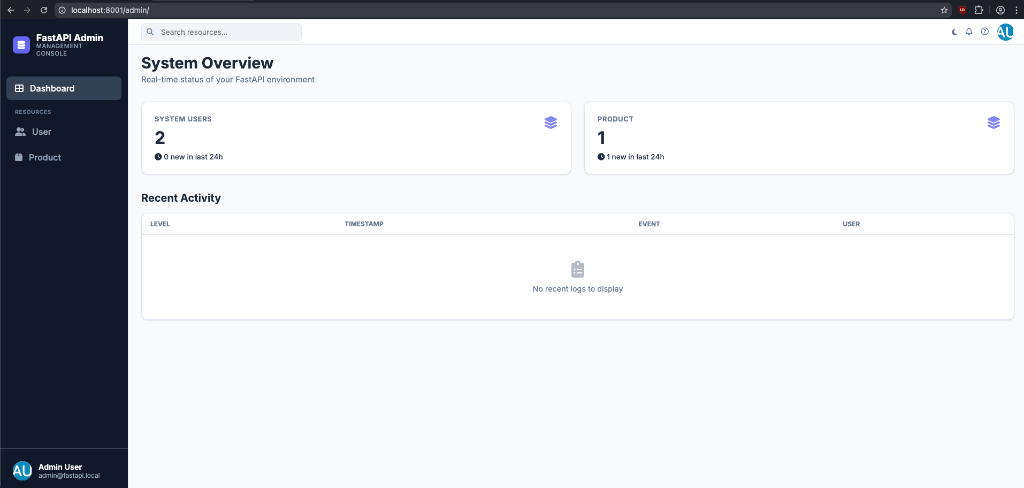
🖥️ Dashboard / System Overview
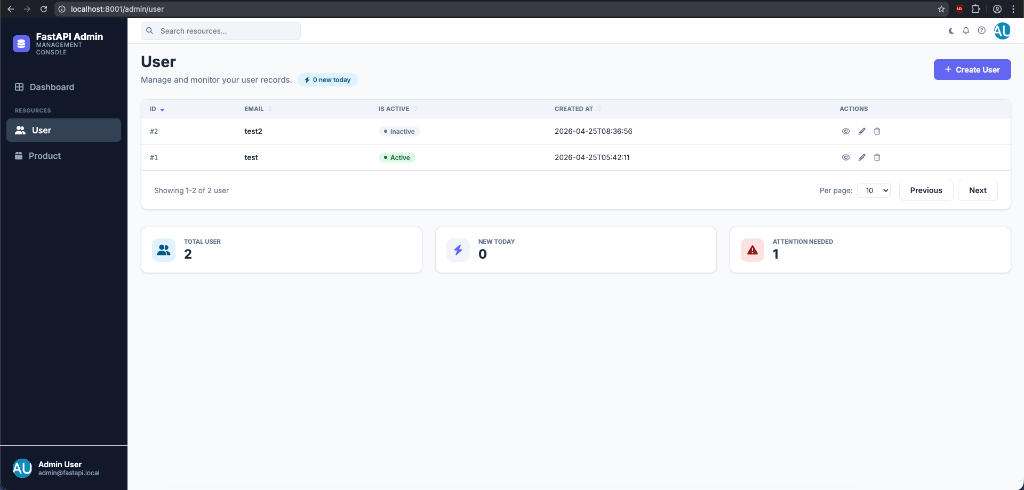
📊 Model List View
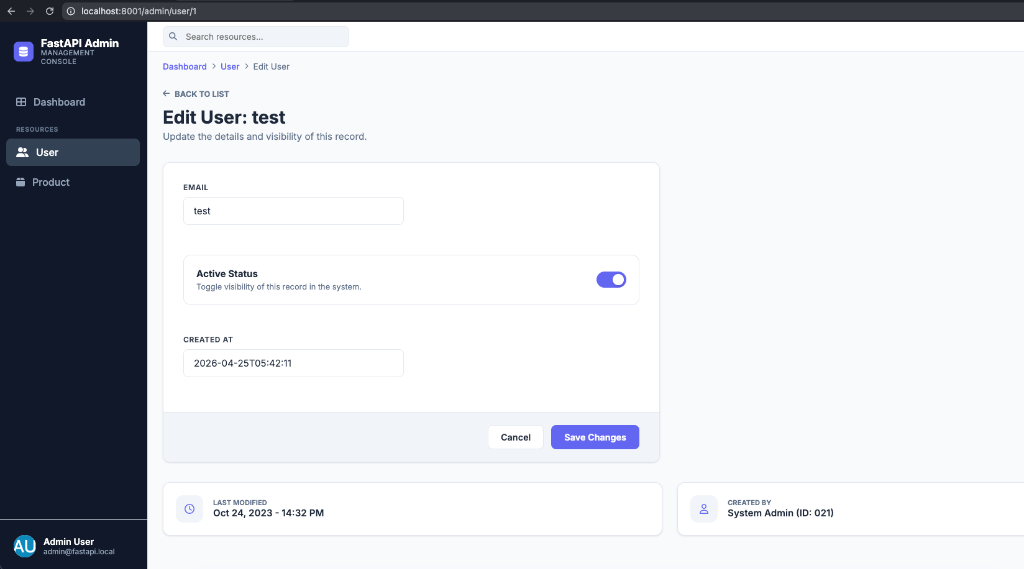
📝 Edit/Create Record Form
Features
- Zero-config CRUD: Automatically generate admin interfaces for your models.
- ORM Agnostic: Initial support for SQLAlchemy, designed to support others.
- API First: All admin actions are available via a clean, RESTful API.
- Lightweight UI: Fast, responsive, Jinja2 templates with server-side pagination, sorting, and search.
- Attention Filters: Highlight critical records (e.g. low stock, inactive users) requiring moderation attention.
- Live Activity Badges: "24h Activity" badges in headers and footers for real-time monitoring.
- Custom System Logs: Display a customizable activity feed on the main dashboard.
Installation
Install the package directly into your project:
pip install fastapi-lite-admin
For development/local setup, clone the repository and run:
pip install -e ".[dev]"
Quick Start & Usage
Using FastAPI Lite Admin is designed to be highly explicit, simple, and require minimal boilerplate. Here is how you can set it up in your application.
1. Initialize the Admin Panel
Instantiate the Admin class and mount it to your FastAPI instance.
from fastapi import FastAPI
from fastapi_admin_lite import Admin

app = FastAPI()

admin = Admin(
    title="Secure Control Panel",  # Dashboard title
    base_url="/admin",             # URL prefix for the admin panel
    enable_ui=True                 # Enable/disable Jinja-based UI
)

# Mount the admin router and views to your FastAPI app
admin.mount(app)
This will automatically create and serve:
- The UI dashboard at
http://localhost:8000/admin
Registering Models (Adding Tables)
To add database tables to your admin panel, register your models using admin.register().
from database import get_db  # Your SQLAlchemy session dependency
from models import User

admin.register(
    model=User,
    get_db=get_db,
    list_display=["id", "email", "is_active", "created_at"],
    date_field="created_at",
    attention_filter=(User.is_active == False),
    readonly_fields=["created_at"],
    config={"display_name": "System Users"}
)
Registration Configuration Parameters
When calling admin.register(), you can configure how each model is represented:
| Parameter | Type | Required | Description |
|---|---|---|---|
model |
Type[Any] |
Yes | The SQLAlchemy Declarative model class to generate CRUD operations for. |
get_db |
Callable |
Yes | An async/sync generator yielding an active SQLAlchemy database session (AsyncSession or Session). |
list_display |
List[str] |
No | List of field/column names to display as columns in the UI model list view. Defaults to all fields. |
date_field |
str |
No | Name of the datetime field (e.g. created_at). Required to show the "24h Activity" count cards on the dashboard and lists. |
attention_filter |
SQLAlchemy Expression |
No | A SQLAlchemy binary filter expression (e.g., User.is_active == False or Product.stock < 10) used to calculate and flag rows that require moderator attention. |
readonly_fields |
List[str] |
No | List of columns that cannot be modified or set via creation or updates (e.g., auto-generated columns or timestamps like id, created_at). |
file_fields |
List[str] |
No | List of column names that should be treated as file upload fields, rendering a drag-and-drop zone. |
config |
Dict[str, Any] |
No | Dictionary containing extra settings. Supports "display_name" to override the sidebar label. |
Initialization Configurations
The Admin class constructor supports the following parameters for customization:
| Parameter | Type | Default | Description |
|---|---|---|---|
title |
str |
"FastAPI Admin Lite" |
Customized title displayed in the UI header and dashboard. |
base_url |
str |
"/admin" |
URL prefix where the admin UI is served. |
enable_ui |
bool |
True |
Whether to serve the Jinja2 templates UI. If False, only the API routes are registered. |
dependencies |
List[Any] |
[] |
General list of FastAPI dependencies to apply to all admin routes. |
auth_dependency |
Callable |
None |
Dependency function for custom security gating (e.g., checking tokens or cookies). |
permission_checker |
Callable |
allow all |
Custom callable to restrict user roles. |
dashboard_models |
List[str] |
None |
List of registered model names to display on the dashboard (if you want to restrict which registered models show on the home dashboard). |
get_logs |
Callable |
None |
An optional callable (async or sync) returning system logs to display on the dashboard activity log feed. |
logs_config |
Dict[str, Any] |
{"title": "System Activity", "columns": ["level", "timestamp", "message"]} |
Config dictionary to customize dashboard log columns and activity title. |
upload_dir |
str |
"uploads" |
Local directory path where uploaded files will be stored. |
upload_url |
str |
"/uploads" |
URL prefix used to serve uploaded files statically. |
upload_handler |
Callable |
None |
Optional custom upload handler callback for buckets (S3, GCS, Azure). |
Gating Access & Security
By default, the admin panel warns if no authentication is configured. You can gate the admin panel and its APIs using standard FastAPI dependencies:
1. auth_dependency
Pass a dependency to Admin constructor that handles authentication.
from fastapi import Header, HTTPException

async def verify_admin_token(x_admin_token: str = Header(None)):
    if x_admin_token != "super-secret-admin-token":
        raise HTTPException(status_code=401, detail="Unauthorized")
    return x_admin_token

admin = Admin(
    title="Secure Admin",
    auth_dependency=verify_admin_token
)
2. permission_checker
Restrict granular user roles with a custom callable:
async def check_permissions(user: Any = Depends(get_current_user)) -> bool:
    return user.is_superuser

admin = Admin(
    title="Staff Portal",
    permission_checker=check_permissions
)
Custom Dashboard Activity Logs
Configure a live activity log feed on the dashboard homepage:
async def fetch_system_logs():
    # Fetch logs from a database table, file, or third-party service
    return [
        {"level": "info", "timestamp": "10:45 AM", "event": "User signup", "user": "alice@example.com"},
        {"level": "error", "timestamp": "11:20 AM", "event": "Payment failed", "user": "bob@example.com"}
    ]

admin = Admin(
    title="Command Center",
    get_logs=fetch_system_logs,
    logs_config={
        "title": "Recent Activity Feed",
        "columns": ["level", "timestamp", "event", "user"]
    }
)
File Uploads & Cloud Storage
FastAPI Lite Admin supports rendering drag-and-drop file uploads for designated string fields (e.g., image paths or document URLs).
1. Default Local Storage
By default, uploaded files are stored locally in the uploads/ directory and served statically:
admin = Admin(
    title="My Admin",
    upload_dir="my_uploads",   # Stored in project-root/my_uploads
    upload_url="/static/files" # Served statically at http://localhost:8000/static/files
)
2. Cloud Storage / Buckets (S3, GCS, Azure, etc.)
If you are deploying to production and storing files in a cloud bucket, you can plug in a custom upload_handler:
from fastapi import UploadFile

async def my_s3_upload_handler(file: UploadFile) -> str:
    # 1. Upload file.file to S3, GCS, Cloudinary, etc.
    # 2. Return the public URL to be stored in the database
    return f"https://my-bucket.s3.amazonaws.com/{file.filename}"

admin = Admin(
    title="Cloud Admin",
    upload_handler=my_s3_upload_handler
)
3. Enabling File Upload in Models
Pass the file_fields parameter when registering your model:
admin.register(
    model=Product,
    get_db=get_db,
    file_fields=["image_url"] # These will render as drag-and-drop zones
)
Running the Example Application
We package a complete working example inside the /example directory. To run it:
# 1. Install dependencies with dev options
pip install -e ".[dev]"

# 2. Run the example application
python -m example.main
Then visit http://localhost:8001/admin in your web browser. You'll be able to view logs, add/update users, search database entries, and filter elements dynamically.
Release history Release notifications | RSS feed


Download files
Download the file for your platform. If you're not sure which to choose, learn more about installing packages.
Source Distribution
Built Distribution
Filter files by name, interpreter, ABI, and platform.
If you're not sure about the file name format, learn more about wheel file names.
Copy a direct link to the current filters
File details
Details for the file fastapi_lite_admin-0.1.7.tar.gz.
File metadata
- Download URL: fastapi_lite_admin-0.1.7.tar.gz
- Upload date:
- Size: 27.9 kB
- Tags: Source
- Uploaded using Trusted Publishing? No
- Uploaded via: twine/6.2.0 CPython/3.13.3
File hashes
| Algorithm | Hash digest | |
|---|---|---|
| SHA256 |
f901852c75b1f68f09220474f4c4789f34690648a990c0fa63de136c6c738542
|
|
| MD5 |
bdfce030b22e794dc7c47b508b9be38d
|
|
| BLAKE2b-256 |
583ca9740ed5688b5bb89fe2034727008726eaba217403cde58cba51e354428d
|
File details
Details for the file fastapi_lite_admin-0.1.7-py3-none-any.whl.
File metadata
- Download URL: fastapi_lite_admin-0.1.7-py3-none-any.whl
- Upload date:
- Size: 30.6 kB
- Tags: Python 3
- Uploaded using Trusted Publishing? No
- Uploaded via: twine/6.2.0 CPython/3.13.3
File hashes
| Algorithm | Hash digest | |
|---|---|---|
| SHA256 |
b5c964511c6bb521f408c9f76a41a4f130ce30e8ebe46400293811aa30f3f0fd
|
|
| MD5 |
6c40388caf4bad13ce3145f554441a76
|
|
| BLAKE2b-256 |
cd6e20495f70f750fefa0a76b94f9bb01ac7f90609bcff41970e7499f819362a
|






