
Middleware and tool for FastApi HTTP requests and DB queries debugging

Project description
FAST API TELESCOPE
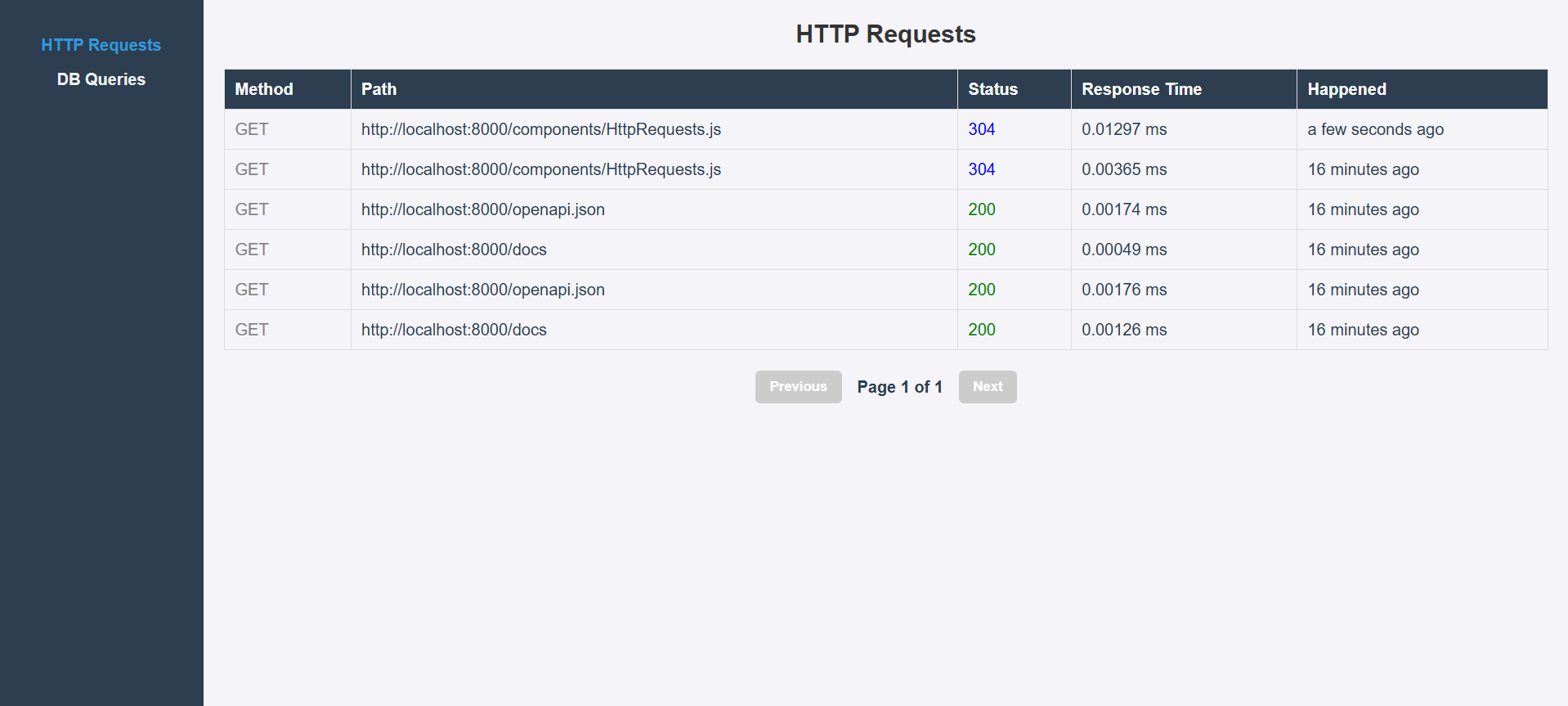
This is a FastAPI middleware with UI dashboard for monitoring and debugging your FastAPI applications. It provides a set of tools to help you visualize and analyze the performance of your API endpoints, including request/response times, error rates, and more.
Requirements
- FastAPI
- PostgreSQL
- SQLAlchemy
Setup
- Install the package using pip.
- Create main.py file with a FastAPI application, include the middleware and mount components like this:
from dotenv import load_dotenv

load_dotenv()

from fastapi.staticfiles import StaticFiles
import uvicorn
from fastapi import FastAPI, Request, status
from fastapi.responses import JSONResponse
from fastapi_telescope import TelescopeMiddleware
from fastapi_telescope import TELESCOPE_COMPONENTS_DIR
from fastapi_pagination import add_pagination
from .router import router

app = FastAPI()

app.add_middleware(TelescopeMiddleware)  # add telescope middleware

app.include_router(router) # optionally add admin auth dependency here

add_pagination(app)  # add pagination to your app

app.mount("/components", StaticFiles(directory=TELESCOPE_COMPONENTS_DIR),
          name="components")  # mount Vue components directory


@app.exception_handler(Exception)  # global exception handler, you can add your own
def global_exception_handler(request: Request, exc: Exception):
    return JSONResponse(
        status_code=status.HTTP_500_INTERNAL_SERVER_ERROR,
        content={'message': 'An unexpected error occurred'},
    )


if __name__ == '__main__':
    uvicorn.run(
        'main.cmd.main:app', host='0.0.0.0', port=8000, reload=True
    )  # use for debugging
- Create router.py file and include the Telescope router and optionally add the authenticated user ID in requests using custom dependency like this:
from starlette.requests import Request
from fastapi import APIRouter, Depends
from fastapi_telescope import router as telescope_router

async def get_user_id(
    request: Request,
) -> str:
    user_id = '111' # this is just an example, you can get user id from your auth system
    request.state.user_id = user_id # this user_id will be used in logs
    return user_id

router = APIRouter(dependencies=[Depends(get_user_id)])
router.include_router(telescope_router)

__all__ = ['router']
- Add creds (DB_USER,DB_PASSWORD,DB_HOST,DB_PORT,DB_NAME) to POSTGRES db, SITE_URL (f.e. http://localhost:8000) and API_PREFIX (f.e. '/api') to your .env file.
- To allow middleware use hooks to intercept database calls and log them, use the session maker from the package to create an asynchronous session:
from fastapi_telescope.db import get_async_sessionmaker
from typing import AsyncGenerator, Callable

from fastapi import Depends
from sqlalchemy.ext.asyncio import (
    AsyncSession,
)

async def get_async_session(
    sessionmaker: Callable[..., AsyncSession] = Depends(get_async_sessionmaker),
) -> AsyncGenerator[AsyncSession, None]:
    async with sessionmaker() as session:
        yield session
- Add migration with such methods to your migrations folder and run it (or you can use raw sql query for your db).
def upgrade():
    op.create_table('log_http_requests',
                    sa.Column('id', sa.Integer(), nullable=False),
                    sa.Column('level', sa.String(), nullable=False),
                    sa.Column('request_method', sa.String(), nullable=False),
                    sa.Column('request_url', sa.String(), nullable=False),
                    sa.Column('path_params', sa.String(), nullable=False),
                    sa.Column('query_params', sa.String(), nullable=False),
                    sa.Column('headers', sa.String(), nullable=False),
                    sa.Column('request_body', sa.String(), nullable=False),
                    sa.Column('status_code', sa.Integer(), nullable=False),
                    sa.Column('response_time', sa.Float(), nullable=False),
                    sa.Column('response_body', sa.String(), nullable=False),
                    sa.Column('exception_message', sa.String(), nullable=True),
                    sa.Column('stack_trace', sa.String(), nullable=True),
                    sa.Column('user_id', sa.String(), nullable=True),
                    sa.Column('created_at', sa.DateTime(), nullable=False),
                    sa.Column('updated_at', sa.DateTime(), nullable=False),
                    sa.PrimaryKeyConstraint('id')
                    )
    op.create_table('log_db_queries',
                    sa.Column('id', sa.Integer(), nullable=False),
                    sa.Column('log_http_request_id', sa.Integer(), nullable=False),
                    sa.Column('level', sa.String(), nullable=False),
                    sa.Column('db_query', sa.String(), nullable=False),
                    sa.Column('db_query_time', sa.Float(), nullable=False),
                    sa.Column('created_at', sa.DateTime(), nullable=False),
                    sa.Column('updated_at', sa.DateTime(), nullable=False),
                    sa.ForeignKeyConstraint(['log_http_request_id'], ['log_http_requests.id'], ),
                    sa.PrimaryKeyConstraint('id')
                    )
    op.create_index(op.f('ix_log_db_queries_log_http_request_id'), 'log_db_queries', ['log_http_request_id'],
                    unique=False)


def downgrade() -> None:
    op.drop_index(op.f('ix_log_db_queries_log_http_request_id'), table_name='log_db_queries')
    op.drop_table('log_db_queries')
    op.drop_table('log_http_requests')
- Run your FastAPI app and open docs page http://localhost:8000/docs.
- Open your browser and go to
<SITE_URL><API_PREFIX>/telescope/dashboardto see the dashboard. It should look like this:


Download files
Download the file for your platform. If you're not sure which to choose, learn more about installing packages.
Source Distribution
Built Distribution
Filter files by name, interpreter, ABI, and platform.
If you're not sure about the file name format, learn more about wheel file names.
Copy a direct link to the current filters
File details
Details for the file fastapi_telescope-0.0.14.tar.gz.
File metadata
- Download URL: fastapi_telescope-0.0.14.tar.gz
- Upload date:
- Size: 64.2 kB
- Tags: Source
- Uploaded using Trusted Publishing? No
- Uploaded via: twine/6.1.0 CPython/3.13.0
File hashes
| Algorithm | Hash digest | |
|---|---|---|
| SHA256 |
d9af4eb444444fde0c3addd1da427f3ceec080c691d4fe1ccbb1f352d93fd877
|
|
| MD5 |
4274c58cc6aef1852014a9a3ca5655f1
|
|
| BLAKE2b-256 |
0d38f7556d6f0a30d2f7a3812209d93deea7a05461c4c3542078d8155c7bad01
|
File details
Details for the file fastapi_telescope-0.0.14-py3-none-any.whl.
File metadata
- Download URL: fastapi_telescope-0.0.14-py3-none-any.whl
- Upload date:
- Size: 24.0 kB
- Tags: Python 3
- Uploaded using Trusted Publishing? No
- Uploaded via: twine/6.1.0 CPython/3.13.0
File hashes
| Algorithm | Hash digest | |
|---|---|---|
| SHA256 |
f9e6c6ad161b92bb961972c22bd2dcf75da01b7b4e04af25170be7aad438db74
|
|
| MD5 |
6531b07b18e3401f09c1b30729377f8f
|
|
| BLAKE2b-256 |
6db17d96ba3430bc2fd4af9cd60594208796ab7d210d353672c944c116d0af7b
|






