
Request tracing and visualization for FastAPI applications.

Project description
WatchTower
WatchTower is a project-aware FastAPI runtime observability tool that traces requests across your application and maps them to user-defined classes and functions.
It helps developers:
- understand request flow
- inspect function-level execution
- debug complex pipelines
- visualize backend behavior without framework noise
🚀 Installation
pip install fastapi-watchtower
or
uv add fastapi-watchtower
⚙️ Requirements
- Use
async defendpoints for best tracing accuracy - Sync endpoints (
def) may lead to incomplete or unstable traces
🧪 Example Usage
from fastapi import FastAPI

from .api.routes import router
from .core.config import settings
from .core.logging_util import configure_logging
from watchtower import setup_watchtower

configure_logging()

app = FastAPI(
    title="ML Pipeline Server Example",
    version="1.0.0",
    description="A layered FastAPI example for demonstrating WatchTower tracing on realistic ML pipelines.",
)

setup_watchtower(
    app,
    source_root="examples/ml_pipeline_server",
    code_index_path=".watchtower-ml_pipeline_server/code_index.json",
    output_dir=".watchtower-ml_pipeline_server",
    enable_ui=True,
    ui_dist_dir="frontend/watchtower-ui/dist",
)

app.include_router(router, prefix=settings.api_prefix)

@app.get("/")
async def healthcheck():
    return {
        "status": "ok",
        "service": "ml-pipeline-server",
        "api_prefix": settings.api_prefix,
    }
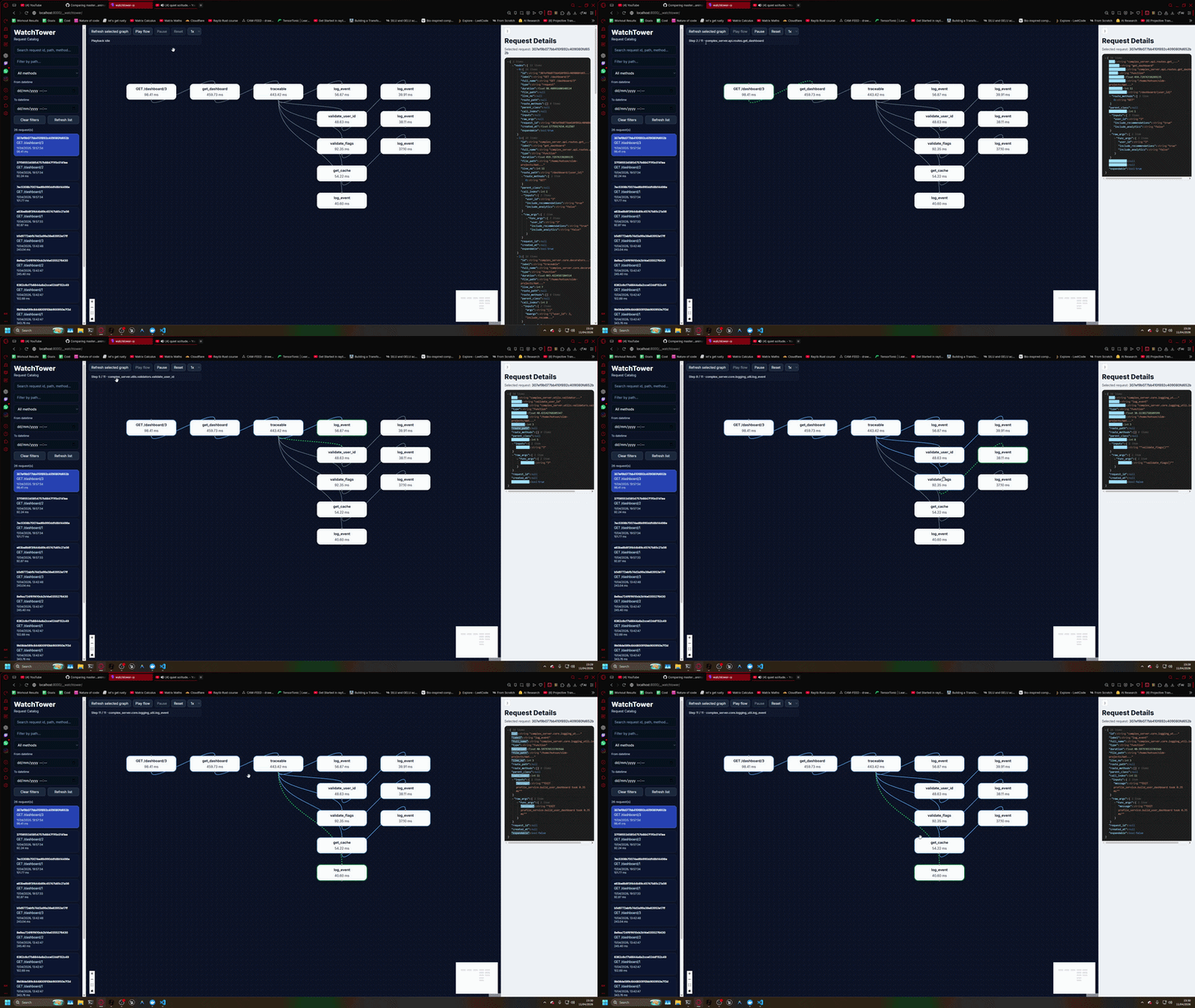
🎬 Request Flow Visualization
Below is an example of WatchTower tracing a complex FastAPI request flow:
✨ Features
- 🔍 Function-level request tracing
- 🧠 Project-aware filtering (no framework noise)
- 📊 Visual request flow graph
- 🧵 Supports async FastAPI pipelines
- 📦 Zero external dependencies for users (no UI server needed)
- ⚡ Lightweight and easy to integrate
💡 Why WatchTower?
Modern backend systems are complex:
- nested service calls
- ML pipelines
- async execution flows
Traditional logs don’t show how execution actually flows.
WatchTower solves this by giving you:
A visual, step-by-step breakdown of what happened inside your backend.
🔗 Links
- GitHub: https://github.com/HOTSONHONET/WatchTower
- PyPI: https://pypi.org/project/fastapi-watchtower/
📄 License
MIT License
Release history Release notifications | RSS feed


Download files
Download the file for your platform. If you're not sure which to choose, learn more about installing packages.
Source Distribution
Built Distribution
Filter files by name, interpreter, ABI, and platform.
If you're not sure about the file name format, learn more about wheel file names.
Copy a direct link to the current filters
File details
Details for the file fastapi_watchtower-1.0.3.tar.gz.
File metadata
- Download URL: fastapi_watchtower-1.0.3.tar.gz
- Upload date:
- Size: 12.9 kB
- Tags: Source
- Uploaded using Trusted Publishing? No
- Uploaded via: twine/6.2.0 CPython/3.13.5
File hashes
| Algorithm | Hash digest | |
|---|---|---|
| SHA256 |
7933f794b115e83d5f6ec7a6142920bb1f7fc258af4c94495aa56455b28ede2b
|
|
| MD5 |
eb765ca279773f1c58397b378184d8c1
|
|
| BLAKE2b-256 |
fbf5ada1e1b8eb132aed658f1805f8aed48fdb6a9e91bd424edca8220cace4a3
|
File details
Details for the file fastapi_watchtower-1.0.3-py3-none-any.whl.
File metadata
- Download URL: fastapi_watchtower-1.0.3-py3-none-any.whl
- Upload date:
- Size: 17.7 kB
- Tags: Python 3
- Uploaded using Trusted Publishing? No
- Uploaded via: twine/6.2.0 CPython/3.13.5
File hashes
| Algorithm | Hash digest | |
|---|---|---|
| SHA256 |
1a8bd51da9de087405fa7b8d5e721e4a7ec4e27b86c0e9c84f96820b2905830d
|
|
| MD5 |
59deed3bacfb202b877f1798d74c0dbe
|
|
| BLAKE2b-256 |
237136c747a1d28540910fd914bb8c82aec1ff717c0524bc8dc2442cc0e735e0
|






