
WatchTrace
WatchTrace is a project-aware FastAPI runtime observability tool that traces requests across your application and maps them to user-defined classes and functions.
It helps developers:
- understand request flow
- inspect function-level execution
- debug complex pipelines
- visualize backend behavior without framework noise
🚀 Installation
pip install fastapi-watchtrace
or
uv add fastapi-watchtrace
⚙️ Requirements
- Use
async defendpoints for best tracing accuracy - Sync endpoints (
def) may lead to incomplete or unstable traces
🧪 Example Usage
For this below file structure
> tree
.
├── README.md
├── main.py
├── pyproject.toml
└── uv.lock
Import and initialize watchtrace
from fastapi import FastAPI
from watchtrace import setup_watchtrace

app = FastAPI(
    title="My Server",
    version="1.0.0",
    description="My Server",
)

setup_watchtrace(
    app,
    source_root=".",
    code_index_path=".code_index.json",
    output_dir=".server_profile", # <- here you are mentioning where to store the profile logs
    enable_ui=True,
)


@app.get("/")
async def healthcheck():
    return {
        "status": "ok",
    }
Then run you server
uvicorn main:app --reload --port 8000
Once the server is up, you can visit this url http://localhost:8000/__watchtrace/
🎬 Request Flow Visualization
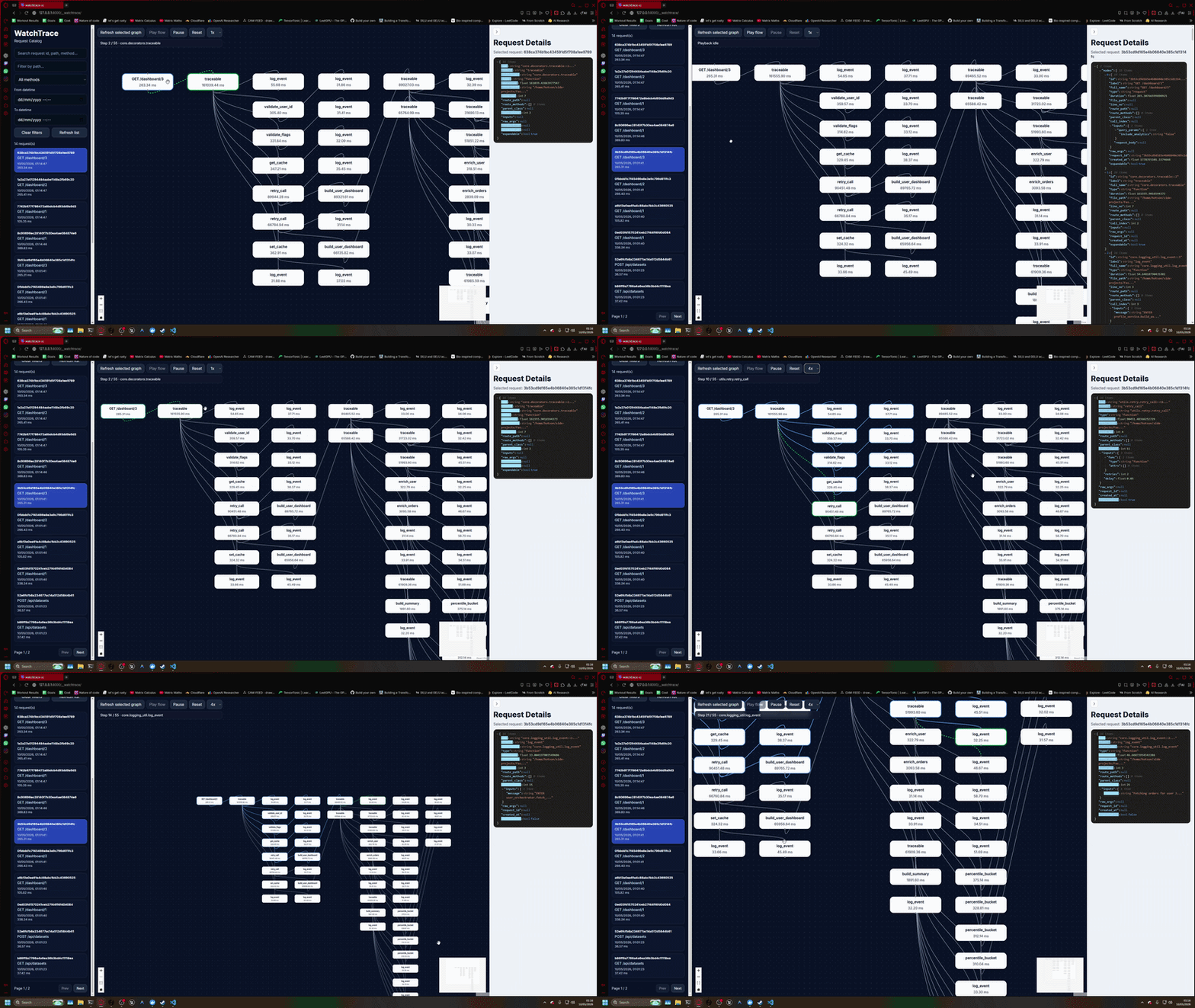
Below is an example of WatchTrace tracing a complex FastAPI request flow:
✨ Features
- 🔍 Function-level request tracing
- 🧠 Project-aware filtering (no framework noise)
- 📊 Visual request flow graph
- 🧵 Supports async FastAPI pipelines
- 📦 Zero external dependencies for users (no UI server needed)
- ⚡ Lightweight and easy to integrate
💡 Why WatchTrace?
Modern backend systems are complex:
- nested service calls
- ML pipelines
- async execution flows
Traditional logs don’t show how execution actually flows.
WatchTrace solves this by giving you:
A visual, step-by-step breakdown of what happened inside your backend.
🛠️ Local Development
Clone the repository:
git clone https://github.com/HOTSONHONET/WatchTrace.git
cd WatchTrace
Install dependencies using uv:
uv sync
Run the frontend in development mode:
cd frontend/watchtrace-ui
npm install
npm run dev
Build the frontend UI:
npm run build
The generated UI assets will be available inside:
frontend/watchtrace-ui/dist
Run the example ML pipeline server:
uv run uvicorn examples.ml_pipeline_server.main:app --reload
Open WatchTrace UI:
http://localhost:8000/__watchtrace/
✅ Testing
Run all unit tests:
uv run --with pytest pytest tests/unit_test
Build the package locally:
uv build
Validate package metadata:
uv run --with twine twine check dist/*
Run wheel smoke test:
./scripts/smoke_test_wheel.sh
The smoke test validates:
- packaged wheel installation
- WatchTrace UI mounting
- internal API availability
- generated frontend asset serving
📦 Releasing a New Version
Update the version inside pyproject.toml:
version = "0.0.1"
Build the package:
rm -rf dist build src/*.egg-info
uv build
Validate the package:
uv run --with twine twine check dist/*
Upload manually to PyPI:
uv run --with twine twine upload dist/*
Or create a release tag for CI/CD publishing:
git tag v0.0.1
git push origin v0.0.1
WatchTrace uses semantic versioning:
MAJOR.MINOR.PATCH
Examples:
0.1.0→ new feature0.1.1→ bug fix1.0.0→ stable public release
🔗 Links
- GitHub: https://github.com/HOTSONHONET/WatchTrace
- PyPI: https://pypi.org/project/fastapi-watchtrace/
📄 License
MIT License
1 maintainer

Metadata
1 maintainer
Release files for fastapi-watchtrace 0.0.2
For a detailed explanation of source distributions (sdists) and built distributions (wheels), please see the package formats documentation.
Source distribution (sdist)
| File | Size | Uploaded | |
|---|---|---|---|
| fastapi_watchtrace-0.0.2.tar.gz | 136.9 kB | Details |
Built distribution (wheel)
| File | Interpreter | ABI | Platform | Reset |
|---|---|---|---|---|
| fastapi_watchtrace-0.0.2-py3-none-any.whl | Python 3 | none | any | Details |
Total release size: 279.9 kB
Release files / fastapi_watchtrace-0.0.2.tar.gz
| Download URL | fastapi_watchtrace-0.0.2.tar.gz |
|---|---|
| Size | 136.9 kB |
| Tags | Source |
|
SHA-256 checksum How to use checksums |
c714c2e1e978273cff6d6cafc6f70a2a0d0efe9603f622cef125c36d13043736
|
|
BLAKE2b-256 checksum How to use checksums |
bb6c7d68daa5d3c9f1865266defa1900aa3d02f9bdadf1299ad176a4343e4ac4
|
| Upload date | |
|
Uploaded using Trusted Publishing? What is trusted publishing? |
Yes |
| Uploaded via |
twine/6.1.0 CPython/3.13.12
|
Provenance
Provenance describes where a file came from. On PyPI, provenance is shared via attestations, which provide a verifiable record of the build or publishing details. View details, limitations and caveats.


PyPI Publish Attestation
PyPI verified that this artifact, at this checksum, originated from the publisher listed below.
Signed by GitHub Actions, verified by PyPI on May 9, 2026.
Transparency logRelease files / fastapi_watchtrace-0.0.2-py3-none-any.whl
| Download URL | fastapi_watchtrace-0.0.2-py3-none-any.whl |
|---|---|
| Size | 142.9 kB |
| Tags | Python 3 |
|
SHA-256 checksum How to use checksums |
73b509ea65013b9f7862e4099d6a1a1399827061e37ca950e15eac9692d534c8
|
|
BLAKE2b-256 checksum How to use checksums |
826d4f997a6ec6af1216baffd3864e643c5a1abbaa674018b1da17e7af76a500
|
| Upload date | |
|
Uploaded using Trusted Publishing? What is trusted publishing? |
Yes |
| Uploaded via |
twine/6.1.0 CPython/3.13.12
|
Provenance
Provenance describes where a file came from. On PyPI, provenance is shared via attestations, which provide a verifiable record of the build or publishing details. View details, limitations and caveats.
PyPI Publish Attestation
PyPI verified that this artifact, at this checksum, originated from the publisher listed below.
Signed by GitHub Actions, verified by PyPI on May 9, 2026.
Transparency log













