
FastAPI-Amis-Admin is a high-performance, efficient and easily extensible FastAPI admin framework. Inspired by Django-admin, and has as many powerful functions as Django-admin.

Project description
Introduction
FastAPI-Amis-Admin
fastapi-amis-admin is a high-performance, efficient and easily extensible FastAPI admin framework.
Inspired by Django-admin, and has as many powerful functions as Django-admin.




source code · online demo · documentation · can't open the document?
fastapi-amis-admin is a high-performance and efficient framework based on fastapi & amis with Python 3.7+, and
based on standard Python type hints. The original intention of the development is to improve the application ecology and
to quickly generate a visual dashboard for the web application . According to the Apache2.0 protocol, it is free and
open source . But in order to better operate and maintain this project in the long run, I very much hope to get
everyone's sponsorship and support.
Features
- High performance: Based on FastAPI. Enjoy all the benefits.
- High efficiency: Perfect code type hints. Higher code reusability.
- Support asynchronous and synchronous hybrid writing:
ORMis based onSQLModel&Sqlalchemy. Freely customize database type. Support synchronous and asynchronous mode. Strong scalability. - Front-end separation: The front-end is rendered by
Amis, the back-end interface is automatically generated byfastapi-amis-admin. The interface is reusable. - Strong scalability: The background page supports
Amispages and ordinaryhtmlpages. Easily customize the interface freely. - Automatic api documentation: Automatically generate Interface documentation by
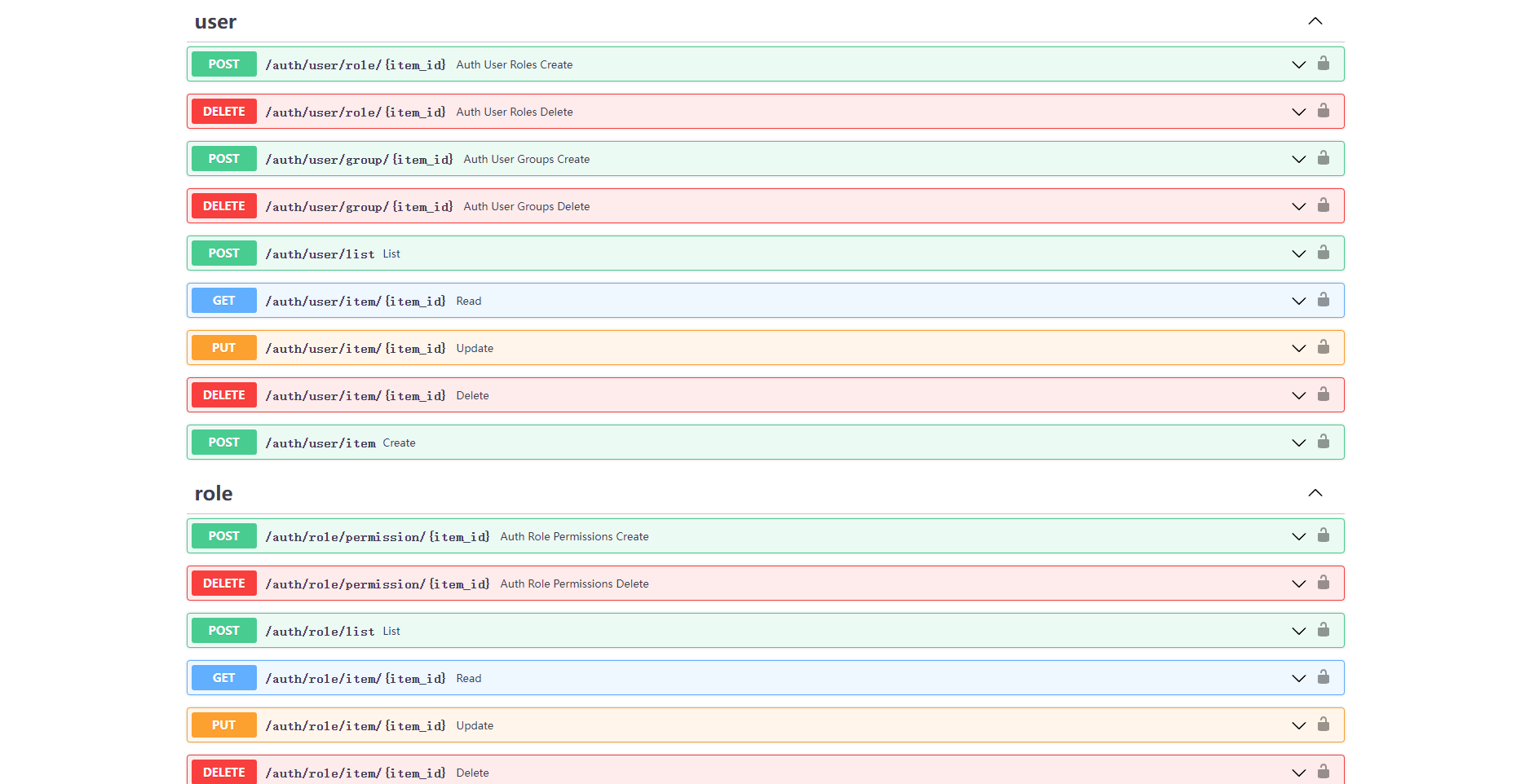
FastAPI. Easily debug and share interfaces.
Dependencies
- FastAPI: Finish the web part.
- SQLModel: Finish
ORMmodel mapping. Perfectly combine SQLAlchemy with Pydantic, and have all their features . - Amis: Finish admin page presentation.
Composition
fastapi-amis-admin consists of three core modules, of which, amis, crud can be used as separate
modules, admin is developed by the former.
amis: Based on thepydanticdata model building library ofbaidu amis. To generate/parse data rapidly.crud: Based onFastAPI&Sqlalchemy. To quickly build Create, Read, Update, Delete common API interface .admin: Inspired byDjango-Admin. Combineamiswithcrud. To quickly build Web Admin dashboard .
Installation
pip install fastapi_amis_admin
Note
sqlmodelcurrently does not supportsqlalchemy 2.0+. If you usesqlalchemy 2.0+to create a model, you cannot usesqlmodelat the same time.- After version
fastapi-amis-admin>=0.6.0,sqlmodelis no longer a required dependency library. If you usesqlmodelto create a model, you can install it with the following command.
pip install fastapi_amis_admin[sqlmodel]
Simple Example
from fastapi import FastAPI
from fastapi_amis_admin.admin.settings import Settings
from fastapi_amis_admin.admin.site import AdminSite

# create FastAPI application
app = FastAPI()

# create AdminSite instance
site = AdminSite(settings=Settings(database_url_async='sqlite+aiosqlite:///amisadmin.db'))

# mount AdminSite instance
site.mount_app(app)

if __name__ == '__main__':
    import uvicorn

    uvicorn.run(app)
ModelAdmin Example
Create Model
- Support
SQLModelmodel,SQLAlchemymodel,SQLAlchemy 2.0model - Method 1: Create model through
SQLModel.
from sqlmodel import SQLModel
from fastapi_amis_admin.models.fields import Field


class Base(SQLModel):
    pass


# Create an SQLModel, see document for details: https://sqlmodel.tiangolo.com/
class Category(SQLModel, table=True):
    id: int = Field(default=None, primary_key=True, nullable=False)
    name: str = Field(title='CategoryName', max_length=100, unique=True, index=True, nullable=False)
    description: str = Field(default='', title='Description', max_length=255)
- Method 2: Create model through
SQLAlchemy.
from sqlalchemy import Column, Integer, String
from sqlalchemy.ext.declarative import declarative_base

Base = declarative_base()


# Create an SQLAlchemy model, see document for details: https://docs.sqlalchemy.org/en/14/orm/tutorial.html
class Category(Base):
    __tablename__ = 'category'
    # Specify the Schema class corresponding to the model. It is recommended to specify it. If omitted, it can be automatically generated.
    __pydantic_model__ = CategorySchema

    id = Column(Integer, primary_key=True, nullable=False)
    name = Column(String(100), unique=True, index=True, nullable=False)
    description = Column(String(255), default='')
- Method 3: Create model through
SQLAlchemy 2.0.
from sqlalchemy import String
from sqlalchemy.orm import DeclarativeBase, Mapped, mapped_column


class Base(DeclarativeBase):
    pass


# Create an SQLAlchemy 2.0 model, see document for details: https://docs.sqlalchemy.org/en/20/orm/quickstart.html
class Category(Base):
    __tablename__ = "category"
    # Specify the Schema class corresponding to the model. It is recommended to specify it. If omitted, it can be automatically generated.
    __pydantic_model__ = CategorySchema

    id: Mapped[int] = mapped_column(primary_key=True, nullable=False)
    name: Mapped[str] = mapped_column(String(100), unique=True, index=True, nullable=False)
    description: Mapped[str] = mapped_column(String(255), default="")
- If you create a model through
sqlalchemy, it is recommended to create a corresponding pydantic model at the same time, and setorm_mode=True.
from pydantic import BaseModel, Field


class CategorySchema(BaseModel):
    id: int = Field(default=None, primary_key=True, nullable=False)
    name: str = Field(title="CategoryName")
    description: str = Field(default="", title="CategoryDescription")

    class Config:
        orm_mode = True
Register ModelAdmin
from fastapi import FastAPI
from sqlmodel import SQLModel
from fastapi_amis_admin.admin.settings import Settings
from fastapi_amis_admin.admin.site import AdminSite
from fastapi_amis_admin.admin import admin

# create FastAPI application
app = FastAPI()

# create AdminSite instance
site = AdminSite(settings=Settings(database_url_async='sqlite+aiosqlite:///amisadmin.db'))


# register ModelAdmin
@site.register_admin
class CategoryAdmin(admin.ModelAdmin):
    page_schema = 'Category'
    # set model
    model = Category


# mount AdminSite instance
site.mount_app(app)


# create initial database table
@app.on_event("startup")
async def startup():
    await site.db.async_run_sync(Base.metadata.create_all, is_session=False)


if __name__ == '__main__':
    import uvicorn

    uvicorn.run(app)
FormAdmin Example
from typing import Any
from fastapi import FastAPI
from pydantic import BaseModel
from starlette.requests import Request
from fastapi_amis_admin.amis.components import Form
from fastapi_amis_admin.admin import admin
from fastapi_amis_admin.admin.settings import Settings
from fastapi_amis_admin.admin.site import AdminSite
from fastapi_amis_admin.crud.schema import BaseApiOut
from fastapi_amis_admin.models.fields import Field

# create FastAPI application
app = FastAPI()

# create AdminSite instance
site = AdminSite(settings=Settings(database_url_async='sqlite+aiosqlite:///amisadmin.db'))


# register FormAdmin
@site.register_admin
class UserLoginFormAdmin(admin.FormAdmin):
    page_schema = 'UserLoginForm'
    # set form information, optional
    form = Form(title='This is a test login form', submitText='login')

    # create form schema
    class schema(BaseModel):
        username: str = Field(..., title='username', min_length=3, max_length=30)
        password: str = Field(..., title='password')

    # handle form submission data
    async def handle(self, request: Request, data: BaseModel, **kwargs) -> BaseApiOut[Any]:
        if data.username == 'amisadmin' and data.password == 'amisadmin':
            return BaseApiOut(msg='Login successfully!', data={'token': 'xxxxxx'})
        return BaseApiOut(status=-1, msg='Incorrect username or password!')


# mount AdminSite instance
site.mount_app(app)

if __name__ == '__main__':
    import uvicorn

    uvicorn.run(app)
Working with Command
# Install command line extension
pip install fastapi_amis_admin[cli]

# View help
faa --help

# Initialize a `FastAPI-Amis-Admin` project
faa new project_name --init

# Initialize a `FastAPI-Amis-Admin` application
faa new app_name

# Fast running project
faa run
Preview
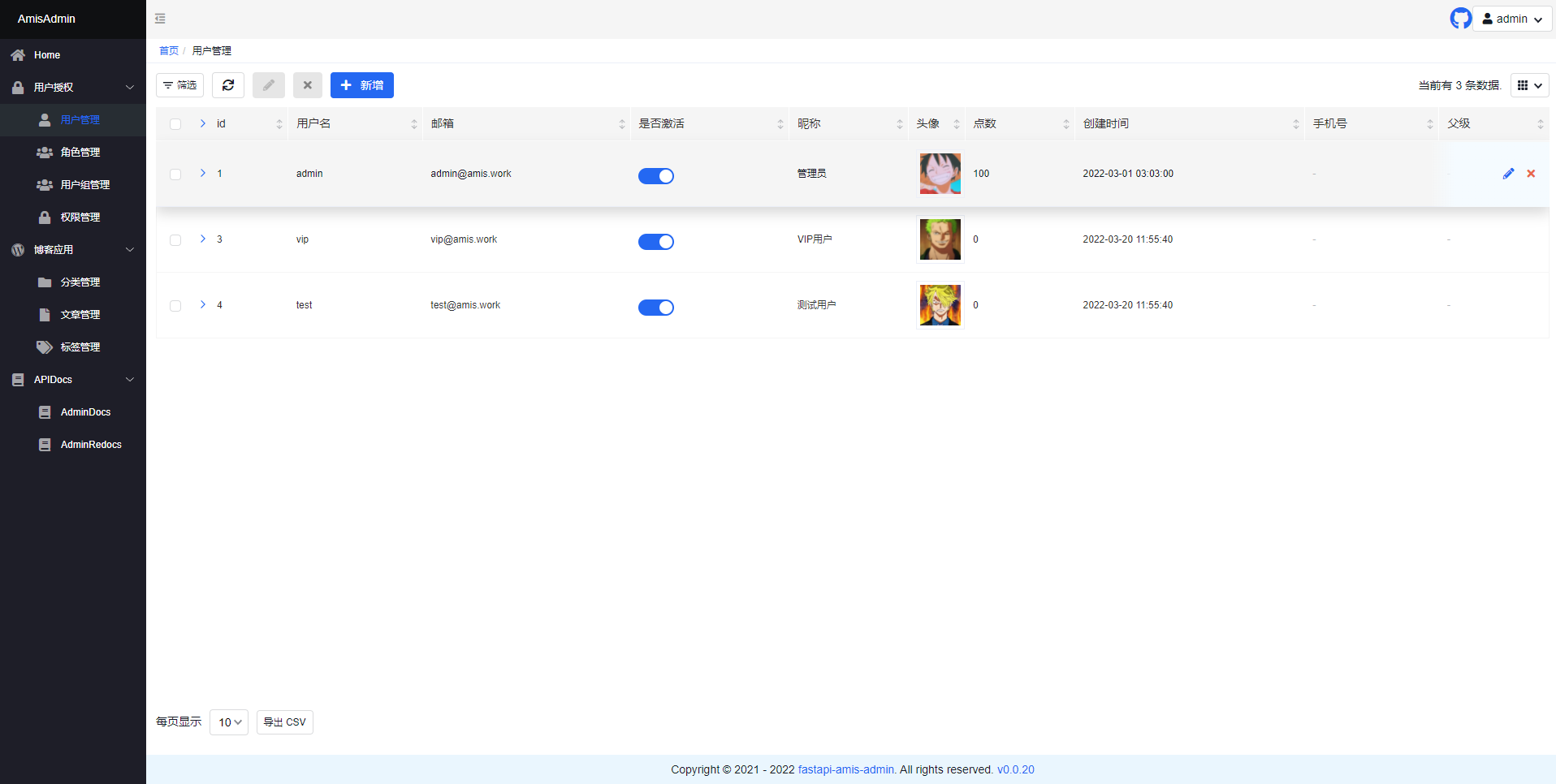
- Open
http://127.0.0.1:8000/admin/in your browser:
- Open
http://127.0.0.1:8000/admin/docsin your browser:
Project
Amis-Admin-Theme-Editor:Theme-Editor for the fastapi-amis-admin. Allows to add custom css styles and to apply theme --vars change on the fly.FastAPI-User-Auth: A simple and powerfulFastAPIuserRBACauthentication and authorization library.FastAPI-Scheduler: A simple scheduled task managementFastAPIextension based onAPScheduler.FastAPI-Config: A visual dynamic configuration management extension package based onFastAPI-Amis-Admin.FastAPI-Amis-Admin-Demo: An exampleFastAPI-Amis-Adminapplication.FastAPI-User-Auth-Demo: An exampleFastAPI-User-Authapplication.
License
- According to the
Apache2.0protocol,fastapi-amis-adminis free and open source. It can be used for commercial for free, but please clearly display copyright information aboutFastAPI-Amis-Adminon the display interface.
Release history Release notifications | RSS feed


Download files
Download the file for your platform. If you're not sure which to choose, learn more about installing packages.
Source Distribution
Built Distribution
Filter files by name, interpreter, ABI, and platform.
If you're not sure about the file name format, learn more about wheel file names.
Copy a direct link to the current filters
File details
Details for the file fastapi_amis_admin-0.6.5a2.tar.gz.
File metadata
- Download URL: fastapi_amis_admin-0.6.5a2.tar.gz
- Upload date:
- Size: 97.6 kB
- Tags: Source
- Uploaded using Trusted Publishing? No
- Uploaded via: pdm/2.8.0 CPython/3.11.0
File hashes
| Algorithm | Hash digest | |
|---|---|---|
| SHA256 |
776e06d387a0f3835f6a3e07d07b04101f9880337971b0bfae14fbed807582ff
|
|
| MD5 |
1e3fe5679b9a08ff53939073064f7cd3
|
|
| BLAKE2b-256 |
45a6608406b42fc6c4384a0479c6e3d9e5a5635baff3e6bf006d9d9480820bf5
|
File details
Details for the file fastapi_amis_admin-0.6.5a2-py3-none-any.whl.
File metadata
- Download URL: fastapi_amis_admin-0.6.5a2-py3-none-any.whl
- Upload date:
- Size: 113.8 kB
- Tags: Python 3
- Uploaded using Trusted Publishing? No
- Uploaded via: pdm/2.8.0 CPython/3.11.0
File hashes
| Algorithm | Hash digest | |
|---|---|---|
| SHA256 |
6d33e3ecc9b35b86f7a09777b03a78e3f0e12a602c7154a6c274140c6c1ac3e6
|
|
| MD5 |
d0f73d744f2041eaf49f39fd7cd3dbd8
|
|
| BLAKE2b-256 |
da8b68a738b7af494ce859d7de241c8eaf06b39942f58ef0089cb2ceaeba2dc7
|






