
Introduction
FastAPI-Amis-Admin
fastapi-amis-admin is a high-performance, efficient and easily extensible FastAPI admin framework.
Inspired by Django-admin, and has as many powerful functions as Django-admin.




source code · online demo · documentation · can't open the document?
fastapi-amis-admin is a high-performance and efficient framework based on fastapi & amis with Python 3.7+, and
based on standard Python type hints. The original intention of the development is to improve the application ecology and
to quickly generate a visual dashboard for the web application . According to the Apache2.0 protocol, it is free and
open source . But in order to better operate and maintain this project in the long run, I very much hope to get
everyone's sponsorship and support.
Features
- High performance: Based on FastAPI. Enjoy all the benefits.
- High efficiency: Perfect code type hints. Higher code reusability.
- Support asynchronous and synchronous hybrid writing:
ORMis based onSQLModel&Sqlalchemy. Freely customize database type. Support synchronous and asynchronous mode. Strong scalability. - Front-end separation: The front-end is rendered by
Amis, the back-end interface is automatically generated byfastapi-amis-admin. The interface is reusable. - Strong scalability: The background page supports
Amispages and ordinaryhtmlpages. Easily customize the interface freely. - Automatic api documentation: Automatically generate Interface documentation by
FastAPI. Easily debug and share interfaces.
Dependencies
- FastAPI: Finish the web part.
- SQLModel: Finish
ORMmodel mapping. Perfectly combine SQLAlchemy with Pydantic, and have all their features . - Amis: Finish admin page presentation.
Composition
fastapi-amis-admin consists of three core modules, of which, amis, crud can be used as separate
modules, admin is developed by the former.
amis: Based on thepydanticdata model building library ofbaidu amis. To generate/parse data rapidly.crud: Based onFastAPI&Sqlalchemy. To quickly build Create, Read, Update, Delete common API interface .admin: Inspired byDjango-Admin. Combineamiswithcrud. To quickly build Web Admin dashboard .
Installation
pip install fastapi_amis_admin
Note
sqlmodelcurrently does not supportsqlalchemy 2.0+. If you usesqlalchemy 2.0+to create a model, you cannot usesqlmodelat the same time.- After version
fastapi-amis-admin>=0.6.0,sqlmodelis no longer a required dependency library. If you usesqlmodelto create a model, you can install it with the following command.
pip install fastapi_amis_admin[sqlmodel]
Simple Example
from fastapi import FastAPI
from fastapi_amis_admin.admin.settings import Settings
from fastapi_amis_admin.admin.site import AdminSite

# create FastAPI application
app = FastAPI()

# create AdminSite instance
site = AdminSite(settings=Settings(database_url_async='sqlite+aiosqlite:///amisadmin.db'))

# mount AdminSite instance
site.mount_app(app)

if __name__ == '__main__':
    import uvicorn

    uvicorn.run(app)
ModelAdmin Example
Create Model
- Support
SQLModelmodel,SQLAlchemymodel,SQLAlchemy 2.0model - Method 1: Create model through
SQLModel.
from sqlmodel import SQLModel
from fastapi_amis_admin.models.fields import Field


class Base(SQLModel):
    pass


# Create an SQLModel, see document for details: https://sqlmodel.tiangolo.com/
class Category(SQLModel, table=True):
    id: int = Field(default=None, primary_key=True, nullable=False)
    name: str = Field(title='CategoryName', max_length=100, unique=True, index=True, nullable=False)
    description: str = Field(default='', title='Description', max_length=255)
- Method 2: Create model through
SQLAlchemy.
from sqlalchemy import Column, Integer, String
from sqlalchemy.ext.declarative import declarative_base

Base = declarative_base()


# Create an SQLAlchemy model, see document for details: https://docs.sqlalchemy.org/en/14/orm/tutorial.html
class Category(Base):
    __tablename__ = 'category'
    # Specify the Schema class corresponding to the model. It is recommended to specify it. If omitted, it can be automatically generated.
    __pydantic_model__ = CategorySchema

    id = Column(Integer, primary_key=True, nullable=False)
    name = Column(String(100), unique=True, index=True, nullable=False)
    description = Column(String(255), default='')
- Method 3: Create model through
SQLAlchemy 2.0.
from sqlalchemy import String
from sqlalchemy.orm import DeclarativeBase, Mapped, mapped_column


class Base(DeclarativeBase):
    pass


# Create an SQLAlchemy 2.0 model, see document for details: https://docs.sqlalchemy.org/en/20/orm/quickstart.html
class Category(Base):
    __tablename__ = "category"
    # Specify the Schema class corresponding to the model. It is recommended to specify it. If omitted, it can be automatically generated.
    __pydantic_model__ = CategorySchema

    id: Mapped[int] = mapped_column(primary_key=True, nullable=False)
    name: Mapped[str] = mapped_column(String(100), unique=True, index=True, nullable=False)
    description: Mapped[str] = mapped_column(String(255), default="")
- If you create a model through
sqlalchemy, it is recommended to create a corresponding pydantic model at the same time, and setorm_mode=True.
from pydantic import BaseModel, Field


class CategorySchema(BaseModel):
    id: int = Field(default=None, primary_key=True, nullable=False)
    name: str = Field(title="CategoryName")
    description: str = Field(default="", title="CategoryDescription")

    class Config:
        orm_mode = True
Register ModelAdmin
from fastapi import FastAPI
from sqlmodel import SQLModel
from fastapi_amis_admin.admin.settings import Settings
from fastapi_amis_admin.admin.site import AdminSite
from fastapi_amis_admin.admin import admin

# create FastAPI application
app = FastAPI()

# create AdminSite instance
site = AdminSite(settings=Settings(database_url_async='sqlite+aiosqlite:///amisadmin.db'))


# register ModelAdmin
@site.register_admin
class CategoryAdmin(admin.ModelAdmin):
    page_schema = 'Category'
    # set model
    model = Category


# mount AdminSite instance
site.mount_app(app)


# create initial database table
@app.on_event("startup")
async def startup():
    await site.db.async_run_sync(Base.metadata.create_all, is_session=False)


if __name__ == '__main__':
    import uvicorn

    uvicorn.run(app)
FormAdmin Example
from typing import Any
from fastapi import FastAPI
from pydantic import BaseModel
from starlette.requests import Request
from fastapi_amis_admin.amis.components import Form
from fastapi_amis_admin.admin import admin
from fastapi_amis_admin.admin.settings import Settings
from fastapi_amis_admin.admin.site import AdminSite
from fastapi_amis_admin.crud.schema import BaseApiOut
from fastapi_amis_admin.models.fields import Field

# create FastAPI application
app = FastAPI()

# create AdminSite instance
site = AdminSite(settings=Settings(database_url_async='sqlite+aiosqlite:///amisadmin.db'))


# register FormAdmin
@site.register_admin
class UserLoginFormAdmin(admin.FormAdmin):
    page_schema = 'UserLoginForm'
    # set form information, optional
    form = Form(title='This is a test login form', submitText='login')

    # create form schema
    class schema(BaseModel):
        username: str = Field(..., title='username', min_length=3, max_length=30)
        password: str = Field(..., title='password')

    # handle form submission data
    async def handle(self, request: Request, data: BaseModel, **kwargs) -> BaseApiOut[Any]:
        if data.username == 'amisadmin' and data.password == 'amisadmin':
            return BaseApiOut(msg='Login successfully!', data={'token': 'xxxxxx'})
        return BaseApiOut(status=-1, msg='Incorrect username or password!')


# mount AdminSite instance
site.mount_app(app)

if __name__ == '__main__':
    import uvicorn

    uvicorn.run(app)
Working with Command
# Install command line extension
pip install fastapi_amis_admin[cli]

# View help
faa --help

# Initialize a `FastAPI-Amis-Admin` project
faa new project_name --init

# Initialize a `FastAPI-Amis-Admin` application
faa new app_name

# Fast running project
faa run
Preview
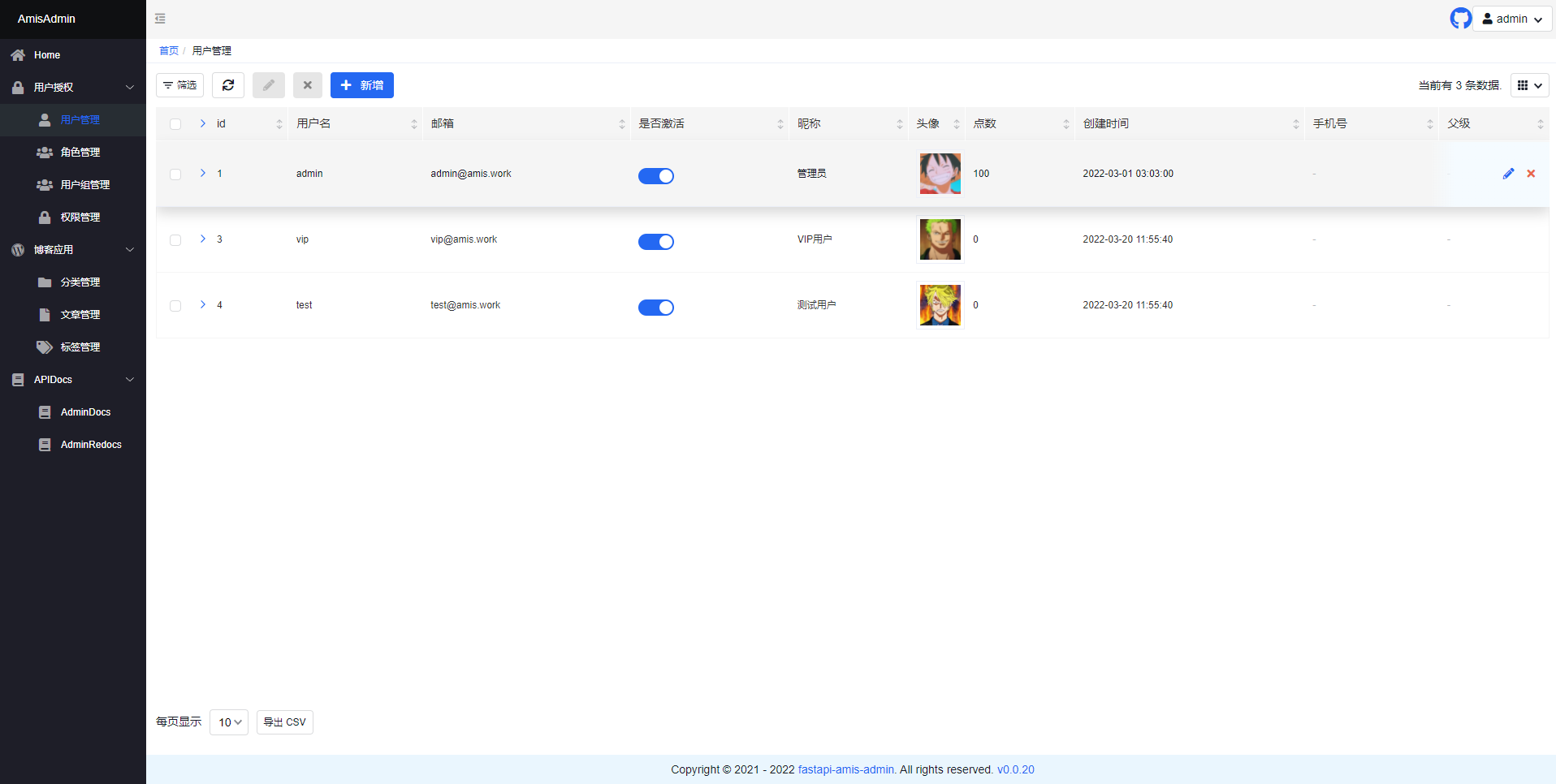
- Open
http://127.0.0.1:8000/admin/in your browser:
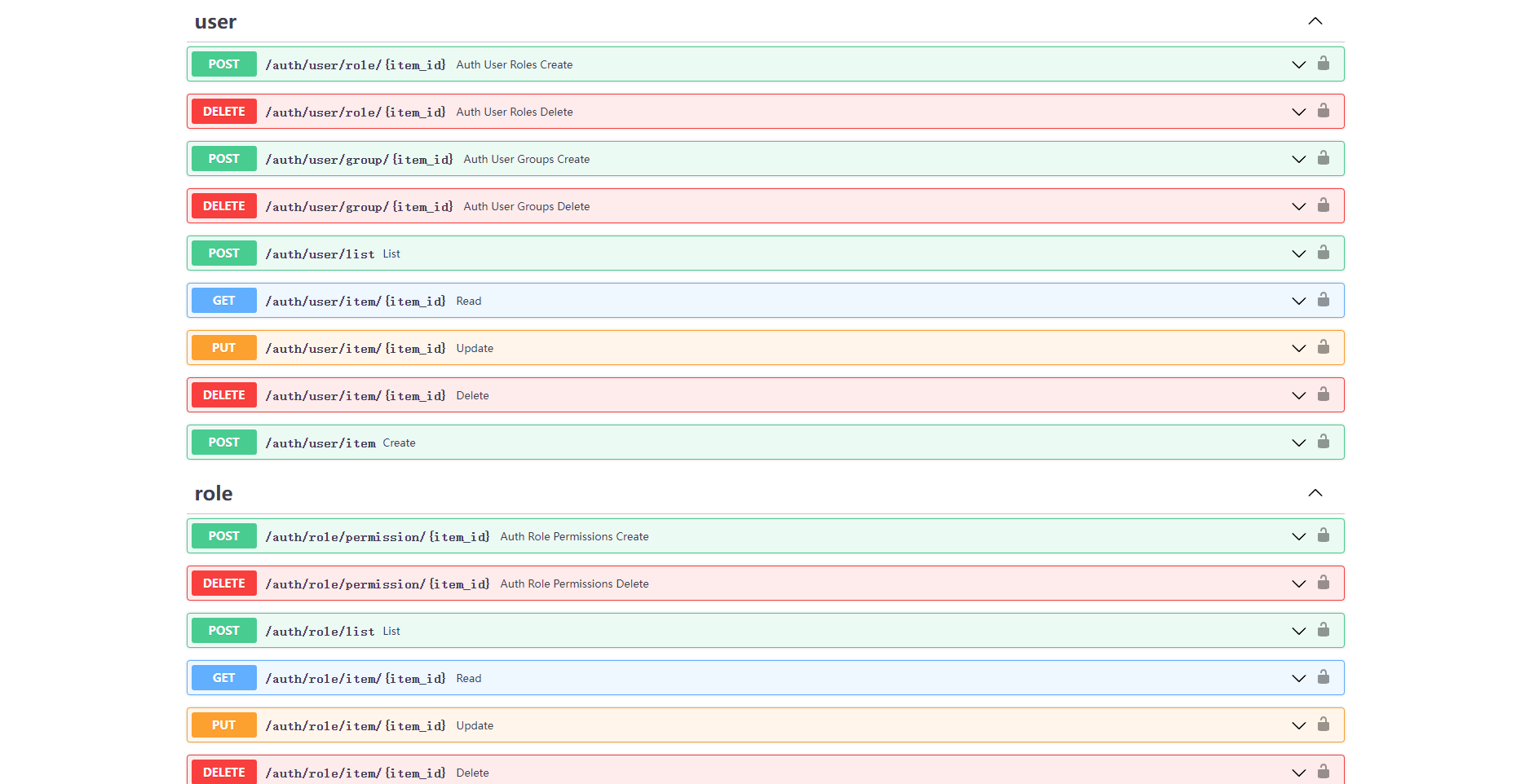
- Open
http://127.0.0.1:8000/admin/docsin your browser:
Project
Amis-Admin-Theme-Editor:Theme-Editor for the fastapi-amis-admin. Allows to add custom css styles and to apply theme --vars change on the fly.FastAPI-User-Auth: A simple and powerfulFastAPIuserRBACauthentication and authorization library.FastAPI-Scheduler: A simple scheduled task managementFastAPIextension based onAPScheduler.FastAPI-Config: A visual dynamic configuration management extension package based onFastAPI-Amis-Admin.FastAPI-Amis-Admin-Demo: An exampleFastAPI-Amis-Adminapplication.FastAPI-User-Auth-Demo: An exampleFastAPI-User-Authapplication.
License
- According to the
Apache2.0protocol,fastapi-amis-adminis free and open source. It can be used for commercial for free, but please clearly display copyright information aboutFastAPI-Amis-Adminon the display interface.
1 maintainer

Metadata
1 maintainer
Release files for fastapi_amis_admin 0.6.8
For a detailed explanation of source distributions (sdists) and built distributions (wheels), please see the package formats documentation.
Source distribution (sdist)
| File | Size | Uploaded | Provenance | Actions |
|---|---|---|---|---|
| fastapi_amis_admin-0.6.8.tar.gz | 464.7 kB | Without provenance | Details for fastapi_amis_admin-0.6.8.tar.gz |
Built distribution (wheel)
| File | Interpreter | ABI | Platform | Actions Reset |
|---|---|---|---|---|
| fastapi_amis_admin-0.6.8-py3-none-any.whl | Python 3 | none | any | Details for fastapi_amis_admin-0.6.8-py3-none-any.whl |
Total release size: 577.1 kB
Release files / fastapi_amis_admin-0.6.8.tar.gz
| Download URL | fastapi_amis_admin-0.6.8.tar.gz |
|---|---|
| Size | 464.7 kB |
| Tags | Source |
|
SHA-256 checksum How to use checksums |
9ca3a52ef3e5be571b6df70311ef4e601b19d62d793b825009accb8a2061fd09
|
|
BLAKE2b-256 checksum How to use checksums |
7dcd08671fc3ce4755dfeb515d32c3e9e5b64acde6199735dae955ddf30221fb
|
| Upload date | |
|
Uploaded using Trusted Publishing? What is trusted publishing? |
No |
| Uploaded via |
python-requests/2.31.0
|
Release files / fastapi_amis_admin-0.6.8-py3-none-any.whl
| Download URL | fastapi_amis_admin-0.6.8-py3-none-any.whl |
|---|---|
| Size | 112.4 kB |
| Tags | Python 3 |
|
SHA-256 checksum How to use checksums |
43b12ea2b9aff86e129717d6628f5d24cc032ed1c22565a483113b04386fc3e5
|
|
BLAKE2b-256 checksum How to use checksums |
0d390cf8b71a8ef8c2769d31e6d7a88c111d424c1ec8d7a579b265dd43aba4c2
|
| Upload date | |
|
Uploaded using Trusted Publishing? What is trusted publishing? |
No |
| Uploaded via |
python-requests/2.31.0
|
Security for fastapi_amis_admin 0.6.8
Provenance
Provenance describes where a file came from. On PyPI, provenance is shared via attestations, which provide a verifiable record of the build or publishing details. View details, limitations and caveats.
No provenance found
None of the files in this release were uploaded with provenance metadata.
A note on package security
PyPI is a repository for distributing packages, not a service for auditing them. While third-party security researchers and our staff do their best to detect and remove malicious packages, PyPI cannot guarantee the quality, security or suitability of any given package.
To learn more about protecting yourself from malicious actors, visit our package security documentation.














