
fastbi ⚡️
Scaffold Power BI projects instantly from templates.



Create ready-to-use Power BI Projects (.pbip) with intelligent renaming and path updates—all from a single command.

From template to working project in seconds.
✨ Quick Start
Installation
Option 1: Use without installing (quickest)
uvx fastbi "My Project"
Option 2: Install globally (recommended for frequent use)
pip install fastbi

# Or with uv:
uv pip install fastbi
Option 3: Run directly with uvx
# No installation needed, runs in isolated environment
uvx fastbi "My Project"
First-Time Setup
The first time you run fastbi, a setup wizard will ask for your .pbip template folder location.
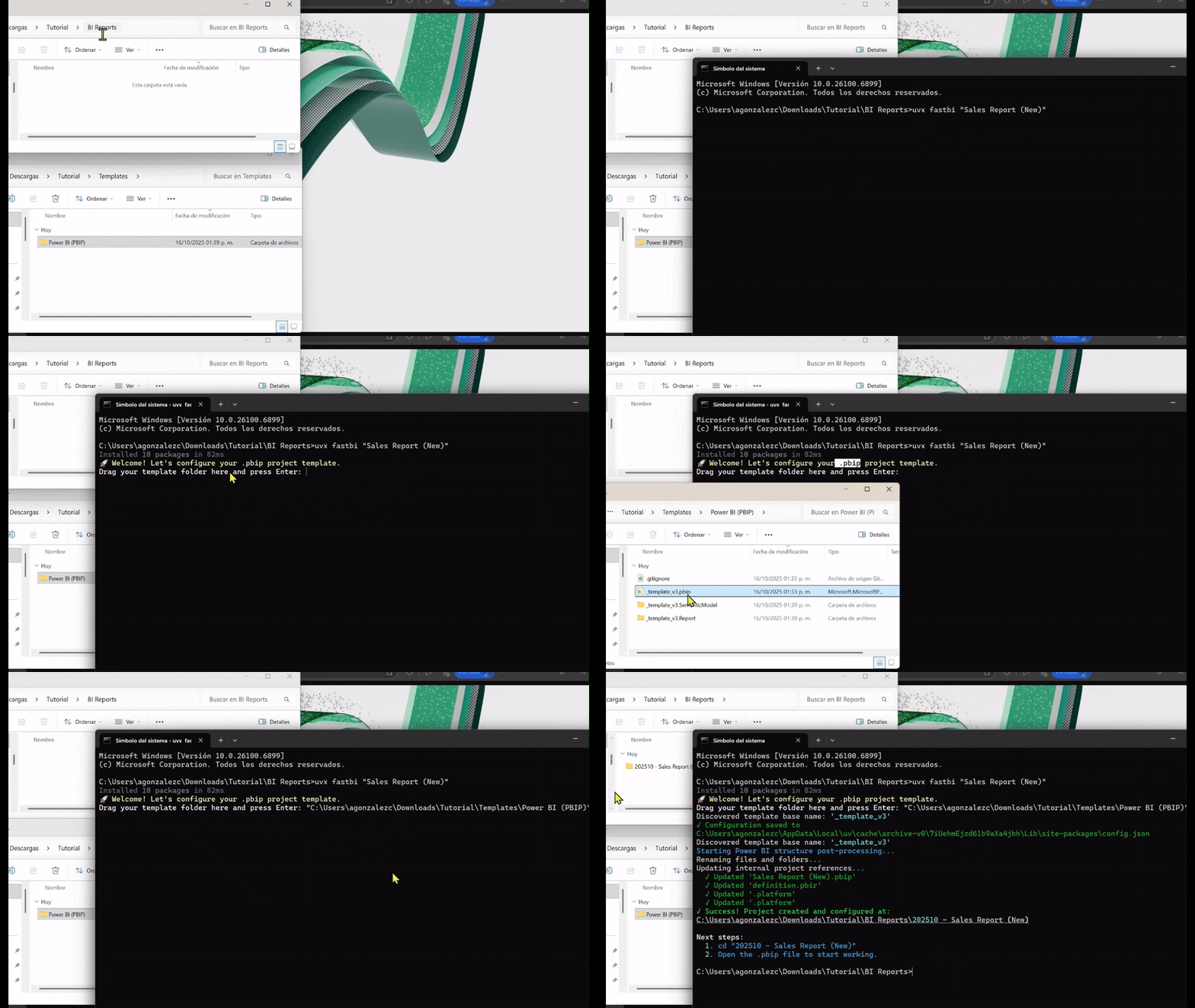
First time setup: uvx fastbi "My Project" prompts for template configuration.
# Try creating your first project - the wizard launches automatically
fastbi "My First Report"

# 🪄 The wizard will start:
# 🚀 Welcome! Let's configure your .pbip project template.
# Drag your template folder here and press Enter: _
Create Projects
Once configured, just pass the project name:
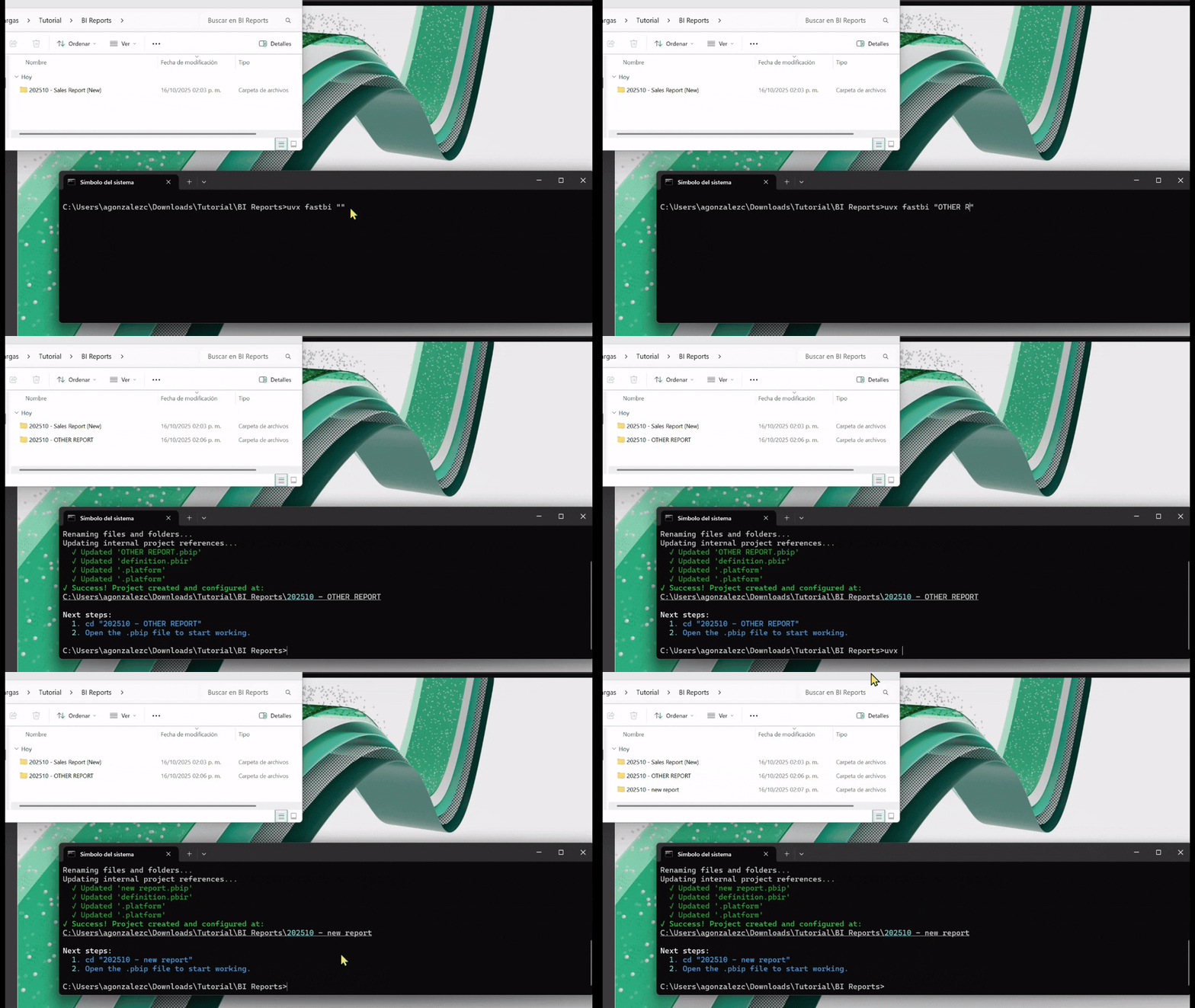
Subsequent use: uvx fastbi "new project" creates a project without re-configuring the template.
# The main way (recommended):
fastbi "Q4 Sales Dashboard"

# ✓ Success! Project created at '202510 - Q4 Sales Dashboard'
Multiple ways to create projects:
# Shortcut (fastest):
fastbi "Annual Report"

# Explicit command:
fastbi create "Annual Report"
fastbi new "Annual Report"

# Using fbi alias (same functionality):
fbi "Annual Report"
🔧 How It Works
fastbi doesn't just copy files—it performs intelligent scaffolding:
- 🔍 Discovery: Analyzes your
.pbiptemplate and automatically detects the base project structure - ✏️ Rename: Updates folder names,
.pbipfile, and.Report/.SemanticModeldirectories to match your new project - 🔄 Update: Edits internal JSON configs (
.pbip,.pbir,.platform) so all paths and display names work correctly in Fabric
Result: Zero manual fixes. Your project just works.
🎨 Creating Your Template
The power of fastbi is that it works with your own template. Here's how:
-
Design Your Base Report: Open Power BI Desktop and create your ideal starting point—add logos, themes, common pages, standard visuals.
-
Save as Project: Go to
File > Save As. In the file type dropdown, choosePower BI Project (*.pbip)instead of.pbix. -
That's Your Template: Power BI creates a folder with the project structure. Point the fastbi setup wizard to this folder.
Living Template: Update your base report anytime. Just save it as
.pbipagain in the same location. All future projects will inherit the changes automatically.
🧰 Commands
| Command | Action |
|---|---|
fastbi "Name" |
Create a new project (shortcut) |
fastbi create "Name" |
Create a new project (explicit) |
fastbi new "Name" |
Create a new project (alias) |
fastbi setup |
Configure or reconfigure template path |
fastbi --help |
Show all commands and options |
fbi "Name" |
Same as fastbi, just cooler 😎 |
💡 Why fastbi?
- Zero Config Needed: Works with any
.pbiptemplate structure - Intelligent Updates: Automatically fixes all internal paths and references
- Date Prefixing: Auto-adds
YYYYMM -prefix to keep projects organized - Error Prevention: Validates names and prevents overwrites
- Multiple Aliases: Use
fastbi,create,new, orfbi- whatever fits your style
🚀 Advanced Usage
Using with uv (recommended for speed)
# Install with uv (faster than pip)
uv pip install fastbi

# Or run without installing
uvx fastbi "Project Name"
Reconfiguring Template
Need to change your template location?
fastbi setup
The wizard will guide you through selecting a new template folder.
📦 What Gets Created
When you run fastbi "Sales Report", you get:
202410 - Sales Report/
├── Sales Report.pbip                    # Renamed project file
├── Sales Report.Report/                 # Renamed report folder
│   ├── definition.pbir                  # Updated with new paths
│   └── .platform                        # Updated display name
└── Sales Report.SemanticModel/          # Renamed model folder
    └── .platform                        # Updated display name
All internal references are automatically updated to match the new names.
🐛 Troubleshooting
"No .pbip file found in template"
- Make sure your template folder contains a
.pbipfile - The template must be saved as Power BI Project format, not
.pbix
"Directory already exists"
- A project with that name already exists for this month
- Choose a different name or delete the existing folder
Commands not working?
- Make sure you're using the latest version:
pip install --upgrade fastbi - For uvx users:
uvx --refresh fastbi "Project"
🤝 Contributing
Issues and pull requests are welcome! Visit the GitHub repository.
📝 License
MIT License - see LICENSE file for details.
Built for analysts and developers who value their time.
Forge your Power BI projects. Don't fight with folder structures.
1 maintainer

Metadata
1 maintainer
Release files for fastbi 0.1.2
For a detailed explanation of source distributions (sdists) and built distributions (wheels), please see the package formats documentation.
Source distribution (sdist)
| File | Size | Uploaded | |
|---|---|---|---|
| fastbi-0.1.2.tar.gz | 8.4 kB | Details |
Built distribution (wheel)
| File | Interpreter | ABI | Platform | Reset |
|---|---|---|---|---|
| fastbi-0.1.2-py3-none-any.whl | Python 3 | none | any | Details |
Total release size: 16.7 kB
Release files / fastbi-0.1.2.tar.gz
| Download URL | fastbi-0.1.2.tar.gz |
|---|---|
| Size | 8.4 kB |
| Tags | Source |
|
SHA-256 checksum How to use checksums |
18077bcfa20494dcfc1ea01ace59351e6e10f1860a1ba4565483275130f73661
|
|
BLAKE2b-256 checksum How to use checksums |
d7b5b3dd4955462ee8d5ece36a4398a9a2c1e9506728e56bb9b8fb174125f962
|
| Upload date | |
|
Uploaded using Trusted Publishing? What is trusted publishing? |
No |
| Uploaded via |
twine/6.2.0 CPython/3.13.9
|
Release files / fastbi-0.1.2-py3-none-any.whl
| Download URL | fastbi-0.1.2-py3-none-any.whl |
|---|---|
| Size | 8.4 kB |
| Tags | Python 3 |
|
SHA-256 checksum How to use checksums |
ce20f3d4c85546f79bee40ae95c9b470bc3d7773d224e33f67771979fc0a7ce6
|
|
BLAKE2b-256 checksum How to use checksums |
7eca7b7987164084ad4e21f0bfa64e903a5aa7fdaa9cfc7d1eddec044029e1f4
|
| Upload date | |
|
Uploaded using Trusted Publishing? What is trusted publishing? |
No |
| Uploaded via |
twine/6.2.0 CPython/3.13.9
|














