
fastcat











Fastcat is a little Python library for quickly looking up broader/narrower relations between Wikipedia categories, locally. The idea is that fastcat can be useful in situations where you need to rapidly look up category relations, but don't want to hammer on the Wikipedia API. Fastcat relies on Redis and the SKOS files that DBpedia builds from the Wikipedia dumps: it loads a language's dump into Redis once, and after that every hop up or down the category graph is a single local lookup.
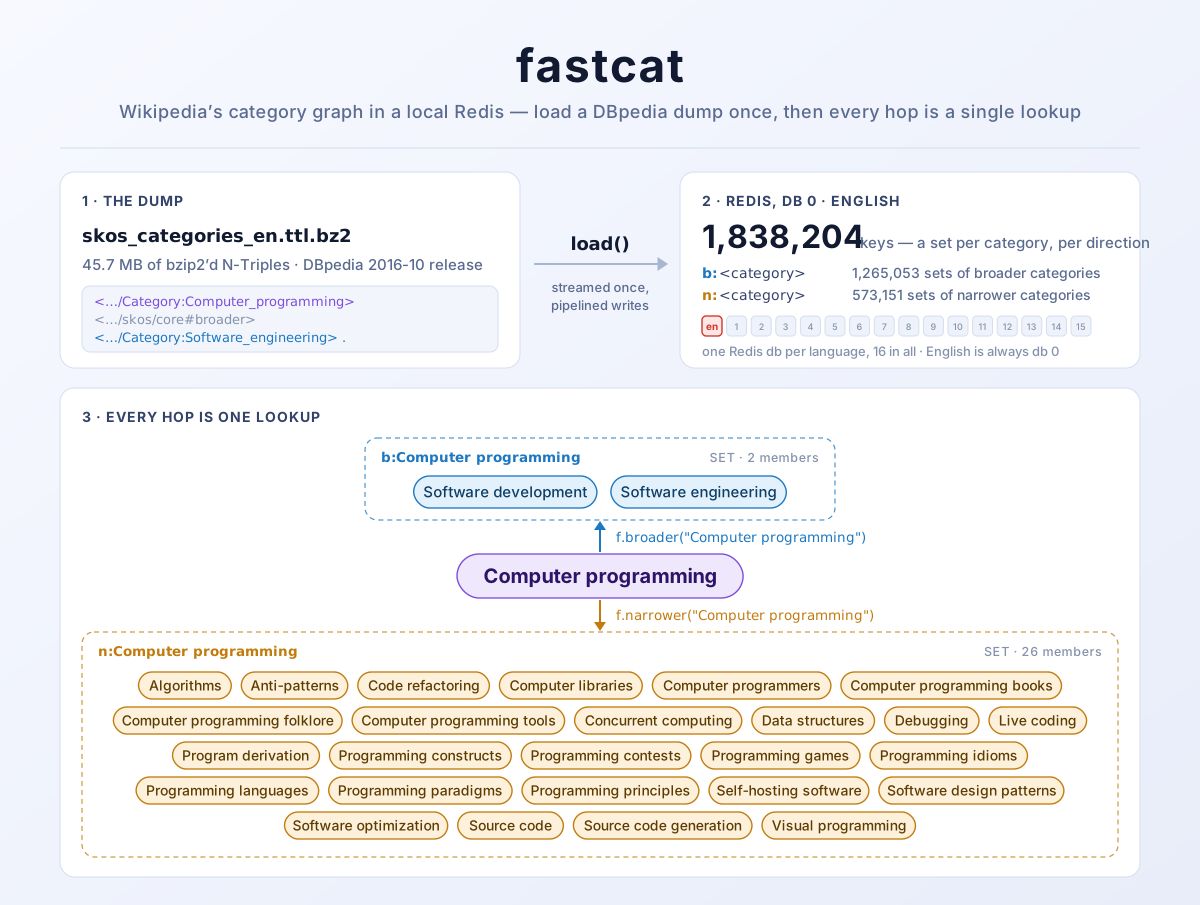
(The banner is drawn from fastcat's own output: the dump, the key counts and
both category sets are what load(), broader() and narrower() produce for
the English data.)
Quick start
$ docker run -d --name redis -p 6379:6379 redis:7-alpine   # or any Redis on localhost:6379
$ pip install fastcat
>>> import fastcat
>>> f = fastcat.FastCat()
>>> f.load()  # once: downloads ~45 MB from DBpedia and fills Redis, about a minute
>>> sorted(f.broader("Computer programming"))
['Software development', 'Software engineering']
Install
Redis
Fastcat needs a Redis server, by default on localhost:6379.
On Mac:
$ brew install redis
$ brew services start redis
On Linux (Debian, Ubuntu):
$ sudo apt install redis-server
On Windows:
Redis has no native Windows build. Either run it with Docker (below), or install it inside WSL with the Linux instructions above.
With Docker (any platform):
$ docker run -d --name redis -p 6379:6379 redis:7-alpine
From a clone of this repository, the bundled compose file does the same and keeps the loaded categories in a named volume, so they survive a restart:
$ docker compose up -d redis
The module
$ pip install fastcat
Or with uv:
$ uv add fastcat
Or, for the newest development code:
$ pip install git+https://github.com/oskar-j/fastcat.git
Usage
Basic usage
The first time you use fastcat you'll need to populate your Redis database
with the category data from DBpedia. To do that, create a FastCat object and
call its load method. After that you can use it to do lookups.
>>> import fastcat
>>> f = fastcat.FastCat()
>>> f.load()  # downloads the dump and loads it into Redis (about a minute for English)
>>> sorted(f.broader("Computer programming"))
['Software development', 'Software engineering']
>>> len(f.narrower("Computer programming"))
26
>>> sorted(f.narrower("Computer programming"))[:6]
['Algorithms', 'Anti-patterns', 'Code refactoring', 'Computer libraries', 'Computer programmers', 'Computer programming books']
A few things worth knowing:
- Pass category names the way the category page title shows them, without
the
Category:prefix and with spaces rather than underscores. broader()andnarrower()return a list built from a Redis set, so the order is arbitrary. Sort it if you need a stable one.- An unknown category, or one with nothing above or below it, gives
[]rather than an error. load()only has to run once per language. The data stays in Redis, and later calls printLoading aborted (language already exists)and return straight away.
Every answer is itself a category, so walking further is just more lookups. For example, everything up to two levels above a category:
>>> def ancestors(f, category, depth=2):
...     found, frontier = set(), {category}
...     for _ in range(depth):
...         frontier = {b for c in frontier for b in f.broader(c)} - found
...         found |= frontier
...     return found
...
>>> sorted(ancestors(f, "Computer programming"))
['Areas of computer science', 'Computer engineering', 'Computing', 'Engineering disciplines', 'Information technology management', 'Product development', 'Software', 'Software development', 'Software engineering', 'Systems engineering', 'Technology development']
Subtracting found matters: Wikipedia's category graph is not a tree, and a
category can turn up through more than one route (here Software engineering
is both a parent of Computer programming and of Software development).
Non-English categories
Pass a language code from the table below to the FastCat() constructor. Each
language is loaded into its own Redis database, so they don't mix.
>>> import fastcat
>>> f = fastcat.FastCat(language='de')
>>> f.load()  # the German dump is smaller: about 10 seconds
>>> sorted(f.broader("Berlin"))
['Deutschland nach Bundesland', 'Deutschland nach Gemeinde', 'Europa nach Ort']
>>> len(f.narrower("Berlin"))
31
>>> sorted(f.narrower("Berlin"))[:4]
['Architektur (Berlin)', 'Berlin als Namensgeber', 'Berlin in der Kultur', 'Berlin nach Bezirk']
Category names are in the language of that Wikipedia, and again without its
prefix (Kategorie: for German).
Currently supported languages (and their codes)
| Language | Code | Also accepted | Prefix you leave off |
|---|---|---|---|
| Czech | cs |
cze |
Kategorie: |
| English | en |
eng, en-GB, en-US, en-CA, en-NZ |
Category: |
| Estonian | et |
est |
Kategooria: |
| German | de |
ger, de-DE |
Kategorie: |
| Japanese | ja |
jpn, ja-JP |
Category: |
| Polish | pl |
pol, pl-PL |
Kategoria: |
| Portuguese | pt |
por, pt-PT, pt-BR |
Categoria: |
| Russian | ru |
rus, ru-RU |
Категория: |
| Ukrainian | ua |
uk, ukr, uk-UA |
Категорія: |
Codes are case-insensitive, and _ works in place of - (pt_BR). They are
language codes, not country codes, which is why Czech is cs rather than cz.
Ukrainian is the exception: its id in fastcat is ua (Ukraine's country code)
for historical reasons, but its language code uk works too. uk therefore
means Ukrainian, not the United Kingdom; British English is en or en-GB.
Any other code raises a ValueError that lists the supported ones.
Connecting to Redis
By default fastcat talks to localhost:6379. Any keyword argument the
constructor does not use itself is passed on to redis.Redis:
>>> f = fastcat.FastCat(host='redis.example.com', port=6380, password='secret')
The FASTCAT_REDIS_HOST and FASTCAT_REDIS_PORT environment variables change
the default instead, which is how the fastcat service in docker-compose.yml
finds its Redis.
You can also hand fastcat a client of your own through db. It is used as it
is, whatever database it points at, and that database holds the language you
name:
>>> import redis
>>> f = fastcat.FastCat(db=redis.Redis(db=15), language='et')
>>> f.load()
>>> f.get_current_language().name
'Estonian'
A database holds one language. fastcat records which one filled it, and refuses to load another on top.
switch_language() moves an object to another language's database on the same
server. It keeps the connection settings: the host, port, password, SSL or
socket of the client it had, your own client's included.
Where the data comes from
The engine argument selects the download source:
>>> import fastcat
>>> f = fastcat.FastCat(engine='wiki-archive')  # the default
>>> f.load()
| Engine | Status | What it downloads |
|---|---|---|
wiki-archive |
default | DBpedia's archived 2016-10 release: fixed URLs, data frozen in 2016 |
databus |
available | DBpedia's current Databus release (2022.12.01 at the time of writing): current data, resolved through metadata |
For up-to-date categories, ask for the Databus:
>>> f = fastcat.FastCat(language='et', engine='databus')
>>> f.load()
The Databus has no fixed download URLs. fastcat resolves the newest version of
the generic/categories artifact, then asks the Databus SPARQL endpoint for the
SKOS part for your language, with the release's metadata page as a fallback. The
Databus also publishes a sha256 per file, which fastcat checks after
downloading; a mismatch discards the file rather than loading it.
The two engines are not interchangeable
They are different snapshots of Wikipedia, six years apart, and the categories really do differ. For Estonian:
| Engine | sorted(f.broader("Tallinn")) |
Category keys |
|---|---|---|
wiki-archive (2016) |
['Eesti linnad', 'Hansalinnad', 'Harju maakonna omavalitsused'] |
31,677 |
databus (2022) |
['Eesti asulate kategooriad', 'Harju maakonna omavalitsusüksuste kategooriad'] |
41,252 |
Because mixing them would produce a set of relations belonging to neither snapshot, fastcat records which engine filled a Redis db and refuses to load the other on top:
>>> f = fastcat.FastCat(language='et', engine='databus')
>>> f.load()
>>> f.load(engine='wiki-archive')
RuntimeError: Language 'et' is already loaded in this redis db from the 'databus'
engine, so loading 'wiki-archive' data would merge two different snapshots.
Flush this db first (e.g. FastCat.db.flushdb()) or point this language at another db.
To keep both side by side, give the other one a database of its own:
>>> import redis
>>> archive = fastcat.FastCat(db=redis.Redis(db=15), language='et')
>>> archive.load()
>>> sorted(archive.broader("Tallinn"))
['Eesti linnad', 'Hansalinnad', 'Harju maakonna omavalitsused']
>>> sorted(f.broader("Tallinn"))
['Eesti asulate kategooriad', 'Harju maakonna omavalitsusüksuste kategooriad']
wiki-archive stays the default: it needs no metadata lookup, is unaffected by
the Databus being down, and leaves existing installs on the data they already
have.
You can list the engines from code:
>>> fastcat.FastCat.get_supported_engines()
('wiki-archive', 'databus')
>>> fastcat.FastCat.get_implemented_engines()
('wiki-archive', 'databus')
How long loading takes
load() pipelines its writes to Redis and streams the dump rather than holding
it in memory, so populating a language is quick and cheap:
| Language | Category keys | Load time | Peak memory |
|---|---|---|---|
| Czech | 151,019 | 4.1s | 55 MB |
| German | 359,819 | 10s | 56 MB |
| English | 1,838,204 | 56s | 58 MB |
(Measured on a laptop with Python 3.13 against a local Redis 7, dump already
downloaded. Before 0.2.4 the same Czech load took 91.5s and English held
1.26 GB in memory.)
load() takes a few optional arguments:
| Argument | Default | What it does |
|---|---|---|
language |
the object's language | Which language to load. |
engine |
the object's engine | Download source for this call only. |
batch_size |
10000 |
Redis commands buffered per pipeline flush; the default is a reasonable trade between speed and memory. |
progress_bar |
True |
Draw a progress bar while loading. |
verbose |
False |
Print what is happening; 2 and up print every relation. |
Downloaded dumps are cached inside the installed package, as
fastcat/data/skos-<engine>-<language>.nt.bz2, and the language → Redis db
mapping is pickled next to them in fastcat/settings/. Delete a dump to force
a fresh download.
A download only takes that name once it is complete, so an interrupted one
(Ctrl-C, a dropped connection, 60 seconds without data) leaves nothing behind,
and the next load() starts it again. If a cached dump turns out to be damaged
while loading, fastcat deletes it and raises DamagedDumpError, a
RuntimeError; run load() again to download it afresh.
Development
See CONTRIBUTING.md for the guidelines and the release process.
With uv, which installs the exact versions from
the committed uv.lock:
$ uv sync
$ uv run pytest
Or with pip:
$ pip install -e '.[dev]'
$ pytest
That runs the fast, offline tests. The end-to-end tests need a Redis server and download a SKOS dump per language from DBpedia, so they are opt-in:
$ docker compose up -d redis      # or your own local Redis
$ pytest --run-integration
The compose file also defines a fastcat container with the package and its
dev dependencies installed, for running the suite in a clean environment:
$ docker compose run --rm fastcat pytest
Q&A
How well is it tested?
The offline unit tests run on every push and pull request, on Python 3.10
through 3.14. The integration tests load a real dump for each of the nine
languages and check a known broader/narrower pair in each
(tests/language_cases.py).
Feedback is still very welcome under ticket #7.
What are the biggest drawbacks of fastcat?
DBpedia SKOS files move around, and that has already bitten this project once:
the rolling current tree fastcat downloaded from was withdrawn, and
downloading Wikipedia data stopped working entirely until 0.2.3 repointed
it at the archived 2016-10 release. Pinning to an archive buys stable URLs at
the cost of data that stops in 2016, so pass engine='databus' for current
categories.
Each language takes one of Redis's numbered databases, of which there are 16 by default, so that is also the cap on languages. Last but not least, each language means a one-off download of up to ~45 MB.
Which Python versions are supported?
Python 3.10 and above (tested on GitHub Actions against 3.10 through 3.14).
Releases up to 0.1.2 supported Python 3.5+; if you are stuck on an older
interpreter, pin fastcat==0.1.2.
Which languages are supported?
The nine in the table above.
From code, FastCat.get_supported_languages() returns their names:
>>> fastcat.FastCat.get_supported_languages()
dict_keys(['Czech', 'English', 'Estonian', 'German', 'Japanese', 'Polish', 'Portuguese', 'Russian', 'Ukrainian'])
Adding one takes an entry in src/fastcat/lang.py, a category-prefix pattern
in src/fastcat/interface.py and a known relation in tests/language_cases.py.
If your language is missing, an issue
or a pull request is very welcome.
What's coming next?
Support for the rest of the European languages. Exporting an n-level tree of categories to a CSV or GraphML file. Moving the downloaded dumps and the language mapping out of the package directory into a proper user cache directory.
License
Creative Commons Attribution-ShareAlike 3.0
Attribution
This software is a fork of the fastcat tool created by Ed Summers. Changes were made under the Creative Commons Attribution-ShareAlike 3.0 license and are described in commit messages. The major ones are porting the code to Python 3 and adding support for more than one language.
1 maintainer

Metadata
1 maintainer
Release files for fastcat 0.3.5
For a detailed explanation of source distributions (sdists) and built distributions (wheels), please see the package formats documentation.
Source distribution (sdist)
| File | Size | Uploaded | Provenance | Actions |
|---|---|---|---|---|
| fastcat-0.3.5.tar.gz | 48.9 kB | With provenance | Details for fastcat-0.3.5.tar.gz |
Built distribution (wheel)
| File | Interpreter | ABI | Platform | Actions Reset |
|---|---|---|---|---|
| fastcat-0.3.5-py3-none-any.whl | Python 3 | none | any | Details for fastcat-0.3.5-py3-none-any.whl |
Total release size: 79.0 kB
Release files / fastcat-0.3.5.tar.gz
| Download URL | fastcat-0.3.5.tar.gz |
|---|---|
| Size | 48.9 kB |
| Tags | Source |
|
SHA-256 checksum How to use checksums |
04b862436630c074ffc7fc4870da713364bead43e3592972b392729917c48073
|
|
BLAKE2b-256 checksum How to use checksums |
f0c5953d3081a3ea04058b95faf5ec148b575e6b9f09d20eae784148e2aafb04
|
| Upload date | |
|
Uploaded using Trusted Publishing? What is trusted publishing? |
Yes |
| Uploaded via |
twine/7.0.0 CPython/3.13.16
|
Provenance
Provenance describes where a file came from. On PyPI, provenance is shared via attestations, which provide a verifiable record of the build or publishing details. View details, limitations and caveats.


PyPI Publish Attestation
PyPI verified that this artifact, at this checksum, originated from the publisher listed below.
Signed by GitHub Actions, verified by PyPI on Oct 24, 2026.
Transparency logRelease files / fastcat-0.3.5-py3-none-any.whl
| Download URL | fastcat-0.3.5-py3-none-any.whl |
|---|---|
| Size | 30.1 kB |
| Tags | Python 3 |
|
SHA-256 checksum How to use checksums |
e4036a487e98d2f1471c28999f2bba7503e2fda7ffd319166c875352475eeaa0
|
|
BLAKE2b-256 checksum How to use checksums |
d75374815f951995e07197db8832568873e83057d4f920e828c3971dce6ac5c4
|
| Upload date | |
|
Uploaded using Trusted Publishing? What is trusted publishing? |
Yes |
| Uploaded via |
twine/7.0.0 CPython/3.13.16
|
Provenance
Provenance describes where a file came from. On PyPI, provenance is shared via attestations, which provide a verifiable record of the build or publishing details. View details, limitations and caveats.
PyPI Publish Attestation
PyPI verified that this artifact, at this checksum, originated from the publisher listed below.
Signed by GitHub Actions, verified by PyPI on Oct 24, 2026.
Transparency logSecurity for fastcat 0.3.5
Provenance
Provenance describes where a file came from. On PyPI, provenance is shared via attestations, which provide a verifiable record of the build or publishing details. View details, limitations and caveats.
Full provenance
All 2 files in this release have been uploaded with provenance metadata.
Attestation for fastcat-0.3.5.tar.gz
PyPI Publish Attestation
PyPI verified that this artifact, at this checksum, originated from the publisher listed below.
Signed by GitHub Actions, verified by PyPI on Oct 24, 2026.
Transparency logA note on package security
PyPI is a repository for distributing packages, not a service for auditing them. While third-party security researchers and our staff do their best to detect and remove malicious packages, PyPI cannot guarantee the quality, security or suitability of any given package.
To learn more about protecting yourself from malicious actors, visit our package security documentation.














