
Linux命令行使用Clash代理

Project description
linux命令行轻松使用代理:fastclash





🚀 快速安装
安装(推荐)
# 1. 安装 fastclash 工具
pip install fastclash

# 2. 安装 Clash 环境(用户级,无需 sudo)
fastclash install -s https://your-subscription-url.com

# 3. 开始使用
clash on
📖 使用教程
重要:无论使用哪种方式安装,以下所有命令都完全相同!
📋 基本命令
安装完成后,使用以下命令:
$ fastclash --help
Usage:
    fastclash COMMAND [OPTION]

Commands:
    install              安装 Clash 环境(用户级)
    uninstall            卸载 Clash 环境(用户级)
启动和停止代理
# 启动代理服务
$ clash on
😼 已开启代理环境

# 停止代理服务
$ clash off
😼 已关闭代理环境

# 查看服务状态
$ clash status
● mihomo.service - mihomo Daemon, A[nother] Clash Kernel.
   Loaded: loaded (/etc/systemd/system/mihomo.service; enabled; vendor preset: enabled)
   Active: active (running) since Mon 2025-01-27 10:30:15 CST; 2h 15min ago
说明:
clash on会同时启动内核服务和设置系统代理环境变量clash off会停止服务并清除代理环境变量- 服务支持开机自启,重启后自动恢复代理状态
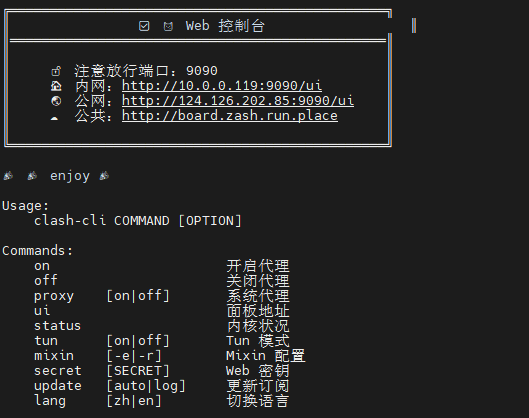
🌐 Web 控制台
访问控制台
$ clash ui
╔═══════════════════════════════════════════════╗
║                😼 Web 控制台                  ║
║═══════════════════════════════════════════════║
║                                               ║
║     🔓 注意放行端口:9090                      ║
║     🌍 面板地址:http://127.0.0.1:9090/ui     ║
║                                               ║
╚═══════════════════════════════════════════════╝
安全设置
# 设置访问密钥
$ clash secret mypassword123
😼 密钥更新成功,已重启生效

# 查看当前密钥
$ clash secret
😼 当前密钥:mypassword123

# 清除密钥(设为空)
$ clash secret ""
😼 密钥更新成功,已重启生效
📡 订阅管理
手动更新订阅
# 使用新的订阅链接更新
$ clash update https://your-subscription-url.com
👌 正在下载:原配置已备份...
🍃 下载成功:内核验证配置...
🍃 订阅更新成功

# 使用上次的订阅链接更新
$ clash update
🍃 订阅更新成功

# 查看更新日志
$ clash update log
✅ [2025-01-27 10:30:15] 订阅更新成功:https://your-subscription-url.com
✅ [2025-01-27 08:15:22] 订阅更新成功:https://your-subscription-url.com
自动更新设置
# 设置自动更新(每2天凌晨更新)
$ clash update auto
😼 已设置定时更新订阅

# 设置自动更新并指定新的订阅链接
$ clash update auto https://new-subscription-url.com
😼 已设置定时更新订阅

# 查看定时任务
$ crontab -l | grep fastclash
0 0 */2 * * /bin/bash -i -c 'fastclash update https://your-subscription-url.com'
🔧 高级功能
Tun 模式
# 查看 Tun 状态
$ clash tun
😾 Tun 状态:关闭

# 开启 Tun 模式
$ clash tun on
😼 Tun 模式已开启

# 关闭 Tun 模式
$ clash tun off
😼 Tun 模式已关闭
Mixin 配置管理
# 查看 mixin 配置
$ clash mixin
😼 less 查看 mixin 配置

# 编辑 mixin 配置
$ clash mixin -e
😼 vim 编辑 mixin 配置

# 查看运行时配置(合并后的最终配置)
$ clash mixin -r
😼 less 查看 运行时 配置
🗑️ 卸载
卸载方式对比
| 安装方式 | 卸载命令 | 说明 |
|---|---|---|
| Python 包 | sudo fastclash uninstall + pip uninstall fastclash |
先卸载服务,再卸载工具 |
| Shell 脚本 | sudo bash uninstall.sh |
运行卸载脚本 |
完整卸载步骤
# 1. 卸载 Clash 服务和配置(用户级)
fastclash uninstall

# 2. 卸载 fastclash 工具(可选)
pip uninstall fastclash
注意:卸载后 Clash 服务配置和数据会被完全清除
🤝 贡献
欢迎提交 Issue 和 Pull Request!
📄 许可证
本项目采用 MIT 许可证。
⭐ Star History

⚠️ 免责声明
本工具仅供学习和研究使用,请遵守当地法律法规。使用本工具所产生的任何后果由用户自行承担。
Release history Release notifications | RSS feed


Download files
Download the file for your platform. If you're not sure which to choose, learn more about installing packages.
Source Distribution
fastclash-1.3.6.tar.gz
(22.4 kB
view details)
Built Distribution
Filter files by name, interpreter, ABI, and platform.
If you're not sure about the file name format, learn more about wheel file names.
Copy a direct link to the current filters
fastclash-1.3.6-py3-none-any.whl
(23.2 kB
view details)
File details
Details for the file fastclash-1.3.6.tar.gz.
File metadata
- Download URL: fastclash-1.3.6.tar.gz
- Upload date:
- Size: 22.4 kB
- Tags: Source
- Uploaded using Trusted Publishing? No
- Uploaded via: twine/6.2.0 CPython/3.13.9
File hashes
| Algorithm | Hash digest | |
|---|---|---|
| SHA256 |
978c666caa34a664ec28e52edcb285527544c4c13d6707e8ac3c2381d42f48e0
|
|
| MD5 |
aa144f8a401ecc6986aaa2c66e318c18
|
|
| BLAKE2b-256 |
6dba07884304052388f7a9f84a6b1a0ff58e52b7e6faedaa538b761692b1fa18
|
File details
Details for the file fastclash-1.3.6-py3-none-any.whl.
File metadata
- Download URL: fastclash-1.3.6-py3-none-any.whl
- Upload date:
- Size: 23.2 kB
- Tags: Python 3
- Uploaded using Trusted Publishing? No
- Uploaded via: twine/6.2.0 CPython/3.13.9
File hashes
| Algorithm | Hash digest | |
|---|---|---|
| SHA256 |
008b2927f4d41295cde7bda02fa594c9f6aecb9628acdef1a3cff0e8c25da1e3
|
|
| MD5 |
c2ff4b8a676793226cd95dddf19c06a7
|
|
| BLAKE2b-256 |
619bc3e0844bdcfbbf0257fd555a567510ac4f7d31113d4cf8438efbfb50e229
|






