

Make your code faster. Automatically optimise performance and verify every improvement.
This package is the free, open-source version of fastercode.ai. For the full product, visit www.fastercode.ai.
fastercode doesn't just rewrite your functions — it proves whether a rewrite is actually better. It replays a function's real recorded calls against every candidate, checks the outputs still match, and measures execution time, lines of code, and peak memory before keeping anything. Rejected candidates are reported honestly, not hidden.
Use it two ways:
- As a coding agent's referee, via MCP — your agent (Claude Code, etc.) writes the candidate code; fastercode measures whether it's actually better. No LLM call, no API key needed for this path.
- As a standalone optimizer, via the Python API — decorate a function, call
optimise(), and fastercode calls an LLM (OpenAI, Anthropic, and others) itself to propose and measure candidates.
Install
pip install fastercode-ai
mcp is a standard dependency, so agent mode works right out of the box — no extra install needed.
Set up the MCP agent
Register the server with your coding agent:
claude mcp add fastercode -- python -m fastercode.mcp_server
Or add it to any MCP client's config:
{
  "mcpServers": {
    "fastercode": {
      "command": "python",
      "args": ["-m", "fastercode.mcp_server"]
    }
  }
}
Then just ask your agent to make a function faster. It calls analyse_function to see what evidence is available, asks you which recording strategy to use, proposes candidates, and calls optimise_function to measure them. See AGENTS.md for the full workflow and tool reference.
Basic example — Python API
from fastercode import refactor

# Needs an OPENAI_API_KEY (or another supported provider's key) in the environment.
optimise = refactor(objective="speed")

@optimise.track
def calculate_average(values):
    total = 0
    n = 0
    for x in values:
        total += x
        n += 1
    return total / n

calculate_average([1, 2, 3, 4, 5])  # record at least one real call first

result = optimise.optimise(calculate_average, tries=5)
print(result["report_path"])
Every run writes a self-contained report.html you can open in any browser — see a real one generated from this exact example: examples/example_report.html.
What a report looks like
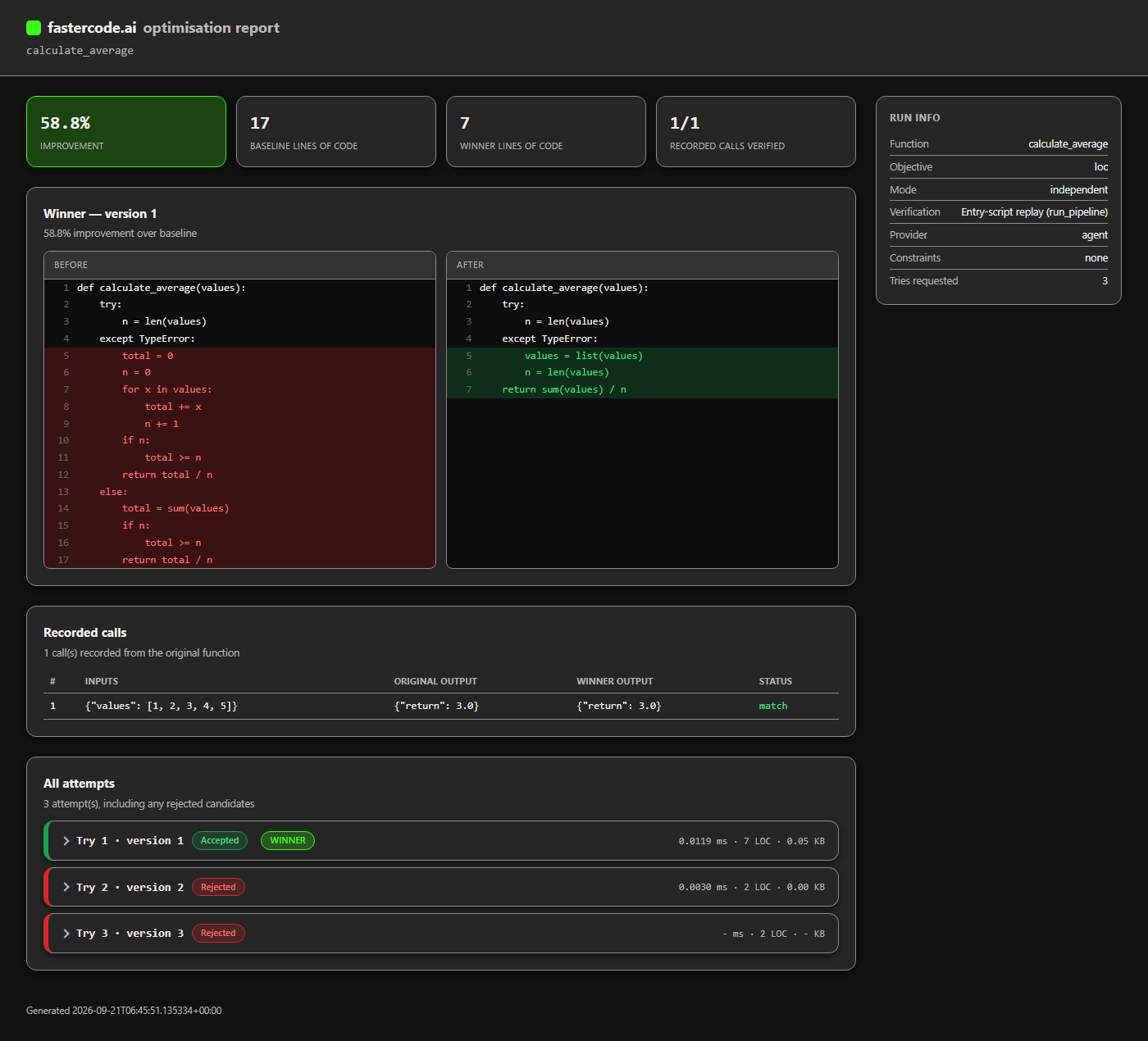
Every attempt is shown, not just the winner: the exact diff, every recorded call's input and output, and the LLM transcript (or "provided directly by agent" in MCP mode) — so a claimed improvement can be checked, not just trusted.
License
MIT — see LICENSE.
1 maintainer

Metadata
1 maintainer
Release files for fastercode-ai 0.1.0
For a detailed explanation of source distributions (sdists) and built distributions (wheels), please see the package formats documentation.
Source distribution (sdist)
| File | Size | Uploaded | |
|---|---|---|---|
| fastercode_ai-0.1.0.tar.gz | 78.7 kB | Details |
Built distribution (wheel)
| File | Interpreter | ABI | Platform | Reset |
|---|---|---|---|---|
| fastercode_ai-0.1.0-py3-none-any.whl | Python 3 | none | any | Details |
Total release size: 154.5 kB
Release files / fastercode_ai-0.1.0.tar.gz
| Download URL | fastercode_ai-0.1.0.tar.gz |
|---|---|
| Size | 78.7 kB |
| Tags | Source |
|
SHA-256 checksum How to use checksums |
7473607c86bfa1072e2e7b16165168664917b1b47c4e1393fc12fabed438a8a3
|
|
BLAKE2b-256 checksum How to use checksums |
35b665d7d89af27be147feab7381af686b8a4a5d7072bf290a3d395cd2b70dc9
|
| Upload date | |
|
Uploaded using Trusted Publishing? What is trusted publishing? |
No |
| Uploaded via |
twine/7.0.0 CPython/3.12.10
|
Release files / fastercode_ai-0.1.0-py3-none-any.whl
| Download URL | fastercode_ai-0.1.0-py3-none-any.whl |
|---|---|
| Size | 75.7 kB |
| Tags | Python 3 |
|
SHA-256 checksum How to use checksums |
dfd930d14360774404bc7927aefd99c26a288ea7bbe438693c9036a299bd44ae
|
|
BLAKE2b-256 checksum How to use checksums |
d565ebf439db4c656857d690d6c08e7584103aac04f85a6838e02a4b5c64752f
|
| Upload date | |
|
Uploaded using Trusted Publishing? What is trusted publishing? |
No |
| Uploaded via |
twine/7.0.0 CPython/3.12.10
|














