
fastf1-mcp


An MCP server that exposes Formula 1 data to AI assistants via the FastF1 library. Ask Claude (or any MCP-compatible client) questions about race results, lap times, telemetry, standings, and more.
Features
- 36 tools covering standings, race results, lap times, telemetry, pit stops, qualifying, race control, weather, race progression, tyre degradation, corner analysis, DRS zones and live championship projections
- Real circuit maps offline — every F1 circuit since 2018 drawn from bundled outline data, no download needed
- Charts — track maps, speed traces, race position charts, tyre strategies and lap-time plots returned as PNG images Claude can show inline
- Live replay bridge — follow a race playing in f1-race-replay and get race-engineer commentary
- 4 MCP resources for schedule, driver, constructor, and circuit reference data
- 6 guided prompts for race recaps, qualifying analysis, strategy deep-dives, weekend previews and live replay commentary
- Async-safe LRU session cache — repeat queries are instant after the first load
- Distance-based telemetry sampling — large raw datasets compressed to ≤ 500 points
- All errors returned as structured dicts — the server never crashes on bad input
Gallery
These are unedited PNGs from the server's chart tools, the same images Claude shows inline, drawn from real F1 timing data via FastF1. Under each one is a question that brings it up and the tool it calls.
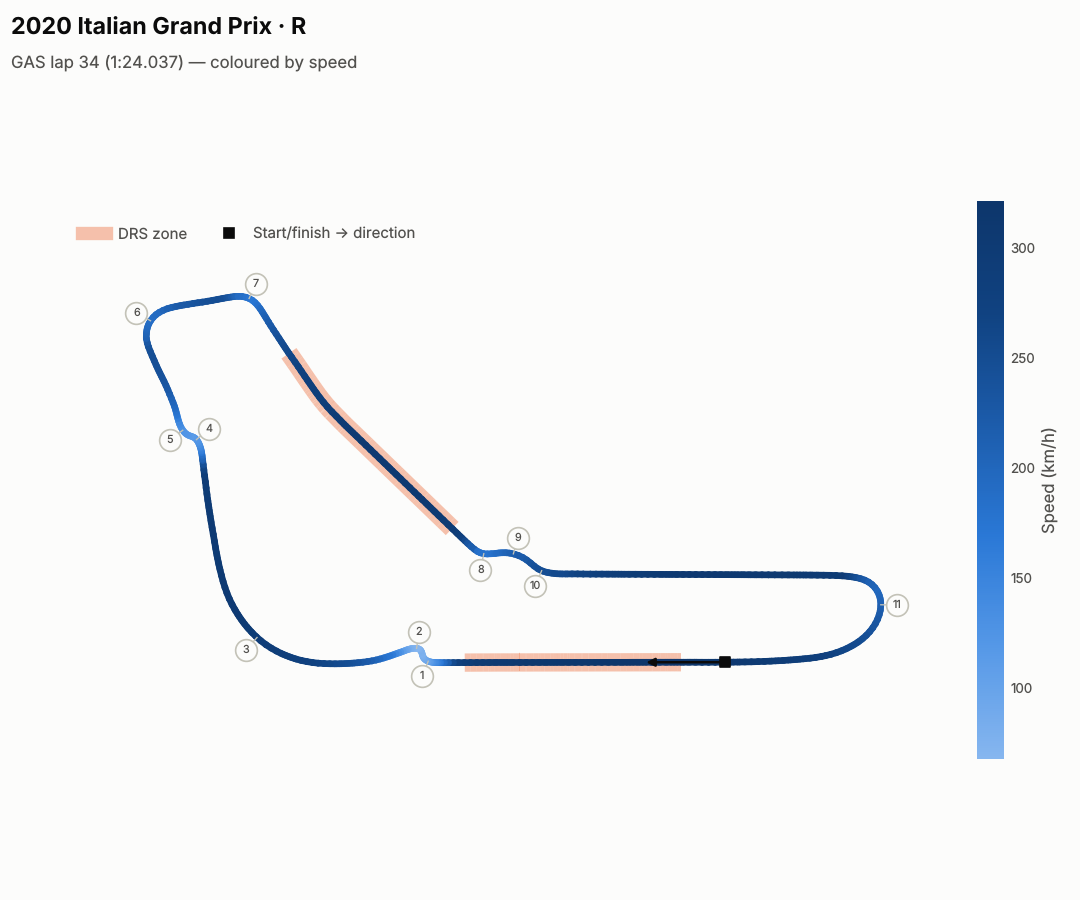 "Show Gasly's fastest lap at Monza 2020, coloured by speed." plot_track_map |
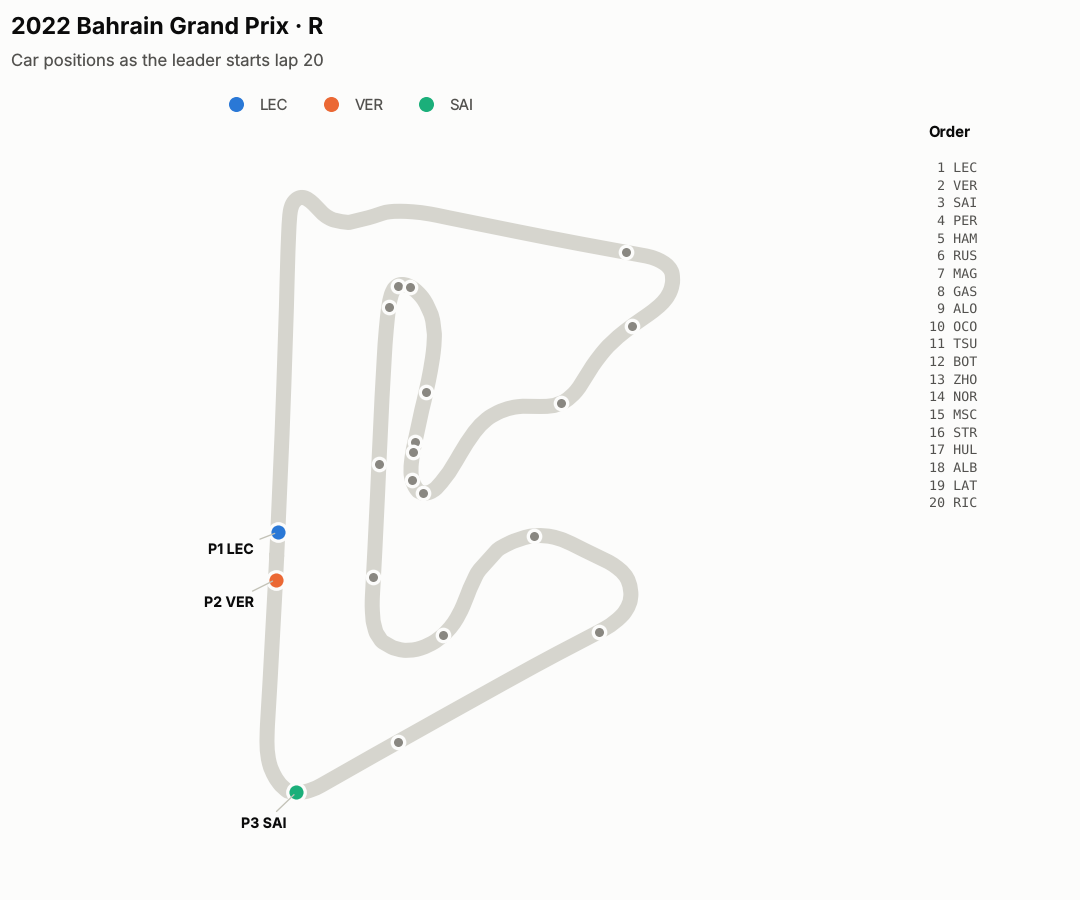 "Where was everyone on track when lap 20 of Bahrain 2022 began?" plot_track_map(at_lap=20) |
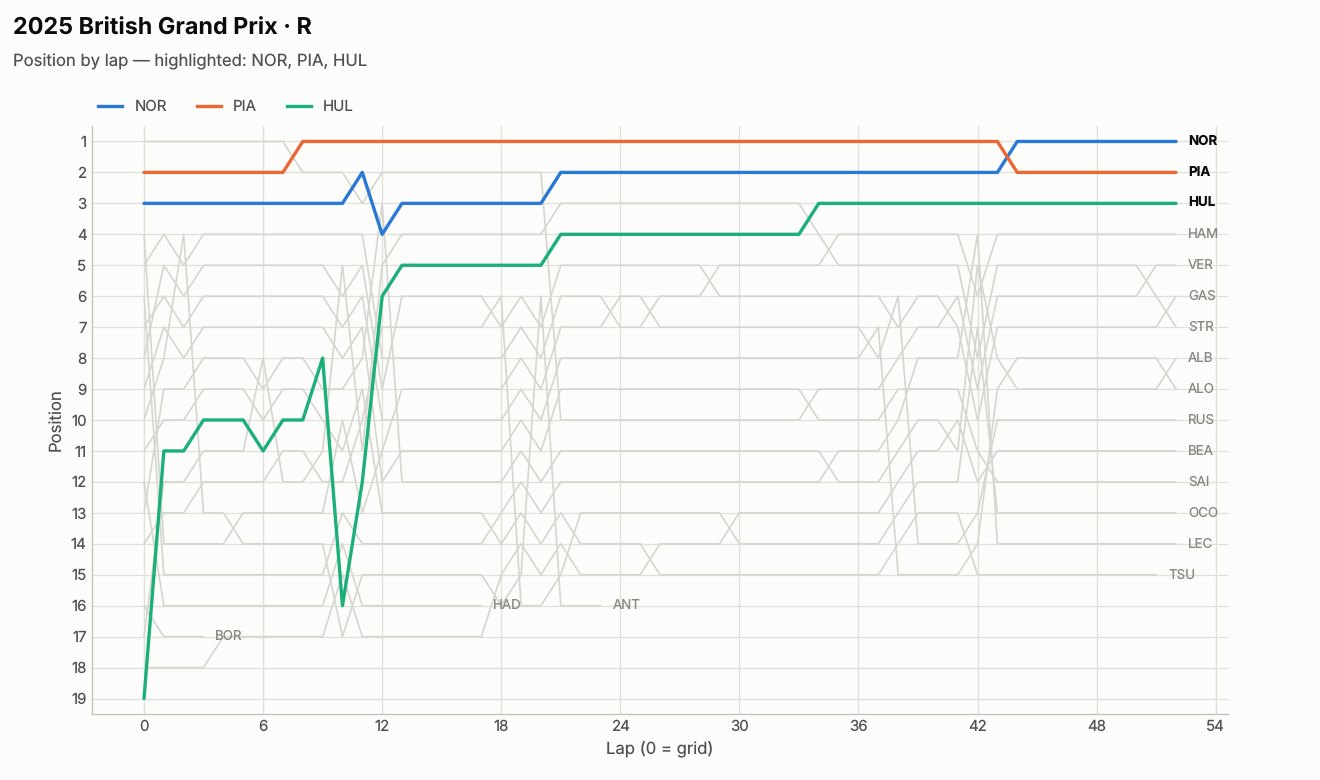 "How did Hülkenberg get from P19 to the podium at Silverstone?" plot_position_chart |
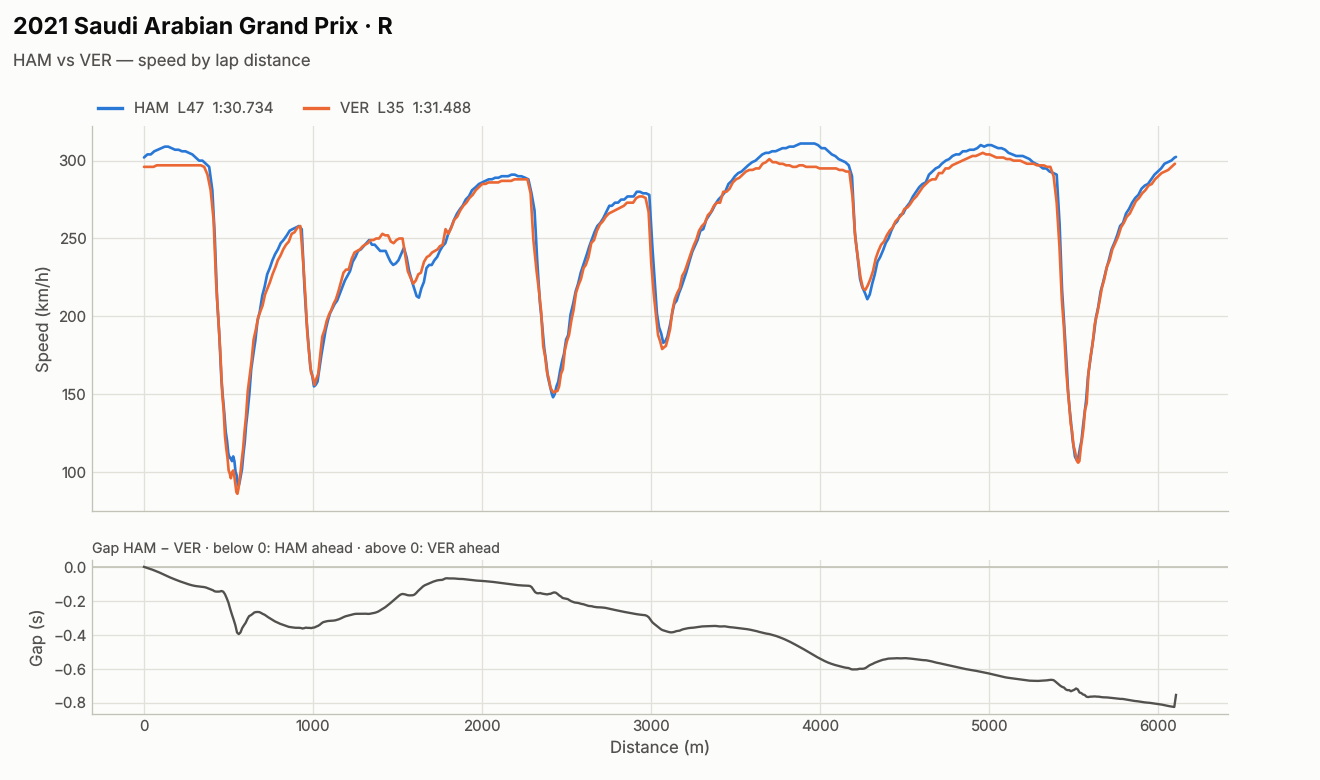 "Compare Hamilton's and Verstappen's fastest laps in Jeddah 2021." plot_speed_trace |
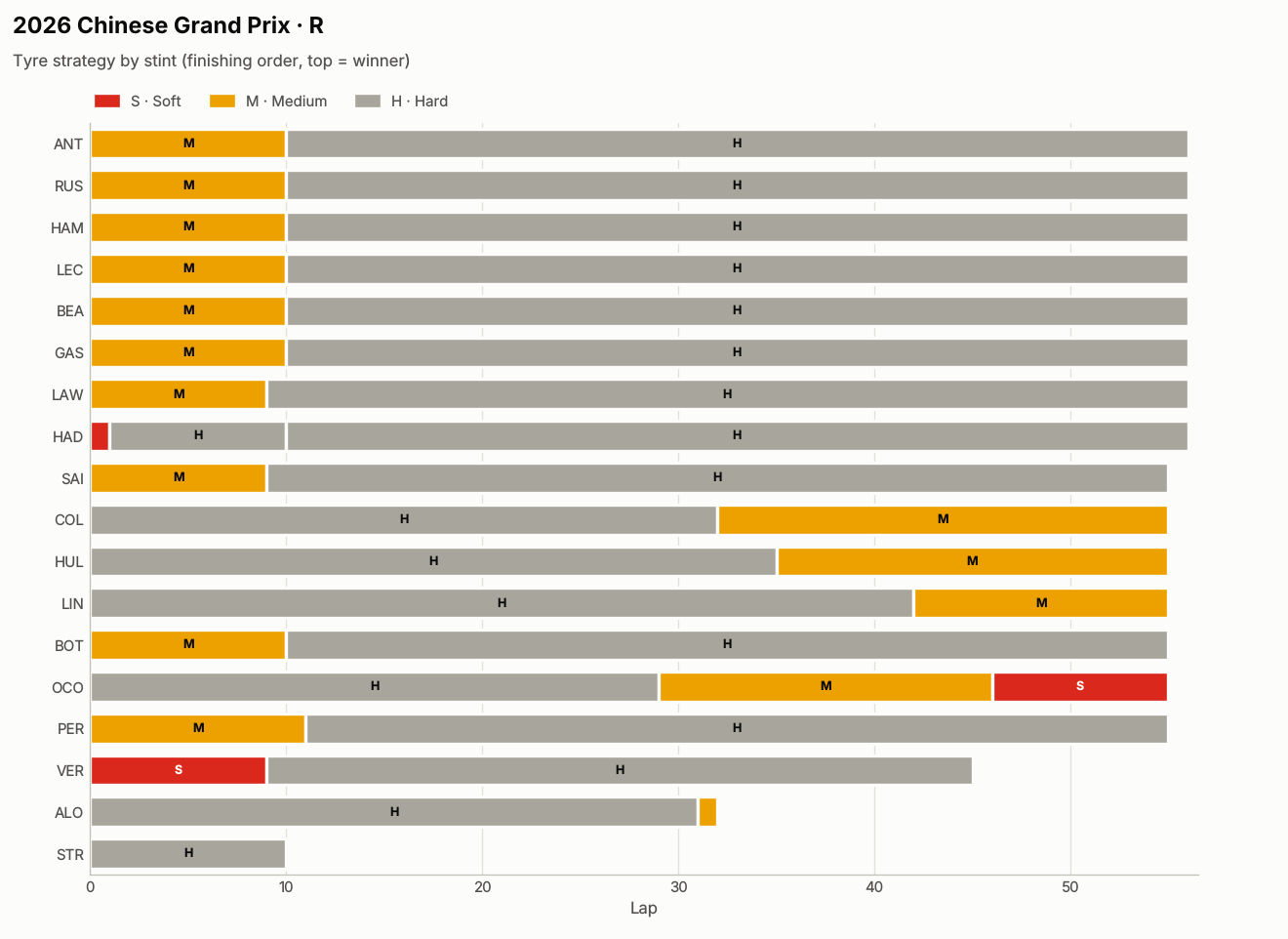 "What tyre strategies did teams run in China this year?" plot_tyre_strategy |
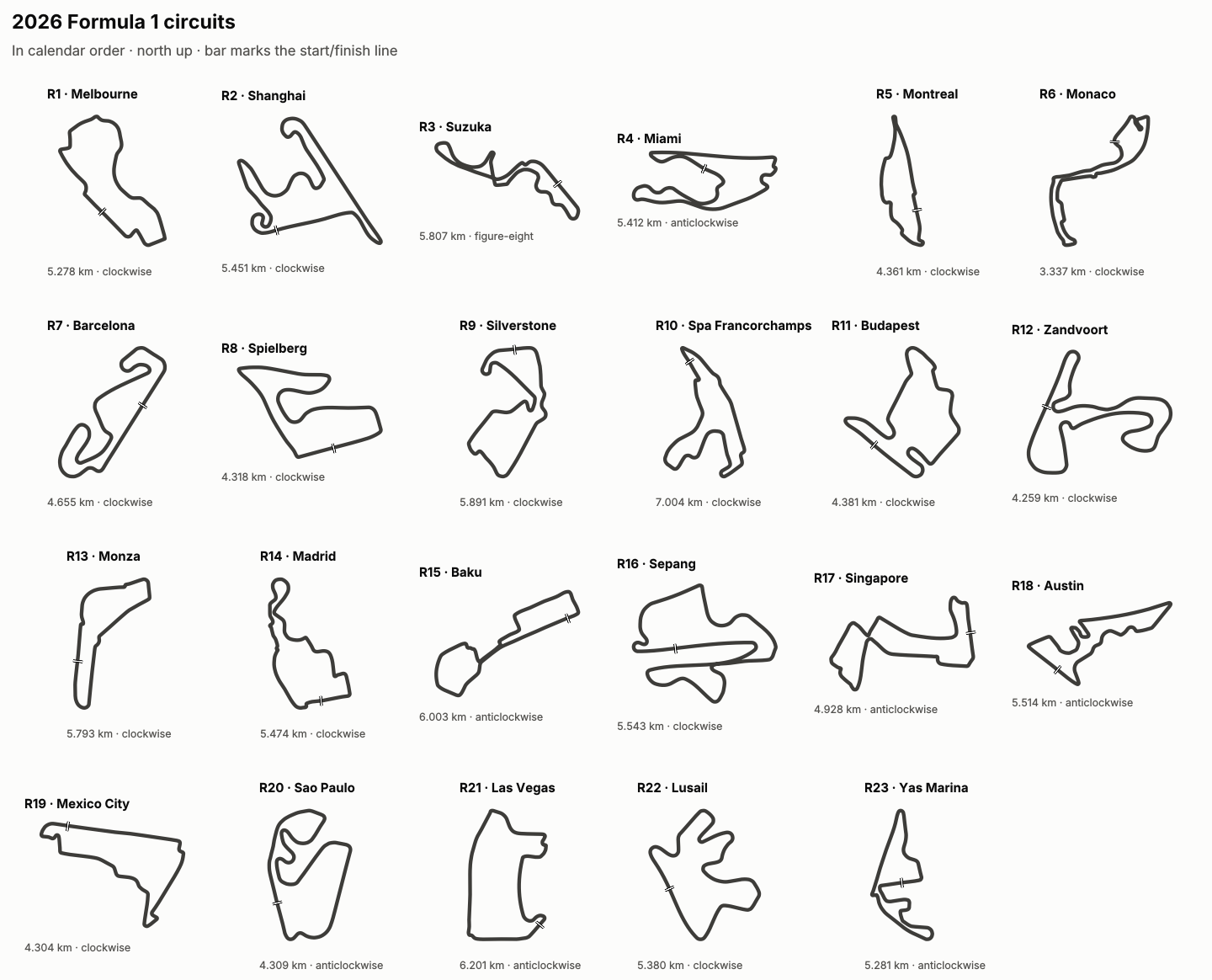 "Draw every circuit on the 2026 calendar." Works offline. plot_circuit(year=2026) |
Quick start
No clone needed — uv runs the published package.
Claude Code
claude mcp add fastf1 -- uvx fastf1-mcp-server
Claude Desktop — add to claude_desktop_config.json and restart:
{
  "mcpServers": {
    "fastf1": {
      "command": "uvx",
      "args": ["fastf1-mcp-server"]
    }
  }
}
Then ask: "Plot the tyre strategies from the 2025 British Grand Prix" or "Who led every lap of the 2021 Saudi Arabian GP, and when were the red flags?"
Requirements
- Python 3.12+
- uv (recommended) or pip
Installation
With uv (recommended)
git clone https://github.com/Surya96t/fastf1-mcp
cd fastf1-mcp
uv sync
With pip
pip install fastf1-mcp-server
Running the server
# via uv (development)
uv run fastf1-mcp-server

# or directly
python -m fastf1_mcp
MCP Inspector (development / debugging)
# Option A — official npx inspector
npx @modelcontextprotocol/inspector uv --directory . run fastf1-mcp-server

# Option B — fastmcp wrapper
uv run fastmcp dev inspector -m fastf1_mcp.server --with-editable .
Both open the inspector at http://localhost:6274.
Claude Desktop configuration (from a clone)
Add the following to ~/Library/Application Support/Claude/claude_desktop_config.json (macOS) or %APPDATA%\Claude\claude_desktop_config.json (Windows):
{
  "mcpServers": {
    "fastf1": {
      "command": "uv",
      "args": ["run", "fastf1-mcp-server"],
      "cwd": "/absolute/path/to/fastf1-mcp",
      "env": {
        "FASTF1_MCP_LOG_LEVEL": "INFO",
        "FASTF1_MCP_MAX_CACHED_SESSIONS": "10"
      }
    }
  }
}
Restart Claude Desktop after saving. The server name fastf1 will appear in the tools panel.
Configuration
All settings are read from environment variables with the FASTF1_MCP_ prefix.
| Variable | Default | Description |
|---|---|---|
FASTF1_MCP_FASTF1_CACHE_PATH |
~/.fastf1_cache |
Disk cache for FastF1 session files |
FASTF1_MCP_MAX_CACHED_SESSIONS |
10 |
Max sessions held in memory (LRU) |
FASTF1_MCP_DEFAULT_TELEMETRY_SAMPLES |
200 |
Default telemetry sample points |
FASTF1_MCP_MAX_TELEMETRY_SAMPLES |
500 |
Hard cap on telemetry sample points |
FASTF1_MCP_EXPORT_DIR |
./fastf1-exports |
Directory for CSV exports (relative to server cwd) |
FASTF1_MCP_AUTO_EXPORT_ROWS |
50 |
Auto-export to CSV when the bulk array exceeds this many rows. Set to 0 to disable. |
FASTF1_MCP_REPLAY_STREAM_HOST |
127.0.0.1 |
f1-race-replay telemetry stream host (keep on loopback — the stream is unauthenticated) |
FASTF1_MCP_REPLAY_STREAM_PORT |
9999 |
f1-race-replay telemetry stream port |
FASTF1_MCP_LOG_LEVEL |
INFO |
Python logging level |
Exporting full datasets for analysis
get_lap_times, get_stint_analysis, get_lap_telemetry, and
compare_telemetry route the bulk data array through CSV when the user
needs the file rather than the inline JSON.
Two ways the export gets triggered:
- Auto-export (default for large responses) — when the response's
bulk array would exceed
FASTF1_MCP_AUTO_EXPORT_ROWSrows (default 50), the server writes it to CSV inFASTF1_MCP_EXPORT_DIRand the response carriesexportPath+ anoteinstead of the array. This catches full-race lap-time queries, full-grid stint analyses, and 200-point telemetry traces — exactly the cases where MCP clients would otherwise silently spill the response to an opaque temp file. - Explicit
export_pathparameter — pass it on the tool call:export_path=True→ write to<FASTF1_MCP_EXPORT_DIR>/<auto-named>.csvexport_path="data/laps"→ write the auto-named file into the given directoryexport_path="data/ver-monaco.csv"→ write to exactly that file
The summary field is always included so a chat-only user can still
answer "what was the fastest lap / what's the strategy" without opening
the file. Relative paths resolve against the MCP server's working
directory — under Claude Desktop, that's the cwd set in your MCP
config, so files land in the user's project directory by default.
Tools
Quick Lookup (Ergast API — 1950-present)
| Tool | Description |
|---|---|
get_schedule |
Get the F1 race calendar for a season. |
get_driver_standings |
Get driver championship standings. |
get_constructor_standings |
Get constructor championship standings. |
get_driver_info |
Get driver information. |
get_race_results_historical |
Get historical race results (pre-2018 or when session data unavailable). |
get_circuit_info |
Get circuit information. |
Session Data (FastF1 Live Timing — 2018-present)
| Tool | Description |
|---|---|
get_session_results |
Get session classification/results. |
get_lap_times |
Get all lap times for a driver in a session. |
get_fastest_laps |
Get fastest laps in a session, one per driver. |
get_race_pace |
Calculate average race pace for all drivers. |
get_stint_analysis |
Analyze tire stints for a race. |
get_pit_stops |
Get all pit stops from a race. |
get_qualifying_breakdown |
Get qualifying results split by Q1/Q2/Q3. |
Telemetry (FastF1 Live Timing — 2018-present)
| Tool | Description |
|---|---|
get_lap_telemetry |
Get telemetry data for a specific lap. |
compare_telemetry |
Compare telemetry between two drivers on the same session. |
get_speed_trap_data |
Get speed trap and top-speed data for all drivers in a session. |
get_sector_times |
Get best sector times and theoretical best lap for each driver. |
get_corner_analysis |
Corner-by-corner apex/entry/exit speed, gear and brake point for one lap; with a second driver, where each gains or loses time. |
get_drs_zones |
DRS zones (open/close distance, length, surrounding corners) inferred from where the flap actually opened (fastest laps, or in races the laps with the most DRS use). 2018–2025 (DRS was replaced by active aero in 2026). |
Race Analysis (FastF1 Live Timing — 2018-present)
| Tool | Description |
|---|---|
get_race_control_messages |
Race control feed with a session summary: SC/VSC/red-flag periods (with laps), penalties, investigations, track-limits deletions. Filter by category, driver or lap range. |
get_weather |
Air/track temperature, humidity, wind and rain over a session, with rain periods mapped to laps. |
get_position_changes |
Lap-by-lap positions and gaps to the leader, grid→finish movement, laps led and lead changes. |
get_tyre_degradation |
Fuel-corrected degradation rate per stint and per compound, plus compound crossover estimates. Works on races and practice long runs. |
get_championship_projection |
Drivers' and constructors' standings as if the race ended at any lap — live points, lead changes during the race, and final official standings. Handles sprint weekends and the 2019–2024 fastest-lap point. |
Charts (PNG images)
| Tool | Description |
|---|---|
plot_speed_trace |
Speed vs distance for one lap, or two drivers overlaid with a time-gap panel and corner markers. |
plot_position_chart |
Race history chart — every driver's position by lap, up to 8 highlighted. |
plot_tyre_strategy |
Stint bars coloured (and lettered) by compound, in finishing order. |
plot_lap_times |
Lap time vs lap for up to 3 drivers, marker shape = compound. |
plot_track_map |
Circuit map of a lap coloured by speed or gear, with numbered corners, DRS zones and direction of travel — or, with at_lap, every car's position on track at the start of that lap. Falls back to the stored outline when FastF1 telemetry can't be downloaded. |
plot_circuit |
Real circuit outline from bundled data — works offline. By name ("Monaco", "COTA", "Spa"), Grand Prix, or year + round; with only a year, a sheet of that season's circuits. Shows official length, direction of racing and start/finish. |
All chart tools accept save_path to also write the PNG into the export directory. plot_speed_trace also shades where DRS was open.
Live Replay (f1-race-replay)
These read the telemetry stream that f1-race-replay broadcasts on localhost:9999 while a replay is playing. Start a replay there (python main.py --viewer --year 2024 --round 12), then ask Claude what's happening.
| Tool | Description |
|---|---|
get_replay_state |
Snapshot: replay time, lap, leader, track status, safety car, weather, live leaderboard (tyre, speed, DRS, pit, gaps) and latest race-control messages. |
watch_replay |
Watch for N seconds and report overtakes, pit entries/exits, SC/VSC/red-flag changes and new race-control messages. |
The client drains the stream continuously and disconnects promptly — f1-race-replay's server writes on its render thread, so a client that stopped reading would freeze the replay.
Utility
| Tool | Description |
|---|---|
list_events |
List all events in a season. |
list_drivers |
List all drivers in a season, optionally filtered to a specific event. |
get_cache_status |
Check server in-memory session cache status. |
clear_cache |
Clear cached sessions from in-memory storage. |
Resources
| URI | Description |
|---|---|
f1://schedule/{year} |
Full race calendar for a season |
f1://drivers/{year} |
All drivers who competed in a season |
f1://constructors/{year} |
All constructors in a season |
f1://circuits |
All F1 circuits (all-time) |
Prompts
| Prompt | Args | What it does |
|---|---|---|
race_recap |
year, event |
Results + position changes + race control + fastest laps + stints, then narrates the race |
qualifying_analysis |
year, event |
Q breakdown + sector times + corner analysis of the pole lap |
driver_comparison |
year, driver1, driver2 |
Season-level head-to-head: standings, races, qualifying |
strategy_analysis |
year, event |
Stints + pit timing + tyre degradation + SC/VSC timing + race pace — explains who won the strategy battle |
weekend_preview |
year, event |
Circuit details + recent history + championship context |
replay_commentary |
rounds |
Race-engineer radio updates on a replay running in f1-race-replay |
Example queries (Claude Desktop)
Who won the 2024 Monaco Grand Prix and what was the strategy?
→ use race_recap prompt or call get_session_results + get_stint_analysis

Compare Verstappen and Leclerc's telemetry in 2024 Monaco qualifying
→ compare_telemetry(2024, "Monaco", "Q", "VER", "LEC")

Who had the fastest theoretical lap in 2024 Silverstone qualifying?
→ get_sector_times(2024, "Silverstone", "Q")

Where did Norris lose pole to Verstappen in 2024 Spain qualifying?
→ get_corner_analysis(2024, "Spain", "Q", "NOR", driver2="VER")

Why did everyone pit on lap 34? Were there any penalties?
→ get_race_control_messages(2024, "Hungary")

How quickly did the mediums degrade compared to the hards?
→ get_tyre_degradation(2024, "Bahrain")

Show me how the 2024 Brazil race unfolded
→ plot_position_chart(2024, "Brazil", highlight=["VER", "NOR", "RUS"])

Where was everyone when the safety car came out on lap 34?
→ plot_track_map(2024, "Hungary", "R", at_lap=34)

Draw the Suzuka circuit / show me all the 2026 tracks
→ plot_circuit("Suzuka") / plot_circuit(year=2026)

Who was leading the championship on the road at half distance in Abu Dhabi?
→ get_championship_projection(2024, "Abu Dhabi", after_lap=29)

What's happening in the replay right now?
→ get_replay_state() / watch_replay(duration_sec=10)

Show me the 2024 constructor standings after round 10
→ get_constructor_standings(2024, after_round=10)
Development
# Install dev dependencies
uv sync --dev

# Run tests
uv run pytest

# Run tests with coverage
uv run pytest --cov=fastf1_mcp

# Lint
uv run ruff check src/
Data sources & coverage
| Source | Coverage | Used for |
|---|---|---|
| Ergast API (via FastF1) | 1950 – present | Standings, schedules, historical results, circuit info |
| FastF1 Live Timing | 2018 – present | Lap times, telemetry, qualifying, pit stops, tire data, race control, weather |
| MultiViewer (via FastF1) | 2018 – present | Circuit corner positions (corner analysis, speed-trace markers) |
| bacinger/f1-circuits (bundled, MIT) | all F1 circuits used 2018 – 2026 + classics | Offline circuit outlines and 2020 – 2026 calendars (plot_circuit, track-map fallback) |
Note: FastF1 session data is only available from 2018 onwards. Use
get_race_results_historicalfor earlier seasons.
License
MIT
1 maintainer

Metadata
1 maintainer
Release files for fastf1-mcp-server 0.3.0
For a detailed explanation of source distributions (sdists) and built distributions (wheels), please see the package formats documentation.
Source distribution (sdist)
| File | Size | Uploaded | Provenance | Actions |
|---|---|---|---|---|
| fastf1_mcp_server-0.3.0.tar.gz | 287.8 kB | With provenance | Details for fastf1_mcp_server-0.3.0.tar.gz |
Built distribution (wheel)
| File | Interpreter | ABI | Platform | Actions Reset |
|---|---|---|---|---|
| fastf1_mcp_server-0.3.0-py3-none-any.whl | Python 3 | none | any | Details for fastf1_mcp_server-0.3.0-py3-none-any.whl |
Total release size: 433.2 kB
Release files / fastf1_mcp_server-0.3.0.tar.gz
| Download URL | fastf1_mcp_server-0.3.0.tar.gz |
|---|---|
| Size | 287.8 kB |
| Tags | Source |
|
SHA-256 checksum How to use checksums |
07db7fc38debf7c7917943d60da80a4e815c18fa1829358e335ec503bd384493
|
|
BLAKE2b-256 checksum How to use checksums |
470af0e383616914852e24af5105f0292ff7a7b2db94e61f3a35f10548dbb48b
|
| Upload date | |
|
Uploaded using Trusted Publishing? What is trusted publishing? |
Yes |
| Uploaded via |
twine/7.0.0 CPython/3.13.16
|
Provenance
Provenance describes where a file came from. On PyPI, provenance is shared via attestations, which provide a verifiable record of the build or publishing details. View details, limitations and caveats.


PyPI Publish Attestation
PyPI verified that this artifact, at this checksum, originated from the publisher listed below.
Signed by GitHub Actions, verified by PyPI on Nov 20, 2026.
Transparency logRelease files / fastf1_mcp_server-0.3.0-py3-none-any.whl
| Download URL | fastf1_mcp_server-0.3.0-py3-none-any.whl |
|---|---|
| Size | 145.4 kB |
| Tags | Python 3 |
|
SHA-256 checksum How to use checksums |
0a7b81fe06f6b7efcf57581ac0cca410725d15c7bde6cc694610cdf79ddfced0
|
|
BLAKE2b-256 checksum How to use checksums |
c502b7b0572837d315017bd6be2ab0bf7176a73929b3ff8c498275e61ebc11eb
|
| Upload date | |
|
Uploaded using Trusted Publishing? What is trusted publishing? |
Yes |
| Uploaded via |
twine/7.0.0 CPython/3.13.16
|
Provenance
Provenance describes where a file came from. On PyPI, provenance is shared via attestations, which provide a verifiable record of the build or publishing details. View details, limitations and caveats.
PyPI Publish Attestation
PyPI verified that this artifact, at this checksum, originated from the publisher listed below.
Signed by GitHub Actions, verified by PyPI on Nov 20, 2026.
Transparency logSecurity for fastf1-mcp-server 0.3.0
Provenance
Provenance describes where a file came from. On PyPI, provenance is shared via attestations, which provide a verifiable record of the build or publishing details. View details, limitations and caveats.
Full provenance
Both files in this release have been uploaded with provenance metadata.
Attestation for fastf1_mcp_server-0.3.0.tar.gz
PyPI Publish Attestation
PyPI verified that this artifact, at this checksum, originated from the publisher listed below.
Signed by GitHub Actions, verified by PyPI on Nov 20, 2026.
Transparency logA note on package security
PyPI is a repository for distributing packages, not a service for auditing them. While third-party security researchers and our staff do their best to detect and remove malicious packages, PyPI cannot guarantee the quality, security or suitability of any given package.
To learn more about protecting yourself from malicious actors, visit our package security documentation.














