





fastmolwidget
A PyQt/PySide6 widget to display crystal structures
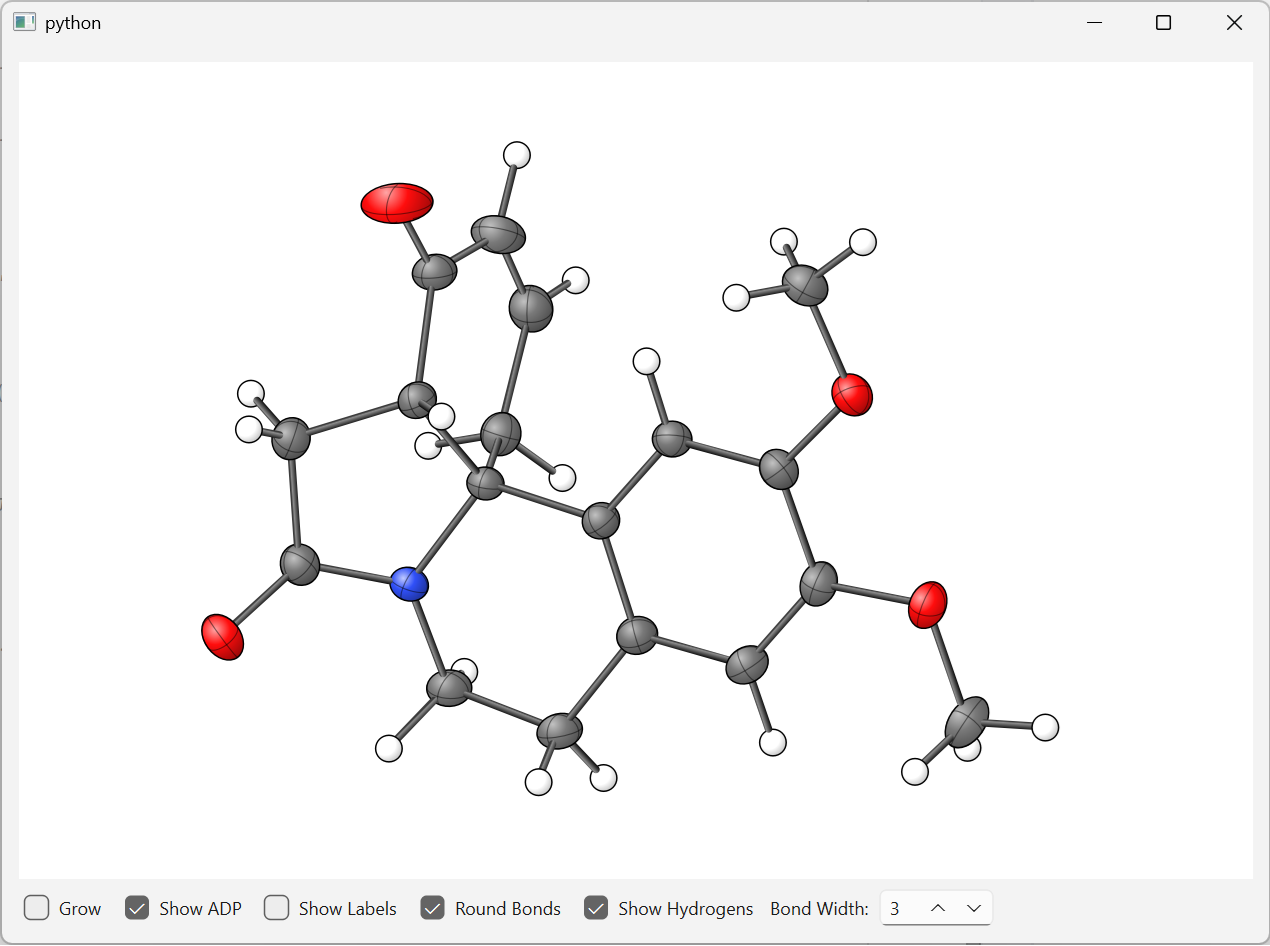
fastmolwidget is a lightweight, embeddable Qt widget that renders molecular and crystal structures in both 2D projection and 3D OpenGL. It supports anisotropic displacement parameter (ADP) ellipsoids, ball-and-stick diagrams, and plain sphere representations. The 2D backend uses a pure-Python QPainter renderer (no OpenGL required); the 3D backend uses hardware-accelerated OpenGL with sphere and ellipsoid impostors. A Qt Quick backend is also available for embedding the 2D renderer inside a QML scene.
Screenshots
| 2D (QPainter) | 3D (OpenGL) |
|---|---|
 |
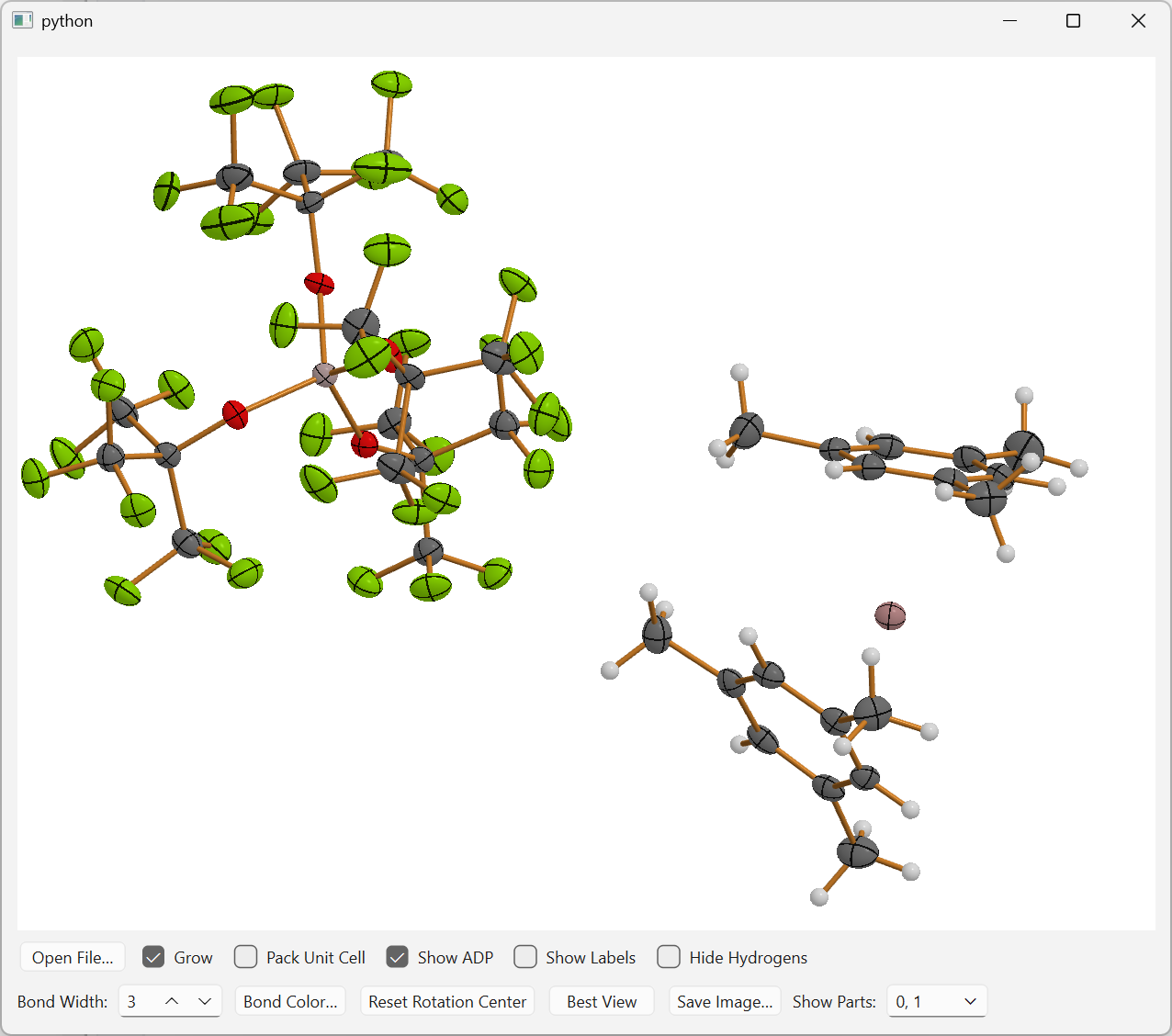 |
| ORTEP-style crystal structure with ADP ellipsoids (2D QPainter backend) | Real-time 3D ball-and-stick view with depth-shaded spheres and cylinder bonds (OpenGL backend) |
Features
- ADP ellipsoids at the 50 % probability level
- Ball-and-stick and isotropic sphere
- Real-time 3D rendering via
MoleculeWidget3D— sphere impostors and tessellated cylinder bonds in hardware-accelerated OpenGL - Interactive mouse controls: rotate (left-drag), zoom (right-drag), pan (middle-drag), scroll wheel to resize labels
- Atom and bond selection: single click or Ctrl+click for multi-selection; emits
atomClicked/bondClickedQt signals - Hover labels: hovering over an atom shows its label; hovering over a bond shows the distance in Ångströms
- Hydrogen visibility toggle
- Atom label display toggle with adjustable font size
- Bond width adjustment via spin box
- Configurable bond color — set programmatically or via the control-bar color picker
- Residual (Fo−Fc) density maps — computed on the fly from a SHELX
.hkl(or an fcf-style CIF reflection loop) plus the refined model, and drawn as green/red wireframe isosurfaces in all three renderers; no pre-computed map file needed (see Residual density maps) - Multiple file formats: CIF, SHELX
.res/.ins, and plain XYZ. More to come... - Embeddable — both
MoleculeWidget(2D) andMoleculeWidget3D(3D) are plainQWidgetsubclasses; drop either into any layout - Qt Quick support —
MoleculeQuickItem(QQuickPaintedItem) andMoleculeViewerQuickWidgetallow embedding the 2D renderer in a QML scene - Ready-to-use viewers —
MoleculeViewerWidget(2D),MoleculeViewer3DWidget(3D), andMoleculeViewerQuickWidget(Qt Quick) bundle the renderer with a full control bar - Common protocol —
MoleculeWidgetProtocollets you write code that works with either widget interchangeably - HTML / browser output — a dependency-free JavaScript port of the 2D renderer ships with the package;
fastmolwidget.webhands you the renderer and the structure as ready-to-embed strings for HTML reports (see Embedding in HTML reports)
Supported File Formats
| Extension | Format | Notes |
|---|---|---|
.cif |
Crystallographic Information File | Reads atoms, unit cell, and ADPs |
.res / .ins |
SHELXL instruction file | Reads atoms and unit cell via shelxfile |
.xyz |
Standard XYZ coordinate file | Cartesian coordinates, no cell or ADPs |
Installation
# with PySide6 (recommended)
uv add "fastmolwidget[pyside6]"

# or PyQt6
uv add "fastmolwidget[pyqt6]"

# add 3D OpenGL support (optional, requires Qt ≥ 6.7 and pyopenGL installed in the Python environment)
uv add "fastmolwidget[pyside6,gl3d]"
Optional C++ Acceleration (sdm_cpp)
The symmetry-growing step (SDM) has an optional C++ extension that uses pybind11 and OpenMP for a significant speed-up on large structures. The pure-Python fallback is always available.
uv pip install pybind11
uv pip install -e . --no-build-isolation

# macOS: optionally install libomp for multi-threaded acceleration
brew install libomp
Requirements: Python ≥ 3.12, NumPy, gemmi, shelxfile, qtpy, and either PySide6 or PyQt6.
Quick Start
Standalone 2D viewer
from qtpy.QtWidgets import QApplication
from fastmolwidget import MoleculeViewerWidget

app = QApplication([])
viewer = MoleculeViewerWidget()
viewer.load_file("structure.cif")
viewer.show()
app.exec()
Standalone 3D viewer
from qtpy.QtWidgets import QApplication
from fastmolwidget import MoleculeViewer3DWidget

app = QApplication([])
viewer = MoleculeViewer3DWidget()
viewer.load_file("structure.cif")
viewer.show()
app.exec()
Qt Quick viewer
The Qt Quick viewer embeds the 2D QPainter renderer inside a QML scene with a QML-native control bar.
from qtpy.QtWidgets import QApplication
from qtpy.QtCore import QTimer
from fastmolwidget import MoleculeViewerQuickWidget

app = QApplication([])
viewer = MoleculeViewerQuickWidget()
viewer.resize(900, 650)
viewer.show()
# Load after show so the QML Component.onCompleted has fired
QTimer.singleShot(100, lambda: viewer.load_file("structure.cif"))
app.exec()
Note:
load_filemust be called after the widget is shown and the QML scene has initialised. Using a shortQTimer.singleShotdelay is the simplest approach.
Embedding the 3D widget in your own layout
from fastmolwidget import MoleculeWidget3D

mol = MoleculeWidget3D(parent=self)
mol.open_molecule(atoms, cell=cell)
layout.addWidget(mol)
Embedding the 2D widget in your own layout
from fastmolwidget import MoleculeWidget, MoleculeLoader

mol = MoleculeWidget(parent=self)
loader = MoleculeLoader(mol)
# The loader recognizes the file format from the extension and populates `mol` accordingly
loader.load_file("structure.cif")

# drop `mol` into any QLayout
layout.addWidget(mol)
Loading a different file at runtime
viewer.load_file("new_structure.res")
Reacting to atom / bond clicks
mol.atomClicked.connect(lambda label: print(f"Clicked atom: {label}"))
mol.bondClicked.connect(lambda a, b: print(f"Clicked bond: {a}–{b}"))
Mouse Controls
| Action | Effect |
|---|---|
| Left-drag | Rotate the molecule |
| Right-drag | Zoom in / out |
| Middle-drag | Pan the view |
| Middle-click | Recentre the rotation pivot on the clicked atom (3D only) |
| Alt/Option + Left-click | On systems without a middle mouse button, Alt/Option + Left-click recentres the rotation pivot on the clicked atom (same as Middle-click) |
| Scroll wheel | Increase / decrease label font size |
| Ctrl + Scroll wheel | Raise / lower the residual-density contour level by 0.02 e/ų per notch (passed through when no density map is shown) |
| Left-click | Select a single atom or bond |
| Ctrl + Left-click | Toggle multi-selection |
| Hover over atom | Show the atom label (enlarged when persistent labels are on) |
| Hover over bond | Show the bond distance (Å) in a rounded tooltip near the cursor |
Keyboard Shortcuts
The widget must have keyboard focus (click on it once) for these shortcuts to work.
| Key | Effect |
|---|---|
| F1 | Align the view so that the reciprocal axis a* points towards the viewer (requires a unit cell) |
| F2 | Align the view so that the reciprocal axis b* points towards the viewer (requires a unit cell) |
| F3 | Align the view so that the reciprocal axis c* points towards the viewer (requires a unit cell) |
Note: The F-key shortcuts are available in both the 2D (
MoleculeWidget) and 3D (MoleculeWidget3D) renderers. They have no effect when no unit cell is loaded (e.g. plain XYZ files).
Control Bar Options
MoleculeViewerWidget (2D) and MoleculeViewer3DWidget (3D)
Both viewers expose the same two-row control bar:
Row 1 — structure toggles
| Control | Default | Description |
|---|---|---|
| Open File… | — | Opens a file dialog to load a structure file |
| Grow | ✗ | Expand the asymmetric unit to complete molecules (mutually exclusive with Pack Unit Cell) |
| Pack Unit Cell | ✗ | Generate all symmetry-equivalent positions within one unit cell (mutually exclusive with Grow) |
| Show ADP | ✓ | Toggle ORTEP ellipsoid / isotropic sphere rendering |
| Show Labels | ✗ | Toggle non-hydrogen atom labels |
| Hide Hydrogens | ✗ | When checked, hydrogen atoms and their bonds are hidden |
Row 2 — bond and view controls
| Control | Default | Description |
|---|---|---|
| Bond Width | 3 | Stroke width / cylinder radius for bonds (2D: 1–15, 3D: 0–15) |
| Bond Color | — | Opens a colour picker to change the default bond colour |
| Reset Rotation Center | — | Restores the rotation pivot to the molecule's geometric centre (both 2D and 3D) |
| Best View | — | Rotates the current structure to a visibility-optimized orientation (PCA on visible atoms) |
| Save Image… | — | Opens a file-save dialog and writes the current view to a PNG or JPEG file |
| Residual Density | off | Checkable — pressed (sunken, green) while the Fo−Fc isosurface is shown; click again to hide it. Uses reflections embedded in the model file directly, and opens a file dialog when a separate reflection file is needed |
| Level | 3σ | Contour level of the residual-density isosurface in e/ų; defaults to 3× the map RMS and is enabled only while density is shown. Ctrl + mouse wheel over the structure changes it too, in 0.02 e/ų steps |
| Parts | All | Filter displayed disorder parts; shown when multiple part values are present |
When Pack Unit Cell is active, a unit-cell axis indicator (a = red, b = green, c = blue) is drawn in the bottom-left corner of the widget and rotates with the view.
MoleculeViewerQuickWidget (Qt Quick)
The Qt Quick viewer provides the same two-row control bar as the widget viewers, but implemented in QML (qml/MoleculeViewer.qml). All controls and features are identical, Residual Density and Level included; the Parts filter uses a QML Popup (opens upward) with checkable items instead of the QComboBox-based PartFilterWidget, and the level control is qml/DensityLevelSpinBox.qml (QtQuick's SpinBox is integer-only, so it holds hundredths of an e/ų internally).
API Overview
MoleculeViewer3DWidget(parent=None)
A self-contained 3D viewer combining MoleculeWidget3D with the control bar.
load_file(path)— load a structure file (format auto-detected from extension:.cif,.res,.ins,.xyz)grow()— expand the asymmetric unit to complete molecules using crystal symmetry; deactivates Pack Unit Cell if active; no-op for XYZ files or when no file is loadedset_bond_color(color)— set the default color for non-selected bondsrender_widget— read-only property exposing the underlyingMoleculeWidget3D
MoleculeViewerQuickWidget(parent=None)
A self-contained Qt Quick viewer embedding a QQuickWidget with a QML control bar and a MoleculeQuickItem renderer. Degrades gracefully to a text label when Qt Quick is unavailable.
load_file(path)— load a structure file (format auto-detected from extension:.cif,.res,.ins,.xyz). Must be called after the widget is shown and the QML scene has initialised (useQTimer.singleShotfor a short delay).set_bond_color(color)— set the default color for non-selected bondsshow_residual_density(hkl_path=None, level=None)/clear_residual_density()— as on the other viewers; the QML button and Level spin box follow alongrender_widget— read-only property exposing the underlyingMoleculeQuickItem(Nonebefore the QMLComponent.onCompletedfires or when Qt Quick is unavailable)
MoleculeQuickItem(parent=None)
The Qt Quick renderer. A QQuickPaintedItem subclass that shares all drawing logic with MoleculeWidget via MoleculeRendererMixin. Register with QML before use:
from qtpy.QtQml import qmlRegisterType
from fastmolwidget import MoleculeQuickItem

qmlRegisterType(MoleculeQuickItem, "Fastmolwidget", 1, 0, "MoleculeItem")
Then in QML:
import Fastmolwidget 1.0
MoleculeItem { id: mol; anchors.fill: parent }
The item exposes the same data and display methods as MoleculeWidget (see below): open_molecule, clear, show_adps, set_isotropic_u_scaling, show_labels, show_hydrogens, set_visible_parts, set_bond_width, set_bond_color, set_labels_visible, setLabelFont, set_background_color, reset_view, align_best_view, save_image.
MoleculeWidget3D(parent=None)
Hardware-accelerated OpenGL renderer. A QOpenGLWidget (Qt ≥ 6) or QWidget subclass that can be dropped into any layout.
Rendering technique
| Primitive | Technique |
|---|---|
| Atoms | Billboard sphere impostors — each atom is a quad; the fragment shader ray-casts a sphere and writes corrected depth values |
| ADP ellipsoids | Impostor quads — the fragment shader ray-casts an exact ellipsoid using the inverse U_cart tensor passed as a mat3 uniform |
| Bonds | Tessellated cylinder mesh (8-segment, 4-segment for angular style) built on the CPU and uploaded as a single VBO |
| Labels | QPainter overlay drawn after the OpenGL pass |
GLSL shader targets are platform-aware: #version 120 on macOS (OpenGL 2.1 / GLSL 1.20) and #version 140 on Windows/Linux (OpenGL 3.1+ / GLSL 1.40).
Qt Signals
| Signal | Signature | Emitted when |
|---|---|---|
atomClicked |
(label: str) |
The user clicks on an atom |
bondClicked |
(label1: str, label2: str) |
The user clicks on a bond |
Data Methods
-
open_molecule(atoms, cell=None, keep_view=False)
Load a new set of atoms and redraw.atoms— list ofAtomtuple(label, type, x, y, z, part, adp=None, u_iso=None)in Cartesian coordinates (Å); embedadp=(U11,U22,U33,U23,U13,U12)directly in the tuple for anisotropic atoms, oru_iso=U(Ų) for isotropically refined onescell— optional(a, b, c, α, β, γ)tuple; required for ADP renderingkeep_view— preserve current zoom, rotation, and pan whenTrue
-
grow_molecule(atoms, cell=None)
Replace atoms while preserving the view. Equivalent toopen_molecule(..., keep_view=True). -
clear()
Remove all atoms and bonds.
Display Methods
show_adps(value: bool)— toggle ADP ellipsoid rendering; atoms with only an isotropicu_isoare drawn as spheres of radius1.5382 · √U_iso(50 % probability, the same convention as the ellipsoids), and atoms without a usable U keep their element display radius. WhenFalse, every atom uses its element display radiusset_isotropic_u_scaling(value: bool)— choose how isotropically refined atoms are sized while ADPs are shown:True(default) scales them by their U value,Falsedraws them at the fixed element display radius. Anisotropic atoms are unaffectedshow_labels(value: bool)— show / hide atom labelsshow_hydrogens(value: bool)— show / hide hydrogen atoms and bondsset_visible_parts(parts: set[int] | None)— filter by disorder part;Noneshows all atoms; an empty set hides all atoms; e.g.set_visible_parts({0, 1})shows only Part 0 and Part 1set_bond_width(width: int)— set cylinder radius scale (0–15)set_bond_color(color)— set the default color for non-selected bonds; acceptsQColor, hex string, or an RGB tupleset_labels_visible(visible: bool)— alias forshow_labelssetLabelFont(font_size: int)— set label font pixel sizeset_background_color(color: QColor)— change background colourreset_view()— reset zoom, rotation, and pan to defaultsalign_best_view()— rotate the structure so the widest face points towards the viewer (PCA on visible atoms; H/D excluded when hydrogen visibility is off)reset_rotation_center()— restore the rotation pivot to the molecule's geometric center (undoes a middle-click recentring)save_image(filename: Path, image_scale: float = 1.5)— capture the current OpenGL framebuffer and write it to a PNG or JPEG file (format inferred from the file extension). The captured image is then scaled byimage_scaleusing smooth bilinear filtering before saving. Labels appear in the saved image if they are active at the time of the call.
Residual-density Methods
show_residual_density(hkl_path=None, level=None, *, model_path=None)— compute a residual (Fo−Fc) map and display it as wireframe isosurfaces (green at+level, red at-level, in e/ų).level=Nonecontours at 3σ of the map, which adapts to each structure;hkl_path=Noneuses the source declared withset_model_source(), else finds the reflections automatically — the model file itself, then siblings of the same basename;model_pathdefaults to the declared model or the file the widget last loaded. Both accept a path, an in-memorygemmi.cif.Document/Block, agemmi.SmallStructure(model) orReflectionData(reflections). Note the control-bar button is deliberately stricter and only auto-uses reflections that are declared or embedded in the model, asking for anything else. OnMoleculeViewer3DWidgetthis also presses the Residual Density button in and updates the Level spin box, so the controls never disagree with the view. RaisesRuntimeErrorwhen no model is available or the compileddensity_cppextension is missing, andFileNotFoundErrorwhen no reflection data can be found.set_model_source(model=None, reflections=None)— declare what the displayed atoms came from when they were handed over withopen_molecule()instead of loaded from a file. Accepts a path, agemmi.cif.Document/Blockor agemmi.SmallStructure; a cached map is dropped when the sources really change (reloading the same file, as Grow and Pack do, keeps it).has_residual_density_data(property) — whether a map could be computed right now, checked without computing one. Use it to enable or disable a density control after loading a structure.set_residual_density_level(level: float)— re-contour the already computed map; much cheaper than recomputing. No-op when no map is loaded. EmitsdensityLevelChanged(float)when the value actually changes.step_residual_density_level(steps: int) -> bool— raise or lower the level by steps wheel notches (molecule_base.DENSITY_LEVEL_STEP, 0.02 e/ų each), clamped toDENSITY_LEVEL_MIN…DENSITY_LEVEL_MAX. Backs Ctrl + mouse wheel; returnsFalsewhen no map is loaded.clear_residual_density()— remove the isosurface.refresh_residual_density()— re-clip the cached map around the atoms that are visible now. Only needed by hosts that change the displayed atoms behind the widget's back; loading a molecule and the hydrogen / disorder-part filters do it themselves.residual_density_map(property) — the computedResidualDensityMap(with.max,.min,.rms,.d_minand the raw.arraygrid), orNone.residual_density_level(property) — the contour level the surface is currently drawn at, in e/ų.
All three renderers implement these.
MoleculeWidget3Ddraws a true 3-D wireframe isosurface with depth testing;MoleculeWidget(2D) andMoleculeQuickItemproject the same cage into their 2-D view, on top of the atoms and bonds, and it follows every rotation without re-contouring.
Example — feeding atom data directly to MoleculeWidget3D
from fastmolwidget import MoleculeWidget3D, Atomtuple

mol = MoleculeWidget3D(parent=self)

# Embed ADP tensors directly in each Atomtuple (None = isotropic / no ADP)
atoms = [
    Atomtuple(label="C1", type="C", x=0.0,  y=0.0,  z=0.0,  part=0,
              adp=(0.02, 0.02, 0.02, 0.0, 0.0, 0.0)),
    Atomtuple(label="O1", type="O", x=1.22, y=0.0,  z=0.0,  part=0,
              adp=(0.03, 0.03, 0.03, 0.0, 0.0, 0.0)),
    Atomtuple(label="H1", type="H", x=-0.5, y=0.94, z=0.0,  part=0),
]

cell = (5.0, 5.0, 5.0, 90.0, 90.0, 90.0)

mol.open_molecule(atoms=atoms, cell=cell)
mol.atomClicked.connect(lambda label: print(f"Selected: {label}"))

layout.addWidget(mol)
MoleculeViewerWidget(parent=None)
A self-contained 2D viewer combining MoleculeWidget with the control bar.
load_file(path)— load a structure file (format auto-detected from extension)grow()— expand the asymmetric unit to complete molecules using crystal symmetry; deactivates Pack Unit Cell if active; no-op for XYZ files or when no file is loadedset_bond_color(color)— set the default color for non-selected bondsrender_widget— read-only property exposing the underlyingMoleculeWidget
MoleculeWidget(parent=None)
The 2D QPainter renderer. A plain QWidget subclass you can drop into any layout.
Qt Signals
| Signal | Signature | Emitted when |
|---|---|---|
atomClicked |
(label: str) |
The user clicks on an atom; label is the atom name (e.g. "C1") |
bondClicked |
(label1: str, label2: str) |
The user clicks on a bond; both atom labels are passed |
Data Methods
-
open_molecule(atoms, cell=None, keep_view=False)
Load a new set of atoms and reset (or optionally preserve) the view.atoms— list ofAtomtuple(label, type, x, y, z, part, adp=None, u_iso=None)in Cartesian coordinates (Å); embedadp=(U11,U22,U33,U23,U13,U12)for anisotropic atoms, oru_iso=U(Ų) for isotropically refined onescell— optional(a, b, c, α, β, γ)tuple of unit-cell parameters (Å / °); required for ADP renderingkeep_view— whenTrue, the current zoom, pan, and rotation are preserved (useful for live updates)
-
grow_molecule(atoms, cell=None)
Replace the atom set while always preserving the current view.
Equivalent to callingopen_molecule(..., keep_view=True). -
clear()
Remove all atoms and bonds from the display.
Display Methods
-
show_adps(value: bool)
Toggle ORTEP-style ADP ellipsoid rendering. Atoms with only an isotropicu_isoare drawn as spheres of radius1.5382 · √U_iso(50 % probability, the same convention as the ellipsoids); atoms without a usable U keep their element display radius. WhenFalse, every atom uses its element display radius. -
set_isotropic_u_scaling(value: bool)
Choose how isotropically refined atoms are sized while ADPs are shown:True(the default) scales them by their U value,Falsedraws them at the fixed element display radius. Anisotropic atoms are unaffected. -
show_labels(value: bool)
Show or hide non-hydrogen atom labels. -
show_hydrogens(value: bool)
Show or hide hydrogen / deuterium atoms and their bonds. -
set_visible_parts(parts: set[int] | None)
Filter by disorder part number.None(the default) shows all parts. Pass a set of integers to restrict rendering to those parts; an empty set hides every atom. Example:widget.set_visible_parts({0, 1})shows Part 0 and Part 1. -
set_bond_width(width: int)
Set the stroke width for bonds in pixels (valid range: 1–15). -
set_bond_color(color)
Set the default color for non-selected bonds. AcceptsQColor, hex string (e.g."#d1812a"), or an RGB tuple (floats in[0..1]or integers in[0..255]). -
set_labels_visible(visible: bool)
Alias forshow_labels. -
setLabelFont(font_size: int)
Set the pixel size used for atom labels. -
set_background_color(color: QColor)
Change the widget background color. -
reset_view()
Reset zoom, pan, and rotation to their defaults. -
align_best_view()
Rotate the structure to the orientation that maximises atom visibility for screenshots. Uses PCA on the currently visible atom positions: the thinnest axis of the atom cloud points towards the camera so the widest face faces the viewer. Hydrogen / deuterium atoms are excluded when their visibility is turned off. -
save_image(filename: Path, image_scale: float = 1.5)
Render the current structure view to an image file.
The widget is redrawn off-screen atwidget_size × image_scale; the result is saved as PNG or JPEG (format inferred from the file extension).
Labels appear in the saved image if they are active at the time of the call.
Example — feeding atom data directly to MoleculeWidget (2D)
from fastmolwidget import MoleculeWidget, Atomtuple

mol = MoleculeWidget(parent=self)

# Embed ADP tensors directly in each Atomtuple (omit or use None = isotropic)
atoms = [
    Atomtuple(label="C1", type="C", x=0.0,  y=0.0,  z=0.0,  part=0,
              adp=(0.02, 0.02, 0.02, 0.0, 0.0, 0.0)),
    Atomtuple(label="O1", type="O", x=1.22, y=0.0,  z=0.0,  part=0,
              adp=(0.03, 0.03, 0.03, 0.0, 0.0, 0.0)),
    Atomtuple(label="H1", type="H", x=-0.5, y=0.94, z=0.0,  part=0),
]

cell = (5.0, 5.0, 5.0, 90.0, 90.0, 90.0)  # optional

mol.open_molecule(atoms=atoms, cell=cell)
mol.atomClicked.connect(lambda label: print(f"Selected: {label}"))

layout.addWidget(mol)
Advanced API
MoleculeWidgetProtocol
The core rendering interface is defined by MoleculeWidgetProtocol. MoleculeWidget (2D), MoleculeWidget3D (3D), and MoleculeQuickItem (Qt Quick) all satisfy this protocol, making them drop-in replacements for each other.
from fastmolwidget.molecule_base import MoleculeWidgetProtocol
from fastmolwidget import MoleculeWidget3D

def do_something_with_widget(widget: MoleculeWidgetProtocol):
    ...
3D Application Example
import sys
from qtpy.QtWidgets import QApplication
from fastmolwidget import MoleculeViewer3DWidget

app = QApplication(sys.argv)
viewer = MoleculeViewer3DWidget()
viewer.load_file("examples/test_molecule.res")
viewer.show()
sys.exit(app.exec_())
3D Generic Widget Example
import sys
from qtpy.QtWidgets import QApplication, QMainWindow, QVBoxLayout, QWidget
from fastmolwidget import MoleculeWidget3D
from fastmolwidget.loader import MoleculeLoader

app = QApplication(sys.argv)

main_window = QMainWindow()
central_widget = QWidget(main_window)
layout = QVBoxLayout(central_widget)

# Create and configure the 3D molecule widget
molecule_widget = MoleculeWidget3D()
molecule_widget.set_bond_color("#FF5733")  # Example: set bond color to a shade of orange

# Load a molecule file (CIF, RES, or XYZ format)
loader = MoleculeLoader(molecule_widget)
loader.load_file("examples/test_molecule.res")

layout.addWidget(molecule_widget)
main_window.setCentralWidget(central_widget)

main_window.show()
sys.exit(app.exec_())
Residual (Fo−Fc) density maps
MoleculeWidget3D (3D), MoleculeWidget (2D) and MoleculeQuickItem
(Qt Quick) can all compute and display a residual electron-density map
directly from a reflection file and the refined model — no .fcf, .map or
any other pre-computed map file is required. The API is identical on all
three; only the drawing differs, and the examples below work with
MoleculeViewerWidget just as well as with MoleculeViewer3DWidget.
from fastmolwidget import MoleculeViewer3DWidget

viewer = MoleculeViewer3DWidget()
viewer.load_file("structure.cif")   # a self-contained SHELXL CIF
viewer.show_residual_density()      # reflections come from the CIF itself
The reflection data is used without asking only when it lives inside the model file. Three kinds are recognised, and preferred in this order:
| Source | Written by | Notes |
|---|---|---|
_refln_* loop (_refln_index_h, _refln_F_squared_meas/_refln_F_meas, …) |
SHELXL .fcf, and CIFs that embed one |
F_calc and phase_calc are reused when present |
_shelx_hkl_file |
SHELXL self-contained CIFs | the complete .hkl the refinement used |
_diffrn_refln_* loop (_diffrn_refln_index_h, _diffrn_refln_intensity_net, _diffrn_refln_intensity_u) |
FinalCif, Olex2 — the raw data checkCIF wants | unmerged and unscaled, so it is the last resort; _diffrn_refln_intensity_sigma and _diffrn_refln_scale_group_code are understood too |
Any of the three makes a CIF sufficient on its own — no separate .hkl needed.
When the reflections are in a separate file (the usual .res + .hkl
pair) the button opens a file dialog, with a matching .hkl next to the model
pre-selected — so it is always visible which dataset a map was computed from.
The button is a toggle: while density is displayed it stays pressed and is tinted green, and clicking it again removes the surface. The Level spinbox is enabled only while a map is shown, and the button's tooltip carries the map statistics.
Loading a different structure switches the density off again — the map belongs to the previous model's reflections. Grow and Pack reload the same file, so they keep the map and simply re-clip it around the larger set of displayed atoms.
Pass an explicit path to skip the dialog:
viewer.show_residual_density("other.hkl", level=0.5)

m = viewer.render_widget.residual_density_map
print(f"peak {m.max:+.3f}, hole {m.min:+.3f}, rms {m.rms:.3f} e/ų")
Called programmatically without arguments, show_residual_density() searches
more widely than the button does: the model file itself first, then files of
the same basename with a .hkl, .fcf, .fco or .cif extension
(fastmolwidget.hkl_io.find_reflection_file).
Density in a host application's own layout
An application that builds its atom list itself and hands it to
open_molecule() has no file for the widget to work from. It declares the
model once, drops in the ready-made control bar, and never sees a file dialog:
from fastmolwidget import MoleculeWidget, ResidualDensityControls

render_widget = MoleculeWidget()
controls = ResidualDensityControls(render_widget=render_widget,
                                   allow_reflection_dialog=False)
my_layout.addWidget(controls)

render_widget.open_molecule(atoms, cell=cell)
render_widget.set_model_source(block, reflections=block)  # gemmi.cif.Block
controls.update_density_availability()   # greys the button out when there
                                         # is no usable reflection data
set_model_source() takes a path, an in-memory gemmi.cif.Document or
Block, or a gemmi.SmallStructure, so an edited document does not have to be
written to a temporary file first; the same kinds of source (plus already read
ReflectionData) work for the reflections. has_residual_density_data answers
whether a map is possible without computing one, and
allow_reflection_dialog=False makes a missing dataset simply do nothing
instead of asking the user for a file.
Positive density is drawn as a green wireframe at +level, negative
density as a red wireframe at -level. The level defaults to 3σ of the
map (three times its RMS), computed per structure — a single absolute level
cannot suit every dataset, because the RMS of a residual map varies by an
order of magnitude between refinements. Only density within 1.5 Å of a
visible atom is shown, so hiding hydrogens or filtering disorder parts
re-contours the surface accordingly, and no density is drawn in empty regions
of the unit cell.
Changing the level interactively
Ctrl + mouse wheel over the structure raises or lowers the contour level
by 0.02 e/ų per notch, in both the 2-D and the 3-D view, and the Level spin
box follows along (the renderer emits densityLevelChanged(float)). Without
Ctrl the wheel keeps resizing the atom labels as before, and Ctrl + wheel is
passed on untouched when no map is loaded. The level is clamped to the same
range the spin box offers, so the two can never disagree.
In the 2-D and Qt Quick renderers
MoleculeWidget and MoleculeQuickItem contour exactly the same map and
project the resulting cage into their 2-D view, drawn after the atoms and
bonds so it stays readable on top of the ORTEP ellipsoids. There is no depth
buffer, so the whole cage is visible rather than only its front half.
The segments are kept in the unrotated crystal frame and re-projected on every
repaint, so rotating, panning or zooming never re-contours the map — only
changing the level, the hydrogen filter or the disorder-part filter does.
Segments outside the viewport, and segments that would come out shorter than a
pixel, are dropped before anything is handed to QPainter; on a ~90-atom
structure the wireframe adds roughly 6 ms to a repaint.
Grid size
The FFT grid uses a fixed 0.15 Å spacing derived from the unit cell alone,
so the number of grid points never depends on how high the data resolution is
— sub-Ångström data does not make the grid explode. Reflections finer than the
grid can represent are dropped rather than aliased. Pass grid_spacing= to
calculate_residual_density() to trade detail against speed and memory.
How it is calculated
- Reflections are read from a SHELX
.hkl(HKLF 4) file, from an fcf-style CIF reflection loop, from a_shelx_hkl_fileblock embedded in the CIF, or from a raw_diffrn_refln_*loop, and merged into the reciprocal asymmetric unit with 1/σ² weights. Systematically absent reflections are discarded — theirFcis zero by symmetry, so their measured noise would enter the map amplified by1/scale. - Fc is taken from the reflection file when it already contains
phased calculated values, otherwise it is computed by direct summation with
gemmi, including the real anomalous term
f′. Atoms whose anisotropic ADP tensor is not positive definite are
downgraded to isotropic with a
RuntimeWarning— a negative eigenvalue makes the Debye-Waller factor grow with resolution and would otherwise bury the map under a huge dipole at that atom. - Twinned data is detwinned against the model: each observed intensity is
apportioned between the domains as
Fo²(h₁) = Io · |Fc(h₁)|² / Σ b_k |Fc(h_k)|².HKLF 4files generate the other domains from theTWINmatrix,HKLF 5files list them explicitly. A negativeTWINcount means general and racemic twinning, with the second half of the components being the Friedel opposites of the first. AnHKLFindex-transformation matrix is applied first, so reflection files indexed on a different setting from the model are handled. Without this the other domains' scattering appears as residual density across the whole map. - The refined overall scale factor (SHELXL's first
FVAR) puts the two on a common scale, and SHELXL's isotropicEXTIcorrection is applied when it was refined. - The map uses SHELXL's own unweighted difference coefficients,
(|Fo|/OSF − |Fc|)·exp(iφc)— theWGHTscheme deliberately is not applied, because SHELXL uses it only for the least-squares objective and not for Fourier maps. - Weak, poorly measured data is down-weighted: every coefficient is
multiplied by
1 / (1 + w·(σ(F)/|Fc|)³)withw = 1.0(fastmolwidget.density.DEFAULT_WEAK_WEIGHT, exponentWEAK_DATA_EXPONENT). A reflection measured well compared with what the model predicts passes through unchanged, while one whose σ approaches its calculated amplitude is suppressed. Since the noisy reflections are predominantly the high-angle ones, this acts as a data-driven, resolution-dependent low-pass filter — the map is smoothed before the FFT rather than blurred afterward, so no feature is displaced. Passweak_weight=tocalculate_residual_density()to change the strength;0.0switches the filter off. It is skipped entirely when the reflection file carried no standard uncertainties. - An FFT over the space group yields ρ in e/ų, and the isosurface is
extracted with the
density_cppmarching-cubes extension.
A leading global_ block in a CIF is ignored; the first block with atom sites
is used. SHELX LATT lattice centring is applied on top of the SYMM cards —
omitting it would silently reduce, say, C2/c to P2/c.
Where the refinement parameters come from
The refined FVAR / WGHT / EXTI values are looked up in this order:
- the
.res/.insfile itself, when that is what was loaded; - a
.res(then.ins) file of the same basename next to a loaded CIF; - a complete SHELX
.resblock embedded in the CIF (_shelx_res_fileor_iucr_refine_instructions_details) — which most deposited CIFs carry, so a CIF on its own is usually enough.
If none of these exist, a least-squares scale factor is estimated from the
data instead; this is an approximation and is documented as such in
fastmolwidget.density.
Requirements and accuracy
Isosurface extraction needs the optional compiled density_cpp extension:
uv pip install pybind11
uv pip install -e . --no-build-isolation
Without it the feature degrades gracefully — the control-bar button is
disabled and show_residual_density() raises a clear RuntimeError instead
of crashing.
For the bundled p31c test structure the computed map gives
max +0.32, min −0.30, rms 0.062 e/ų against SHELXL's reported
+0.224 / −0.252 / 0.053, and the underlying structure-factor calculation
reproduces the published R1 of 0.0343. The remaining difference in
the extremes comes from SHELXL merging Friedel pairs, neglecting f″ and
contouring on its own grid; the position and shape of the density features are
unaffected. A ~130-atom structure with 43 000 reflections (p21c.cif) takes
about 0.4 s; detwinning a twinned dataset costs roughly one extra second.
Two twinning cases are not fully handled:
- A pure inversion (racemic) twin is a no-op, because
hand−honly differ through the imaginary anomalous term f″, which gemmi's real-valued addends cannot express. The map is left marginally too large — the size of the anomalous signal, which is small for light atoms. HKLF 1/2/3/6(including the SHELX-76 'condensed' format and themoffset) are not read; onlyHKLF 4andHKLF 5are supported. Reflection data embedded in the.insfile itself (negativeHKLF N, deprecated by SHELXL) is likewise not read.
Using the map without Qt
fastmolwidget.density and fastmolwidget.hkl_io import no Qt at all, so the
map can be computed in headless scripts:
from fastmolwidget import calculate_residual_density

m = calculate_residual_density("structure.res")   # reflections found automatically
print(m.array.shape, m.rms)          # raw numpy grid, one unit cell
vertices, edges = m.isosurface(0.3)   # Cartesian wireframe

# Both lobes at once: the cut-out of the grid the two contours share is then
# only made once, which is what the widgets use to re-contour.
(pos, neg) = m.isosurfaces((0.3, -0.3), atoms=coordinates, margin=1.5)
Running the Examples
To run the provided examples, you can use the following commands:
# 2D Viewer example
python -m fastmolwidget.examples.viewer_2d_example

# 3D Viewer example
python -m fastmolwidget.examples.viewer_3d_example

# Generic 3D Widget example
python -m fastmolwidget.examples.generic_3d_widget_example
Embedding in HTML reports
The package ships a dependency-free JavaScript port of the 2D renderer
(fastmolwidget/web/js, see its README.md). Structure parsing stays in
Python; growing, packing and rendering run in the browser on a <canvas> — no
Qt, no build step, and no network access at runtime.
fastmolwidget.web imports no Qt at all, so it also works in a headless report
generator.
Drop it into your own template
bundle_js() returns the whole renderer as a single classic-<script> string
and structure_json() the structure. Both are safe to paste inside a
<script> element; in Jinja2 inject them with | safe:
from fastmolwidget.web import bundle_js, structure_json

html = template.render(
    fastmolwidget_js=bundle_js(),
    structure_json=structure_json('structure.cif'),
)
<div id="mol" style="height:400px"></div>
<script>
    var mol = {{ structure_json | safe }};
    {{ fastmolwidget_js | safe }}
</script>
<script>
    var viewer = Fastmolwidget.createViewer(
        document.getElementById('mol'), mol, {controls: false, grow: true});
</script>
createViewer(container, structure, options) fills the container with a
HiDPI-aware canvas and keeps it sized to the element. Options: controls,
grow, pack, adps, labels, hydrogens, bondWidth, bondColor,
background, bestView. The returned object is a MoleculeViewer2D; its
.widget exposes the same API as the Python MoleculeWidget (showAdps(),
setBondColor(), alignBestView(), saveImage(), …) and emits atomClicked,
bondClicked and partsChanged events.
controls accepts true/false to show/hide the whole bar, or an object to
selectively show/hide individual elements (unspecified keys default to
visible):
Fastmolwidget.createViewer(container, mol, {
  controls: { pack: false, bondWidth: false, saveImage: false },
});
Recognised keys: grow, pack, adps, labels, hydrogens, partFilter,
bondWidth, bestView, resetView, saveImage.
window.Fastmolwidget also exposes MoleculeViewer2D, MoleculeWidget2D,
SDM, createPartFilter and version.
Or generate a finished page
from fastmolwidget.web import render_html, write_html

write_html('structure.cif', 'structure.html', controls=True, grow=True)
html = render_html('structure.cif', controls=False, height='400px')
# Selectively hide individual control-bar elements:
html = render_html('structure.cif', controls={'pack': False, 'bondWidth': False})
The result is fully self-contained (renderer and structure inlined), so it
works from file://, inside an e-mail attachment, or in a Qt app via
QWebEngineView.setHtml(render_html('structure.cif')).
Residual density in the browser
The Fo−Fc wireframe is available in the JavaScript viewer too. The map is computed in Python and embedded in the page; the browser contours it, so the level stays adjustable and the surface follows Grow / Pack:
write_html('structure.cif', 'report.html', controls=True, density=True)

# tune the payload, which is the largest thing on the page:
write_html('structure.cif', 'report.html', controls=True, density=True,
           density_options={'grid_spacing': 0.3, 'coverage': 'cell'})
It is opt-in: without density= nothing is embedded and the page is
exactly as big as before. With it, expect roughly 40–190 KB depending on
grid_spacing (default 0.25 Å) and coverage — 'asu' (default), 'grow'
or 'cell', meaning which atoms density is kept around. Pick the widest mode
your page's controls allow, since the browser cannot recover what was masked
away. The control bar gains a Density checkbox and a level box, both hidden
when the structure carries no map.
Use fastmolwidget.web_export.export_density() directly if you want to compute
the payload once and reuse it across several pages.
To try it out, serve a structure with the built-in demo server:
python -m fastmolwidget.web_demo_server --cif tests/test-data/p21c.cif
python -m fastmolwidget.web_demo_server --density   # with the Fo-Fc wireframe
1 maintainer

Release files for fastmolwidget 1.5.1
For a detailed explanation of source distributions (sdists) and built distributions (wheels), please see the package formats documentation.
Built distributions (wheels)
Total release size: 24.6 MB
Release files / fastmolwidget-1.5.1-cp314-cp314-win_amd64.whl
| Download URL | fastmolwidget-1.5.1-cp314-cp314-win_amd64.whl |
|---|---|
| Size | 412.2 kB |
| Tags | CPython 3.14 Windows x86-64 |
|
SHA-256 checksum How to use checksums |
0c2ae28be69b8a483795e2eb36eb84b30151bc5cba19e327a58866413d19d4e8
|
|
BLAKE2b-256 checksum How to use checksums |
27a256b104beea535dc05fa72d05de28f6359cbaa4fed6c5127793d815f09576
|
| Upload date | |
|
Uploaded using Trusted Publishing? What is trusted publishing? |
Yes |
| Uploaded via |
twine/7.0.0 CPython/3.13.14
|
Provenance
Provenance describes where a file came from. On PyPI, provenance is shared via attestations, which provide a verifiable record of the build or publishing details. View details, limitations and caveats.


PyPI Publish Attestation
PyPI verified that this artifact, at this checksum, originated from the publisher listed below.
Signed by GitHub Actions, verified by PyPI on Sep 10, 2026.
Transparency logRelease files / fastmolwidget-1.5.1-cp314-cp314-musllinux_1_2_x86_64.whl
| Download URL | fastmolwidget-1.5.1-cp314-cp314-musllinux_1_2_x86_64.whl |
|---|---|
| Size | 4.1 MB |
| Tags | CPython 3.14 Linux musl 1.2+ x86-64 |
|
SHA-256 checksum How to use checksums |
aff220693ee22ab58043fa747bf7d33b316ba316d41b8b29d0b7b00f95c4bffa
|
|
BLAKE2b-256 checksum How to use checksums |
8506660096f23d989149757ebcc83a6ac4bfb28935036207a3127efed2f065de
|
| Upload date | |
|
Uploaded using Trusted Publishing? What is trusted publishing? |
Yes |
| Uploaded via |
twine/7.0.0 CPython/3.13.14
|
Provenance
Provenance describes where a file came from. On PyPI, provenance is shared via attestations, which provide a verifiable record of the build or publishing details. View details, limitations and caveats.
PyPI Publish Attestation
PyPI verified that this artifact, at this checksum, originated from the publisher listed below.
Signed by GitHub Actions, verified by PyPI on Sep 10, 2026.
Transparency logRelease files / fastmolwidget-1.5.1-cp314-cp314-manylinux_2_24_x86_64.manylinux_2_28_x86_64.whl
| Download URL | fastmolwidget-1.5.1-cp314-cp314-manylinux_2_24_x86_64.manylinux_2_28_x86_64.whl |
|---|---|
| Size | 3.1 MB |
| Tags | CPython 3.14 Linux glibc 2.24+ x86-64 Linux glibc 2.28+ x86-64 |
|
SHA-256 checksum How to use checksums |
6aadfaa8a03e55b0c35553bc8219c7fd21fe721190d1c24eef3f65a1581d8e50
|
|
BLAKE2b-256 checksum How to use checksums |
ea7d5e21020c3b24f13f40c167d85020cb485bb0dac5a431e840708746a49d08
|
| Upload date | |
|
Uploaded using Trusted Publishing? What is trusted publishing? |
Yes |
| Uploaded via |
twine/7.0.0 CPython/3.13.14
|
Provenance
Provenance describes where a file came from. On PyPI, provenance is shared via attestations, which provide a verifiable record of the build or publishing details. View details, limitations and caveats.
PyPI Publish Attestation
PyPI verified that this artifact, at this checksum, originated from the publisher listed below.
Signed by GitHub Actions, verified by PyPI on Sep 10, 2026.
Transparency logRelease files / fastmolwidget-1.5.1-cp314-cp314-macosx_14_0_universal2.whl
| Download URL | fastmolwidget-1.5.1-cp314-cp314-macosx_14_0_universal2.whl |
|---|---|
| Size | 597.1 kB |
| Tags | CPython 3.14 macOS 14.0+ universal2 (ARM64, x86-64) |
|
SHA-256 checksum How to use checksums |
a9bfb4214d9771f0886eca4d26d2eb3134bf103a1590460a886715fedfe8f524
|
|
BLAKE2b-256 checksum How to use checksums |
b1a9ecc6ddbd0de979211bdc561e6c954eb2516c6d975900ba59319118279415
|
| Upload date | |
|
Uploaded using Trusted Publishing? What is trusted publishing? |
Yes |
| Uploaded via |
twine/7.0.0 CPython/3.13.14
|
Provenance
Provenance describes where a file came from. On PyPI, provenance is shared via attestations, which provide a verifiable record of the build or publishing details. View details, limitations and caveats.
PyPI Publish Attestation
PyPI verified that this artifact, at this checksum, originated from the publisher listed below.
Signed by GitHub Actions, verified by PyPI on Sep 10, 2026.
Transparency logRelease files / fastmolwidget-1.5.1-cp313-cp313-win_amd64.whl
| Download URL | fastmolwidget-1.5.1-cp313-cp313-win_amd64.whl |
|---|---|
| Size | 406.4 kB |
| Tags | CPython 3.13 Windows x86-64 |
|
SHA-256 checksum How to use checksums |
90573630284983effadf378064f4964583383c5c975fe61f2c783616c9a44873
|
|
BLAKE2b-256 checksum How to use checksums |
0c7943f8f32553c3287c356db8f77883fd7693540b7ec4e4595d9e27bf298ede
|
| Upload date | |
|
Uploaded using Trusted Publishing? What is trusted publishing? |
Yes |
| Uploaded via |
twine/7.0.0 CPython/3.13.14
|
Provenance
Provenance describes where a file came from. On PyPI, provenance is shared via attestations, which provide a verifiable record of the build or publishing details. View details, limitations and caveats.
PyPI Publish Attestation
PyPI verified that this artifact, at this checksum, originated from the publisher listed below.
Signed by GitHub Actions, verified by PyPI on Sep 10, 2026.
Transparency logRelease files / fastmolwidget-1.5.1-cp313-cp313-musllinux_1_2_x86_64.whl
| Download URL | fastmolwidget-1.5.1-cp313-cp313-musllinux_1_2_x86_64.whl |
|---|---|
| Size | 4.1 MB |
| Tags | CPython 3.13 Linux musl 1.2+ x86-64 |
|
SHA-256 checksum How to use checksums |
65cc2c532058b891e50448aeb55aa0c3f5f0b4071147c21661851b4a74c356ef
|
|
BLAKE2b-256 checksum How to use checksums |
a325042035ae7b21c16431d6a2295132e733d6b385815ab4f40444b5a1df7852
|
| Upload date | |
|
Uploaded using Trusted Publishing? What is trusted publishing? |
Yes |
| Uploaded via |
twine/7.0.0 CPython/3.13.14
|
Provenance
Provenance describes where a file came from. On PyPI, provenance is shared via attestations, which provide a verifiable record of the build or publishing details. View details, limitations and caveats.
PyPI Publish Attestation
PyPI verified that this artifact, at this checksum, originated from the publisher listed below.
Signed by GitHub Actions, verified by PyPI on Sep 10, 2026.
Transparency logRelease files / fastmolwidget-1.5.1-cp313-cp313-manylinux_2_24_x86_64.manylinux_2_28_x86_64.whl
| Download URL | fastmolwidget-1.5.1-cp313-cp313-manylinux_2_24_x86_64.manylinux_2_28_x86_64.whl |
|---|---|
| Size | 3.1 MB |
| Tags | CPython 3.13 Linux glibc 2.24+ x86-64 Linux glibc 2.28+ x86-64 |
|
SHA-256 checksum How to use checksums |
2c0b151c4c5c64c697c3a698115ab345d14753416443b550fcf826690cd9fb61
|
|
BLAKE2b-256 checksum How to use checksums |
dcad1e982c3383a22fc81901b2be14bf3598fe5bc57c5e02abffdda5275dbd57
|
| Upload date | |
|
Uploaded using Trusted Publishing? What is trusted publishing? |
Yes |
| Uploaded via |
twine/7.0.0 CPython/3.13.14
|
Provenance
Provenance describes where a file came from. On PyPI, provenance is shared via attestations, which provide a verifiable record of the build or publishing details. View details, limitations and caveats.
PyPI Publish Attestation
PyPI verified that this artifact, at this checksum, originated from the publisher listed below.
Signed by GitHub Actions, verified by PyPI on Sep 10, 2026.
Transparency logRelease files / fastmolwidget-1.5.1-cp313-cp313-macosx_14_0_universal2.whl
| Download URL | fastmolwidget-1.5.1-cp313-cp313-macosx_14_0_universal2.whl |
|---|---|
| Size | 597.2 kB |
| Tags | CPython 3.13 macOS 14.0+ universal2 (ARM64, x86-64) |
|
SHA-256 checksum How to use checksums |
9289a94852e96e95069e6c67ffa73810263198f7a0d9d4170a0f30d572e16412
|
|
BLAKE2b-256 checksum How to use checksums |
010305221d6d734ffe9870652ba9fab1c609272e77b81177e775da28663c504d
|
| Upload date | |
|
Uploaded using Trusted Publishing? What is trusted publishing? |
Yes |
| Uploaded via |
twine/7.0.0 CPython/3.13.14
|
Provenance
Provenance describes where a file came from. On PyPI, provenance is shared via attestations, which provide a verifiable record of the build or publishing details. View details, limitations and caveats.
PyPI Publish Attestation
PyPI verified that this artifact, at this checksum, originated from the publisher listed below.
Signed by GitHub Actions, verified by PyPI on Sep 10, 2026.
Transparency logRelease files / fastmolwidget-1.5.1-cp312-cp312-win_amd64.whl
| Download URL | fastmolwidget-1.5.1-cp312-cp312-win_amd64.whl |
|---|---|
| Size | 406.4 kB |
| Tags | CPython 3.12 Windows x86-64 |
|
SHA-256 checksum How to use checksums |
dc3edfd096b540b48725eecadc71cd85fcb3373f3f88c7610f01fd405c8a386b
|
|
BLAKE2b-256 checksum How to use checksums |
c061e484dea87e1ca11a9bbacedc04115278c43a649504aec975bec8003da6f2
|
| Upload date | |
|
Uploaded using Trusted Publishing? What is trusted publishing? |
Yes |
| Uploaded via |
twine/7.0.0 CPython/3.13.14
|
Provenance
Provenance describes where a file came from. On PyPI, provenance is shared via attestations, which provide a verifiable record of the build or publishing details. View details, limitations and caveats.
PyPI Publish Attestation
PyPI verified that this artifact, at this checksum, originated from the publisher listed below.
Signed by GitHub Actions, verified by PyPI on Sep 10, 2026.
Transparency logRelease files / fastmolwidget-1.5.1-cp312-cp312-musllinux_1_2_x86_64.whl
| Download URL | fastmolwidget-1.5.1-cp312-cp312-musllinux_1_2_x86_64.whl |
|---|---|
| Size | 4.1 MB |
| Tags | CPython 3.12 Linux musl 1.2+ x86-64 |
|
SHA-256 checksum How to use checksums |
3700141be14021aeecf6a9fca497533f97d9a8822957377d9e13e94c361bfc89
|
|
BLAKE2b-256 checksum How to use checksums |
f20146b80b4435d10010188dff30fb9c4c85b0ef6bed2d6d7081ab293fd5d816
|
| Upload date | |
|
Uploaded using Trusted Publishing? What is trusted publishing? |
Yes |
| Uploaded via |
twine/7.0.0 CPython/3.13.14
|
Provenance
Provenance describes where a file came from. On PyPI, provenance is shared via attestations, which provide a verifiable record of the build or publishing details. View details, limitations and caveats.
PyPI Publish Attestation
PyPI verified that this artifact, at this checksum, originated from the publisher listed below.
Signed by GitHub Actions, verified by PyPI on Sep 10, 2026.
Transparency logRelease files / fastmolwidget-1.5.1-cp312-cp312-manylinux_2_24_x86_64.manylinux_2_28_x86_64.whl
| Download URL | fastmolwidget-1.5.1-cp312-cp312-manylinux_2_24_x86_64.manylinux_2_28_x86_64.whl |
|---|---|
| Size | 3.1 MB |
| Tags | CPython 3.12 Linux glibc 2.24+ x86-64 Linux glibc 2.28+ x86-64 |
|
SHA-256 checksum How to use checksums |
13052bcf0fd7b054add441ad55cc5093c5f99063b91c1e9dfe9fbf5ddee56b00
|
|
BLAKE2b-256 checksum How to use checksums |
8522ab45b081caf07d94c3b9353007da82a5c78f891e1748e6d3846670164493
|
| Upload date | |
|
Uploaded using Trusted Publishing? What is trusted publishing? |
Yes |
| Uploaded via |
twine/7.0.0 CPython/3.13.14
|
Provenance
Provenance describes where a file came from. On PyPI, provenance is shared via attestations, which provide a verifiable record of the build or publishing details. View details, limitations and caveats.
PyPI Publish Attestation
PyPI verified that this artifact, at this checksum, originated from the publisher listed below.
Signed by GitHub Actions, verified by PyPI on Sep 10, 2026.
Transparency logRelease files / fastmolwidget-1.5.1-cp312-cp312-macosx_14_0_universal2.whl
| Download URL | fastmolwidget-1.5.1-cp312-cp312-macosx_14_0_universal2.whl |
|---|---|
| Size | 597.0 kB |
| Tags | CPython 3.12 macOS 14.0+ universal2 (ARM64, x86-64) |
|
SHA-256 checksum How to use checksums |
463425636d640ead52e498e580c30fcfc816b693309b8a809427559d3bbeaa14
|
|
BLAKE2b-256 checksum How to use checksums |
e4b2fac6b06590db246d0956d70cd94231413350bdc620f2fc47f59339078391
|
| Upload date | |
|
Uploaded using Trusted Publishing? What is trusted publishing? |
Yes |
| Uploaded via |
twine/7.0.0 CPython/3.13.14
|
Provenance
Provenance describes where a file came from. On PyPI, provenance is shared via attestations, which provide a verifiable record of the build or publishing details. View details, limitations and caveats.
PyPI Publish Attestation
PyPI verified that this artifact, at this checksum, originated from the publisher listed below.
Signed by GitHub Actions, verified by PyPI on Sep 10, 2026.
Transparency log













