
Rust-accelerated quadtree for Python with fast inserts, range queries, and k-NN search.

Project description
fastquadtree

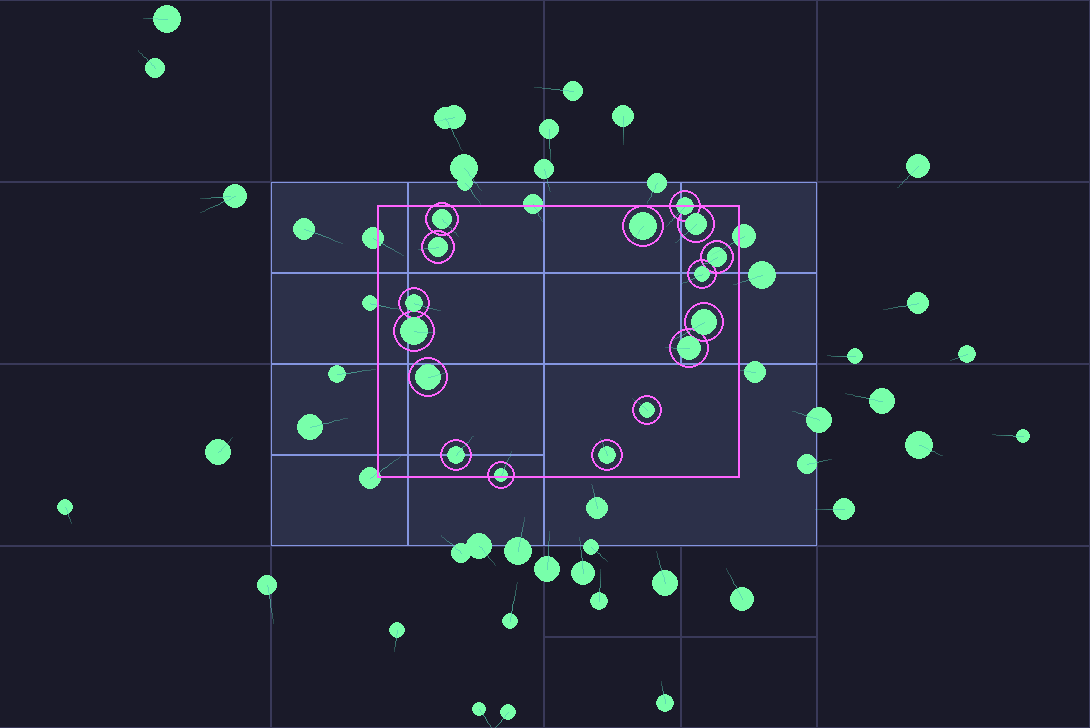
Rust-optimized quadtree with a simple Python API.
- Python package:
fastquadtree - Python ≥ 3.8
- Import path:
from fastquadtree import QuadTree
Install
pip install fastquadtree
If you are developing locally:
# optimized dev install
maturin develop --release
Quickstart
from fastquadtree import QuadTree

# Bounds are (min_x, min_y, max_x, max_y)
qt = QuadTree(bounds=(0, 0, 1000, 1000), capacity=20)  # max_depth is optional

# Insert points with auto ids
id1 = qt.insert((10, 10))
id2 = qt.insert((200, 300))
id3 = qt.insert((999, 500), id=42)  # you can supply your own id

# Axis-aligned rectangle query
hits = qt.query((0, 0, 250, 350))  # returns [(id, x, y), ...] by default
print(hits)  # e.g. [(1, 10.0, 10.0), (2, 200.0, 300.0)]

# Nearest neighbor
best = qt.nearest_neighbor((210, 310))  # -> (id, x, y) or None
print(best)

# k-nearest neighbors
top3 = qt.nearest_neighbors((210, 310), 3)
print(top3)  # list of up to 3 (id, x, y) tuples

# Delete items by ID and location
deleted = qt.delete(id2, (200, 300))  # True if found and deleted
print(f"Deleted: {deleted}")
print(f"Remaining items: {qt.count_items()}")

# For object tracking with track_objects=True
qt_tracked = QuadTree((0, 0, 1000, 1000), capacity=4, track_objects=True)
player1 = {"name": "Alice", "score": 100}
player2 = {"name": "Bob", "score": 200}

id1 = qt_tracked.insert((50, 50), obj=player1)
id2 = qt_tracked.insert((150, 150), obj=player2)

# Delete by object reference (O(1) lookup!)
deleted = qt_tracked.delete_by_object(player1, (50, 50))
print(f"Deleted player: {deleted}")  # True
Working with Python objects
You can keep the tree pure and manage your own id → object map, or let the wrapper manage it.
Option A: Manage your own map
from fastquadtree import QuadTree

qt = QuadTree((0, 0, 1000, 1000), capacity=16)
objects: dict[int, object] = {}

def add(obj) -> int:
    obj_id = qt.insert(obj.position)  # auto id
    objects[obj_id] = obj
    return obj_id

# Later, resolve ids back to objects
ids = [obj_id for (obj_id, x, y) in qt.query((100, 100, 300, 300))]
selected = [objects[i] for i in ids]
Option B: Ask the wrapper to track objects
from fastquadtree import QuadTree

qt = QuadTree((0, 0, 1000, 1000), capacity=16, track_objects=True)

# Store the object alongside the point
qt.insert((25, 40), obj={"name": "apple"})

# Ask for Item objects so you can access .obj lazily
items = qt.query((0, 0, 100, 100), as_items=True)
for it in items:
    print(it.id, it.x, it.y, it.obj)
You can also attach or replace an object later:
qt.attach(123, my_object) # binds object to id 123
API
QuadTree(bounds, capacity, *, max_depth=None, track_objects=False, start_id=1)
bounds— tuple(min_x, min_y, max_x, max_y)defines the 2D area covered by the quadtreecapacity— max number of points kept in a leaf before splittingmax_depth— optional depth cap. If omitted, the tree can keep splitting as neededtrack_objects— ifTrue, the wrapper maintains an id → object map for convenience.start_id— starting value for auto-assigned ids
Core Methods
Full docs are in the docstrings of the Python Shim
-
insert(xy, *, id=None, obj=None) -> int -
insert_many_points(points) -> int -
query(rect, *, as_items=False) -> list -
nearest_neighbor(xy, *, as_item=False) -> (id, x, y) | Item | None -
nearest_neighbors(xy, k, *, as_items=False) -> list -
delete(id, xy) -> bool -
delete_by_object(obj) -> bool (requires track_objects=True) -
attach(id, obj) -> None (requires track_objects=True) -
count_items() -> int -
get(id) -> object | None -
get_all_rectangles() -> list[tuple] (for visualization)
Item (returned when as_items=True)
- Attributes:
id,x,y, and a lazyobjproperty - Accessing
objperforms a dictionary lookup only if tracking is enabled
Geometric conventions
- Rectangles are
(min_x, min_y, max_x, max_y). - Containment rule is closed on the min edge and open on the max edge
(x >= min_x and x < max_x and y >= min_y and y < max_y). This only matters for points exactly on edges.
Performance tips
- Choose
capacityso that leaves keep a small batch of points. Typical values are 8 to 64. - If your data is very skewed, set a
max_depthto prevent long chains. - For fastest local runs, use
maturin develop --release. - The wrapper keeps Python overhead low: raw tuple results by default,
Itemwrappers only when requested.
Benchmarks
fastquadtree outperforms all other quadtree python packages (at least all the ones I could find and install via pip.)
Library comparison
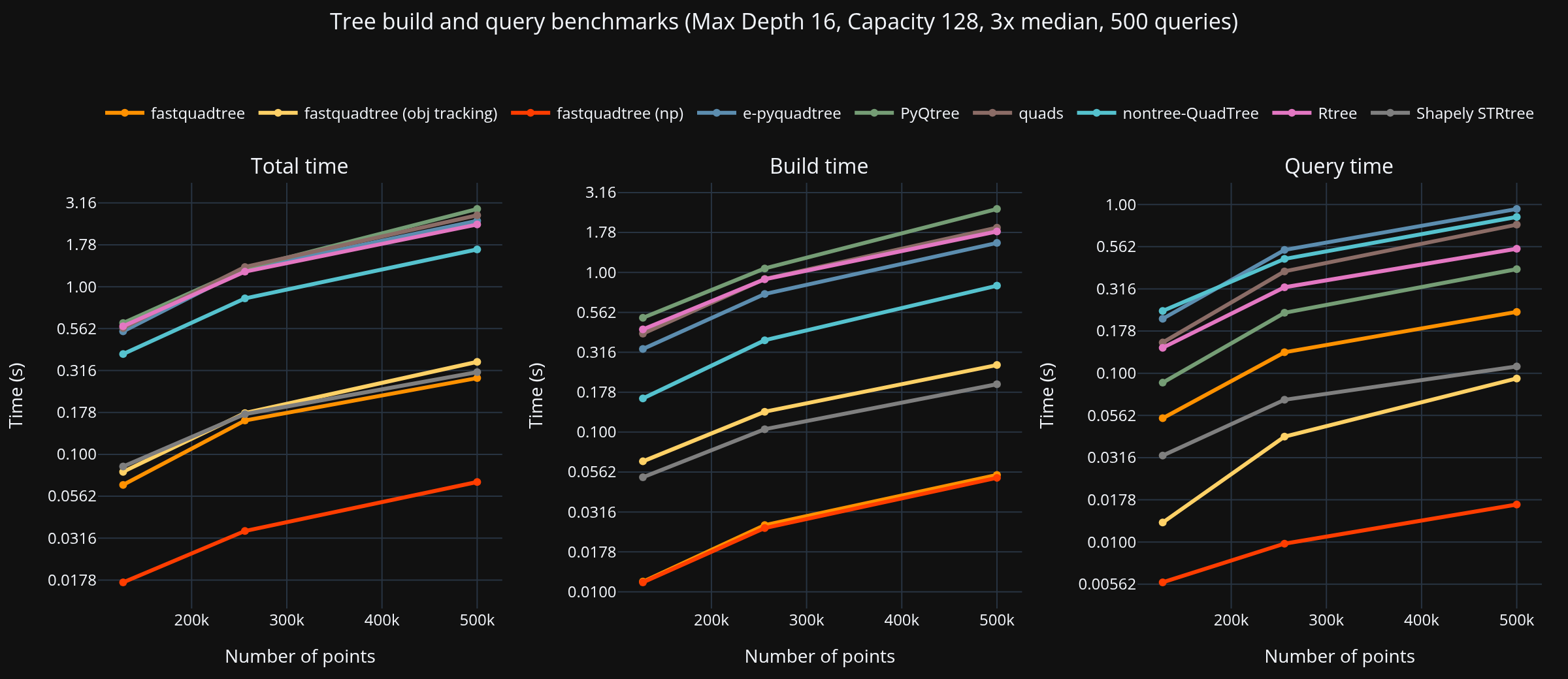
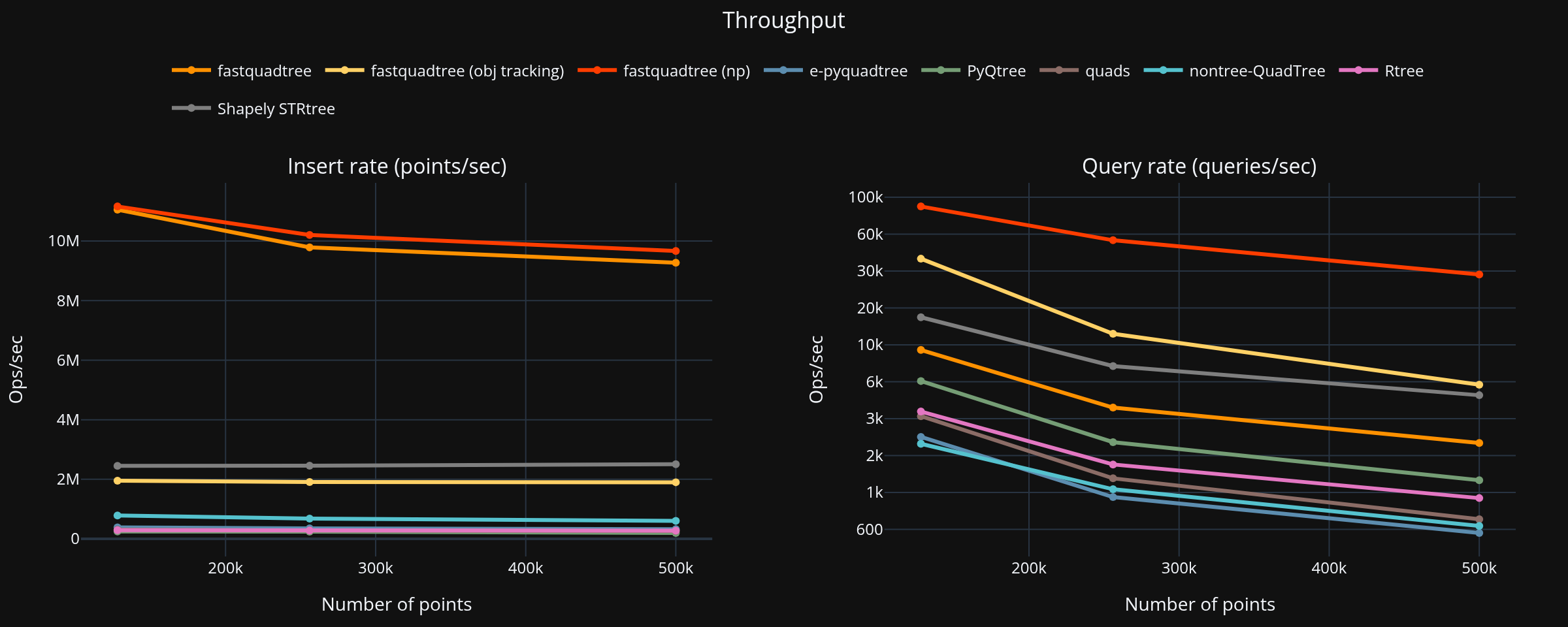
Summary (largest dataset, PyQtree baseline)
- Points: 500,000, Queries: 500
- Fastest total: fastquadtree at 2.207 s
| Library | Build (s) | Query (s) | Total (s) | Speed vs PyQtree |
|---|---|---|---|---|
| fastquadtree | 0.321 | 1.885 | 2.207 | 4.27× |
| Rtree | 1.718 | 4.376 | 6.095 | 1.55× |
| nontree-QuadTree | 1.617 | 7.643 | 9.260 | 1.02× |
| PyQtree | 4.349 | 5.082 | 9.431 | 1.00× |
| quads | 3.874 | 9.058 | 12.932 | 0.73× |
| e-pyquadtree | 2.732 | 10.598 | 13.330 | 0.71× |
| Brute force | 0.019 | 19.986 | 20.005 | 0.47× |
Native vs Shim
Setup
- Points: 500,000
- Queries: 500
- Repeats: 5
Timing (seconds)
| Variant | Build | Query | Total |
|---|---|---|---|
| Native | 0.483 | 4.380 | 4.863 |
| Shim (no map) | 0.668 | 4.167 | 4.835 |
| Shim (track+objs) | 1.153 | 4.458 | 5.610 |
Overhead vs Native
- No map: build 1.38x, query 0.95x, total 0.99x
- Track + objs: build 2.39x, query 1.02x, total 1.15x
Run benchmarks
To run the benchmarks yourself, first install the dependencies:
pip install -r benchmarks/requirements.txt
Then run:
python benchmarks/cross_library_bench.py
python benchmarks/benchmark_native_vs_shim.py
Run Visualizer
A visualizer is included to help you understand how the quadtree subdivides space.
pip install -r interactive/requirements.txt
python interactive/interactive_v2.py
Check the CLI arguments for the cross-library benchmark in benchmarks/quadtree_bench/main.py.
FAQ
What happens if I insert the same id more than once? Allowed. For k-nearest, duplicates are de-duplicated by id. For range queries you will see every inserted point.
Can I delete items from the quadtree?
Yes! Use delete(id, xy) to remove specific items. You must provide both the ID and exact location for precise deletion. This handles cases where multiple items exist at the same location. If you're using track_objects=True, you can also use delete_by_object(obj, xy) for convenient object-based deletion with O(1) lookup. The tree automatically merges nodes when item counts drop below capacity.
Can I store rectangles or circles? The core stores points. To index objects with extent, insert whatever representative point you choose. For rectangles you can insert centers or build an AABB tree separately.
Threading Use one tree per thread if you need heavy parallel inserts from Python.
License
MIT. See LICENSE.
Acknowledgments
Release history Release notifications | RSS feed


Download files
Download the file for your platform. If you're not sure which to choose, learn more about installing packages.
Source Distribution
Built Distributions
Filter files by name, interpreter, ABI, and platform.
If you're not sure about the file name format, learn more about wheel file names.
Copy a direct link to the current filters
File details
Details for the file fastquadtree-0.4.0.tar.gz.
File metadata
- Download URL: fastquadtree-0.4.0.tar.gz
- Upload date:
- Size: 656.4 kB
- Tags: Source
- Uploaded using Trusted Publishing? No
- Uploaded via: maturin/1.9.4
File hashes
| Algorithm | Hash digest | |
|---|---|---|
| SHA256 |
a10063b6ddc50b906bcc13af05391cb850873f7da68c999fd2dec1e1e7c03189
|
|
| MD5 |
71caba950fe4af3bb3f6d00f9cac6471
|
|
| BLAKE2b-256 |
969bb57f1516f37731d96f3d27eef7265cdc126afd558c165f03b1becf117dac
|
File details
Details for the file fastquadtree-0.4.0-cp38-abi3-win_amd64.whl.
File metadata
- Download URL: fastquadtree-0.4.0-cp38-abi3-win_amd64.whl
- Upload date:
- Size: 149.2 kB
- Tags: CPython 3.8+, Windows x86-64
- Uploaded using Trusted Publishing? No
- Uploaded via: maturin/1.9.4
File hashes
| Algorithm | Hash digest | |
|---|---|---|
| SHA256 |
683fab7c6bae360dca55363d376c9f0455634b6f9b2631f9d3692d57928159c8
|
|
| MD5 |
562e1afe9c5efecf339b421d195eaddf
|
|
| BLAKE2b-256 |
73c0842d300c5ee83548f8e89ac456199b0de8492bee22f4f763dd941424dfc2
|
File details
Details for the file fastquadtree-0.4.0-cp38-abi3-manylinux_2_17_x86_64.manylinux2014_x86_64.whl.
File metadata
- Download URL: fastquadtree-0.4.0-cp38-abi3-manylinux_2_17_x86_64.manylinux2014_x86_64.whl
- Upload date:
- Size: 246.5 kB
- Tags: CPython 3.8+, manylinux: glibc 2.17+ x86-64
- Uploaded using Trusted Publishing? No
- Uploaded via: maturin/1.9.4
File hashes
| Algorithm | Hash digest | |
|---|---|---|
| SHA256 |
18d259841c22a7faf2416f70f94790f05ad6d20eb0cc9e37ddfad8c2107171f8
|
|
| MD5 |
cd86db8ac52a5195b81f968bbc1c2fae
|
|
| BLAKE2b-256 |
095e4923fa2085f08fa6f92f7c8982db8c389d459d9f984f88a769516aa46b1a
|
File details
Details for the file fastquadtree-0.4.0-cp38-abi3-macosx_10_12_x86_64.macosx_11_0_arm64.macosx_10_12_universal2.whl.
File metadata
- Download URL: fastquadtree-0.4.0-cp38-abi3-macosx_10_12_x86_64.macosx_11_0_arm64.macosx_10_12_universal2.whl
- Upload date:
- Size: 425.1 kB
- Tags: CPython 3.8+, macOS 10.12+ universal2 (ARM64, x86-64), macOS 10.12+ x86-64, macOS 11.0+ ARM64
- Uploaded using Trusted Publishing? No
- Uploaded via: maturin/1.9.4
File hashes
| Algorithm | Hash digest | |
|---|---|---|
| SHA256 |
b7ace71525d3ab7419fb7ffa43c76a0a994b0e2d01fb5816443bd1885cef172c
|
|
| MD5 |
54ef53340a2a13dd81691654b29666ed
|
|
| BLAKE2b-256 |
0075e986717b4d7bd9e79690e6ff1fac0a8a4f5875dd2425c277a06283557014
|






