
A CLI and web-based tool for tracking daily work activities and generating reports

Project description
FastRep
A powerful CLI and web-based tool for tracking daily work activities and generating professional reports.


Features
- Easy Logging: Quickly log your daily work activities with project names and descriptions
- Automatic Reports: Generate weekly, bi-weekly, and monthly reports instantly
- Dual Interface: Use either the command-line interface or the professional web UI
- SQLite Database: All data stored locally in a lightweight SQLite database
- Project Tracking: Automatically organize logs by project
- Flexible Dating: Log entries for any date, not just today
- Easy Search: View and filter logs by date range
- Data Management: Delete individual entries or clear entire database
- Dark/Light Theme: Choose your preferred theme or sync with system settings
- App Mode: Launches as a standalone application window for a cleaner experience
- AI Summarization: Automatically summarizes extensive monthly logs into concise bullet points using Cline
Screenshots
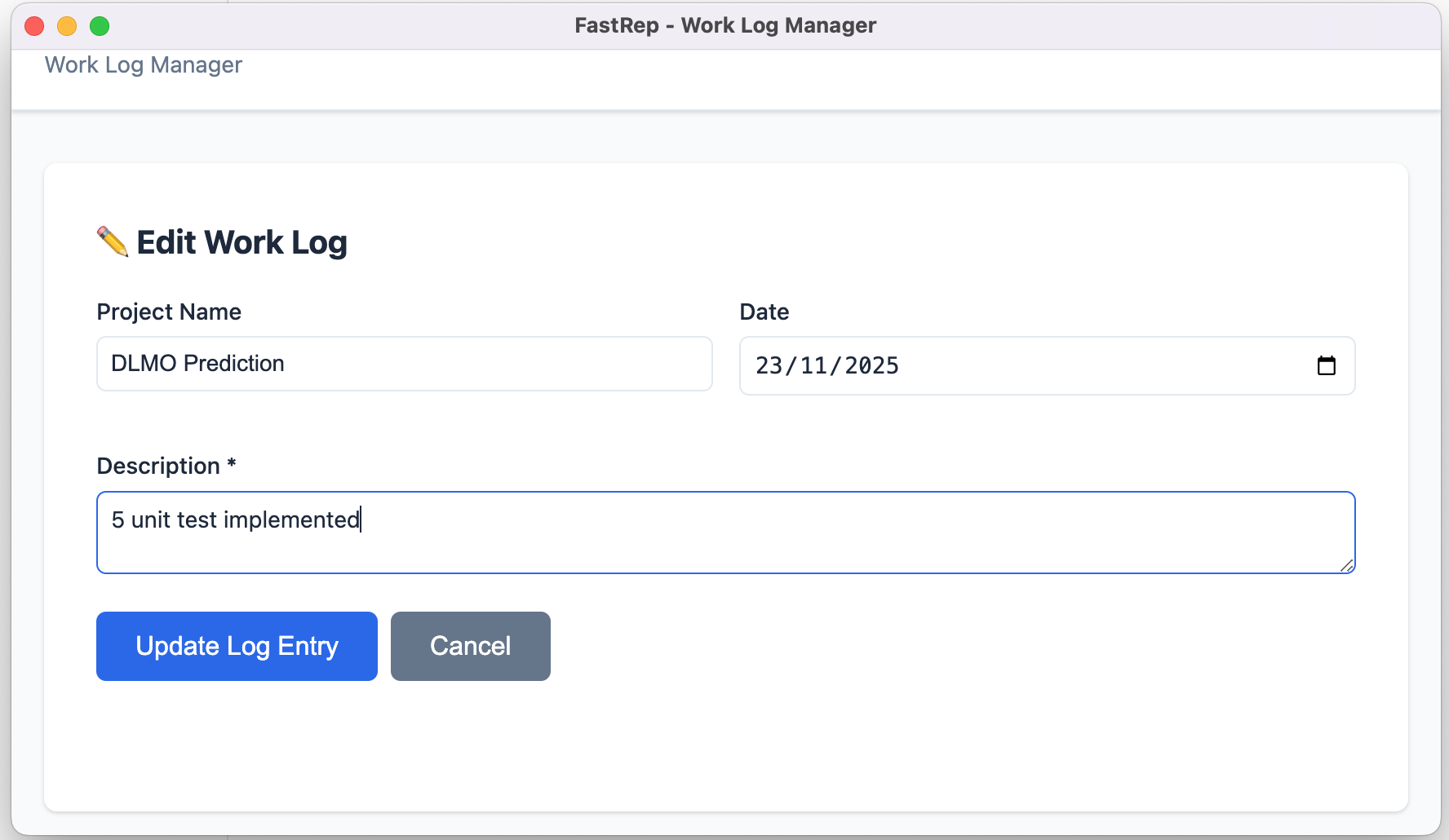
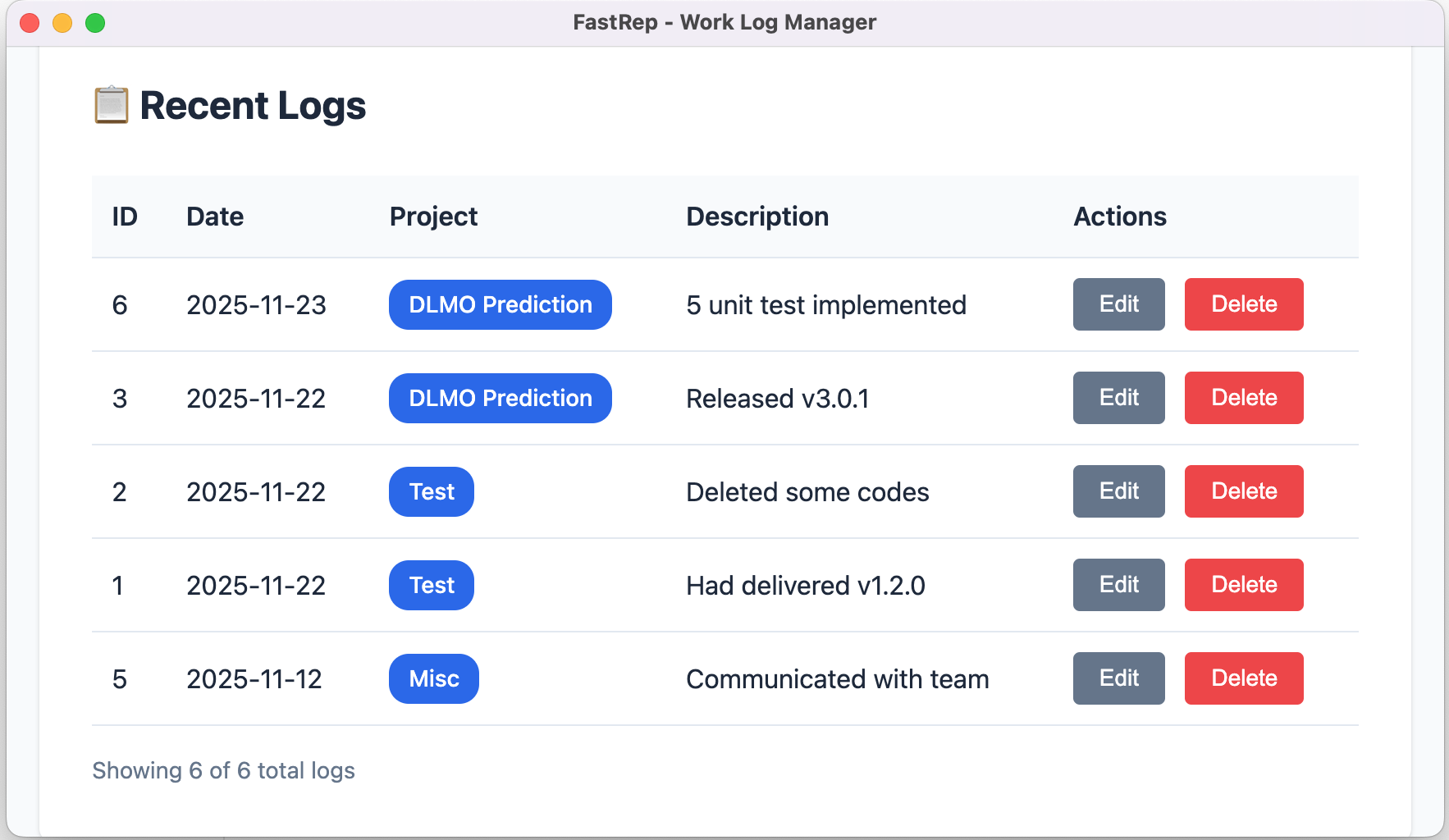
Installation
From PyPI (Recommended)
pip install fastrep
From Source
git clone https://github.com/hissain/fastrep.git
cd fastrep
pip install -e .
Quick Start
Command Line Interface
# Add a work log entry
fastrep log -p "Project Alpha" -d "Implemented user authentication"

# Add a log for a specific date
fastrep log -p "Project Beta" -d "Fixed bug #123" --date 2024-11-15

# View weekly report
fastrep view --mode weekly

# View bi-weekly report
fastrep view --mode biweekly

# View monthly report
fastrep view --mode monthly

# List all entries
fastrep list

# View all projects
fastrep projects

# Delete a specific entry
fastrep delete --id 5

# Clear all data (with confirmation)
fastrep clear
Web Interface
Launch the web UI:
fastrep-ui
The web interface will automatically open in your default browser at http://127.0.0.1:5000.
You can also specify a custom port:
fastrep-ui --port 8080
# or
fastrep-ui -p 8080
For debugging AI summarization issues, use verbose mode:
fastrep-ui --verbose
Usage Examples
Daily Workflow
# Morning: Log yesterday's work
fastrep log -p "API Development" -d "Completed endpoint for user profiles" --date 2024-11-20

# End of day: Log today's work
fastrep log -p "API Development" -d "Started work on authentication middleware"
fastrep log -p "Documentation" -d "Updated API documentation"

# Friday: Generate weekly report
fastrep view --mode weekly
Report Output Example
Report Period: 11/16 - 11/22
============================================================

Project: API Development
------------------------------------------------------------
  * 11/21 - Started work on authentication middleware
  * 11/20 - Completed endpoint for user profiles
  * 11/18 - Fixed performance issues in database queries

Project: Documentation
------------------------------------------------------------
  * 11/21 - Updated API documentation
  * 11/19 - Created user guide for new features
CLI Commands Reference
fastrep log
Add a new work log entry.
Options:
-p, --project TEXT: Project name (optional, defaults to "Misc")-d, --description TEXT: Work description (required)-dt, --date TEXT: Date in YYYY-MM-DD format (optional, defaults to today)
fastrep view
View logs and generate reports.
Options:
-m, --mode [weekly|biweekly|monthly]: Report period (default: weekly)-s, --start TEXT: Custom start date (YYYY-MM-DD)-e, --end TEXT: Custom end date (YYYY-MM-DD)
fastrep list
List all log entries with their IDs.
fastrep projects
List all unique projects.
fastrep delete
Delete a specific log entry.
Options:
-i, --id INTEGER: Log entry ID to delete (required)-y, --confirm: Skip confirmation prompt
fastrep clear
Clear all log entries from the database.
Options:
-y, --confirm: Skip confirmation prompt
Web UI Features
The web interface provides:
- Dashboard: Add new logs with autocomplete for project names
- Recent Logs Table: View, edit, and delete entries
- Report Generation: One-click weekly, bi-weekly, and monthly reports
- Copy to Clipboard: Easy report copying for emails/documents
- AI Summarization: Intelligent summarization for monthly reports (requires Cline CLI)
- Theme Support: Toggle between Light, Dark, and System themes
- Settings: Database management, AI configuration, and preferences
- App Mode: Opens in a dedicated window without browser clutter
- Compact Design: Optimized form layout for quick entry
Database Location
Logs are stored in: ~/.fastrep/fastrep.db
Both CLI and web UI use the same database, so your data is always in sync.
Development
Setup Development Environment
git clone https://github.com/hissain/fastrep.git
cd fastrep
pip install -e .
Project Structure
fastrep/
├── fastrep/
│   ├── __init__.py
│   ├── cli.py              # CLI commands
│   ├── database.py         # Database operations
│   ├── models.py           # Data models
│   ├── report_generator.py # Report generation logic
│   └── ui/
│       ├── app.py          # Flask application
│       ├── templates/      # HTML templates
│       └── static/         # CSS files
├── tests/
├── setup.py
└── README.md
Contributing
Contributions are welcome! Please feel free to submit a Pull Request.
- Fork the repository
- Create your feature branch (
git checkout -b feature/AmazingFeature) - Commit your changes (
git commit -m 'Add some AmazingFeature') - Push to the branch (
git push origin feature/AmazingFeature) - Open a Pull Request
License
This project is licensed under the MIT License - see the LICENSE file for details.
Author
Md. Sazzad Hissain Khan
- GitHub: @hissain
- Email: hissain.khan@gmail.com
Acknowledgments
Support
If you encounter any issues or have questions:
- Open an issue on GitHub
- Check existing issues for solutions
Star ⭐ this repository if you find it helpful!
Release history Release notifications | RSS feed


Download files
Download the file for your platform. If you're not sure which to choose, learn more about installing packages.
Source Distribution
Built Distribution
Filter files by name, interpreter, ABI, and platform.
If you're not sure about the file name format, learn more about wheel file names.
Copy a direct link to the current filters
File details
Details for the file fastrep-2.0.3.tar.gz.
File metadata
- Download URL: fastrep-2.0.3.tar.gz
- Upload date:
- Size: 369.3 kB
- Tags: Source
- Uploaded using Trusted Publishing? No
- Uploaded via: twine/6.2.0 CPython/3.11.14
File hashes
| Algorithm | Hash digest | |
|---|---|---|
| SHA256 |
341d81e75fd9ab48f7c4a7c61b582feb4a2f2156409767db3482722770456c83
|
|
| MD5 |
239e9b77e1d79329af100bc6ad0711d7
|
|
| BLAKE2b-256 |
887c2b0565baaebf6d0daecf19ef708aad7e7d77bbd8305ec85017fc5e175703
|
File details
Details for the file fastrep-2.0.3-py3-none-any.whl.
File metadata
- Download URL: fastrep-2.0.3-py3-none-any.whl
- Upload date:
- Size: 28.0 kB
- Tags: Python 3
- Uploaded using Trusted Publishing? No
- Uploaded via: twine/6.2.0 CPython/3.11.14
File hashes
| Algorithm | Hash digest | |
|---|---|---|
| SHA256 |
5a9d747acc25f575bcfdbf1161540d86ab126268c8e5c9d541945dab045d9b8b
|
|
| MD5 |
881362f39462eb7d8596771d96c92044
|
|
| BLAKE2b-256 |
b38db41e700d47aaa93aecb92f0ab8e06320bc0bd4b170f222d9fa420e904354
|






