
FastSAR


FastSAR forms synthetic aperture radar (SAR) images on x86 and ARM CPUs, Nvidia GPUs and Google Cloud TPUs from Python. It reads frequency-domain CPHD files, forms spotlight, stripmap and sliding spotlight images by factorized backprojection, and provides autofocus, interferometry, geolocation, map GeoTIFFs and SICD output.
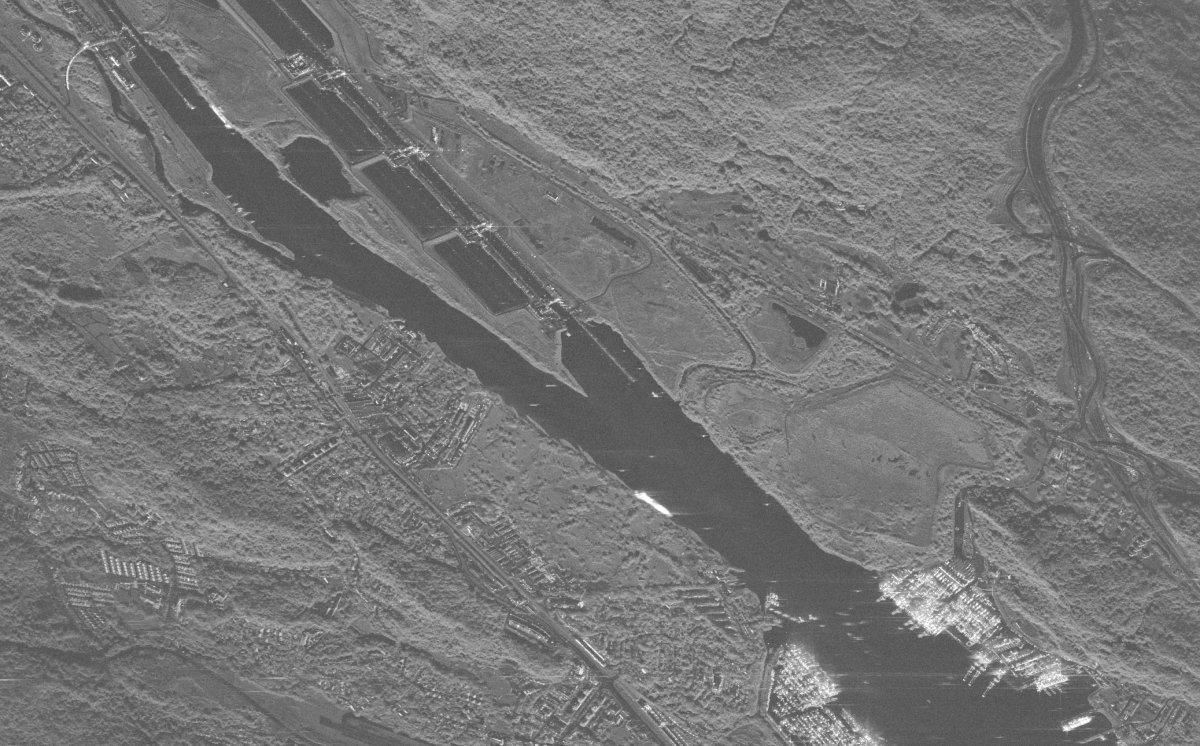
Panama Canal, Pacific entrance (Umbra open data, 2023-07-18): 12,207 by 8,808 pixels in 2.9 s on an Nvidia L4 (warm former, transfers included; float32, -59.9 dB against the float64 reference of precision.md), downsampled. A c4d-highmem-16 CPU instance (16 vCPUs, 8 cores) takes 11.3 s. ISCE3, the fastest open-source code that forms this collection, would take an estimated 4.8 h on that CPU and 27 min on the L4.
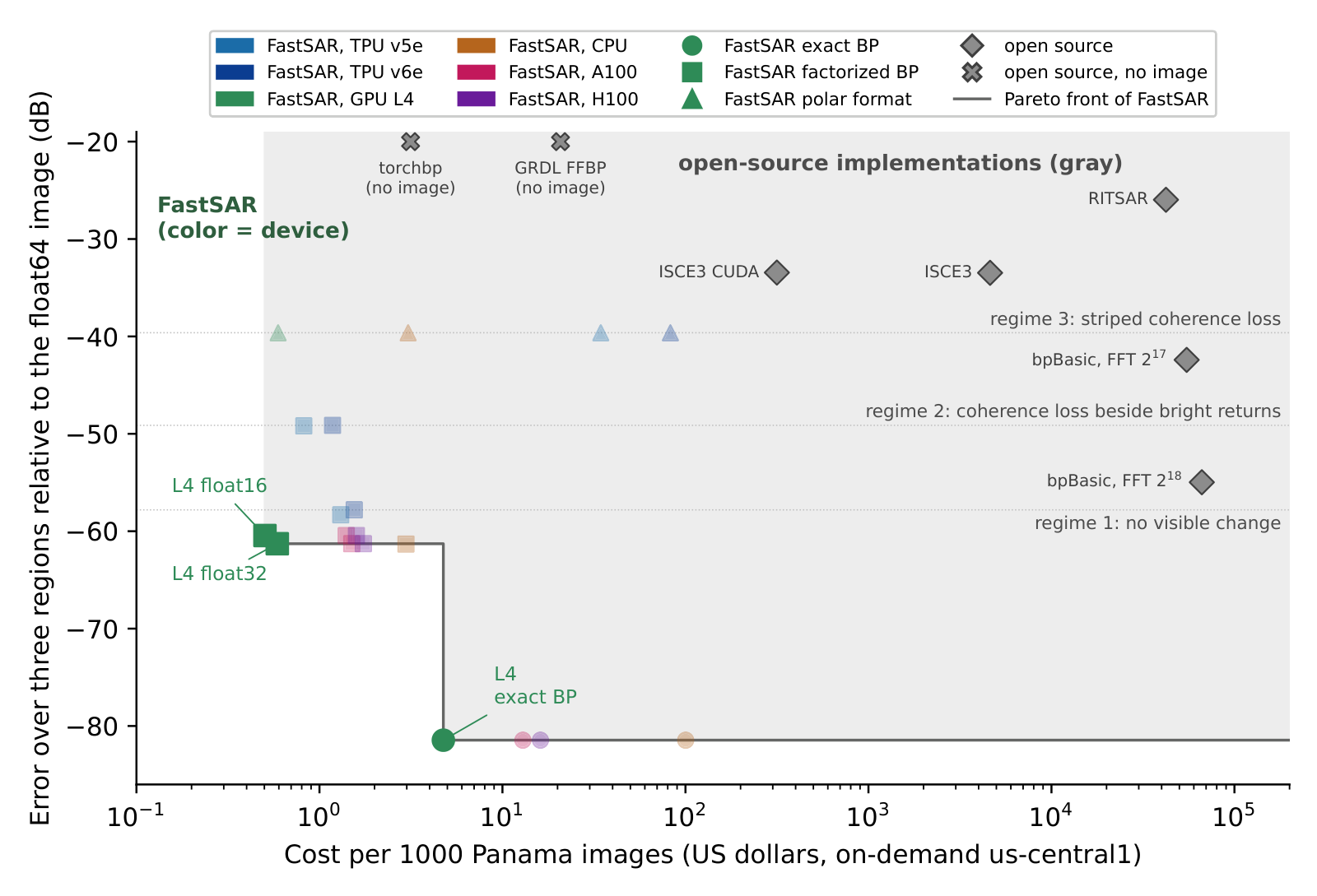
Cost per 1000 Panama images (October 2026 prices) against error over the lock, port and ship regions, relative to the float64 reference (performance, comparison).
Install
Linux on x86-64 or 64-bit ARM and macOS on Apple silicon, Python 3.10 to 3.13. The CPU kernels compile on first
use: with g++ and OpenMP on Linux (Debian and Ubuntu: apt install g++), with Apple's clang on macOS (the command
line tools, xcode-select --install, which also serve the Metal backend of ExactFormer on Apple GPUs); the
cuda extra needs an Nvidia driver for CUDA 12 and the tpu extra a Cloud TPU VM.
pip install fastsar                  # CPU (and JAX on whatever device it has)
pip install "fastsar[io]"            # io: sarpy for CPHD and SICD
pip install "fastsar[cuda]"          # cuda: CuPy for Nvidia GPUs
pip install "fastsar[tpu]"           # tpu: jax[tpu] for Cloud TPUs
pip install "fastsar[geo]"           # geo: rasterio for GeoTIFFs and DEMs
pip install "fastsar[raw]"           # raw: h5py for the NISAR raw reader
pip install "fastsar[cuda,io,geo]"   # extras combine
From a clone: pip install -e ".[cuda,io]" or uv sync. The CUDA tensor-core kernels (float16, and float32 on compute capability 8.0 and later) need nvcc from the CUDA toolkit; without it float32 runs on the CUDA cores, more slowly. On the CPU set
OMP_NUM_THREADS=<physical cores> OMP_PLACES=cores OMP_PROC_BIND=close. Importing fastsar sets
XLA_PYTHON_CLIENT_PREALLOCATE=false unless it is already set, so that JAX does not reserve most of a GPU's memory
before the CUDA kernels run (performance.md).
Quickstart
The chain below reads a CPHD file and writes a GeoTIFF and a SICD, so it needs pip install "fastsar[io,geo]".
import fastsar
from fastsar import products

out = fastsar.form_cphd('scene_CPHD.cphd')        # mode, grid and window from the file
img = out['image']                                # complex64 [nx, ny] on a ground plane at the scene height
lat, lon, h = products.geolocate(out, 100, 200)   # pixel (100, 200) on the ground
products.write_geotiff('amp.tif', **products.geocode_image(out))   # amplitude on a north-up UTM grid
products.write_sicd('scene.nitf', out)            # complex image with its geometry
examples/chain.py runs this chain from the command line (--simulate needs no data);
form_umbra.py and form_capella_stripmap.py form
vendor grids.
Supported data, modes and devices
| Data | Modes | Status |
|---|---|---|
| Capella CPHD | stripmap, spotlight, sliding spotlight | checked against vendor SICDs; a 2022 dynamic stripmap is correct near the center only |
| Umbra CPHD | spotlight | three open-data collections on the vendor's grid |
| ICEYE CPHD | dwell spotlight | formed (28 GB history); not compared with the vendor image |
| TOA-domain CPHD, raw Level-0 | not supported | |
| Simulated echoes | stripmap, ScanSAR, TOPS, any track | fastsar.stripmap, burst, patches |
CPU (cpu) |
Nvidia GPU (cuda) |
Cloud TPU (tpu) |
Any JAX device (jax) |
|
|---|---|---|---|---|
| Factorized backprojection | C++/OpenMP: AVX-512 or AVX2 on x86-64, NEON or SVE on ARM | CUDA via CuPy | Pallas | reference program |
| Precision | float32 | float32, float16 | three-pass (default), single-pass | float32, float16 |
Exact backprojection (ExactFormer) |
C++/OpenMP, float32 with float64 tile centers | CUDA, the same | falls back to jax |
float32, float64 block centers |
Polar format (algorithm='pfa') runs as a JAX program on any device.
Documentation
docs/README.md lists every page; start with the processing chain. Measurement records are in sar-accel-study. To cite FastSAR, use CITATION.cff.
Contributing and license
CONTRIBUTING.md explains how to run the tests (GitHub Actions runs the CPU suite; the CUDA and TPU tests run on those machines before a release). MIT license (LICENSE).
1 maintainer

Metadata
1 maintainer
Release files for fastsar 0.1.4
For a detailed explanation of source distributions (sdists) and built distributions (wheels), please see the package formats documentation.
Source distribution (sdist)
| File | Size | Uploaded | |
|---|---|---|---|
| fastsar-0.1.4.tar.gz | 302.4 kB | Details |
Built distribution (wheel)
| File | Interpreter | ABI | Platform | Reset |
|---|---|---|---|---|
| fastsar-0.1.4-py3-none-any.whl | Python 3 | none | any | Details |
Total release size: 523.6 kB
Release files / fastsar-0.1.4.tar.gz
| Download URL | fastsar-0.1.4.tar.gz |
|---|---|
| Size | 302.4 kB |
| Tags | Source |
|
SHA-256 checksum How to use checksums |
37f0dd82f5d3350a0ffa35bcaaf66f007f62a1228ab58b8541376674e4d12d91
|
|
BLAKE2b-256 checksum How to use checksums |
aaf7a39cc62576e4ce07670e2aca07d32df80942dd5266b37e540357ebe737b6
|
| Upload date | |
|
Uploaded using Trusted Publishing? What is trusted publishing? |
No |
| Uploaded via |
twine/7.0.0 CPython/3.13.13
|
Release files / fastsar-0.1.4-py3-none-any.whl
| Download URL | fastsar-0.1.4-py3-none-any.whl |
|---|---|
| Size | 221.2 kB |
| Tags | Python 3 |
|
SHA-256 checksum How to use checksums |
faf804b09bf778d81692f961cdb2511dd50c7c1f16161d5aec08e76f6dcf6c22
|
|
BLAKE2b-256 checksum How to use checksums |
e1e277451ba9fef693bfd037834fa6cf4f0fae83b8f5693639f13e5b99888a9d
|
| Upload date | |
|
Uploaded using Trusted Publishing? What is trusted publishing? |
No |
| Uploaded via |
twine/7.0.0 CPython/3.13.13
|














