

Async VK bot framework with FastAPI-style decorators and aiogram-style FSM.






Source Code: https://github.com/ndugram/fastvk
FastVK is a modern async VK bot framework for Python. It brings a decorator-based handler API — similar to FastAPI and aiogram, but for VK — with FSM, middleware, filters, keyboard builder, and a real-time dashboard out of the box.
Key features:
- Familiar — if you know FastAPI or aiogram, you already know FastVK. Same patterns, same ergonomics.
- CallbackData — typed callback data factory with
pack()/unpack()— inspired by aiogram. - Auto-retry — built-in exponential backoff for VK API calls (network errors, flood control, rate limits) plus optional captcha solving.
- Auto-pagination —
bot.collect()iterates paginated methods (members, posts, history) with no manual loops. - Batching —
bot.execute_batch()packs up to 25 API calls into one request. - Scheduler —
@scheduler.every("30m")/@scheduler.at("09:00")for periodic jobs. - i18n — JSON catalogs +
I18nMiddlewarewith per-user locale. - CLI —
fastvk new mybotscaffolds a project,fastvk runruns it. - Testing —
fastvk.testshipsMockedBotand update factories for unit tests. - Async — built on aiohttp with full async/await support from top to bottom.
- FSM — built-in Finite State Machine with
State,StatesGroup, and pluggable storage: Memory, Redis, SQLite. - Filters —
Command,Text,StateFilter,FromUser,IsChatand custom filters via any callable. - Keyboard — fluent keyboard builder with text, callback, link, location, and VK Pay buttons.
- Injection — handler parameters injected by type:
message,state,bot,update— no manual wiring. - Routers — split handlers across multiple
Routerinstances and include them into the main bot. - Middleware — intercept every update before and after handlers with
BaseMiddleware. - Webhook — built-in Callback API server via
run_webhook(), no extra setup needed. - Dashboard — real-time monitoring UI with live stats, activity feed, and handler search.
- Logging — colored, structured terminal output with per-logger colors and event highlighting.
- Typed — full type annotations throughout; works great with mypy and pyright.
Requirements
Python 3.10+
FastVK depends on:
aiohttp— async HTTP transport for Long Poll, Webhook, and VK API calls.pydantic— typed data models for VK event objects.
Installation
$ pip install fastvk

---> 100%
Example
Create it
Create a file main.py:
from fastvk import FastVK
from fastvk.filters import Command
from fastvk.types import Message

bot = FastVK(token="vk1.a.YOUR_TOKEN")


@bot.message(Command("start"))
async def start(message: Message) -> None:
    await message.answer("Привет! Я FastVK бот.")


if __name__ == "__main__":
    bot.run_polling()
Run it
$ python main.py
Check it
You will see colored output like:
10:35:42  INFO     fastvk                  FastVK started (group_id=123456789)
10:35:44  INFO     fastvk                  ← message_new  →  start()  [Иван  id=123]
Send /start to your bot — it replies instantly.
Upgrade the example
With FSM (multi-step forms)...
Use StatesGroup and State to collect data across multiple messages:
from fastvk import FastVK
from fastvk.filters import Command, StateFilter
from fastvk.fsm import FSMContext, State, StatesGroup
from fastvk.types import Message

bot = FastVK(token="vk1.a.YOUR_TOKEN")


class Form(StatesGroup):
    waiting_name = State()
    waiting_age  = State()


@bot.message(Command("start"))
async def cmd_start(message: Message, state: FSMContext) -> None:
    await state.set_state(Form.waiting_name)
    await message.answer("Как тебя зовут?")


@bot.message(StateFilter(Form.waiting_name))
async def got_name(message: Message, state: FSMContext) -> None:
    await state.update_data(name=message.text)
    await state.set_state(Form.waiting_age)
    await message.answer(f"Отлично, {message.text}! Сколько тебе лет?")


@bot.message(StateFilter(Form.waiting_age))
async def got_age(message: Message, state: FSMContext) -> None:
    data = await state.update_data(age=message.text)
    await state.clear()
    await message.answer(f"Готово!\nИмя: {data['name']}\nВозраст: {data['age']}")


if __name__ == "__main__":
    bot.run_polling()
With persistent FSM storage (SQLite)...
FSM state survives restarts — no Redis required:
from fastvk import FastVK
from fastvk.fsm import SQLiteStorage

bot = FastVK(
    token="vk1.a.YOUR_TOKEN",
    storage=SQLiteStorage("bot.db"),
)
Install the optional dependency first:
$ pip install fastvk[sqlite]
For Redis:
from fastvk.fsm import RedisStorage

bot = FastVK(..., storage=RedisStorage("redis://localhost:6379/0"))
$ pip install fastvk[redis]
With keyboard buttons...
Build keyboards with a fluent API:
from fastvk import FastVK
from fastvk.filters import Command
from fastvk.keyboard import Button, Keyboard
from fastvk.enums import Color
from fastvk.types import Message

bot = FastVK(token="vk1.a.YOUR_TOKEN")


@bot.message(Command("menu"))
async def menu(message: Message) -> None:
    kb = (
        Keyboard(one_time=True)
        .row(
            Button.text("Да",  color=Color.POSITIVE),
            Button.text("Нет", color=Color.NEGATIVE),
        )
        .row(Button.text("Отмена"))
    )
    await message.answer("Выберите:", keyboard=kb)


@bot.message(Command("pay"))
async def pay(message: Message) -> None:
    kb = (
        Keyboard(inline=True)
        .row(Button.vkpay(action="pay-to-group", group_id=123456789, amount=100, description="Донат"))
    )
    await message.answer("Поддержать проект:", keyboard=kb)
With inline buttons (callback)...
Handle button clicks from inline keyboards:
from fastvk import FastVK
from fastvk.filters import Command
from fastvk.keyboard import Button, Keyboard
from fastvk.types import CallbackQuery, Message

bot = FastVK(token="vk1.a.YOUR_TOKEN")


@bot.message(Command("vote"))
async def vote(message: Message) -> None:
    kb = (
        Keyboard(inline=True)
        .row(
            Button.callback("👍 За",    payload={"v": "yes"}),
            Button.callback("👎 Против", payload={"v": "no"}),
        )
    )
    await message.answer("Голосование:", keyboard=kb)


@bot.callback()
async def on_vote(cb: CallbackQuery) -> None:
    choice = cb.payload.get("v")
    await cb.answer(f"Вы проголосовали: {'за' if choice == 'yes' else 'против'}")
With CallbackData (typed payloads)...
Use typed callback data instead of raw dicts — inspired by aiogram's CallbackData:
from typing import ClassVar

from fastvk import FastVK, CallbackData
from fastvk.filters import Command
from fastvk.keyboard import Button, Keyboard
from fastvk.types import CallbackQuery, Message


class ProductCallback(CallbackData):
    prefix: ClassVar[str] = "product"
    product_id: int
    action: str = "view"


bot = FastVK(token="vk1.a.YOUR_TOKEN")


@bot.message(Command("shop"))
async def shop(message: Message) -> None:
    kb = (
        Keyboard(inline=True)
        .row(
            Button.callback("Товар 1", payload=ProductCallback(product_id=1).pack()),
            Button.callback("Товар 2", payload=ProductCallback(product_id=2).pack()),
        )
    )
    await message.answer("Каталог:", keyboard=kb)


@bot.callback()
async def on_product(callback: CallbackQuery) -> None:
    cb = ProductCallback.unpack(callback.payload)
    await callback.answer(f"Товар #{cb.product_id}: {cb.action}")
# Compact payload format: product:{"product_id":1,"action":"view"}
With routers...
Split handlers into separate modules and include them into the bot:
# shop.py
from fastvk import Router
from fastvk.filters import Command, Text
from fastvk.types import Message

router = Router()


@router.message(Command("catalog"))
async def catalog(message: Message) -> None:
    await message.answer("Наш каталог: ...")


@router.message(Text("цена", contains=True, ignore_case=True))
async def price_mention(message: Message) -> None:
    await message.answer("Цены начинаются от 99₽")
# main.py
from fastvk import FastVK
from shop import router

bot = FastVK(token="vk1.a.YOUR_TOKEN")
bot.include_router(router)

if __name__ == "__main__":
    bot.run_polling()
With middleware...
Intercept every incoming update to add logging, rate limiting, or custom data:
from collections.abc import Awaitable, Callable
from typing import Any

from fastvk import FastVK
from fastvk.middleware import BaseMiddleware
from fastvk.filters import Command
from fastvk.types import Message


class LoggingMiddleware(BaseMiddleware):
    async def __call__(
        self,
        handler: Callable[[Any, dict], Awaitable[Any]],
        event: Any,
        data: dict,
    ) -> Any:
        print(f"incoming: {type(event).__name__}")
        result = await handler(event, data)
        print("handled")
        return result


bot = FastVK(
    token="vk1.a.YOUR_TOKEN",
    middleware=[LoggingMiddleware()],
)
With error handlers...
Catch exceptions raised inside handlers — by type, with full context injection:
from fastvk import FastVK
from fastvk.exceptions import VKAPIError
from fastvk.filters import Command
from fastvk.types import Message

bot = FastVK(token="vk1.a.YOUR_TOKEN")


@bot.message(Command("risky"))
async def risky(message: Message) -> None:
    raise ValueError("что-то пошло не так")


@bot.exception_handler(VKAPIError)
async def on_vk_error(error: VKAPIError, message: Message) -> None:
    await message.answer("VK API недоступен, попробуй позже.")


@bot.exception_handler()
async def on_any_error(error: Exception, message: Message) -> None:
    await message.answer(f"Ошибка: {error}")


if __name__ == "__main__":
    bot.run_polling()
With webhook...
Receive updates via VK Callback API instead of Long Poll:
from fastvk import FastVK
from fastvk.filters import Command
from fastvk.types import Message

bot = FastVK(token="vk1.a.YOUR_TOKEN")


@bot.message(Command("start"))
async def start(message: Message) -> None:
    await message.answer("Привет через webhook!")


if __name__ == "__main__":
    bot.run_webhook(
        confirmation_token="abc123def",  # from VK group settings
        host="0.0.0.0",
        port=8080,
        path="/vk",
        secret="my_secret",             # optional
    )
With filters...
Combine built-in and custom filters on any handler:
from fastvk import FastVK
from fastvk.filters import Command, FromUser, IsChat, Text
from fastvk.types import Message

ADMIN_ID = 123456789
bot = FastVK(token="vk1.a.YOUR_TOKEN")


@bot.message(Command("ban"), FromUser(ADMIN_ID))
async def admin_ban(message: Message) -> None:
    await message.answer("Пользователь заблокирован.")


@bot.message(IsChat("private"), Text("помощь", contains=True, ignore_case=True))
async def help_in_pm(message: Message) -> None:
    await message.answer("Список команд: /start, /help")


def is_long_message(message: Message, data: dict) -> bool:
    return len(message.text or "") > 200


@bot.message(is_long_message)
async def long_message(message: Message) -> None:
    await message.answer("Это очень длинное сообщение!")
With raw VK API calls...
Access the full VK API via the injected bot parameter:
from fastvk import Bot, FastVK
from fastvk.filters import Command
from fastvk.types import Message

bot = FastVK(token="vk1.a.YOUR_TOKEN")


@bot.message(Command("me"))
async def cmd_me(message: Message, bot: Bot) -> None:
    users = await bot.users.get(user_ids=message.from_id, fields="photo_200")
    name = f"{users[0]['first_name']} {users[0]['last_name']}"
    await message.answer(f"Ты: {name}")


@bot.message(Command("members"))
async def cmd_members(message: Message, bot: Bot) -> None:
    data = await bot.groups.getMembers(group_id=123456789, count=1)
    await message.answer(f"Участников: {data['count']}")
With event handlers...
Handle any VK event type — not just messages:
from fastvk import Bot, FastVK
from fastvk.types import GroupJoinEvent, GroupLeaveEvent, Update, User, WallPostEvent

bot = FastVK(token="vk1.a.YOUR_TOKEN")


@bot.group_join()
async def on_join(event: GroupJoinEvent, user: User, bot: Bot) -> None:
    await bot.messages.send(
        peer_id=event.user_id,
        message=f"Добро пожаловать, {user.first_name}!",
        random_id=0,
    )


@bot.group_leave()
async def on_leave(event: GroupLeaveEvent) -> None:
    action = "сам покинул" if event.is_self else "был исключён из"
    print(f"Пользователь {event.user_id} {action} группы.")


@bot.wall_post_new()
async def on_new_post(event: WallPostEvent) -> None:
    print(f"Новый пост #{event.id}: {event.text[:80]!r}")


@bot.on("photo_new")
async def on_photo(update: Update) -> None:
    print(f"Новое фото: {update.object}")
With the scheduler...
from fastvk import FastVK, Scheduler
from fastvk.types import Message

bot = FastVK(token="vk1.a.YOUR_TOKEN")
scheduler = Scheduler()


@scheduler.every("30m")
async def refresh(bot: FastVK) -> None:
    await bot.messages.send(peer_id=123, message="Прошло полчаса", random_id=0)


@scheduler.at("09:00")
async def morning() -> None:
    ...


@bot.startup
async def _start(bot: FastVK) -> None:
    scheduler.bind(bot)
    await scheduler.start()
With i18n...
from fastvk import FastVK
from fastvk.middleware.i18n import I18n, I18nMiddleware
from fastvk.types import Message

i18n = I18n("locales", default_locale="ru")   # locales/ru.json, locales/en.json
bot = FastVK(token="vk1.a.YOUR_TOKEN", middleware=[I18nMiddleware(i18n)])


@bot.message()
async def hello(message: Message, i18n: I18n) -> None:
    await message.answer(i18n("hello", name=message.from_id))
With typed attachments...
from fastvk import FastVK
from fastvk.filters import ContentType
from fastvk.types import Message

bot = FastVK(token="vk1.a.YOUR_TOKEN")


@bot.message(ContentType("photo"))
async def on_photo(message: Message) -> None:
    photo = message.photos[0]
    await message.answer(f"Фото {photo.largest.width}px: {photo.url}")
Testing handlers...
from fastvk import Router
from fastvk.filters import Command
from fastvk.test import MockedBot, dispatch, message_update
from fastvk.types import Message

router = Router()


@router.message(Command("ping"))
async def ping(message: Message) -> None:
    await message.answer("pong")


async def test_ping() -> None:
    bot = MockedBot()
    assert await dispatch(router, bot, message_update("/ping"))
    assert bot.sent_messages[0]["message"] == "pong"
Command line...
$ fastvk new mybot          # scaffold a project
$ fastvk run mybot/main.py  # run it (polling)
$ fastvk run app:bot --webhook 0.0.0.0:8080 --confirmation abc123
Dashboard
Enable the real-time monitoring dashboard by passing a BaseDashboard instance:
from fastvk import FastVK
from fastvk.dashboard import BaseDashboard, DashboardConfig

class MyDashboard(BaseDashboard):
    config = DashboardConfig(
        dashboard_host="127.0.0.1",
        dashboard_port=8080,
    )

bot = FastVK(
    token="vk1.a.YOUR_TOKEN",
    dashboard=MyDashboard(),
)
Open http://127.0.0.1:8080 in your browser.
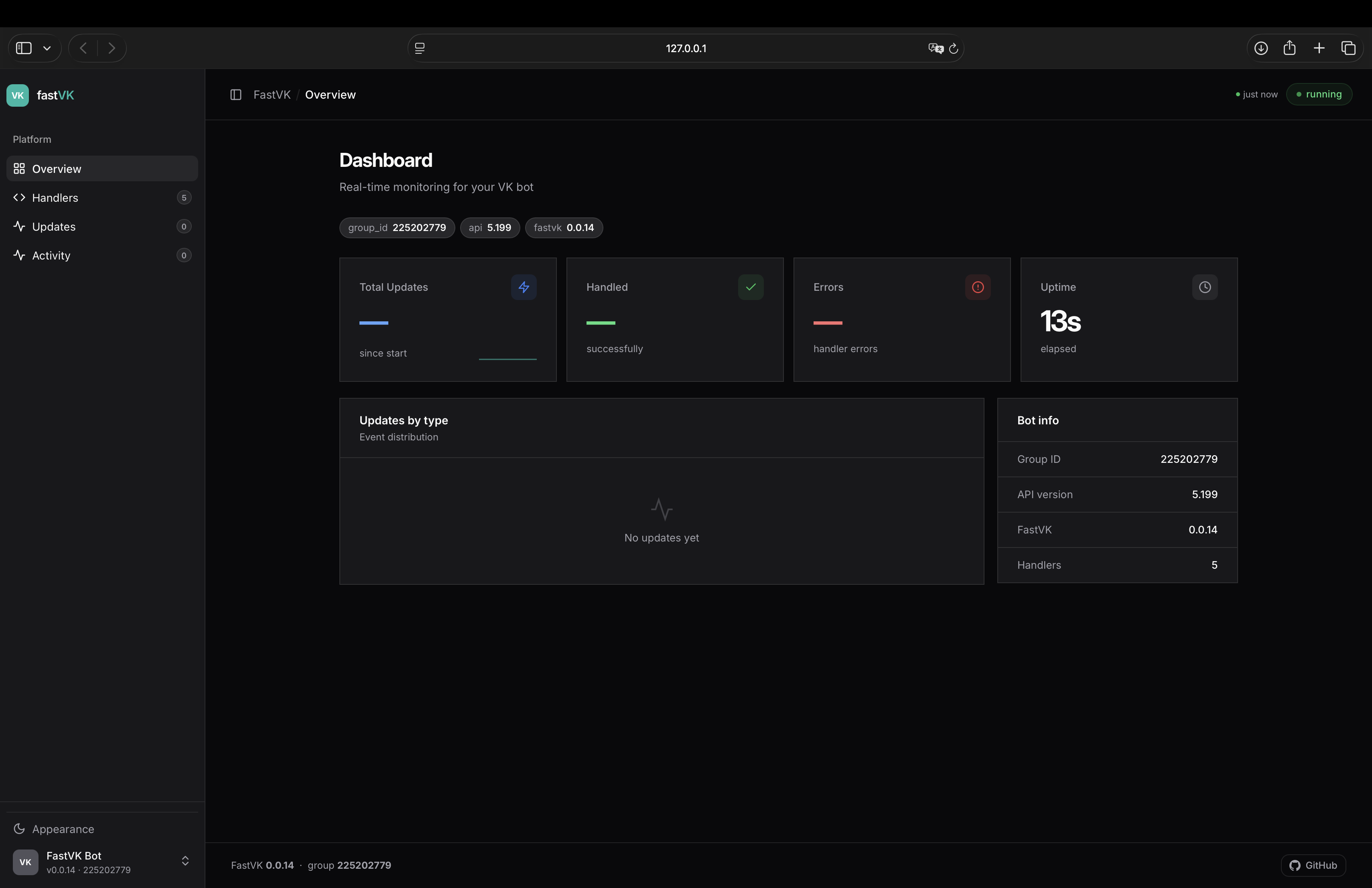
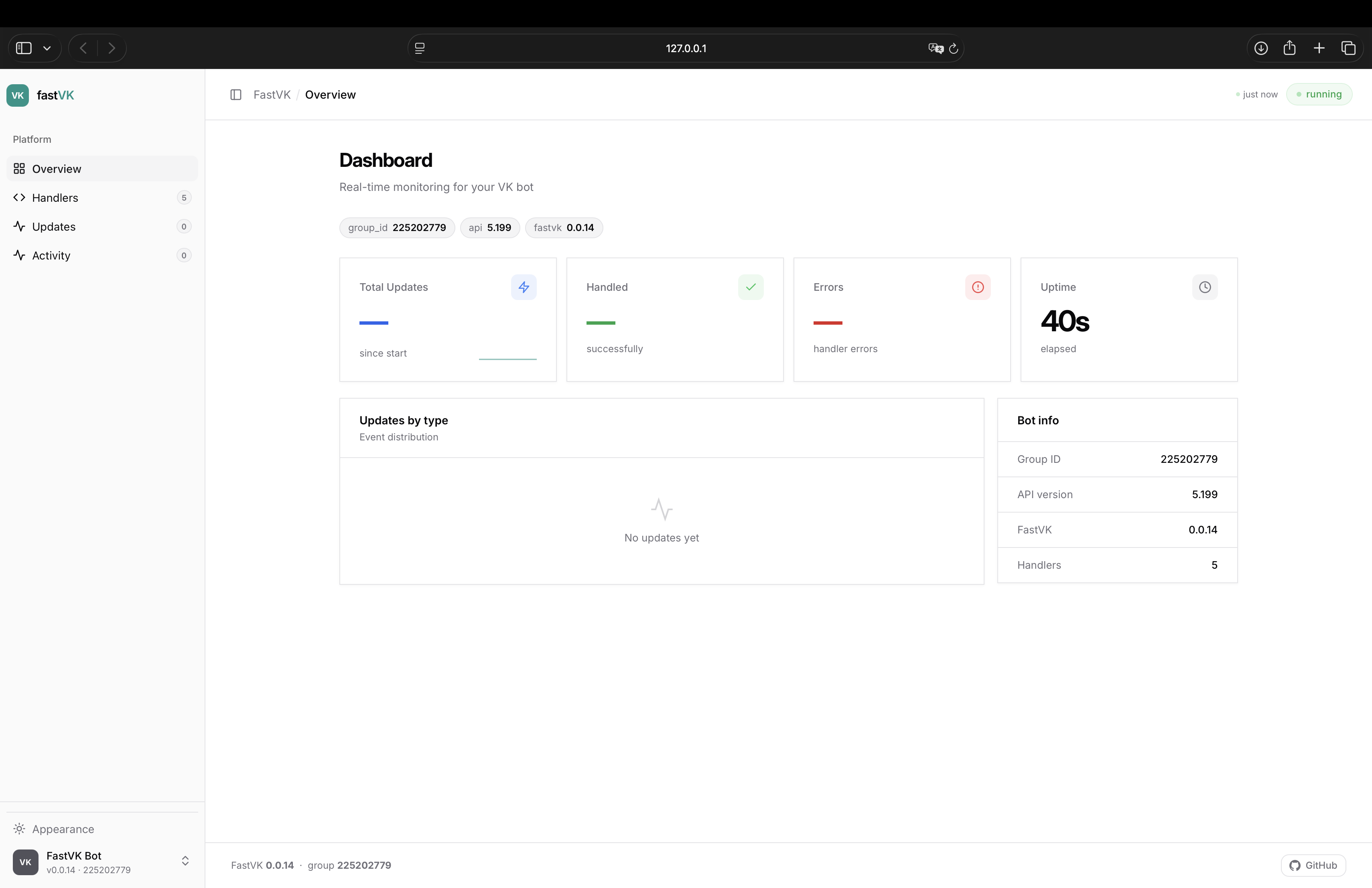
The dashboard shows:
- Overview — total updates, handled, errors, uptime, sparkline, updates/min, event distribution
- Handlers — registered handlers with filters, searchable
- Updates — live event type breakdown with percentages
- Activity — real-time event feed with timestamps, last 200 events
Dependency injection
Handler parameters are injected by type — declare what you need, the framework provides it:
| Type | What you get |
|---|---|
Message |
Parsed incoming message (message_new events) |
CallbackQuery |
Inline button click payload (message_event events) |
FSMContext |
FSM state accessor for the current user |
Bot |
VK API client |
Update |
Full raw update object |
User |
Sender info — fetched lazily, only when you ask for it |
BackgroundTasks |
Fire-and-forget background tasks |
re.Match |
Regex match object (when using the Regexp filter) |
Your CallbackData subclass |
Unpacked callback payload (when using CallbackDataFilter) |
Any value a middleware puts in data |
Injected by its type |
Note: FastVK no longer calls
users.geton every update. Declareuser: Userin a handler (or callawait message.get_user()) when you need the sender; otherwisemessage.from_userisNone.
@router.message()
async def handler(
    message: Message,
    state: FSMContext,
    bot: Bot,
) -> None:
    ...
Optional dependencies
| Extra | Installs | Use |
|---|---|---|
fastvk[sqlite] |
aiosqlite |
SQLiteStorage — persistent FSM without Redis |
fastvk[redis] |
redis |
RedisStorage — Redis-backed FSM storage |
$ pip install fastvk[sqlite]
$ pip install fastvk[redis]
Contributing
Contributions are welcome! Please open an issue before submitting a pull request.
Found a bug? Open an issue on GitHub.
License
This project is licensed under the terms of the MIT license.
1 maintainer

Download files
Download the file for your platform. If you're not sure which to choose, learn more about installing packages.
Source Distribution
Built Distribution
Filter files by name, interpreter, ABI, and platform.
If you're not sure about the file name format, learn more about wheel file names.
Copy a direct link to the current filters
File details
Details for the file fastvk-0.0.18.tar.gz.
File metadata
- Download URL: fastvk-0.0.18.tar.gz
- Upload date:
- Size: 181.7 kB
- Tags: Source
- Uploaded using Trusted Publishing? No
- Uploaded via:
twine/7.0.0 CPython/3.13.15
File hashes
| Algorithm | Hash digest | |
|---|---|---|
| SHA256 |
c483b86c37e27d61477a6d0bfddcc45df5952cad5b627b3ed81db345ece42c1e
|
|
| MD5 |
1ffee21f1de9526c68b64123e7b90125
|
|
| BLAKE2b-256 |
b059c5297d4f7985f4deb33b0422b409d02d677d8a693a68f1a59647f263bb5e
|
File details
Details for the file fastvk-0.0.18-py3-none-any.whl.
File metadata
- Download URL: fastvk-0.0.18-py3-none-any.whl
- Upload date:
- Size: 84.6 kB
- Tags: Python 3
- Uploaded using Trusted Publishing? No
- Uploaded via:
twine/7.0.0 CPython/3.13.15
File hashes
| Algorithm | Hash digest | |
|---|---|---|
| SHA256 |
c2209c08ee8c440efb9864bd42ed64ad858c29b278c339a4b8089f1aff3b12c3
|
|
| MD5 |
ac45b7cad4e52b8c617491af4d406599
|
|
| BLAKE2b-256 |
d710275d675dd2494795f4b45bf430ba6ff3102370cbd771872aa98be65893ba
|














