

Fat Llama 


fat_llama is a Python package for upscaling audio files to FLAC or WAV formats using advanced audio processing techniques. It utilizes CUDA-accelerated calculations to enhance audio quality by upsampling and adding missing frequencies through FFT (Fast Fourier Transform), resulting in richer and more detailed audio.
Features
- Upscale MP3 files to high-quality FLAC format.
- Band-limited (FFT-domain) interpolation and iterative soft thresholding (IST) for enhanced audio processing, with no bandwidth extension beyond the original recording's frequency ceiling.
- LMS adaptive filtering, auto-scaling amplitude adjustment, and normalization.
- Supports GPU-accelerated processing with CuPy.
- Claude is used for coding and maintainance of this package, but not for generating audio.
Requirements
- CUDA capable GPU
(Note: For cpu verison please look at https://pypi.org/project/fat-llama-fftw/)
Installation
Install via pip:
pip install fat-llama
Note: This version works with CUDA 13 (tested against 13.3).
Further need CUDA & CuPy properly installed: https://docs.cupy.dev/en/stable/install.html
Also, requires ffmpeg: https://support.audacityteam.org/basics/installing-ffmpeg
Note to install on older versions of CUDA and CuPy. You will need to download specific versions and install locally.
- cupy version - https://github.com/bkraad47/fat_llama/tree/v-0.1.3---cupy
- cupy-cuda11x version - https://github.com/bkraad47/fat_llama/tree/v-0.1.3---cupy-cuda11x
- cupy-cuda12x version - https://github.com/bkraad47/fat_llama/tree/v-1.1.0
To install locally:
git clone <target_url>
cd fat_llama
pip install .
Usage
Example Usage
You can run the example provided in example.py:
from fat_llama.audio_fattener.feed import upscale

# Example call to the method
upscale(
    input_file_path='input_test.mp3',
    output_file_path='output_test.flac',
    source_format='mp3',
    target_format='flac',
    max_iterations=300,
    threshold_value=0.6,
    target_bitrate_kbps=1400,
    toggle_normalize=True,
    toggle_autoscale=True,
    toggle_adaptive_filter=True
)
Function Parameters
input_file_path (str): Path to the input audio file. Mandatory.output_file_path (str): Path to the output processed audio file. Mandatory.source_format (str): Format of the input audio file (e.g., 'mp3', 'wav', 'ogg', 'flac').target_format (str): Format of the output audio file (e.g., 'flac', 'wav'). Default is 'flac'.max_iterations (int): Maximum number of iterations for IST. Default is 300.threshold_value (float): Threshold value for IST. Default is 0.6.target_bitrate_kbps (int): Used to derive the upscale factor relative to the source file's own bitrate; must fall within the valid range fortarget_format(800-1411 kbps forflac, 800-6444 kbps forwav). Default is 1411. Note this is not a promise about the output file's real bitrate — the output is always written as uncompressed PCM at an upsampled sample rate, so its actual bitrate will be substantially higher.toggle_normalize (bool): Whether to normalize the audio. Default True.toggle_autoscale (bool): Whether to autoscale the audio based on the original audio. Default True.toggle_adaptive_filter (bool): Whether to apply LMS adaptive filtering. Default True.
Running the Example
To run the example, execute the following command:
python example.py
This will upscale the MP3 file specified in the example and produce a FLAC file with full processing.
Spectrogram Results
Audio Quality Scores
Generated by the test-fat-llama skill's audio-quality-checker subagent — updated each run, not hand-edited.
| Metric | Score | Notes |
|---|---|---|
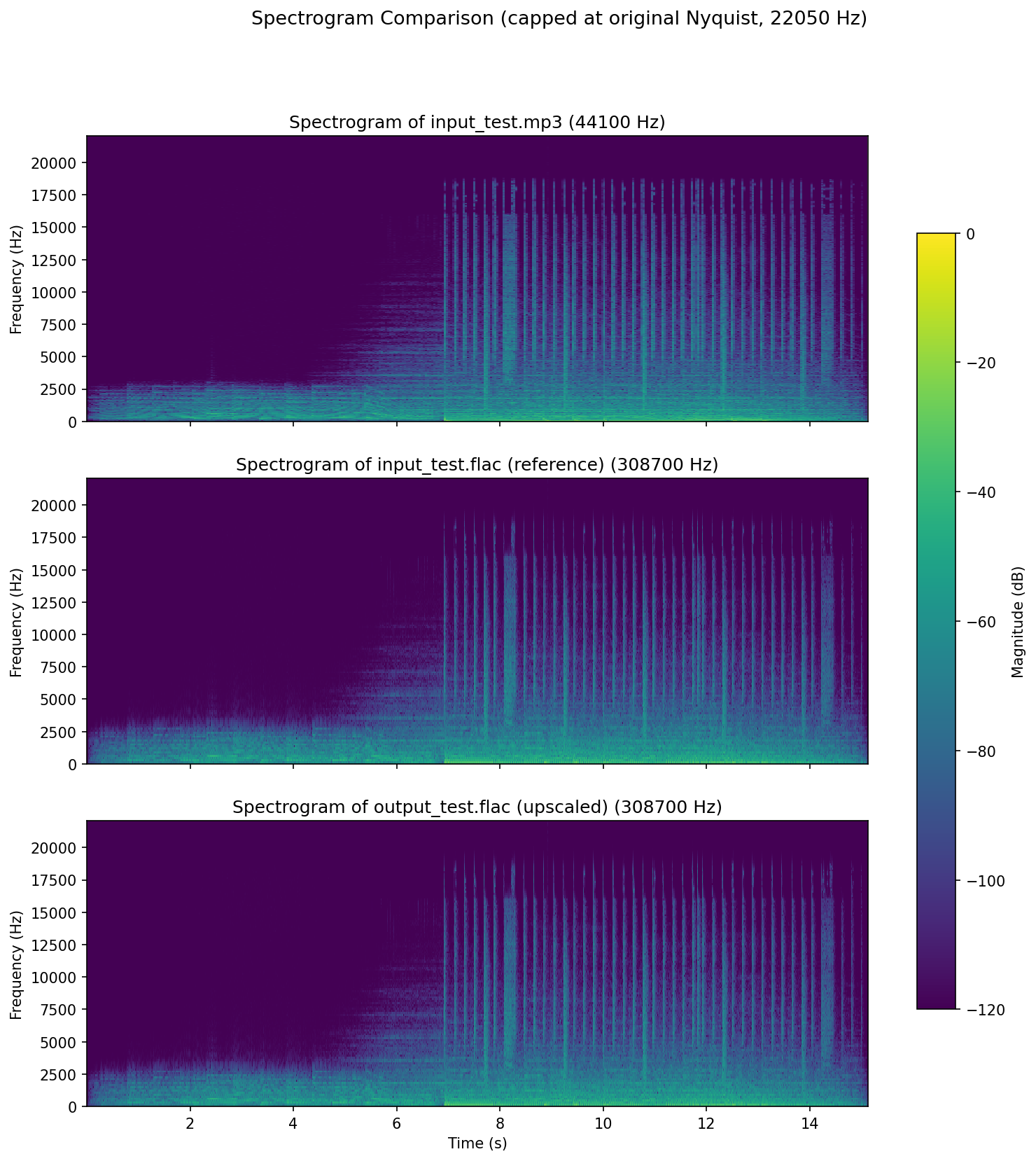
| Coherence (upscale quality, 0-10) | 9 | Clean on every check - 0 non-finite samples, 0.0129% clipping, 0 dropouts >50ms, 99.9th-pct sample-to-sample jump 0.0161 vs the reference's 0.0582, above-original-Nyquist (22050-88200 Hz) band at -176.3 dB peak / -143.9 dB rms relative to in-band content, dynamic range 30.7 dB vs the reference's 30.6 dB with envelope correlation 1.00000 and no persistent non-source tone - with only a modest band-selective HF lift (+1.0 dB at 10-14 kHz rising to +2.6 dB at 18-20 kHz, flat to -0.00 dB below 2 kHz, so no broadband noise-floor rise) and no new content in the one genuinely empty band (20-22.05 kHz stayed at ~-126 dB), i.e. a safe, transparent upscale rather than clearly measurable added detail. |
| Spectral deviation vs. reference FLAC (0-10) | 9.9 | convergence=0.9839, correlation=0.9999 against input_test.flac (both signals mono-downmixed, output resampled 176400 -> 308700 Hz via resample_poly(7,4), trimmed to match, STFT nperseg=2048/noverlap=1024, each spectrogram max-normalized). |
How it works
Algorithm Explanation
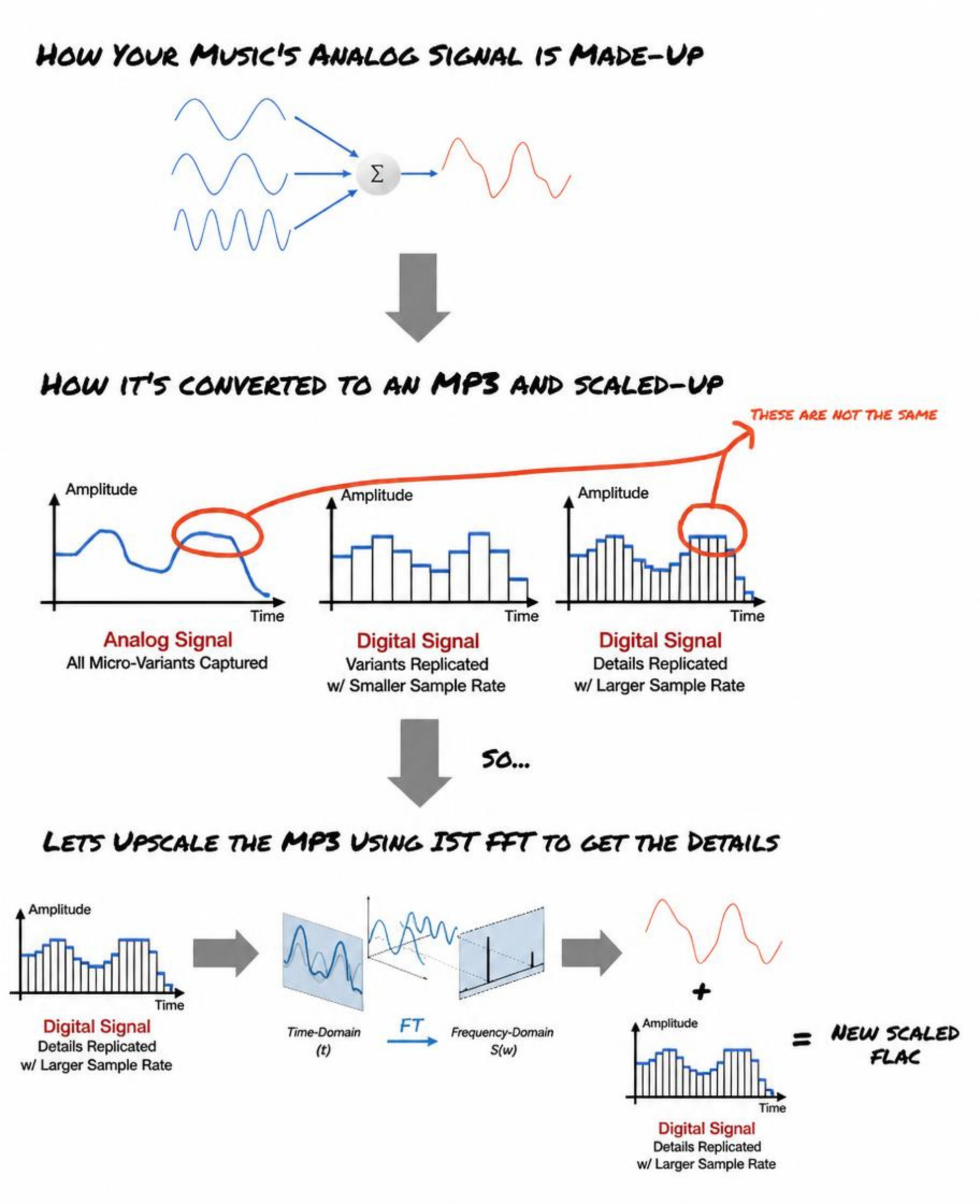
The upscaling process involves several steps:
- Reading Audio File: The audio file is read, and the audio samples are extracted along with the sample rate and bitrate.
- Calculating Upscale Factor: The upscale factor is derived from
target_bitrate_kbpsrelative to the source file's own bitrate, then clamped so the resulting sample rate never exceeds a realistic consumer playback ceiling (192 kHz) and never goes below the original sample rate — the derivation no longer produces arbitrarily large factors (e.g. 250-300+ kHz output sample rates) that the pipeline's own Nyquist cutoff (step 8) would have made mostly silent anyway. - Upscaling Channels: The audio channels are upscaled using a bandlimited FFT-domain interpolation (zero-padding the spectrum then inverse-transforming) rather than naive sample repetition, so the extra samples don't introduce spectral imaging above the original signal's Nyquist frequency.
- Iterative Soft Thresholding (IST): IST is applied to enhance the audio by adding missing frequencies. This process uses FFT to transform the signal into the frequency domain, apply a threshold to keep significant frequencies, and then inverse transform back to the time domain, repeated for
max_iterationsrounds. A per-iteration synthetic harmonic-reconstruction term was tried across cycles 2-3 (content-derived frequency, peak-scaled amplitude), but was found (cycle 4) to be computed from a single whole-buffer FFT, so for any real multi-second upscaled channel its "content-derived" frequency was actually static across the whole track — a constant, audible, non-source tone that collapsed measured dynamic range in quiet passages. It has been removed rather than revised a fourth time; IST now performs the plain FFT/threshold/IFFT round trip described above with no synthetic tone added on top. - Scaling Amplitude: The amplitude of the upscaled audio is scaled to match the original.
- Normalizing Audio: The audio is normalized to the range -1 to 1.
- Adaptive Filtering: A block-adaptive LMS filter with a short decorrelation delay refines the normalized signal, adapting its coefficients based on the signal's own short-term predictability. Tap weights update once per block of samples (rather than once per individual sample) using the block-averaged gradient, which is what makes enabling this stage practical at typical upscaled sample counts.
- Original-Nyquist Cutoff: An unconditional final FFT-domain lowpass removes any spectral content above the original source file's Nyquist frequency, guaranteeing the upscale never synthesizes or leaves behind content beyond the original recording's real bandwidth — upscaling improves precision and headroom within that bandwidth, it does not extend it.
- Writing FLAC File: The processed audio is written to a FLAC file.
Why FFT and IST?
FFT (Fast Fourier Transform) is used to transform the audio signal into the frequency domain. This allows for the identification and manipulation of specific frequency components. By applying a threshold in the frequency domain, we can keep significant frequencies and discard noise and add it to our upscaling data to add detail to upscaling frequencies.
The report titled "Fast Sparse Fourier Transformations for NMR Spectroscopy" by Badruddin Kamal, supervised by Thomas Huber and Alastair Rendall, 2015, provides a comprehensive understanding of sparse representations and their applications in signal processing. IST leverages the concepts from this report to add missing frequencies and enhance the audio quality by making it more detailed and rich. This is particularly useful in upscaling audio where some frequencies might be missing or congested.
Test Audio Source
ericzo - beyond link(https://soundcloud.com/ericzomusic/free-electro-trap-anthem-beyond)
Changelog
The full, current changelog is maintained in CHANGELOG.md — see it for the latest entries going forward. The history below is kept for reference.
1 maintainer

Metadata
1 maintainer
Release files for fat-llama 1.4.4
For a detailed explanation of source distributions (sdists) and built distributions (wheels), please see the package formats documentation.
Source distribution (sdist)
| File | Size | Uploaded | |
|---|---|---|---|
| fat_llama-1.4.4.tar.gz | 40.4 kB | Details |
Built distribution (wheel)
| File | Interpreter | ABI | Platform | Reset |
|---|---|---|---|---|
| fat_llama-1.4.4-py3-none-any.whl | Python 3 | none | any | Details |
Total release size: 78.5 kB
Release files / fat_llama-1.4.4.tar.gz
| Download URL | fat_llama-1.4.4.tar.gz |
|---|---|
| Size | 40.4 kB |
| Tags | Source |
|
SHA-256 checksum How to use checksums |
9bc1e9d3b5da5d3f7c1764c7caf8d6fdc11985d3fa05ca3bb9172d9a51341de0
|
|
BLAKE2b-256 checksum How to use checksums |
6b30ed883bb37d29eecf2be415996b61b31a256572143022fc5c62ce48042987
|
| Upload date | |
|
Uploaded using Trusted Publishing? What is trusted publishing? |
No |
| Uploaded via |
twine/7.0.0 CPython/3.12.14
|
Release files / fat_llama-1.4.4-py3-none-any.whl
| Download URL | fat_llama-1.4.4-py3-none-any.whl |
|---|---|
| Size | 38.0 kB |
| Tags | Python 3 |
|
SHA-256 checksum How to use checksums |
33f92f40e930e9d766331e4fc47b5f038d1dcc3873feb6122c0d33dc9a7c3e55
|
|
BLAKE2b-256 checksum How to use checksums |
bb38daba2559e2b453dc2d9d3b06099c8d56fb4c2ff79b0558022871f85e89e0
|
| Upload date | |
|
Uploaded using Trusted Publishing? What is trusted publishing? |
No |
| Uploaded via |
twine/7.0.0 CPython/3.12.14
|














