
FatCat Metadata





Native slicer settings and 3MF metadata for your own model generator.
FatCat Metadata is a C++17 library with Python bindings. It resolves native printer, process and material profiles, composes final project settings, and describes the metadata a 3MF writer needs for a selected slicer. It can be used independently of Lumina or any other application.
English · 简体中文 · API guide · Examples · Report an issue
Start here: first result, command-line usage and complete 3MF example. Use it to discover native choices, generate a model without Lumina, preserve user-project tuning, or compose merged material slots through the same core.
See the same custom process in seven slicers
One 20 mm cube, one shared process JSON, and eight target-specific exports: OrcaSlicer with Bambu A1 mini/P1S, Bambu Studio with P1S, and five other native slicers. The installed example changes layer height, widths, walls, shells, gyroid infill and brim settings. Each shown project was actually opened and sliced in the application; the animation uses enlarged GUI keyframes and compresses waiting time.
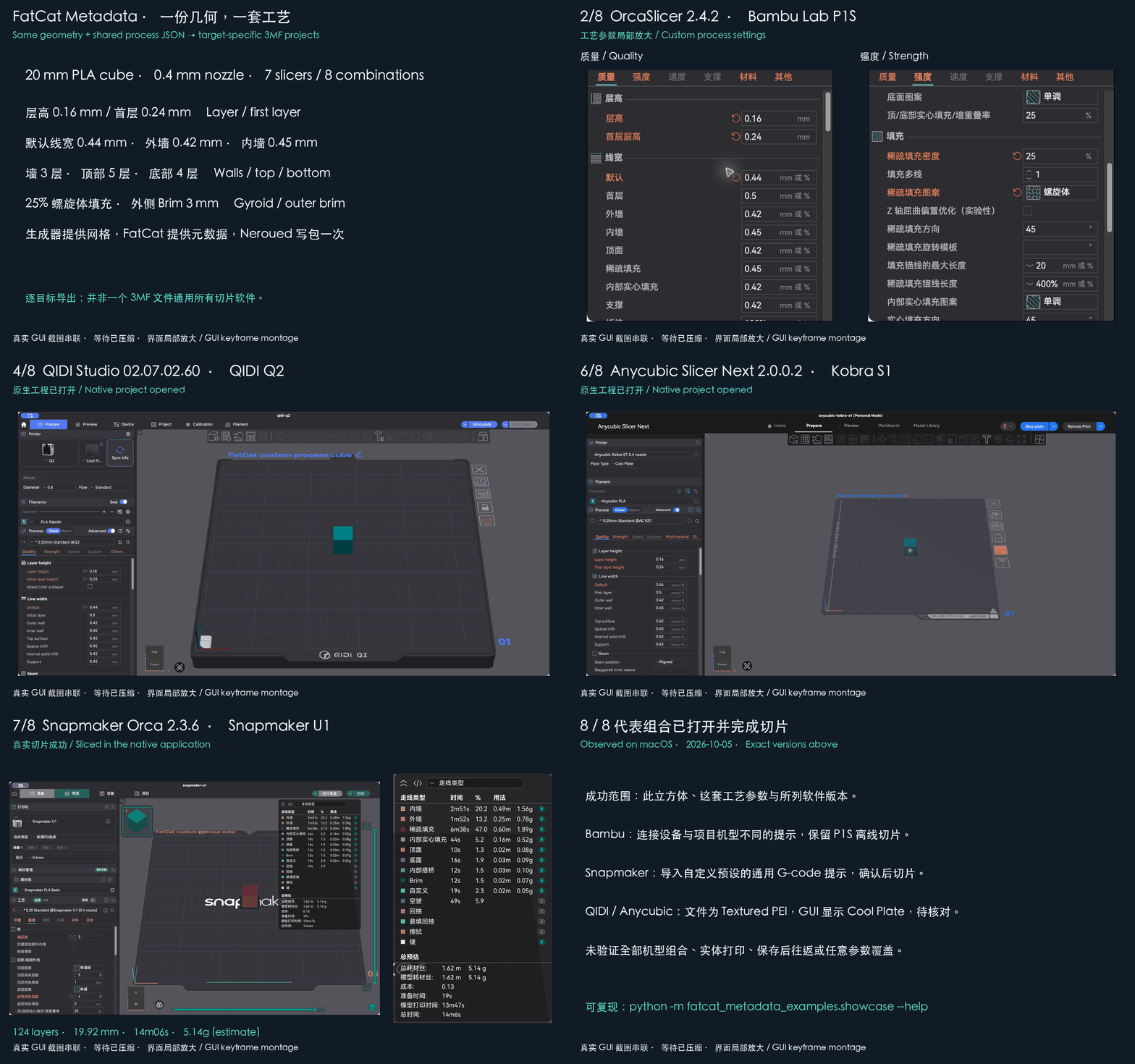
Reproduce the exports and read the observed results. All eight representative projects sliced successfully. Bambu/Snapmaker import notices and QIDI/Anycubic plate-label differences are recorded there. This is evidence for the listed combinations, rather than all printers or physical print quality. A separate 3MF is composed for each target.
Project status
The first PyPI release is 0.1.0, an early public SDK. Install a matching prebuilt wheel using the command below. Source users should pin an exact commit; a published version is fixed and is not replaced with later development code.
| Language | Current entry point |
|---|---|
| C++17 | Standalone static library, public headers and an installable CMake SDK; Python is not required. |
| Python 3.12–3.14 | Compiled bindings to the same C++ core, dictionary/JSON APIs and editor type hints. |
| Other languages | No shipped C ABI or language bindings yet. A bridge to the C++ core is required. |
What it provides
- Native profile selection by exact slicer version, printer, nozzle, material and build plate.
- Resolution of profile inheritance and includes from bundled upstream JSON snapshots.
- Composition of native projects, user-supplied project settings and merged material slots.
- Preservation of source material identity, temperatures, flow, unknown project fields and recorded provenance.
- Slicer-specific metadata parts, content types, relationships and root-model descriptions for a writer.
- An optional Neroued adapter and independent Python/C++ examples.
How it fits into a generator
flowchart LR
    G[Your generator] -->|Target, materials and model facts| F[FatCat Metadata]
    G -->|Meshes, object IDs and placement| W[3MF writer]
    F -->|Final settings and metadata description| W
    W --> P[3MF project]
Your generator owns geometry, material choices and placement. FatCat owns profile selection and metadata composition. The writer assembles and writes the archive. Metadata uses the writer's real object IDs and material indices; images and other binary resources remain caller-supplied.
Neroued is optional: the core package has no Neroued runtime dependency, and another writer can consume the metadata description. FatCat does not perform slicing or send print jobs.
Supported slicer snapshots
These are the exact versions currently bundled with the library:
| Application | slicer_id |
Version |
|---|---|---|
| Bambu Studio | BambuStudio |
02.08.02.61 |
| OrcaSlicer | OrcaSlicer |
2.4.2 |
| QIDI Studio | QIDIStudio |
02.07.02.60 |
| ElegooSlicer | ElegooSlicer |
1.5.3.5 |
| Anycubic Slicer Next | AnycubicSlicerNext |
2.0.0.3 |
| Flash Studio | FlashStudio |
1.7.18 |
| Snapmaker Orca | SnapmakerOrca |
2.4.0 |
| PrusaSlicer (preview) | PrusaSlicer |
3.0.0-alpha12 |
The target manifest is the authoritative version list. Unknown targets and incompatible selections are rejected. A supported slicer does not imply every printer/nozzle/material/plate combination is available; inspect its native source catalogue.
The seven stable snapshots were checked against official macOS downloads on 2026-10-06. PrusaSlicer is an explicitly supported preview, checked on 2026-10-07; its new native project format is separate from PrusaSlicer 2.x. Anycubic's Linux 2.0.0.5 build is a different release and is not claimed by the macOS 2.0.0.3 snapshot.
Explicit process settings use a discoverable contract:
known equivalents are normalized, target array formats are respected, and
unknown or unsupported inputs raise actionable errors. The seven stable targets cover 38 fields,
not every slicer feature or every interaction between settings.
Use fatcat fields --slicer BambuStudio or Python list_native_fields to inspect
versioned native evidence and process coverage. Missing SDK support is reported
separately from an excluded native enum token; absent fields remain unverified.
Some combinations use explicitly recorded historical sources. OrcaSlicer 2.4.2 U1 0.4 mm, for example, uses a recorded 2.2.4 process and textured-plate material. The result identifies their actual versions. See compatibility notes.
PrusaSlicer 3 preview
The SDK composes native Metadata/PrusaSlicer3_project.json from Prusa's own
configuration exports. Its catalogue contains 32 default-nozzle FFF hardware
selections, including MK4S, CORE One, MINI, MMU and XL. A single nozzle with MMU
material slots and multiple independent tools retain their distinct native
configuration structures. Native process overrides and per-material temperature
and flow settings use the exact application's schema.
fatcat catalog --slicer PrusaSlicer
python -m fatcat_metadata_examples.prusa --machine prusa:mk4s --output prusa.3mf
The complete example requires the optional Neroued writer. MK4S, MK4S + MMU3 and XL 5T samples were opened and sliced in the actual alpha12 GUI. This does not establish every catalogue combination or physical print quality. See the Prusa guide for configuration imports, aliases and limits.
Python quick start
Install from PyPI
Use 64-bit CPython 3.12, 3.13 or 3.14 on Windows AMD64, macOS 14+ Apple Silicon, or Linux x86_64 with glibc 2.28+. Pip selects the matching precompiled extension and native command. The option below prevents an unexpected source build on unsupported platforms; installing a matching wheel requires no C++ compiler.
python -m pip install --only-binary=:all: fatcat-metadata==0.1.0
fatcat --version
fatcat catalog
For the complete 3MF examples, install fatcat-metadata[examples]==0.1.0 instead.
The optional extra adds Neroued; the metadata core remains usable on its own.
Downloads are also available on the PyPI files page.
Alpine/musl, Intel Macs, Windows ARM and free-threaded Python have no prebuilt
wheel in this release. Building from source requires a compatible toolchain.
Read the distribution guide for build and publishing details.
The installed cube example was opened and sliced in the pinned Bambu Studio version:
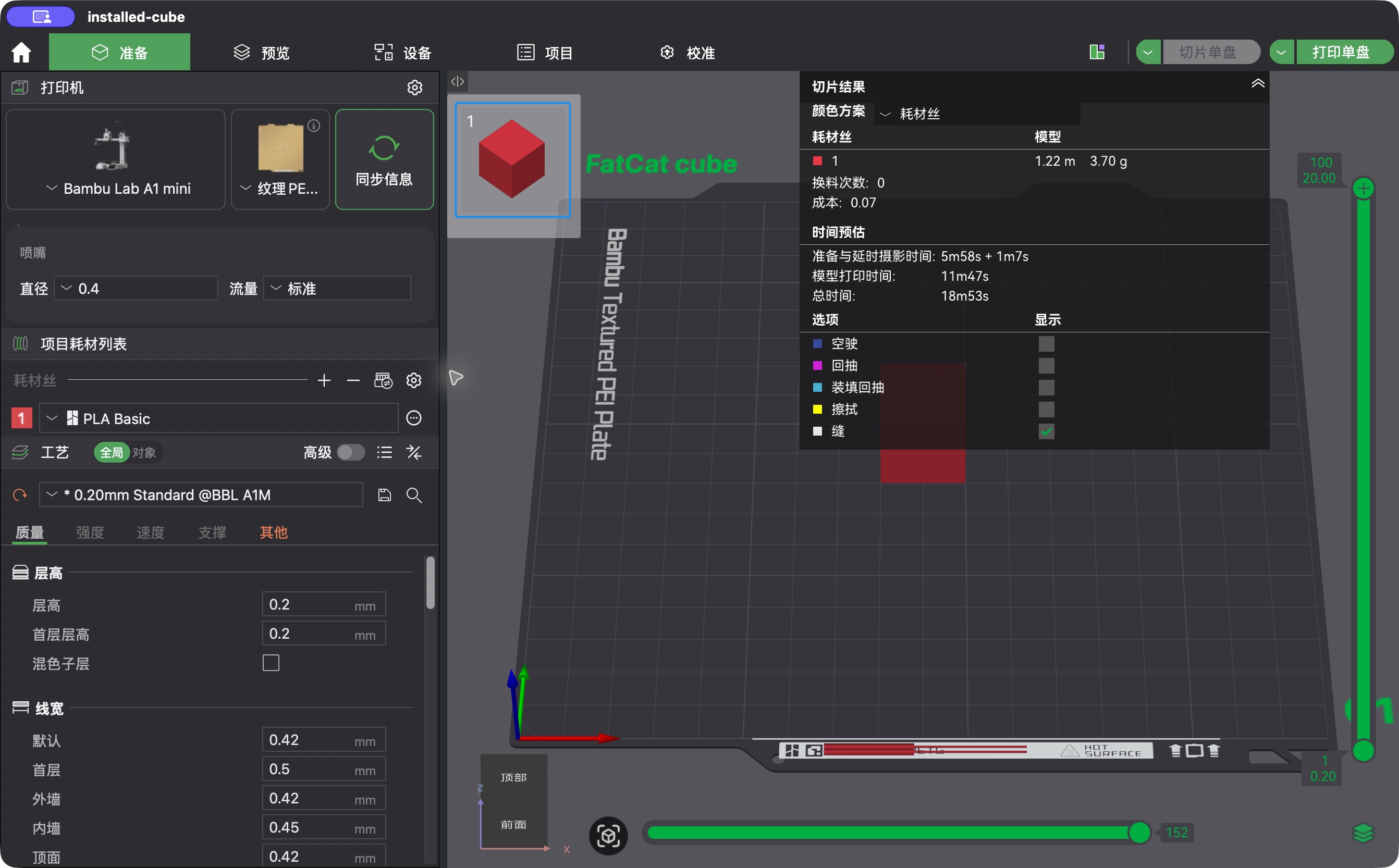
This demonstrates one example's settings and toolpaths. It does not establish all printer combinations or physical print quality.
No installed slicer is needed. Query choices before composing settings:
fatcat choices --slicer BambuStudio --application-version 02.08.02.61 \
  --machine bambu-lab:a1-mini --nozzle nozzle:0.4mm --plate plate:textured-pei
Compose native project settings
import fatcat_metadata as fatcat

result = fatcat.compose_project_settings({
    "project_source": "fatcat_native",
    "slicer_id": "BambuStudio",
    "application_version": "02.08.02.61",
    "machine_uid": "bambu-lab:a1-mini",
    "nozzle_uid": "nozzle:0.4mm",
    "build_plate_uid": "plate:textured-pei",
    "source_materials": [
        {"name": "Bambu PLA Basic", "material_type": "PLA Basic", "colour": "#E63946"}
    ],
})
project = result["project_settings"]
Supply the final dictionary and your real model facts to
compose_model_metadata(project, model_request) for the writer-facing description.
For a user-provided project, use compose_project_settings(source_project, request).
Existing JSON-string calls remain supported. See the API guide
for both request contracts.
Write a complete example 3MF
Install the optional writer and run the example shipped by the wheel, without cloning this repository:
python -m pip install 'neroued-3mf==0.4.0'
python -m fatcat_metadata_examples.minimal --output fatcat-cube.3mf
The minimal example shows settings composition, real geometry/ID creation, metadata application and one archive write. It uses Neroued's public core assembly layout. The complete guide covers custom sources, U1 compatibility and writer requirements for optional external production-model layouts.
Build from source
Source builds require a C++17 toolchain, CMake 3.18+ and Python 3.12–3.14. The build fetches pinned JSON/XML dependencies if suitable system packages are absent. Check out the reviewed full SHA for a reproducible integration.
git clone https://github.com/MOVIBALE/fatcat-metadata.git
cd fatcat-metadata
python -m pip install .
Use source builds for unsupported platforms or expired download artifacts.
All current builds are version 0.1.0. Inspect the installed build with:
import fatcat_metadata as fatcat

print(fatcat.__version__)
print(fatcat.__source_revision__)
print(fatcat.__source_dirty__)
The revision identifies the actual build checkout; PR CI may use a merge
revision. Git-free archives report "unknown" and None unless their packaging
workflow supplies build provenance. See the distribution guide.
These build fields
are separate from the selected profiles' provenance.
Standalone C++ SDK
Build and install the core without Python. Replace the installation prefix below with an absolute path on your machine:
cmake -S cpp -B build-sdk -DCMAKE_BUILD_TYPE=Release \
  -DFATCAT_BUILD_PYTHON=OFF -DFATCAT_BUILD_TESTS=OFF -DFATCAT_INSTALL_CPP=ON
cmake --build build-sdk --config Release --parallel
cmake --install build-sdk --config Release --prefix /absolute/path/to/fatcat-sdk
Point your CMake project's CMAKE_PREFIX_PATH at that installation, then link
your existing my_generator target:
find_package(FatCatMetadata 0.1.0 CONFIG REQUIRED)
target_link_libraries(my_generator PRIVATE FatCatMetadata::Core)
Pass FatCatMetadata_DATA_DIR to the public composition APIs; the library
resolves its internal profile/target paths. System JSON/XML packages used to
build the SDK must also be available to the consumer. Python wheels do not
include this C++ development SDK. See the C++ guide and
external CMake consumer for complete examples.
Data and validation
Native profiles are bundled JSON snapshots from the listed slicer releases. Normal calls read that packaged data; they do not query installed slicers or download profiles at runtime. Upstream files retain their original content and inheritance relationships. Library-maintained target contracts and source indices are separate from those raw profiles.
CI checks C++ Debug/Release builds, Python wheel installation, composition, independent consumers and generated archive structure on Windows, Linux and macOS. Native GUI opening/slicing and physical printer behavior require separate acceptance. See validation scope for what each check establishes.
Documentation and repository layout
| Guide | Purpose |
|---|---|
| API | Settings/metadata requests, dictionary and JSON calls, and build provenance. |
| First result | Installed CLI, choice discovery and the complete cube example. |
| Custom process showcase | Seven-slicer GUI montage, editable process JSON and eight reproducible exports. |
| Distributions | PyPI installation, portable builds, Trusted Publishing and source/hash receipts. |
| Python examples | Complete independent generator and optional writer integration. |
| C++ SDK | Source builds, installation and downstream CMake consumption. |
| Compatibility | Historical profiles and unavailable combinations. |
| Maintenance | Updating snapshots, target bindings and source provenance. |
| Validation | Automated checks and separate native GUI acceptance. |
cpp/            C++ core, public headers, Python bindings and examples
python/         Optional Neroued adapter and Python type signatures
compatibility/  Native profile snapshots, source indices and target contracts
scripts/        Source refresh and installed-package checks
docs/           API, compatibility, maintenance and validation guides
licenses/       Third-party license texts and source manifest
Contributing
Use Issues for bug reports
and feature proposals, and submit pull requests against main. Include the
library source revision, OS, exact slicer version, printer/nozzle/material/plate
selection and a minimal input in reports. Remove private geometry and customer
data before sharing a reproduction.
Keep public interfaces compatible, adopt new helpers in a real consumer and document behavior changes. Profile updates need exact upstream sources and license records: follow the maintenance guide. Existing build/check commands are in the C++ guide and CI workflow. Record actual application versions and GUI outcomes separately from CI results.
License
Original FatCat code is licensed under AGPL-3.0-only; see LICENSE. Third-party profile data and dependencies retain their respective licenses. Their sources and notices are recorded in NOTICE.md and the third-party manifest. COPYRIGHT.md explains copyright ownership and separate licensing terms for original code. Neroued is a separate project with its own terms.
1 maintainer

Metadata
1 maintainer
Release files for fatcat-metadata 0.1.0
For a detailed explanation of source distributions (sdists) and built distributions (wheels), please see the package formats documentation.
Source distribution (sdist)
| File | Size | Uploaded | |
|---|---|---|---|
| fatcat_metadata-0.1.0.tar.gz | 6.6 MB | Details |
Built distributions (wheels)
Total release size: 83.2 MB
Release files / fatcat_metadata-0.1.0.tar.gz
| Download URL | fatcat_metadata-0.1.0.tar.gz |
|---|---|
| Size | 6.6 MB |
| Tags | Source |
|
SHA-256 checksum How to use checksums |
44214a81bf2f2bee4045157fe63cc06c2bc7f6fd212109f2b07a62aecdeba10c
|
|
BLAKE2b-256 checksum How to use checksums |
387120cc0b3163d0db2e94596607a42fc249abb44e73381cc5bffb7e3803d1a7
|
| Upload date | |
|
Uploaded using Trusted Publishing? What is trusted publishing? |
Yes |
| Uploaded via |
twine/7.0.0 CPython/3.13.14
|
Provenance
Provenance describes where a file came from. On PyPI, provenance is shared via attestations, which provide a verifiable record of the build or publishing details. View details, limitations and caveats.


PyPI Publish Attestation
PyPI verified that this artifact, at this checksum, originated from the publisher listed below.
Signed by GitHub Actions, verified by PyPI on Oct 14, 2026.
Transparency logRelease files / fatcat_metadata-0.1.0-cp314-cp314-win_amd64.whl
| Download URL | fatcat_metadata-0.1.0-cp314-cp314-win_amd64.whl |
|---|---|
| Size | 8.3 MB |
| Tags | CPython 3.14 Windows x86-64 |
|
SHA-256 checksum How to use checksums |
60b4f38cc3311b395b6072bc987a011d4d5146f543a53c29393968db9b3f2e41
|
|
BLAKE2b-256 checksum How to use checksums |
2e8d6369d93040ffa5bb760b00f8430b8c4f05155e6ee5d96a260d66dc9403b7
|
| Upload date | |
|
Uploaded using Trusted Publishing? What is trusted publishing? |
Yes |
| Uploaded via |
twine/7.0.0 CPython/3.13.14
|
Provenance
Provenance describes where a file came from. On PyPI, provenance is shared via attestations, which provide a verifiable record of the build or publishing details. View details, limitations and caveats.
PyPI Publish Attestation
PyPI verified that this artifact, at this checksum, originated from the publisher listed below.
Signed by GitHub Actions, verified by PyPI on Oct 14, 2026.
Transparency logRelease files / fatcat_metadata-0.1.0-cp314-cp314-manylinux_2_26_x86_64.manylinux_2_28_x86_64.whl
| Download URL | fatcat_metadata-0.1.0-cp314-cp314-manylinux_2_26_x86_64.manylinux_2_28_x86_64.whl |
|---|---|
| Size | 9.3 MB |
| Tags | CPython 3.14 Linux glibc 2.26+ x86-64 Linux glibc 2.28+ x86-64 |
|
SHA-256 checksum How to use checksums |
bed41281e88f41a597b37db0a9daed4fd70dbc1490ea6a4c4868c801e5d751a8
|
|
BLAKE2b-256 checksum How to use checksums |
88dcc8afab20549e2ba8816cc6aff7e09fc83e9c7551a83652de3aed9d409a2a
|
| Upload date | |
|
Uploaded using Trusted Publishing? What is trusted publishing? |
Yes |
| Uploaded via |
twine/7.0.0 CPython/3.13.14
|
Provenance
Provenance describes where a file came from. On PyPI, provenance is shared via attestations, which provide a verifiable record of the build or publishing details. View details, limitations and caveats.
PyPI Publish Attestation
PyPI verified that this artifact, at this checksum, originated from the publisher listed below.
Signed by GitHub Actions, verified by PyPI on Oct 14, 2026.
Transparency logRelease files / fatcat_metadata-0.1.0-cp314-cp314-macosx_14_0_arm64.whl
| Download URL | fatcat_metadata-0.1.0-cp314-cp314-macosx_14_0_arm64.whl |
|---|---|
| Size | 8.0 MB |
| Tags | CPython 3.14 macOS 14.0+ ARM64 |
|
SHA-256 checksum How to use checksums |
6599f2c016789ae047f66e903b8a345284001e981f6ecc3167755c51d0ba758f
|
|
BLAKE2b-256 checksum How to use checksums |
1afc8d2890b1b75d80f24ca1a23572f327a04befbda8334309e05f263b5b33d7
|
| Upload date | |
|
Uploaded using Trusted Publishing? What is trusted publishing? |
Yes |
| Uploaded via |
twine/7.0.0 CPython/3.13.14
|
Provenance
Provenance describes where a file came from. On PyPI, provenance is shared via attestations, which provide a verifiable record of the build or publishing details. View details, limitations and caveats.
PyPI Publish Attestation
PyPI verified that this artifact, at this checksum, originated from the publisher listed below.
Signed by GitHub Actions, verified by PyPI on Oct 14, 2026.
Transparency logRelease files / fatcat_metadata-0.1.0-cp313-cp313-win_amd64.whl
| Download URL | fatcat_metadata-0.1.0-cp313-cp313-win_amd64.whl |
|---|---|
| Size | 8.2 MB |
| Tags | CPython 3.13 Windows x86-64 |
|
SHA-256 checksum How to use checksums |
90aa3a3b890110ca3ff1a0f3f36ab6113814b66b944173cd1db66911197125d6
|
|
BLAKE2b-256 checksum How to use checksums |
7e457246eb850051ffe73f35acdd8710420cf71ab943686680ffd88594a7655b
|
| Upload date | |
|
Uploaded using Trusted Publishing? What is trusted publishing? |
Yes |
| Uploaded via |
twine/7.0.0 CPython/3.13.14
|
Provenance
Provenance describes where a file came from. On PyPI, provenance is shared via attestations, which provide a verifiable record of the build or publishing details. View details, limitations and caveats.
PyPI Publish Attestation
PyPI verified that this artifact, at this checksum, originated from the publisher listed below.
Signed by GitHub Actions, verified by PyPI on Oct 14, 2026.
Transparency logRelease files / fatcat_metadata-0.1.0-cp313-cp313-manylinux_2_26_x86_64.manylinux_2_28_x86_64.whl
| Download URL | fatcat_metadata-0.1.0-cp313-cp313-manylinux_2_26_x86_64.manylinux_2_28_x86_64.whl |
|---|---|
| Size | 9.3 MB |
| Tags | CPython 3.13 Linux glibc 2.26+ x86-64 Linux glibc 2.28+ x86-64 |
|
SHA-256 checksum How to use checksums |
8222ca497a947ff1521ad82d1d9d61a4971c87264a4538eaa22b749ef56d4a1e
|
|
BLAKE2b-256 checksum How to use checksums |
fffd88ce592b0c2b52dde3ab461c3930d51cd74e588857680ea661147c58c640
|
| Upload date | |
|
Uploaded using Trusted Publishing? What is trusted publishing? |
Yes |
| Uploaded via |
twine/7.0.0 CPython/3.13.14
|
Provenance
Provenance describes where a file came from. On PyPI, provenance is shared via attestations, which provide a verifiable record of the build or publishing details. View details, limitations and caveats.
PyPI Publish Attestation
PyPI verified that this artifact, at this checksum, originated from the publisher listed below.
Signed by GitHub Actions, verified by PyPI on Oct 14, 2026.
Transparency logRelease files / fatcat_metadata-0.1.0-cp313-cp313-macosx_14_0_arm64.whl
| Download URL | fatcat_metadata-0.1.0-cp313-cp313-macosx_14_0_arm64.whl |
|---|---|
| Size | 8.0 MB |
| Tags | CPython 3.13 macOS 14.0+ ARM64 |
|
SHA-256 checksum How to use checksums |
bd10109d566180858a063ea43c12142e0524881eda45f1152512f7672b841b24
|
|
BLAKE2b-256 checksum How to use checksums |
0a8329ef337e32f0ac4b9ecddb6198800b648c523e97d9e212227619303e44b9
|
| Upload date | |
|
Uploaded using Trusted Publishing? What is trusted publishing? |
Yes |
| Uploaded via |
twine/7.0.0 CPython/3.13.14
|
Provenance
Provenance describes where a file came from. On PyPI, provenance is shared via attestations, which provide a verifiable record of the build or publishing details. View details, limitations and caveats.
PyPI Publish Attestation
PyPI verified that this artifact, at this checksum, originated from the publisher listed below.
Signed by GitHub Actions, verified by PyPI on Oct 14, 2026.
Transparency logRelease files / fatcat_metadata-0.1.0-cp312-cp312-win_amd64.whl
| Download URL | fatcat_metadata-0.1.0-cp312-cp312-win_amd64.whl |
|---|---|
| Size | 8.2 MB |
| Tags | CPython 3.12 Windows x86-64 |
|
SHA-256 checksum How to use checksums |
f4746c73c02dff90de52172de02afcc5673f882e256eff5b2eaab65a31af899f
|
|
BLAKE2b-256 checksum How to use checksums |
3d086369ad4fe44395e636d579eeab6ca11011c01da8f6f3e61c249142546240
|
| Upload date | |
|
Uploaded using Trusted Publishing? What is trusted publishing? |
Yes |
| Uploaded via |
twine/7.0.0 CPython/3.13.14
|
Provenance
Provenance describes where a file came from. On PyPI, provenance is shared via attestations, which provide a verifiable record of the build or publishing details. View details, limitations and caveats.
PyPI Publish Attestation
PyPI verified that this artifact, at this checksum, originated from the publisher listed below.
Signed by GitHub Actions, verified by PyPI on Oct 14, 2026.
Transparency logRelease files / fatcat_metadata-0.1.0-cp312-cp312-manylinux_2_26_x86_64.manylinux_2_28_x86_64.whl
| Download URL | fatcat_metadata-0.1.0-cp312-cp312-manylinux_2_26_x86_64.manylinux_2_28_x86_64.whl |
|---|---|
| Size | 9.3 MB |
| Tags | CPython 3.12 Linux glibc 2.26+ x86-64 Linux glibc 2.28+ x86-64 |
|
SHA-256 checksum How to use checksums |
0d488a156e667df1b9edcf9b18dcd401d847c2002f6a445d6c9bf44ac984ed91
|
|
BLAKE2b-256 checksum How to use checksums |
90ebaf42b5c2c1bf5b84924c7e8576c46e8863c27217d7ceca23cd1ed25e0d99
|
| Upload date | |
|
Uploaded using Trusted Publishing? What is trusted publishing? |
Yes |
| Uploaded via |
twine/7.0.0 CPython/3.13.14
|
Provenance
Provenance describes where a file came from. On PyPI, provenance is shared via attestations, which provide a verifiable record of the build or publishing details. View details, limitations and caveats.
PyPI Publish Attestation
PyPI verified that this artifact, at this checksum, originated from the publisher listed below.
Signed by GitHub Actions, verified by PyPI on Oct 14, 2026.
Transparency logRelease files / fatcat_metadata-0.1.0-cp312-cp312-macosx_14_0_arm64.whl
| Download URL | fatcat_metadata-0.1.0-cp312-cp312-macosx_14_0_arm64.whl |
|---|---|
| Size | 8.0 MB |
| Tags | CPython 3.12 macOS 14.0+ ARM64 |
|
SHA-256 checksum How to use checksums |
74a8c8a340d64106076e99b6ed0bd63b4438fd3dbf0983908f8d3c1a4cb810e7
|
|
BLAKE2b-256 checksum How to use checksums |
ed7fd99b2c89769bad633781beb8bc85b557aad4c9feeac70d817f6b069ea2e3
|
| Upload date | |
|
Uploaded using Trusted Publishing? What is trusted publishing? |
Yes |
| Uploaded via |
twine/7.0.0 CPython/3.13.14
|
Provenance
Provenance describes where a file came from. On PyPI, provenance is shared via attestations, which provide a verifiable record of the build or publishing details. View details, limitations and caveats.
PyPI Publish Attestation
PyPI verified that this artifact, at this checksum, originated from the publisher listed below.
Signed by GitHub Actions, verified by PyPI on Oct 14, 2026.
Transparency log













