
Modern, account-based Python library for the unofficial Facebook Messenger API — with E2EE support.

Project description
fbchat-v2






A modern, unofficial Python library for the Facebook Messenger API — driven by a real user account (cookies / login). Now with End-to-End Encryption (E2EE) support for 1-on-1 Messenger chats via a Go bridge.
- Repository: https://github.com/MinhHuyDev/fbchat-v2
- Documentation: DOCS.md · FLOWCHART.md
- Changelog: CHANGELOG.md
- Issues: https://github.com/MinhHuyDev/fbchat-v2/issues
⚠️ Disclaimer
This is not an official Facebook product. Facebook provides an official Messenger Platform API here. fbchat-v2 differs in that it authenticates as a real user account via cookies or username/password, which carries inherent risks (account flags, rate-limits, ToS considerations). Use at your own risk and never share your cookies/tokens.
Since November 2024, all 1-on-1 Messenger chats are End-to-End Encrypted by default. fbchat-v2 v2.1.0 ships an E2EE listener (listeningE2EEEvent) that decrypts those messages by spawning a Go subprocess (fbchat-bridge-e2ee); group chats continue to use the MQTT WebSocket listener (listeningEvent).
✨ Features
Authentication
- 🔐 Login via username/password (with optional 2FA TOTP) or session cookies
- 🍪 Session reuse — no re-login on every run
Messaging
- 📥 Receive messages from both users and group threads
- 🔒 E2EE listener for 1-on-1 Messenger chats (Secret Conversations / Labyrinth) via Go bridge
- 📤 Send text, attachments, stickers, user mentions
- 🔍 Search messages and threads
- ↩️ Reactions, unsend, message-request handling
- 📡 Real-time event listener
Threads & Groups
- 👥 Create groups, add admins, change name / emoji / nickname
- 📊 Polls, full thread metadata
Facebook actions (_features._facebook)
- 📝 Create posts, edit bio, profile registration
- 👤 User search, profile info, notification management
- 🚫 Block/unblock, Marketplace and Professional mode
📦 Installation
Default install (group chats only)
pip install fbchat-v2
This pulls in requests, paho-mqtt, attrs, and pyotp. The MQTT-based group-message listener (listeningEvent) works out of the box.
Optional: enable E2EE for 1-on-1 chats
The E2EE listener requires a separate Go binary (fbchat-bridge-e2ee) that PyPI cannot ship. Build it once from source:
# 1) Install Go ≥ 1.24 from https://go.dev/dl/
# 2) Clone the bridge from the upstream repo
git clone https://github.com/MinhHuyDev/fbchat-v2
cd fbchat-v2/bridge-e2ee
git clone https://github.com/mautrix/meta.git ./meta
go mod tidy

# Windows
go build -ldflags="-s -w" -o fbchat-bridge-e2ee.exe .

# Linux / macOS
go build -ldflags="-s -w" -o fbchat-bridge-e2ee .
Then point the library at the binary via an environment variable:
# Windows (PowerShell)
$env:FBCHAT_E2EE_BIN = "C:\path\to\fbchat-bridge-e2ee.exe"

# Linux / macOS
export FBCHAT_E2EE_BIN=/path/to/fbchat-bridge-e2ee
The [e2ee] extra is reserved for a future automatic-download helper:
pip install "fbchat-v2[e2ee]" # currently a no-op placeholder
Roadmap: v2.2.0 plans to publish prebuilt bridge binaries on GitHub Releases and auto-download them on first use.
🚀 Quick Start
dataGetHome(setCookies)takes a single positional cookie string — exactly the value of theCookie:header you would copy from your browser DevTools (e.g."c_user=...; xs=...; fr=...; datr=...;"). It is not a dict and there is nocookies=keyword.
Group chat listener (no Go required)
import threading
from fbchat_v2 import dataGetHome, listeningEvent

COOKIE = "c_user=100012345678; xs=...; fr=...; datr=...;"

# 1) Bootstrap the session (scrapes fb_dtsg, jazoest, FacebookID, … from facebook.com)
dataFB = dataGetHome(COOKIE)

# 2) Start the MQTT listener
listener = listeningEvent(dataFB)
listener.get_last_seq_id()
threading.Thread(target=listener.connect_mqtt, daemon=True).start()

# listener.bodyResults is mutated in place — poll it from the main thread.
1-on-1 E2EE listener (requires Go bridge)
import threading
from fbchat_v2 import dataGetHome, listeningE2EEEvent

COOKIE = "c_user=100012345678; xs=...; fr=...; datr=...;"

dataFB = dataGetHome(COOKIE)

listener = listeningE2EEEvent(
    dataFB,
    log_level="warn",          # "none" | "error" | "warn" | "info" | "debug"
    e2ee_memory_only=True,     # set False + device_path="./device.json" to persist keys
    enable_e2ee=True,
    binary_path=None,          # auto-resolves; or pass an explicit path
)
listener.get_last_seq_id()
threading.Thread(target=listener.connect_mqtt, daemon=True).start()

# listener.bodyResults uses the SAME schema as listeningEvent —
# you can swap the import without changing your event handler.
Decorator-style handler (E2EE)
@listener.on_message
def on_msg(evt):                    # evt = {"type": "...", "data": {...}, "timestamp": ms}
    if evt["type"] == "e2eeMessage" and evt["data"].get("text") == "ping":
        listener.send_e2ee_message(
            chat_jid=evt["data"]["chatJid"],
            text="pong",
            reply_to_id=evt["data"]["id"],
            reply_to_sender_jid=evt["data"]["senderJid"],
        )
1-on-1 E2EE sender — sendingE2EEEvent (new in 2.1.3)
sendingE2EEEvent is the send-side companion to listeningE2EEEvent. It
speaks the same Go bridge and returns the same {"success": 1, "payload": {...}}
/ {"error": 1, "payload": {...}} schema as the plain HTTP _send.api,
so your bot code does not need a special branch for E2EE replies.
Mode A — reuse the listener's bridge (recommended). No extra pairing handshake, no "new device" notification on the peer:
import threading
from fbchat_v2 import dataGetHome, listeningE2EEEvent, sendingE2EEEvent

dataFB   = dataGetHome(COOKIE)
listener = listeningE2EEEvent(dataFB)
threading.Thread(target=listener.connect_mqtt, daemon=True).start()
# ... wait for the "e2eeConnected" event before sending ...

sender = sendingE2EEEvent(listener=listener)

@listener.on_message
def on_msg(evt):
    if evt["type"] == "e2eeMessage" and evt["data"].get("text") == "ping":
        result = sender.reply(evt["data"], "pong")
        # → {'success': 1, 'payload': {'messageID': '3EB0…', 'timestamp': 1715000000000}}
Mode B — standalone (own bridge subprocess). Useful for one-shot scripts;
supports Python's with statement:
from fbchat_v2 import dataGetHome, sendingE2EEEvent

dataFB = dataGetHome(COOKIE)

with sendingE2EEEvent(
    dataFB=dataFB,
    log_level="warn",          # "none" | "error" | "warn" | "info" | "debug"
    device_path="./device.json",
    e2ee_memory_only=False,    # persist Signal keys across runs
    binary_path=None,          # auto-resolves; or pass an explicit path
) as sender:
    sender.send(
        chat_jid    = "100012345678@s.whatsapp.net",
        contentSend = "hello E2EE",
    )
sendingE2EEEvent.send(...) reference
| Argument | Type | Description |
|---|---|---|
chat_jid |
str | Signal-style JID. Always copy from evt["data"]["chatJid"] — do not build it from a numeric threadID. DM = <id>@s.whatsapp.net, group = <id>@g.us. |
contentSend |
str | Message body. |
replyMessage |
str | (Optional) id of the message you are quote-replying to. |
replySenderJid |
str | (Optional, required if replyMessage is set) JID of the original sender. |
Returns — mirrors _send.api.send:
- ✅
{"success": 1, "payload": {"messageID": str, "timestamp": int}} - ❌
{"error": 1, "payload": {"error-decription": str, "error-code": "bridge_error" | "not_connected"}}
The typo
error-decriptionis intentional — it preserves the existing_send.apicontract so callers can use one error handler for both.
Convenience methods
| Method | Use |
|---|---|
sender.reply(evt_data, contentSend) |
Quote-reply in one line — auto-fills chat_jid, replyMessage, replySenderJid from a listener event. |
sender.connect(*, enable_e2ee=True, timeout=120) |
Standalone-only — spawn bridge, pair with Meta. |
sender.close() |
Standalone-only — stop the owned bridge subprocess. |
with sender: ... |
Standalone context-manager — auto connect() + close(). |
⚠️ Passing both
listener=anddataFB=raisesValueError. Pick one. Reuse mode is strongly preferred — each standalone process must re-pair with Meta and pops a new device alert on the peer's account.
📦 E2EE media sending (
SendE2EEImage/Video/Audio) is implemented in the Go bridge but not yet exposed by the Python wrapper — text only for now.
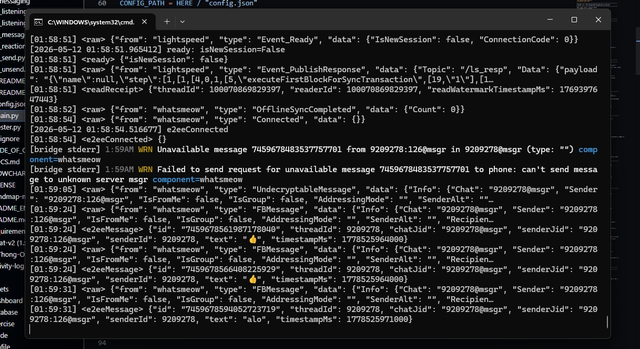
Demo — receiving decrypted 1-on-1 E2EE messages
📂 Package Layout
Installed Python package (importable as fbchat_v2):
fbchat_v2/
├── __init__.py                 # Re-exports: dataGetHome, listeningEvent, listeningE2EEEvent
├── py.typed                    # PEP 561 marker
├── _core/                      # Session, login, low-level helpers
│   ├── _facebookLogin.py
│   ├── _session.py
│   └── _utils.py
├── _features/
│   ├── _facebook/              # Posts, bio, search, notifications, blocking, marketplace, …
│   │   ├── _blocking.py
│   │   ├── _changeBio.py
│   │   ├── _createPost.py
│   │   ├── _get_user_info.py
│   │   ├── _marketplace.py
│   │   ├── _notification.py
│   │   ├── _professional.py
│   │   ├── _registerOnProfile.py
│   │   └── _search.py
│   └── _thread/                # Group/thread admin operations
│       ├── _addAdmin.py
│       ├── _all_thread_data.py
│       ├── _changeEmoji.py
│       ├── _changeNameThread.py
│       └── _changeNickname.py
└── _messaging/
    ├── _attachments.py
    ├── _listening.py           # MQTT — group messages
    ├── _listening_e2ee.py      # Go bridge — 1-on-1 E2EE listener
    ├── _message_requests.py
    ├── _reactions.py
    ├── _send.py                # HTTP sender (groups + plain DMs)
    ├── _send_e2ee.py           # Go bridge — 1-on-1 E2EE sender (new in 2.1.3)
    └── _unsend.py
Public API
The top-level fbchat_v2 namespace re-exports the most common entry points:
| Symbol | Source | Purpose |
|---|---|---|
dataGetHome |
fbchat_v2._core._session |
Build the session object from cookies / login |
listeningEvent |
fbchat_v2._messaging._listening |
MQTT listener for group messages |
listeningE2EEEvent |
fbchat_v2._messaging._listening_e2ee |
E2EE listener for 1-on-1 messages |
sendingE2EEEvent |
fbchat_v2._messaging._send_e2ee |
E2EE sender for 1-on-1 messages (new in 2.1.3) |
__version__ |
fbchat_v2 |
Package version string |
Submodules (fbchat_v2._features._facebook._createPost, etc.) can be imported directly for fine-grained access.
🔧 System Requirements
| Component | Minimum | Recommended | Notes |
|---|---|---|---|
| Python | 3.10 | 3.11 / 3.12 | Required |
| Go toolchain | 1.24 | 1.24+ | Only for E2EE — to build fbchat-bridge-e2ee |
| Git | any | latest | Needed for go mod tidy to fetch mautrix/meta |
| OS | Windows / Linux / macOS | — | — |
| RAM | 256 MB | 1 GB+ | Bridge process uses ~80–150 MB when active |
| Network | Stable connection to facebook.com and edge-chat.facebook.com |
— | — |
Python dependencies (auto-installed by pip):
requests   >= 2.31.0   # HTTP client
paho-mqtt  >= 1.6.1    # MQTT WebSocket for listeningEvent
attrs      >= 23.2.0   # Data classes
pyotp      >= 2.9.0    # 2FA TOTP for username/password login
🏗 Architecture
flowchart LR
    A[Your bot / app] --> B[fbchat_v2._core<br/>session • login • utils]
    B --> C[fbchat_v2._features<br/>facebook • thread]
    B --> D[fbchat_v2._messaging<br/>send • listen • reactions]
    D -.spawns.-> E[fbchat-bridge-e2ee<br/><i>Go subprocess, optional</i>]
    C --> F[(Facebook<br/>internal endpoints)]
    D --> F
    E --> F
Three clear layers:
| Layer | Path | Responsibility |
|---|---|---|
| Core | fbchat_v2._core |
Session management, login, request helpers, low-level utilities |
| Features | fbchat_v2._features |
Facebook & thread business logic (posts, groups, profile, …) |
| Messaging | fbchat_v2._messaging |
Send / receive / react / listen / unsend |
Full request flow diagrams live in FLOWCHART.md.
🗺 Roadmap
- E2EE decryption for 1-on-1 Messenger chats (v2.1.0 — Go bridge)
- Native
async/awaitAPI - Prebuilt bridge binaries published on GitHub Releases (auto-download)
- Full type hints across the public API
- Pluggable storage backend for sessions
- Integration test suite & CI
Have an idea? Open an issue.
🤝 Contributing
Contributions are welcome! See CONTRIBUTING guide and CODE_OF_CONDUCT.md.
- Fork the repo and create a feature branch (
feat/<name>). - Follow the existing 3-layer architecture (
_core→_features/_messaging). - Use Conventional Commits —
feat:,fix:,docs:,refactor:, … - Open a PR with a clear description and reproduction steps for bug fixes.
- Never commit secrets —
config.json, cookies, tokens,.venv, etc.
🌟 Acknowledgements
After 4 years of development, this project would not exist without its community.
Community contributors
tomdev112 · syrex1013 · Kheir Eddine · 陶世玉 · Jihadi John · Bắc Trịnh · Quang Trần · Minh Trần Ngọc · Victor Knutsenberger · Hoàng Lân · Kareem Adel Abomandor · @lluevy · @phuncnheo · @minhphatnw · @khanh235a · @chapesh1 · @klongg13 · @seafibrahem · @agent1047 · @stefekdziura
Upstream open-source projects powering v2.1.0 (E2EE)
mautrix/meta— Meta Labyrinth / Lightspeed implementation in Gotulir/whatsmeow— Signal Protocol (Curve25519, Double Ratchet, Sender Keys, Noise XX) in Goyumi-team/meta-messenger.js— design reference for the JSON-RPC bridgemautrix/go— Matrix/Meta client utilities
AI assistants
- Claude Opus 4.7 (Anthropic) — code review, documentation, refactoring
- Codex 5.3 (OpenAI) — boilerplate and RPC prototyping
If you have contributed and are missing from this list, please open an issue or PR.
📜 License
Distributed under the MIT License. See LICENSE for details.
Made with ❤️ by MinhHuyDev · Telegram
Release history Release notifications | RSS feed


Download files
Download the file for your platform. If you're not sure which to choose, learn more about installing packages.
Source Distribution
Built Distribution
Filter files by name, interpreter, ABI, and platform.
If you're not sure about the file name format, learn more about wheel file names.
Copy a direct link to the current filters
File details
Details for the file fbchat_v2-2.1.3.tar.gz.
File metadata
- Download URL: fbchat_v2-2.1.3.tar.gz
- Upload date:
- Size: 95.7 kB
- Tags: Source
- Uploaded using Trusted Publishing? No
- Uploaded via: twine/6.2.0 CPython/3.13.11
File hashes
| Algorithm | Hash digest | |
|---|---|---|
| SHA256 |
b61d42d5d7c6e79c4d75a46f35b96a4a5e07c81dd079037e1264f573b209379c
|
|
| MD5 |
546be64a2d292693bb0e35af302ef321
|
|
| BLAKE2b-256 |
08c7303e467f49c61fbc3b00542e52001dd8a426013342c6029a4c57c4091bd0
|
File details
Details for the file fbchat_v2-2.1.3-py3-none-any.whl.
File metadata
- Download URL: fbchat_v2-2.1.3-py3-none-any.whl
- Upload date:
- Size: 85.7 kB
- Tags: Python 3
- Uploaded using Trusted Publishing? No
- Uploaded via: twine/6.2.0 CPython/3.13.11
File hashes
| Algorithm | Hash digest | |
|---|---|---|
| SHA256 |
0bce30cd34eb6fbcc1a7d5b006ba11774c7aa5595d5afd16ba6f824bf3b738c6
|
|
| MD5 |
42a6ad56c8e59ed7ca36c1c6ef46983d
|
|
| BLAKE2b-256 |
ba758a949a8cb6fcf231111b35ffc0ae2f0d453fe6ed791835d73047e7f47ae5
|






