
A library/command line utility for parsing Facebook chat history

Project description
Facebook Chat Archive Parser 
A small tool and library for parsing chat history from a Facebook data archive into more usable formats.
What is a “Facebook Chat Archive”?
Facebook Messenger records all your conversation history since the beginning of time. If you want it back for some reason, you have two options:
Create a scraper that constantly “scrolls up” in the conversation window you’re interested in (or simulates that with API calls), progressively getting more and more of your chat history.
Ask Facebook for an archive of all your data here , and wait a couple of days for them to give it to you as a zip archive.
Number 2 is the only practical option if you want everything in a timely manner.
What does Facebook give me in this zip archive?
Facebook gives you literally everything you’ve ever posted to Facebook, which includes your pictures, videos, posts. etc in addition to your chat messages.
Your chat history comes in a single HTML page titled messages.htm. Unfortunately, the data is mostly unordered and impossible to load into your web browser (it can be several hundred megabytes in size). You’re essentially forced to parse it if you want to analyze the content.
Why would I ever want my Facebook chat history?
There are a number of reasons you may want to parse your Facebook chat history:
To make a simulation of your friends using Markov chains.
You’re deleting your Facebook account, but would like a record of your conversations.
You need to analyze a copy of your conversations for legal reasons.
Here comes the Facebook Chat Archive Parser!
The Facebook Chat Archive Parser is a command line tool (and library for advanced users) for easily transforming your messages.htm file into something actually useful.
How do I get it?
Install the Facebook Chat Archive Parser via pip under at least Python 2.7:
pip install fbchat-archive-parserHow does it work?
Simply run the command fbcap in your terminal with your messages.htm file as the argument.
fbcap ./messages.htmAnd watch as the parser sifts through your data!

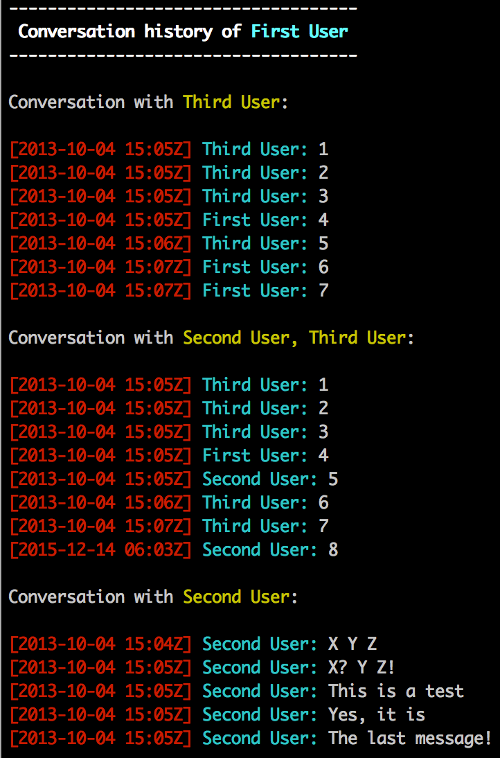
When it’s done, it will dump all your conversation history is dumped to stdout. Obviously, this can be very long, so here is an example:
What if I want JSON?
Simply supply the -f json option to the command line:
fbcap ./messages.htm -f jsonThe output format is as follows:
Messages are ordered from oldest to newest.
{
    "threads": [
        {
            "participants": ["participant_0", "...", "participant_n"],
            "messages": [
                {
                    "date": "ISO 8601 formatted date",
                    "sender": "sender name",
                    "message": "message text"
                },
                "..."
            ]
        },
        "..."
    ]
}
How about CSV?
Of course!
fbcap ./messages.htm -f csvWhat if I want to see some statistics?
See who you talk to the most among your friends and how much each of you contribute to the conversation.
fbcap ./messages.htm -f stats
How do I get any of the above into a file?
Just use standard file redirects.
fbcap ./messages.html > my_file.txtWhat if I only want to parse out a specific conversation?
You can use the -t option to specify a particular conversation/thread you want to output. Just provide a comma-separated set of names. If you don’t remember a last name (or conversely, only remember the last name), the system will try to compensate.
fbcap ./messages.html -t second
fbcap ./messages.html -t second,third
What else can I do?
Take a look at the help options to find out more!
$ fbcap --help
fbcap: A program for converting Facebook chat history to a number of more usable formats

Usage: fbcap {{arguments}} {{options}}

Arguments:
  path [text]  Path of the messages.htm file to parse

Options:
  -h, --help           Show this help message and exit
  -f, --format [str]   Format to convert to (json, csv, text, stats) (default: text)
  -t, --thread [text]  Only include threads involving exactly the following comma-separated participants in output (-t 'Billy,Steve Jensson')
  -n, --nocolor        Do not colorize output
Release history Release notifications | RSS feed


Download files
Download the file for your platform. If you're not sure which to choose, learn more about installing packages.
Source Distribution
File details
Details for the file fbchat_archive_parser-0.7.post2.tar.gz.
File metadata
- Download URL: fbchat_archive_parser-0.7.post2.tar.gz
- Upload date:
- Size: 27.8 kB
- Tags: Source
- Uploaded using Trusted Publishing? No
File hashes
| Algorithm | Hash digest | |
|---|---|---|
| SHA256 |
3ddea2d48e92e02b42ee4e464e4afa29f8e9532b417890547a4db257794a5074
|
|
| MD5 |
e0ab8707c760f9461962cab37ed4bdfa
|
|
| BLAKE2b-256 |
f39174302d64352babe269134763fc0bd6d677a177f30ffc59c1cec160b8ae85
|






