
FBNNet (Python)
Infer gene regulatory networks from time-series gene expression data with Fundamental Boolean Networks.



FBNNet turns time-series expression measurements (microarray or RNA-seq) into an easy-to-read network that tells you
which genes switch other genes on (activation), which switch them off (inhibition), and how long a gene
stays active when nothing regulates it (decay). fbnnet-core is the Python edition of the R package
FBNNet; it provides the same models, the same example data and the same
network pictures, and it runs considerably faster.
Contents
- Background
- What you can do with it
- Installation
- Quick start
- Your own data: infer a network
- Explore a network
- Draw a network
- Attractors: where does the network settle?
- Check a network against your data
- Worked example: childhood leukaemia
- Included data sets
- Coming from the R package?
- Citation
- Copyright and licensing
Background
The Fundamental Boolean Model (FBM), published in Chen et al. (2018), gives an intuitive definition of activation and inhibition pathways and includes a mechanism for protein decay. Instead of one opaque truth table per gene, the model describes every gene by a handful of short rules such as
Gene2 is switched ON  when  Gene1 is ON, Gene4 is OFF and Gene5 is ON      (activation rule)
Gene2 is switched OFF when  Gene4 is ON                                     (inhibition rule)
Each rule carries a confidence, a support and a time step (how many measurements later the effect appears). The resulting Fundamental Boolean Network (FBN) shows the internal connections between genes, for example of the mammalian cell cycle, split into activation, inhibition and decay, and it can be simulated to follow how genes regulate each other over time. This makes it suitable for research questions such as which genes a drug target influences, or what side effects an intervention could have.
The temporal extension (TFBM), described in Chen et al. (2022), allows rules to act over more than one time step, and was used to study the regulatory pathways of childhood acute lymphoblastic leukaemia.
What you can do with it
| Task | Function |
|---|---|
| Infer an FBN from expression time series | generate_fbm_network |
| Find the genes a gene regulates, or the genes that regulate it | find_forward_related_network_by_genes, find_backward_related_network_by_genes |
| Draw a network: all rules, rules active at one time point, or the dynamics over time | plot_network, fbn_network_graph |
| Find and draw the cycles a network settles into | search_for_attractors, draw_attractor |
| Check how well a network reproduces your data | reconstruct_timeseries, generate_similary_report |
| Try everything on published example data | load_dataset |
Installation
pip install fbnnet-core
- Python 3.10 – 3.13 on Linux and macOS (ready-made packages are provided; no compiler needed).
- On Windows, use the Windows Subsystem for Linux (WSL).
numpy,pandas,scipy,networkxandmatplotlibare installed automatically.
Check the installation:
import fbnnet_core
print(fbnnet_core.__version__)
Quick start
Infer a network from the bundled five-gene example, look at it, and draw it:
from fbnnet_core import load_dataset, generate_fbm_network
from fbnnet_core.network_graph import plot_network

# 32 simulated time series (rows = genes, columns = time points)
timeseries = load_dataset("ExampleTimeseriesData")

network = generate_fbm_network(timeseries, max_k=4)
print(network)

graph = plot_network(network)          # all genes, rules and their inputs
graph.save("example_network.png")      # picture
graph.save("example_network.html")     # interactive version for your browser
print(network) lists the rules found for each gene:
Multiple Transition Functions for Gene2 with decay value = 1:
Gene2_1_Activator: Gene2 = Gene1&!Gene4&Gene5 (Confidence: 1, TimeStep: 1)
Gene2_1_Inhibitor: Gene2 = !Gene1 (Confidence: 1, TimeStep: 1)
Gene2_2_Inhibitor: Gene2 = Gene4 (Confidence: 1, TimeStep: 1)
Gene2_3_Inhibitor: Gene2 = !Gene5 (Confidence: 1, TimeStep: 1)
Read the first line as: Gene2 is activated when Gene1 is on, Gene4 is off (!) and Gene5 is on; this holds in every
observation (confidence 1) and acts on the next time point (time step 1).
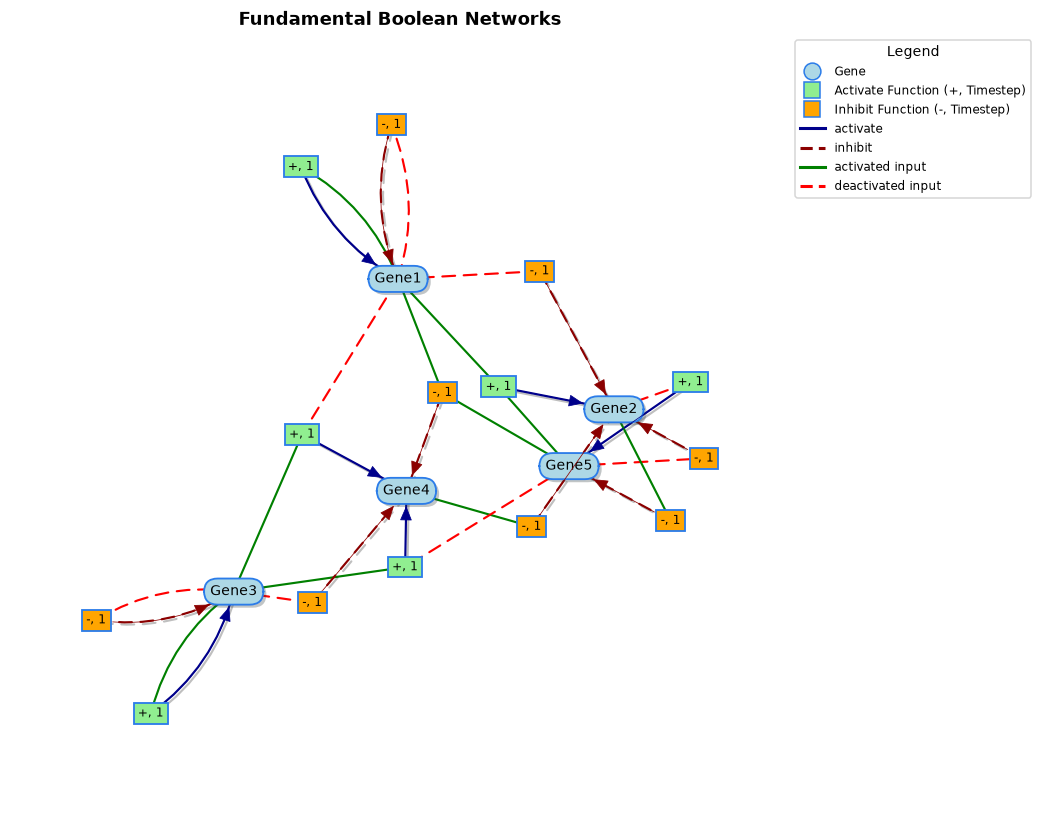
How to read the pictures
| Symbol | Meaning |
|---|---|
| Blue oval | A gene |
| Green box +, n | An activation rule that switches its target gene on after n time steps |
| Orange box -, n | An inhibition rule that switches its target gene off after n time steps |
| Solid green line | An input gene that must be on for the rule |
| Dashed red line | An input gene that must be off for the rule |
| Blue arrow | The rule activates its target |
| Dashed dark-red arrow | The rule inhibits its target |
| Dashed grey arrow | Decay (only in dynamic pictures) |
| Pink / light-blue oval (dynamic pictures) | The gene is off / on at that time point |
In the interactive HTML version you can drag nodes, zoom, and hover over a gene to see its full annotated name or over a rule to see its Boolean expression.
Your own data: infer a network
1. Prepare the data
Provide your time series as a table (a pandas.DataFrame) with genes as rows and time points as columns.
If you have several samples or replicates, pass a list of such tables.
import pandas as pd

sample1 = pd.read_csv("patient1.csv", index_col=0)    # rows: genes, columns: time points
sample2 = pd.read_csv("patient2.csv", index_col=0)
Values may be raw expression levels or already on/off (0/1) values. Raw values are converted to on/off
automatically; choose the method with method="kmeans" (default, finds the best on/off split for every gene) or
method="edgeDetector" (looks for the steepest change between time points).
2. Infer the network
from fbnnet_core import generate_fbm_network

network = generate_fbm_network(
    [sample1, sample2],
    max_k=4,                 # up to 4 input genes per rule
    max_deep_temporal=1,     # 1 = Fundamental Boolean Model, 2 = temporal model (TFBM)
    use_parallel=True,       # use several CPU cores
)
| Setting | Meaning | Default |
|---|---|---|
max_k |
Largest number of input genes in one rule. Higher values find more complex rules but take longer. | 4 |
max_deep_temporal |
Largest delay (in time steps) between the inputs and the effect. 1 gives the FBM, 2 or more the temporal TFBM. |
1 |
threshold_confidence |
Minimum confidence (0–1) of a rule. 1 keeps only rules that were never contradicted. |
1 |
threshold_error |
Maximum tolerated error rate (0–1). | 0 |
threshold_support |
Minimum fraction of observations that must support a rule (0–1). | 0.00001 |
max_fbn_rules |
Largest number of activation and of inhibition rules kept per gene. | 5 |
method |
How raw values are converted to on/off: "kmeans" or "edgeDetector". |
"kmeans" |
use_parallel |
Spread the work over several CPU cores. | False |
Small examples finish in a fraction of a second. The leukaemia study (285 genes, 26 patients) takes a few minutes.
Explore a network
The following examples use the leukaemia networks that ship with the package. FBM_Leukeamia_Networks contains rules
that act on the next time point only; TFBM_Leukeamia_Networks also contains rules that act two time points later.
from fbnnet_core import load_dataset
from fbnnet_core.network_app import (
    find_forward_related_network_by_genes,
    find_all_backward_related_genes,
)

network = load_dataset("TFBM_Leukeamia_Networks")
Which genes does a gene regulate? (forward search)
# Genes switched ON when CDC42EP3 is ON
targets_on = find_forward_related_network_by_genes(
    network, target_gene_list=["CDC42EP3"],
    regulation_type=1,     # 1 = activation rules (the target is switched on), 0 = inhibition rules
    target_type=1,         # 1 = CDC42EP3 must be ON in the rule, 0 = it must be OFF
    max_deep=1,            # how many layers of downstream genes to follow
)
regulation_type |
target_type |
Question answered |
|---|---|---|
| 1 | 1 | Which genes are switched on when the gene is on? |
| 0 | 1 | Which genes are switched off when the gene is on? |
| 1 | 0 | Which genes are switched on when the gene is off? |
| 0 | 0 | Which genes are switched off when the gene is off? |
Leave regulation_type / target_type out (or None) to include both. Set max_deep=2 (or more) to follow the
effect further down the pathway, and next_level_mix_type=True to include every kind of rule in the deeper layers.
Which genes regulate a gene? (backward search)
# Genes that switch CDC42EP3 OFF
inhibitors = find_all_backward_related_genes(
    network, target_gene="CDC42EP3", regulation_type=0, max_deep=1
)
print(inhibitors)
Multiple Transition Functions for CDC42EP3 with decay value = 1:
CDC42EP3_1_Inhibitor: CDC42EP3 = CKS1B (Confidence: 1, TimeStep: 1)
CDC42EP3_2_Inhibitor: CDC42EP3 = !GBP4 (Confidence: 1, TimeStep: 1)
CDC42EP3_3_Inhibitor: CDC42EP3 = KNL1 (Confidence: 1, TimeStep: 1)
CDC42EP3_4_Inhibitor: CDC42EP3 = CDT1 (Confidence: 1, TimeStep: 1)
CDC42EP3_5_Inhibitor: CDC42EP3 = !NEAT1 (Confidence: 1, TimeStep: 1)
Use regulation_type=1 for the genes that switch it on. Both searches return a network, which you can print, draw,
or search again.
Other ways to narrow down a network
from fbnnet_core.network_app import (
    filter_network_connections_by_genes,
    filter_network_connections_by_input_genes,
    merge_network,
)

genes_of_interest = ["CDC42EP3", "LGALS3", "RBM14"]
sub_network = filter_network_connections_by_genes(network, genelist=genes_of_interest, exclusive=False)
only_inputs = filter_network_connections_by_input_genes(network, genelist=genes_of_interest)
combined = merge_network(sub_network, only_inputs)
Draw a network
plot_network filters and draws a network in one call. The result is a graph object that you can save as a
picture (.png, .pdf, .svg) or as an interactive web page (.html). In a Jupyter notebook the interactive
version is displayed directly under the cell.
from fbnnet_core.network_graph import plot_network

graph = plot_network(network, target_genes=["CDC42EP3"], type="forward_4a")
graph.save("cdc42ep3_forward.png")
graph.save("cdc42ep3_forward.html")
Choose what to draw with type:
type |
What is drawn |
|---|---|
"static" |
The whole network, or only the rules connected to target_genes |
"staticSlice" |
The rules that were active at one time point (target_time_point), judged from a time series (timeseries_matrix) |
"dynamic" |
The rules that fired between start_time_point and end_time_point, with genes coloured on/off at every time point |
"forward_1a" … "forward_4b" |
Genes downstream of target_genes (see the table below) |
"backward_1a" … "backward_2b" |
Genes upstream of target_genes |
The number in the forward and backward types combines the two settings of the searches above:
| Number | Genes shown |
|---|---|
forward_1 |
switched off when the searched gene is off |
forward_2 |
switched off when the searched gene is on |
forward_3 |
switched on when the searched gene is off |
forward_4 |
switched on when the searched gene is on |
backward_1 |
genes that switch the searched gene off |
backward_2 |
genes that switch the searched gene on |
The letter chooses how deeper layers are expanded: a keeps following the same kind of rule, b follows every kind of
rule. expand_level sets the number of layers (default 2). Add output_network=True to also get the network that was
drawn: network, graph = plot_network(...).
Example: genes regulated by CDC42EP3
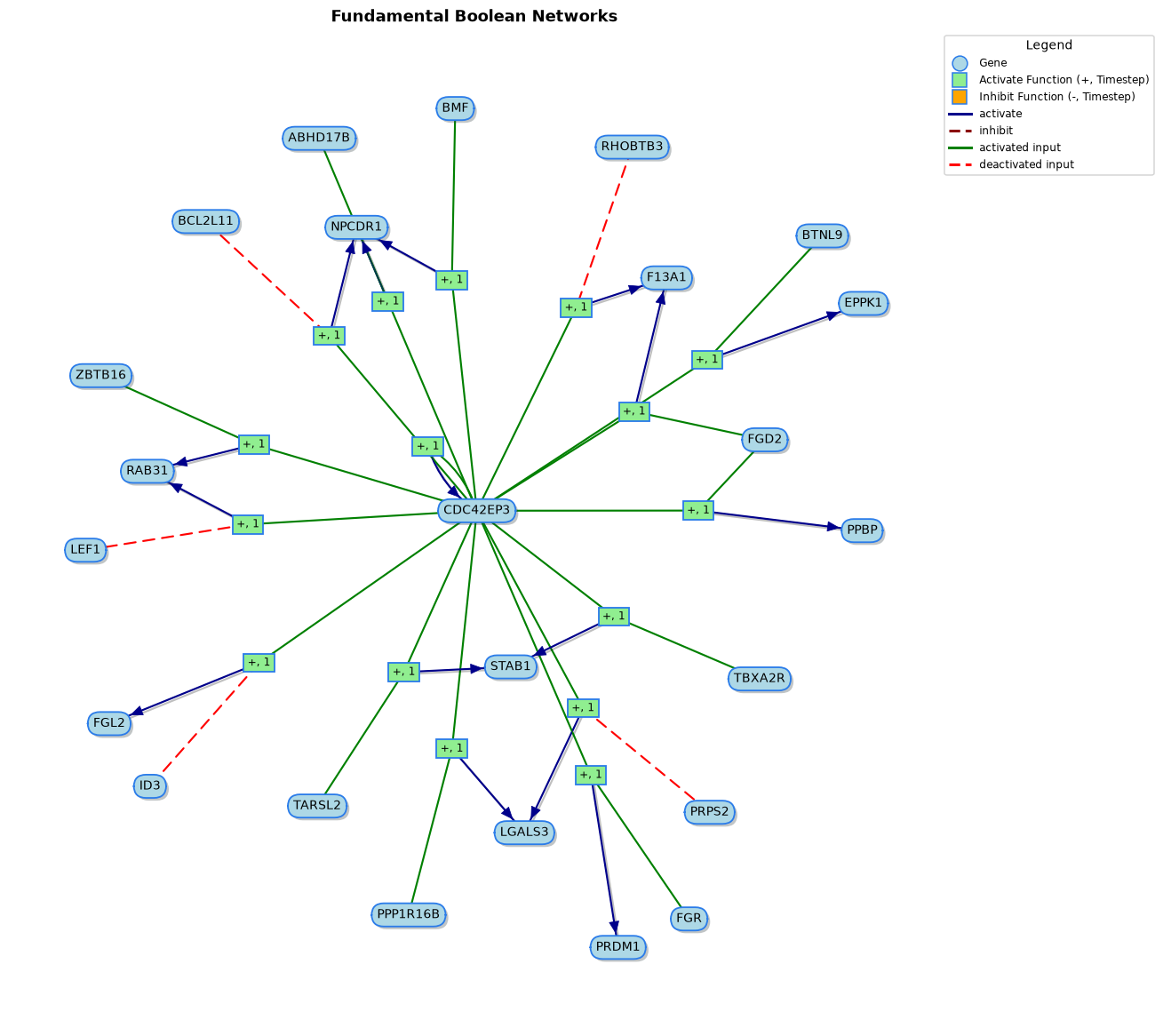
| TFBM – genes switched on when CDC42EP3 is on |
TFBM – genes switched off when CDC42EP3 is on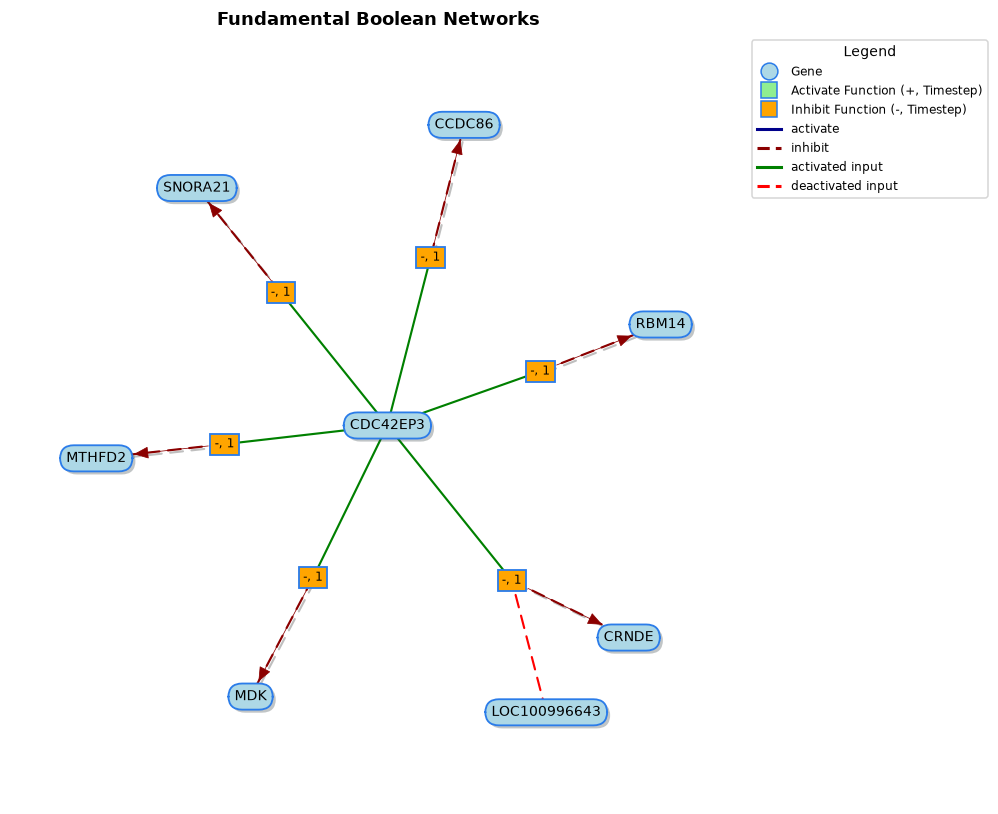 |
TFBM – two layers: genes switched on when CDC42EP3 is off, and what they regulate next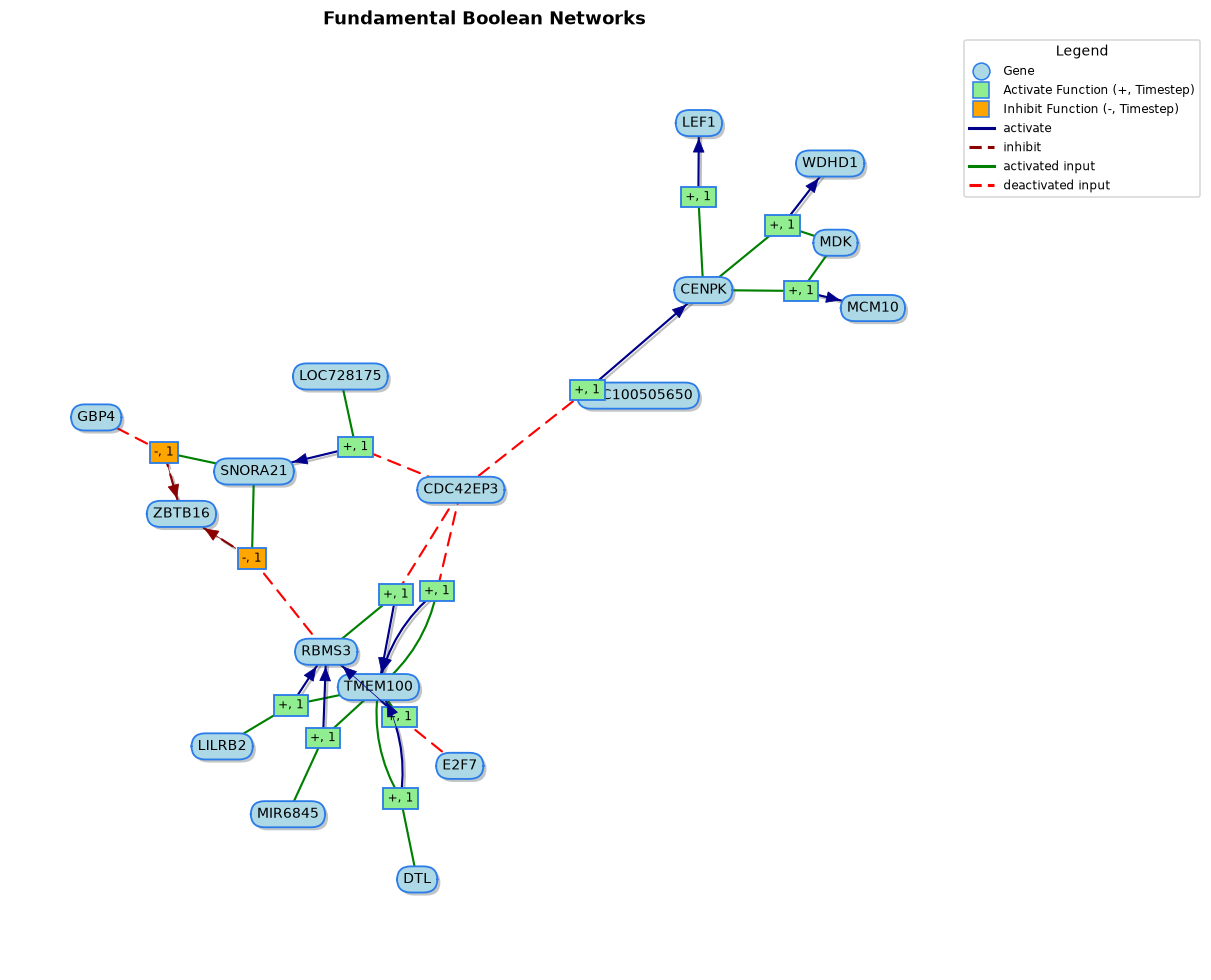 |
TFBM – genes that switch CDC42EP3 off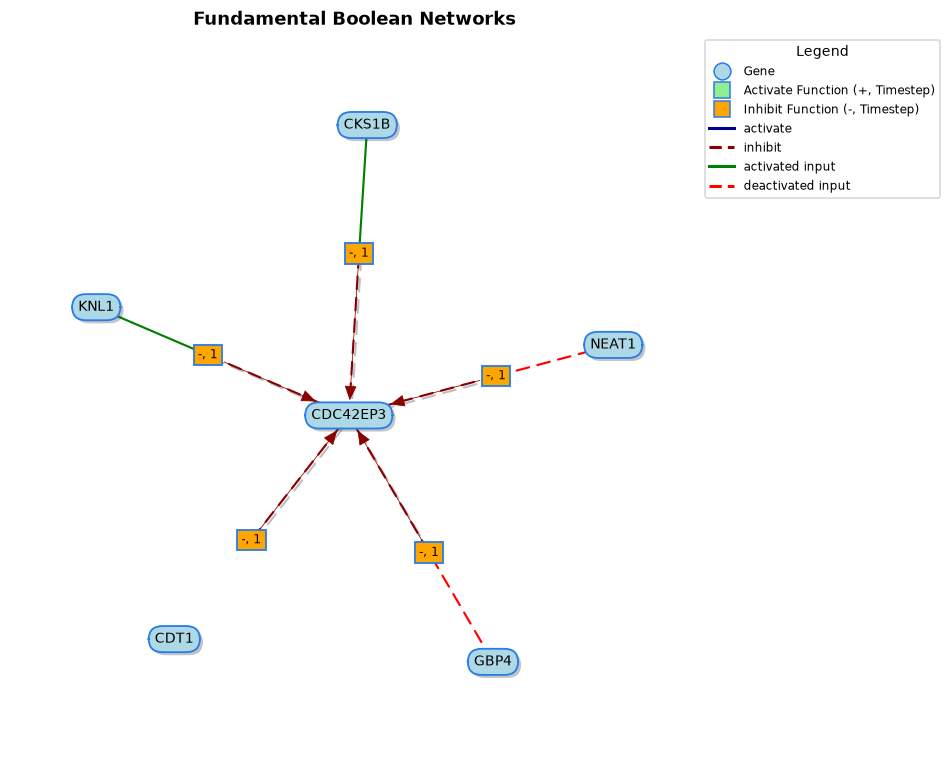 |
from fbnnet_core import load_dataset
from fbnnet_core.network_app import find_forward_related_network_by_genes, find_all_backward_related_genes
from fbnnet_core.network_graph import fbn_network_graph

tfbm = load_dataset("TFBM_Leukeamia_Networks")

# genes switched ON when CDC42EP3 is ON
fbn_network_graph(find_forward_related_network_by_genes(
    tfbm, ["CDC42EP3"], regulation_type=1, target_type=1, max_deep=1)).save("tfbm_on_on.png")

# genes switched OFF when CDC42EP3 is ON
fbn_network_graph(find_forward_related_network_by_genes(
    tfbm, ["CDC42EP3"], regulation_type=0, target_type=1, max_deep=1)).save("tfbm_on_off.png")

# genes switched ON when CDC42EP3 is OFF, followed for two layers (all rule kinds in the second layer)
fbn_network_graph(find_forward_related_network_by_genes(
    tfbm, ["CDC42EP3"], regulation_type=1, target_type=0, max_deep=2, next_level_mix_type=True)).save("tfbm_two_layers.png")

# genes that switch CDC42EP3 OFF
fbn_network_graph(find_all_backward_related_genes(
    tfbm, "CDC42EP3", regulation_type=0, max_deep=1)).save("tfbm_backward.png")
The same calls with load_dataset("FBM_Leukeamia_Networks") give the non-temporal (FBM) network:
genes switched on,
genes switched off,
two layers and
regulators.
Rules active at one time point, and dynamics over time
If you have a time series, you can see which rules actually fired, and in which state every gene was:
from fbnnet_core import load_dataset
from fbnnet_core.network_graph import fbn_network_graph

network = load_dataset("FBNExampleNetworks")
timeseries = load_dataset("ExampleTimeseriesData")[0]       # one simulated sample, 5 genes x 43 time points

# rules active at time point 3
fbn_network_graph(network, type="staticSlice", timeseries_matrix=timeseries, to_time_point=3).save("slice.png")

# what happened between time points 1 and 4 (light blue = gene on, pink = gene off)
fbn_network_graph(network, type="dynamic", timeseries_matrix=timeseries, from_time_point=1, to_time_point=4).save("dynamic.png")
Rules active at time point 3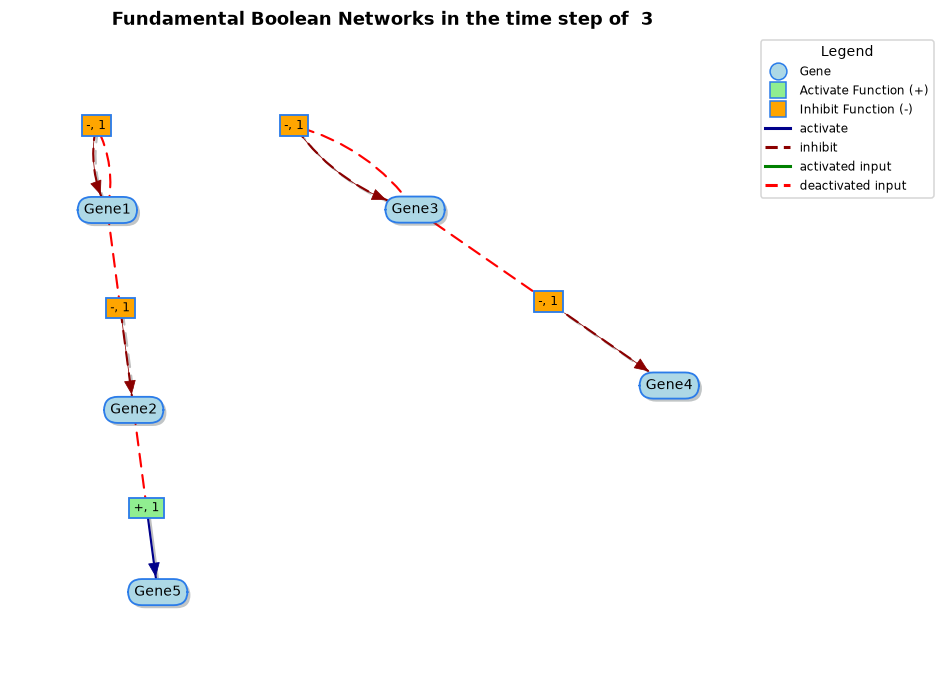 |
Dynamics from time point 1 to 4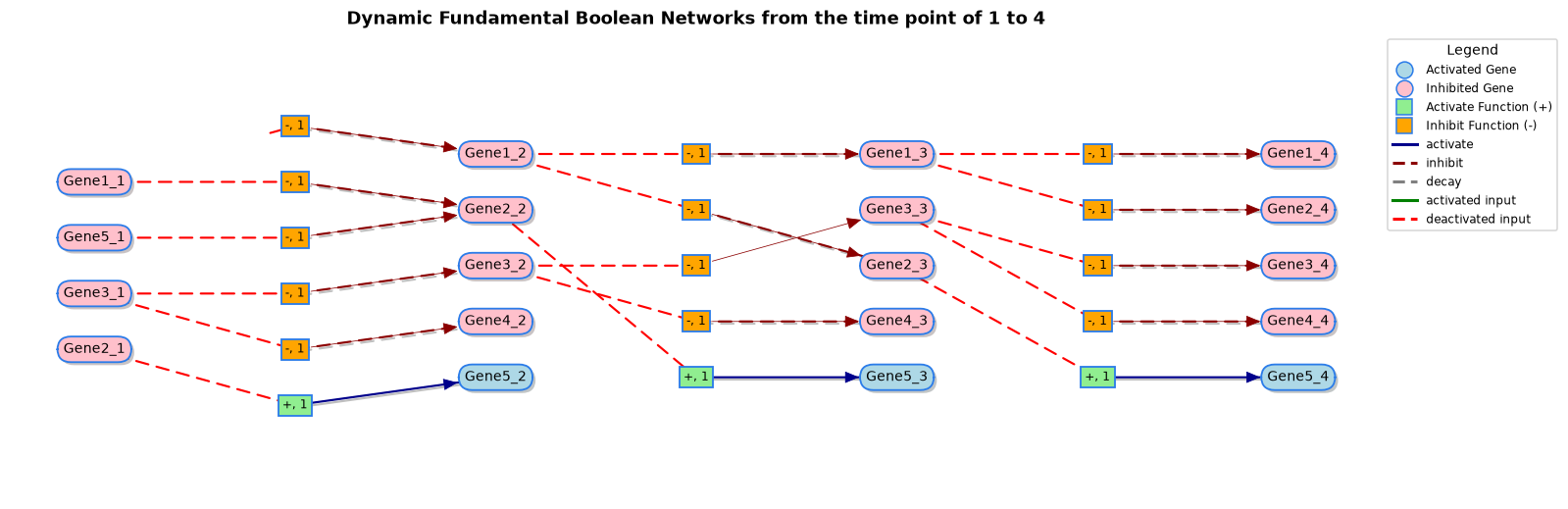 |
Customising a picture
graph = plot_network(network)
graph.draw(figsize=(14, 10), font_size=11, show_legend=True)   # returns a matplotlib Axes you can adjust further
graph.save("network.pdf")                                      # .png, .pdf, .svg or .html
graph.nodes, graph.edges                                       # the underlying tables (pandas DataFrames)
graph.to_networkx()                                            # hand the graph over to networkx
Attractors: where does the network settle?
Starting from any combination of on/off genes, a network eventually falls into a repeating pattern called an attractor (a stable state, or a cycle of states). Attractors are often interpreted as cell fates or phenotypes.
from fbnnet_core import load_dataset, search_for_attractors
from fbnnet_core.network_graph import draw_attractor

network = load_dataset("FBNExampleNetworks")
attractors = search_for_attractors(network, network["genes"], transition_type="synchronous")
print(attractors)                         # lists every attractor and its states

graph = draw_attractor(network, attractors, index=3)   # the fourth attractor (counting from 0)
graph.save("attractor.png")

The picture reads from left to right: every column of ovals is one state of the cycle, and the boxes between them are the rules that produce the next state.
Useful options of search_for_attractors:
| Option | Meaning |
|---|---|
start_states |
Start only from these on/off states instead of all possible combinations |
transition_type |
"synchronous" (all genes update together) or "asynchronous" (one gene at a time) |
genes_on / genes_off |
Hold genes permanently on or off, for example to simulate a knock-out |
max_search |
Longest path followed before giving up on a start state |
For a compact view of one attractor as a table of on/off values use plot_attractor_heatmap(attractors, index).
Check a network against your data
A good network should be able to reproduce the behaviour it was learned from. reconstruct_timeseries replays the
network from the first time point of each sample, and generate_similary_report compares the replay with the original:
from fbnnet_core import load_dataset, generate_fbm_network, reconstruct_timeseries
from fbnnet_core.general_utils import generate_similary_report

timeseries = load_dataset("ExampleTimeseriesData")
network = generate_fbm_network(timeseries, max_k=4)

# the first time point of every sample is the starting state of the replay
initial_states = [
    {gene: int(series.loc[gene, "1"]) for gene in series.index} for series in timeseries
]
replay = reconstruct_timeseries(network, initial_states, max_timepoints=43)

report = generate_similary_report(timeseries, replay)
print(report["AccurateRate"], report["ErrorRate"])    # 1.0 and 0.0 for this example
AccurateRate is the proportion of replayed samples that match the original, ErrorRate the proportion of values that
differ.
Worked example: childhood leukaemia
This is the study the temporal model was designed for (Chen et al., 2022): the expression of 285 common genes in 26 childhood acute lymphoblastic leukaemia samples.
from fbnnet_core import load_dataset, generate_fbm_network

samples = load_dataset("Leukeamia_Timeseries")          # 26 tables, 285 genes x 3 time points

# non-temporal model (FBM): rules act on the next time point
fbm = generate_fbm_network(samples, max_k=3, max_deep_temporal=1, use_parallel=True)

# temporal model (TFBM): rules may also act two time points later
tfbm = generate_fbm_network(samples, max_k=3, max_deep_temporal=2, use_parallel=True)

print(len(fbm["genes"]), "genes")
The inference takes a few minutes. To skip it, use the networks mined for the paper, which are included:
load_dataset("FBM_Leukeamia_Networks") and load_dataset("TFBM_Leukeamia_Networks"). Gene tooltips in the pictures
show the full gene names taken from the DAVID annotation (load_dataset("DAVID_Gene_List")).
The networks inferred here agree closely with the published ones. They differ slightly (for example 2,803 rules versus 2,758 for the FBM) because the later version of the R package (2.0.1) applies a stricter statistical filter than the version used for the paper (2.0.0); this package follows 2.0.1.
Included data sets
All data sets of the R package are included. Load them with load_dataset(name); available_datasets() lists them.
| Name | Description | Returned as |
|---|---|---|
ExampleNetwork |
The five-gene traditional Boolean network used in the paper (Chen et al., 2018) | BoolNet-style network |
BoolNet_CellCycle_Network |
Mammalian cell-cycle Boolean network (Fauré et al., 2006) | BoolNet-style network |
ExampleTimeseriesData |
32 simulated time series (5 genes × 43 time points) generated with the five-gene example | list of tables |
FBNExampleNetworks |
Fundamental Boolean network of the five-gene example | network |
FBNcellcycleNetwork |
Fundamental Boolean network of the mammalian cell cycle (Chen et al., 2018) | network |
yeastTimeSeries |
Expression of four yeast cell-cycle genes at 14 time points | table |
Leukeamia_Timeseries |
Binarised time series of 285 genes in 26 leukaemia samples | list of tables |
Common_Genes_Leukeamia |
The 285 genes common to the leukaemia study | list of gene names |
Common_Genes_Clusters |
DAVID functional annotation clusters of those genes | dict of tables |
FBM_Leukeamia_Networks |
Leukaemia network, non-temporal (FBM) | network |
TFBM_Leukeamia_Networks (also Leukeamia_Networks) |
Leukaemia network, temporal (TFBM) | network |
DAVID_Gene_List |
Maps probeset identifiers to gene symbols and full gene names | table |
Coming from the R package?
The names follow the R package in snake_case:
| R | Python |
|---|---|
generateFBMNetwork |
generate_fbm_network |
plotNetwork |
plot_network |
FBNNetwork.Graph |
fbn_network_graph |
FBNNetwork.Graph.DrawAttractor |
draw_attractor (attractor numbering starts at 0) |
FBNNetwork.Graph.DrawDynamicForOneMatrix |
draw_dynamic_for_one_matrix |
findForwardRelatedNetworkByGenes |
find_forward_related_network_by_genes |
findBackwardRelatedNetworkByGenes |
find_backward_related_network_by_genes |
findAllForwardRelatedGenes / findAllBackwardRelatedGenes |
find_all_forward_related_genes / find_all_backward_related_genes |
filterNetworkConnectionsByGenes |
filter_network_connections_by_genes |
mergeNetwork / mergeClusterNetworks |
merge_network / merge_cluster_networks |
searchForAttractors |
search_for_attractors |
reconstructTimeseries / generateSimilaryReport |
reconstruct_timeseries / generate_similary_report |
data("FBM_Leukeamia_Networks") |
load_dataset("FBM_Leukeamia_Networks") |
Arguments are also in snake_case: regulationType becomes regulation_type, maxDeep becomes max_deep, and
next_level_mix_type is unchanged. The pictures use the same colours, shapes, legends and titles as the R widgets.
Time series are pandas tables with genes in rows, like the R matrices.
Citation
If you use this package, please cite:
- L. Chen, D. Kulasiri and S. Samarasinghe (2018). A Novel Data-Driven Boolean Model for Genetic Regulatory Networks. Frontiers in Physiology 9: 1328. https://doi.org/10.3389/fphys.2018.01328
- L. Chen, D. Kulasiri and S. Samarasinghe (2022). Fundamental Boolean network modelling for childhood acute lymphoblastic leukaemia pathways. Quantitative Biology 10(1): 94–121. https://doi.org/10.15302/J-QB-021-0280
Copyright and licensing
This package and the underlying concepts were originally proposed and developed by Leshi Chen (https://doi.org/10.3389/fphys.2018.01328) under the supervision of Don Kulasiri and Sandhya Samarasinghe during PhD study at Lincoln University, New Zealand.
- The package, including everything ported from the R package, is released under the MIT License.
- The tensor-based mining backend (
backend="tensor":fbnnet_core/tensor_mining.pyandfbnnet_core/batched_counts.py) is a newer addition and is licensed under the GNU AGPL v3 or later. Use of this backend must comply with the AGPL; a commercial licence is available from the author.
The original R package is available at https://github.com/clsdavid/FBNNet2_public. Questions and bug reports are welcome in the issue tracker.
1 maintainer

Metadata
1 maintainer
Release files for fbnnet-core 1.1.6
For a detailed explanation of source distributions (sdists) and built distributions (wheels), please see the package formats documentation.
Source distribution (sdist)
| File | Size | Uploaded | |
|---|---|---|---|
| fbnnet_core-1.1.6.tar.gz | 2.2 MB | Details |
Built distributions (wheels)
Total release size: 31.6 MB
Release files / fbnnet_core-1.1.6.tar.gz
| Download URL | fbnnet_core-1.1.6.tar.gz |
|---|---|
| Size | 2.2 MB |
| Tags | Source |
|
SHA-256 checksum How to use checksums |
c5b783ad624fb13ef78ea4c40b9a3e3b13bc0033e2ebcde51fec49af2dded4e5
|
|
BLAKE2b-256 checksum How to use checksums |
9358b344040bc519a335cbe20a74d3c0cf58df2620c394fd5504c5f5f70e13a0
|
| Upload date | |
|
Uploaded using Trusted Publishing? What is trusted publishing? |
Yes |
| Uploaded via |
twine/7.0.0 CPython/3.13.14
|
Provenance
Provenance describes where a file came from. On PyPI, provenance is shared via attestations, which provide a verifiable record of the build or publishing details. View details, limitations and caveats.


PyPI Publish Attestation
PyPI verified that this artifact, at this checksum, originated from the publisher listed below.
Signed by GitHub Actions, verified by PyPI on Oct 4, 2026.
Transparency logRelease files / fbnnet_core-1.1.6-cp313-cp313-manylinux_2_27_x86_64.manylinux_2_28_x86_64.whl
| Download URL | fbnnet_core-1.1.6-cp313-cp313-manylinux_2_27_x86_64.manylinux_2_28_x86_64.whl |
|---|---|
| Size | 2.6 MB |
| Tags | CPython 3.13 Linux glibc 2.27+ x86-64 Linux glibc 2.28+ x86-64 |
|
SHA-256 checksum How to use checksums |
ab74d9efc74fc699b7ada98d4fc29302f5c434f0f49ba276a95b82b30eb8dc5c
|
|
BLAKE2b-256 checksum How to use checksums |
b0c6807495781d241716c302897614cb530b2f604eaef13956b2213c3f21f7ec
|
| Upload date | |
|
Uploaded using Trusted Publishing? What is trusted publishing? |
Yes |
| Uploaded via |
twine/7.0.0 CPython/3.13.14
|
Provenance
Provenance describes where a file came from. On PyPI, provenance is shared via attestations, which provide a verifiable record of the build or publishing details. View details, limitations and caveats.
PyPI Publish Attestation
PyPI verified that this artifact, at this checksum, originated from the publisher listed below.
Signed by GitHub Actions, verified by PyPI on Oct 4, 2026.
Transparency logRelease files / fbnnet_core-1.1.6-cp313-cp313-macosx_11_0_arm64.whl
| Download URL | fbnnet_core-1.1.6-cp313-cp313-macosx_11_0_arm64.whl |
|---|---|
| Size | 2.4 MB |
| Tags | CPython 3.13 macOS 11.0+ ARM64 |
|
SHA-256 checksum How to use checksums |
9a685e534ea0edcd08f92a153afea993786ca39ec9f9254722b47c634691ecf2
|
|
BLAKE2b-256 checksum How to use checksums |
45b1ef5ea6d9330995fb072809a2dc431deba19b4515d6699f9e5556595ca380
|
| Upload date | |
|
Uploaded using Trusted Publishing? What is trusted publishing? |
Yes |
| Uploaded via |
twine/7.0.0 CPython/3.13.14
|
Provenance
Provenance describes where a file came from. On PyPI, provenance is shared via attestations, which provide a verifiable record of the build or publishing details. View details, limitations and caveats.
PyPI Publish Attestation
PyPI verified that this artifact, at this checksum, originated from the publisher listed below.
Signed by GitHub Actions, verified by PyPI on Oct 4, 2026.
Transparency logRelease files / fbnnet_core-1.1.6-cp313-cp313-macosx_10_13_x86_64.whl
| Download URL | fbnnet_core-1.1.6-cp313-cp313-macosx_10_13_x86_64.whl |
|---|---|
| Size | 2.4 MB |
| Tags | CPython 3.13 macOS 10.13+ x86-64 |
|
SHA-256 checksum How to use checksums |
84743ad03756f785ff5d32f1ef4975e117902a0eba6dd38d2b46c6bed05dd5ec
|
|
BLAKE2b-256 checksum How to use checksums |
0cfd569a4762dfe5c040d110cfba544146e127f73708c4e1cd73f7fcd42c54c5
|
| Upload date | |
|
Uploaded using Trusted Publishing? What is trusted publishing? |
Yes |
| Uploaded via |
twine/7.0.0 CPython/3.13.14
|
Provenance
Provenance describes where a file came from. On PyPI, provenance is shared via attestations, which provide a verifiable record of the build or publishing details. View details, limitations and caveats.
PyPI Publish Attestation
PyPI verified that this artifact, at this checksum, originated from the publisher listed below.
Signed by GitHub Actions, verified by PyPI on Oct 4, 2026.
Transparency logRelease files / fbnnet_core-1.1.6-cp312-cp312-manylinux_2_27_x86_64.manylinux_2_28_x86_64.whl
| Download URL | fbnnet_core-1.1.6-cp312-cp312-manylinux_2_27_x86_64.manylinux_2_28_x86_64.whl |
|---|---|
| Size | 2.6 MB |
| Tags | CPython 3.12 Linux glibc 2.27+ x86-64 Linux glibc 2.28+ x86-64 |
|
SHA-256 checksum How to use checksums |
85f5ded6651cef0e037d0c04da2034ad1d2acc902350662f5a5fb90619259476
|
|
BLAKE2b-256 checksum How to use checksums |
cf117bf68e1fb602db6cc0f6af6a51bfbdbea6350572f6bbc44ecfab2d29f70c
|
| Upload date | |
|
Uploaded using Trusted Publishing? What is trusted publishing? |
Yes |
| Uploaded via |
twine/7.0.0 CPython/3.13.14
|
Provenance
Provenance describes where a file came from. On PyPI, provenance is shared via attestations, which provide a verifiable record of the build or publishing details. View details, limitations and caveats.
PyPI Publish Attestation
PyPI verified that this artifact, at this checksum, originated from the publisher listed below.
Signed by GitHub Actions, verified by PyPI on Oct 4, 2026.
Transparency logRelease files / fbnnet_core-1.1.6-cp312-cp312-macosx_11_0_arm64.whl
| Download URL | fbnnet_core-1.1.6-cp312-cp312-macosx_11_0_arm64.whl |
|---|---|
| Size | 2.4 MB |
| Tags | CPython 3.12 macOS 11.0+ ARM64 |
|
SHA-256 checksum How to use checksums |
ef9cd29cc534bf384eda088af4916c89a31b76f0a60bb4a01ab7b64ddbb73538
|
|
BLAKE2b-256 checksum How to use checksums |
d1b0bf05f08228614c64020d0a2294ddd3a6ccc43a3333a8ac42a9491d7cf3b1
|
| Upload date | |
|
Uploaded using Trusted Publishing? What is trusted publishing? |
Yes |
| Uploaded via |
twine/7.0.0 CPython/3.13.14
|
Provenance
Provenance describes where a file came from. On PyPI, provenance is shared via attestations, which provide a verifiable record of the build or publishing details. View details, limitations and caveats.
PyPI Publish Attestation
PyPI verified that this artifact, at this checksum, originated from the publisher listed below.
Signed by GitHub Actions, verified by PyPI on Oct 4, 2026.
Transparency logRelease files / fbnnet_core-1.1.6-cp312-cp312-macosx_10_13_x86_64.whl
| Download URL | fbnnet_core-1.1.6-cp312-cp312-macosx_10_13_x86_64.whl |
|---|---|
| Size | 2.4 MB |
| Tags | CPython 3.12 macOS 10.13+ x86-64 |
|
SHA-256 checksum How to use checksums |
25035ee727542ae7895f3ab891f4750d94a8045e0d6a1cee8fcc7ede34458c9d
|
|
BLAKE2b-256 checksum How to use checksums |
566659f822ade23e6c1cba6818ec649550614a4f1a2d3e60746568daf4a0570c
|
| Upload date | |
|
Uploaded using Trusted Publishing? What is trusted publishing? |
Yes |
| Uploaded via |
twine/7.0.0 CPython/3.13.14
|
Provenance
Provenance describes where a file came from. On PyPI, provenance is shared via attestations, which provide a verifiable record of the build or publishing details. View details, limitations and caveats.
PyPI Publish Attestation
PyPI verified that this artifact, at this checksum, originated from the publisher listed below.
Signed by GitHub Actions, verified by PyPI on Oct 4, 2026.
Transparency logRelease files / fbnnet_core-1.1.6-cp311-cp311-manylinux_2_27_x86_64.manylinux_2_28_x86_64.whl
| Download URL | fbnnet_core-1.1.6-cp311-cp311-manylinux_2_27_x86_64.manylinux_2_28_x86_64.whl |
|---|---|
| Size | 2.6 MB |
| Tags | CPython 3.11 Linux glibc 2.27+ x86-64 Linux glibc 2.28+ x86-64 |
|
SHA-256 checksum How to use checksums |
47182a3765d654c8220aaeb3f880c3a4b8aca4499b90ff3919031ba10062642e
|
|
BLAKE2b-256 checksum How to use checksums |
9b50aca964cbe7821222bc954c7b0a247b60bb30a276884abc7208456c087d4f
|
| Upload date | |
|
Uploaded using Trusted Publishing? What is trusted publishing? |
Yes |
| Uploaded via |
twine/7.0.0 CPython/3.13.14
|
Provenance
Provenance describes where a file came from. On PyPI, provenance is shared via attestations, which provide a verifiable record of the build or publishing details. View details, limitations and caveats.
PyPI Publish Attestation
PyPI verified that this artifact, at this checksum, originated from the publisher listed below.
Signed by GitHub Actions, verified by PyPI on Oct 4, 2026.
Transparency logRelease files / fbnnet_core-1.1.6-cp311-cp311-macosx_11_0_arm64.whl
| Download URL | fbnnet_core-1.1.6-cp311-cp311-macosx_11_0_arm64.whl |
|---|---|
| Size | 2.3 MB |
| Tags | CPython 3.11 macOS 11.0+ ARM64 |
|
SHA-256 checksum How to use checksums |
5afe3a45f27badf4584691e107018e4364c27d9887e44a7e17e228456cf9003b
|
|
BLAKE2b-256 checksum How to use checksums |
172043cdbb02c603274b32bd7b7f5815b39dc3ad87e1663f582df776b6982945
|
| Upload date | |
|
Uploaded using Trusted Publishing? What is trusted publishing? |
Yes |
| Uploaded via |
twine/7.0.0 CPython/3.13.14
|
Provenance
Provenance describes where a file came from. On PyPI, provenance is shared via attestations, which provide a verifiable record of the build or publishing details. View details, limitations and caveats.
PyPI Publish Attestation
PyPI verified that this artifact, at this checksum, originated from the publisher listed below.
Signed by GitHub Actions, verified by PyPI on Oct 4, 2026.
Transparency logRelease files / fbnnet_core-1.1.6-cp311-cp311-macosx_10_9_x86_64.whl
| Download URL | fbnnet_core-1.1.6-cp311-cp311-macosx_10_9_x86_64.whl |
|---|---|
| Size | 2.4 MB |
| Tags | CPython 3.11 macOS 10.9+ x86-64 |
|
SHA-256 checksum How to use checksums |
9ef96fd240db0edf96ce835afb30642881cc503524ab0d7c913d79fd876da033
|
|
BLAKE2b-256 checksum How to use checksums |
1216684bb3bcdce689c20caff5a29080a4e7323480a613ff43ed9ea201262254
|
| Upload date | |
|
Uploaded using Trusted Publishing? What is trusted publishing? |
Yes |
| Uploaded via |
twine/7.0.0 CPython/3.13.14
|
Provenance
Provenance describes where a file came from. On PyPI, provenance is shared via attestations, which provide a verifiable record of the build or publishing details. View details, limitations and caveats.
PyPI Publish Attestation
PyPI verified that this artifact, at this checksum, originated from the publisher listed below.
Signed by GitHub Actions, verified by PyPI on Oct 4, 2026.
Transparency logRelease files / fbnnet_core-1.1.6-cp310-cp310-manylinux_2_27_x86_64.manylinux_2_28_x86_64.whl
| Download URL | fbnnet_core-1.1.6-cp310-cp310-manylinux_2_27_x86_64.manylinux_2_28_x86_64.whl |
|---|---|
| Size | 2.6 MB |
| Tags | CPython 3.10 Linux glibc 2.27+ x86-64 Linux glibc 2.28+ x86-64 |
|
SHA-256 checksum How to use checksums |
9c8c7b9b5656f7f307cd6f7b1da163f8e3888605012b1e88ccfb38831555939d
|
|
BLAKE2b-256 checksum How to use checksums |
c5d85626df9a11daa314ef4a7316cf40ed01dfc371cec92ba9a2ee91a770269f
|
| Upload date | |
|
Uploaded using Trusted Publishing? What is trusted publishing? |
Yes |
| Uploaded via |
twine/7.0.0 CPython/3.13.14
|
Provenance
Provenance describes where a file came from. On PyPI, provenance is shared via attestations, which provide a verifiable record of the build or publishing details. View details, limitations and caveats.
PyPI Publish Attestation
PyPI verified that this artifact, at this checksum, originated from the publisher listed below.
Signed by GitHub Actions, verified by PyPI on Oct 4, 2026.
Transparency logRelease files / fbnnet_core-1.1.6-cp310-cp310-macosx_11_0_arm64.whl
| Download URL | fbnnet_core-1.1.6-cp310-cp310-macosx_11_0_arm64.whl |
|---|---|
| Size | 2.3 MB |
| Tags | CPython 3.10 macOS 11.0+ ARM64 |
|
SHA-256 checksum How to use checksums |
7cef7c53deb94b3420f852b468a59cfade01425a19a62f19f5e5bae2d243c84a
|
|
BLAKE2b-256 checksum How to use checksums |
f29b91e1b5896486b4f8f24a4169cc11651d14224c17c7a3a68238ff57474b17
|
| Upload date | |
|
Uploaded using Trusted Publishing? What is trusted publishing? |
Yes |
| Uploaded via |
twine/7.0.0 CPython/3.13.14
|
Provenance
Provenance describes where a file came from. On PyPI, provenance is shared via attestations, which provide a verifiable record of the build or publishing details. View details, limitations and caveats.
PyPI Publish Attestation
PyPI verified that this artifact, at this checksum, originated from the publisher listed below.
Signed by GitHub Actions, verified by PyPI on Oct 4, 2026.
Transparency logRelease files / fbnnet_core-1.1.6-cp310-cp310-macosx_10_9_x86_64.whl
| Download URL | fbnnet_core-1.1.6-cp310-cp310-macosx_10_9_x86_64.whl |
|---|---|
| Size | 2.4 MB |
| Tags | CPython 3.10 macOS 10.9+ x86-64 |
|
SHA-256 checksum How to use checksums |
f672240df0026be6af72b34795a510413008f10ed09b3f38df43efc080cadb4d
|
|
BLAKE2b-256 checksum How to use checksums |
e27e039936079b2b226932f82eedfb7c04afef279bf634570fb84b49d3e92c70
|
| Upload date | |
|
Uploaded using Trusted Publishing? What is trusted publishing? |
Yes |
| Uploaded via |
twine/7.0.0 CPython/3.13.14
|
Provenance
Provenance describes where a file came from. On PyPI, provenance is shared via attestations, which provide a verifiable record of the build or publishing details. View details, limitations and caveats.
PyPI Publish Attestation
PyPI verified that this artifact, at this checksum, originated from the publisher listed below.
Signed by GitHub Actions, verified by PyPI on Oct 4, 2026.
Transparency log















