
fbuild

fbuild is a fast, multi-platform compiler, deployer, emulator runner, and
serial monitor for embedded development. It reads the same platformio.ini
files already used by PlatformIO sketches, but uses a Rust-native, data-driven
build pipeline.





Build Matrix
These board builds are part of the front door. They show the platform breadth that fbuild actively protects in CI.
AVR






MegaAVR



Renesas

ESP8266

ESP32









CH32V (RISC-V)






CH32X (RISC-V, USB PD)

Teensy








STM32








SAM / SAMD / SAME






RP2040 / RP2350


Nordic NRF52





Apollo3


NXP LPC (Cortex-M0+)





Silicon Labs


Raspberry Pi Pico


Board descriptions and family deep-dives live in
docs/BOARD_STATUS.md.
Build performance
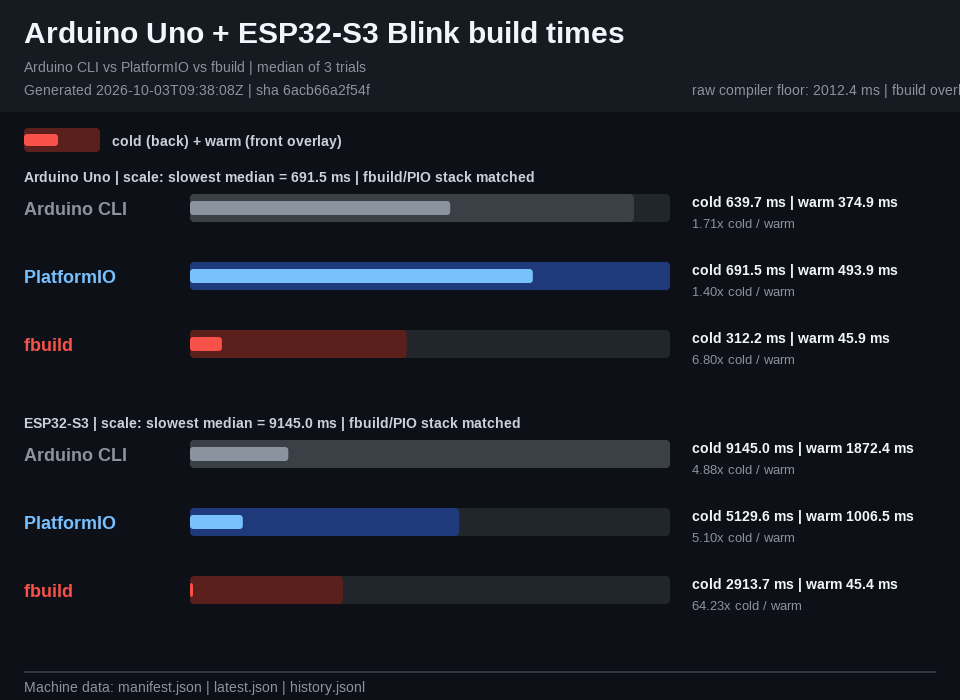
The chart is regenerated nightly from clean-output (cold) and immediate repeat (warm) Arduino Uno and ESP32-S3 Blink builds. Raw measurements are discoverable through the benchmark manifest.
Installation
pip install fbuild
For source installs, platform notes, and first-run cache behavior, start with the getting started guide.
On Windows, fbuild --fix-win enables long paths with administrator approval.
Interactive ESP32 commands offer this repair when needed; declining uses a
short cache and prints a yellow warning. See Windows setup.
Command Quick Start
fbuild reads the same platformio.ini files as PlatformIO. Use these commands
as direct replacements for the most common PlatformIO workflows:
| fbuild | PlatformIO equivalent | Use it to |
|---|---|---|
fbuild build |
pio run |
Compile the project. |
fbuild build --clean |
pio run --target clean, then pio run |
Clean and compile the project. |
fbuild deploy |
pio run --target upload |
Build and upload firmware. |
fbuild deploy --clean |
Clean, then pio run --target upload |
Clean, build, and upload firmware. |
fbuild monitor |
pio device monitor |
Monitor serial output without flashing. |
fbuild ci |
pio ci |
Build one or more sketches for CI. |
Pass --platformio to build, deploy, or monitor to delegate that
workflow to the installed PlatformIO CLI. fbuild ci is a fbuild-native,
PlatformIO-compatible CI command; detailed flags and nested commands are in
the CLI reference.
fbuild-only commands
These commands extend beyond the PlatformIO workflow surface:
| Command | Purpose |
|---|---|
fbuild symbols |
Report per-symbol firmware size and bloat details. |
fbuild bloat |
Inspect symbol back-references and generate bloat graphs. |
fbuild reset |
Reset a device without flashing it. |
fbuild purge |
Purge downloaded packages or run cache garbage collection. |
fbuild sync |
Resolve platformio.ini dependencies into a deterministic lock file. |
fbuild install |
Download an environment's platform, toolchains, framework, tools and lib_deps without compiling (--check exits 2 when something is missing). |
fbuild daemon |
Manage the background build daemon, locks, and cache. |
fbuild show |
Show daemon logs and other runtime information. |
fbuild device |
List devices and manage device leases. |
fbuild mcp |
Start the Model Context Protocol server for AI integrations. |
fbuild clang-tidy |
Run clang-tidy static analysis on project sources. |
fbuild iwyu |
Run include-what-you-use analysis on project sources. |
fbuild clangd-config |
Generate clangd and VS Code configuration for the project. |
fbuild test-emu |
Build and run firmware in an emulator for testing. |
fbuild clang-query |
Run a clang-query matcher against project sources. |
fbuild lnk |
Fetch, verify, and create .lnk resource pointers. |
fbuild lib-select |
Diagnose the LDF-style library selection result. |
fbuild compile-many |
Compile many sketches against one board in parallel stages. |
fbuild serial |
Probe serial ports and read them with board-aware settings. |
fbuild bringup |
Orchestrate build, flash, reset, monitor, and bring-up steps. |
fbuild port |
Scan serial ports with vendor and product identification. |
fbuild cache |
Save, restore, list, and verify portable cache archives. |
See fbuild help <command> or the full CLI reference
for options and nested subcommands.
Quick Start
Create a minimal Arduino project:
mkdir my-project
cd my-project
mkdir src
Add platformio.ini:
[env:uno]
platform = atmelavr
board = uno
framework = arduino
Add src/main.ino:
void setup() {
  pinMode(LED_BUILTIN, OUTPUT);
}

void loop() {
  digitalWrite(LED_BUILTIN, HIGH);
  delay(1000);
  digitalWrite(LED_BUILTIN, LOW);
  delay(1000);
}
Build it:
fbuild build
On the first build, fbuild downloads the toolchain and framework packages it
needs, then caches them for later builds. A successful Uno build writes
.fbuild/build/uno/firmware.hex.
Examples
Common workflows:
fbuild build
fbuild deploy --clean
fbuild deploy --monitor
fbuild test-emu . -e uno
fbuild monitor --timeout 60 --halt-on-success "TEST PASSED"
Detailed build, deploy, monitor, and emulator examples live in the CLI reference and emulator testing guide.
Docs Index
The full FAQ-style map is docs/INDEX.md. Common entry
points:
| Goal | Start here |
|---|---|
| Install fbuild and run the first build | docs/getting-started/ |
| Use build, deploy, monitor, or test-emu | docs/reference/cli.md |
Configure platformio.ini |
docs/reference/platformio-ini.md |
| Check board and platform support | docs/platforms/ |
| Understand the project rationale | docs/WHY.md |
| Work on fbuild itself | docs/development/ |
| Read architecture internals | docs/architecture/overview.md |
Key Features
platformio.inicompatibility for existing Arduino and ESP32 sketches- Fast incremental builds with cached toolchains, frameworks, and libraries
- URL-based package and library management, including GitHub
lib_deps - Build, deploy, serial monitor, and emulator test workflows from one CLI
- Cross-platform support on Windows, macOS, and Linux
- Host tools as Rust-built APE native executables: one binary per tool that runs everywhere fbuild does, even on NixOS (details)
- Transparent architecture with Rust workspace internals documented under
docs/architecture/
See docs/WHY.md for the full rationale, benefits, and
performance notes.
Host Tools: APE Native Executables
The tools fbuild runs on the host for each platform are moving to FastLED-built Rust executables shipped in a single format: the cosmocc Actually Portable Executable (APE). That covers upload/flash utilities, deployers and image/format helpers that would otherwise come as Python scripts, per-OS vendor binaries, or packages that behave differently on each host. Each tool is built once and runs as a native executable on every host fbuild supports: Linux, macOS and Windows, x86_64 and aarch64. There is one artifact per tool instead of one per OS and CPU, and one behavior to test instead of a matrix.
The goal per platform is to replace its third-party host tools with Rust tools whose bugs FastLED fixes once and then ships as APE, so the fix reaches every host at the same time.
Reference platform: NXP LPC8xx. Its flasher is FastLED's fork of the Rust
probe-rs. The fork carries the fixes that make the
LPC845-BRK's LPC-Link2 CMSIS-DAP firmware work: spec-default fallbacks when
the firmware doesn't answer DAP_Info, an explicit DAP_Connect(Swd) with
retry, and a CMSIS-DAP v1 HID transport over nusb (FastLED/fbuild#935,
FastLED/fbuild#936). The source is on the tools branch of
FastLED/framework-arduino-lpc8xx,
and fastled-release-cross.yml cross-builds it today as six per-host
release assets: Windows, Linux and macOS, each on x86_64 and aarch64. fbuild
pins and checksums all six in crates/fbuild-deploy/src/probe_rs.rs. The APE
target is one asset, built and pinned once, that runs on all of those hosts.
Next: WCH CH32V. Its flashers, wlink
(WCH-LinkE) and wchisp (USB ISP), are
already Rust. fbuild pins them per host in
crates/fbuild-deploy/src/wlink.rs and wchisp.rs, and wlink has assets for
only three hosts. Every other host needs FBUILD_WLINK_PATH. An APE build
removes that gap.
Guaranteed launch, nothing to install
An APE tool launches anywhere fbuild does. Nothing has to be installed on the
host: no ape loader, no binfmt_misc registration, no shell support. That
guarantee is needed because most Unix hosts can't exec an APE file directly.
posix_spawn returns ENOEXEC ("Exec format error") unless an APE handler is
registered, and some distros, NixOS among them, ship none. Every fbuild spawn
detects the APE magic (MZqFpD=', jartsr=', APEDBG=') and runs the tool
through a loader:
| Host | How an APE tool runs |
|---|---|
| Windows | Natively; an APE file is a valid PE. |
| Linux | The shared running-process implementation extracts the loader embedded in the tool itself, checks it is a 64-bit ELF for the host CPU, and caches it in an owner-only, exec-capable directory. If no such directory exists (read-only HOME, noexec /tmp), it runs the loader from a sealed in-memory file instead. The tool's environment needs no PATH, sh, coreutils, HOME or TMPDIR. |
| macOS | x86_64: the shared loader extracts the tool's embedded loader and turns it into a Mach-O (the prologue's header move). Apple Silicon: the shared loader compiles the tool's embedded ape-m1.c once with /usr/bin/cc (Xcode Command Line Tools). Both are cached like on Linux. |
Loader precedence is FBUILD_APE_LOADER (explicit override), then the loader
embedded in the tool, then ape on PATH, /usr/bin/ape and
/usr/local/bin/ape, then /bin/sh. Set FBUILD_APE_CACHE_DIR to choose
where extracted loaders are cached. Parallel builds and deploys are safe: running-process
holds a shared fork lock while it writes a loader, so a concurrent first spawn can't
fail with ETXTBSY ("Text file busy").
Adding an APE tool
Build the Rust tool with cosmocc so the output is an APE, provision it like any
other package, and spawn it through fbuild_core::subprocess::run_command*, or
build the command with fbuild_core::platform::process::command /
tokio_command instead of Command::new. The tool then works like any other
executable, with no per-host special casing. A hello-world fixture and its build
script live in
crates/fbuild-core/data/ape-hello/.
Implementation notes are in
crates/fbuild-core/src/platform/README.md.
CLI Usage
The user-facing command reference is
docs/reference/cli.md. It covers core workflows
(build, deploy, monitor, test-emu) and diagnostics such as symbols,
bloat, lib-select, compile-many, and ci.
Configuration
fbuild reads platformio.ini project files. The configuration reference,
including default_envs, build_flags, lib_deps, upload and monitor
settings, and compatibility notes, lives in
docs/reference/platformio-ini.md.
Emulator Testing
fbuild can build firmware and run it without hardware via fbuild test-emu or
fbuild deploy --to emu. Emulator backends, auto-detection rules, QEMU notes,
and known limitations live in
docs/guides/emulator-testing.md.
PlatformIO Compatibility: .eh_frame Strip
On supported release builds, fbuild may strip unused GCC .eh_frame unwind
metadata to reduce firmware size. The policy, opt-out controls, and rationale
are documented in
docs/reference/platformio-compatibility.md.
Supported Platforms
fbuild supports AVR, MegaAVR, Renesas RA, ESP8266, ESP32 variants, CH32 RISC-V, Teensy, STM32, SAM/SAMD, RP2040/RP2350, Nordic NRF52, Apollo3, Silicon Labs EFR32, NXP LPC, and WASM via Emscripten.
For the canonical per-board CI badge matrix, support table, and board-family
notes, see docs/BOARD_STATUS.md or the
platforms docs.
Project Structure
The repository is a Rust workspace with a Python package boundary. The human
development guide is docs/development/, and the
crate dependency map is crates/CLAUDE.md.
Architecture
Architecture docs are decentralized under
docs/architecture/. Start with
docs/architecture/overview.md, then follow
the subsystem-specific docs.
Development
Testing, troubleshooting, linting, release, and local setup instructions live
in docs/development/. Project-wide rules for
contributors and LLM agents are in CLAUDE.md.
License
fbuild is free software licensed under the GNU Affero General Public
License v3.0 only (AGPL-3.0-only). See LICENSE.
1 maintainer

Metadata
1 maintainer
Release files for fbuild 2.5.53
For a detailed explanation of source distributions (sdists) and built distributions (wheels), please see the package formats documentation.
Built distributions (wheels)
| File | Actions Reset | |||
|---|---|---|---|---|
| fbuild-2.5.53-cp310-abi3-win_amd64.whl | CPython 3.10 | abi3 | Windows x86-64 | Details for fbuild-2.5.53-cp310-abi3-win_amd64.whl |
| fbuild-2.5.53-cp310-abi3-manylinux_2_17_x86_64.manylinux2014_x86_64.whl | CPython 3.10 | abi3 | Linux glibc 2.17+ x86-64 | Details for fbuild-2.5.53-cp310-abi3-manylinux_2_17_x86_64.manylinux2014_x86_64.whl |
| fbuild-2.5.53-cp310-abi3-manylinux_2_17_aarch64.manylinux2014_aarch64.whl | CPython 3.10 | abi3 | Linux glibc 2.17+ ARM64 | Details for fbuild-2.5.53-cp310-abi3-manylinux_2_17_aarch64.manylinux2014_aarch64.whl |
| fbuild-2.5.53-cp310-abi3-macosx_11_0_arm64.whl | CPython 3.10 | abi3 | macOS 11.0+ ARM64 | Details for fbuild-2.5.53-cp310-abi3-macosx_11_0_arm64.whl |
| fbuild-2.5.53-cp310-abi3-macosx_10_12_x86_64.whl | CPython 3.10 | abi3 | macOS 10.12+ x86-64 | Details for fbuild-2.5.53-cp310-abi3-macosx_10_12_x86_64.whl |
Total release size: 163.0 MB
Release files / fbuild-2.5.53-cp310-abi3-win_amd64.whl
| Download URL | fbuild-2.5.53-cp310-abi3-win_amd64.whl |
|---|---|
| Size | 33.1 MB |
| Tags | CPython 3.10 Windows x86-64 abi3 |
|
SHA-256 checksum How to use checksums |
fc576117202b5f73da0b659bf9a31a43969c38edc923eee7018616721db22acc
|
|
BLAKE2b-256 checksum How to use checksums |
a03afbe7e95c98b22d2e75dbbadb9377b09ac249e3822b04c66c5026280cacf7
|
| Upload date | |
|
Uploaded using Trusted Publishing? What is trusted publishing? |
Yes |
| Uploaded via |
twine/6.1.0 CPython/3.13.13
|
Provenance
Provenance describes where a file came from. On PyPI, provenance is shared via attestations, which provide a verifiable record of the build or publishing details. View details, limitations and caveats.


PyPI Publish Attestation
PyPI verified that this artifact, at this checksum, originated from the publisher listed below.
Signed by GitHub Actions, verified by PyPI on Nov 22, 2026.
Transparency logRelease files / fbuild-2.5.53-cp310-abi3-manylinux_2_17_x86_64.manylinux2014_x86_64.whl
| Download URL | fbuild-2.5.53-cp310-abi3-manylinux_2_17_x86_64.manylinux2014_x86_64.whl |
|---|---|
| Size | 34.0 MB |
| Tags | CPython 3.10 Linux glibc 2.17+ x86-64 abi3 |
|
SHA-256 checksum How to use checksums |
07d756fe7059a653aa83b9985bf04330c1c5ec6c20a78d16d7d0ccd36d656b03
|
|
BLAKE2b-256 checksum How to use checksums |
03ad1aea6e02468249930d073cdc8c89e06f30ebbd05905666057919dd6c4464
|
| Upload date | |
|
Uploaded using Trusted Publishing? What is trusted publishing? |
Yes |
| Uploaded via |
twine/6.1.0 CPython/3.13.13
|
Provenance
Provenance describes where a file came from. On PyPI, provenance is shared via attestations, which provide a verifiable record of the build or publishing details. View details, limitations and caveats.
PyPI Publish Attestation
PyPI verified that this artifact, at this checksum, originated from the publisher listed below.
Signed by GitHub Actions, verified by PyPI on Nov 22, 2026.
Transparency logRelease files / fbuild-2.5.53-cp310-abi3-manylinux_2_17_aarch64.manylinux2014_aarch64.whl
| Download URL | fbuild-2.5.53-cp310-abi3-manylinux_2_17_aarch64.manylinux2014_aarch64.whl |
|---|---|
| Size | 32.4 MB |
| Tags | CPython 3.10 Linux glibc 2.17+ ARM64 abi3 |
|
SHA-256 checksum How to use checksums |
0f6ba80720859a5686631be19686ccfa89d5f8a0bcbd7582332c629e035bafd1
|
|
BLAKE2b-256 checksum How to use checksums |
5bb07341a259e03a678f897bda966f7a872c28b9a39aac1bfef535620e6559cd
|
| Upload date | |
|
Uploaded using Trusted Publishing? What is trusted publishing? |
Yes |
| Uploaded via |
twine/6.1.0 CPython/3.13.13
|
Provenance
Provenance describes where a file came from. On PyPI, provenance is shared via attestations, which provide a verifiable record of the build or publishing details. View details, limitations and caveats.
PyPI Publish Attestation
PyPI verified that this artifact, at this checksum, originated from the publisher listed below.
Signed by GitHub Actions, verified by PyPI on Nov 22, 2026.
Transparency logRelease files / fbuild-2.5.53-cp310-abi3-macosx_11_0_arm64.whl
| Download URL | fbuild-2.5.53-cp310-abi3-macosx_11_0_arm64.whl |
|---|---|
| Size | 30.5 MB |
| Tags | CPython 3.10 abi3 macOS 11.0+ ARM64 |
|
SHA-256 checksum How to use checksums |
fdf0ab2cc0a369b7f1180b2cbe891e4a5e5d1e19ef009209d6caf9e51c4e04fb
|
|
BLAKE2b-256 checksum How to use checksums |
a2121138570ec2c2e39e38b619baaf6dd7359979061901706892dccce8570de0
|
| Upload date | |
|
Uploaded using Trusted Publishing? What is trusted publishing? |
Yes |
| Uploaded via |
twine/6.1.0 CPython/3.13.13
|
Provenance
Provenance describes where a file came from. On PyPI, provenance is shared via attestations, which provide a verifiable record of the build or publishing details. View details, limitations and caveats.
PyPI Publish Attestation
PyPI verified that this artifact, at this checksum, originated from the publisher listed below.
Signed by GitHub Actions, verified by PyPI on Nov 22, 2026.
Transparency logRelease files / fbuild-2.5.53-cp310-abi3-macosx_10_12_x86_64.whl
| Download URL | fbuild-2.5.53-cp310-abi3-macosx_10_12_x86_64.whl |
|---|---|
| Size | 32.9 MB |
| Tags | CPython 3.10 abi3 macOS 10.12+ x86-64 |
|
SHA-256 checksum How to use checksums |
b0b755bbb54c8c1aef4918e4b6b622243d947e3949924cbc21a63d9504942cbd
|
|
BLAKE2b-256 checksum How to use checksums |
42d3dfeb1f5db941ccc75145fa01dca2788735bc080f6785a31ac2710066ade4
|
| Upload date | |
|
Uploaded using Trusted Publishing? What is trusted publishing? |
Yes |
| Uploaded via |
twine/6.1.0 CPython/3.13.13
|
Provenance
Provenance describes where a file came from. On PyPI, provenance is shared via attestations, which provide a verifiable record of the build or publishing details. View details, limitations and caveats.
PyPI Publish Attestation
PyPI verified that this artifact, at this checksum, originated from the publisher listed below.
Signed by GitHub Actions, verified by PyPI on Nov 22, 2026.
Transparency logSecurity for fbuild 2.5.53
Provenance
Provenance describes where a file came from. On PyPI, provenance is shared via attestations, which provide a verifiable record of the build or publishing details. View details, limitations and caveats.
Full provenance
All 5 files in this release have been uploaded with provenance metadata.
Attestation for fbuild-2.5.53-cp310-abi3-win_amd64.whl
PyPI Publish Attestation
PyPI verified that this artifact, at this checksum, originated from the publisher listed below.
Signed by GitHub Actions, verified by PyPI on Nov 22, 2026.
Transparency logA note on package security
PyPI is a repository for distributing packages, not a service for auditing them. While third-party security researchers and our staff do their best to detect and remove malicious packages, PyPI cannot guarantee the quality, security or suitability of any given package.
To learn more about protecting yourself from malicious actors, visit our package security documentation.














