
fce-enhanced





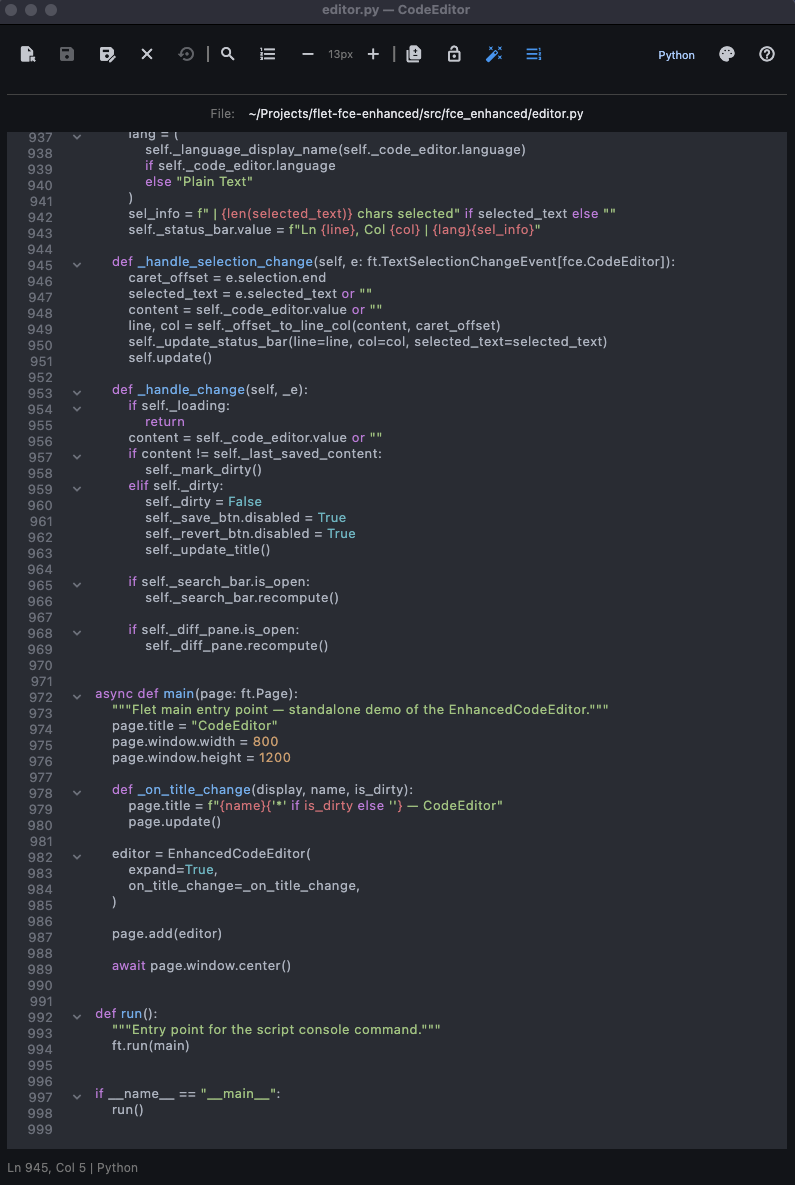
An enhanced Flet CodeEditor control with file I/O, search/replace, syntax highlighting, and theme selection.
Built on top of flet-code-editor, adding a full-featured editing experience you can drop into any Flet app or run standalone. This project was created to explore and showcase what's possible with Flet — building a desktop-quality code editor entirely in Python.
Install
pip install fce-enhanced
Or with uv:
uv add fce-enhanced
Development setup
git clone https://github.com/oktl/flet-fce-enhanced.git
cd flet-fce-enhanced
uv sync
source .venv/bin/activate
pre-commit install  # optional, for development
Usage
Run as a standalone app
uvx fce-enhanced                     # open with an empty editor
uvx fce-enhanced path/to/file.py     # open a specific file on launch
During development:
flet run src/fce_enhanced/editor.py                     # open with an empty editor
flet run src/fce_enhanced/editor.py path/to/file.py     # open a specific file on launch
Embed in your own Flet app
EnhancedCodeEditor is a Flet declarative component (@ft.component). Render it with page.render(...) rather than page.add(...).
Minimal example
import flet as ft
from fce_enhanced import EnhancedCodeEditor


def main(page: ft.Page):
    page.title = "My Editor"
    page.render(lambda: EnhancedCodeEditor(expand=True))


ft.run(main)
With configuration
import flet as ft
import flet_code_editor as fce
from fce_enhanced import EnhancedCodeEditor


def main(page: ft.Page):
    page.title = "My Editor"

    def on_title_change(display_path, name, is_dirty):
        page.title = f"{name}{'*' if is_dirty else ''} — My Editor"

    page.render(
        lambda: EnhancedCodeEditor(
            language=fce.CodeLanguage.JAVASCRIPT,
            value="console.log('hello');",
            code_theme=fce.CodeTheme.MONOKAI,
            on_title_change=on_title_change,
            ruff_on_save=False,  # disable ruff (only applies to Python files)
            expand=True,
        )
    )


ft.run(main)
Driving the editor from code
Because a component has no instance to call methods on, pass an EditorHandle
to drive it imperatively (open a file, save, etc.) and read its live state:
import sys
import flet as ft
from fce_enhanced import EditorHandle, EnhancedCodeEditor


def main(page: ft.Page):
    handle = EditorHandle()
    initial = sys.argv[1] if len(sys.argv) > 1 else None
    page.render(
        lambda: EnhancedCodeEditor(
            expand=True, handle=handle, initial_path=initial
        )
    )
    # handle.open_path("/path/to/file"), handle.save(), handle.save_as(),
    # handle.close(); read handle.value / handle.dirty / handle.current_path

ft.run(main)
initial_pathopens a file automatically on mount — the simplest way to load a file at startup without touching the handle.
Constructor parameters
| Parameter | Type | Default | Description |
|---|---|---|---|
language |
CodeLanguage |
PLAINTEXT |
Initial syntax highlighting language |
value |
str |
"# New file\n" |
Initial editor content |
show_toolbar |
bool |
True |
Show the file I/O toolbar |
show_status_bar |
bool |
True |
Show the line/column status bar |
show_gutter |
bool |
True |
Show the line-number gutter |
register_keyboard_shortcuts |
bool |
True |
Register global keyboard shortcuts |
autocomplete |
bool |
True |
Enable autocomplete |
autocomplete_words |
list[str] |
None |
Custom autocomplete suggestions |
code_theme |
CodeTheme |
ATOM_ONE_DARK |
Syntax highlighting theme |
text_style |
TextStyle |
None |
Text style for editor content |
gutter_style |
GutterStyle |
None |
Style for the line number gutter |
on_title_change |
callable |
None |
Callback (display_path, name, is_dirty) — fires on file open/close, save, and dirty-state changes. display_path is the home-relative path (e.g. ~/projects/foo.py) or "untitled". |
ruff_on_save |
bool |
False |
Auto-format Python files with ruff on save |
initial_path |
str |
None |
File to open automatically on mount |
handle |
EditorHandle |
None |
Imperative handle for driving the editor |
expand |
bool |
False |
Expand the root column to fill its parent |
Driving via EditorHandle
Pass an EditorHandle instance and the component populates it on every render:
handle.open_path("/path/to/file")  # load a file (no dialog)
handle.save()                      # save to current path
handle.save_as()                   # save-as dialog
handle.close()                     # close current file

handle.value          # current editor content (str)
handle.current_path   # path of open file, or None
handle.dirty          # True if there are unsaved changes
Other public exports
The package also exports these utilities from fce_enhanced:
| Export | Description |
|---|---|
EditorHandle |
Imperative handle for driving the editor component |
SearchReplaceBar |
Reusable search/replace component |
DiffPane |
Reusable unified-diff component |
compute_matches() |
Pure function: find search matches in text |
compute_unified_diff() |
Pure function: unified diff + add/remove counts |
open_file() / save_file() |
Async platform-aware file dialogs |
language_for_path() |
Detect CodeLanguage from a file path |
EXTENSION_TO_LANGUAGE |
Dict mapping file extensions to CodeLanguage |
THEMES / DEFAULT_THEME / theme_display_name() |
Theme utilities |
main() / run() |
Entry points for standalone mode |
Features
- File operations — Open, Save, Save As, Close, and Revert to Saved with unsaved-changes confirmation
- Native file dialogs — AppleScript dialogs on macOS (with extension filtering), Flet's built-in FilePicker on other platforms
- Search & Replace — Find toolbar with match counting, case sensitivity toggle, whole word matching, prev/next navigation (Enter navigates to next match), Replace and Replace All
- Command Palette — Searchable list of all available commands; type to filter (Cmd+Shift+P / Ctrl+Shift+P)
- Theme Selector — 80+ built-in syntax highlighting themes via a searchable dialog (type to filter)
- Go to Line — Jump to a specific line number (Cmd+G / Ctrl+G)
- Read-Only Mode — Toggle editing lock (Cmd+L / Ctrl+L)
- Font Size Controls — Increase/decrease font size (Cmd+= / Cmd+-)
- Language Selector — Choose syntax highlighting language from a searchable dialog (type to filter); auto-detected on file open, and Save As defaults to the matching file extension
- Language Detection — Automatic syntax highlighting for 40+ file extensions
- Dirty-File Tracking — Visual indicator for unsaved changes
- Diff Pane — Toggleable unified diff view showing changes since last save, with green/red syntax coloring (Cmd+D / Ctrl+D)
- Gutter Toggle — Show or hide the line-number gutter (Shift+Cmd+G / Ctrl+Shift+G)
- Ruff on Save — Auto-runs
ruff check --fixandruff formaton.pyfiles; silently skips if ruff is not installed (no error). Remaining lint warnings are shown in a snackbar, and the editor auto-reloads the formatted content. Toggleable from the toolbar - Status Bar — Line, column, language, and selection info
Keyboard shortcuts
| Action | macOS | Windows / Linux |
|---|---|---|
| Open File | ⌘O | Ctrl+O |
| Save | ⌘S | Ctrl+S |
| Save As | ⇧⌘S | Ctrl+Shift+S |
| Close File | ⌘W | Ctrl+W |
| Revert to Saved | ⇧⌘R | Ctrl+Shift+R |
| Find | ⌘F | Ctrl+F |
| Find and Replace | ⌥⌘F | Ctrl+H |
| Toggle Diff | ⌘D | Ctrl+D |
| Toggle Gutter | ⇧⌘G | Ctrl+Shift+G |
| Go to Line | ⌘G | Ctrl+G |
| Toggle Read-Only | ⌘L | Ctrl+L |
| Increase Font Size | ⌘+ | Ctrl++ |
| Decrease Font Size | ⌘- | Ctrl+- |
| Command Palette | ⇧⌘P | Ctrl+Shift+P |
| Help | F1 | F1 |
| Close Search Bar | Esc | Esc |
Contributing
Contributions are welcome! See CONTRIBUTING.md for guidelines.
License
MIT
Development
Code style is enforced with ruff via pre-commit hooks:
pre-commit run --all-files
Run tests:
pytest
Built With
- Flet — Build multi-platform apps in Python powered by Flutter
- flet-code-editor — Code editor control for Flet with syntax highlighting
- ruff — Fast Python linter and formatter
1 maintainer

Download files
Download the file for your platform. If you're not sure which to choose, learn more about installing packages.
Source Distribution
Built Distribution
Filter files by name, interpreter, ABI, and platform.
If you're not sure about the file name format, learn more about wheel file names.
Copy a direct link to the current filters
File details
Details for the file fce_enhanced-0.2.1.tar.gz.
File metadata
- Download URL: fce_enhanced-0.2.1.tar.gz
- Upload date:
- Size: 22.5 kB
- Tags: Source
- Uploaded using Trusted Publishing? Yes
- Uploaded via:
twine/7.0.0 CPython/3.13.14
File hashes
| Algorithm | Hash digest | |
|---|---|---|
| SHA256 |
2030ad9ae88c99aa59ee0f45101471b0b4542b54c2dc773d0a7e163b329a0240
|
|
| MD5 |
218e2f93c141c9df27747b9e9553e111
|
|
| BLAKE2b-256 |
f334d0be8cacf1dfcdd4490683e418d86361ae8a9475a7b4bff8f686664b4b20
|
Provenance
The following attestation bundles were made for fce_enhanced-0.2.1.tar.gz:
Publisher:
publish.yml on oktl/flet-fce-enhanced
-
Statement:
-
Statement type:
https://in-toto.io/Statement/v1 -
Predicate type:
https://docs.pypi.org/attestations/publish/v1 -
Subject name:
fce_enhanced-0.2.1.tar.gz -
Subject digest:
2030ad9ae88c99aa59ee0f45101471b0b4542b54c2dc773d0a7e163b329a0240 - Sigstore transparency entry: 2631270117
- Sigstore integration time:
-
Permalink:
oktl/flet-fce-enhanced@67feceee07c2676c5af3d607cf427070a1ec015f -
Branch / Tag:
refs/tags/v0.2.1 - Owner: https://github.com/oktl
-
Access:
public
-
Token Issuer:
https://token.actions.githubusercontent.com -
Runner Environment:
github-hosted -
Publication workflow:
publish.yml@67feceee07c2676c5af3d607cf427070a1ec015f -
Trigger Event:
release
-
Statement type:
File details
Details for the file fce_enhanced-0.2.1-py3-none-any.whl.
File metadata
- Download URL: fce_enhanced-0.2.1-py3-none-any.whl
- Upload date:
- Size: 26.2 kB
- Tags: Python 3
- Uploaded using Trusted Publishing? Yes
- Uploaded via:
twine/7.0.0 CPython/3.13.14
File hashes
| Algorithm | Hash digest | |
|---|---|---|
| SHA256 |
452654147102ca2cd1cefa532555a8bc423abc69974200c01937219256079ae5
|
|
| MD5 |
aecd3f64642c539eb7c50002f783f3ae
|
|
| BLAKE2b-256 |
9ea3a1acd4ecb8fffd0ce386d9880af78bd5af2f61a93d14b3fb1cd058eef761
|
Provenance
The following attestation bundles were made for fce_enhanced-0.2.1-py3-none-any.whl:
Publisher:
publish.yml on oktl/flet-fce-enhanced
-
Statement:
-
Statement type:
https://in-toto.io/Statement/v1 -
Predicate type:
https://docs.pypi.org/attestations/publish/v1 -
Subject name:
fce_enhanced-0.2.1-py3-none-any.whl -
Subject digest:
452654147102ca2cd1cefa532555a8bc423abc69974200c01937219256079ae5 - Sigstore transparency entry: 2631270152
- Sigstore integration time:
-
Permalink:
oktl/flet-fce-enhanced@67feceee07c2676c5af3d607cf427070a1ec015f -
Branch / Tag:
refs/tags/v0.2.1 - Owner: https://github.com/oktl
-
Access:
public
-
Token Issuer:
https://token.actions.githubusercontent.com -
Runner Environment:
github-hosted -
Publication workflow:
publish.yml@67feceee07c2676c5af3d607cf427070a1ec015f -
Trigger Event:
release
-
Statement type:














