
📊 FDA Toolkit
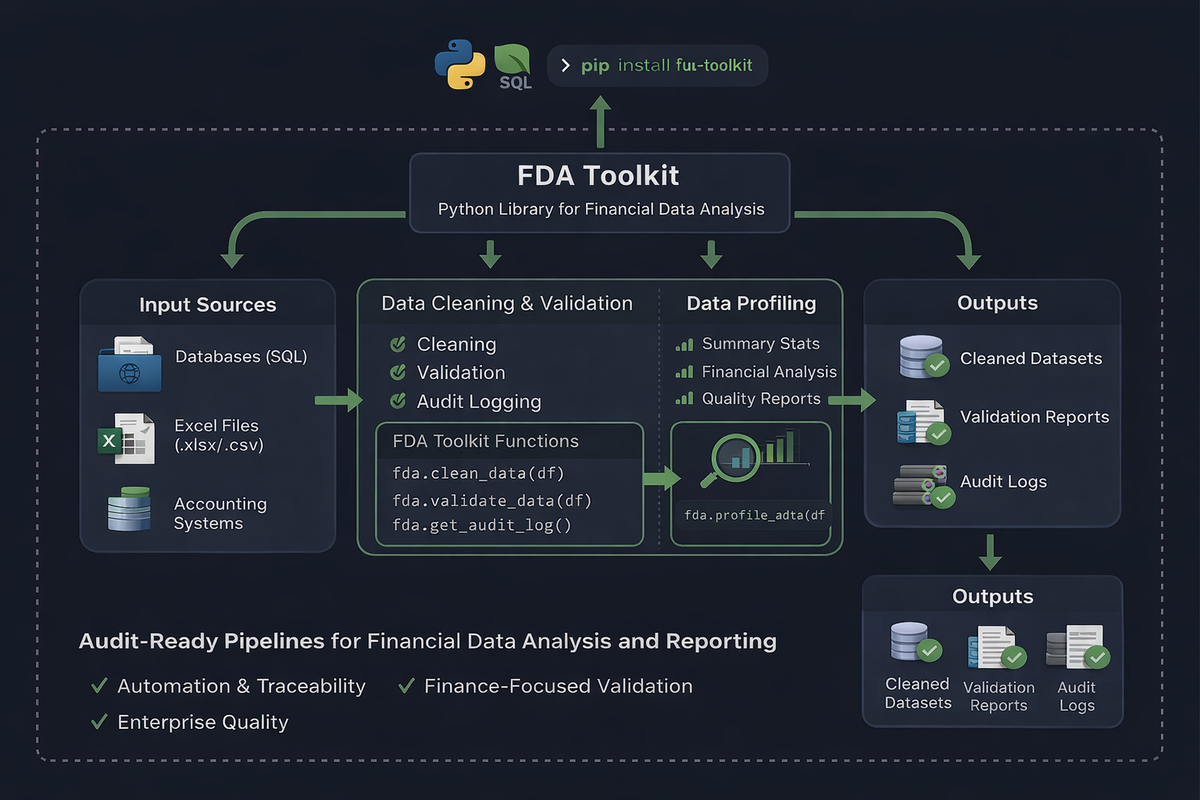
Financial Data Analysis Made Simple — A production-grade Python toolkit for loading, cleaning, validating, and analyzing financial data with one-line pipelines.




Why FDA Toolkit?
Financial data analysis is messy. You spend 80% of your time cleaning, validating, and transforming data instead of analyzing it. FDA Toolkit eliminates that pain by providing:
- 87 production-ready functions grouped into 8 intelligent modules
- One-line pipelines for common workflows (e.g.,
ftk.quick_clean_finance()) - Finance-aware validation — understand sign conventions, entity names, currency formats
- Audit trail — every operation logged for compliance and debugging
- Type-safe — full type hints and IDE autocomplete throughout
- Memory efficient — optimize dtypes, handle large files with chunking
- Professional API — pandas-like, intuitive, well-documented
Module Overview
| Module | Functions | Purpose |
|---|---|---|
| core | 40 | Column and row cleaning, types, duplicates, missing, outliers, text |
| features | 7 | Date & categorical feature engineering |
| finance | 11 | Currency parsing, entity standardization, financial validation |
| validation | 9 | Schema, ranges, integrity, reconciliation |
| reporting | 10 | Profiling, snapshots, delta reports, quick checks |
| io | 5 | Safe CSV/Excel reading, chunked processing, parquet export |
| pipelines | 2 | Pre-built quick_clean() and quick_clean_finance() |
| utils | 6 | Logging, security, memory optimization |
| TOTAL | 87 | Production-ready functions |
Quick Start
Install
pip install fda-toolkit
Update to Latest Version
Using pip:
pip install --upgrade fda-toolkit
Using uv (faster):
uv pip install --upgrade fda-toolkit
In Jupyter Notebooks:
# Add this to a cell and run it
%pip install --upgrade fda-toolkit

# Or with uv
!uv pip install --upgrade fda-toolkit

# Then restart your kernel
For Projects with requirements.txt:
# Update the version in requirements.txt
fda-toolkit>=0.4.1

# Then reinstall
pip install -r requirements.txt --upgrade
# or with uv
uv pip install -r requirements.txt
Check Version
import fda_toolkit as ftk
print(ftk.__version__)  # Should show 0.4.1 or later
Use in 3 Lines
import fda_toolkit as ftk

df = ftk.read_csv_safely("data/transactions.csv")
df_clean = ftk.quick_clean_finance(df, primary_key="transaction_id",
                                   date_cols=["date"], currency_cols=["amount"])
ftk.quick_check(df_clean)  # Profile results
Discover All Functions
# See all 87 available functions and their details
ftk.info()

# Sort functions into the eight package levels
ftk.info('level')

# Filter by level (the level= form is also supported)
ftk.info('finance')

# Filter by module
ftk.info(module='finance.parsing')

# Combine filters
ftk.info(level='finance', module='finance.parsing')
The detail column gives a short note on what each function does.
📚 What's Inside?
Core Data Cleaning (40 functions)
Handle the fundamentals with confidence:
from fda_toolkit import core

df = core.clean_column_headers(df)               # 'Name ' → 'name'
df = core.drop_empty_columns(df)                 # Remove entirely blank columns
df = core.drop_empty_rows(df)                    # Remove entirely blank rows
df = core.remove_repeated_headers(df)            # Remove headers embedded in data
df = core.convert_date_columns(df, ['date'])     # Convert several date columns
groups = core.classify_columns(df)               # Group columns by data type
Finance-Specific (11 functions)
Domain expertise built-in:
from fda_toolkit.finance import parsing, entities, rules

df['amount'] = parsing.parse_currency(df['amount'])        # Handle $, €, £
df['vendor'] = entities.strip_legal_suffixes(df['vendor']) # ACME Ltd → ACME
rules.validate_sign_conventions(df, rules_config)          # Verify debit/credit
Feature Engineering (7 functions)
Prepare data for ML in seconds:
from fda_toolkit.features import datetime, categorical

df = datetime.extract_date_features(df, 'date')  # Add year, month, quarter
df['category'] = categorical.limit_cardinality(df['category'], top_n=10)
Validation Suite (9 functions)
Catch issues before they become problems:
from fda_toolkit.validation import schema, ranges, integrity

schema.validate_required_fields(df, ['id', 'date', 'amount'])
violations = ranges.validate_data_ranges(df, {'amount': (0, 1_000_000)})
integrity.reconciliation_check(original_df, clean_df, value_cols=['amount'])
Smart Pipelines (2 functions)
Pre-built, battle-tested workflows:
# Generic pipeline
df_clean = ftk.quick_clean(df)

# Finance pipeline (smart defaults for financial data)
df_clean = ftk.quick_clean_finance(
    df,
    primary_key="invoice_id",
    date_cols=["invoice_date", "due_date"],
    currency_cols=["amount", "tax"]
)
Reporting & Profiling (10 functions)
Understand your data instantly:
# Quick diagnosis
ftk.quick_check(df)

# Detailed profile
profile = ftk.profile_report(df)  # Types, missingness, memory, outliers

# Track changes
snapshot_v1 = ftk.snapshot_dataset(df_before, name="before_clean")
snapshot_v2 = ftk.snapshot_dataset(df_after, name="after_clean")
delta = ftk.compare_snapshots(snapshot_v1, snapshot_v2)
Secure I/O (5 functions)
Read and write without surprises:
# Safe reading with encoding detection
df = ftk.read_csv_safely("messy_file.csv")
df = ftk.read_excel_safely("workbook.xlsx", sheet_name="Data")

# Process huge files in chunks
for chunk in ftk.chunked_processing("huge_file.csv", chunksize=50_000):
    process(chunk)

# Export in optimized formats
ftk.export_parquet(df, "output.parquet")  # Fast, compressed
Architecture: Dynamic & Scalable
Every function self-registers via decorator — no manual __all__ lists:
from fda_toolkit.registry import register_function

@register_function(
    name="detect_fraud",
    category="Validation",
    module="custom.fraud"
)
def detect_fraud(df: pd.DataFrame) -> pd.DataFrame:
    """Your custom logic here."""
    result = df[df['amount'] > threshold]
    audit_log("detect_fraud", before=len(df), after=len(result))
    return result

# Automatically appears in ftk.info()!
Audit Trail (Compliance Ready)
Every operation is logged automatically:
from fda_toolkit.utils.logging import get_global_audit_log

log = get_global_audit_log()

for event in log.events:
    print(f"✓ {event.name} at {event.timestamp_utc}")

# Export for compliance teams
audit_json = log.to_dict()  # JSON-ready
💡 Real-World Example
import fda_toolkit as ftk

# 1. Load and diagnose
df = ftk.read_csv_safely("sales_transactions_2024.csv")
ftk.quick_check(df)
# → Reports: types, missing %, duplicates, outliers, memory usage

# 2. Clean for analysis
df_clean = ftk.quick_clean_finance(
    df,
    primary_key="transaction_id",
    date_cols=["date", "due_date"],
    currency_cols=["amount", "tax"]
)

# 3. Validate
from fda_toolkit.validation import integrity
integrity.reconciliation_check(
    original=df,
    cleaned=df_clean,
    value_cols=["amount"],
    group_cols=["vendor_id"]
)

# 4. Engineer features for ML
df_ml = ftk.extract_date_features(df_clean, "date")
df_ml = ftk.limit_cardinality(df_ml, "vendor", top_n=20)

# 5. Export and log
ftk.export_parquet(df_ml, "ready_for_ml.parquet")
print("✅ Pipeline complete with full audit trail!")
Testing
# Run all tests
pytest

# Run specific module
pytest tests/test_core/

# Verbose output
pytest -v
Example test:
import pandas as pd
from fda_toolkit.core.columns import clean_column_headers

def test_clean_headers():
    df = pd.DataFrame({'Name ': [1], 'Age (years)': [2]})
    result = clean_column_headers(df)
    assert result.columns.tolist() == ['name', 'age_years']
Installation & Development
From Source
# Clone or download
cd fda_toolkit_project

# Install in editable mode (dev)
pip install -e .

# With dev dependencies (if available)
pip install -e ".[dev]"
Requirements
- Python 3.9+
- pandas (data manipulation)
- numpy (numerical operations)
Security & Compliance
- Audit logging — Every operation tracked with timestamps
- Data masking —
mask_sensitive_fields()for PII protection - Type safety — Full type hints prevent common errors
- Error handling — Clear, actionable error messages
- Memory optimization — Control data footprint
📖 API Reference
Explore the full API:
ftk.info()                           # List all functions
ftk.info("finance")                  # Filter by package level
ftk.get_data_summary(df)            # Profile a dataset
ftk.profile_report(df)              # Detailed analysis
For detailed docs on each function:
from fda_toolkit.core.outliers import detect_outliers_iqr
help(detect_outliers_iqr)  # Full docstring with examples
See QUICK_REFERENCE.md for common patterns.
🎯 Use Cases
✅ Financial Reporting — Prepare data for compliance audits
✅ ML Pipelines — Clean & engineer features for models
✅ Data Migration — Validate and transform during transfers
✅ Anomaly Detection — Flag outliers in transactions
✅ Time Series Analysis — Extract date features automatically
✅ Data Quality Monitoring — Profile and compare snapshots
🚀 Next Steps
- Explore functions:
ftk.info() - Try examples: See examples/01_quick_check.py
- Read docs: docs/function_reference.md
- Run tests:
pytest - Extend: Add your own functions using
@register_function
📝 License
MIT License — see LICENSE for details.
🤝 Contributing
Found a bug? Have an idea? Open an issue or PR!
Built for financial analysts who value time, accuracy, and peace of mind. 📊✨
FDA Toolkit: Where data cleaning stops being painful and starts being productive.
1 maintainer

Metadata
1 maintainer
Release files for fda-toolkit 0.4.1
For a detailed explanation of source distributions (sdists) and built distributions (wheels), please see the package formats documentation.
Source distribution (sdist)
| File | Size | Uploaded | Provenance | Actions |
|---|---|---|---|---|
| fda_toolkit-0.4.1.tar.gz | 49.9 kB | Without provenance | Details for fda_toolkit-0.4.1.tar.gz |
Built distribution (wheel)
| File | Interpreter | ABI | Platform | Actions Reset |
|---|---|---|---|---|
| fda_toolkit-0.4.1-py3-none-any.whl | Python 3 | none | any | Details for fda_toolkit-0.4.1-py3-none-any.whl |
Total release size: 111.3 kB
Release files / fda_toolkit-0.4.1.tar.gz
| Download URL | fda_toolkit-0.4.1.tar.gz |
|---|---|
| Size | 49.9 kB |
| Tags | Source |
|
SHA-256 checksum How to use checksums |
2c27b5f61b53a0d77cd808c6d695321015cc46beeb9fea6e50955c97d6faaab1
|
|
BLAKE2b-256 checksum How to use checksums |
f3181465781785a37afc083c84e5ea8196da85b0c10c5c13d79c6ecd87361ac7
|
| Upload date | |
|
Uploaded using Trusted Publishing? What is trusted publishing? |
No |
| Uploaded via |
twine/7.0.0 CPython/3.14.6
|
Release files / fda_toolkit-0.4.1-py3-none-any.whl
| Download URL | fda_toolkit-0.4.1-py3-none-any.whl |
|---|---|
| Size | 61.3 kB |
| Tags | Python 3 |
|
SHA-256 checksum How to use checksums |
36870ffc813bb56129f2f786a4cd7a79a47bdb0e2e0b04e74ebf08c7e3d1ce0c
|
|
BLAKE2b-256 checksum How to use checksums |
9f3f2d59f7cc12f8ecc0b3d30cc5c749eb70f5f2faee1282af2ae78cfdf566d9
|
| Upload date | |
|
Uploaded using Trusted Publishing? What is trusted publishing? |
No |
| Uploaded via |
twine/7.0.0 CPython/3.14.6
|
Security for fda-toolkit 0.4.1
Provenance
Provenance describes where a file came from. On PyPI, provenance is shared via attestations, which provide a verifiable record of the build or publishing details. View details, limitations and caveats.
No provenance found
None of the files in this release were uploaded with provenance metadata.
A note on package security
PyPI is a repository for distributing packages, not a service for auditing them. While third-party security researchers and our staff do their best to detect and remove malicious packages, PyPI cannot guarantee the quality, security or suitability of any given package.
To learn more about protecting yourself from malicious actors, visit our package security documentation.














