
:robot: Fdroid-auto

:bookmark: Table of contents
:question: About
Fdroid-auto is a very little program that automates the process of uninstalling, downloading and installing F-droid apk's through ADB.
This is useful when doing Factory resets or changing of :iphone: phone and don't want to deal with the :repeat: repetitive task of :scream: bootloop while uninstalling because you didn't :brain: remember it was an important package or manually downloading F-droid apks by typing them into the search bar :mag: and then manually installing it.
:file_folder: Installation
:penguin: Binary dependencies (Unix)
sudo apt-get install python3 python3-pip python3-setuptools adb
:snake: Option 1: Pypi
python3 -m pip install fdroid-auto
:hand: Option 2: Git repository (Still connects to Pypi)
git clone https://codeberg.org/Sivefunc/fdroid_auto
cd fdroid_auto
python3 -m pip install .
:computer: Usage
- Enable USB Debugging on your Android device :iphone:
- Connect your Android device to the Host computer through the USB cable.
- There are two files apps/uninstall.txt and apps/download.txt which are examples files you can download and use.
usage: fdroid_auto options
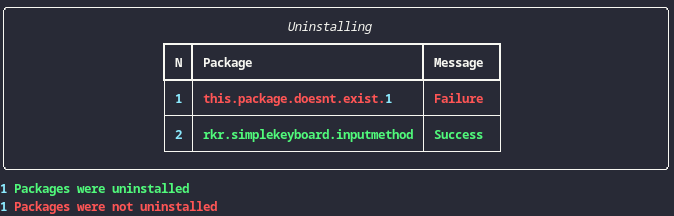
:clipboard: Uninstalling
fdroid_auto -u apps/uninstall.txt # Uninstall packages listed.
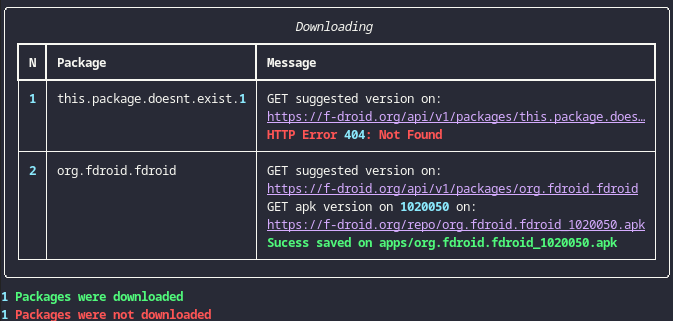
:clipboard: Downloading
fdroid_auto -d apps/download.txt apps/  # Download packages listed
                                        # and saved them on apps/
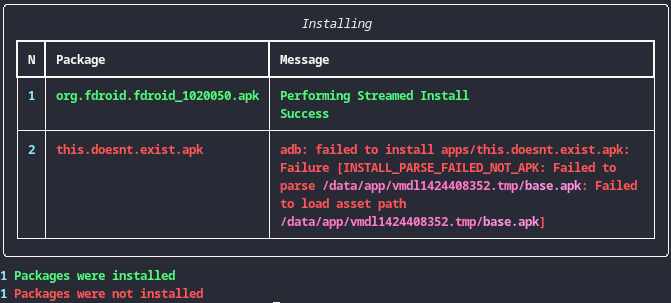
:clipboard: Installing
fdroid_auto -i apps/                    # Install packages listed
                                        # on directory apps/
:handshake: Joined together
fdroid_auto.py -u apps/uninstall.txt \
               -d apps/download.txt apps/ \
               -i apps/
:page_facing_up: Output
| Uninstalling | Downloading | Installing |
|---|---|---|
 |
 |
 |
:gear: Options
-h, --help → show this help message and exit.-v, --version → show program's version number and exit.-u [FILE], --uninstall [FILE] → Uninstall ALL packages listed from FILE on device using adb.-d [FILE] [DIR], --download [FILE] [DIR] → Download ALL fdroid .apks listed from FILE and push them into DIR.-i [DIR], --install [DIR] → Install ALL packages .apk listed from DIR on device using adb.n, --notation → Shows how to format the FILE and exit.
:notebook: Notes
-
:bangbang: The order of events occur in the following way:
- Uninstall:
adb shell pm uninstall -k --user 0 - Download
- Install:
adb install
- Uninstall:
-
Suggested versions are the ones downloaded (not the latest unstable? version).
-
:shield: Official repository is the one being used.
-
Third party repositories are not supported like Bromite
-
Uninstall/Install of apps is not limited to only F-droid, if these are installed or on a directory respectively.
-
I haven't tested ADB through Wi-Fi only USB.
-
Manuals I used: man adb or adb shell pm
-
Read the source code to know things are done, specially packages.py
-
The
-koption on uninstall preserves app data, so you can reinstall with install-existing and not lose data. -
I recommend when looking for files to uninstall instead of the traditional
adb shell pm list packagesuse App Manager
Made by :link: Sivefunc
Licensed under :link: GPLv3
1 maintainer

Metadata
1 maintainer
Release files for fdroid-auto 1.0.0
For a detailed explanation of source distributions (sdists) and built distributions (wheels), please see the package formats documentation.
Source distribution (sdist)
| File | Size | Uploaded | Provenance | |
|---|---|---|---|---|
| fdroid_auto-1.0.0.tar.gz | 24.7 kB | Without provenance | Details |
Built distribution (wheel)
| File | Interpreter | ABI | Platform | Reset |
|---|---|---|---|---|
| fdroid_auto-1.0.0-py3-none-any.whl | Python 3 | none | any | Details |
Total release size: 49.1 kB
Release files / fdroid_auto-1.0.0.tar.gz
| Download URL | fdroid_auto-1.0.0.tar.gz |
|---|---|
| Size | 24.7 kB |
| Tags | Source |
|
SHA-256 checksum How to use checksums |
ea052fee1583c2b3a22c39c051ed926ed0eab8f755eec1ccefea98d9c9148c63
|
|
BLAKE2b-256 checksum How to use checksums |
62bcc44dd054a848a4bdf9704b734deede9ca7300da081af56c450540ddfc58a
|
| Upload date | |
|
Uploaded using Trusted Publishing? What is trusted publishing? |
No |
| Uploaded via |
twine/5.1.1 CPython/3.11.2
|
Release files / fdroid_auto-1.0.0-py3-none-any.whl
| Download URL | fdroid_auto-1.0.0-py3-none-any.whl |
|---|---|
| Size | 24.4 kB |
| Tags | Python 3 |
|
SHA-256 checksum How to use checksums |
2d0f0bccacc999a2111b38551058754e27477c13db00a497ac6f7c01d0a44ce9
|
|
BLAKE2b-256 checksum How to use checksums |
6ee5aa6dfd18f4c955ac8185b89b839f30ef065187268f24ffe8e937d82abab1
|
| Upload date | |
|
Uploaded using Trusted Publishing? What is trusted publishing? |
No |
| Uploaded via |
twine/5.1.1 CPython/3.11.2
|
Security for fdroid-auto 1.0.0
Provenance
Provenance describes where a file came from. On PyPI, provenance is shared via attestations, which provide a verifiable record of the build or publishing details. View details, limitations and caveats.
No provenance found
None of the files in this release were uploaded with provenance metadata.
A note on package security
PyPI is a repository for distributing packages, not a service for auditing them. While third-party security researchers and our staff do their best to detect and remove malicious packages, PyPI cannot guarantee the quality, security or suitability of any given package.
To learn more about protecting yourself from malicious actors, visit our package security documentation.













