

Feat
Feedback Experiment Aansturing Tool
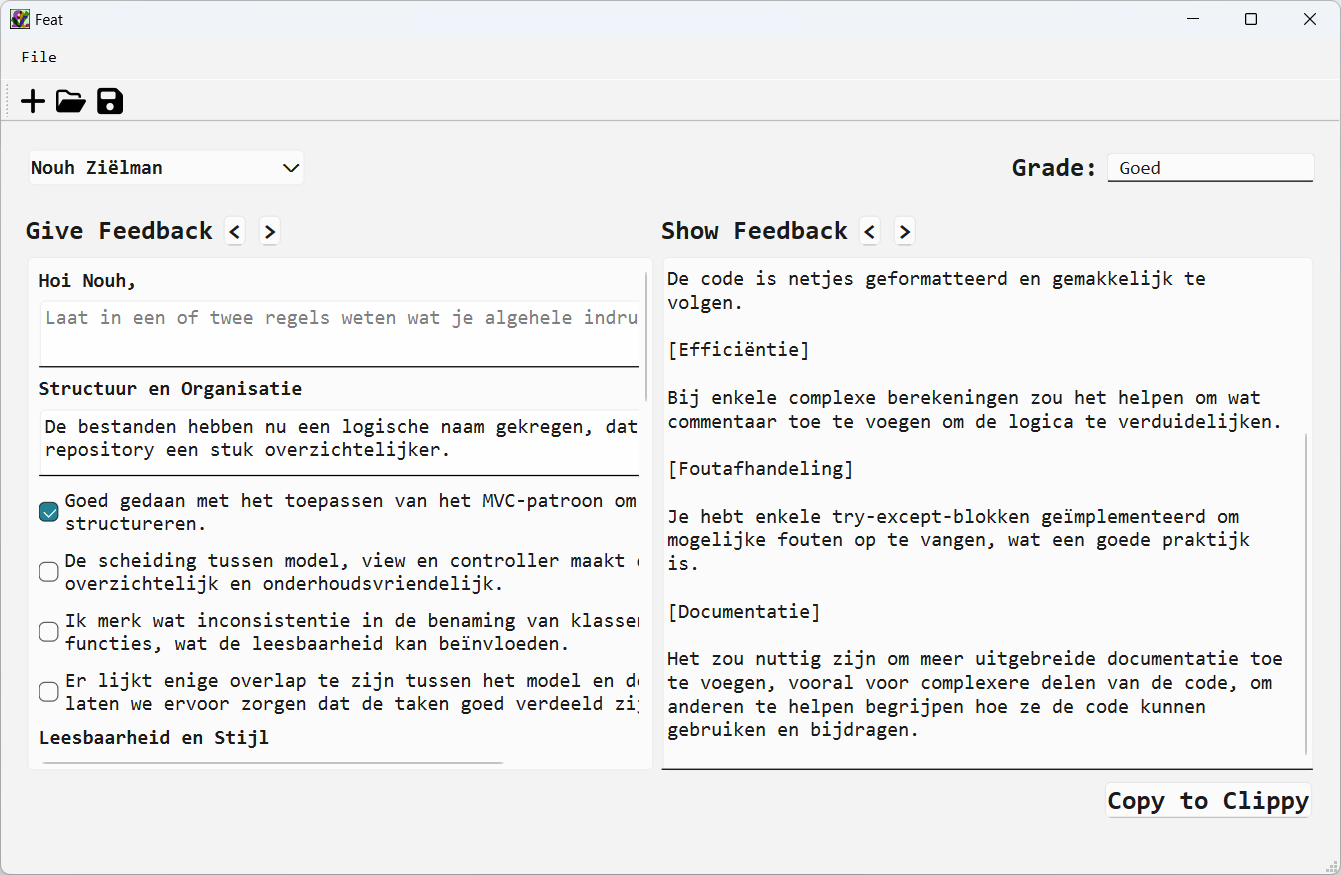
Create fast feedback messages based on your own prewritten feedback file and add personalised feedback per student. Feat requires you to import a list of student, which allows you to create feedback messages with personal salutation. It also gives you the opportunity to easily switch between the feedback text for all students in your group. You can save the .feat file and continue to provide feedback. With a single click the feedback messages is copied to your clipboard and ready to send to your students using the communication method of your choice.
Features
- Import prewritten feedback
- Import student names
- Switch between feedback messages of students
- Have personal salutations
- Add personalised feedback for each feedback section
- Add personalised feedback in a general section
- Add general complimentary close
- Save each student's grade in various formats (numeric, letters, or words)
- Save the feedback messages
- Copy the feedback messages to the clipboard
Screenshots
Select file > new, a new window appears.
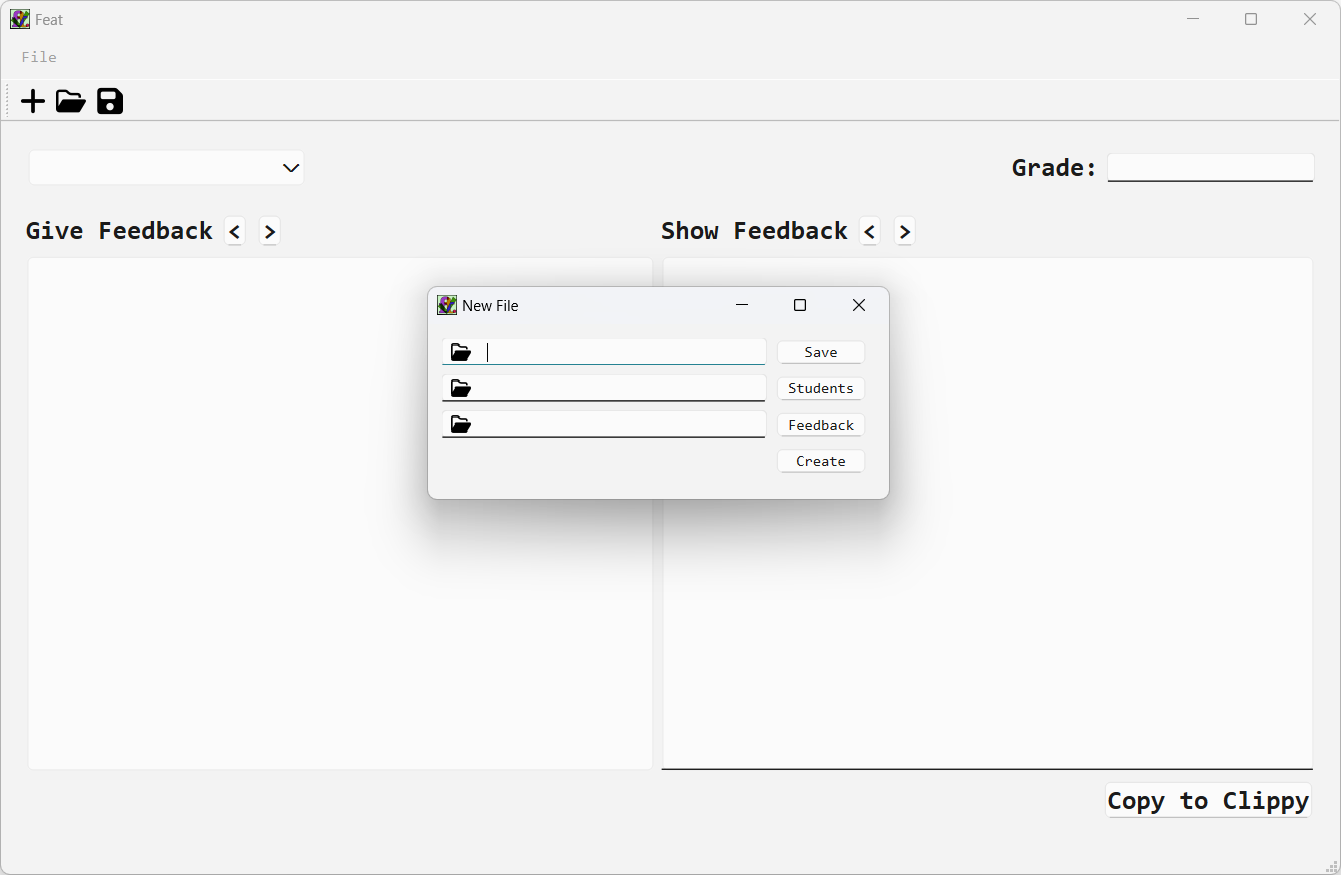
- Select the location to save the .feat file and give it a name.
- Select the file with student names.
- select the file with feedback.
Click create to create the .feat file and start composing feedback.
Select file > open to open a .feat file.
File Format Specifications
Student file
The file(.txt) with student names should be designed in the following way:
# Teaching assistant (information)
first_name lastname (unique_student_id)
first_name lastname (unique_student_id)
Text after '#' can be arbitrary since lines with '#' will be skipped. First names with spaces must be connected with "_". There is an example student file available.
Feedback form
The file(.toml) with feedback should be designed in the following way:
["Section 1"]
Unique_id = "Feedbackline 1"
Unique_id = "Feedbackline 2"
Unique_id = "Feedbackline 3"
Unique_id = "Feedbackline 4"

["Section 2"]
Unique_id = "Feedbackline 1"
Unique_id = "Feedbackline 2"
Unique_id = "Feedbackline 3"
Unique_id = "Feedbackline 4"
The unique IDs must be unique within the feedback form. There is an example feedback form available.
Install
In a virtual environment:
pip install feat-feedback-tool
Or with pipx:
pipx install feat-feedback-tool
Open Feat with ft.
ft.
Development instructions
Clone the repository
Create a new conda environment with python
conda create -n feat python
Activate the new conda enviornment
conda activate feat
Install Feat with poetry install
poetry install
Open Feat with ft.
ft.
2 maintainers


Metadata
2 maintainers
Release files for feat-feedback-tool 1.3.0
For a detailed explanation of source distributions (sdists) and built distributions (wheels), please see the package formats documentation.
Source distribution (sdist)
| File | Size | Uploaded | Provenance | |
|---|---|---|---|---|
| feat_feedback_tool-1.3.0.tar.gz | 126.0 kB | Without provenance | Details |
Built distribution (wheel)
| File | Interpreter | ABI | Platform | Reset |
|---|---|---|---|---|
| feat_feedback_tool-1.3.0-py3-none-any.whl | Python 3 | none | any | Details |
Total release size: 252.2 kB
Release files / feat_feedback_tool-1.3.0.tar.gz
| Download URL | feat_feedback_tool-1.3.0.tar.gz |
|---|---|
| Size | 126.0 kB |
| Tags | Source |
|
SHA-256 checksum How to use checksums |
2c1f4d1af94935c4fefde1d72266403fae4739acfb8e4b7f6c62e80b84642825
|
|
BLAKE2b-256 checksum How to use checksums |
b6601d4fa1964a9f226ec4703714264ba928a0f8f560e05203b2eb66678f4d0d
|
| Upload date | |
|
Uploaded using Trusted Publishing? What is trusted publishing? |
No |
| Uploaded via |
poetry/2.5.1 CPython/3.15.0 Darwin/27.0.0
|
Release files / feat_feedback_tool-1.3.0-py3-none-any.whl
| Download URL | feat_feedback_tool-1.3.0-py3-none-any.whl |
|---|---|
| Size | 126.2 kB |
| Tags | Python 3 |
|
SHA-256 checksum How to use checksums |
53b09fde8a3fe9e42ed1add118332eec9f1ba7dfa1e2c8f477663ba66dddd228
|
|
BLAKE2b-256 checksum How to use checksums |
a6f449e4815dba007c02cdfdec8a5fb8b5083336e6a78665bf33b8c76bf835b3
|
| Upload date | |
|
Uploaded using Trusted Publishing? What is trusted publishing? |
No |
| Uploaded via |
poetry/2.5.1 CPython/3.15.0 Darwin/27.0.0
|
Security for feat-feedback-tool 1.3.0
Provenance
Provenance describes where a file came from. On PyPI, provenance is shared via attestations, which provide a verifiable record of the build or publishing details. View details, limitations and caveats.
No provenance found
None of the files in this release were uploaded with provenance metadata.
A note on package security
PyPI is a repository for distributing packages, not a service for auditing them. While third-party security researchers and our staff do their best to detect and remove malicious packages, PyPI cannot guarantee the quality, security or suitability of any given package.














