

Features Goldmine
Are you stuck building your ML pipeline? Are you searching for creative ideas for new features? Looking for a quick, easy, and performant way to do feature engineering?
We would like to introduce features_goldmine, a Python package built exactly for that problem. It runs multiple feature engineering strategies on your raw tabular data, creates new candidate features, filters weak ideas, and proposes only the features that are worth checking.
The main goal of features_goldmine is simple: improve ML pipeline accuracy with minimal code changes.
California Housing Example
Use your existing train/test split, generate golden features in one line, retrain your model.
from features_goldmine import GoldenFeatures

# 1) baseline model on X_train / X_test
# 2) add golden features

gf = GoldenFeatures(verbose=1, selectivity="balanced")
X_train_gold = gf.fit_transform(X_train, y_train)
X_test_gold = gf.transform(X_test)

X_train_aug = pd.concat([X_train, X_train_gold], axis=1)
X_test_aug = pd.concat([X_test, X_test_gold], axis=1)

# 3) train your model on augmented data and compare metric
Real run from this repo:
uv run python examples/california_housing.py
Baseline RMSE (single split): 0.450530
Golden   RMSE (single split): 0.447588
Delta RMSE (golden - baseline): -0.002942
RMSE improvement vs baseline: +0.65%
Selected examples of created features:
AveOccup_div_MedInc
MedInc_div_AveOccup
ctx_raw_Longitude_z_k15
HouseAge_mul_MedInc
Latitude_mul_Longitude
Full California Housing training output
uv run python examples/california_housing.py
Dataset: california_housing
Rows=20640, Features=8
Mode: single train/test split (test_size=0.25), selectivity=balanced, gf_verbose=1
[GoldenFeatures] fit: validating inputs
[GoldenFeatures] fit: task=regression, rows=15480, total_features=8, numeric_features=8, categorical_features=0, selectivity=relaxed, max_selected_features=None, enabled_strategies=['categorical_frequency', 'categorical_group_deviation', 'categorical_hash_cross', 'categorical_oof_target', 'categorical_prototypes', 'context_knn', 'grouped_row_stats', 'path', 'projection_ica', 'projection_pca', 'residual_numeric']
[GoldenFeatures] stage1: training fast LightGBM on raw features (3 repeats)
[GoldenFeatures] stage1: repeat=1/3, seed=42, paths=1223
[GoldenFeatures] stage1: repeat=2/3, seed=143, paths=1247
[GoldenFeatures] stage1: repeat=3/3, seed=244, paths=1245
[GoldenFeatures] stage1: trained with 8 raw features
[GoldenFeatures] stage2: extracted total 3715 paths across repeats
[GoldenFeatures] stage3: ranking feature interactions
[GoldenFeatures] stage3: ranked 28 interaction pairs
[GoldenFeatures] stage4: building candidate engineered features (enabled=['categorical_frequency', 'categorical_group_deviation', 'categorical_hash_cross', 'categorical_oof_target', 'categorical_prototypes', 'context_knn', 'grouped_row_stats', 'path', 'projection_ica', 'projection_pca', 'residual_numeric'])
[GoldenFeatures] stage4: generated 160 path candidates + 3 projection candidates + 3 ica candidates + 20 grouped-stats candidates + 30 context-knn candidates + 50 residual candidates = 266 total
[GoldenFeatures] stage5: quick filtering candidates
[GoldenFeatures] stage5: kept 159 candidates, rejected 107
[GoldenFeatures] stage6: survival competition with repeated LightGBM
[GoldenFeatures] stage6: 16 candidates survived
[GoldenFeatures] stage7: redundancy pruning
[GoldenFeatures] stage7: final survivors after pruning = 15
[GoldenFeatures] fit: completed (candidates=266, after_filter=159, survivors=16, final=15)
[GoldenFeatures] transform: generating 15 golden features
[GoldenFeatures] transform: generating 15 golden features
[Split] created=15 features: ['AveOccup_div_MedInc', 'MedInc_div_AveOccup', 'MedInc_div_AveRooms', 'Latitude_div_Longitude', 'ctx_raw_Longitude_z_k15', 'HouseAge_mul_MedInc', 'grpstat_002_mean', 'AveOccup_absdiff_MedInc', 'AveRooms_div_MedInc', 'AveRooms_sub_MedInc', 'Latitude_mul_Longitude', 'AveBedrms_mul_MedInc', 'AveBedrms_sub_Longitude', 'Latitude_sub_Longitude', 'AveOccup_sub_MedInc']
Baseline RMSE (single split): 0.450530
Golden   RMSE (single split): 0.447588
Delta RMSE (golden - baseline): -0.002942
RMSE improvement vs baseline: +0.65%
Breast Cancer Binary Example
uv run python examples/breast_cancer_binary.py
Baseline AUC (single split): 0.992872
Golden   AUC (single split): 0.995178
Delta AUC (golden - baseline): +0.002306
AUC improvement vs baseline: +0.23%
Selected examples of created features:
worst_area_mul_worst_concave_points
worst_perimeter_mul_worst_smoothness
rule_worst_perimeter_le_112p800_and_worst_concave_points_le_0p146_013
worst_area_mul_worst_texture
area_error_mul_mean_concave_points
Full Breast Cancer Binary training output
uv run python examples/breast_cancer_binary.py
Dataset: breast_cancer
Rows=569, Features=30
Mode: single train/test split (test_size=0.25), selectivity=balanced, gf_verbose=1
[GoldenFeatures] fit: validating inputs
[GoldenFeatures] fit: task=binary, rows=426, total_features=30, numeric_features=30, categorical_features=0, selectivity=balanced, max_selected_features=None, enabled_strategies=['categorical_frequency', 'categorical_group_deviation', 'categorical_hash_cross', 'categorical_oof_target', 'categorical_prototypes', 'context_knn', 'grouped_row_stats', 'path', 'projection_ica', 'projection_pca', 'residual_numeric']
[GoldenFeatures] stage1: training fast LightGBM on raw features (3 repeats)
[GoldenFeatures] stage1: repeat=1/3, seed=42, paths=572
[GoldenFeatures] stage1: repeat=2/3, seed=143, paths=567
[GoldenFeatures] stage1: repeat=3/3, seed=244, paths=572
[GoldenFeatures] stage1: trained with 30 raw features
[GoldenFeatures] stage2: extracted total 1711 paths across repeats
[GoldenFeatures] stage3: ranking feature interactions
[GoldenFeatures] stage3: ranked 235 interaction pairs
[GoldenFeatures] stage4: building candidate engineered features (enabled=['categorical_frequency', 'categorical_group_deviation', 'categorical_hash_cross', 'categorical_oof_target', 'categorical_prototypes', 'context_knn', 'grouped_row_stats', 'path', 'projection_ica', 'projection_pca', 'residual_numeric'])
[GoldenFeatures] stage4: generated 170 path candidates + 5 projection candidates + 5 ica candidates + 48 grouped-stats candidates + 30 context-knn candidates = 258 total
[GoldenFeatures] stage5: quick filtering candidates
[GoldenFeatures] stage5: kept 170 candidates, rejected 88
[GoldenFeatures] stage6: survival competition with repeated LightGBM
[GoldenFeatures] stage6: 13 candidates survived
[GoldenFeatures] stage7: redundancy pruning
[GoldenFeatures] stage7: final survivors after pruning = 13
[GoldenFeatures] fit: completed (candidates=258, after_filter=170, survivors=13, final=13)
[GoldenFeatures] transform: generating 13 golden features
[GoldenFeatures] transform: generating 13 golden features
[Split] created=13 features: ['worst_area_mul_worst_concave_points', 'worst_perimeter_mul_worst_smoothness', 'rule_worst_perimeter_le_112p800_and_worst_concave_points_le_0p146_013', 'worst_area_mul_worst_texture', 'area_error_mul_mean_concave_points', 'grpstat_004_mean', 'worst_perimeter_mul_worst_texture', 'area_error_mul_worst_concave_points', 'mean_texture_mul_worst_radius', 'worst_perimeter_mul_worst_symmetry', 'mean_concave_points_mul_worst_texture', 'ica_comp_003', 'mean_texture_mul_worst_area']
Baseline AUC (single split): 0.992872
Golden   AUC (single split): 0.995178
Delta AUC (golden - baseline): +0.002306
AUC improvement vs baseline: +0.23%
Other Examples
These example scripts are included in this repository:
uv run python examples/breast_cancer_binary.py
uv run python examples/credit_scoring.py
uv run python examples/house_prices_rmse.py
How It Works
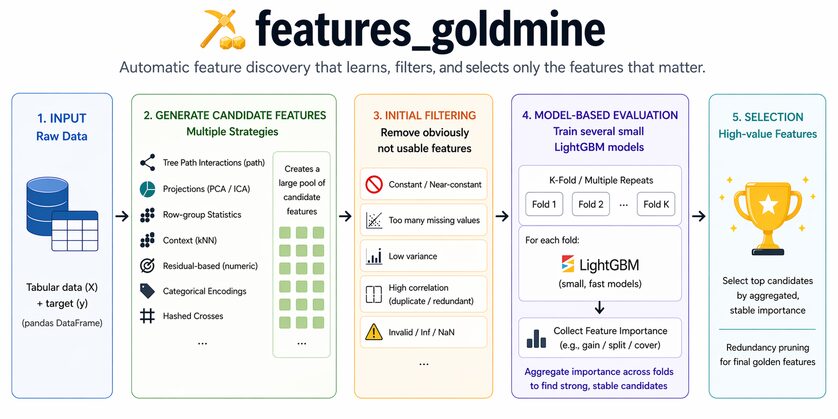
features_goldmine starts with your raw tabular data: a pandas DataFrame X and target y.
First, the package generates many candidate features using several strategies. Some strategies look for interactions discovered by LightGBM tree paths. Others create numeric transformations, projection features, row-group statistics, categorical encodings, categorical-numeric deviation features, and context-style features.
Next, features_goldmine runs a fast initial filtering step. This removes candidates that are obviously not useful: constant columns, near-constant columns, invalid values, too many missing values, duplicates, and features that are too similar to their parent columns.
Finally, it trains several small LightGBM models and lets the candidates compete against the raw features. Candidate features are selected based on repeated feature importance: features that consistently receive useful gain and rank highly across runs are kept. Redundant survivors are pruned, and the final output is a clean DataFrame containing only the selected engineered features.
In short:
raw X, y
  -> generate many candidate features
  -> remove obviously bad candidates
  -> train several small LightGBM models
  -> keep candidates with strong, stable importance
  -> return final golden features
Performance
We tested features_goldmine by comparing two models:
LGBM_Baseline: a simple LightGBM model trained on raw data.LGBM_GoldenFeatures: the same LightGBM parameters, trained on raw data plus golden features.
The comparison was run on TabArena Lite, across 51 datasets. Lower metric_error is better.
LGBM_GoldenFeatures vs LGBM_Baseline
Better: 27 datasets
Worse : 24 datasets
Win rate: 52.9%
The practical takeaway: golden features help often, but not always. Feature engineering is data-dependent, so features_goldmine is designed to make it fast and easy to check whether engineered features improve your pipeline.
Simple API
from features_goldmine import GoldenFeatures

gf = GoldenFeatures()
X_gold = gf.fit_transform(X, y)
Constructor arguments:
gf = GoldenFeatures(
    random_state=42,
    verbose=0,
    selectivity="balanced",
    max_selected_features=None,
    include_strategies=None,
    exclude_strategies=None,
)
random_state- Controls randomness for repeatable results.
- Use the same value if you want the same generated features across runs.
verbose- Set to
1to print detailed logs for every stage. - Keep
0for quiet mode.
- Set to
selectivity- Controls how strict the feature survival test is.
- Options:
relaxed,balanced,strict. balancedis the default and a good starting point.
max_selected_features- Limits the final number of selected golden features.
- Example:
max_selected_features=3keeps only the top 3.
include_strategies- Optional list of strategies to use.
- If
None, all built-in strategies are enabled.
exclude_strategies- Optional list of strategies to disable.
- Useful when you want to turn off a specific family, for example
categorical_frequency.
That is the core API. Three methods:
fit(X, y)- What it does: learns which engineered features are useful from your training data.
- Use it when: you want to fit once, then transform multiple datasets later.
- Returns: the same
GoldenFeaturesobject (self).
transform(X)- What it does: creates the selected engineered features for new data.
- Use it when: you already called
fit(or loaded a fitted model) and now want features for validation/test/production data. - Returns: a DataFrame with only engineered features.
fit_transform(X, y)- What it does:
fit+transformin one call. - Use it when: you just want engineered features for your training split quickly.
- Returns: a DataFrame with only engineered features.
- What it does:
Beginner rule of thumb:
- training split:
fit_transform - validation/test split:
transform
Example:
gf = GoldenFeatures()

# train split
X_train_gold = gf.fit_transform(X_train, y_train)

# validation/test split (same fitted feature logic)
X_valid_gold = gf.transform(X_valid)
X_test_gold = gf.transform(X_test)
Other useful methods:
save(path)- What it does: saves a fitted
GoldenFeaturesobject to disk. - Use it when: you want to reuse the exact same feature logic later.
- What it does: saves a fitted
GoldenFeatures.load(path)- What it does: loads a previously saved fitted object.
- Use it when: you want consistent features in another script or production job.
Useful attributes:
selected_feature_names_golden_features_report_
Strategy Control and Available Strategies
Defaults work well for first use. If needed:
gf = GoldenFeatures(
    include_strategies=["path", "context_knn", "categorical_group_deviation"],
    exclude_strategies=["categorical_frequency"],
)
Current strategy keys:
path- finds feature interactions that tree models actually used, then creates formulas like multiply/divide/subtract and simple split-based rules.
- Usually helps when: non-linear numeric interactions matter.
projection_pca- creates compact summary features (principal components) from many numeric columns.
- Usually helps when: numeric features are correlated and you want cleaner combined signals.
projection_ica- creates independent numeric components that can reveal hidden patterns different from PCA.
- Usually helps when: signals are mixed and not well captured by simple linear combinations.
grouped_row_stats- computes row-level stats (mean/std/min/max) over related feature groups.
- Usually helps when: relative scale inside a group of columns matters.
context_knn- compares each row to nearby rows in numeric space (local context), generating deviation-style features.
- Usually helps when: local neighborhood behavior is informative.
residual_numeric- for regression, creates numeric interactions that correlate with baseline model residual errors.
- Usually helps when: baseline model leaves structured numeric errors.
categorical_frequency- encodes how common each category value is in the data.
- Usually helps when: rare vs common category values carry signal.
categorical_oof_target- leak-safe target encoding using out-of-fold averages per category.
- Usually helps when: category values strongly relate to target.
categorical_group_deviation- compares a numeric value to what is typical for its category (for example
value - category_mean). - Usually helps when: "higher/lower than typical for this category" matters.
- compares a numeric value to what is typical for its category (for example
categorical_prototypes- measures distance between a row and category-specific numeric prototypes.
- Usually helps when: each category has a characteristic numeric profile.
categorical_hash_cross- builds compact crossed-category signals via hashed category pairs.
- Usually helps when: interactions between two categorical columns matter but full one-hot crosses would explode.
Install
# from PyPI (recommended)
pip install features_goldmine
uv add features_goldmine

# local editable install (development)
uv pip install -e .
pip install -e .
Useful Tricks
You can experiment with different selection settings. In practice, it is often worth trying a few variants because the best setting depends on your data.
If you want to increase the number of proposed golden features, try relaxed:
gf = GoldenFeatures(selectivity="relaxed", verbose=1)
If you want a smaller, more conservative set of features, try strict:
gf = GoldenFeatures(selectivity="strict", verbose=1)
If you want only the top few golden features, use max_selected_features. For example, keep only the top 3:
gf = GoldenFeatures(max_selected_features=3, verbose=1)
License
Apache 2.0

1 maintainer

Metadata
1 maintainer
Release files for features-goldmine 1.0.1
For a detailed explanation of source distributions (sdists) and built distributions (wheels), please see the package formats documentation.
Source distribution (sdist)
| File | Size | Uploaded | |
|---|---|---|---|
| features_goldmine-1.0.1.tar.gz | 39.9 kB | Details |
Built distribution (wheel)
| File | Interpreter | ABI | Platform | Reset |
|---|---|---|---|---|
| features_goldmine-1.0.1-py3-none-any.whl | Python 3 | none | any | Details |
Total release size: 85.5 kB
Release files / features_goldmine-1.0.1.tar.gz
| Download URL | features_goldmine-1.0.1.tar.gz |
|---|---|
| Size | 39.9 kB |
| Tags | Source |
|
SHA-256 checksum How to use checksums |
c98b6edf4b309297b3cbca29d7f1de8222eaa941c08def43ed8a0f51d199995c
|
|
BLAKE2b-256 checksum How to use checksums |
aaca1dfdd1ac8287b36d64869faa2647c90a5d79f50f829ad0b72d9861871860
|
| Upload date | |
|
Uploaded using Trusted Publishing? What is trusted publishing? |
No |
| Uploaded via |
twine/6.2.0 CPython/3.11.10
|
Release files / features_goldmine-1.0.1-py3-none-any.whl
| Download URL | features_goldmine-1.0.1-py3-none-any.whl |
|---|---|
| Size | 45.7 kB |
| Tags | Python 3 |
|
SHA-256 checksum How to use checksums |
7364074aaef6664a4f6adb70713236e7d34cfa7ac840dbff0ecd753cf5cab60f
|
|
BLAKE2b-256 checksum How to use checksums |
477e2cffc371f22630b0da1475156a0c32980b318a6adc7d2422aae3ddb1041b
|
| Upload date | |
|
Uploaded using Trusted Publishing? What is trusted publishing? |
No |
| Uploaded via |
twine/6.2.0 CPython/3.11.10
|














