
Export Feishu/Lark cloud documents to Markdown

Project description
feishu-docx
Feishu/Lark Docs、Sheet、Bitable → Markdown | AI Agent-friendly knowledge base exporter with OAuth 2.0, CLI, TUI & Claude Skills support



中文 | English
🎯 Why feishu-docx?
Let AI Agents read your Feishu/Lark knowledge base.
- 🤖 Built for AI — Works seamlessly with Claude/GPT Skills for document retrieval
- 📄 Full Coverage — Documents, Spreadsheets, Bitables, Wiki nodes
- 🔐 Authentication — One-time auth, automatic token refresh
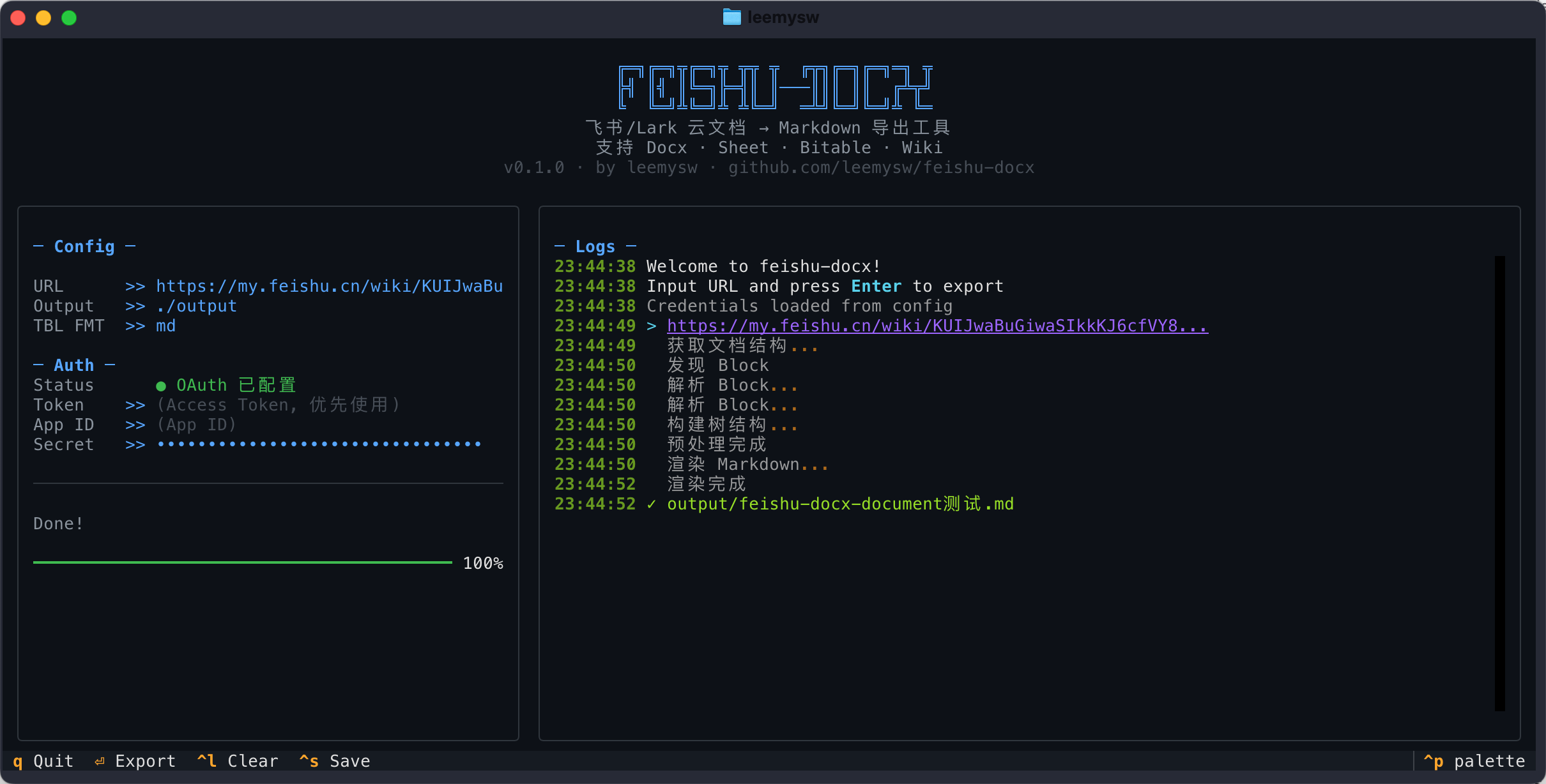
- 🎨 Dual Interface — CLI + Beautiful TUI (Textual-based)
- 📦 Zero Config —
pip installand start exporting
⚡ Quick Start (30 seconds)
# Install
pip install feishu-docx

# Configure credentials (one-time)
feishu-docx config set --app-id YOUR_APP_ID --app-secret YOUR_APP_SECRET

# Export! (auto-obtains tenant_access_token, no OAuth needed)
feishu-docx export "https://my.feishu.cn/wiki/KUIJwaBuGiwaSIkkKJ6cfVY8nSg"

# Optional: Use OAuth mode for user-level permissions
# feishu-docx config set --auth-mode oauth && feishu-docx auth
🤖 Claude Skills Support
Enable Claude to access your Feishu knowledge base directly!
This project includes a Claude Skill at .skills/feishu-docx/SKILL.md.
Copy this Skill to your agent project, and Claude can:
- 📖 Read Feishu knowledge base as context
- 🔍 Search and reference internal documents
- 📝 (Planned) Write conversation content back to Feishu
✨ Features
| Feature | Description |
|---|---|
| 📄 Document Export | Docx → Markdown with formatting, images, tables |
| 📊 Spreadsheet Export | Sheet → Markdown tables |
| 📋 Bitable Export | Multidimensional tables → Markdown |
| 📚 Wiki Export | Auto-resolve wiki nodes |
| 🗂️ Wiki Batch Export | Recursively export entire wiki space with hierarchy |
| 🗄️ Database Schema | Export APaaS database structure to Markdown |
| 🖼️ Auto Image Download | Images saved locally with relative paths |
| 🔐 Auth | Auto tenant_access_token (recommended) or OAuth 2.0 |
| 🎨 Beautiful TUI | Terminal UI powered by Textual |
✅ Supported Blocks
This tool currently supports exporting the following Feishu/Lark document components:
| Category | Features | Status | Notes |
|---|---|---|---|
| Basic Text | Headings, Paragraphs, Lists, Tasks (Todo), Code Blocks, Quotes | ✅ | Fully Supported |
| Formatting | Bold, Italic, Strikethrough, Underline, Links, @Mentions | ✅ | Fully Supported |
| Layout | Columns, Callouts, Dividers | ✅ | Fully Supported |
| Tables | Native Tables | ✅ | Export to Markdown/HTML |
| Media | Images, Drawing Boards | ✅ | Drawing boards exported as images |
| Embedded | Spreadsheets (Sheets), Bitable | ✅ | Text content only |
| Special | Synced Blocks | ⚠️ | Original blocks within the same doc only |
| Files | Attachments | ✅ | File name + download link |
📖 Usage
CLI
# Export single document to specific directory
feishu-docx export "https://xxx.feishu.cn/docx/xxx" -o ./docs

# Batch export entire wiki space (preserves hierarchy)
feishu-docx export-wiki-space <space_id_or_url> -o ./wiki_backup --max-depth 5

# Export APaaS database schema
feishu-docx export-workspace-schema <workspace_id> -o ./database_schema.md

# Export WeChat article to Markdown
feishu-docx export-wechat "https://mp.weixin.qq.com/s/xxxxxx"

# Fetch a WeChat article and create a Feishu doc
feishu-docx create --url "https://mp.weixin.qq.com/s/xxxxxx"

# Use token directly
feishu-docx export "URL" -t your_access_token

# Launch TUI
feishu-docx tui
Python API
from feishu_docx import FeishuExporter

# Initialize (uses tenant_access_token by default)
exporter = FeishuExporter(app_id="xxx", app_secret="xxx")

# Export single document
path = exporter.export("https://xxx.feishu.cn/wiki/xxx", "./output")

# Get content without saving
content = exporter.export_content("https://xxx.feishu.cn/docx/xxx")

# Batch export entire wiki space
result = exporter.export_wiki_space(
    space_id="xxx",
    output_dir="./wiki_backup",
    max_depth=3,
)
print(f"Exported {result['exported']} docs to {result['space_dir']}")
🔐 Feishu App Setup
- Create app at Feishu Open Platform
- Add redirect URL:
http://127.0.0.1:9527/ - Request permissions:
"docx:document:readonly"  # 查看云文档
"wiki:wiki:readonly"  # 查看知识库
"drive:drive:readonly"  # 查看云空间文件(图片下载)
"sheets:spreadsheet:readonly"  # 查看电子表格
"bitable:app:readonly"  # 查看多维表格
"board:whiteboard:node:read"  # 查看白板
"contact:contact.base:readonly"  # 获取用户基本信息(@用户名称)
"offline_access"  # 离线访问(获取 refresh_token)
- Save credentials:
feishu-docx config set --app-id cli_xxx --app-secret xxx
🔑 Authentication Modes
| Tenant Mode (Default) | OAuth Mode | |
|---|---|---|
| Token Type | tenant_access_token |
user_access_token |
| Setup | Configure permissions in Open Platform | Request permissions during OAuth flow |
| User Interaction | ✅ Automatic, no user action needed | ❌ Requires browser authorization |
| Access Scope | Documents the app has permission to | Documents the user has permission to |
| Best For | Server automation, AI Agents | Accessing user's private documents |
Tenant Mode (Recommended for most cases):
# One-time setup
feishu-docx config set --app-id xxx --app-secret xxx

# Export (auto-obtains tenant_access_token)
feishu-docx export "https://xxx.feishu.cn/docx/xxx"
⚠️ Tenant mode requires pre-configuring document permissions in Feishu Open Platform → App Permissions.
OAuth Mode (For user-level access):
# One-time setup
feishu-docx config set --app-id xxx --app-secret xxx --auth-mode oauth
feishu-docx auth  # Opens browser for authorization

# Export (uses cached user_access_token)
feishu-docx export "https://xxx.feishu.cn/docx/xxx"
💡 OAuth mode requests permissions during the authorization flow, no pre-configuration needed.
📖 Commands
| Command | Description |
|---|---|
export <URL> |
Export single document to Markdown |
export-wiki-space <space_id> |
Batch export wiki space with hierarchy |
export-workspace-schema <id> |
Export APaaS database schema |
export-wechat <URL> |
Export WeChat article to Markdown |
create <title> |
Create new Feishu document (--url supported) |
write <URL> |
Append Markdown content to document |
update <URL> |
Update specific block in document |
auth |
OAuth authorization |
tui |
Launch TUI interface |
config set |
Set credentials |
config show |
Show configuration |
config clear |
Clear cache |
🗺️ Roadmap
- Document/Sheet/Wiki export
- OAuth 2.0 + Token refresh
- TUI interface
- Claude Skills support
- Batch export entire wiki space
- MCP Server support
- Write to Feishu (create/update docs)
📜 Changelog
See CHANGELOG.md for version history.
📄 License
MIT License - See LICENSE
⭐ Star this repo if you find it helpful!
Release history Release notifications | RSS feed


Download files
Download the file for your platform. If you're not sure which to choose, learn more about installing packages.
Source Distribution
Built Distribution
Filter files by name, interpreter, ABI, and platform.
If you're not sure about the file name format, learn more about wheel file names.
Copy a direct link to the current filters
File details
Details for the file feishu_docx-0.2.1.tar.gz.
File metadata
- Download URL: feishu_docx-0.2.1.tar.gz
- Upload date:
- Size: 66.4 kB
- Tags: Source
- Uploaded using Trusted Publishing? No
- Uploaded via: twine/6.2.0 CPython/3.11.14
File hashes
| Algorithm | Hash digest | |
|---|---|---|
| SHA256 |
28e0774293b85b6d21ac7f911fdc23b5592cab998c535d80bd1c810198602164
|
|
| MD5 |
3eff4c998eeaed3b8d605c88d5885010
|
|
| BLAKE2b-256 |
d896633cee60b008b76f2725042a30ff52552203e2d3fc826a1fcc023edd3d98
|
File details
Details for the file feishu_docx-0.2.1-py3-none-any.whl.
File metadata
- Download URL: feishu_docx-0.2.1-py3-none-any.whl
- Upload date:
- Size: 98.8 kB
- Tags: Python 3
- Uploaded using Trusted Publishing? No
- Uploaded via: twine/6.2.0 CPython/3.11.14
File hashes
| Algorithm | Hash digest | |
|---|---|---|
| SHA256 |
aba2708471d892ed48bdd97699bb7dbb5b721fd1fdb1f2f32f36dff67f0f866e
|
|
| MD5 |
bcd10b2bb1ddbc1481c5e6e8bae376a3
|
|
| BLAKE2b-256 |
89a0f3a33b62d7ad656f1c103221f1d7768546bef2a4e9d1a6a37fb0fe4ff30f
|






