
FenToBoardImage takes a Fen string representing a Chess position, and renders a Pillow image of the resulting position.

Project description
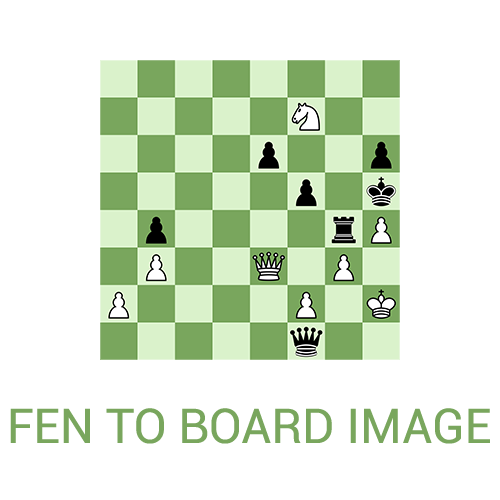
About
FenToBoardImage takes a Fen string representing a Chess position, and renders a PIL image of the resulting position.
You can customize:
- the size and color of the board
- piece sprites
- black or white perspective
- Board highlighting for last move
- Arrows
Installation
Install the package using pip
$ pip install fenToBoardImage
Then import the fenToImage and loadPiecesFolder functions and use them as follows:
from fenToBoardImage import fenToImage, loadPiecesFolder

boardImage = fenToImage(
	fen="rnbqkbnr/pppppppp/8/8/8/8/PPPPPPPP/RNBQKBNR w KQkq - 0 1",
	squarelength=100,
	pieceSet=loadPiecesFolder("./pieces"),
	darkColor="#D18B47",
	lightColor="#FFCE9E"
)
In order to load a piece set, the pieces must follow this file structure, and must be a .png:
-piece_set_name
  -white
    - Knight.png
    - Rook.png
    - Pawn.png
    - Bishop.png
    - Queen.png
    - King.png
  -black
    - Knight.png
    - Rook.png
    - Pawn.png
    - Bishop.png
    - Queen.png
    - King.png
Usage
The fenToBoardImage has these parameters:
fen: str
Fen string representing a position
squarelength: int
the length of one square on the board

resulting board will be 8 * squarelength long
pieceSet: loadPiecesFolder
the piece set, loaded using the loadPiecesFolder function
darkColor: str
dark square color on the board
lightColor: str
light square color on the board
flipped: boolean
default = False

Whether to flip to board, and render it from black's perspective
The loadPiecesFolder has one parameter:
path: str
Loads piece set located at the path provided.
Dependencies
Release history Release notifications | RSS feed


Download files
Download the file for your platform. If you're not sure which to choose, learn more about installing packages.
Source Distribution
Built Distribution
Filter files by name, interpreter, ABI, and platform.
If you're not sure about the file name format, learn more about wheel file names.
Copy a direct link to the current filters
File details
Details for the file fenToBoardImage-1.0.1.tar.gz.
File metadata
- Download URL: fenToBoardImage-1.0.1.tar.gz
- Upload date:
- Size: 17.2 kB
- Tags: Source
- Uploaded using Trusted Publishing? No
- Uploaded via: poetry/1.1.13 CPython/3.9.5 Linux/5.11.0-49-generic
File hashes
| Algorithm | Hash digest | |
|---|---|---|
| SHA256 |
8b264ba30fe4513e3eb452be2bb5baa807b72617399682b66217a8ac08874514
|
|
| MD5 |
d40e87a7bb6d0993ac80e2ff5112af7c
|
|
| BLAKE2b-256 |
4b290e37cef46600ece1cdebe05850481f973d7e3d0db3bd7f199e6b18ee2449
|
File details
Details for the file fenToBoardImage-1.0.1-py3-none-any.whl.
File metadata
- Download URL: fenToBoardImage-1.0.1-py3-none-any.whl
- Upload date:
- Size: 17.5 kB
- Tags: Python 3
- Uploaded using Trusted Publishing? No
- Uploaded via: poetry/1.1.13 CPython/3.9.5 Linux/5.11.0-49-generic
File hashes
| Algorithm | Hash digest | |
|---|---|---|
| SHA256 |
f30f1357449552491a4332b88628496996b4eacebb1a411bb840f9bd63eb89a6
|
|
| MD5 |
2459d8bb20e4071e6a66bd6db4629566
|
|
| BLAKE2b-256 |
9aee11008b2f6859b24f070e9fcb635459616be37e2ab8e7876a7682b6203cb1
|






