
Next generation cardiac mechanics solver based on FEniCSx

Project description









fenicsx-pulse
fenicsx-pulse is a cardiac mechanics solver based on FEniCSx. It is a successor of pulse which is a cardiac mechanics solver based on FEniCS.
- Documentation: https://finsberg.github.io/fenicsx-pulse/
- Source code: https://github.com/finsberg/fenicsx-pulse
Install
You can install the library with pip
python3 -m pip install fenicsx-pulse
or with conda
conda install -c conda-forge fenicsx-pulse
Note that installing with pip requires FEniCSx already installed
We also provide a pre-built docker image with FEniCSx and fenicsx_pulse installed. You pull this image using the command
docker pull ghcr.io/finsberg/fenicsx-pulse:v0.6.1
Getting started
Here is a minimal example of how to use fenicsx-pulse to solve a simple cardiac mechanics problem.
import numpy as np
import dolfinx
import cardiac_geometries
import pulse

# Create a geometry with cardiac-geometries
geo = cardiac_geometries.mesh.lv_ellipsoid(
    outdir="geometry",
    create_fibers=True,
    fiber_space="Quadrature_6",
)
# Convert the geometry to a pulse.Geometry
geometry = pulse.HeartGeometry.from_cardiac_geometries(geo, metadata={"quadrature_degree": 6})

# Create a material model
material_params = pulse.HolzapfelOgden.transversely_isotropic_parameters()
material = pulse.HolzapfelOgden(f0=geo.f0, s0=geo.s0, **material_params)

# Define model for active contraction
Ta = pulse.Variable(dolfinx.fem.Constant(geometry.mesh, dolfinx.default_scalar_type(0.0)), "kPa")
active_model = pulse.ActiveStress(geo.f0, activation=Ta)

# Define mode for compressibility
comp_model = pulse.Incompressible()

# Assemble into a cardiac model
model = pulse.CardiacModel(
    material=material,
    active=active_model,
    compressibility=comp_model,
)

# Define boundary conditions
traction = pulse.Variable(
    dolfinx.fem.Constant(geometry.mesh, dolfinx.default_scalar_type(0.0)), "kPa"
)
neumann = pulse.NeumannBC(traction=traction, marker=geometry.markers["ENDO"][0])


def dirichlet_bc(V: dolfinx.fem.FunctionSpace):
    # Find facets for the BASE marker
    facets = geo.ffun.find(geo.markers["BASE"][0])
    # Locate degrees of freedom for the x-component (sub(0)) on these facets
    dofs = dolfinx.fem.locate_dofs_topological(V.sub(0), geo.mesh.topology.dim - 1, facets)
    # Return the Dirichlet BC object
    return [dolfinx.fem.dirichletbc(0.0, dofs, V.sub(0))]


robin_epi = pulse.RobinBC(
    value=pulse.Variable(
        dolfinx.fem.Constant(geometry.mesh, dolfinx.default_scalar_type(1e3)),
        "Pa / m",
    ),
    marker=geometry.markers["EPI"][0],
)
robin_base = pulse.RobinBC(
    value=pulse.Variable(
        dolfinx.fem.Constant(geometry.mesh, dolfinx.default_scalar_type(1e3)),
        "Pa / m",
    ),
    marker=geometry.markers["BASE"][0],
)

bcs = pulse.BoundaryConditions(neumann=(neumann,), dirichlet=(dirichlet_bc,), robin=(robin_base, robin_epi))

# Create a mechanics problem
problem = pulse.StaticProblem(
    model=model,
    geometry=geometry,
    bcs=bcs,
)
# Perform an initial solve
problem.solve()

# Create a file for storing the solution
vtx = dolfinx.io.VTXWriter(geometry.mesh.comm, "displacement.bp", [problem.u], engine="BP4")
vtx.write(0.0)

# Assign a pressure and activation and ramp them up in steps
target_pressure = 5.0  # kPa
target_activation = 5.0  # kPa
num_steps = 5
for i, (pressure, activation) in enumerate(
    zip(np.linspace(0, target_pressure, num_steps), np.linspace(0, target_activation, num_steps))
):
    traction.assign(pressure)  # kPa
    Ta.assign(activation)  # kPa
    problem.solve()
    # Save the displacement field
    vtx.write(i + 1)
vtx.close()
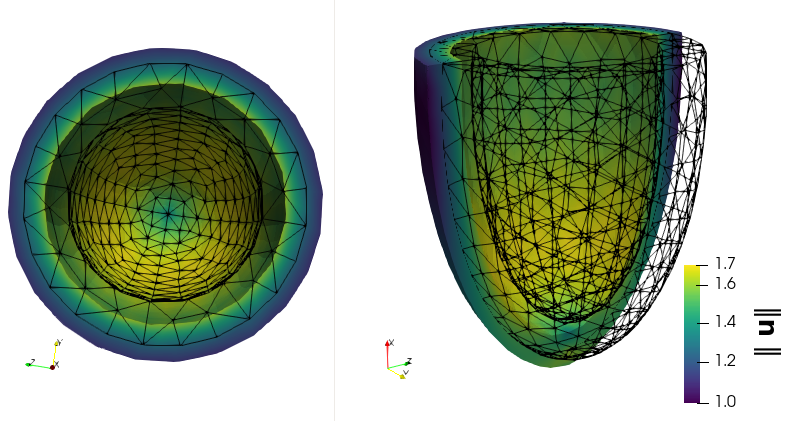
A more realistic example is visualized here:
https://github.com/user-attachments/assets/8e2f5d85-3fbf-4e30-9574-22e7f718230c
Checkout out the demos in the documentation for more examples.
Contributing
See https://finsberg.github.io/fenicsx-pulse/CONTRIBUTING.html
Release history Release notifications | RSS feed


Download files
Download the file for your platform. If you're not sure which to choose, learn more about installing packages.
Source Distribution
Built Distribution
Filter files by name, interpreter, ABI, and platform.
If you're not sure about the file name format, learn more about wheel file names.
Copy a direct link to the current filters
File details
Details for the file fenicsx_pulse-0.6.1.tar.gz.
File metadata
- Download URL: fenicsx_pulse-0.6.1.tar.gz
- Upload date:
- Size: 45.9 kB
- Tags: Source
- Uploaded using Trusted Publishing? Yes
- Uploaded via: twine/6.1.0 CPython/3.13.12
File hashes
| Algorithm | Hash digest | |
|---|---|---|
| SHA256 |
bce4d9aaf24eb01a0e8ca158781fa76349596a55559e0d1c8955562f95d9e2bc
|
|
| MD5 |
63005ec859f875b1cdc2ecd1eba8168b
|
|
| BLAKE2b-256 |
b177d991518b2b7fed1d066039f45ab71e50e7348c9dd87eec2f776bf333a79c
|
Provenance
The following attestation bundles were made for fenicsx_pulse-0.6.1.tar.gz:
Publisher:
pypi.yml on finsberg/fenicsx-pulse
-
Statement:
-
Statement type:
https://in-toto.io/Statement/v1 -
Predicate type:
https://docs.pypi.org/attestations/publish/v1 -
Subject name:
fenicsx_pulse-0.6.1.tar.gz -
Subject digest:
bce4d9aaf24eb01a0e8ca158781fa76349596a55559e0d1c8955562f95d9e2bc - Sigstore transparency entry: 1534782935
- Sigstore integration time:
-
Permalink:
finsberg/fenicsx-pulse@4218efd39beab0cd974242908bb2f0afc43d2836 -
Branch / Tag:
refs/tags/v0.6.1 - Owner: https://github.com/finsberg
-
Access:
public
-
Token Issuer:
https://token.actions.githubusercontent.com -
Runner Environment:
github-hosted -
Publication workflow:
pypi.yml@4218efd39beab0cd974242908bb2f0afc43d2836 -
Trigger Event:
push
-
Statement type:
File details
Details for the file fenicsx_pulse-0.6.1-py3-none-any.whl.
File metadata
- Download URL: fenicsx_pulse-0.6.1-py3-none-any.whl
- Upload date:
- Size: 48.1 kB
- Tags: Python 3
- Uploaded using Trusted Publishing? Yes
- Uploaded via: twine/6.1.0 CPython/3.13.12
File hashes
| Algorithm | Hash digest | |
|---|---|---|
| SHA256 |
4179fbf40a44929fab5158dbd3f91cd1526e58fb605f8d56163c76b7c5100141
|
|
| MD5 |
a02e09d67790cdb72f044b5373473c58
|
|
| BLAKE2b-256 |
003d924858ee5fda6cc912d20d436e60d0ed5783919f237bc9bad8534e884229
|
Provenance
The following attestation bundles were made for fenicsx_pulse-0.6.1-py3-none-any.whl:
Publisher:
pypi.yml on finsberg/fenicsx-pulse
-
Statement:
-
Statement type:
https://in-toto.io/Statement/v1 -
Predicate type:
https://docs.pypi.org/attestations/publish/v1 -
Subject name:
fenicsx_pulse-0.6.1-py3-none-any.whl -
Subject digest:
4179fbf40a44929fab5158dbd3f91cd1526e58fb605f8d56163c76b7c5100141 - Sigstore transparency entry: 1534783024
- Sigstore integration time:
-
Permalink:
finsberg/fenicsx-pulse@4218efd39beab0cd974242908bb2f0afc43d2836 -
Branch / Tag:
refs/tags/v0.6.1 - Owner: https://github.com/finsberg
-
Access:
public
-
Token Issuer:
https://token.actions.githubusercontent.com -
Runner Environment:
github-hosted -
Publication workflow:
pypi.yml@4218efd39beab0cd974242908bb2f0afc43d2836 -
Trigger Event:
push
-
Statement type:






