
Feret: A Python Module to calculate the Feret Diameter of Binary Images




📖 How to cite
If you use this software in academic work, please cite it. GitHub renders a "Cite this repository" button in the sidebar that reads the CITATION.cff file and produces BibTeX / APA on demand.
Neuwirth-Trapp, M. (2026). Feret: A Python Module to calculate the Feret Diameter of Binary Images [Computer software]. Zenodo. https://doi.org/10.5281/zenodo.21727752
BibTeX:
@software{neuwirth_trapp_feret,
  author    = {Neuwirth-Trapp, Matthias},
  title     = {Feret: A Python Module to calculate the Feret Diameter of Binary Images},
  year      = {2026},
  publisher = {Zenodo},
  doi       = {10.5281/zenodo.21727752},
  url       = {https://doi.org/10.5281/zenodo.21727752}
}
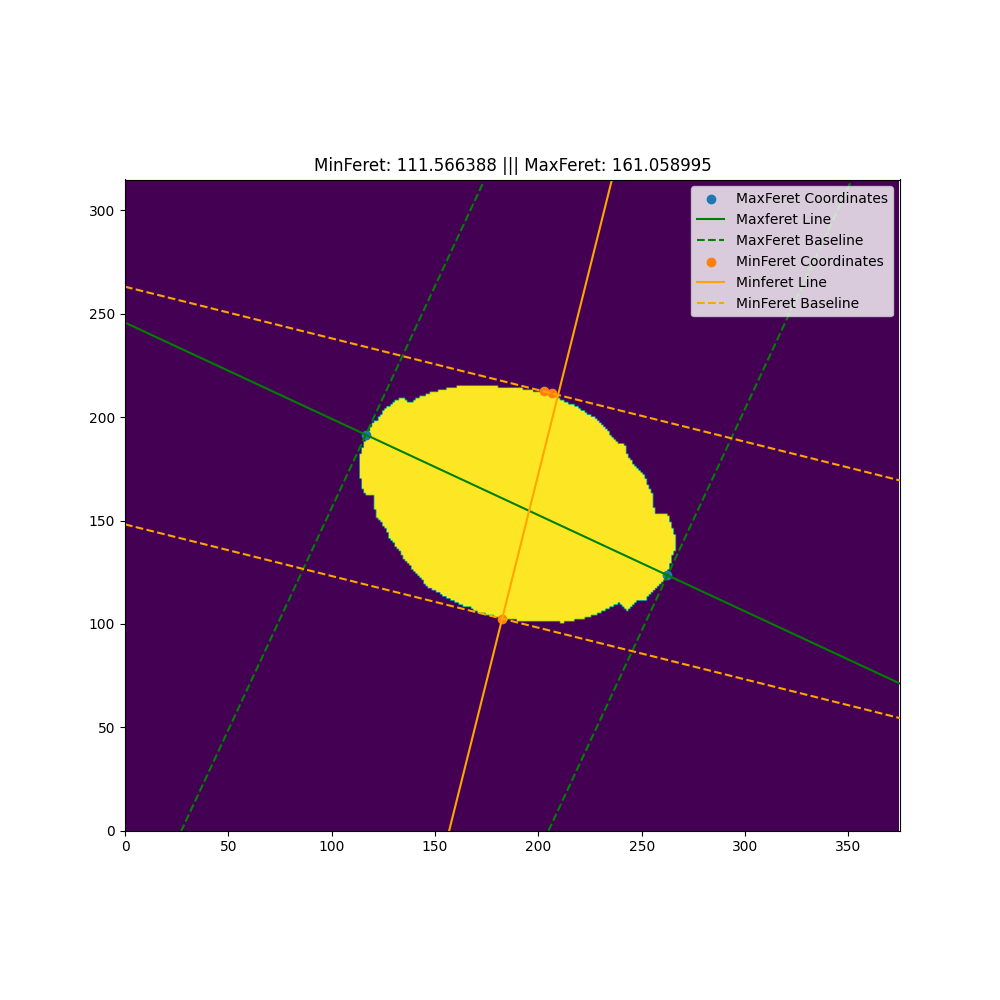
This python module can calculate the following parameters for binary images:
- maximum Feret diameter (maxferet, maxf)
- minimum Feret diameter (minferet, minf)
- Feret diameter 90 ° to the minferet (minferet90, minf90)
- Feret diameter 90 ° to maxferet (maxferet90, maxf90)
See this Wikipedia page to get the definition of those parameters.
This module reproduces ImageJ's results exactly (use edge=True as shown below), all the parameters are exactly calculated and not approximated.
Installation
pip install feret
Requires Python 3.8 or newer. The following runtime dependencies are pulled
in automatically: numpy, scipy, opencv-python, matplotlib. The package
works on both NumPy 1.x and NumPy 2.x.
Development install
git clone https://github.com/matthiasnwt/feret
cd feret
python -m venv .venv
.venv\Scripts\activate            # Windows PowerShell / cmd
# or: source .venv/bin/activate    # Linux / macOS
pip install -e ".[dev]"
pytest
pre-commit install
pip install -e ".[dev]" adds pytest, ruff, mypy, pre-commit,
tifffile and build. Run the full test matrix with pytest, lint with
ruff check src tests and ruff format --check src tests, and type-check
with mypy.
Pieces of Information
Convex Hull
The definition of the maxferet and minferet uses the image of a caliper. Therefore, only the points which correspond to the convex hull of the object play a role. That is why before any calculations the convex hull is determined to reduce the runtime.
Maxferet
The maxferet is calculated as the maximum Euclidean distance of all pixels.
Minferet
The minferet is exactly calculated and not approximated. My algorithm uses the fact, that the calipers that define the minferet run on one side through two points and on the other through one point. The script iterates over all edge points and defines a line through the point and the one next to it. Then all the distances to the other points are calculated and the maximum is taken. The minimum of all those maximums is the minferet. The maximum of all those maximums is not the maxferet, that is the reason it is calculated separately. The runtime of this is already pretty good but hopefully I can improve it in the future.
Use
The module can be used as followed:
First you need a binary image for which the feret diameter should be calculated. The background has to have the value zero, the object can have any nonzero value. The object doesn't have to be convex. At the moment the module only supports one object per image. This means, that if there are multiple not connected regions, the script will calculate a convexhull which include all regions and for this hull the feret diameter is calculated.
The calls are:
import feret

# tifffile is not required nor included in this module.
import tifffile as tif
img = tif.imread('example.tif') # Image has to be a numpy 2d-array.


# get the values
maxf, minf, minf90, maxf90 = feret.all(img)

# get only maxferet
maxf = feret.max(img)

# get only minferet
minf = feret.min(img)

# get only minferet90
minf90 = feret.min90(img)

# get only maxferet90
maxf90 = feret.max90(img)

# get all the informations
res = feret.calc(img)
maxf = res.maxf
minf =  res.minf
minf90 = res.minf90
minf_angle = res.minf_angle
minf90_angle = res.minf90_angle
maxf_angle = res.maxf_angle
maxf90_angle = res.maxf90_angle
There is an option to calculate the Feret diameters for the pixel edges instead of the centers. Just add an edge=True in the call as shown below. This works for all calls analogous.
import feret

# tifffile is not required nor included in this module.
import tifffile as tif
img = tif.imread('example.tif') # Image has to be a numpy 2d-array.

# get only maxferet
maxf = feret.max(img, edge=True)
This module can also plot the result. Just use
import feret

# tifffile is not required nor included in this module.
import tifffile as tif
img = tif.imread('example.tif') # Image has to be a numpy 2d-array.

# plot the result
feret.plot(img) #edge=True can be passed here too
The reason for the two MinFeret points on the left is described above. The MinFeret line does not have to run in between its two base points or through one of them. MaxFeret and MinFeret do not have to be 90° to each other. To calculate the 90° to MaxFeret and MinFeret use feret.max90(img) and feret.min90(img) methods.
1 maintainer

Download files
Download the file for your platform. If you're not sure which to choose, learn more about installing packages.
Source Distribution
Built Distribution
Filter files by name, interpreter, ABI, and platform.
If you're not sure about the file name format, learn more about wheel file names.
Copy a direct link to the current filters
File details
Details for the file feret-1.4.3.tar.gz.
File metadata
- Download URL: feret-1.4.3.tar.gz
- Upload date:
- Size: 112.0 kB
- Tags: Source
- Uploaded using Trusted Publishing? No
- Uploaded via:
twine/7.0.0 CPython/3.12.4
File hashes
| Algorithm | Hash digest | |
|---|---|---|
| SHA256 |
88c9e09a81eca93d134453adfb26af163c13a8ac5010235e9d98c96561bc87bc
|
|
| MD5 |
166640ecfa9d2f175263f84d39bd80d1
|
|
| BLAKE2b-256 |
79199fdf8100357fa56b6a4a242586c5acc5121d70eab772e24dd632e6547da7
|
File details
Details for the file feret-1.4.3-py3-none-any.whl.
File metadata
- Download URL: feret-1.4.3-py3-none-any.whl
- Upload date:
- Size: 14.6 kB
- Tags: Python 3
- Uploaded using Trusted Publishing? No
- Uploaded via:
twine/7.0.0 CPython/3.12.4
File hashes
| Algorithm | Hash digest | |
|---|---|---|
| SHA256 |
8a2b442190e78ff62b2a61d3e7fccc7711d7baef4e7f3f9b192c02a9eaad618c
|
|
| MD5 |
7a65f4e6b15fcfca262014c20464ad93
|
|
| BLAKE2b-256 |
e2d13da267659618022263776d049c0df1d080f7a225e61c76aa23fac2c473b7
|







