
Fernz
Fernz is a clean-room, pure Python reimplementation of Jericho and its underlying Frotz Z-machine engine, with a familiar Python API for playing and exploring interactive fiction. Here, clean-room means implementing the engine using only open specifications and documented public APIs, then testing its behavior against the original interpreters without inspecting their code (i.e., black-box behavioral comparisons).
It is also an experiment in agentic coding to see how far Astra could get with a public specification and a black-box reference implementation.
It was built to enable cross-platform play and redistribution in Cabin Fever x86 and to make Z-machine games easy to embed, test, and experiment with from Python. Fernz is MIT licensed and runs on Linux, macOS, and Windows.
It currently plays V3, V4, V5, and V8 stories and inspects V1–V8 files. The API covers gameplay, checkpoints, score/move queries, and object inspection; some Jericho methods and Z-machine features remain unimplemented.
Install
Requires Python 3.11+. Include the optional Textual terminal interface:
python -m pip install "fernz[textual]"
Use pip install fernz for the dependency-free library and simple terminal player.
Get a game and play
Bring a raw Z-machine story file, or download Zork I from the BYU-PCCL game collection with Python:
from urllib.request import urlretrieve

url = "https://raw.githubusercontent.com/BYU-PCCL/z-machine-games/master/jericho-game-suite/zork1.z5"
urlretrieve(url, "zork1.z5")
Games are distributed separately and retain their own copyrights and licenses.
This Zork I file contains a V3 story despite its .z5 extension.
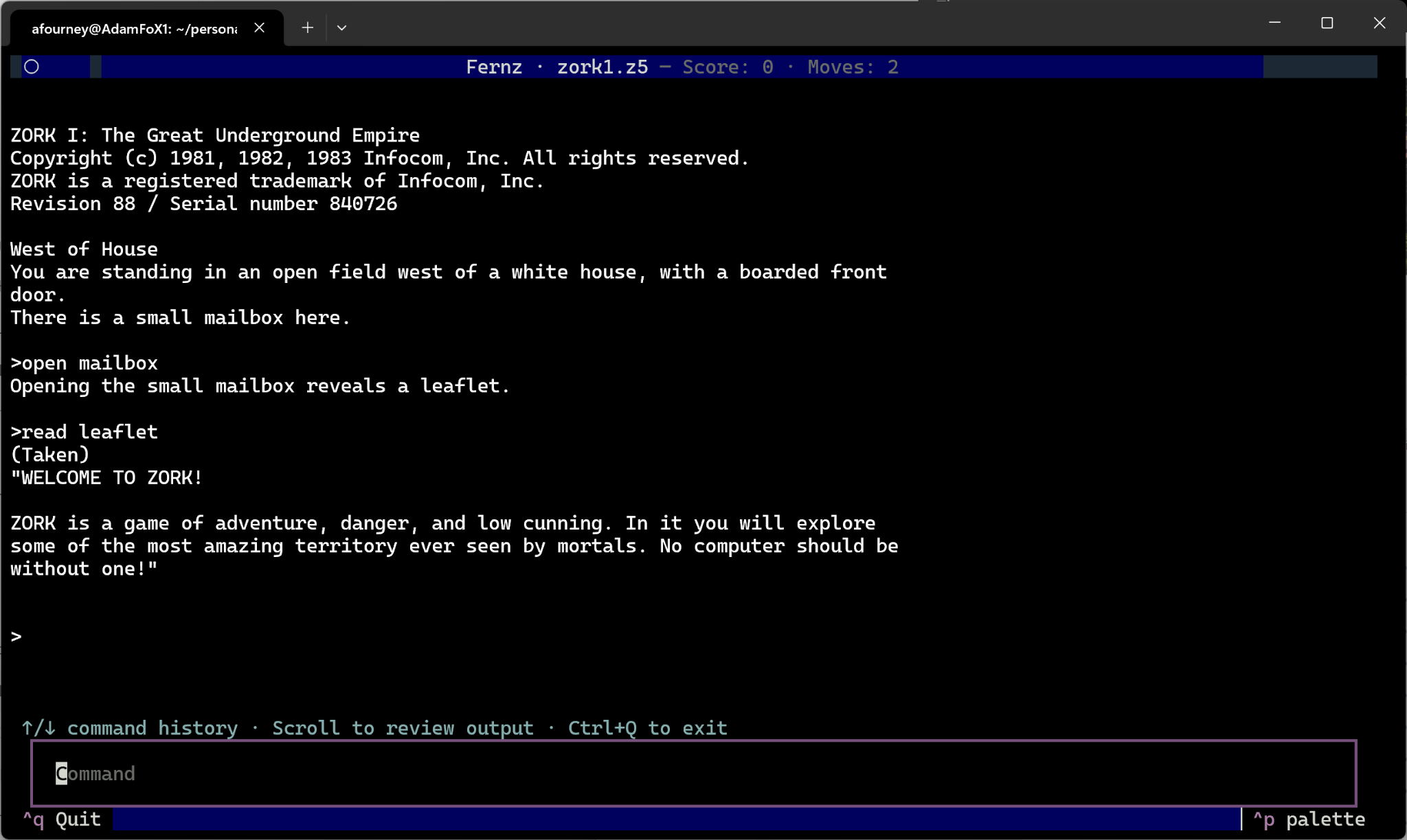
fernz zork1.z5
Try look, open mailbox, and read leaflet. Press Ctrl+Q to exit.
Textual is selected automatically when installed; --simple selects plain text.
The game's save and restore commands open file dialogs.
Use the API
from fernz import FernzEnv

env = FernzEnv("zork1.z5", seed=42)
try:
    observation, info = env.reset()
    print(observation.text, end="")
    for command in ("open mailbox", "take leaflet", "read leaflet"):
        observation, reward, done, info = env.step(command)
        print(observation.text, end="")
        if done:
            break
    checkpoint = env.get_state()
    env.step("look")
    env.set_state(checkpoint)
finally:
    env.close()
Observations provide plain .text and an ordered .stream with display tags.
reward is the score change, info includes score and moves for supported games,
and done means the interpreter has quit. Checkpoints include RNG state for
reproducible replay; env.copy() forks an environment for independent exploration.
Further reading
Detailed guide · Terminal controls · API and project overview · Testing
Specifications: Z-machine Standard 1.1, annotated edition, Quetzal save format, and Jericho's public API.
1 maintainer

Metadata
1 maintainer
Release files for fernz 0.0.1
For a detailed explanation of source distributions (sdists) and built distributions (wheels), please see the package formats documentation.
Source distribution (sdist)
| File | Size | Uploaded | |
|---|---|---|---|
| fernz-0.0.1.tar.gz | 56.6 kB | Details |
Built distribution (wheel)
| File | Interpreter | ABI | Platform | Reset |
|---|---|---|---|---|
| fernz-0.0.1-py3-none-any.whl | Python 3 | none | any | Details |
Total release size: 121.5 kB
Release files / fernz-0.0.1.tar.gz
| Download URL | fernz-0.0.1.tar.gz |
|---|---|
| Size | 56.6 kB |
| Tags | Source |
|
SHA-256 checksum How to use checksums |
7875d8d825bc1878f99eabfe8ffedda482b49261537304d7be451bd16d627d25
|
|
BLAKE2b-256 checksum How to use checksums |
c5f9dd492e583d278946621a19c3f1eeb9b7334db19b8254192eb2df0ff83a23
|
| Upload date | |
|
Uploaded using Trusted Publishing? What is trusted publishing? |
No |
| Uploaded via |
twine/7.0.0 CPython/3.14.3
|
Release files / fernz-0.0.1-py3-none-any.whl
| Download URL | fernz-0.0.1-py3-none-any.whl |
|---|---|
| Size | 64.8 kB |
| Tags | Python 3 |
|
SHA-256 checksum How to use checksums |
4c186bc34b424c57a8313c014b1d89cc46ccd4589ebeea22dc1773bf03cb788a
|
|
BLAKE2b-256 checksum How to use checksums |
80566d5fcf50a9c6cf006d2e9dd4742dcd307542a7134a483556fb5d3a188cf8
|
| Upload date | |
|
Uploaded using Trusted Publishing? What is trusted publishing? |
No |
| Uploaded via |
twine/7.0.0 CPython/3.14.3
|














