
MCP Atlassian




Model Context Protocol (MCP) server for Atlassian products (Confluence and Jira). This integration supports both Confluence & Jira Cloud and Server/Data Center deployments.
Feature Demo

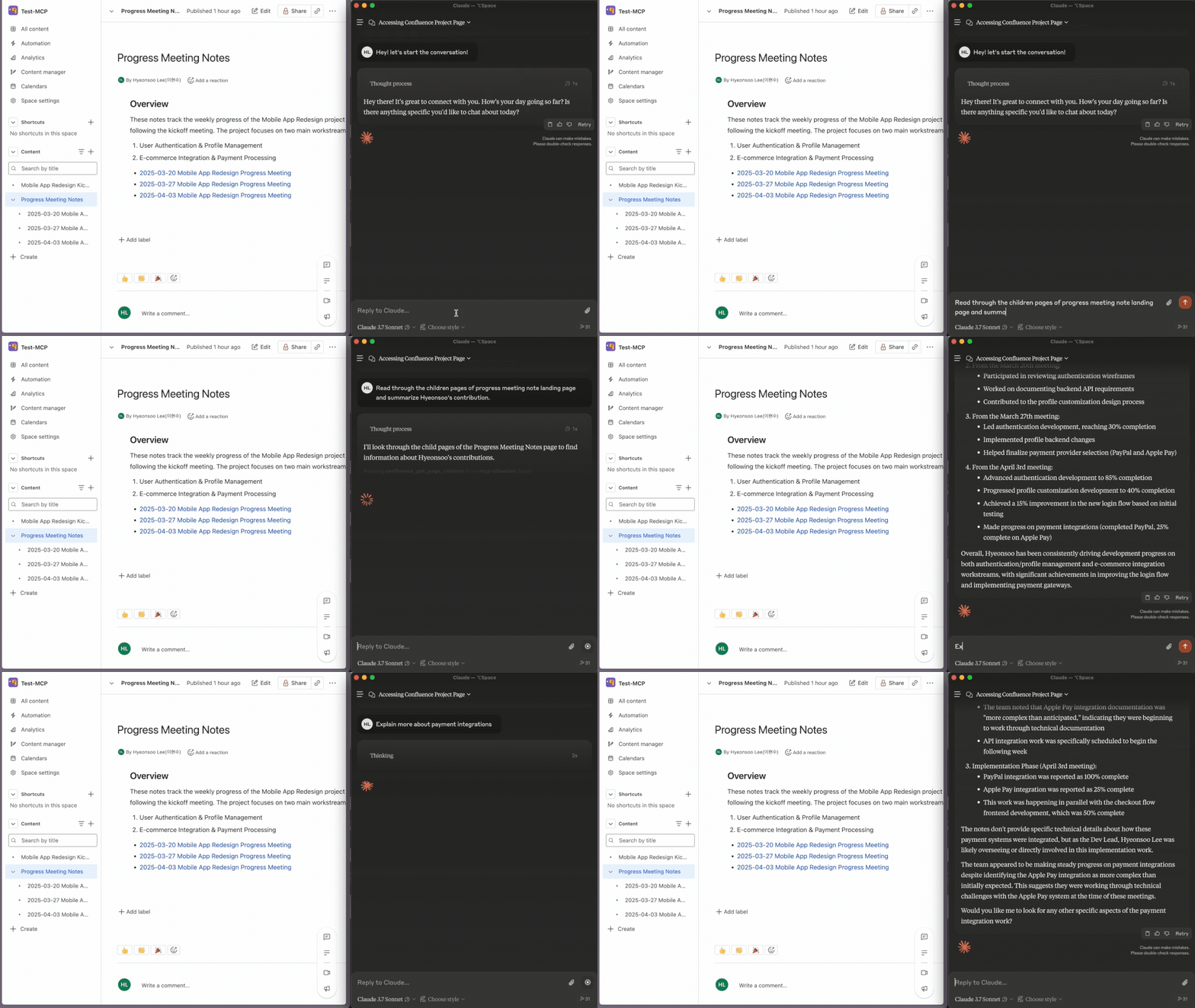
Confluence Demo
Compatibility
| Product | Deployment Type | Support Status |
|---|---|---|
| Confluence | Cloud | ✅ Fully supported |
| Confluence | Server/Data Center | ✅ Supported (version 7.9+) |
| Jira | Cloud | ✅ Fully supported |
| Jira | Server/Data Center | ✅ Supported (version 8.14+) |
Setup Guide
1. Authentication Setup
First, generate the necessary authentication tokens for Confluence & Jira:
For Cloud
- Go to https://id.atlassian.com/manage-profile/security/api-tokens
- Click Create API token, name it
- Copy the token immediately
For Server/Data Center
- Go to your profile (avatar) → Profile → Personal Access Tokens
- Click Create token, name it, set expiry
- Copy the token immediately
2. Installation
Choose one of these installation methods:
# Using uv (recommended)
brew install uv
uvx mcp-atlassian

# Using pip
pip install mcp-atlassian

# Using Docker
git clone https://github.com/sooperset/mcp-atlassian.git
cd mcp-atlassian
docker build -t mcp/atlassian .
3. Configuration and Usage
You can configure the MCP server using command line arguments. The server supports using either Confluence, Jira, or both services - include only the arguments needed for your use case.
Required Arguments
For Cloud:
uvx mcp-atlassian \
  --confluence-url https://your-company.atlassian.net/wiki \
  --confluence-username your.email@company.com \
  --confluence-token your_api_token \
  --jira-url https://your-company.atlassian.net \
  --jira-username your.email@company.com \
  --jira-token your_api_token
For Server/Data Center:
uvx mcp-atlassian \
  --confluence-url https://confluence.your-company.com \
  --confluence-personal-token your_token \
  --jira-url https://jira.your-company.com \
  --jira-personal-token your_token
Note: You can configure just Confluence, just Jira, or both services. Simply include only the arguments for the service(s) you want to use. For example, to use only Confluence Cloud, you would only need
--confluence-url,--confluence-username, and--confluence-token.
Optional Arguments
--transport: Choose transport type (stdio[default] orsse)--port: Port number for SSE transport (default: 8000)--[no-]confluence-ssl-verify: Toggle SSL verification for Confluence Server/DC--[no-]jira-ssl-verify: Toggle SSL verification for Jira Server/DC--confluence-spaces-filter: Comma-separated list of space keys to filter Confluence search results (e.g., "DEV,TEAM,DOC")--jira-projects-filter: Comma-separated list of project keys to filter Jira search results (e.g., "PROJ,DEV,SUPPORT")--read-only: Run in read-only mode (disables all write operations)--verbose: Increase logging verbosity (can be used multiple times, default is WARNING level)-vor--verbose: Set logging to INFO level-vvor--verbose --verbose: Set logging to DEBUG level
Note: All configuration options can also be set via environment variables. See the
.env.examplefile in the repository for the full list of available environment variables.
IDE Integration
Claude Desktop Setup
Using uvx (recommended) - Cloud:
{
  "mcpServers": {
    "mcp-atlassian": {
      "command": "uvx",
      "args": [
        "mcp-atlassian",
        "--confluence-url=https://your-company.atlassian.net/wiki",
        "--confluence-username=your.email@company.com",
        "--confluence-token=your_api_token",
        "--jira-url=https://your-company.atlassian.net",
        "--jira-username=your.email@company.com",
        "--jira-token=your_api_token"
      ]
    }
  }
}
Using uvx (recommended) - Server/Data Center
{
  "mcpServers": {
    "mcp-atlassian": {
      "command": "uvx",
      "args": [
        "mcp-atlassian",
        "--confluence-url=https://confluence.your-company.com",
        "--confluence-personal-token=your_token",
        "--jira-url=https://jira.your-company.com",
        "--jira-personal-token=your_token"
      ]
    }
  }
}
Using pip
Note: Examples below use Cloud configuration. For Server/Data Center, use the corresponding arguments (--confluence-personal-token, --jira-personal-token) as shown in the Configuration section above.
{
  "mcpServers": {
    "mcp-atlassian": {
      "command": "python",
      "args": [
        "-m",
        "mcp-atlassian",
        "--confluence-url=https://your-company.atlassian.net/wiki",
        "--confluence-username=your.email@company.com",
        "--confluence-token=your_api_token",
        "--jira-url=https://your-company.atlassian.net",
        "--jira-username=your.email@company.com",
        "--jira-token=your_api_token"
      ]
    }
  }
}
Using docker
Note: Examples below use Cloud configuration. For Server/Data Center, use the corresponding arguments (--confluence-personal-token, --jira-personal-token) as shown in the Configuration section above.
There are two ways to configure the Docker environment:
- Using cli arguments directly in the config:
{
  "mcpServers": {
    "mcp-atlassian": {
      "command": "docker",
      "args": [
        "run",
        "--rm",
        "-i",
        "mcp/atlassian",
        "--confluence-url=https://your-company.atlassian.net/wiki",
        "--confluence-username=your.email@company.com",
        "--confluence-token=your_api_token",
        "--jira-url=https://your-company.atlassian.net",
        "--jira-username=your.email@company.com",
        "--jira-token=your_api_token"
      ]
    }
  }
}
- Using an environment file:
{
  "mcpServers": {
    "mcp-atlassian": {
      "command": "docker",
      "args": [
        "run",
        "--rm",
        "-i",
        "--env-file",
        "/path/to/your/.env",
        "mcp/atlassian"
      ]
    }
  }
}
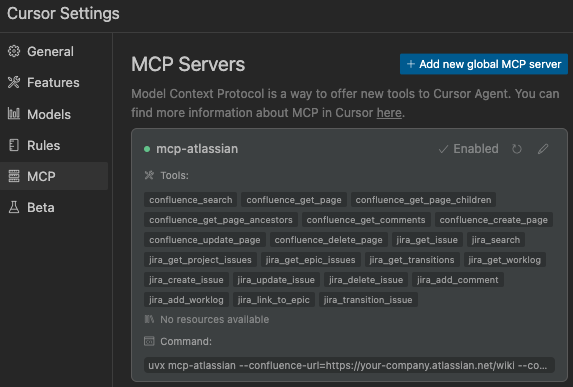
Cursor IDE Setup
- Open Cursor Settings
- Navigate to
Features>MCP Servers(or directly toMCP) - Click
+ Add new global MCP server
This will create or edit the ~/.cursor/mcp.json file with your MCP server configuration.
JSON Configuration for stdio Transport
For Cloud:
{
  "mcpServers": {
    "mcp-atlassian": {
      "command": "uvx",
      "args": [
        "mcp-atlassian",
        "--confluence-url=https://your-company.atlassian.net/wiki",
        "--confluence-username=your.email@company.com",
        "--confluence-token=your_api_token",
        "--jira-url=https://your-company.atlassian.net",
        "--jira-username=your.email@company.com",
        "--jira-token=your_api_token"
      ]
    }
  }
}
Server/Data Center Configuration
{
  "mcpServers": {
    "mcp-atlassian": {
      "command": "uvx",
      "args": [
        "mcp-atlassian",
        "--confluence-url=https://confluence.your-company.com",
        "--confluence-personal-token=your_token",
        "--jira-url=https://jira.your-company.com",
        "--jira-personal-token=your_token"
      ]
    }
  }
}
SSE Transport Configuration
For SSE transport, first start the server:
uvx mcp-atlassian --transport sse --port 9000
Then configure in Cursor:
{
  "mcpServers": {
    "mcp-atlassian-sse": {
      "url": "http://localhost:9000/sse",
      "env": {
        "CONFLUENCE_URL": "https://your-company.atlassian.net/wiki",
        "CONFLUENCE_USERNAME": "your.email@company.com",
        "CONFLUENCE_API_TOKEN": "your_api_token",
        "JIRA_URL": "https://your-company.atlassian.net",
        "JIRA_USERNAME": "your.email@company.com",
        "JIRA_API_TOKEN": "your_api_token"
      }
    }
  }
}
Resources
Note: The MCP server filters resources to only show Confluence spaces and Jira projects that the user is actively interacting with, based on their contributions and assignments.
confluence://{space_key}: Access Confluence spacesjira://{project_key}: Access Jira projects
Available Tools
| Tool | Description |
|---|---|
confluence_search |
Search Confluence content using CQL |
confluence_get_page |
Get content of a specific Confluence page |
confluence_get_page_children |
Get child pages of a specific Confluence page |
confluence_get_page_ancestors |
Get parent pages of a specific Confluence page |
confluence_get_comments |
Get comments for a specific Confluence page |
confluence_create_page |
Create a new Confluence page |
confluence_update_page |
Update an existing Confluence page |
confluence_delete_page |
Delete an existing Confluence page |
jira_get_issue |
Get details of a specific Jira issue |
jira_search |
Search Jira issues using JQL |
jira_get_project_issues |
Get all issues for a specific Jira project |
jira_create_issue |
Create a new issue in Jira |
jira_update_issue |
Update an existing Jira issue |
jira_delete_issue |
Delete an existing Jira issue |
jira_get_transitions |
Get available status transitions for a Jira issue |
jira_transition_issue |
Transition a Jira issue to a new status |
jira_add_worklog |
Add a worklog entry to a Jira issue |
jira_get_worklog |
Get worklog entries for a Jira issue |
jira_link_to_epic |
Link an issue to an Epic |
jira_get_epic_issues |
Get all issues linked to a specific Epic |
Development & Debugging
Local Development Setup
If you've cloned the repository and want to run a local version:
For Cloud:
{
  "mcpServers": {
    "mcp-atlassian": {
      "command": "uv",
      "args": [
        "--directory", "/path/to/your/mcp-atlassian",
        "run", "mcp-atlassian",
        "--confluence-url=https://your-domain.atlassian.net/wiki",
        "--confluence-username=your.email@domain.com",
        "--confluence-token=your_api_token",
        "--jira-url=https://your-domain.atlassian.net",
        "--jira-username=your.email@domain.com",
        "--jira-token=your_api_token"
      ]
    }
  }
}
Debugging Tools
# Using MCP Inspector
# For installed package
npx @modelcontextprotocol/inspector uvx mcp-atlassian ...

# For local development version
npx @modelcontextprotocol/inspector uv --directory /path/to/your/mcp-atlassian run mcp-atlassian ...

# View logs
tail -n 20 -f ~/Library/Logs/Claude/mcp*.log
Security
- Never share API tokens
- Keep .env files secure and private
- See SECURITY.md for best practices
License
Licensed under MIT - see LICENSE file. This is not an official Atlassian product.
1 maintainer

Metadata
1 maintainer
Release files for ff-mcp-atlassian 0.4.0
For a detailed explanation of source distributions (sdists) and built distributions (wheels), please see the package formats documentation.
Source distribution (sdist)
| File | Size | Uploaded | |
|---|---|---|---|
| ff_mcp_atlassian-0.4.0.tar.gz | 211.9 kB | Details |
Built distribution (wheel)
| File | Interpreter | ABI | Platform | Reset |
|---|---|---|---|---|
| ff_mcp_atlassian-0.4.0-py3-none-any.whl | Python 3 | none | any | Details |
Total release size: 313.0 kB
Release files / ff_mcp_atlassian-0.4.0.tar.gz
| Download URL | ff_mcp_atlassian-0.4.0.tar.gz |
|---|---|
| Size | 211.9 kB |
| Tags | Source |
|
SHA-256 checksum How to use checksums |
0f4ca23dacbd230928006723a42bfe01c8a97c7c8a7ca7b6f75b2dbaac1aaae6
|
|
BLAKE2b-256 checksum How to use checksums |
73eb49851af70db63e73f0e43185edb00f65ba684753d5d1acfe6b9a35a4d739
|
| Upload date | |
|
Uploaded using Trusted Publishing? What is trusted publishing? |
Yes |
| Uploaded via |
twine/6.1.0 CPython/3.12.9
|
Provenance
Provenance describes where a file came from. On PyPI, provenance is shared via attestations, which provide a verifiable record of the build or publishing details. View details, limitations and caveats.


PyPI Publish Attestation
PyPI verified that this artifact, at this checksum, originated from the publisher listed below.
Signed by GitHub Actions, verified by PyPI on Mar 28, 2025.
Transparency logRelease files / ff_mcp_atlassian-0.4.0-py3-none-any.whl
| Download URL | ff_mcp_atlassian-0.4.0-py3-none-any.whl |
|---|---|
| Size | 101.1 kB |
| Tags | Python 3 |
|
SHA-256 checksum How to use checksums |
488edd366327d30a3792688d77a7b88026e3badd9602078b5a4a2228f9dd615d
|
|
BLAKE2b-256 checksum How to use checksums |
b43fea6eb357204e9898da29b84bf7b38499e4d1a13607b349202b2c138b0cf7
|
| Upload date | |
|
Uploaded using Trusted Publishing? What is trusted publishing? |
Yes |
| Uploaded via |
twine/6.1.0 CPython/3.12.9
|
Provenance
Provenance describes where a file came from. On PyPI, provenance is shared via attestations, which provide a verifiable record of the build or publishing details. View details, limitations and caveats.
PyPI Publish Attestation
PyPI verified that this artifact, at this checksum, originated from the publisher listed below.
Signed by GitHub Actions, verified by PyPI on Mar 28, 2025.
Transparency log












