
Turn Markdown and Jupyter Notebooks into dynamic FastHTML posts with smart YAML parsing and live Python execution.

Project description
fh_posts
fh_posts is a Python package that transforms your Markdown and Jupyter Notebook blog posts into dynamic FastHTML content. It extracts YAML front matter using fastcore’s AttrDict for seamless metadata access and executes custom-tagged Python code blocks to render interactive posts.
Features
- YAML Front Matter Parsing: Automatically extracts front matter (e.g., title, summary, date, tags) and makes it accessible via both dictionary and attribute notation.
- Multi-Format Support: Process both Markdown (.md) and Jupyter Notebook (.ipynb) files.
- Dynamic Code Execution: Custom code block tags let you decide whether to run code, hide code, or show output live.
- FastHTML Integration: Render posts to FastHTML’s NotStr objects for lightning-fast blog content.
- Link Handling: Optionally set all links to open in a new window when rendering.
Installation
Install the package via pip:
pip install fh-posts
Usage
Learn more about the package in the documentation.
You can import the package in two ways:
# Option 1: Import everything
from fh_posts.all import *

# Option 2: Import only the core functionality
from fh_posts.core import Post, load_posts
Tags
In a markdown file when you add a code block with triple backticks and python, append additional colon seperated tags to control how the code is run and rendered. All run code blocks will be executed in order and be in the namespace for the rest of the post. This should feel familiar to those who have used jupyter notebooks.
python(default) - output the code but don’t run itpython:run- run and show the code and the outputpython:run:hide- run the code but don’t show the code or outputpython:run:hide-in- run the code but don’t show the code block, only the outputpython:run:hide-out- run the code and show the output but don’t show the code blockpython:run:hide-call- run the code and show the output and the code block but don’t show the call to the function (last line of code)
In a notebook file all code cells are run by default. Add a #|python
tag to the first line of any code cell to also have it appear as a code
block in the post. All of the other tags for markdown posts apply to
notebook posts as well. Having to add run each time is redundant since
all cells are run but it keeps things consistent between markdown and
notebook posts.
Example: Markdown Posts
Markdown File (hello.md):
---
title: Hello FastHTML and MonsterUI
summary: An introduction to FastHTML and MonsterUI.
date: February 25, 2025
tags:
  - python
  - fasthtml
  - monsterui
---

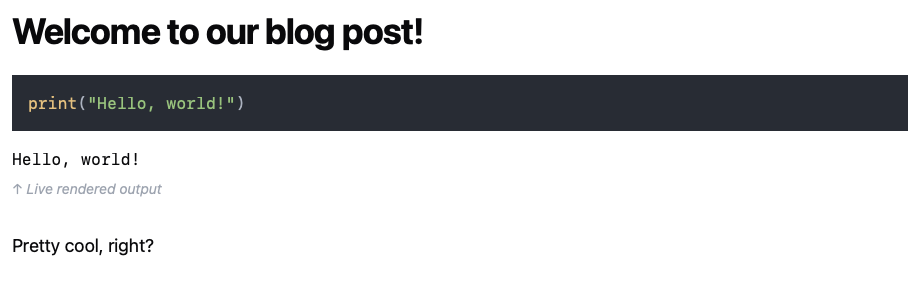
Welcome to our blog post!

```python:run
print("Hello, world!")
```
Loading & Rendering:
from pathlib import Path
from fh_posts.core import load_posts

# Load posts from the 'posts' directory
posts = load_posts(Path('posts'))

# Access metadata
for post in posts:
    print(post.title, post.date)

# Render a post by its slug
post = next(p for p in posts if p.slug == 'hello')
html_output = post.render(open_links_new_window=True)
print(html_output)
Example: Jupyter Notebook Posts
Notebook File (notebook_post.ipynb):
- Cell 1 (Raw Cell with YAML Front Matter):
---
title: Notebook Post Example
summary: A demonstration of a notebook-based blog post.
date: March 1, 2025
tags:
  - jupyter
  - python
---
Code Cell Example:
#|python:run:hide-in
print("Notebook live output")
Contributing
Contributions are welcome! Please open an issue or submit a pull request to help improve fh_posts.
Release history Release notifications | RSS feed


Download files
Download the file for your platform. If you're not sure which to choose, learn more about installing packages.
Source Distribution
Built Distribution
Filter files by name, interpreter, ABI, and platform.
If you're not sure about the file name format, learn more about wheel file names.
Copy a direct link to the current filters
File details
Details for the file fh_posts-0.0.3.tar.gz.
File metadata
- Download URL: fh_posts-0.0.3.tar.gz
- Upload date:
- Size: 15.8 kB
- Tags: Source
- Uploaded using Trusted Publishing? No
- Uploaded via: twine/6.1.0 CPython/3.12.8
File hashes
| Algorithm | Hash digest | |
|---|---|---|
| SHA256 |
9bb7bcd33a772cd83540dc030e41305a2f6965b7e4bffa06f3213d6e9fe981d6
|
|
| MD5 |
b1c5c25b1d8f3dfff6dba40f600e17eb
|
|
| BLAKE2b-256 |
b7c9b273953059ffc0fb95583d791b44395e63c46b06001c154202a998fb5efa
|
File details
Details for the file fh_posts-0.0.3-py3-none-any.whl.
File metadata
- Download URL: fh_posts-0.0.3-py3-none-any.whl
- Upload date:
- Size: 13.2 kB
- Tags: Python 3
- Uploaded using Trusted Publishing? No
- Uploaded via: twine/6.1.0 CPython/3.12.8
File hashes
| Algorithm | Hash digest | |
|---|---|---|
| SHA256 |
1b4451b563795b99fb33001ce5bc2c291b19898183c9f31fb72e39518c7b97c3
|
|
| MD5 |
094c767920cb722ee80eefa81c7c885e
|
|
| BLAKE2b-256 |
97b8fae7567d44c1e0933409501b4fdc191e8fe775e6e0a857d165f5a4f0ccac
|






