
a library to turn any pydantic BaseModel object into a fasthtml/monsterui input form
Verified details
These details have been verified by PyPIProject links
GitHub Statistics
Maintainers

Project description
fh-pydantic-form


Generate HTML forms from Pydantic models for your FastHTML applications.
fh-pydantic-form simplifies creating web forms for FastHTML by automatically generating the necessary HTML input elements based on your Pydantic model definitions. It integrates seamlessly with and leverages MonsterUI components for styling.
show demo screen recording
Table of Contents
- Purpose
- Installation
- Quick Start
- Key Features
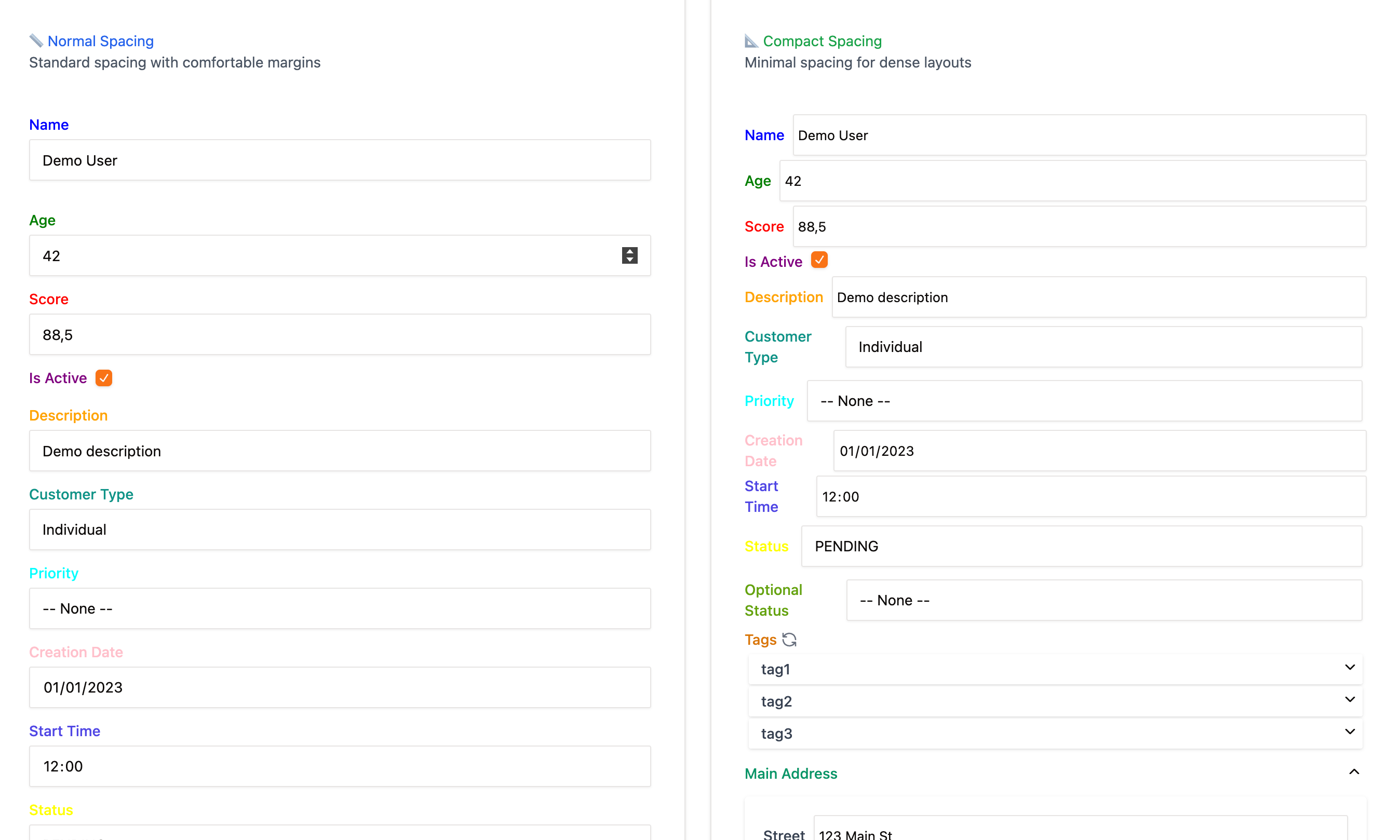
- Spacing & Styling
- Working with Lists
- Nested Models
- Literal & Enum Fields
- Initial Values & Enum Parsing
- Disabling & Excluding Fields
- Refreshing & Resetting
- Label Colors
- Schema Drift Resilience
- Custom Renderers
- API Reference
- Contributing
Purpose
- Reduce Boilerplate: Automatically render form inputs (text, number, checkbox, select, date, time, etc.) based on Pydantic field types and annotations.
- Data Validation: Leverage Pydantic's validation rules directly from form submissions.
- Nested Structures: Support for nested Pydantic models and lists of models/simple types with accordion UI.
- Dynamic Lists: Built-in HTMX endpoints and JavaScript for adding, deleting, and reordering items in lists within the form.
- Customization: Easily register custom renderers for specific Pydantic types or fields.
- Robust Schema Handling: Gracefully handles model changes and missing fields in initial data.
Installation
You can install fh-pydantic-form using either pip or uv.
Using pip:
pip install fh-pydantic-form
Using uv:
uv add fh-pydantic-form
This will also install necessary dependencies like pydantic, python-fasthtml, and monsterui.
Quick Start
# examples/simple_example.py
import fasthtml.common as fh
import monsterui.all as mui
from pydantic import BaseModel, ValidationError

# 1. Import the form renderer
from fh_pydantic_form import PydanticForm

app, rt = fh.fast_app(
    hdrs=[
        mui.Theme.blue.headers(),
        # Add list_manipulation_js() if using list fields
        # from fh_pydantic_form import list_manipulation_js
        # list_manipulation_js(),
    ],
    pico=False, # Using MonsterUI, not PicoCSS
    live=True,  # Enable live reload for development
)

# 2. Define your Pydantic model
class SimpleModel(BaseModel):
    """Model representing a simple form"""
    name: str = "Default Name"
    age: int
    is_active: bool = True

# 3. Create a form renderer instance
#    - 'my_form': Unique name for the form (used for prefixes and routes)
#    - SimpleModel: The Pydantic model class
form_renderer = PydanticForm("my_form", SimpleModel)

# (Optional) Register list manipulation routes if your model has List fields
# form_renderer.register_routes(app)

# 4. Define routes
@rt("/")
def get():
    """Display the form"""
    return fh.Div(
        mui.Container(
            mui.Card(
                mui.CardHeader("Simple Pydantic Form"),
                mui.CardBody(
                    # Use MonsterUI Form component for structure
                    mui.Form(
                        # Render the inputs using the renderer
                        form_renderer.render_inputs(),
                        # Add standard form buttons
                        fh.Div(
                            mui.Button("Submit", type="submit", cls=mui.ButtonT.primary),
                            form_renderer.refresh_button("🔄"),
                            form_renderer.reset_button("↩️"),
                            cls="mt-4 flex items-center gap-2",
                        ),
                        # HTMX attributes for form submission
                        hx_post="/submit_form",
                        hx_target="#result", # Target div for response
                        hx_swap="innerHTML",
                        # Set a unique ID for the form itself for refresh/reset inclusion
                        id=f"{form_renderer.name}-form",
                    )
                ),
            ),
            # Div to display validation results
            fh.Div(id="result"),
        ),
    )

@rt("/submit_form")
async def post_submit_form(req):
    """Handle form submission and validation"""
    try:
        # 5. Validate the request data against the model
        validated_data: SimpleModel = await form_renderer.model_validate_request(req)

        # Success: Display the validated data
        return mui.Card(
            mui.CardHeader(fh.H3("Validation Successful")),
            mui.CardBody(
                fh.Pre(
                    validated_data.model_dump_json(indent=2),
                )
            ),
            cls="mt-4",
        )
    except ValidationError as e:
        # Validation Error: Display the errors
        return mui.Card(
            mui.CardHeader(fh.H3("Validation Error", cls="text-red-500")),
            mui.CardBody(
                fh.Pre(
                    e.json(indent=2),
                )
            ),
            cls="mt-4",
        )

if __name__ == "__main__":
    fh.serve()
Key Features
- Automatic Field Rendering: Handles
str,int,float,bool,date,time,Optional,Literal, nestedBaseModels, andLists out-of-the-box. - Sensible Defaults: Uses appropriate HTML5 input types (
text,number,date,time,checkbox,select). - Labels & Placeholders: Generates labels from field names (converting snake_case to Title Case) and basic placeholders.
- Descriptions as Tooltips: Uses
Field(description=...)from Pydantic to create tooltips (uk-tooltipvia UIkit). - Required Fields: Automatically adds the
requiredattribute based on field definitions (consideringOptionaland defaults). - Disabled Fields: Disable the whole form with
disabled=Trueor disable specific fields withdisabled_fields - Collapsible Nested Models: Renders nested Pydantic models in accordion-style components for better form organization and space management.
- List Manipulation:
- Renders lists of simple types or models in accordion-style cards with an enhanced UI.
- Provides HTMX endpoints (registered via
register_routes) for adding and deleting list items. - Includes JavaScript (
list_manipulation_js()) for client-side reordering (moving items up/down). - Click list field labels to toggle all items open/closed.
- Form Refresh & Reset:
- Provides HTMX-powered "Refresh" and "Reset" buttons (
form_renderer.refresh_button(),form_renderer.reset_button()). - Refresh updates list item summaries or other dynamic parts without full page reload.
- Reset reverts the form to its initial values.
- Provides HTMX-powered "Refresh" and "Reset" buttons (
- Custom Renderers: Register your own
BaseFieldRenderersubclasses for specific Pydantic types or complex field logic usingFieldRendererRegistryor by passingcustom_renderersduringPydanticForminitialization. - Form Data Parsing: Includes logic (
form_renderer.parseandform_renderer.model_validate_request) to correctly parse submitted form data (handling prefixes, list indices, nested structures, boolean checkboxes, etc.) back into a dictionary suitable for Pydantic validation.
Spacing & Styling
fh-pydantic-form ships with two spacing presets to fit different UI requirements:
| Theme | Purpose | Usage |
|---|---|---|
| normal (default) | Comfortable margins & borders – great for desktop forms | PydanticForm(..., spacing="normal") |
| compact | Ultra-dense UIs, mobile layouts, or forms with many fields | PydanticForm(..., spacing="compact") |
# Example: side-by-side normal vs compact forms
form_normal = PydanticForm("normal_form", MyModel, spacing="normal")
form_compact = PydanticForm("compact_form", MyModel, spacing="compact")
Important: The compact CSS is now scoped with .fhpf-compact classes and only affects form inputs, not layout containers. This prevents conflicts with your application's layout system.
Working with Lists
When your Pydantic models contain List[str], List[int], or List[BaseModel] fields, fh-pydantic-form provides rich list manipulation capabilities:
Basic Setup
from fh_pydantic_form import PydanticForm, list_manipulation_js
from typing import List

app, rt = fh.fast_app(
    hdrs=[
        mui.Theme.blue.headers(),
        list_manipulation_js(),  # Required for list manipulation
    ],
    pico=False,
    live=True,
)

class ListModel(BaseModel):
    name: str = ""
    tags: List[str] = Field(["tag1", "tag2"])
    addresses: List[Address] = Field(default_factory=list)

form_renderer = PydanticForm("list_model", ListModel)
form_renderer.register_routes(app)  # Register HTMX endpoints
List Features
- Add Items: Each list has an "Add Item" button that creates new entries
- Delete Items: Each list item has a delete button with confirmation
- Reorder Items: Move items up/down with arrow buttons
- Toggle All: Click the list field label to expand/collapse all items at once
- Refresh Display: Use the 🔄 icon next to list labels to update item summaries
- Smart Defaults: New items are created with sensible default values
The list manipulation uses HTMX for seamless updates without page reloads, and includes JavaScript for client-side reordering.
Nested Models
Nested Pydantic models are automatically rendered in collapsible accordion components:
class Address(BaseModel):
    street: str = "123 Main St"
    city: str = "Anytown"
    is_billing: bool = False

class User(BaseModel):
    name: str
    address: Address  # Rendered as collapsible accordion
    backup_addresses: List[Address]  # List of accordions
Key behaviors:
- Nested models inherit
disabledandspacingsettings from the parent form - Field prefixes are automatically managed (e.g.,
user_address_street) - Accordions are open by default for better user experience
- Schema drift is handled gracefully - missing fields use defaults, unknown fields are ignored
Literal & Enum Fields
fh-pydantic-form provides comprehensive support for choice-based fields through Literal, Enum, and IntEnum types, all automatically rendered as dropdown selects:
Literal Fields
from typing import Literal, Optional

class OrderModel(BaseModel):
    # Required Literal field - only defined choices available
    shipping_method: Literal["STANDARD", "EXPRESS", "OVERNIGHT"] = "STANDARD"

    # Optional Literal field - includes "-- None --" option
    category: Optional[Literal["ELECTRONICS", "CLOTHING", "BOOKS", "OTHER"]] = None
Enum Fields
from enum import Enum, IntEnum

class OrderStatus(Enum):
    """Order status enum with string values."""
    PENDING = "pending"
    CONFIRMED = "confirmed"
    SHIPPED = "shipped"
    DELIVERED = "delivered"
    CANCELLED = "cancelled"

class Priority(IntEnum):
    """Priority levels using IntEnum for numeric ordering."""
    LOW = 1
    MEDIUM = 2
    HIGH = 3
    URGENT = 4

class OrderModel(BaseModel):
    # Required Enum field with default
    status: OrderStatus = OrderStatus.PENDING

    # Optional Enum field without default
    payment_method: Optional[PaymentMethod] = None

    # Required IntEnum field with default
    priority: Priority = Priority.MEDIUM

    # Optional IntEnum field without default
    urgency_level: Optional[Priority] = Field(
        None, description="Override priority for urgent orders"
    )

    # Enum field without default (required)
    fulfillment_status: OrderStatus = Field(
        ..., description="Current fulfillment status"
    )
Field Rendering Behavior
| Field Type | Required | Optional | Notes |
|---|---|---|---|
| Literal | Shows only defined choices | Includes "-- None --" option | String values displayed as-is |
| Enum | Shows enum member values | Includes "-- None --" option | Displays enum.value in dropdown |
| IntEnum | Shows integer values | Includes "-- None --" option | Maintains numeric ordering |
Key features:
- Automatic dropdown generation for all choice-based field types
- Proper value handling - enum values are correctly parsed during form submission
- Optional field support - includes None option when fields are Optional
- Field descriptions become tooltips on hover
- Default value selection - dropdowns pre-select the appropriate default value
Initial Values & Enum Parsing
fh-pydantic-form intelligently parses initial values from dictionaries, properly converting strings and integers to their corresponding enum types:
Setting Initial Values
# Example initial values from a dictionary
initial_values_dict = {
    "shipping_method": "EXPRESS",      # Literal value as string
    "category": "ELECTRONICS",         # Optional Literal value
    "status": "shipped",               # Enum value (parsed to OrderStatus.SHIPPED)
    "payment_method": "paypal",        # Optional Enum (parsed to PaymentMethod.PAYPAL)
    "priority": 3,                     # IntEnum as integer (parsed to Priority.HIGH)
    "urgency_level": 4,                # Optional IntEnum as integer (parsed to Priority.URGENT)
    "fulfillment_status": "confirmed"  # Required Enum (parsed to OrderStatus.CONFIRMED)
}

# Create form with initial values
form_renderer = PydanticForm("order_form", OrderModel, initial_values=initial_values_dict)
Parsing Behavior
The form automatically handles conversion between different value formats:
| Input Type | Target Type | Example | Result |
|---|---|---|---|
| String | Enum | "shipped" |
OrderStatus.SHIPPED |
| String | Optional[Enum] | "paypal" |
PaymentMethod.PAYPAL |
| Integer | IntEnum | 3 |
Priority.HIGH |
| Integer | Optional[IntEnum] | 4 |
Priority.URGENT |
| String | Literal | "EXPRESS" |
"EXPRESS" (unchanged) |
Benefits:
- Flexible data sources - works with database records, API responses, or any dictionary
- Type safety - ensures enum values are valid during parsing
- Graceful handling - invalid enum values are passed through for Pydantic validation
- Consistent behavior - same parsing logic for required and optional fields
Example Usage
@rt("/")
def get():
    return mui.Form(
        form_renderer.render_inputs(),  # Pre-populated with parsed enum values
        fh.Div(
            mui.Button("Submit", type="submit", cls=mui.ButtonT.primary),
            form_renderer.refresh_button("🔄"),
            form_renderer.reset_button("↩️"),  # Resets to initial parsed values
            cls="mt-4 flex items-center gap-2",
        ),
        hx_post="/submit_order",
        hx_target="#result",
        id=f"{form_renderer.name}-form",
    )

@rt("/submit_order")
async def post_submit_order(req):
    try:
        # Validates and converts form data back to proper enum types
        validated_order: OrderModel = await form_renderer.model_validate_request(req)

        # Access enum properties
        print(f"Status: {validated_order.status.value} ({validated_order.status.name})")
        print(f"Priority: {validated_order.priority.value} ({validated_order.priority.name})")

        return success_response(validated_order)
    except ValidationError as e:
        return error_response(e)
This makes it easy to work with enum-based forms when loading data from databases, APIs, or configuration files.
Disabling & Excluding Fields
Disabling Fields
You can disable the entire form or specific fields:
# Disable all fields
form_renderer = PydanticForm("my_form", FormModel, disabled=True)

# Disable specific fields only
form_renderer = PydanticForm(
    "my_form",
    FormModel,
    disabled_fields=["field1", "field3"]
)
Excluding Fields
Exclude specific fields from being rendered in the form:
form_renderer = PydanticForm(
    "my_form",
    FormModel,
    exclude_fields=["internal_field", "computed_field"]
)
Important: When fields are excluded from the UI, fh-pydantic-form automatically injects their default values during form parsing and validation. This ensures:
- Hidden fields with defaults are still included in the final validated data
- Required fields without defaults will still cause validation errors if not provided elsewhere
- Default factories are executed to provide computed default values
- Nested BaseModel defaults are converted to dictionaries for consistency
This automatic default injection means you can safely exclude fields that shouldn't be user-editable while maintaining data integrity.
Refreshing & Resetting
Forms support dynamic refresh and reset functionality:
mui.Form(
    form_renderer.render_inputs(),
    fh.Div(
        mui.Button("Submit", type="submit", cls=mui.ButtonT.primary),
        form_renderer.refresh_button("🔄 Refresh"),  # Update display
        form_renderer.reset_button("↩️ Reset"),      # Restore initial values
        cls="mt-4 flex items-center gap-2",
    ),
    # ... rest of form setup
)
- Refresh button updates the form display based on current values (useful for updating list item summaries)
- Reset button restores all fields to their initial values with confirmation
- Both use HTMX for seamless updates without page reloads
Label Colors
Customize the appearance of field labels with the label_colors parameter:
form_renderer = PydanticForm(
    "my_form",
    MyModel,
    label_colors={
        "name": "text-blue-600",    # Tailwind CSS class
        "score": "#E12D39",        # Hex color value
        "status": "text-green-500", # Another Tailwind class
    },
)
Supported formats:
- Tailwind CSS classes:
"text-blue-600","text-red-500", etc. - Hex color values:
"#FF0000","#0066CC", etc. - CSS color names:
"red","blue","darkgreen", etc.
This can be useful for e.g. highlighting the values of different fields in a pdf with different highlighting colors matching the form input label color.
Setting Initial Values
You can set initial form values of the form by passing a model instance or dictionary:
initial_data = MyModel(name="John", tags=["happy", "joy"])
form_renderer = PydanticForm("my_form", MyModel, initial_values=initial_data)


initial_data_dict = {"name": "John"}
form_renderer = PydanticForm("my_form", MyModel, initial_values=initial_values_dict)
The dictionary does not have to be complete, and we try to handle schema drift gracefully. If you exclude fields from the form, we fill those fields with the initial_values or the default values.
Schema Drift Resilience
fh-pydantic-form gracefully handles model evolution and schema changes:
Initial values can come from older or newer versions of your model – unknown fields are ignored gracefully and missing fields use defaults.
# Your model evolves over time
class UserModel(BaseModel):
    name: str
    email: str           # Added in v2
    phone: Optional[str] # Added in v3

# Old data still works
old_data = {"name": "John"}  # Missing newer fields
form = PydanticForm("user", UserModel, initial_values=old_data)

# Newer data works too
new_data = {"name": "Jane", "email": "jane@example.com", "phone": "555-1234", "removed_field": "ignored"}
form = PydanticForm("user", UserModel, initial_values=new_data)
Benefits:
- Backward compatibility: Old data structures continue to work
- Forward compatibility: Unknown fields are silently ignored
- Graceful degradation: Missing fields fall back to model defaults
- Production stability: No crashes during rolling deployments
Custom Renderers
The library is extensible through custom field renderers for specialized input types:
from fh_pydantic_form.field_renderers import BaseFieldRenderer
from fh_pydantic_form import FieldRendererRegistry

class CustomDetail(BaseModel):
    value: str = "Default value"
    confidence: Literal["HIGH", "MEDIUM", "LOW"] = "MEDIUM"

    def __str__(self) -> str:
        return f"{self.value} ({self.confidence})"

class CustomDetailFieldRenderer(BaseFieldRenderer):
    """Display value input and dropdown side by side"""

    def render_input(self):
        value_input = fh.Div(
            mui.Input(
                value=self.value.get("value", ""),
                id=f"{self.field_name}_value",
                name=f"{self.field_name}_value",
                placeholder=f"Enter {self.original_field_name.replace('_', ' ')} value",
                cls="uk-input w-full",
            ),
            cls="flex-grow",
        )

        confidence_options = [
            fh.Option(
                opt, value=opt, selected=(opt == self.value.get("confidence", "MEDIUM"))
            )
            for opt in ["HIGH", "MEDIUM", "LOW"]
        ]

        confidence_select = mui.Select(
            *confidence_options,
            id=f"{self.field_name}_confidence",
            name=f"{self.field_name}_confidence",
            cls_wrapper="w-[110px] min-w-[110px] flex-shrink-0",
        )

        return fh.Div(
            value_input,
            confidence_select,
            cls="flex items-start gap-2 w-full",
        )

# Register the custom renderer (multiple ways)
FieldRendererRegistry.register_type_renderer(CustomDetail, CustomDetailFieldRenderer)

# Or pass directly to PydanticForm
form_renderer = PydanticForm(
    "my_form",
    MyModel,
    custom_renderers=[(CustomDetail, CustomDetailFieldRenderer)],
)
Registration Methods
- Type-based:
register_type_renderer(CustomDetail, CustomDetailFieldRenderer) - Type name:
register_type_name_renderer("CustomDetail", CustomDetailFieldRenderer) - Predicate:
register_type_renderer_with_predicate(lambda field: isinstance(field.annotation, CustomDetail), CustomDetailFieldRenderer)
API Reference
PydanticForm Constructor
| Parameter | Type | Default | Description |
|---|---|---|---|
form_name |
str |
Required | Unique identifier for the form (used for HTMX routes and prefixes) |
model_class |
Type[BaseModel] |
Required | The Pydantic model class to render |
initial_values |
Optional[Union[BaseModel, Dict]] |
None |
Initial form values as model instance or dictionary |
custom_renderers |
Optional[List[Tuple[Type, Type[BaseFieldRenderer]]]] |
None |
List of (type, renderer_class) pairs for custom rendering |
disabled |
bool |
False |
Whether to disable all form inputs |
disabled_fields |
Optional[List[str]] |
None |
List of specific field names to disable |
label_colors |
Optional[Dict[str, str]] |
None |
Mapping of field names to CSS colors or Tailwind classes |
exclude_fields |
Optional[List[str]] |
None |
List of field names to exclude from rendering (auto-injected on submission) |
spacing |
SpacingValue |
"normal" |
Spacing theme: "normal", "compact", or SpacingTheme enum |
Key Methods
| Method | Purpose |
|---|---|
render_inputs() |
Generate the HTML form inputs (without <form> wrapper) |
refresh_button(text=None, **kwargs) |
Create a refresh button component |
reset_button(text=None, **kwargs) |
Create a reset button component |
register_routes(app) |
Register HTMX endpoints for list manipulation |
parse(form_dict) |
Parse raw form data into model-compatible dictionary |
model_validate_request(req) |
Extract, parse, and validate form data from request |
Utility Functions
| Function | Purpose |
|---|---|
list_manipulation_js() |
JavaScript for list reordering and toggle functionality |
default_dict_for_model(model_class) |
Generate default values for all fields in a model |
default_for_annotation(annotation) |
Get sensible default for a type annotation |
Contributing
Contributions are welcome! Please feel free to open an issue or submit a pull request.
Project details
Verified details
These details have been verified by PyPIProject links
GitHub Statistics
Maintainers
Release history Release notifications | RSS feed


Download files
Download the file for your platform. If you're not sure which to choose, learn more about installing packages.
Source Distribution
Built Distribution
Filter files by name, interpreter, ABI, and platform.
If you're not sure about the file name format, learn more about wheel file names.
Copy a direct link to the current filters
File details
Details for the file fh_pydantic_form-0.2.5.tar.gz.
File metadata
- Download URL: fh_pydantic_form-0.2.5.tar.gz
- Upload date:
- Size: 45.8 kB
- Tags: Source
- Uploaded using Trusted Publishing? Yes
- Uploaded via: twine/6.1.0 CPython/3.12.9
File hashes
| Algorithm | Hash digest | |
|---|---|---|
| SHA256 |
bb2773c57ea33ce66f3fd9ba12e5220fe318cf4f8493363239dedfbaba12d230
|
|
| MD5 |
fe6a9e9d00f399046d59149dd35b5cb3
|
|
| BLAKE2b-256 |
08514a298266ad187a14ed73726f46aff4c106c49f72a12f026cfcfebb353805
|
Provenance
The following attestation bundles were made for fh_pydantic_form-0.2.5.tar.gz:
Publisher:
publish.yaml on Marcura/fh-pydantic-form
-
Statement:
-
Statement type:
https://in-toto.io/Statement/v1 -
Predicate type:
https://docs.pypi.org/attestations/publish/v1 -
Subject name:
fh_pydantic_form-0.2.5.tar.gz -
Subject digest:
bb2773c57ea33ce66f3fd9ba12e5220fe318cf4f8493363239dedfbaba12d230 - Sigstore transparency entry: 243900384
- Sigstore integration time:
-
Permalink:
Marcura/fh-pydantic-form@7b59d89eb969faa4d85a7a83e2fc0bf2f047eed0 -
Branch / Tag:
refs/tags/v0.2.5 - Owner: https://github.com/Marcura
-
Access:
public
-
Token Issuer:
https://token.actions.githubusercontent.com -
Runner Environment:
github-hosted -
Publication workflow:
publish.yaml@7b59d89eb969faa4d85a7a83e2fc0bf2f047eed0 -
Trigger Event:
release
-
Statement type:
File details
Details for the file fh_pydantic_form-0.2.5-py3-none-any.whl.
File metadata
- Download URL: fh_pydantic_form-0.2.5-py3-none-any.whl
- Upload date:
- Size: 46.4 kB
- Tags: Python 3
- Uploaded using Trusted Publishing? Yes
- Uploaded via: twine/6.1.0 CPython/3.12.9
File hashes
| Algorithm | Hash digest | |
|---|---|---|
| SHA256 |
67e3ad9ec9f1a4e8e92e87694f5447cad860fad9d0faff6e7c1e647842a6d538
|
|
| MD5 |
a3fc0d01bbf378329fb6b8d11434695f
|
|
| BLAKE2b-256 |
e4828127282e2a731191270e2e72588f94561e2297669081566f41047ec61809
|
Provenance
The following attestation bundles were made for fh_pydantic_form-0.2.5-py3-none-any.whl:
Publisher:
publish.yaml on Marcura/fh-pydantic-form
-
Statement:
-
Statement type:
https://in-toto.io/Statement/v1 -
Predicate type:
https://docs.pypi.org/attestations/publish/v1 -
Subject name:
fh_pydantic_form-0.2.5-py3-none-any.whl -
Subject digest:
67e3ad9ec9f1a4e8e92e87694f5447cad860fad9d0faff6e7c1e647842a6d538 - Sigstore transparency entry: 243900387
- Sigstore integration time:
-
Permalink:
Marcura/fh-pydantic-form@7b59d89eb969faa4d85a7a83e2fc0bf2f047eed0 -
Branch / Tag:
refs/tags/v0.2.5 - Owner: https://github.com/Marcura
-
Access:
public
-
Token Issuer:
https://token.actions.githubusercontent.com -
Runner Environment:
github-hosted -
Publication workflow:
publish.yaml@7b59d89eb969faa4d85a7a83e2fc0bf2f047eed0 -
Trigger Event:
release
-
Statement type:






