
FHAWS
Helper functions to make working with Boto3 and AWS easier via Python
Installing
pip install fhaws --upgrade
Organizations (org)
A collections of functions for AWS Organizations
import fhaws.org as org
Available Functions
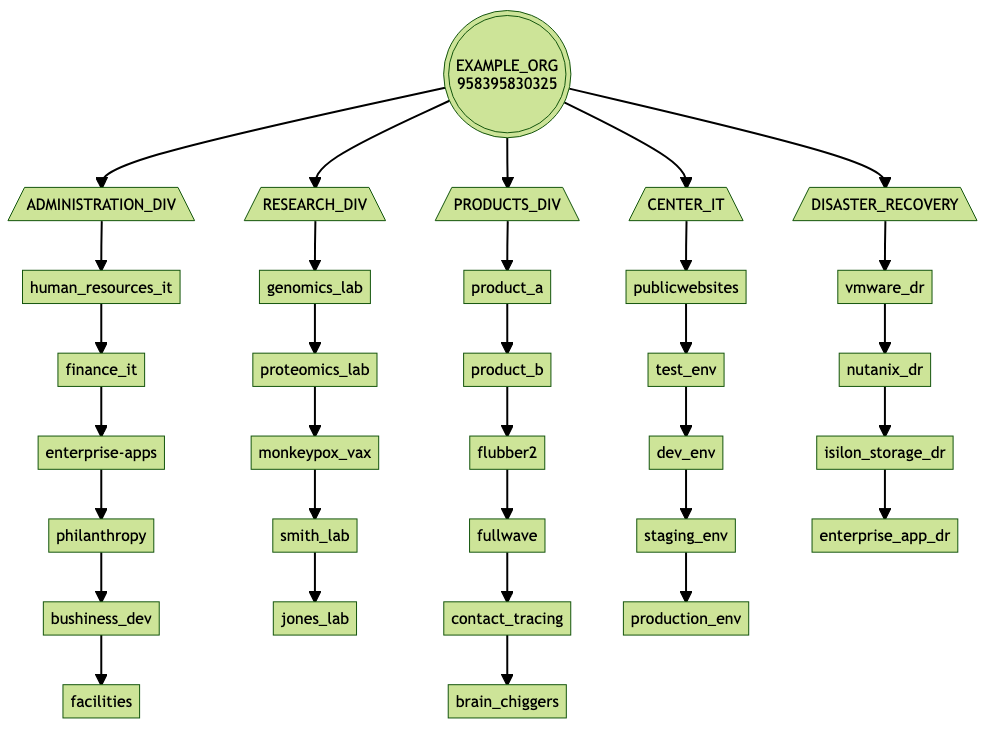
org_diagram(profile)
Generate a mermaid formatted diagram of the organizational structure, similar to the example diagram at the top of the Organziations section above.
Required parameters:
- profile: the name of the AWS profile to use
Example diagram created by the "org_diagram" function:
getaccounts(profile)
Returns a dictionary of all AWS accounts that are members of the organization.
Required parameters:
- profile: the name of the AWS profile to use
account_inventory(profile)
Returns a CSV report, including all available information on all AWS accounts that are members of the AWS Organization.
Required parameters:
- profile: the name of the AWS profile to use
Provided fields:
- Name
- Id
- Arn
- Status
- JoinedMethod
- JoinedTimestamp
getorg(profile)
Get information about the organization
Required parameters:
- profile: the name of the AWS profile to use
getroots(profile)
Get information about the root of the organization
Required parameters:
- profile: the name of the AWS profile to use
getous(profile, parent)
Get the OUs directly under the specified parent (root or parent OU)
Required parameters:
- profile: the name of the AWS profile to use
- parent: the id of the parent object
getchildren(profile, parent, child_type)
Get the children objects under the parent. you must also specify the type of children you want "
Required parameters:
- profile: the name of the AWS profile to use
- parent: the id of the parent object
- child_type: the type of child objects you want ('ACCOUNT' or 'ORGANIZATIONAL_UNIT')
account_name_lookup(profile)
Generate a account Id to Name lookup dictionary
Required parameters:
- profile: the name of the AWS profile to use
org_structure(profile)
Generate an dictionary containing the structure of the organization. OUs are Keys with a list of the children accounts as the value.
Required parameters:
- profile: the name of the AWS profile to use
Identity and Access Management (iam)
A collection for working with AWS IAM
import fhaws.iam as iam
get_users(profile)
Get all IAM user objects in the AWS account
inventory_users(profile)
Get a CSV inventory of all IAM users in the AWS account
get_mfas(profile)
Get a list of MFA objects for an entire AWS account
Example combining the iam.get_mfas() and iam.get_users() functions to create a simple MFA compliance report (check to make sure that every user has an assigned MFA):
import time
import fhaws.iam as iam

def mfa_compliance_report(account):
    users = set([user['UserName'] for user in iam.get_users(account)])
    mfas =  set([mfa['User']['UserName'] for mfa in iam.get_mfas(account)])
    without_mfas = users - mfas

    print("\nMFA Compliance Report: {}\n{}".format(time.asctime(), "-" * 47))
    print("Total Users: {}".format(len(users)))
    print("Total MFAs: {}".format(len(mfas)))
    print("Users Without MFA: {}".format(len(without_mfas)))

    if without_mfas:
        print("Status: Not In Compliance ❌\n")
        print("Users out of compliance 😡:")
        for user in without_mfas:
            print("\t🔥 {}".format(user))
    else:
        print("Status: In Compliance ✅\n")

if __name__ == "__main__":
    account = "prod_account" #profile to use
    mfa_compliance_report(account)
Example of an account out of compliance:
MFA Compliance Report: Fri Aug 12 12:14:19 2022
-----------------------------------------------
Total Users: 58
Total MFAs: 52
Users Without MFA: 6
Status: Not In Compliance ❌

Users out of compliance 😡:
	🔥 billy_g
	🔥 sammy_j
	🔥 lazy_user
	🔥 security_manager
	🔥 joey_b
	🔥 teddy_p
Example of an account in compliance:
MFA Compliance Report: Fri Aug 12 12:18:15 2022
-----------------------------------------------
Total Users: 10
Total MFAs: 10
Users Without MFA: 0
Status: In Compliance ✅
get_access_keys(profile, username='')
Get information on the access keys for a single user is a username is provided, or information for all access keys in the AWS account if the username is omitted.
Example combining the fhaws.iam.get_users() and fhaws.iam.get_access_keys() functions to create a simple access keys report for an AWS account:
import fhaws.iam as iam
profile = 'aws-profile2'
access_keys = iam.get_access_keys(profile)
usernames = [user['UserName'] for user in iam.get_users(profile)]
print("UserName, AccessKeyId, Status, CreateDate")
for user in usernames:
    for key in access_keys:
        if key['UserName'] == user:
            print("%s: %s, %s, %s" % (user, key['AccessKeyId'],
                                     key['Status'], key['CreateDate']))
Output:
UserName, AccessKeyId,         Status,   CreateDate
user1:    AXAXYCYGMXZWTDFAKE,  Active,   2022-04-05 19:48:19+00:00
user2:    AXAXYCYGMXZSZGFAKE,  Inactive, 2021-11-08 20:06:20+00:00
user3:    AXAXYCYGMXZXHKFAKE,  Active,   2022-07-01 00:43:46+00:00
user4:    AXAXYCYGMXZTO3FAKE,  Active,   2021-10-19 17:27:41+00:00
user5:    AXAXYCYGMXZ2PLFAKE,  Active,   2022-07-22 21:49:52+00:00
user6:    AXAXYCYGMXZ4J3FAKE,  Active,   2022-07-14 15:41:14+00:00
...
Simple Storage Service (s3)
import fhaws.s3 as s3
get_buckets(profile)
Returns a list of all S3 buckets in the AWS account.
Elastic Compute Cloud (ec2)
get_regions(profile)
Returns a dictionary of all AWS regions in the form of "RegionName = EndpointURL"
instance_inventory(profile, region='')
Generates a simple (need to add more fields) CSV report on the EC2 instances in an account. By default it will look for EC2 instances in all AWS regions around the globe. You can optionally provide a region to restrict the inventory to a specific region.
Cost Explorer (ce)
import fhaws.ce as ce
get_linked_account_charges(profile, start_date, end_date, resolution)
Gather the charge details (discount, taxes, charges) for accounts linked to parent
accounts_with_taxes(profile)
For organizations that are tax exempt, this function report accounts that have tax charges so they can be fixed
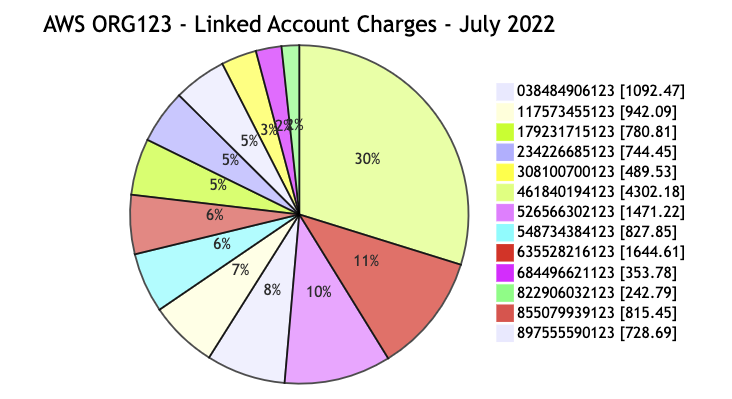
generate_linked_charges_chart(profile, title)
Generates a Mermaid formatted pie chart config of the costs of all linked child accounts in the organization for the past full month billing period.
Example:
import fhaws.ce as ce

print(ce.generate_linked_charges_chart('org123', "AWS ORG123 - Linked Account Charges - July 2022")) >> org123-costs-2022-07.mmd
Output:
$cat org123-2022-07.mmd

pie showData
	title AWS ORG123 - Linked Account Charges - July 2022
	 "038484906123" : 1092.47
	 "117573455123" : 942.09
	 "179231715123" : 780.81
	 "234226685123" : 744.45
	 "308100700123" : 489.53
	 "461840194123" : 4302.18
	 "526566302123" : 1471.22
	 "548734384123" : 827.85
	 "635528216123" : 1644.61
	 "684496621123" : 353.78
	 "822906032123" : 242.79
	 "855079939123" : 815.45
	 "897555590123" : 728.69
AWS Support (support)
import fhaws.support as support
create_tax_exempt_support_case(profile, accounts)
Open a support request with AWS to have them change accounts to tax exempt status
The following example uses uses a combination of the fhaws.ce.accounts_with_taxes() and fhaws.support.create_tax_exempt_support_case() functions to check to see if any AWS accounts that should be tax exempt have incurred any tax charges, and if so report the affected account IDs and opens an AWS support case to change them to tax exempt status.
import fhaws.ce as ce
import fhaws.support as support

def tax_exempt_check_fix(awsroot):
    "Checks to see if an account has incurred any taxes, and opens support ticket to correct"
    taxed_accounts = ce.accounts_with_taxes(awsroot)
    if taxed_accounts:
        print("\n[%s]\nThe following AWS accounts need to be changed to tax exempt status:\n" % awsroot.upper())
        for account in taxed_accounts:
            print("\t💰 {}".format(account))

        print("\nOpening AWS support case to correct the situation...")
        support.create_tax_exempt_case(awsroot, taxed_accounts)
        print("Done!")
    else:
        print("\n[%s]\nAll linked accounts are tax exempt ✅\n" % awsroot.upper())

if __name__ == "__main__":
    org_roots = ['org1_root', 'org2_root']
    for org_root in org_roots:
        tax_exempt_check_fix(org_root)
Output:
[ORG1_ROOT]
All linked accounts are tax exempt ✅


[ORG2_ROOT]
The following AWS accounts need to be changed to tax exempt status:

	💰 548734312345
	💰 684496612345

Opening AWS support case to correct the situation...
Done!
Security Token Service (sts)
import fhaws.ce as sts
role_chain(profile, role, child_account):
Fetch temporary credentials to access a child account; returns session_id, session_key, session_token.
1 maintainer

Metadata
1 maintainer
Release files for fhaws 0.3.4
For a detailed explanation of source distributions (sdists) and built distributions (wheels), please see the package formats documentation.
Source distribution (sdist)
| File | Size | Uploaded | |
|---|---|---|---|
| fhaws-0.3.4.tar.gz | 15.6 kB | Details |
Built distribution (wheel)
| File | Interpreter | ABI | Platform | Reset |
|---|---|---|---|---|
| fhaws-0.3.4-py3-none-any.whl | Python 3 | none | any | Details |
Total release size: 32.7 kB
Release files / fhaws-0.3.4.tar.gz
| Download URL | fhaws-0.3.4.tar.gz |
|---|---|
| Size | 15.6 kB |
| Tags | Source |
|
SHA-256 checksum How to use checksums |
c2e5787b61ae3250087d9c4b21ffbacf6ea9ca0af1a5d139b6f84d10b1a32386
|
|
BLAKE2b-256 checksum How to use checksums |
5b188e13565bd2fecc5499260f2d0d8614b3409b61edb4d0260345009020db1d
|
| Upload date | |
|
Uploaded using Trusted Publishing? What is trusted publishing? |
No |
| Uploaded via |
poetry/1.1.14 CPython/3.9.13 Darwin/21.5.0
|
Release files / fhaws-0.3.4-py3-none-any.whl
| Download URL | fhaws-0.3.4-py3-none-any.whl |
|---|---|
| Size | 17.2 kB |
| Tags | Python 3 |
|
SHA-256 checksum How to use checksums |
a7ed9a0b08cc0bc14e0373978e8780feb2480a81ace89d5c3557ab1c6af95013
|
|
BLAKE2b-256 checksum How to use checksums |
db0615c8b334d26dfc609a302ef37e73acd7e89d48681722d469cf33f39fdae5
|
| Upload date | |
|
Uploaded using Trusted Publishing? What is trusted publishing? |
No |
| Uploaded via |
poetry/1.1.14 CPython/3.9.13 Darwin/21.5.0
|














