

62 ready-to-use integrations for FHEM, written in Python.





Quick start · Modules · Troubleshooting · Remote peers · Write your own module
✨ Why fhempy?
- Lots of devices out of the box: Tuya, Xiaomi, Google Cast, Spotify, Zigbee2MQTT, ESPHome, solar inverters, cars, Bluetooth sensors and many more.
- No Python fiddling: fhempy sets up its own Python environment (even a newer Python if your system's is too old) and every module installs its libraries automatically the first time you use it.
- Feels like any other FHEM device:
define,set,get,attrand readings work as usual. - Extend your range: run modules on a remote Raspberry Pi, e.g. close to your Bluetooth devices.
🚀 Quick start
1. Install the system packages
Copy & paste this command on the machine running FHEM:
sudo apt install python3 python3-pip python3-dev python3-venv libffi-dev libssl-dev libjpeg-dev zlib1g-dev autoconf build-essential libglib2.0-dev libdbus-1-dev bluez libbluetooth-dev git libprotocol-websocket-perl libjson-xs-perl
On other distributions install the same packages with your package manager. If there is no package for the Perl module Protocol::WebSocket, install it with sudo cpan Protocol::WebSocket.
libjson-xs-perl (JSON::XS) isn't required, but without it FHEM decodes every fhempy message with the much slower pure Perl JSON::PP. Check it with {JSON->backend} in FHEM, JSON::Backend::XS is the fast one.
2. Add fhempy to FHEM
Enter these commands one after another in the FHEM command field:
update add https://raw.githubusercontent.com/fhempy/fhempy/master/controls_pythonbinding.txt
update
shutdown restart
define fhempy_local BindingsIo fhempy
Now lean back: the first start sets up fhempy and can take up to 15 minutes on a Raspberry Pi. fhempy_local shows a green circle as soon as it's ready.
3. Define your first device
Pick a module from the list below and define it like any other FHEM device, for example:
define castdevice fhempy googlecast "Living Room"
define eq3bt fhempy eq3bt 00:11:22:33:44:66:77
define upnp fhempy discover_upnp
The module's README (linked in the list) explains its options. Its Python libraries are installed automatically on first use.
🐳 Docker
Running FHEM in Docker? fhempy-docker provides a ready-made image per module, e.g. ghcr.io/fhem/fhempy-docker-<modulename>:latest. Start the container in the same network as FHEM and connect it with define fhempy_peer_<modulename> BindingsIo fhempy-<modulename>:15733 fhempy.
🧩 Modules
☀️ Energy & solar
| Module | Description |
|---|---|
| alphaesscloud | Alpha ESS inverter cloud integration |
| energie_gv_at | Retrieve current Austrian energy status |
| fusionsolar | Retrieve data from FusionSolar |
| goodwe | Get data from GoodWe inverters |
| huawei_modbus | Retrieve data from Huawei inverters |
| rct_power | RCT Power inverter |
| tibber | Get consumption data from tibber |
| wienernetze_smartmeter | Retrieve data from Wiener Netze smartmeter |
| zappi | Zappi charger |
🚗 Cars
| Module | Description |
|---|---|
| kia_hyundai | Control your Kia/Hyundai car |
| seatconnect | Control your Seat/Cupra car |
| skodaconnect | Control your Skoda car |
| volvo | Retrieve infos from your Volvo car (only new API) |
| volvo_software_update | Get notified about Volvo software updates |
🏠 Smart home devices
| Module | Description |
|---|---|
| erelax_vaillant | Control eRelax Vaillant |
| esphome | Installs and starts the ESPHome dashboard for easy ESPHome device management |
| gree_climate | Control Gree HVAC devices |
| homekit | Control HomeKit devices |
| meross | Control Meross devices |
| miio | Control Xiaomi WiFi devices |
| mqtt_ha_discovery | Support Home Assistant MQTT discovery |
| nefit | Control Nefit devices |
| ring | Ring doorbell/chime/cam |
| pyit600 | Control Salus iT600 devices |
| tuya | Recommended: control Tuya devices locally incl. real-time updates (only WiFi devices) |
| tuya_cloud | Control Tuya devices via cloud incl. real-time updates (WiFi & ZigBee) |
| tuya_smartlife | Recommended: control Tuya devices via cloud incl. real-time updates (WiFi & ZigBee) |
| warema | Control Warema devices |
| xiaomi_gateway3 | Xiaomi Gateway V3 (only V3!) |
| xiaomi_tokens | Retrieve all Xiaomi tokens from the cloud |
| zigbee2mqtt | Install, update and run a Zigbee2MQTT server |
📶 Bluetooth
| Module | Description |
|---|---|
| ble_monitor | Supports a lot of BLE devices |
| ble_presence | Presence detection incl. RSSI for Bluetooth Low Energy |
| ble_reset | Resets all Bluetooth interfaces every X hours |
| blue_connect | Blue Connect pool sensor |
| bt_presence | Presence detection incl. RSSI for Bluetooth |
| eq3bt | Control EQ3 Bluetooth thermostats |
| gfprobt | Control GF Pro Bluetooth irrigation control |
| miflora | Xiaomi BLE plant sensor |
| miscale | Xiaomi Mi Scale V1/2 support |
| mitemp | Xiaomi BLE temperature/humidity sensor |
| nespresso_ble | Nespresso Bluetooth coffee machine |
🎵 Media
| Module | Description |
|---|---|
| dlna_dmr | Control DLNA MediaRenderer devices |
| googlecast | Control Cast devices and stream Spotify |
| spotify | Control Spotify Connect and use FHEM as Spotify Connect player |
🔍 Presence & discovery
| Module | Description |
|---|---|
| arp_presence | ARP based presence detection, works also for iOS |
| discover_ble | Discover Bluetooth LE devices |
| discover_mdns | Discover mDNS (e.g. Google Cast) devices |
| discover_upnp | Discover UPnP devices |
🧰 Information & tools
| Module | Description |
|---|---|
| aktionsfinder | Keep informed about product promotions |
| ddnssde | Dynamic DNS updater for the free ddnss.de service |
| geizhals | Retrieve prices from geizhals |
| github_backup | Backup FHEM config to GitHub |
| github_restore | Restore FHEM config from GitHub |
| google_weather | Retrieve weather from Google |
| ikos | Check prices for Ikos resorts |
| object_detection | TensorFlow Lite object detection |
| piclock | Create a LED clock with MAX7219 |
| prusalink | Prusa 3D printer |
| websitetests | Do some basic website checks |
| wienerlinien | Wiener Linien departure times |
| helloworld | Hello World example for developers to start writing their own module |
🩺 Troubleshooting
fhempy_localstays red: open the devicefhempyserver_15733in FHEM. Its readingpythonshows the Python version fhempy found, or why it can't start.- Where is the log? fhempy writes its own log file next to the FHEM log:
log/fhempy-YYYY-MM-DD.log. Setattr fhempyserver_15733 verbose 5for debug output. Please make sure that python3-venv package is installed: runsudo apt install python3-venvand restart fhempy withset fhempyserver_15733 restart.- A module doesn't work: check its README first. Questions are welcome in the FHEM forum, bugs in the GitHub issues.
Bluetooth auto recovery
Modules using Bluetooth LE via bleak (blue_connect, eq3bt, gfprobt, mitemp2) detect a stuck Bluetooth adapter and try to recover it automatically. After 3 failed connection attempts in a row (connect errors, or scans which don't see any device at all) the adapter gets recovered, each time escalating one stage further:
- Power cycle the adapter via BlueZ D-Bus. No extra permissions needed besides the
bluetooth.confpolicy from the module README. - Reset the adapter via bluetooth-auto-recovery (MGMT power cycle, USB reset). Requires
CAP_NET_ADMINfor the fhempy process. - Restart bluetoothd via
sudo -n systemctl restart bluetooth. Requires a sudoers entry.
If bluetoothd doesn't answer on D-Bus at all, it gets restarted right away. Stages without the required permissions are skipped. Two recoveries of the same adapter are at least 5 minutes apart (doubling up to 1 hour while the adapter doesn't recover). The reading connection_recovery shows the last recovery of a device.
Allow stage 2 by adding CAP_NET_ADMIN to the service which starts fhempy (fhem on FHEM installations, fhempy on remote peers):
sudo systemctl edit fhem
[Service]
AmbientCapabilities=CAP_NET_ADMIN
Allow stage 3 via sudo visudo (replace fhem with the user running fhempy, e.g. pi on remote peers):
fhem ALL=NOPASSWD: /usr/bin/systemctl restart bluetooth
fhempy peers (e.g. extend Bluetooth range)
fhempy allows to run modules locally (same device as FHEM runs on) or on remote peers. Those remote peers only make sense if you want to extend the range of bluetooth or want to distribute the load of some modules to other more powerfull devices (e.g. video object detection).
Peer setup (short version)
Only on remote peers, do not run this commands on the FHEM instance. Run this commands with user "pi".
### WARNING: DO THIS COMMAND ONLY ON REMOTE PEER, NOT ON YOUR FHEM INSTANCE ###
# systemd service installation
curl -sL https://raw.githubusercontent.com/fhempy/fhempy/master/install_systemd_fhempy.sh | sudo -E bash -
Peer setup (long version)
Only needed if you didn't run Peer setup (short version). The following steps are only needed if you want to install fhempy on a remote peer, you should not run them on your FHEM installation.
- Setup virtual environment for fhempy:
python3 -m venv .fhempy/fhempy_venv - Activate venv:
source .fhempy/fhempy_venv/bin/activate - Install fhempy with user pi:
pip3 install --upgrade fhempy - Make sure your main fhempy instance (within FHEM) is running
- Test fhempy by just running it with user pi, type
fhempyand enter. Wait a few seconds until it gets discovered and you see the incoming FHEM connection. - Systemd configuration for autostart
curl -sL https://raw.githubusercontent.com/fhempy/fhempy/master/install_systemd_fhempy.sh | sudo -E bash -- fhempy is run with user pi, you can change that in the fhempy.service file in /etc/systemd/system/
- FHEM configuration
- The remote peer is autodiscovered and will show up in FHEM as device e.g. fhempy_peer_192_168_1_50
- You can move any device to the remote peer by changing the IODev of the device.
- If autodiscovery doesn't work (it's based on zeroconf), you can define it with
define fhempy_peer_IP BindingsIo IP:15733 fhempy
Log file
journalctl -u fhempy.service -f
Update
Just do set remote_pybinding update and the remote peer will install the new package via pip and restart afterwads.
Functionality
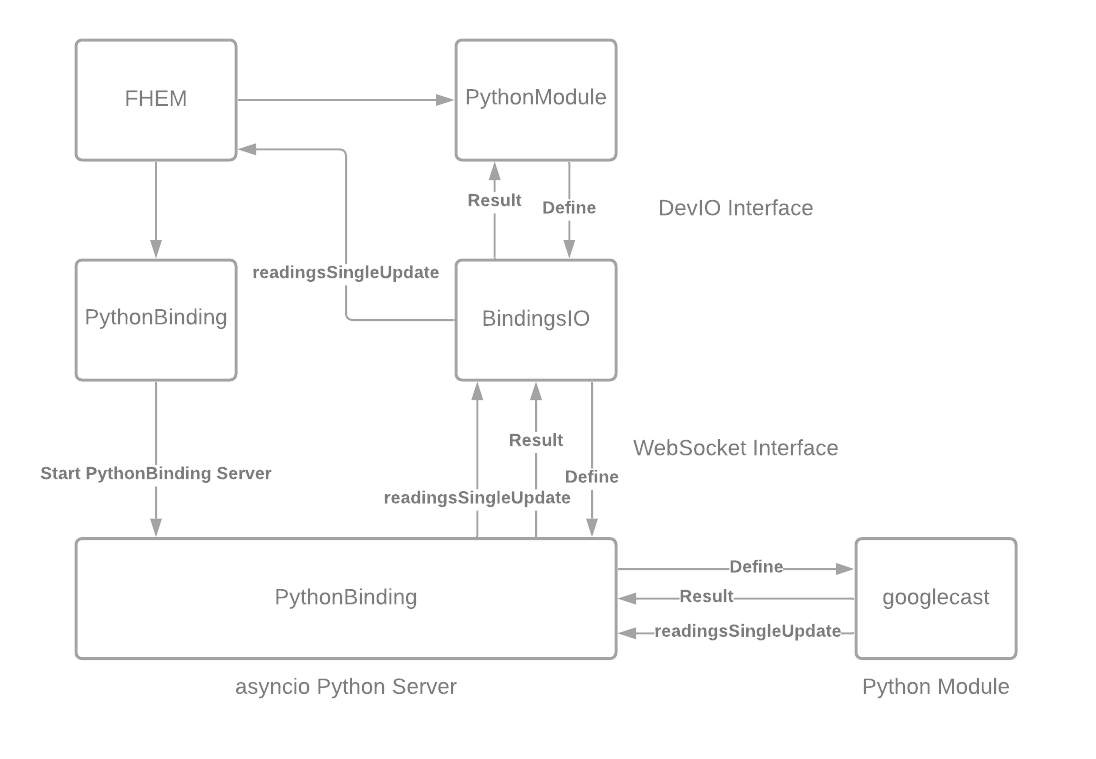
10_BindingsIo
This module is a DevIo device which builds a language neutral communicaton bridge in JSON via websockets.
10_fhempyServer
This module just starts the fhempy server instance
10_fhempy
This module is used as the bridge to BindingsIo. It calls BindingsIo with IOWrite.
fhempy
This is the Python server instance which handles JSON websocket messages from BindingsIo. Based on the message it executes the proper function and replies to BindingsIo via websocket.
Call flow
This example shows how Define function is called from the Python module.
- define castdevice fhempy googlecast "Living Room"
- fhempy sends IOWrite to BindingsIo
- BindingsIo sends a JSON websocket message to fhempy
- fhempy loads the corresponding module (e.g. googlecast), creates an instance of the object (e.g. googlecast) and calls the Define function on that instance
- Define function is executed within the Python context, as long as the function is executed, FHEM waits for the answer the same way as it does for Perl modules
- Python Define returns the result via JSON via websocket to BindingsIo
At any time within the functions FHEM functons like readingsSingleUpdate(...) can be called by using the fhem.py module (fhem.readingsSingleUpdate(...)). There are just a few functions supported at the moment.
Write your own module
Check helloworld example for writing an own module. Be aware that no function which is called from FHEM is allowed to run longer than 1s. In general no blocking code should be used with asyncio. If you want to call blocking code, use utils.run_blocking.
🤝 Contributing
Due to limited time I'm unable to fully support fhempy on my own and I'm looking for developers to help maintain and enhance the project. Bug fixes, new modules and documentation improvements are all welcome, just open an issue or a pull request. See DEVELOPMENT.md to get started.
Your support would mean a lot!
1 maintainer

Metadata
1 maintainer
Release files for fhempy 0.1.765
For a detailed explanation of source distributions (sdists) and built distributions (wheels), please see the package formats documentation.
Source distribution (sdist)
| File | Size | Uploaded | |
|---|---|---|---|
| fhempy-0.1.765.tar.gz | 4.4 MB | Details |
Built distribution (wheel)
| File | Interpreter | ABI | Platform | Reset |
|---|---|---|---|---|
| fhempy-0.1.765-py3-none-any.whl | Python 3 | none | any | Details |
Total release size: 8.9 MB
Release files / fhempy-0.1.765.tar.gz
| Download URL | fhempy-0.1.765.tar.gz |
|---|---|
| Size | 4.4 MB |
| Tags | Source |
|
SHA-256 checksum How to use checksums |
f9a629a252f1a2bf9c8831eb93bf91d9c1c11194407fa8b5660d54c7f82edf29
|
|
BLAKE2b-256 checksum How to use checksums |
e8991ae757682c6b0a372f8fa503e2d67b3e92991984b3d993e854188df5bb6e
|
| Upload date | |
|
Uploaded using Trusted Publishing? What is trusted publishing? |
Yes |
| Uploaded via |
twine/7.0.0 CPython/3.13.14
|
Provenance
Provenance describes where a file came from. On PyPI, provenance is shared via attestations, which provide a verifiable record of the build or publishing details. View details, limitations and caveats.


PyPI Publish Attestation
PyPI verified that this artifact, at this checksum, originated from the publisher listed below.
Signed by GitHub Actions, verified by PyPI on Oct 6, 2026.
Transparency logRelease files / fhempy-0.1.765-py3-none-any.whl
| Download URL | fhempy-0.1.765-py3-none-any.whl |
|---|---|
| Size | 4.5 MB |
| Tags | Python 3 |
|
SHA-256 checksum How to use checksums |
431bfca74d90307084bd3ef6bd6d6d20e66c337282a01a60c74fc54be502f1bf
|
|
BLAKE2b-256 checksum How to use checksums |
d7405e7941b86e647a931ea62d07fe209399722e486ce33d691e3dcd9dd291b8
|
| Upload date | |
|
Uploaded using Trusted Publishing? What is trusted publishing? |
Yes |
| Uploaded via |
twine/7.0.0 CPython/3.13.14
|
Provenance
Provenance describes where a file came from. On PyPI, provenance is shared via attestations, which provide a verifiable record of the build or publishing details. View details, limitations and caveats.
PyPI Publish Attestation
PyPI verified that this artifact, at this checksum, originated from the publisher listed below.
Signed by GitHub Actions, verified by PyPI on Oct 6, 2026.
Transparency log













