
fibr [faɪbə] - File Browser
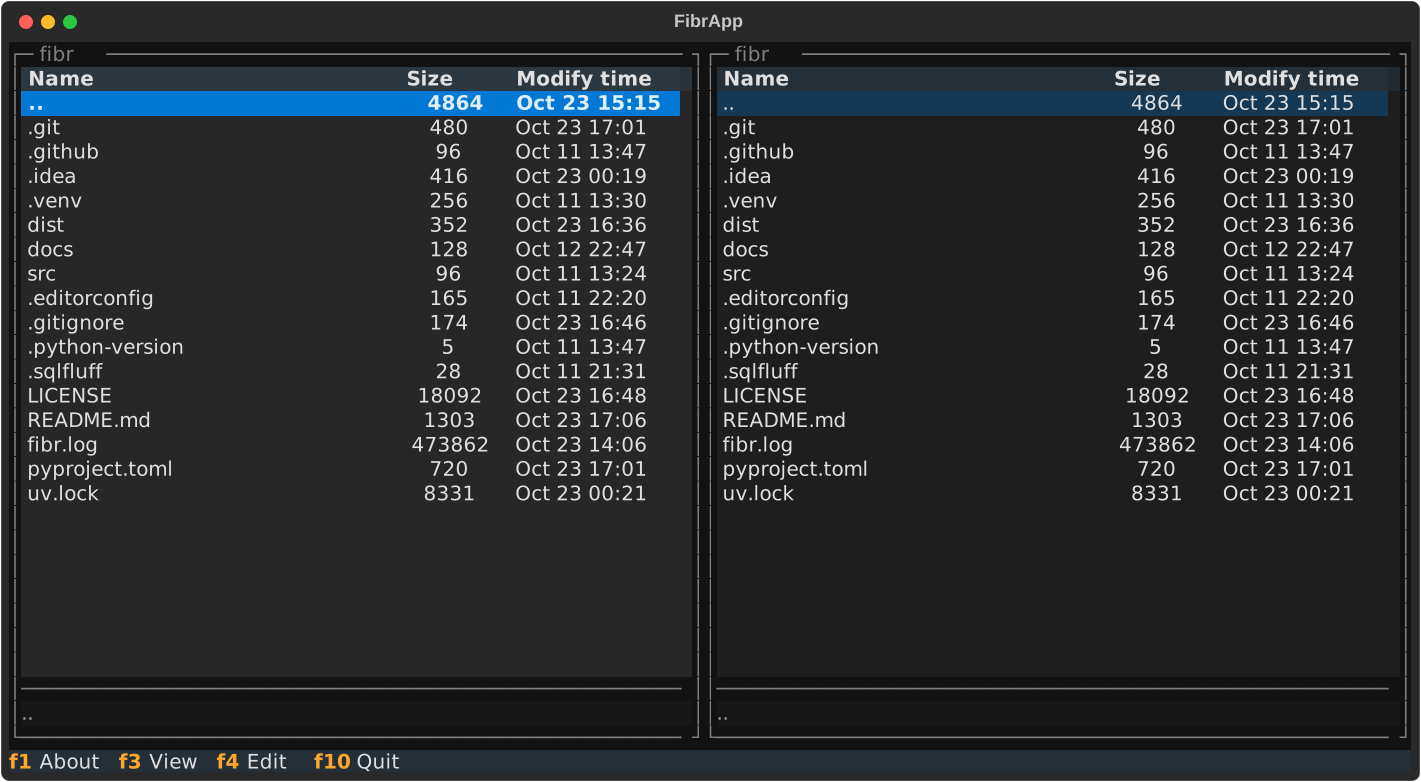
A simple file browser similar to Midnight Commander featuring:
- traditional dual-pane layout
- find-as-you-type per default
basic file operations vai UI: copy, move, mkdirNot implemented yet!- view/edit file delegated to external tools
And that's about it!
It's a very short and select feature set, so this might not be the tool for you. If you're looking for a comprehensive TUI file manager and are not into the classic Norton Commander look & feel, some popular choices to check out are lf, superfile or yazi.
fibr was created to "scratch an itch" and is not looking to become a contender in the space of TUI file managers.
The project status is currently "alpha", i.e. it is neither feature-complete nor extensively tested.
Written in Python using the excellent Textual framework.
Installation
fibr is on PyPi, you can use the package manager of your choice to set yourself up. Here is an example using uv:
uv tool install fibr
Usage
If you're familiar with Midnight Commander, the basics are identical:
- cursor up/down (⬆, ⬇) to move a line
- page up/down (⇞, ⇟) to move a page
- home/end (⇱, ⇲) to jump top/bottom
- enter (⏎) to enter a directory
- tab (⇥) to switch panels
- F3 to open the highlighted file in an external viewer (
$PAGER) - F4 to open the highlighted file in an external editor (
$EDITOR) F5 to copy file/directoryNot implemented yet!F6 to move file/directoryNot implemented yet!F7 to create directoryNot implemented yet!F8 to delete file/directoryNot implemented yet!- any alphanumeric key triggers "find-as-you-type"
- escape (⎋) to cancel
- tab/shift tab (⇥, ⇧⇥) to jump to next/previous match
- enter (⏎) to confirm (will enter directory if search matches)
- ctrl+o (⌃o) to open a subshell
- ctrl+r (^r) to reload directory from disk
- ctrl+t (⌃t) to toggle file selection
[!NOTE]
By default, the content of a directory is cached on first read and not automatically refreshed, even when you switch directories. You have to manually issue a reload to see newly created/deleted/updated files.
This behavior is under review.
License
1 maintainer

Download files
Download the file for your platform. If you're not sure which to choose, learn more about installing packages.
Source Distribution
Built Distribution
Filter files by name, interpreter, ABI, and platform.
If you're not sure about the file name format, learn more about wheel file names.
Copy a direct link to the current filters
File details
Details for the file fibr-0.3.0.tar.gz.
File metadata
- Download URL: fibr-0.3.0.tar.gz
- Upload date:
- Size: 30.0 kB
- Tags: Source
- Uploaded using Trusted Publishing? Yes
- Uploaded via:
twine/6.1.0 CPython/3.13.7
File hashes
| Algorithm | Hash digest | |
|---|---|---|
| SHA256 |
5031315900eb6a98c98b4d3d305dfb1c3e36cfa4a1a65515928b18732cce2a9f
|
|
| MD5 |
ff9c36ccea8e23f304115356c4781652
|
|
| BLAKE2b-256 |
1b6aadc4fdbb4c9445ba922246f28fb05647415fb9315cb2826586746e05458e
|
Provenance
The following attestation bundles were made for fibr-0.3.0.tar.gz:
Publisher:
build.yml on dehesselle/fibr
-
Statement:
-
Statement type:
https://in-toto.io/Statement/v1 -
Predicate type:
https://docs.pypi.org/attestations/publish/v1 -
Subject name:
fibr-0.3.0.tar.gz -
Subject digest:
5031315900eb6a98c98b4d3d305dfb1c3e36cfa4a1a65515928b18732cce2a9f - Sigstore transparency entry: 973403710
- Sigstore integration time:
-
Permalink:
dehesselle/fibr@739d2ee3d665b2eab013ce09f8a62d75ec195293 -
Branch / Tag:
refs/tags/v0.3.0 - Owner: https://github.com/dehesselle
-
Access:
public
-
Token Issuer:
https://token.actions.githubusercontent.com -
Runner Environment:
github-hosted -
Publication workflow:
build.yml@739d2ee3d665b2eab013ce09f8a62d75ec195293 -
Trigger Event:
push
-
Statement type:
File details
Details for the file fibr-0.3.0-py3-none-any.whl.
File metadata
- Download URL: fibr-0.3.0-py3-none-any.whl
- Upload date:
- Size: 35.6 kB
- Tags: Python 3
- Uploaded using Trusted Publishing? Yes
- Uploaded via:
twine/6.1.0 CPython/3.13.7
File hashes
| Algorithm | Hash digest | |
|---|---|---|
| SHA256 |
60fa29b15b6c0cc06471f9cdce55cb1014927f68bd1a32d7ac2d6cc75ee6c853
|
|
| MD5 |
a7b594e6281ec70d8ec100459f9878b5
|
|
| BLAKE2b-256 |
49129df5cf3ad525471da3f652ba7f40a8ae2657c9cd81e38593a5032d345a0b
|
Provenance
The following attestation bundles were made for fibr-0.3.0-py3-none-any.whl:
Publisher:
build.yml on dehesselle/fibr
-
Statement:
-
Statement type:
https://in-toto.io/Statement/v1 -
Predicate type:
https://docs.pypi.org/attestations/publish/v1 -
Subject name:
fibr-0.3.0-py3-none-any.whl -
Subject digest:
60fa29b15b6c0cc06471f9cdce55cb1014927f68bd1a32d7ac2d6cc75ee6c853 - Sigstore transparency entry: 973403712
- Sigstore integration time:
-
Permalink:
dehesselle/fibr@739d2ee3d665b2eab013ce09f8a62d75ec195293 -
Branch / Tag:
refs/tags/v0.3.0 - Owner: https://github.com/dehesselle
-
Access:
public
-
Token Issuer:
https://token.actions.githubusercontent.com -
Runner Environment:
github-hosted -
Publication workflow:
build.yml@739d2ee3d665b2eab013ce09f8a62d75ec195293 -
Trigger Event:
push
-
Statement type:














